Skip to content
  • MySensors
  • OpenHardware.io
  • Categories
  • Recent
  • Tags
  • Popular
Skins
  • Light
  • Brite
  • Cerulean
  • Cosmo
  • Flatly
  • Journal
  • Litera
  • Lumen
  • Lux
  • Materia
  • Minty
  • Morph
  • Pulse
  • Sandstone
  • Simplex
  • Sketchy
  • Spacelab
  • United
  • Yeti
  • Zephyr
  • Dark
  • Cyborg
  • Darkly
  • Quartz
  • Slate
  • Solar
  • Superhero
  • Vapor

  • Default (No Skin)
  • No Skin
Collapse
Brand Logo
ATha1A

ATha1

@ATha1
About
Posts
12
Topics
2
Shares
0
Groups
0
Followers
0
Following
1

Posts

Recent Best Controversial

  • MQTT Ethernet Gateway with Wired RS485 Network
    ATha1A ATha1

    @pjr said in MQTT Ethernet Gateway with Wired RS485 Network:

    #define MY_NODE_ID 123

    wow awesome!
    I've just tried and it seems to recognize the other wired node ☺️

    Now I did some soldering, so that the wiring is easier and moved to a serial gateway.
    Later I will try again to use the MQTT with Ethernet Gateway

    Home Assistant

  • MQTT Ethernet Gateway with Wired RS485 Network
    ATha1A ATha1

    @Michal
    I’ve downloaded an older version of fritzing.
    I think this is a beta version btw.
    I’ve just googled fritzing download.

    Home Assistant

  • MQTT Ethernet Gateway with Wired RS485 Network
    ATha1A ATha1

    @BearWithBeard alright, I've changed the config version to 2.3 now and restarted HASS

    I also change the gateway code and removed the following lines:

    
    // Enable inclusion mode
    //#define MY_INCLUSION_MODE_FEATURE
    // Enable Inclusion mode button on gateway
    //#define MY_INCLUSION_BUTTON_FEATURE
    // Set inclusion mode duration (in seconds)
    //#define MY_INCLUSION_MODE_DURATION 60
    // Digital pin used for inclusion mode button
    //#define MY_INCLUSION_MODE_BUTTON_PIN  3
    

    I deployt the gateway node and this is the output of the Serial Monitor there:

    ⸮⸮Q8V⸮⸮⸮⸮0 MCO:BGN:INIT GW,CP=RSNGA---,FQ=16,REL=255,VER=2.3.2
    19:58:49.479 -> 4 TSM:INIT
    19:58:49.479 -> 5 TSF:WUR:MS=0
    19:58:49.479 -> 7 TSM:INIT:TSP OK
    19:58:49.479 -> 8 TSM:INIT:GW MODE
    19:58:49.479 -> 10 TSM:READY:ID=0,PAR=0,DIS=0
    19:58:49.516 -> 12 MCO:REG:NOT NEEDED
    10183 GWT:TPC:IP=192.168.0.220
    11186 MCO:BGN:STP
    19:59:00.662 -> 11188 MCO:BGN:INIT OK,TSP=1
    15335 GWT:TPC:IP=192.168.0.220
    16338 GWT:RMQ:CONNECTING...
    16996 GWT:RMQ:OK
    19:59:06.476 -> 16998 GWT:TPS:TOPIC=mygateway1-out/0/255/0/0/18,MSG SENT
    19:59:06.476 -> 17004 TSM:READY:NWD REQ
    19:59:06.512 -> 17024 ?TSF:MSG:SEND,0-0-255-255,s=255,c=3,t=20,pt=0,l=0,sg=0,ft=0,st=OK:
    

    btw. yes my mysensors_mqtt.json (persistent file) exists but only looks like this:

    {}
    

    And had no other sensors in this wired network with that id or child_id as far as I know.

    Now I've redeployt the sensor node and output on Serial Monitor is:

    ⸮⸮⸮z⸮⸮⸮⸮⸮Y⸮⸮⸮A⸮h⸮l⸮,ht⸮⸮⸮⸮⸮Q 
    20:14:41.610 ->  __  __       ____
    20:14:41.610 -> |  \/  |_   _/ ___|  ___ _ __  ___  ___  _ __ ___
    20:14:41.610 -> | |\/| | | | \___ \ / _ \ `_ \/ __|/ _ \| `__/ __|
    20:14:41.610 -> | |  | | |_| |___| |  __/ | | \__ \  _  | |  \__ \
    20:14:41.610 -> |_|  |_|\__, |____/ \___|_| |_|___/\___/|_|  |___/
    20:14:41.610 ->         |___/                      2.3.2
    20:14:41.610 -> 
    20:14:41.610 -> 16 MCO:BGN:INIT NODE,CP=RSNNA---,FQ=16,REL=255,VER=2.3.2
    20:14:41.645 -> 26 TSM:INIT
    20:14:41.645 -> 28 TSF:WUR:MS=0
    20:14:41.645 -> 29 TSM:INIT:TSP OK
    20:14:41.645 -> 31 TSM:FPAR
    20:14:41.645 -> 49 ?TSF:MSG:SEND,255-255-255-255,s=255,c=3,t=7,pt=0,l=0,sg=0,ft=0,st=OK:
    2057 !TSM:FPAR:NO REPLY
    20:14:43.660 -> 2059 TSM:FPAR
    20:14:43.696 -> 2076 ?TSF:MSG:SEND,255-255-255-255,s=255,c=3,t=7,pt=0,l=0,sg=0,ft=0,st=OK:
    4084 !TSM:FPAR:NO REPLY
    20:14:45.674 -> 4086 TSM:FPAR
    20:14:45.710 -> 4104 ?TSF:MSG:SEND,255-255-255-255,s=255,c=3,t=7,pt=0,l=0,sg=0,ft=0,st=OK:
    6112 !TSM:FPAR:NO REPLY
    20:14:47.714 -> 6114 TSM:FPAR
    20:14:47.749 -> 6131 ?TSF:MSG:SEND,255-255-255-255,s=255,c=3,t=7,pt=0,l=0,sg=0,ft=0,st=OK:
    8139 !TSM:FPAR:FAIL
    20:14:49.763 -> 8140 TSM:FAIL:CNT=1
    20:14:49.763 -> 8142 TSM:FAIL:DIS
    20:14:49.763 -> 8144 TSF:TDI:TSL
    18146 TSM:FAIL:RE-INIT
    20:14:59.754 -> 18148 TSM:INIT
    20:14:59.754 -> 18149 TSM:INIT:TSP OK
    20:14:59.754 -> 18151 TSM:FPAR
    20:14:59.790 -> 18169 ?TSF:MSG:SEND,255-255-255-255,s=255,c=3,t=7,pt=0,l=0,sg=0,ft=0,st=OK:
    20178 !TSM:FPAR:NO REPLY
    20:15:01.773 -> 20180 TSM:FPAR
    20:15:01.809 -> 20199 ?TSF:MSG:SEND,255-255-255-255,s=255,c=3,t=7,pt=0,l=0,sg=0,ft=0,st=OK:
    22206 !TSM:FPAR:NO REPLY
    20:15:03.800 -> 22208 TSM:FPAR
    20:15:03.837 -> 22226 ?TSF:MSG:SEND,255-255-255-255,s=255,c=3,t=7,pt=0,l=0,sg=0,ft=0,st=OK:
    24235 !TSM:FPAR:NO REPLY
    20:15:05.829 -> 24237 TSM:FPAR
    20:15:05.867 -> 24255 ?TSF:MSG:SEND,255-255-255-255,s=255,c=3,t=7,pt=0,l=0,sg=0,ft=0,st=OK:
    26262 !TSM:FPAR:FAIL
    20:15:07.855 -> 26263 TSM:FAIL:CNT=2
    20:15:07.855 -> 26265 TSM:FAIL:DIS
    20:15:07.855 -> 26267 TSF:TDI:TSL
    36270 TSM:FAIL:RE-INIT
    20:15:17.879 -> 36272 TSM:INIT
    20:15:17.879 -> 36273 TSM:INIT:TSP OK
    20:15:17.879 -> 36275 TSM:FPAR
    20:15:17.913 -> 36293 ?TSF:MSG:SEND,255-255-255-255,s=255,c=3,t=7,pt=0,l=0,sg=0,ft=0,st=OK:
    38301 !TSM:FPAR:NO REPLY
    20:15:19.905 -> 38303 TSM:FPAR
    20:15:19.943 -> 38322 ?TSF:MSG:SEND,255-255-255-255,s=255,c=3,t=7,pt=0,l=0,sg=0,ft=0,st=OK:
    40329 !TSM:FPAR:NO REPLY
    20:15:21.944 -> 40331 TSM:FPAR
    20:15:21.944 -> 40349 ?TSF:MSG:SEND,255-255-255-255,s=255,c=3,t=7,pt=0,l=0,sg=0,ft=0,st=OK:
    42356 !TSM:FPAR:NO REPLY
    20:15:23.961 -> 42358 TSM:FPAR
    20:15:23.997 -> 42377 ?TSF:MSG:SEND,255-255-255-255,s=255,c=3,t=7,pt=0,l=0,sg=0,ft=0,st=OK:
    44384 !TSM:FPAR:FAIL
    20:15:25.987 -> 44385 TSM:FAIL:CNT=3
    20:15:25.987 -> 44387 TSM:FAIL:DIS
    20:15:25.987 -> 44389 TSF:TDI:TSL
    54392 TSM:FAIL:RE-INIT
    20:15:35.987 -> 54394 TSM:INIT
    20:15:35.987 -> 54395 TSM:INIT:TSP OK
    20:15:35.987 -> 54397 TSM:FPAR
    20:15:36.023 -> 54416 ?TSF:MSG:SEND,255-255-255-255,s=255,c=3,t=7,pt=0,l=0,sg=0,ft=0,st=OK:
    56424 !TSM:FPAR:NO REPLY
    20:15:38.017 -> 56426 TSM:FPAR
    20:15:38.055 -> 56444 ?TSF:MSG:SEND,255-255-255-255,s=255,c=3,t=7,pt=0,l=0,sg=0,ft=0,st=OK:
    58452 !TSM:FPAR:NO REPLY
    20:15:40.051 -> 58455 TSM:FPAR
    20:15:40.088 -> 58473 ?TSF:MSG:SEND,255-255-255-255,s=255,c=3,t=7,pt=0,l=0,sg=0,ft=0,st=OK:
    60480 !TSM:FPAR:NO REPLY
    20:15:42.099 -> 60482 TSM:FPAR
    20:15:42.099 -> 60500 ?TSF:MSG:SEND,255-255-255-255,s=255,c=3,t=7,pt=0,l=0,sg=0,ft=0,st=OK:
    62508 !TSM:FPAR:FAIL
    20:15:44.117 -> 62509 TSM:FAIL:CNT=4
    20:15:44.117 -> 62511 TSM:FAIL:DIS
    20:15:44.117 -> 62513 TSF:TDI:TSL
    72516 TSM:FAIL:RE-INIT
    20:15:54.121 -> 72518 TSM:INIT
    20:15:54.121 -> 72519 TSM:INIT:TSP OK
    20:15:54.121 -> 72521 TSM:FPAR
    20:15:54.157 -> 72540 ?TSF:MSG:SEND,255-255-255-255,s=255,c=3,t=7,pt=0,l=0,sg=0,ft=0,st=OK:
    74548 !TSM:FPAR:NO REPLY
    20:15:56.174 -> 74550 TSM:FPAR
    20:15:56.174 -> 74568 ?TSF:MSG:SEND,255-255-255-255,s=255,c=3,t=7,pt=0,l=0,sg=0,ft=0,st=OK:
    76575 !TSM:FPAR:NO REPLY
    20:15:58.190 -> 76577 TSM:FPAR
    20:15:58.190 -> 76596 ?TSF:MSG:SEND,255-255-255-255,s=255,c=3,t=7,pt=0,l=0,sg=0,ft=0,st=OK:
    78603 !TSM:FPAR:NO REPLY
    20:16:00.193 -> 78605 TSM:FPAR
    20:16:00.226 -> 78623 ?TSF:MSG:SEND,255-255-255-255,s=255,c=3,t=7,pt=0,l=0,sg=0,ft=0,st=OK:
    80630 !TSM:FPAR:FAIL
    20:16:02.238 -> 80631 TSM:FAIL:CNT=5
    20:16:02.238 -> 80633 TSM:FAIL:DIS
    20:16:02.238 -> 80635 TSF:TDI:TSL
    90638 TSM:FAIL:RE-INIT
    20:16:12.234 -> 90640 TSM:INIT
    20:16:12.234 -> 90641 TSM:INIT:TSP OK
    20:16:12.234 -> 90643 TSM:FPAR
    20:16:12.270 -> 90661 ?TSF:MSG:SEND,255-255-255-255,s=255,c=3,t=7,pt=0,l=0,sg=0,ft=0,st=OK:
    92670 !TSM:FPAR:NO REPLY
    20:16:14.274 -> 92673 TSM:FPAR
    20:16:14.312 -> 92691 ?TSF:MSG:SEND,255-255-255-255,s=255,c=3,t=7,pt=0,l=0,sg=0,ft=0,st=OK:
    94698 !TSM:FPAR:NO REPLY
    20:16:16.302 -> 94700 TSM:FPAR
    20:16:16.340 -> 94718 ?TSF:MSG:SEND,255-255-255-255,s=255,c=3,t=7,pt=0,l=0,sg=0,ft=0,st=OK:
    96726 !TSM:FPAR:NO REPLY
    20:16:18.335 -> 96728 TSM:FPAR
    20:16:18.371 -> 96746 ?TSF:MSG:SEND,255-255-255-255,s=255,c=3,t=7,pt=0,l=0,sg=0,ft=0,st=OK:
    98753 !TSM:FPAR:FAIL
    20:16:20.373 -> 98754 TSM:FAIL:CNT=6
    20:16:20.373 -> 98756 TSM:FAIL:DIS
    20:16:20.373 -> 98758 TSF:TDI:TSL
    108761 TSM:FAIL:RE-INIT
    20:16:30.382 -> 108763 TSM:INIT
    20:16:30.382 -> 108764 TSM:INIT:TSP OK
    20:16:30.382 -> 108766 TSM:FPAR
    20:16:30.382 -> 108784 ?TSF:MSG:SEND,255-255-255-255,s=255,c=3,t=7,pt=0,l=0,sg=0,ft=0,st=OK:
    110792 !TSM:FPAR:NO REPLY
    20:16:32.394 -> 110794 TSM:FPAR
    20:16:32.431 -> 110813 ?TSF:MSG:SEND,255-255-255-255,s=255,c=3,t=7,pt=0,l=0,sg=0,ft=0,st=OK:
    112821 !TSM:FPAR:NO REPLY
    20:16:34.425 -> 112823 TSM:FPAR
    20:16:34.463 -> 112841 ?TSF:MSG:SEND,255-255-255-255,s=255,c=3,t=7,pt=0,l=0,sg=0,ft=0,st=OK:
    114849 !TSM:FPAR:NO REPLY
    20:16:36.443 -> 114851 TSM:FPAR
    20:16:36.477 -> 114870 ?TSF:MSG:SEND,255-255-255-255,s=255,c=3,t=7,pt=0,l=0,sg=0,ft=0,st=OK:
    116878 !TSM:FPAR:FAIL
    20:16:38.485 -> 116880 TSM:FAIL:CNT=7
    20:16:38.485 -> 116882 TSM:FAIL:DIS
    116884 TSF:TDI:TSL
    176886 TSM:FAIL:RE-INIT
    20:17:38.493 -> 176888 TSM:INIT
    20:17:38.493 -> 176889 TSM:INIT:TSP OK
    20:17:38.493 -> 176891 TSM:FPAR
    20:17:38.529 -> 176910 ?TSF:MSG:SEND,255-255-255-255,s=255,c=3,t=7,pt=0,l=0,sg=0,ft=0,st=OK:
    178918 !TSM:FPAR:NO REPLY
    20:17:40.521 -> 178920 TSM:FPAR
    20:17:40.558 -> 178938 ?TSF:MSG:SEND,255-255-255-255,s=255,c=3,t=7,pt=0,l=0,sg=0,ft=0,st=OK:
    180947 !TSM:FPAR:NO REPLY
    20:17:42.544 -> 180950 TSM:FPAR
    20:17:42.579 -> 180968 ?TSF:MSG:SEND,255-255-255-255,s=255,c=3,t=7,pt=0,l=0,sg=0,ft=0,st=OK:
    182976 !TSM:FPAR:NO REPLY
    20:17:44.599 -> 182978 TSM:FPAR
    20:17:44.599 -> 182996 ?TSF:MSG:SEND,255-255-255-255,s=255,c=3,t=7,pt=0,l=0,sg=0,ft=0,st=OK:
    185005 !TSM:FPAR:FAIL
    20:17:46.606 -> 185007 TSM:FAIL:CNT=7
    20:17:46.606 -> 185009 TSM:FAIL:DIS
    185011 TSF:TDI:TSL
    

    I don't see something in the HA logs which has to do with mqtt gateway.

    Home Assistant

  • MQTT Ethernet Gateway with Wired RS485 Network
    ATha1A ATha1

    @BearWithBeard Thanks for your reply

    Well the sensor doesn't show up.
    And I don't know if my wiring is correct, maybe you could review that, because I don't know, but I think this should be right.

    The motion sensor sketch is used as presented here: https://www.mysensors.org/build/rs485
    So the code looks like this:

    
    // Enable debug prints to serial monitor
    #define MY_DEBUG
    
    // Enable RS485 transport layer
    #define MY_RS485
    
    // Define this to enables DE-pin management on defined pin
    #define MY_RS485_DE_PIN 2
    
    // Set RS485 baud rate to use
    #define MY_RS485_BAUD_RATE 9600
    
    // Enable this if RS485 is connected to a hardware serial port
    //#define MY_RS485_HWSERIAL Serial1
    
    #include <MySensors.h>
    
    uint32_t SLEEP_TIME = 120000; // Sleep time between reports (in milliseconds)
    #define DIGITAL_INPUT_SENSOR 3   // The digital input you attached your motion sensor.  (Only 2 and 3 generates interrupt!)
    #define CHILD_ID 1   // Id of the sensor child
    
    // Initialize motion message
    MyMessage msg(CHILD_ID, V_TRIPPED);
    
    void setup()
    {
        pinMode(DIGITAL_INPUT_SENSOR, INPUT);      // sets the motion sensor digital pin as input
    }
    
    void presentation()
    {
        // Send the sketch version information to the gateway and Controller
        sendSketchInfo("Motion Sensor", "1.0");
    
        // Register all sensors to gw (they will be created as child devices)
        present(CHILD_ID, S_MOTION);
    }
    
    void loop()
    {
        // Read digital motion value
        bool tripped = digitalRead(DIGITAL_INPUT_SENSOR) == HIGH;
    
        Serial.println(tripped);
        send(msg.set(tripped?"1":"0"));  // Send tripped value to gw
    
        // Sleep until interrupt comes in on motion sensor. Send update every two minute.
        sleep(digitalPinToInterrupt(DIGITAL_INPUT_SENSOR), CHANGE, SLEEP_TIME);
    }
    

    I will change to configuration.yml as you've suggested to version: '2.3'. But I haven't recognized any issues so far with that.

    Home Assistant

  • MQTT Ethernet Gateway with Wired RS485 Network
    ATha1A ATha1

    @mfalkvidd Thank you for your reply

    Well I've read that guide. But anyway this doesn't answer my questions.
    What is necessary to do, that the 2nd sensor node shows up?
    Do you know how the MY_INCLUSION_MODE_BUTTON_PIN works?

    Home Assistant

  • MQTT Ethernet Gateway with Wired RS485 Network
    ATha1A ATha1

    Hi everyone.

    Somehow I miss real examples, such as coding examples for wired RS485 Sensor Networks.
    Maybe the wireless option is more famous because not everyone has the opportunity to wire up with all sensors.

    However I tried now to make an example code, with btw. doesn't work so far, but maybe you can help me and use this example for a later more detailed introduction into this approach?

    OK, I use Home Assistent (hassos 3.11 on Raspberry Pi 4) as Controller and tried now to get MQTT working. So far so good, the MQTT Example including the Ethernet Shield works now and made me happy :-)

    Now I tried with the MAX485 Module to make a connection to a separate Sensor Node where I just used the MotionSensor Example for RS485 see here MotionSensorRS485

    Since I wasn't sure about how to wire up with RS485 I found with google the following example: https://maker.pro/arduino/tutorial/creating-long-distance-serial-communication-using-an-arduino-and-an-rs-485-module

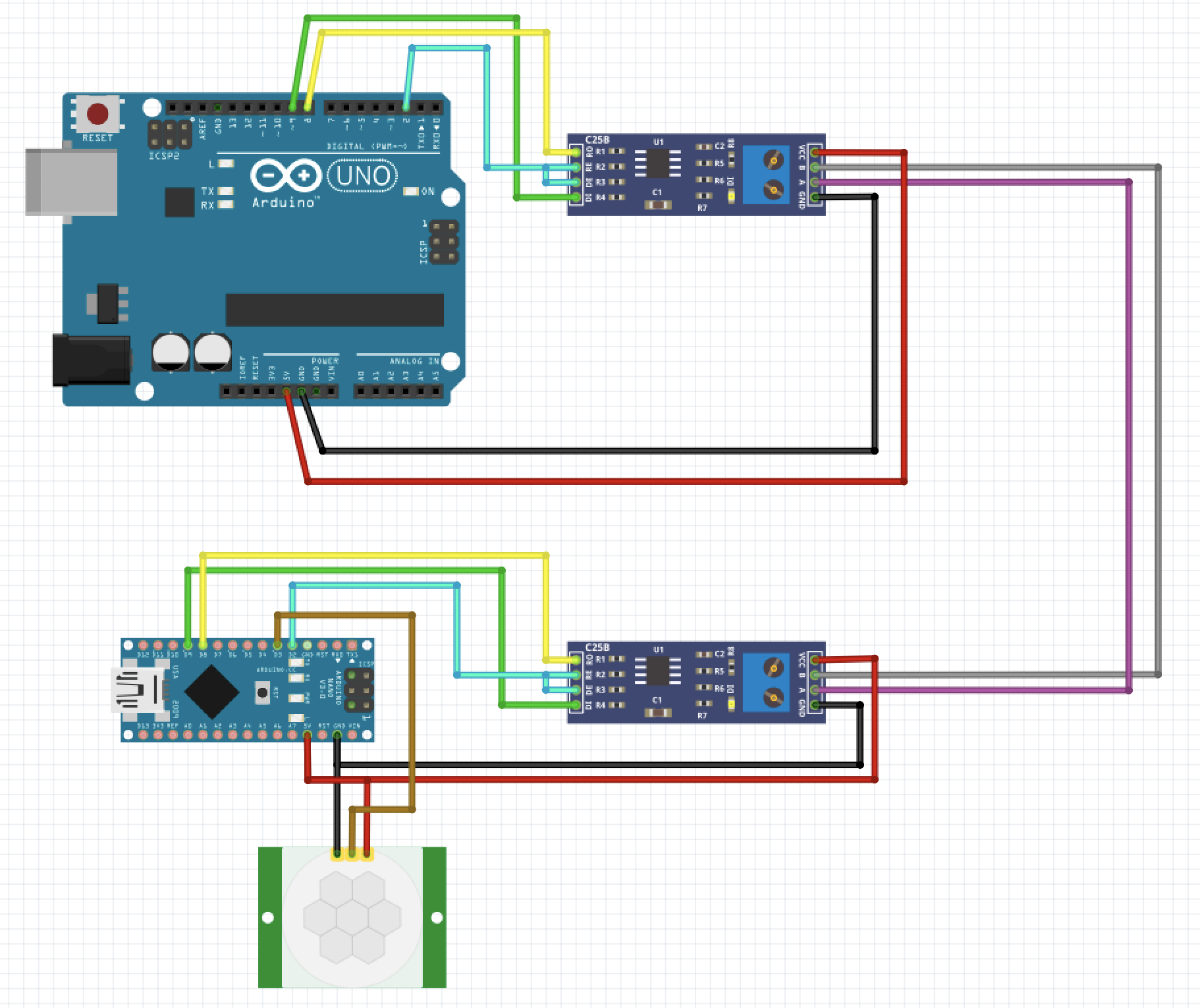
    I'm using now an Arduino Uno as MQTT-Ethernet Gateway and an Arduino Nano as MotionSensor Node. Here a picture of my wiring:
    example-rs485-mqtt.png

    First of all, is that correct ??

    Second my code for the gateway:

    
    // Enable debug prints to serial monitor
    #define MY_DEBUG
    
    // Enables and select radio type (if attached)
    //#define MY_RADIO_RF24
    //#define MY_RADIO_RFM69
    //#define MY_RADIO_RFM95
    
    #define MY_GATEWAY_MQTT_CLIENT
    
    // Set this node's subscribe and publish topic prefix
    #define MY_MQTT_PUBLISH_TOPIC_PREFIX "mygateway1-out"
    #define MY_MQTT_SUBSCRIBE_TOPIC_PREFIX "mygateway1-in"
    
    // Set MQTT client id
    #define MY_MQTT_CLIENT_ID "mysensors-1"
    
    // W5100 Ethernet module SPI enable (optional if using a shield/module that manages SPI_EN signal)
    //#define MY_W5100_SPI_EN 4
    
    // Enable Soft SPI for NRF radio (note different radio wiring is required)
    // The W5100 ethernet module seems to have a hard time co-operate with
    // radio on the same spi bus.
    #if !defined(MY_W5100_SPI_EN) && !defined(ARDUINO_ARCH_SAMD)
    #define MY_SOFTSPI
    #define MY_SOFT_SPI_SCK_PIN 14
    #define MY_SOFT_SPI_MISO_PIN 16
    #define MY_SOFT_SPI_MOSI_PIN 15
    #endif
    
    // When W5100 is connected we have to move CE/CSN pins for NRF radio
    #ifndef MY_RF24_CE_PIN
    #define MY_RF24_CE_PIN 5
    #endif
    #ifndef MY_RF24_CS_PIN
    #define MY_RF24_CS_PIN 6
    #endif
    
    // Enable these if your MQTT broker requires username/password
    #define MY_MQTT_USER "mqtt_user"
    #define MY_MQTT_PASSWORD "mqtt_passwd"
    
    // Enable MY_IP_ADDRESS here if you want a static ip address (no DHCP)
    //#define MY_IP_ADDRESS 192,168,178,87
    
    // If using static ip you can define Gateway and Subnet address as well
    //#define MY_IP_GATEWAY_ADDRESS 192,168,178,1
    //#define MY_IP_SUBNET_ADDRESS 255,255,255,0
    
    // MQTT broker ip address or url. Define one or the other.
    //#define MY_CONTROLLER_URL_ADDRESS "m20.cloudmqtt.com"
    #define MY_CONTROLLER_IP_ADDRESS 192, 168, 0, 164
    
    // The MQTT broker port to to open
    #define MY_PORT 1883
    
    /*
    // Enable inclusion mode
    #define MY_INCLUSION_MODE_FEATURE
    // Enable Inclusion mode button on gateway
    //#define MY_INCLUSION_BUTTON_FEATURE
    // Set inclusion mode duration (in seconds)
    #define MY_INCLUSION_MODE_DURATION 60
    // Digital pin used for inclusion mode button
    //#define MY_INCLUSION_MODE_BUTTON_PIN  3
    
    // Set blinking period
    #define MY_DEFAULT_LED_BLINK_PERIOD 300
    
    // Flash leds on rx/tx/err
    // Uncomment to override default HW configurations
    //#define MY_DEFAULT_ERR_LED_PIN 16  // Error led pin
    //#define MY_DEFAULT_RX_LED_PIN  16  // Receive led pin
    //#define MY_DEFAULT_TX_LED_PIN  16  // the PCB, on board LED
    */
    
    // Enable RS485 transport layer
    #define MY_RS485
    
    // Define this to enables DE-pin management on defined pin
    #define MY_RS485_DE_PIN 2
    
    // Set RS485 baud rate to use
    #define MY_RS485_BAUD_RATE 9600
    
    // Enable inclusion mode
    #define MY_INCLUSION_MODE_FEATURE
    // Enable Inclusion mode button on gateway
    #define MY_INCLUSION_BUTTON_FEATURE
    // Set inclusion mode duration (in seconds)
    #define MY_INCLUSION_MODE_DURATION 60
    // Digital pin used for inclusion mode button
    #define MY_INCLUSION_MODE_BUTTON_PIN  3
    
    #include <Ethernet.h>
    #include <MySensors.h>
    
    void setup()
    {
    	// Setup locally attached sensors
    }
    
    void presentation()
    {
    	// Present locally attached sensors here
    }
    
    void loop()
    {
    	// Send locally attached sensors data here
    }
    

    My Configuration.yml includes the MQTT Option:

    # Example configuration.yaml entry
    mysensors:
      gateways:
        - device: mqtt
          persistence_file: 'mysensors/mysensors_mqtt.json'
          topic_in_prefix: 'mygateway1-out'
          topic_out_prefix: 'mygateway1-in'
      persistence: true
      version: '2.3.2'
    

    So now I don't know how to get the sensor node up and running.
    Is there something wrong in the wiring?
    I have the option for the inclusion button? What is there to do, or what else can I do?
    I tried on D3 pin to pull down to simulate the inclusion button pressed. But I didn't get any reaction.

    So maybe someone is here more experienced with that topic?

    Home Assistant

  • Home Assistent + Serial Gateway + Motion Sensor
    ATha1A ATha1

    OK I found the reason.

    I had to disable MY_RADIO_RF24 and MY_RF24_PA_LEVEL
    so I commented out line 44 and 51 and it worked.

    Sketch code:

    /**
    * The MySensors Arduino library handles the wireless radio link and protocol
    * between your home built sensors/actuators and HA controller of choice.
    * The sensors forms a self healing radio network with optional repeaters. Each
    * repeater and gateway builds a routing tables in EEPROM which keeps track of the
    * network topology allowing messages to be routed to nodes.
    *
    * Created by Henrik Ekblad <henrik.ekblad@mysensors.org>
    * Copyright (C) 2013-2019 Sensnology AB
    * Full contributor list: https://github.com/mysensors/MySensors/graphs/contributors
    *
    * Documentation: http://www.mysensors.org
    * Support Forum: http://forum.mysensors.org
    *
    * This program is free software; you can redistribute it and/or
    * modify it under the terms of the GNU General Public License
    * version 2 as published by the Free Software Foundation.
    *
    *******************************
    *
    * DESCRIPTION
    * The ArduinoGateway prints data received from sensors on the serial link.
    * The gateway accepts input on serial which will be sent out on radio network.
    *
    * The GW code is designed for Arduino Nano 328p / 16MHz
    *
    * Wire connections (OPTIONAL):
    * - Inclusion button should be connected between digital pin 3 and GND
    * - RX/TX/ERR leds need to be connected between +5V (anode) and digital pin 6/5/4 with resistor 270-330R in a series
    *
    * LEDs (OPTIONAL):
    * - To use the feature, uncomment any of the MY_DEFAULT_xx_LED_PINs
    * - RX (green) - blink fast on radio message received. In inclusion mode will blink fast only on presentation received
    * - TX (yellow) - blink fast on radio message transmitted. In inclusion mode will blink slowly
    * - ERR (red) - fast blink on error during transmission error or receive crc error
    *
    */
    
    // Enable debug prints to serial monitor
    #define MY_DEBUG
    
    
    // Enable and select radio type attached
    //#define MY_RADIO_RF24
    //#define MY_RADIO_NRF5_ESB
    //#define MY_RADIO_RFM69
    //#define MY_RADIO_RFM95
    
    // Set LOW transmit power level as default, if you have an amplified NRF-module and
    // power your radio separately with a good regulator you can turn up PA level.
    //#define MY_RF24_PA_LEVEL RF24_PA_LOW
    
    // Enable serial gateway
    #define MY_GATEWAY_SERIAL
    
    // Define a lower baud rate for Arduinos running on 8 MHz (Arduino Pro Mini 3.3V & SenseBender)
    //#if F_CPU == 8000000L
    #define MY_BAUD_RATE 38400
    //#define MY_BAUD_RATE 115200
    //#endif
    
    // Enable inclusion mode
    #define MY_INCLUSION_MODE_FEATURE
    // Enable Inclusion mode button on gateway
    //#define MY_INCLUSION_BUTTON_FEATURE
    
    // Inverses behavior of inclusion button (if using external pullup)
    //#define MY_INCLUSION_BUTTON_EXTERNAL_PULLUP
    
    // Set inclusion mode duration (in seconds)
    #define MY_INCLUSION_MODE_DURATION 60
    // Digital pin used for inclusion mode button
    //#define MY_INCLUSION_MODE_BUTTON_PIN  3
    
    // Set blinking period
    #define MY_DEFAULT_LED_BLINK_PERIOD 300
    
    // Inverses the behavior of leds
    //#define MY_WITH_LEDS_BLINKING_INVERSE
    
    // Flash leds on rx/tx/err
    // Uncomment to override default HW configurations
    //#define MY_DEFAULT_ERR_LED_PIN 4  // Error led pin
    //#define MY_DEFAULT_RX_LED_PIN  6  // Receive led pin
    //#define MY_DEFAULT_TX_LED_PIN  5  // the PCB, on board LED
    
    #include <MySensors.h>
    
    uint32_t SLEEP_TIME = 120000; // Sleep time between reports (in milliseconds)
    #define DIGITAL_INPUT_SENSOR 3   // The digital input you attached your motion sensor.  (Only 2 and 3 generates interrupt!)
    #define CHILD_ID 1   // Id of the sensor child
    
    // Initialize motion message
    MyMessage msg(CHILD_ID, V_TRIPPED);
    
    void setup()
    {
    	// Setup locally attached sensors
      pinMode(DIGITAL_INPUT_SENSOR, INPUT);      // sets the motion sensor digital pin as input
    }
    
    void presentation()
    {
    	// Present locally attached sensors
      // Send the sketch version information to the gateway and Controller
      sendSketchInfo("Motion Sensor", "1.0");
    
      // Register all sensors to gw (they will be created as child devices)
      present(CHILD_ID, S_MOTION);
    }
    
    void loop()
    {
    	// Send locally attached sensor data here
      // Read digital motion value
      bool tripped = digitalRead(DIGITAL_INPUT_SENSOR) == HIGH;
    
      Serial.println(tripped);
      send(msg.set(tripped?"1":"0"));  // Send tripped value to gw
    
      // Sleep until interrupt comes in on motion sensor. Send update every two minute.
      sleep(digitalPinToInterrupt(DIGITAL_INPUT_SENSOR), CHANGE, SLEEP_TIME);
    }
    

    I've also changed some lines in my configuration.yml

    mysensors:
      gateways:
        - device: '/dev/ttyUSB0'
          persistence_file: 'mysensors/mysensors.json'
          baud_rate: 38400
      persistence: true
      version: '2.3.2'
    

    And the motion sensor showed up as Motion Sensor

    Home Assistant

  • Home Assistent + Serial Gateway + Motion Sensor
    ATha1A ATha1

    @mfalkvidd
    I've enabled debugging:
    1d2840de-1652-47ea-9636-eb896e60502d-image.png ![alt text](image url)

    I've got this also on my Serial Monitor within the Arduino IDE. Is there the problem maybe somewhere else?

    Home Assistant

  • Home Assistent + Serial Gateway + Motion Sensor
    ATha1A ATha1

    @mfalkvidd
    Yes /dev/ttyUSB0 disappiers as I unplug the Arduino Nano Gateway and comes back when I connect it to USB again. So far so good, USB0 should be fine.

    When I do

    ls -l /dev/ttyUSB0
    

    it shows something equal to the link you gave.
    So owner 'root', group 'dialout'

    Most of the shell commands aren't available, for example no sudo, however I'm root, but also no usermod .

    Here is what the log-file said:

    2020-03-21 19:26:10 ERROR (MainThread) [mysensors] read failed: device reports readiness to read but returned no data (device disconnected or multiple access on port?)
    2020-03-21 19:26:10 ERROR (MainThread) [mysensors.gateway_serial] Unable to connect to /dev/ttyUSB0
    
    Home Assistant

  • Home Assistent + Serial Gateway + Motion Sensor
    ATha1A ATha1

    @mfalkvidd

    Thank you for your reply.
    I’ve seen this but I couldn’t find any device under /dev/ttyACM*
    But I found /dev/ttyUSB0

    Home Assistant

  • Home Assistent + Serial Gateway + Motion Sensor
    ATha1A ATha1

    @bgunnarb

    Thank you for that hint. I've actually used the default code and just copied the code of motion sensor at the specific functions including all the defines.

    Anyway, I still get the message:
    Gateway /dev/ttyUSB0 not ready after 15.0 secs so continuing with setup

    Home Assistant

  • Home Assistent + Serial Gateway + Motion Sensor
    ATha1A ATha1

    Hi folks,

    I'm sorry for asking, but I'm totally new to mysensors and home assistent, but I've already read a lot and watched youtube videos but in fact I'm right now not aware what I should do next.

    First of all, my setup is home assistent running on a raspberry pi 4 Model B. I've installed MySensors Libarary 2.3.2 and used the SerialGateway Sketch with some modifications to add a motion sensor directly on the Gateway to test the functionality.

    This is what my code looks like on an arduino nano:

    // Enable debug prints to serial monitor
    #define MY_DEBUG
    
    // Enable and select radio type attached
    #define MY_RADIO_RF24
    //#define MY_RADIO_NRF5_ESB
    //#define MY_RADIO_RFM69
    //#define MY_RADIO_RFM95
    
    // Set LOW transmit power level as default, if you have an amplified NRF-module and
    // power your radio separately with a good regulator you can turn up PA level.
    #define MY_RF24_PA_LEVEL RF24_PA_LOW
    
    // Enable serial gateway
    #define MY_GATEWAY_SERIAL
    
    // Define a lower baud rate for Arduinos running on 8 MHz (Arduino Pro Mini 3.3V & SenseBender)
    #if F_CPU == 8000000L
    //#define MY_BAUD_RATE 38400
    #define MY_BAUD_RATE 115200
    #endif
    
    // Enable inclusion mode
    #define MY_INCLUSION_MODE_FEATURE
    // Enable Inclusion mode button on gateway
    //#define MY_INCLUSION_BUTTON_FEATURE
    
    // Inverses behavior of inclusion button (if using external pullup)
    //#define MY_INCLUSION_BUTTON_EXTERNAL_PULLUP
    
    // Set inclusion mode duration (in seconds)
    #define MY_INCLUSION_MODE_DURATION 60
    // Digital pin used for inclusion mode button
    //#define MY_INCLUSION_MODE_BUTTON_PIN  3
    
    // Set blinking period
    #define MY_DEFAULT_LED_BLINK_PERIOD 300
    
    // Inverses the behavior of leds
    //#define MY_WITH_LEDS_BLINKING_INVERSE
    
    // Flash leds on rx/tx/err
    // Uncomment to override default HW configurations
    //#define MY_DEFAULT_ERR_LED_PIN 4  // Error led pin
    //#define MY_DEFAULT_RX_LED_PIN  6  // Receive led pin
    //#define MY_DEFAULT_TX_LED_PIN  5  // the PCB, on board LED
    
    #include <MySensors.h>
    
    uint32_t SLEEP_TIME = 120000; // Sleep time between reports (in milliseconds)
    #define DIGITAL_INPUT_SENSOR 3   // The digital input you attached your motion sensor.  (Only 2 and 3 generates interrupt!)
    #define CHILD_ID 1   // Id of the sensor child
    
    // Initialize motion message
    MyMessage msg(CHILD_ID, V_TRIPPED);
    
    void setup()
    {
    	// Setup locally attached sensors
      pinMode(DIGITAL_INPUT_SENSOR, INPUT);      // sets the motion sensor digital pin as input
    }
    
    void presentation()
    {
    	// Present locally attached sensors
      // Send the sketch version information to the gateway and Controller
      sendSketchInfo("Motion Sensor", "1.0");
    
      // Register all sensors to gw (they will be created as child devices)
      present(CHILD_ID, S_MOTION);
    }
    
    void loop()
    {
    	// Send locally attached sensor data here
      // Read digital motion value
      bool tripped = digitalRead(DIGITAL_INPUT_SENSOR) == HIGH;
    
      Serial.println(tripped);
      send(msg.set(tripped?"1":"0"));  // Send tripped value to gw
    
      // Sleep until interrupt comes in on motion sensor. Send update every two minute.
      sleep(digitalPinToInterrupt(DIGITAL_INPUT_SENSOR), CHANGE, SLEEP_TIME);
    }
    

    In the configure.yml File I've added the following lines as described here:

    # Example configuration.yaml entry
    mysensors:
      gateways:
        - device: '/dev/ttyUSB0'
          baud_rate: 115200
    #      baud_rate: 38400
          nodes:
            1:
              name: 'Motion Sensor'
      persistence: true
      version: 2.0
    

    At the moment I get the following message:
    Unable to connect to /dev/ttyUSB0

    But as I connect the gateway it I can see, that /dev/ttyUSB0 should be correct.

    Any ideas?

    Home Assistant
  • Login

  • Don't have an account? Register

  • Login or register to search.
  • First post
    Last post
0
  • MySensors
  • OpenHardware.io
  • Categories
  • Recent
  • Tags
  • Popular