@TheoL 805 package measures 2x1.2mm... :D depends on your visual acuity !!
Two netwoks with seperate GW ?
@TheoL 805 package measures 2x1.2mm... :D depends on your visual acuity !!
Two netwoks with seperate GW ?
@TheoL thanks for reporting back.
In case you haven't ordered RFM modules yet i could send you a handful of capacitors to update your nRF modules... how about that ?
I have ordered a hundred... well over a lifetime of 1pF capacitors for me :D
@TheoL thanks a lot for your message.
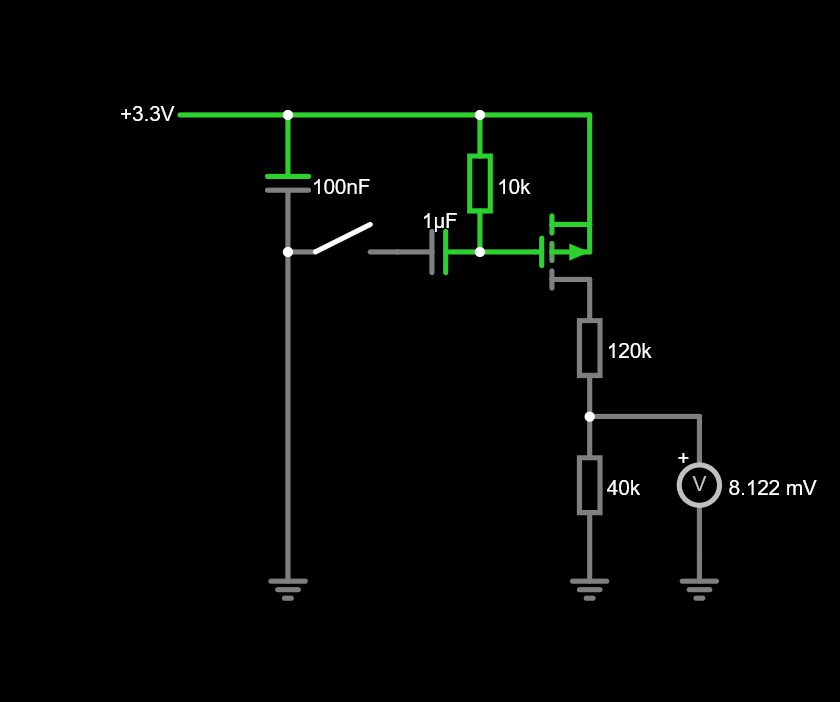
But i guess you are talking about the additional capacitor, in between 3.3V and ground ?
What i would like to know is if these modules you're using do have a 1pF capacitor as per picture :

Please let me know !
@Honk thanks a lot for your input
I'm building @AWI 's "connection quality meter" so i can quantify any change. Being a 10 year's experienced noob in MySensors, it takes me for ever to get it right :D
Please share your experience with faulty modules in possible connection with that missing capacitor.
Hello Everyone,
I love my MySensors + openHab setup but it gets really frustrating when a node just stops working for a while... and then comes back on track a few hours later.
So, long story short : i was just about to switch to (and order some) RFM69 modules last night when i discovered the "magic finger trick" (as i was looking for power consumption nRF vs RFM).
Looks like a pretty high number of nRF modules left the factory with a missing capacitor...
https://ncrmnt.org/2021/01/03/nrf24l01-fixing-the-magic-finger-problem/
Is it just me and everyone else knew ? ALL mt nRF24s from various suppliers are missing that capacitor... no wonder then (if that's the real culprit) !
So I have just ordered a batch of smd capacitor... i'll let you know.
Hi guys
Long time no speak but still a MySensors fan !!
My new project is a bit tougher than expected.
Here is the thing: landline phones used to be analog type, with some 40v running across the wires... adding a beacon for noisy environment was a breeze, just plug it in and whenever a call comes in the beacon picks the signal and rings.
My country has now moved to digital signal, IP i would say (please correct me if wrong terminology).
So now the phone is connected at the back of optic fiber internet box (modem) via RJ45 plug.
Needless to say that analog beacon has become useless. Beacon manufacturers have not yet moved their tech towards IP protocol.
Have you ever bumped into that kind of challenge ? :grin:
I have a spare W5100 in the drawer... would it be able to access to the phone data, to check whether it's ringing ?
Hope you get the picture and you can show me the way forward :+1:
@niccodemi I am no expert and am having a tough time with these files as well !!!
My .things file looks like so :
Bridge mqtt:broker:mosquitto "MySensorsGateway"@"Home" [host="openhabian", port="1883", secure=false]
{
Thing topic garageDoor01 "Garage"@"Basement" {
Channels:
Type contact : garageDoor01switch [stateTopic="mysensors-out/19/1/1/0/16", transformationPattern="MAP:contact.map"]
Type datetime : garageDoor01switch_LastUpdate
}
As far as i understand, you're missing that "linktopic" descrption...
Hi @zkarolyi
I can not provide any help on that matter as i went the MQTT way.
The binding for serial gateway requires loads of work from the MySensors dev team; so it might tatke a while before it becomes available (if it does all together). I really appreciate all the effort put into this but i also understand that it might come to an end someday. No matter how much i prefer the serial gateway over MQTT... i ended up in the mqtt team
Back to your issu : the jar file might not be compatible with OH4
@mfalkvidd Genius !!! :open_mouth:
Hello there
I thought it would be a good idea to upgrade my system to openHAB4, as i wanted to play with my security cameras linked to a Synology NAS system...
Well it didn't go according to plan.
First openhabian had to be upgraded from Buster to Bullseye in order to get Java from 11 to 17. Then Java got upgraded, By that time MySensors stopped working. So i started over with a fresh install of MySensors. All went well until
make
hal/architecture/Linux/drivers/core/GPIO.cpp: In constructor ‘GPIOClass::GPIOClass()’:
hal/architecture/Linux/drivers/core/GPIO.cpp:53:50: warning: ‘%s’ directive output may be truncated writing up to 255 bytes into a region of size 48 [-Wformat-truncation=]
53 | snprintf(file, sizeof(file), "/sys/class/gpio/%s/base", de->d_name);
| ^~
hal/architecture/Linux/drivers/core/GPIO.cpp:53:12: note: ‘snprintf’ output between 22 and 277 bytes into a destination of size 64
53 | snprintf(file, sizeof(file), "/sys/class/gpio/%s/base", de->d_name);
| ~~~~~~~~^~~~~~~~~~~~~~~~~~~~~~~~~~~~~~~~~~~~~~~~~~~~~~~~~~~~~~~~~~~
hal/architecture/Linux/drivers/core/GPIO.cpp:62:50: warning: ‘%s’ directive output may be truncated writing up to 255 bytes into a region of size 48 [-Wformat-truncation=]
62 | snprintf(file, sizeof(file), "/sys/class/gpio/%s/ngpio", de->d_name);
| ^~
hal/architecture/Linux/drivers/core/GPIO.cpp:62:12: note: ‘snprintf’ output between 23 and 278 bytes into a destination of size 64
62 | snprintf(file, sizeof(file), "/sys/class/gpio/%s/ngpio", de->d_name);
| ~~~~~~~~^~~~~~~~~~~~~~~~~~~~~~~~~~~~~~~~~~~~~~~~~~~~~~~~~~~~~~~~~~~~
g++ -MT build/hal/architecture/Linux/drivers/core/interrupt.o -MMD -MP -march=armv8-a+crc -mtune=cortex-a53 -mfpu=neon-fp-armv8 -mfloat-abi=hard -DMY_RADIO_RF24 -DMY_GATEWAY_LINUX -DMY_GATEWAY_MQTT_CLIENT -DMY_DEBUG -DLINUX_SPI_BCM -DLINUX_ARCH_RASPBERRYPI -DMY_MQTT_CLIENT_ID=\"impassedesroses\" -DMY_MQTT_SUBSCRIBE_TOPIC_PREFIX=\"mysensors-in\" -DMY_MQTT_PUBLISH_TOPIC_PREFIX=\"mysensors-out\" -DMY_RF24_PA_LEVEL=RF24_PA_LOW -DMY_CONTROLLER_IP_ADDRESS=127,0,0,1 -Ofast -g -Wall -Wextra -std=c++11 -I. -I./core -I./hal/architecture/Linux/drivers/core -I./hal/architecture/Linux/drivers/BCM -c hal/architecture/Linux/drivers/core/interrupt.cpp -o build/hal/architecture/Linux/drivers/core/interrupt.o
hal/architecture/Linux/drivers/core/interrupt.cpp:33:10: fatal error: stropts.h: No such file or directory
33 | #include <stropts.h>
| ^~~~~~~~~~~
compilation terminated.
make: *** [Makefile:99: build/hal/architecture/Linux/drivers/core/interrupt.o] Error 1
Please advise if i should start over from the very begenning (fresh SD) or just stick with openHAB 3 (but soon or later it will be superseeded)
Thanks a lot for your time people.
@skywatch great, thanks a lot for your suggestion. A bit of research on the internet educated me about these diodes :D looks like they already exist on the board that carries the relay. However, i deeply thank you for the info. This forum and internet in general is such a powerful tool :+1:
@ejlane your concern is fully justified :+1: i also come from an engineering background and i like to think "worse case scenario".
The more one look the more one find that the very vast majority or microwave ovens work the same way : there are 3 industrial switches built in the door lock. 2 of them are cabled on the "power side", one is for signaling ("software side"). So we are pretty safe on that matter.
But you are so right about safety. Magnetron do emitt dangerous waves and capacitors and stuff packed in the oven can be deadly because of high voltage.
Thanks both for suggestions. I will come back with updated sketches and beg for advice once more ;)
Hi guys,
My microwave oven broke down last month.
Not only it's a pain in the backside but it is also more waste for the planet.
A quick search on the internet educated me about safety and how to test parts.
Turns out the main board is dead (display works fine, most buttons too but "start" and "stop" buttons are useless).
New motherboard is difficult to source and is no more available from manufacturer (i bought it 2 years ago but must have been some fairly old design... :face_with_rolling_eyes: )
So back to drawing board and soldering iron:
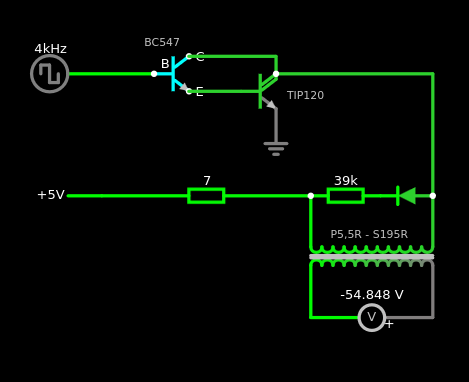
I am pretty well on my way design-wise and need a final advice on transistors ; following are 2 arrangements regarding what i would call the "oven door transistor" (the bottom PNP one).
The 3 NPN transistors at the top drive a relay each one (magnetron, plate and heating resistance). Each transistor is driven by the arduino via a resistor.
Please accept my apologies if any of my sketches make your eyes bleed. :grin:
Which one would be the least bad and how could it be improved.
Thanks a lot for reading :+1:
EDIT: Sketches drawn with https://www.falstad.com


Thank you both :+1:
My Raspberry 3 does it all :
MQTT Explorer has been installed on my fav laptop and it helps seeing clearer.
Nevertheless i cannot reproduce the errors.
I have multiple points of view:
I can sent MQTT messages from different devices :
The less reliable way of sending MQTT message is via terminal : after 2 to 10 succesfull messages it then stops working. At first, node receives messages and processes them (servo moves). But after a few messages, node doesn't receive anymore. MQTT Explorer shows the change of state of the topic but message doesn't go anyfurther... no other monitor show a change.
@OldSurferDude i'm not sure i understand
Each node should be sending messages to its own topic.
Can the mysensor gateway subscribe to more than one topic (which is mysensors-in at the mo) ?
Thanks a lot for helping me through :blush:
@JeeLet thanks a lot for your message
You're right :
TBH i don't know where to start, so difficult to point a finger...
Hi guys,
Long story cut short :
I've had lots of "temporary gone bad nodes" since migrating from serial to mqtt.
Nodes that are normally working fine but then stop responding (most annoying being the one driving the garage door motor :scream: i now keep a key anytime with me instead of just relying on openHab...). A reboot cures it.
So i decided to design a simple logger with arduino + sd card + rtc.
Beside that i am also designing an automatic cat flap locking node, so cats dont go out at night. As i dont want any rtc on that node, i rely on time supplied by controller with requestTime(). So here i am trying to understand how to send that request to controller via mqtt by sending publications...
That's how i discovered that many publications are lost.
What do you suggest to investigate further ? I might have reached my limits... :grimacing: some help would be welcome :+1:
Thanks a lot :blush:
@skywatch oh great :+1: thanks for that !
by removing the smd then the signal becomes "compatible" with a 2.4ghz stick antenna ?
or shall i go with wire and adjust length ?
Thanks everyone :)
@NeverDie thanks a lot for taking so much time for your answer :+1:
Your explainations pushed my thinking a bit further. I now understand that i can't just solder a 2.4ghz stick antenna in-lieu of a "trace" antenna just because it is a 2.4ghz board... am i right ?
The main reason for my post is that i need to have a remote antenna.
And i also wanted to keep clear of Power Amplified modules as their power consumption is too high for my needs (tiny LiPo and solr panel)
And i also wanted to use what's in the drawer ;)
I shall then turn to nrf modules with external antenna. Usual one are difficult to get now. But it seems there are newer ones out there (at least their layout seems new to me) :

Anyone tried yet ?
Anyway, thanks a lot for making things clearer :blush:
Hi Guys,
I would like to connect a stick antenna to a basic nrf24L01+ module.
Please note that i do not need any additional range.
The reason i'm asking is because the nrf is surrounded by metal, copper traces and battery...
So getting the antenna out of the housing might help.
I have an SMA connector handy and a stick antenna as well.
My main question is about soldering the coax cable :

1 -shall i cut the trace as stated in numerous hacksites ?
2 - shall i solder the inner conductor where the blue arrow is ?
3 - shall i solder the outer connector (shield?) where the red arrow is ? or is it best to scratch underside of board and solder straight into ground plane ? but then that reveals more inner connector length, thus next question...
What is the importance of the length of "naked" inner conductor where the insulation will be cut ?
Thanks a lot for your help, comments of any sort are welcome ;)
@adamf663 sorry for delay! I am focusing on mostly software at the moment. So nothing to show so far ;) i'll be posting as soon as the project moves forward again :+1: please read on !!!
@MasMat thanks a lot for your suggestions. As suggested first it is more than probably a case of rights/permissions.
There are many ways to launch a script at startup but in my case some deamons were started via "root" and some others via "user".
As stated before, all worked perfectly when logged under "user" (pi).
So, to summarise:
Then came "systemctl" !
First create a .service file
$ sudo nano /etc/systemd/system/doorbell.service
[Unit]
Description=My test service
After=multi-user.target
[Service]
Type=simple
Restart=always
ExecStart=/usr/bin/python /home/pi/doorbell02.py
[Install]
WantedBy=multi-user.target
#WantedBy=default.target -> test this if previous doesn't work
Reload all daemons to check if your new .service file is ok
Then allow your new service file to be loaded at boot
Last, check if loading worked. If status returns "active" then it's a win :+1:
$ sudo systemctl daemon-reload
$ sudo systemctl --user enable doorbell.service
$ sudo systemctl --user start doorbell.service
$ systemctl --user is-active doorbell.service
Last step: systemctl loads these services at loggin by default (as in : enter user and password). I need it to start automaticaly with no human input. systelctl offers a way to load services without loggin for a given user :
$ loginctl user-status pi
Check status with
$ loginctl user-status pi
If status returns "linger: yes" then it's (once again) a win :+1:
Thanks again @MasMat for suggesting paths to investigate
That's it for now, i'll be back on the hardware point of view next time !