Skip to content
  • MySensors
  • OpenHardware.io
  • Categories
  • Recent
  • Tags
  • Popular
Skins
  • Light
  • Brite
  • Cerulean
  • Cosmo
  • Flatly
  • Journal
  • Litera
  • Lumen
  • Lux
  • Materia
  • Minty
  • Morph
  • Pulse
  • Sandstone
  • Simplex
  • Sketchy
  • Spacelab
  • United
  • Yeti
  • Zephyr
  • Dark
  • Cyborg
  • Darkly
  • Quartz
  • Slate
  • Solar
  • Superhero
  • Vapor

  • Default (No Skin)
  • No Skin
Collapse
Brand Logo
R

rjgmba

@rjgmba
About
Posts
4
Topics
2
Shares
0
Groups
0
Followers
0
Following
0

Posts

Recent Best Controversial

  • RPI Gateway: Connect to Controller and MQTT broker with different IP addresses
    R rjgmba

    Thanks for clarifying, @mfalkvidd, so that means that I won't use the Ethernet GW, but only the MQTT GW configuration, changing it to

    ./configure --my-gateway=mqtt --my-controller-ip-address=192.168.X.BB --my-transport=rfm69 --my-rfm69-frequency=433 --my-is-rfm69hw --my-mqtt-publish-topic-prefix=mysensors-out --my-mqtt-subscribe-topic-prefix=mysensors-in --my-mqtt-client-id=mymqttgateway1
    

    Where <MQTT / MySensors GW IP address> is the MySensors RPI IP address.

    But that also means that in Home-Assistant I will need to change the configuration yaml file and take out the Ethernet GW reference:

    So from

    mysensors:
      gateways:
        - device: '192.168.X.BB'
          persistence_file: 'mysensors3.json'
          tcp_port: 5003
        - device: mqtt
          persistence_file: 'mysensors1.json'
          topic_in_prefix: 'mysensors-out'
          topic_out_prefix: 'mysensors-in'
      optimistic: false
      persistence: true
      retain: true
      version: '2.0'
    

    to

    mysensors:
      gateways:
        - device: mqtt
          persistence_file: 'mysensors1.json'
          topic_in_prefix: 'mysensors-out'
          topic_out_prefix: 'mysensors-in'
      optimistic: false
      persistence: true
      retain: true
      version: '2.0'
    

    But how will Home-Assistant now know what the IP address is for the MySensors RPI gateway?

    Apologies if I completely missing something obvious....
    Troubleshooting

  • RPI Gateway: Connect to Controller and MQTT broker with different IP addresses
    R rjgmba

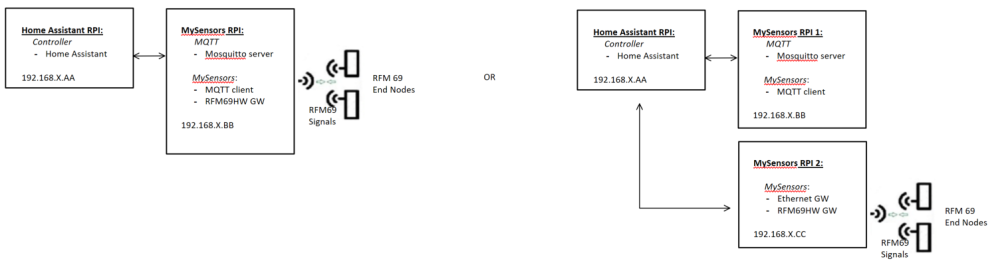
    @mfalkvidd Many thanks for your quick and helpful reply! Could I ask you two more clarifying questions:

    • So if define the rpi as a mqtt gateway, can I see this mqtt GW still as my GW for my RFM69 sensors?
    • Or do I need to split out the ethernet GW for my RFM69 sensors from the mqtt GW?

    0_1552302707752_becf5f20-43d0-4233-98fa-3734b2357dfc-image.png

    Troubleshooting

  • RPI Gateway: Connect to Controller and MQTT broker with different IP addresses
    R rjgmba

    Hi all,
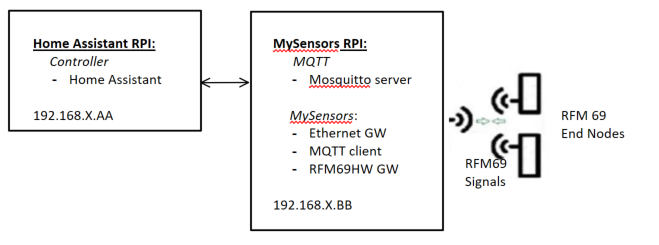
    I am trying to use a RPI as mysensors' gateway for both MQTT as well as RFM69 and connected to network using ethernet. As controller I am using HomeAssistant. Is it possible to run a MQTT broker like mosquito on this gateway / or on a device other than the controller?
    0_1552297840169_247bed7d-c2b0-410f-94cc-fe2a85735e94-image.png

    It looks like the assumption is that the MQTT broker is on the same device as the Controller:
    https://www.mysensors.org/apidocs/group__RaspberryPiGateway.html:
    MySensors options:

    --my-controller-url-address=<URL>
                                Controller or MQTT broker url.
    --my-controller-ip-address=<IP>
                                Controller or MQTT broker ip.
    

    But maybe I misunderstand.

    I was trying to use the following:

    ./configure --my-gateway=ethernet --my-controller-ip-address=<HomeAssistant IP>  --my-transport=rfm69 --my-rfm69-frequency=433 --my-is-rfm69hw --my-gateway=mqtt --my-mqtt-publish-topic-prefix=mysensors-out --my-mqtt-subscribe-topic-prefix=mysensors-in --my-mqtt-client-id=mygateway1
    

    Where <HomeAssistant IP> is 192.168.XX.AA in my picture

    But that doesn't allow me to specify the MQTT broker on a different device than the Controller/Home Assistant...

    Perhaps I got this all wrong?

    Troubleshooting

  • Beginner question: How does the MQTT Gateway communicate with a RFM69 Gateway
    R rjgmba

    Hi all, I have a real beginner question and struggling to understand how the different components work together using the info on Mysensor.org just from a concept perspective. I am trying to build an architecture where I use Home Assistant as a controller to use MQTT sensors via RFM69 radio. So I think I need a MQTT gateway, and a RFM69 Gateway, as well as sensors connected to RFM69 radio. I have seen the description of both the MQTT gateway, as well as the RFM69 Gateway:

    • MQTT Gateway: https://www.mysensors.org/build/mqtt_gateway which seems a combination of ethernet GW with MQTT client
    • RFM69 Gateway: https://www.mysensors.org/build/connect_radio which seems a serial gateway(?) with RFM69 radio (but I might be mistaken) -> how does this talk to the MQTT gateway? Does it need to be combined with an ethernet GW?

    I have seen other architectures (other websites) where the RFM gateway is combined with the MQTT gateway, which I can understand. I am struggling to see how the Controller (Home Assistant) communicates with the sensors using MQTT via RFM69 radio but I must be missing something obvious...

    General Discussion
  • Login

  • Don't have an account? Register

  • Login or register to search.
  • First post
    Last post
0
  • MySensors
  • OpenHardware.io
  • Categories
  • Recent
  • Tags
  • Popular