
MySensors gateway and network reliability
-
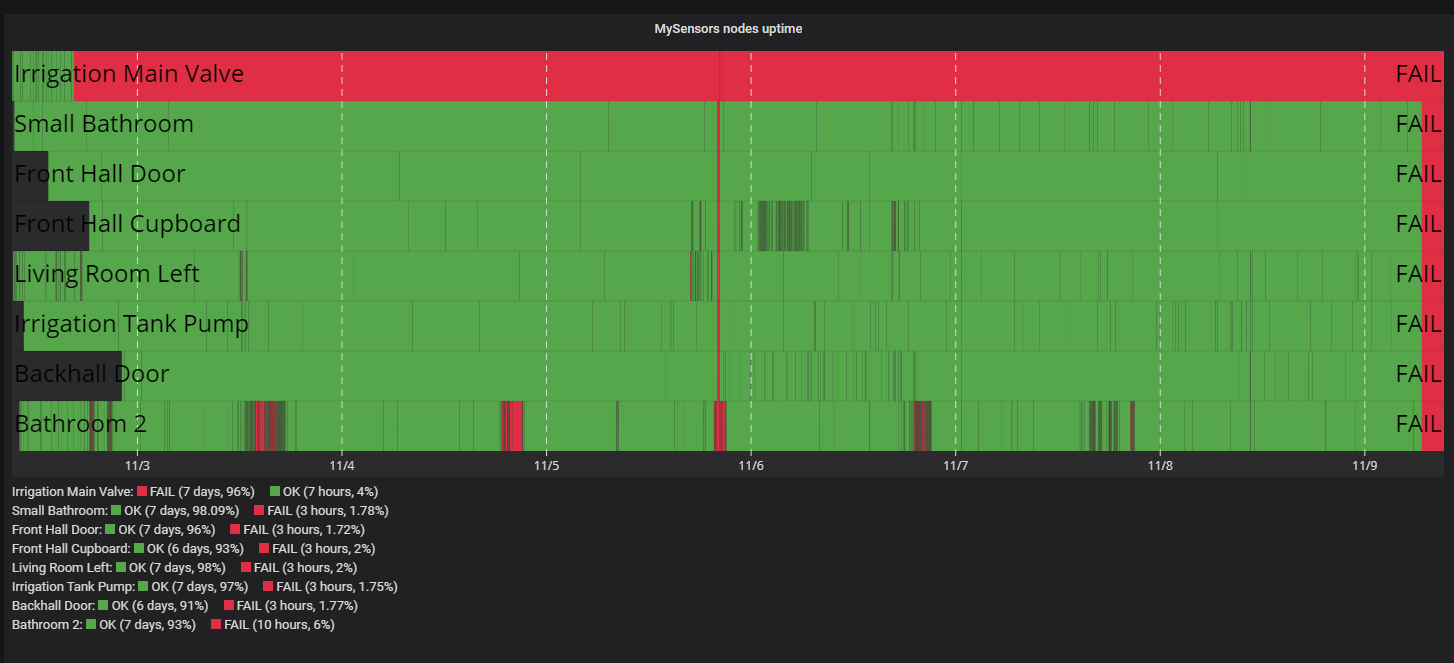
This is actually a good reminder to implement a watchdog on the gateway :-)
// Update:
Here's my new code:/* * * The Candle receiver acts as the bridge between the Candle devices and the Candle Controller. * * It only allows communication with other Candle devices that use the same encryption password as it uses itself. * When you install the Candle Manager, a random password is generated for you. If you ever want to change the encryption password used by your network, this can be done in the Candle Manager settings. * Be warned that you will have to re-create this receiver as well as all your devices, since they will all need to have new code with the new password in it. * * If you have already installed the MySensors add-on, please temporarily disable it before creating this receiver. Otherwise the MySensors add-on may try to connect to it during the creation process, and thus disrupt it. * * * SETTINGS */ // You can enable and disable the settings below by adding or removing double slashes ( // ) in front of a line. #define RF_NANO // RF-Nano. Enable this if you are using the RF-Nano Arduino, which has a built in radio. The Candle project uses the RF-Nano. /* END OF SETTINGS * * * */ // Enable MySensors debug output to the serial monitor, so you can check if the radio is working ok. //#define MY_DEBUG #ifdef RF_NANO // If you are using an RF-Nano, you have to switch CE and CS pins. #define MY_RF24_CS_PIN 9 // Used by the MySensors library. #define MY_RF24_CE_PIN 10 // Used by the MySensors library. #endif // Enable and select radio type attached #define MY_RADIO_RF24 //#define MY_RADIO_NRF5_ESB //#define MY_RADIO_RFM69 //#define MY_RADIO_RFM95 // Set LOW transmit power level as default, if you have an amplified NRF-module and // power your radio separately with a good regulator you can turn up PA level. //#define MY_RF24_PA_LEVEL RF24_PA_MIN //#define MY_RF24_PA_LEVEL RF24_PA_LOW //#define MY_RF24_PA_LEVEL RF24_PA_HIGH #define MY_RF24_PA_LEVEL RF24_PA_MAX // Enable serial gateway #define MY_GATEWAY_SERIAL // Mysensors advanced security #define MY_ENCRYPTION_SIMPLE_PASSWD "changeme" // The Candle Manager add-on will change this into the actual password your network uses. //#define MY_SECURITY_SIMPLE_PASSWD "changeme" // Be aware, the length of the password has an effect on memory use. //#define MY_SIGNING_SOFT_RANDOMSEED_PIN A7 // Setting a pin to pickup random electromagnetic noise helps make encryption more secure. // Mysensors advanced settings //#define MY_RF24_CHANNEL 100 // In EU the default channel 76 overlaps with wifi, so you could try using channel 100. But you will have to set this up on every device, and also on the controller. You can even try 115. //#define MY_RF24_DATARATE RF24_250KBPS // Slower datarate increases the range, but the RF-Nano does not support this slow speed. #define MY_RF24_DATARATE RF24_1MBPS // This datarate is supported by pretty much all NRF24 radios, including the RF-Nano. #define MY_SPLASH_SCREEN_DISABLED // Saves a little memory. #include <MySensors.h> // The MySensors library, which takes care of creating the wireless network. #include <avr/wdt.h> // The watchdog timer - if the device becomes unresponsive and doesn't periodically reset the timer, then it will automatically reset once the timer reaches 0. // Clock for the watchdog #define INTERVAL 1000 // Every second we reset the watchdog timer. If the device freezes, the watchdog will not re reset, and the device will reboot. unsigned long previousMillis = 0; // Used to run the internal clock void setup() { // Setup locally attached sensors wdt_enable(WDTO_2S); // Starts the watchdog timer. If it is not reset once every 2 seconds, then the entire device will automatically restart. } void presentation() { // The receiver does not have any extra children itself. } void loop() { if(millis() - previousMillis >= INTERVAL){ // Main loop, runs every second. previousMillis = millis(); // Store the current time as the previous measurement start time. wdt_reset(); // Reset the watchdog timer } } /** * The MySensors Arduino library handles the wireless radio link and protocol * between your home built sensors/actuators and HA controller of choice. * The sensors forms a self healing radio network with optional repeaters. Each * repeater and gateway builds a routing tables in EEPROM which keeps track of the * network topology allowing messages to be routed to nodes. * * Created by Henrik Ekblad <henrik.ekblad@mysensors.org> * Copyright (C) 2013-2018 Sensnology AB * Full contributor list: https://github.com/mysensors/MySensors/graphs/contributors * * Documentation: http://www.mysensors.org * Support Forum: http://forum.mysensors.org * * This program is free software; you can redistribute it and/or * modify it under the terms of the GNU General Public License * version 2 as published by the Free Software Foundation. */@alowhum MySensors resets the watchdog every time
loop()is exited, so there is no need to callwdt_reset()unless you do something that takes a long time. If you do stuff that takes a long time you should call wait() instead, so messages can be processed. -
So I should be able to solve my gateway crashes easily by just doing the following in my gateway code:
#include <avr/wdt.h>

void setup()
{
 wdt_enable(WDTO_2S);
}
And that's it?
-
So I should be able to solve my gateway crashes easily by just doing the following in my gateway code:
#include <avr/wdt.h>

void setup()
{
 wdt_enable(WDTO_2S);
}
And that's it?
@nick-willis Sounds like it.
My gateway runs on an ESP8266, which has its own watchdog enabled by the default ESP8266 Arduino code. i.e. on an ESP8266, even the blink demo program has watchdog enabled without having to do so explicitly. But on an AVR platform, you need to explicitly enable the watchdog or it won't be active.
Maybe the mysensors code should enable watchdog by default? I bet a lot of people are running without a watchdog and don't even know it.
-
@alowhum MySensors resets the watchdog every time
loop()is exited, so there is no need to callwdt_reset()unless you do something that takes a long time. If you do stuff that takes a long time you should call wait() instead, so messages can be processed.@mfalkvidd said in MySensors gateway and network reliability:
@alowhum MySensors resets the watchdog every time
loop()is exited, so there is no need to callwdt_reset()unless you do something that takes a long time. If you do stuff that takes a long time you should call wait() instead, so messages can be processed.Very interesting! If I don't call
wait()manually, when does the library process messages? Also at the end of the loop?Maybe the mysensors code should enable watchdog by default?
Sounds good to me! What is the code/memory overhead of doing this?
If the
wdt_resetfunction is already being called in every loop, doesn't that imply that Arduino also already loads the entire watchdog code? Otherwise, wouldn't that cause a "function not found" error? -
@neverdie No offence intended, but I gathered watchdog was tried and failed on at least one installation, it appears to be the NRF comms medium itself which is common to both complainants, neither of which your setup uses.
Or were you suggesting an external watchdog (if not already trialled) might shed some light on their issues?@zboblamont What is it that you recommend instead? Maybe (?) there are other issues, but my take is that, at the very least, his watchdog isn't working. So, why not start with that? At least then maybe he wouldn't be locked out of his system while he's on vacation.
But if you think he should put his effort elsewhere, then where exactly, and why?
-
@mfalkvidd said in MySensors gateway and network reliability:
@alowhum MySensors resets the watchdog every time
loop()is exited, so there is no need to callwdt_reset()unless you do something that takes a long time. If you do stuff that takes a long time you should call wait() instead, so messages can be processed.Very interesting! If I don't call
wait()manually, when does the library process messages? Also at the end of the loop?Maybe the mysensors code should enable watchdog by default?
Sounds good to me! What is the code/memory overhead of doing this?
If the
wdt_resetfunction is already being called in every loop, doesn't that imply that Arduino also already loads the entire watchdog code? Otherwise, wouldn't that cause a "function not found" error? -
@zboblamont What is it that you recommend instead? Maybe (?) there are other issues, but my take is that, at the very least, his watchdog isn't working. So, why not start with that? At least then maybe he wouldn't be locked out of his system while he's on vacation.
But if you think he should put his effort elsewhere, then where exactly, and why?
@neverdie My query was that having read @skywatch previously failure with WDT, whether an external device offered a different methodology which the soft version did not address.
Never experienced the problems these lads are trying to resolve as use different comms hardware which are 100% reliable, so no need to learn about WDTs. As I understood it the WDT initiates a reset, which if it clears the problem through re-initialisation implies a lockup on the comms to the NRF or within the NRF itself, since the processor and sketch should be fairly standard.
Why SOME have problems but not others is a curiosity. -
So I should be able to solve my gateway crashes easily by just doing the following in my gateway code:
#include <avr/wdt.h>

void setup()
{
 wdt_enable(WDTO_2S);
}
And that's it?
I also have " wdt_reset(); " in the loop part. I thought that would be needed to reset the WDT, but maybe I misunderstood?
-
I just thought I'd share this with you all in case someone has an idea about it.
This morning I got no response from the pi via http or ssh. Usual situation when it 'crashes'. But this time I noticed that whilst everything was still powered on the network socket leds on the pi3 were out. Both of them completely unlit.
So maybe the issue is with the networking on the pi? It would explain why both http and ssh always die at the same time. Maybe if someone else gets another outage they could check to see if the same condition applies?
Another thing was that the 'act' led was flashing 7 times repeatedly. Apparently this happens if 'kernel.img' cannot be found. Anyone have an idea on why kernel.img might suddenly not be found on a pi running from ssd?
-
If you really enjoy fiddling with connection problems and gateways freezing you should try using the gsm gateway. At first it froze up every day or two. I now run a second mcu just to check connectivity to mycontroller and resetting the gateway when it fails. This sometimes happen a couple of times a day.





Hello! It looks like you're interested in this conversation, but you don't have an account yet.
Getting fed up of having to scroll through the same posts each visit? When you register for an account, you'll always come back to exactly where you were before, and choose to be notified of new replies (either via email, or push notification). You'll also be able to save bookmarks and upvote posts to show your appreciation to other community members.
With your input, this post could be even better 💗
Register Login