Skip to content
  • MySensors
  • OpenHardware.io
  • Categories
  • Recent
  • Tags
  • Popular
Skins
  • Light
  • Brite
  • Cerulean
  • Cosmo
  • Flatly
  • Journal
  • Litera
  • Lumen
  • Lux
  • Materia
  • Minty
  • Morph
  • Pulse
  • Sandstone
  • Simplex
  • Sketchy
  • Spacelab
  • United
  • Yeti
  • Zephyr
  • Dark
  • Cyborg
  • Darkly
  • Quartz
  • Slate
  • Solar
  • Superhero
  • Vapor

  • Default (No Skin)
  • No Skin
Collapse
Brand Logo
  1. Home
  2. Development
  3. Wireless nRF24L01+ sniffer for MySensors

Wireless nRF24L01+ sniffer for MySensors

Scheduled Pinned Locked Moved Development
omgsnifferwiresharknrf24l01+
108 Posts 19 Posters 70.3k Views 18 Watching
  • Oldest to Newest
  • Newest to Oldest
  • Most Votes
Reply
  • Reply as topic
Log in to reply
This topic has been deleted. Only users with topic management privileges can see it.
  • marceltrapmanM marceltrapman

    Everything works now.

    Did not see any packets coming in though but I remember having an issue with a couple of Uno's and I am not sure if this was one of them.

    Anyway, I will do some more testing tomorrow.
    Very exited :)

    YveauxY Offline
    YveauxY Offline
    Yveaux
    Mod
    wrote on last edited by Yveaux
    #45

    @marceltrapman And? How did the testing go?
    I fixed the Nrf24sniff.exe to use static linking so the msvcr110.dll should no longer be required.
    Also fixed executable so it runs on WinXP now (untested...).

    http://yveaux.blogspot.nl

    marceltrapmanM 2 Replies Last reply
    0
    • YveauxY Yveaux

      @marceltrapman And? How did the testing go?
      I fixed the Nrf24sniff.exe to use static linking so the msvcr110.dll should no longer be required.
      Also fixed executable so it runs on WinXP now (untested...).

      marceltrapmanM Offline
      marceltrapmanM Offline
      marceltrapman
      Mod
      wrote on last edited by
      #46

      @Yveaux To be honest, I have played with it a little but I have not come much further.
      Spent my time this weekend on other things :)
      Will let you know soon!

      Fulltime Servoy Developer
      Parttime Moderator MySensors board

      I use Domoticz as controller for Z-Wave and MySensors (previously Indigo and OpenHAB).
      I have a FABtotum to print cases.

      1 Reply Last reply
      0
      • R Offline
        R Offline
        Rasmus Eneman
        wrote on last edited by
        #47

        Could the line quality information be queried directly by the gateway so that it can be known without additional hardware?

        YveauxY 1 Reply Last reply
        0
        • R Rasmus Eneman

          Could the line quality information be queried directly by the gateway so that it can be known without additional hardware?

          YveauxY Offline
          YveauxY Offline
          Yveaux
          Mod
          wrote on last edited by
          #48

          @Rasmus-Eneman no, the nrf24 does not expose it. You can query the amount of retries it took before a message got an acknowledgement, which could be used as quality indication.

          http://yveaux.blogspot.nl

          1 Reply Last reply
          0
          • R Offline
            R Offline
            Rasmus Eneman
            wrote on last edited by
            #49

            @Yveaux Okej, Thank You!

            1 Reply Last reply
            0
            • YveauxY Yveaux

              @marceltrapman And? How did the testing go?
              I fixed the Nrf24sniff.exe to use static linking so the msvcr110.dll should no longer be required.
              Also fixed executable so it runs on WinXP now (untested...).

              marceltrapmanM Offline
              marceltrapmanM Offline
              marceltrapman
              Mod
              wrote on last edited by marceltrapman
              #50

              @Yveaux said:

              And? How did the testing go?

              So, testing went well :)
              I found a couple of malformed packets coming in so I will have to investigate that.
              Yesterday evening I created my first shield, first double sided board and in fact the first true 'home brew' pcb in my entire life...

              This is what it looks like (it is a bit of a mess because I messed up my via's the first time...
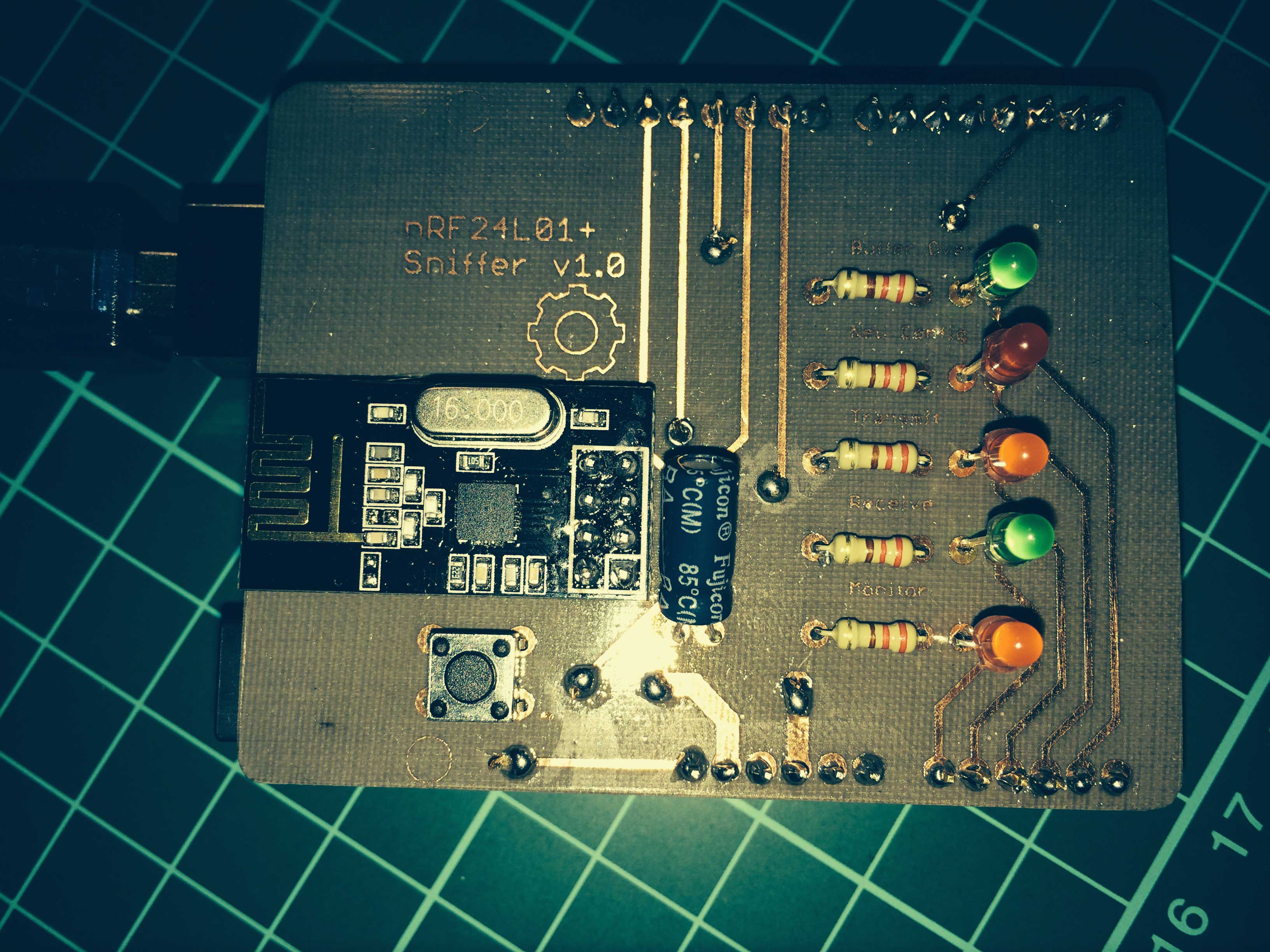
              IMG_0502.jpg

              Fulltime Servoy Developer
              Parttime Moderator MySensors board

              I use Domoticz as controller for Z-Wave and MySensors (previously Indigo and OpenHAB).
              I have a FABtotum to print cases.

              YveauxY 1 Reply Last reply
              1
              • marceltrapmanM marceltrapman

                @Yveaux said:

                And? How did the testing go?

                So, testing went well :)
                I found a couple of malformed packets coming in so I will have to investigate that.
                Yesterday evening I created my first shield, first double sided board and in fact the first true 'home brew' pcb in my entire life...

                This is what it looks like (it is a bit of a mess because I messed up my via's the first time...
                IMG_0502.jpg

                YveauxY Offline
                YveauxY Offline
                Yveaux
                Mod
                wrote on last edited by Yveaux
                #51

                @marceltrapman Wooow! First 'official' sniffer PCB! :+1: (did you give it an oldskool look? looks 50 years+ old :-)
                Great it worked out that well!

                In my experience there are always some malformed packets, nothing to worry about.

                http://yveaux.blogspot.nl

                marceltrapmanM 1 Reply Last reply
                0
                • YveauxY Yveaux

                  Ok, brace yourself! :zap:

                  I finally had the time to write on my blog about the wireless network sniffer I've been working on lately.
                  For the impatient see:

                  • http://yveaux.blogspot.nl/2014/07/nrf24l01-sniffer-part-1.html
                  • http://yveaux.blogspot.nl/2014/07/nrf24l01-sniffer-part-2.html
                  • http://yveaux.blogspot.nl/2014/07/nrf24l01-sniffer-part-3.html

                  This wireless sniffer allows you to capture traffic on air between multiple nodes of your MySensors network and is able to even capture packets with invalid CRC Values. The amount of CRC errors gives a fair indication of link quality, which is not provided by the nRF24.

                  The sniffer in action:
                  http://www.youtube.com/embed/wxjxm0LnkAk

                  Actual capturing is performed by an nRF24L01+ module connected to an Arduino (we all known how to do that ;-) ). No other hardware is required.

                  A small piece of software (currently only for Windows, sorry @hek) reads the packet data from the sniffer and forwards it to Wireshark, a network protocol analyzer.
                  Wireshark then allows you to inspect the packages from high-level down to the individual bits, filter by content, and analyze statistics.
                  Details are all in the blog posts. Last post in this series, which is yet to be written, will dive into using Wireshark and getting useful information from it.
                  I didn't want to keep this tool to myself until finally finished and documented, so there can (will?) still be some bugs left...

                  Please discuss any issues/ideas/suggestions in here or in my blog.

                  Happy sniffin' to all of you!

                  DammeD Offline
                  DammeD Offline
                  Damme
                  Code Contributor
                  wrote on last edited by
                  #52
                  This post is deleted!
                  1 Reply Last reply
                  0
                  • YveauxY Yveaux

                    @marceltrapman Wooow! First 'official' sniffer PCB! :+1: (did you give it an oldskool look? looks 50 years+ old :-)
                    Great it worked out that well!

                    In my experience there are always some malformed packets, nothing to worry about.

                    marceltrapmanM Offline
                    marceltrapmanM Offline
                    marceltrapman
                    Mod
                    wrote on last edited by
                    #53

                    @Yveaux It is a combination of the board color (it really is a bit 'greenish') the green matte, daylight gone and the flash light :)

                    I am pretty content with it except that I need to think about those via's next time as well as using flux.

                    Any idea where those malformed packets come from?

                    Fulltime Servoy Developer
                    Parttime Moderator MySensors board

                    I use Domoticz as controller for Z-Wave and MySensors (previously Indigo and OpenHAB).
                    I have a FABtotum to print cases.

                    YveauxY 2 Replies Last reply
                    0
                    • marceltrapmanM marceltrapman

                      @Yveaux It is a combination of the board color (it really is a bit 'greenish') the green matte, daylight gone and the flash light :)

                      I am pretty content with it except that I need to think about those via's next time as well as using flux.

                      Any idea where those malformed packets come from?

                      YveauxY Offline
                      YveauxY Offline
                      Yveaux
                      Mod
                      wrote on last edited by
                      #54

                      @marceltrapman try to combine vias with through hole components. E.g a resistor write can bring you to the other side of the board.
                      Or just make the board single sided. Should be doable for such a board and it is also easier to construct.
                      I switched to smd primarily to prevent drilling and reduce board space...
                      Just a matter of taste/laziness :)

                      http://yveaux.blogspot.nl

                      marceltrapmanM 1 Reply Last reply
                      0
                      • marceltrapmanM marceltrapman

                        @Yveaux It is a combination of the board color (it really is a bit 'greenish') the green matte, daylight gone and the flash light :)

                        I am pretty content with it except that I need to think about those via's next time as well as using flux.

                        Any idea where those malformed packets come from?

                        YveauxY Offline
                        YveauxY Offline
                        Yveaux
                        Mod
                        wrote on last edited by Yveaux
                        #55

                        @marceltrapman said

                        Any idea where those malformed packets come from?

                        I guess it's just inherent to wireless traffic. The same reason why a Wi-Fi connection gives different rates all of the time.
                        It's just a hunch, I didn't really dive into it.
                        Using the sniffer we could also get some real figures on e.g. the capacitor fix. It all can make a difference but as long as you cannot measure objectively it is all guessing...

                        http://yveaux.blogspot.nl

                        1 Reply Last reply
                        0
                        • YveauxY Yveaux

                          @marceltrapman try to combine vias with through hole components. E.g a resistor write can bring you to the other side of the board.
                          Or just make the board single sided. Should be doable for such a board and it is also easier to construct.
                          I switched to smd primarily to prevent drilling and reduce board space...
                          Just a matter of taste/laziness :)

                          marceltrapmanM Offline
                          marceltrapmanM Offline
                          marceltrapman
                          Mod
                          wrote on last edited by
                          #56

                          @Yveaux said:

                          try to combine vias with through hole components. E.g a resistor write can bring you to the other side of the board.

                          I know and I did that with the LED's but with a header that is more difficult.

                          Or just make the board single sided. Should be doable for such a board and it is also easier to construct.

                          I am sure but I did not want to do that. This also was a learning project for me :)

                          I switched to smd primarily to prevent drilling and reduce board space...
                          Just a matter of taste/laziness :)

                          I am going to do that as well but I wanted to do one step at a time...

                          Thanks for your advice, much appreciated!!!

                          Fulltime Servoy Developer
                          Parttime Moderator MySensors board

                          I use Domoticz as controller for Z-Wave and MySensors (previously Indigo and OpenHAB).
                          I have a FABtotum to print cases.

                          1 Reply Last reply
                          0
                          • hekH Offline
                            hekH Offline
                            hek
                            Admin
                            wrote on last edited by
                            #57

                            Hackaday! Congrats.

                            http://hackaday.com/2014/08/05/sniffing-nrf24l01-traffic-with-wireshark/

                            YveauxY 1 Reply Last reply
                            1
                            • hekH hek

                              Hackaday! Congrats.

                              http://hackaday.com/2014/08/05/sniffing-nrf24l01-traffic-with-wireshark/

                              YveauxY Offline
                              YveauxY Offline
                              Yveaux
                              Mod
                              wrote on last edited by Yveaux
                              #58

                              @hek wow! Thanks for the tip!
                              Hope this will also boost mysensors popularity!

                              Over 1000 hits on my blog in half a day! Wow!

                              http://yveaux.blogspot.nl

                              1 Reply Last reply
                              1
                              • YveauxY Offline
                                YveauxY Offline
                                Yveaux
                                Mod
                                wrote on last edited by
                                #59

                                Updated the sniffer's Wireshark dissectors to MySensors 1.4b protocol version of Aug 18, 2014.
                                Please update the **mysensors2.dll **when you update to this 1.4b version.

                                http://yveaux.blogspot.nl

                                SparkmanS 1 Reply Last reply
                                0
                                • YveauxY Yveaux

                                  Updated the sniffer's Wireshark dissectors to MySensors 1.4b protocol version of Aug 18, 2014.
                                  Please update the **mysensors2.dll **when you update to this 1.4b version.

                                  SparkmanS Offline
                                  SparkmanS Offline
                                  Sparkman
                                  Hero Member
                                  wrote on last edited by Sparkman
                                  #60

                                  @Yveaux Thanks for putting this together. I'm trying it out today and seem to have everything running properly and without errors, but it's not capturing any packets. Can I just run nrf24sniff with all default parameters (other than the com port) for the current 1.4 release, or do I need to change some of them? I haven't made any changes to the default mysensor settings such as channel and data rate. I'm running it on a Mega, but have tested the radio, etc. using the BinarySwitchSensor sketch and it's communicating properly to my gateway/controller.

                                  Thanks
                                  Al

                                  YveauxY 1 Reply Last reply
                                  0
                                  • SparkmanS Sparkman

                                    @Yveaux Thanks for putting this together. I'm trying it out today and seem to have everything running properly and without errors, but it's not capturing any packets. Can I just run nrf24sniff with all default parameters (other than the com port) for the current 1.4 release, or do I need to change some of them? I haven't made any changes to the default mysensor settings such as channel and data rate. I'm running it on a Mega, but have tested the radio, etc. using the BinarySwitchSensor sketch and it's communicating properly to my gateway/controller.

                                    Thanks
                                    Al

                                    YveauxY Offline
                                    YveauxY Offline
                                    Yveaux
                                    Mod
                                    wrote on last edited by
                                    #61

                                    @Sparkman Even if the MySensors protocol changed w.r.t. the version supported by the sniffer you should still be able to capture raw nRF24 packets on air. Only the MySensors dissection could fail in this case.

                                    You should double check the values of DEFAULT_RF_CHANNEL, DEFAULT_RF_DATARATE and DEFAULT_RADIO_ID in NRF24_sniff.ino.
                                    They should match the MySensors configuration from MyConfig.h: RF24_CHANNEL, RF24_DATARATE and BASE_RADIO_ID.
                                    The MySensors default datarate has gone down from 1Mbps to 25Kbps, so I would expect the DEFAULT_RF_DATARATE in the sniffer causes the malfunction.

                                    The SPI/pin settings for the radio connection could also be different on your Mega. The sniffer only supports hardware SPI. Other pins are configured in the same NRF24_sniff.ino:

                                        #define RF_CE_PIN                      (9)
                                        #define RF_CS_PIN                      (10)
                                        #define RF_IRQ_PIN                     (2)
                                        #define RF_IRQ                         (RF_IRQ_PIN-2) 
                                    

                                    Also, the sniffer uses interrupts for quick response to new messages, so make sure the IRQ pin is connected between the Mega and the nRF24 (MySensors doesn't use) !

                                    To rule out any issues caused by the Mega, could you test the sniffer using a regular Uno?

                                    Good luck!

                                    http://yveaux.blogspot.nl

                                    SparkmanS 1 Reply Last reply
                                    0
                                    • YveauxY Yveaux

                                      @Sparkman Even if the MySensors protocol changed w.r.t. the version supported by the sniffer you should still be able to capture raw nRF24 packets on air. Only the MySensors dissection could fail in this case.

                                      You should double check the values of DEFAULT_RF_CHANNEL, DEFAULT_RF_DATARATE and DEFAULT_RADIO_ID in NRF24_sniff.ino.
                                      They should match the MySensors configuration from MyConfig.h: RF24_CHANNEL, RF24_DATARATE and BASE_RADIO_ID.
                                      The MySensors default datarate has gone down from 1Mbps to 25Kbps, so I would expect the DEFAULT_RF_DATARATE in the sniffer causes the malfunction.

                                      The SPI/pin settings for the radio connection could also be different on your Mega. The sniffer only supports hardware SPI. Other pins are configured in the same NRF24_sniff.ino:

                                          #define RF_CE_PIN                      (9)
                                          #define RF_CS_PIN                      (10)
                                          #define RF_IRQ_PIN                     (2)
                                          #define RF_IRQ                         (RF_IRQ_PIN-2) 
                                      

                                      Also, the sniffer uses interrupts for quick response to new messages, so make sure the IRQ pin is connected between the Mega and the nRF24 (MySensors doesn't use) !

                                      To rule out any issues caused by the Mega, could you test the sniffer using a regular Uno?

                                      Good luck!

                                      SparkmanS Offline
                                      SparkmanS Offline
                                      Sparkman
                                      Hero Member
                                      wrote on last edited by Sparkman
                                      #62

                                      @Yveaux Thanks for the reply. I did run it with the -r2 option as well to see if that would work, but I didn't capture any packets that way either. I don't have an unused Uno, but also tried it with a Pro Mini and am not capturing packets that way either. I can use the Mega and Pro Mini with a regular MySensors sketch, so I know that all connections are good. I do have IRQ connected to pin 2 on both of them which according to the documentation for those, is where they need to go. I've confirmed the settings between nrf24_sniff.ino and myconfig.h and everything matched, except the data rate which I have now fixed. With development mode enabled on the sketch, I get the following:

                                      -- RF24 Sniff --
                                      4e 4c02050400fce1a8a80000000220 Channel:     76
                                      Datarate:    250Kb/s
                                      Address:     0xA8A8E1FC**
                                      Max payload: 32
                                      CRC length:  2
                                      
                                      STATUS		= 0x0e RX_DR=0 TX_DS=0 MAX_RT=0 RX_P_NO=7 TX_FULL=0
                                      RX_ADDR_P0-1	= 0xa8a8e1fc 0xa8e1fc03
                                      RX_ADDR_P2-5	= 0xff 0xc4 0xc5 0xc6
                                      TX_ADDR		= 0xa8e1fc00
                                      RX_PW_P0-6	= 0x20 0x20 0x20 0x00 0x00 0x00
                                      	
                                      EN_AA		 = 0x00
                                      EN_RXADDR	= 0x07
                                      F_CH		 = 0x4c
                                      RF_SETUP	= 0x27
                                      CONFIG		 = 0x07
                                      DYNPD/FEATURE	= 0x3f 0x06
                                      Data Rate	 = 250KBPS
                                      Model		 = nRF24L01+
                                      CRC Length	 = Disabled
                                      PA Power	 = PA_MAX
                                      
                                      Listening...
                                      

                                      and from nrf24sniff:

                                      C:\Users\Downloads>nrf24sniff -P4 -r2
                                      
                                      Connect Wireshark to \\.\pipe\wireshark to continue...
                                      Wait for sniffer to restart Ok
                                      
                                      Channel:      76
                                      Datarate:     250Kb/s
                                      Address:      0xa8a8e1fc**
                                      Max payload:  32
                                      CRC length:   2
                                      Captured 0 packets, Lost 0 packets
                                      

                                      Does anything jump out to you as being wrong?

                                      Thanks
                                      Al

                                      YveauxY 1 Reply Last reply
                                      0
                                      • SparkmanS Sparkman

                                        @Yveaux Thanks for the reply. I did run it with the -r2 option as well to see if that would work, but I didn't capture any packets that way either. I don't have an unused Uno, but also tried it with a Pro Mini and am not capturing packets that way either. I can use the Mega and Pro Mini with a regular MySensors sketch, so I know that all connections are good. I do have IRQ connected to pin 2 on both of them which according to the documentation for those, is where they need to go. I've confirmed the settings between nrf24_sniff.ino and myconfig.h and everything matched, except the data rate which I have now fixed. With development mode enabled on the sketch, I get the following:

                                        -- RF24 Sniff --
                                        4e 4c02050400fce1a8a80000000220 Channel:     76
                                        Datarate:    250Kb/s
                                        Address:     0xA8A8E1FC**
                                        Max payload: 32
                                        CRC length:  2
                                        
                                        STATUS		= 0x0e RX_DR=0 TX_DS=0 MAX_RT=0 RX_P_NO=7 TX_FULL=0
                                        RX_ADDR_P0-1	= 0xa8a8e1fc 0xa8e1fc03
                                        RX_ADDR_P2-5	= 0xff 0xc4 0xc5 0xc6
                                        TX_ADDR		= 0xa8e1fc00
                                        RX_PW_P0-6	= 0x20 0x20 0x20 0x00 0x00 0x00
                                        	
                                        EN_AA		 = 0x00
                                        EN_RXADDR	= 0x07
                                        F_CH		 = 0x4c
                                        RF_SETUP	= 0x27
                                        CONFIG		 = 0x07
                                        DYNPD/FEATURE	= 0x3f 0x06
                                        Data Rate	 = 250KBPS
                                        Model		 = nRF24L01+
                                        CRC Length	 = Disabled
                                        PA Power	 = PA_MAX
                                        
                                        Listening...
                                        

                                        and from nrf24sniff:

                                        C:\Users\Downloads>nrf24sniff -P4 -r2
                                        
                                        Connect Wireshark to \\.\pipe\wireshark to continue...
                                        Wait for sniffer to restart Ok
                                        
                                        Channel:      76
                                        Datarate:     250Kb/s
                                        Address:      0xa8a8e1fc**
                                        Max payload:  32
                                        CRC length:   2
                                        Captured 0 packets, Lost 0 packets
                                        

                                        Does anything jump out to you as being wrong?

                                        Thanks
                                        Al

                                        YveauxY Offline
                                        YveauxY Offline
                                        Yveaux
                                        Mod
                                        wrote on last edited by Yveaux
                                        #63

                                        @Sparkman I guess you've only enabled "development mode" (not defining BINARY_OUTPUT) to get some output to post on the forum, right? There will be no communication between the arduino and the Windows nrf24sniff executable when BINARY_OUTPUT is not defined, as textual output is not recognized by the Windows program. The parameter -r2 will not make a difference then...

                                        Anyway, if you change the default configuration items as I suggested in my previous post, you should be able to see some data coming in on the sniffer in "development mode". Another option would be to connect some LEDs to A0..A4 to indicate data coming in/going out. This way you can rule out the connection to the Windows program.

                                        Just to be sure, are you transmitting any data using a separate gateway+sensor when running the sniffer?

                                        http://yveaux.blogspot.nl

                                        SparkmanS 1 Reply Last reply
                                        0
                                        • YveauxY Yveaux

                                          @Sparkman I guess you've only enabled "development mode" (not defining BINARY_OUTPUT) to get some output to post on the forum, right? There will be no communication between the arduino and the Windows nrf24sniff executable when BINARY_OUTPUT is not defined, as textual output is not recognized by the Windows program. The parameter -r2 will not make a difference then...

                                          Anyway, if you change the default configuration items as I suggested in my previous post, you should be able to see some data coming in on the sniffer in "development mode". Another option would be to connect some LEDs to A0..A4 to indicate data coming in/going out. This way you can rule out the connection to the Windows program.

                                          Just to be sure, are you transmitting any data using a separate gateway+sensor when running the sniffer?

                                          SparkmanS Offline
                                          SparkmanS Offline
                                          Sparkman
                                          Hero Member
                                          wrote on last edited by Sparkman
                                          #64

                                          @Yveaux Yes, I only enabled development mode to troubleshoot. Had it running with BINARY_OUTPUT defined during normal operation. I have another sensor nearby that is sending data and it's talking to the gateway/controller properly so I know it's transmitting/receiving. I've tried a few different radio modules as well to rule out any issues with those, but I did test them using a normal MySensors sketch first to make sure they are operating properly. I'll add some LED's to troubleshoot. Below is my sketch for reference. Thanks for your help!

                                          Cheers
                                          Al

                                          EDIT: Code Removed

                                          YveauxY 1 Reply Last reply
                                          0
                                          Reply
                                          • Reply as topic
                                          Log in to reply
                                          • Oldest to Newest
                                          • Newest to Oldest
                                          • Most Votes


                                          14

                                          Online

                                          11.7k

                                          Users

                                          11.2k

                                          Topics

                                          113.1k

                                          Posts


                                          Copyright 2025 TBD   |   Forum Guidelines   |   Privacy Policy   |   Terms of Service
                                          • Login

                                          • Don't have an account? Register

                                          • Login or register to search.
                                          • First post
                                            Last post
                                          0
                                          • MySensors
                                          • OpenHardware.io
                                          • Categories
                                          • Recent
                                          • Tags
                                          • Popular