
Neopixel Node, using 1.6.0 Beta
-
I've been working on a few different concepts about a new node type, called the "Neopixel Node"! Using 1.6.0 Beta MySensors.
Initially, I thought it would be easy to port the strandtest code over... I was wrong. The code is all blocking with delay() everywhere. It means that your sent messages to this node won't send. And then, what's the point?
So I am in the works to make the code as non-blocking as I can make it. So far, I have many functions non-blocking with the exception of the theatre crawling lights. And the delay at most is 150ms.
I pieced everything together on my controller side with Node-Red. I only wanted a basic shell of connecting functionality, whereas you can easily hook it up to a web gui with a few basic blocks.
And remember, the code is very rough right now. I'm working on making more functions non-blocking along with adding new patterns and cool ideas. But using Node-Red makes a very quick turn-around time for testing and updating! Perhaps we can get a Node-Red as a Controller forum added?
V_RGB = give this a hex code. 000000 is off, ff0000 is red
V_VAR1 = Different modes. 2 is slow rainbow. 3 is fast rainbow. 4 is theater chase after you use a hex code.
V_VAR2 = Speed control for mode 2 and 3 for V_VAR1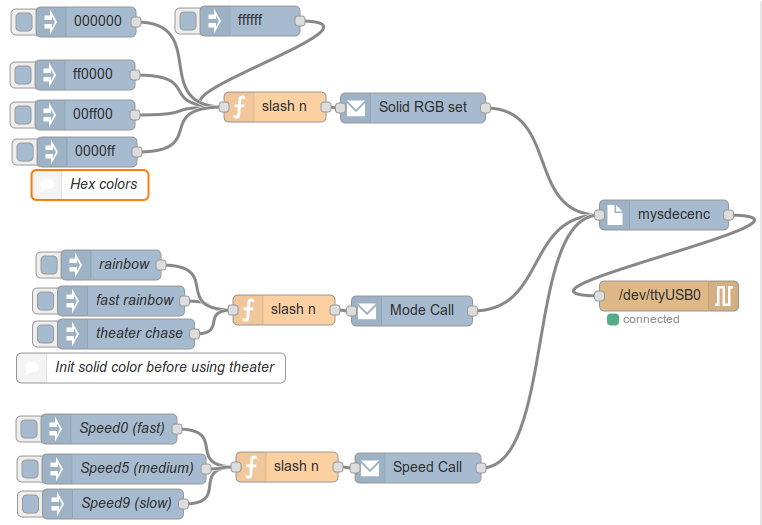
[Node-Red Flow Code]
[{"id":"c02382bd.ae5","type":"serial-port","z":"387afd49.a6b0fa","serialport":"/dev/ttyUSB0","serialbaud":"115200","databits":"8","parity":"none","stopbits":"1","newline":"\\n","bin":"false","out":"char","addchar":true},{"id":"23d05132.32938e","type":"serial out","z":"387afd49.a6b0fa","name":"","serial":"c02382bd.ae5","x":671,"y":298,"wires":[]},{"id":"db668f27.44ac8","type":"mysdecenc","z":"387afd49.a6b0fa","name":"","x":666,"y":217,"wires":[["23d05132.32938e"]]},{"id":"c18b87a6.cc82d8","type":"mysencap","z":"387afd49.a6b0fa","name":"Solid RGB set","nodeid":"9","childid":0,"subtype":"40","internal":0,"ack":false,"msgtype":"1","presentation":false,"presentationtype":0,"presentationtext":"","fullpresentation":false,"firmwarename":"","firmwareversion":"","x":415,"y":110,"wires":[["db668f27.44ac8"]]},{"id":"3542cfac.f962d8","type":"mysencap","z":"387afd49.a6b0fa","name":"Mode Call","nodeid":"9","childid":0,"subtype":"24","internal":0,"ack":false,"msgtype":"1","presentation":false,"presentationtype":0,"presentationtext":"","fullpresentation":false,"firmwarename":"","firmwareversion":"","x":414,"y":313,"wires":[["db668f27.44ac8"]]},{"id":"186b7cdb.c952e3","type":"mysencap","z":"387afd49.a6b0fa","name":"Speed Call","nodeid":"9","childid":0,"subtype":"25","internal":0,"ack":false,"msgtype":"1","presentation":false,"presentationtype":0,"presentationtext":"","fullpresentation":false,"firmwarename":"","firmwareversion":"","x":420,"y":470,"wires":[["db668f27.44ac8"]]},{"id":"29819ac0.48d326","type":"function","z":"387afd49.a6b0fa","name":"slash n","func":"msg.payload = msg.payload + \"\\n\";\nreturn msg;","outputs":1,"noerr":0,"x":277,"y":109,"wires":[["c18b87a6.cc82d8"]]},{"id":"8cfbe481.6b1de8","type":"function","z":"387afd49.a6b0fa","name":"slash n","func":"msg.payload = msg.payload + \"\\n\";\nreturn msg;","outputs":1,"noerr":0,"x":286,"y":312,"wires":[["3542cfac.f962d8"]]},{"id":"f40043ae.2a3dd8","type":"function","z":"387afd49.a6b0fa","name":"slash n","func":"msg.payload = msg.payload + \"\\n\";\nreturn msg;","outputs":1,"noerr":0,"x":289,"y":469,"wires":[["186b7cdb.c952e3"]]},{"id":"f5a3d9a5.f04d5","type":"inject","z":"387afd49.a6b0fa","name":"Speed9 (slow)","topic":"","payload":"9","payloadType":"string","repeat":"","crontab":"","once":false,"x":115,"y":506,"wires":[["f40043ae.2a3dd8"]]},{"id":"346a22ac.72f7be","type":"inject","z":"387afd49.a6b0fa","name":"Speed0 (fast)","topic":"","payload":"0","payloadType":"string","repeat":"","crontab":"","once":false,"x":111,"y":431,"wires":[["f40043ae.2a3dd8"]]},{"id":"ccdef1a.ef36e1","type":"inject","z":"387afd49.a6b0fa","name":"rainbow","topic":"","payload":"2","payloadType":"string","repeat":"","crontab":"","once":false,"x":113,"y":267,"wires":[["8cfbe481.6b1de8"]]},{"id":"eeaad340.169418","type":"inject","z":"387afd49.a6b0fa","name":"fast rainbow","topic":"","payload":"3","payloadType":"string","repeat":"","crontab":"","once":false,"x":123,"y":303,"wires":[["8cfbe481.6b1de8"]]},{"id":"43c0b3c7.fd6814","type":"inject","z":"387afd49.a6b0fa","name":"","topic":"","payload":"000000","payloadType":"string","repeat":"","crontab":"","once":false,"x":88,"y":24,"wires":[["29819ac0.48d326"]]},{"id":"24524b50.eb8acc","type":"inject","z":"387afd49.a6b0fa","name":"","topic":"","payload":"ff0000","payloadType":"string","repeat":"","crontab":"","once":false,"x":87,"y":77,"wires":[["29819ac0.48d326"]]},{"id":"1b069543.32c0ab","type":"inject","z":"387afd49.a6b0fa","name":"","topic":"","payload":"00ff00","payloadType":"string","repeat":"","crontab":"","once":true,"x":87,"y":117,"wires":[["29819ac0.48d326"]]},{"id":"e789eab3.9a517","type":"inject","z":"387afd49.a6b0fa","name":"","topic":"","payload":"ffffff","payloadType":"string","repeat":"","crontab":"","once":false,"x":252,"y":23,"wires":[["29819ac0.48d326"]]},{"id":"d912e499.b4cc28","type":"inject","z":"387afd49.a6b0fa","name":"Speed5 (medium)","topic":"","payload":"5","payloadType":"string","repeat":"","crontab":"","once":false,"x":126,"y":471,"wires":[["f40043ae.2a3dd8"]]},{"id":"1087e912.c8ddbf","type":"inject","z":"387afd49.a6b0fa","name":"","topic":"","payload":"0000ff","payloadType":"string","repeat":"","crontab":"","once":false,"x":89,"y":154,"wires":[["29819ac0.48d326"]]},{"id":"2e6a0789.d500b","type":"inject","z":"387afd49.a6b0fa","name":"theater chase","topic":"","payload":"4","payloadType":"string","repeat":"","crontab":"","once":false,"x":128,"y":336,"wires":[["8cfbe481.6b1de8"]]},{"id":"f66f1235.3e7e58","type":"comment","z":"387afd49.a6b0fa","name":"Init solid color before using theater","info":"","x":153,"y":370,"wires":[]},{"id":"afeca932.c1ba68","type":"comment","z":"387afd49.a6b0fa","name":"Hex colors","info":"","x":92,"y":187,"wires":[]}][Arduino Sketch Code]
//#define MY_DEBUG #define MY_RADIO_NRF24 #define MY_NODE_ID 9 #include <SPI.h> #include <MySensor.h> #include <Adafruit_NeoPixel.h> #include <avr/power.h> Adafruit_NeoPixel strip = Adafruit_NeoPixel(38, 3, NEO_GRB + NEO_KHZ800); unsigned int requestedMode = 0 ; unsigned int requestedSpeed = 0 ; unsigned int currentSpeed = 0 ; int messageType = 0 ; long hexColor = -1 ; unsigned long previousTime = 0 ; int j = 0 ; int q = 0 ; void setup() { Serial.begin(115200); strip.begin(); strip.show(); Serial.println("Neopixel Node device ready"); } void presentation() { sendSketchInfo("Neopixel Node", "1.0"); present(0, S_RGB_LIGHT, "Makes strip said color", true); } void loop() { switch (messageType) { case (1): Serial.print("Hex color override: "); Serial.println(hexColor); colorWipe(hexColor); messageType = 0 ; break; case (2): if ( (previousTime + (long) currentSpeed) < millis() ){ if (requestedMode == 2) { if (j > 256) { j = 0;} for(int i=0; i<strip.numPixels(); i++) {strip.setPixelColor(i, Wheel((i+j) & 255)) ; strip.show(); } j++; if ( (j%255) == 0 ) { Serial.println("Rainbow completed, continuing");} } if (requestedMode == 3) { if (j > 256) { j = 0;} for(int i=0; i<strip.numPixels(); i++) {strip.setPixelColor(i, Wheel(((i * 256 / strip.numPixels()) + j) & 255)); strip.show(); } j = j + 5; if ( (j%255) == 0 ) { Serial.println("Rainbow cycle completed, continuing");} } if (requestedMode == 4) { if (j > 10) { j = 0;} if (q > 3) { q = 0;} for (int j=0; j<10; j++) { for (q=0; q < 3; q++) { for (int i=0; i < strip.numPixels(); i=i+3) { strip.setPixelColor(i+q, hexColor ); } strip.show(); delay(50); for (int i=0; i < strip.numPixels(); i=i+3) { strip.setPixelColor(i+q, 0); } } } } previousTime = millis(); } break; case (3): // Adjust timing of case 2 using non-blocking code (no DELAYs) Serial.print("Case 3 received. Speed set to: "); Serial.print(requestedSpeed * 10); Serial.println(" ms."); currentSpeed = requestedSpeed * 10; messageType = 2 ; break; } } void receive(const MyMessage &message) { Serial.println("Message received: "); if (message.type == V_RGB) { messageType = 1 ; String hexstring = message.getString(); Serial.print("RGB color: "); Serial.println(hexstring); hexColor = strtol( &hexstring[0], NULL, 16); } if (message.type == V_VAR1) { String junkString = message.getString(); Serial.println(junkString); requestedMode = junkString.charAt(0) - 48; messageType = 2 ; Serial.print("Neo mode: "); Serial.println(requestedMode); } if (message.type == V_VAR2) { // This line is for the speed of said mode String junkString = message.getString(); Serial.println(junkString); requestedSpeed = junkString.charAt(0) - 48; messageType = 3 ; Serial.print("Neo speed: "); Serial.println(requestedSpeed); } } //************* Neopixel subroutines, with DELAYs removed. *************** void rainbowCycle() { Serial.println("Rainbow Cycle loop"); uint16_t i, j; for (j = 0; j < 256 * 5; j++) { // 5 cycles of all colors on wheel for (i = 0; i < strip.numPixels(); i++) { strip.setPixelColor(i, Wheel(((i * 256 / strip.numPixels()) + j) & 255));} strip.show(); } } void colorWipe(long number) { long r = hexColor >> 16; long g = hexColor >> 8 & 0xFF; long b = hexColor & 0xFF; for (uint16_t i = 0; i < strip.numPixels(); i++) { strip.setPixelColor(i, r,g,b); strip.show(); } } uint32_t Wheel(byte WheelPos) { WheelPos = 255 - WheelPos; if (WheelPos < 85) { return strip.Color(255 - WheelPos * 3, 0, WheelPos * 3); } else if (WheelPos < 170) { WheelPos -= 85; return strip.Color(0, WheelPos * 3, 255 - WheelPos * 3); } else { WheelPos -= 170; return strip.Color(WheelPos * 3, 255 - WheelPos * 3, 0); } } -
-
-
You should be able to. I have this as Node ID 9, and Child ID 0.
9;0;1;1;40;(HEX) sets a consistent color of the appropriate HEX code.
9;0;1;1;24;(2 or 3 or 4) sets either slow rainbow, fast rainbow or theater chase
9;0;1;1;25;(0 through 9) sets speed. 0 is faster and 9 is slower.Node-Red is what I use, but this should work with any controller given those settings. Of course, use the standard MySensors serial protocol.
Tell me how you like it!
-
https://www.youtube.com/watch?v=77MjJLMA244
Of what it's capable of doing.
-
-
Oh, @msebbe @AWI , I have a FastLED version with a decent web API and web interface available here: http://forum.mysensors.org/topic/2705/fastled-neopixel-ws2811-node-from-arduino-code-to-web-page-with-api
It's working pretty damn well :-D Still working on my front end interface, since I'm not a designer (well, I am a 3d cad designer, not web dev).
Oh, and if you knew my controller's name, you could communicate with it via TOR. Just like corporate solutions, I can communicate and control my gateway from anywhere in the world!


Hello! It looks like you're interested in this conversation, but you don't have an account yet.
Getting fed up of having to scroll through the same posts each visit? When you register for an account, you'll always come back to exactly where you were before, and choose to be notified of new replies (either via email, or push notification). You'll also be able to save bookmarks and upvote posts to show your appreciation to other community members.
With your input, this post could be even better 💗
Register Login