Skip to content
  • MySensors
  • OpenHardware.io
  • Categories
  • Recent
  • Tags
  • Popular
Skins
  • Light
  • Brite
  • Cerulean
  • Cosmo
  • Flatly
  • Journal
  • Litera
  • Lumen
  • Lux
  • Materia
  • Minty
  • Morph
  • Pulse
  • Sandstone
  • Simplex
  • Sketchy
  • Spacelab
  • United
  • Yeti
  • Zephyr
  • Dark
  • Cyborg
  • Darkly
  • Quartz
  • Slate
  • Solar
  • Superhero
  • Vapor

  • Default (No Skin)
  • No Skin
Collapse
Brand Logo
  1. Home
  2. My Project
  3. RelayWithButtonActuator (6 channel)

RelayWithButtonActuator (6 channel)

Scheduled Pinned Locked Moved My Project
33 Posts 3 Posters 15.1k Views 2 Watching
  • Oldest to Newest
  • Newest to Oldest
  • Most Votes
Reply
  • Reply as topic
Log in to reply
This topic has been deleted. Only users with topic management privileges can see it.
  • V Offline
    V Offline
    vampircik
    wrote on last edited by
    #16

    pin 8 (CLK) to Arduino pin 11

    and with the contact what to do?

    K 1 Reply Last reply
    0
    • V Offline
      V Offline
      vampircik
      wrote on last edited by
      #17

      Arduino pin 11 = MOSI NRF24

      1 Reply Last reply
      0
      • V Offline
        V Offline
        vampircik
        wrote on last edited by
        #18

        wiring.png
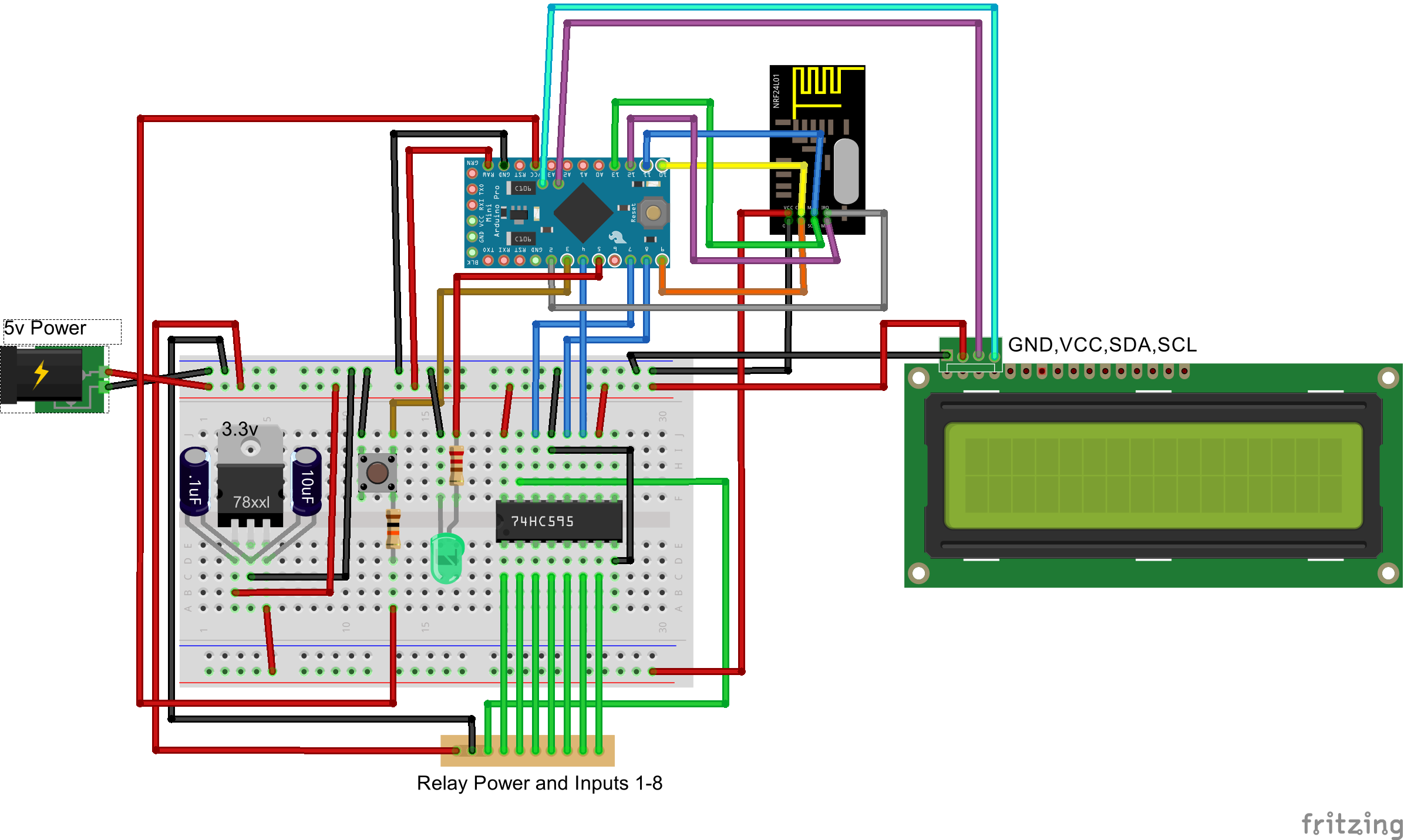
        it seems to me must be so connected. except for the screen?

        1 Reply Last reply
        0
        • V vampircik

          pin 8 (CLK) to Arduino pin 11

          and with the contact what to do?

          K Offline
          K Offline
          korttoma
          Hero Member
          wrote on last edited by
          #19

          @vampircik said:

          pin 8 (CLK) to Arduino pin 11

          and with the contact what to do?

          Looking att the code @BartE posted it seems like it was supposed to be

          pin 11 (CLK) to Arduino pin 8

          • Tomas
          1 Reply Last reply
          0
          • V Offline
            V Offline
            vampircik
            wrote on last edited by
            #20

            ok try. ...............

            1 Reply Last reply
            0
            • K Offline
              K Offline
              korttoma
              Hero Member
              wrote on last edited by
              #21

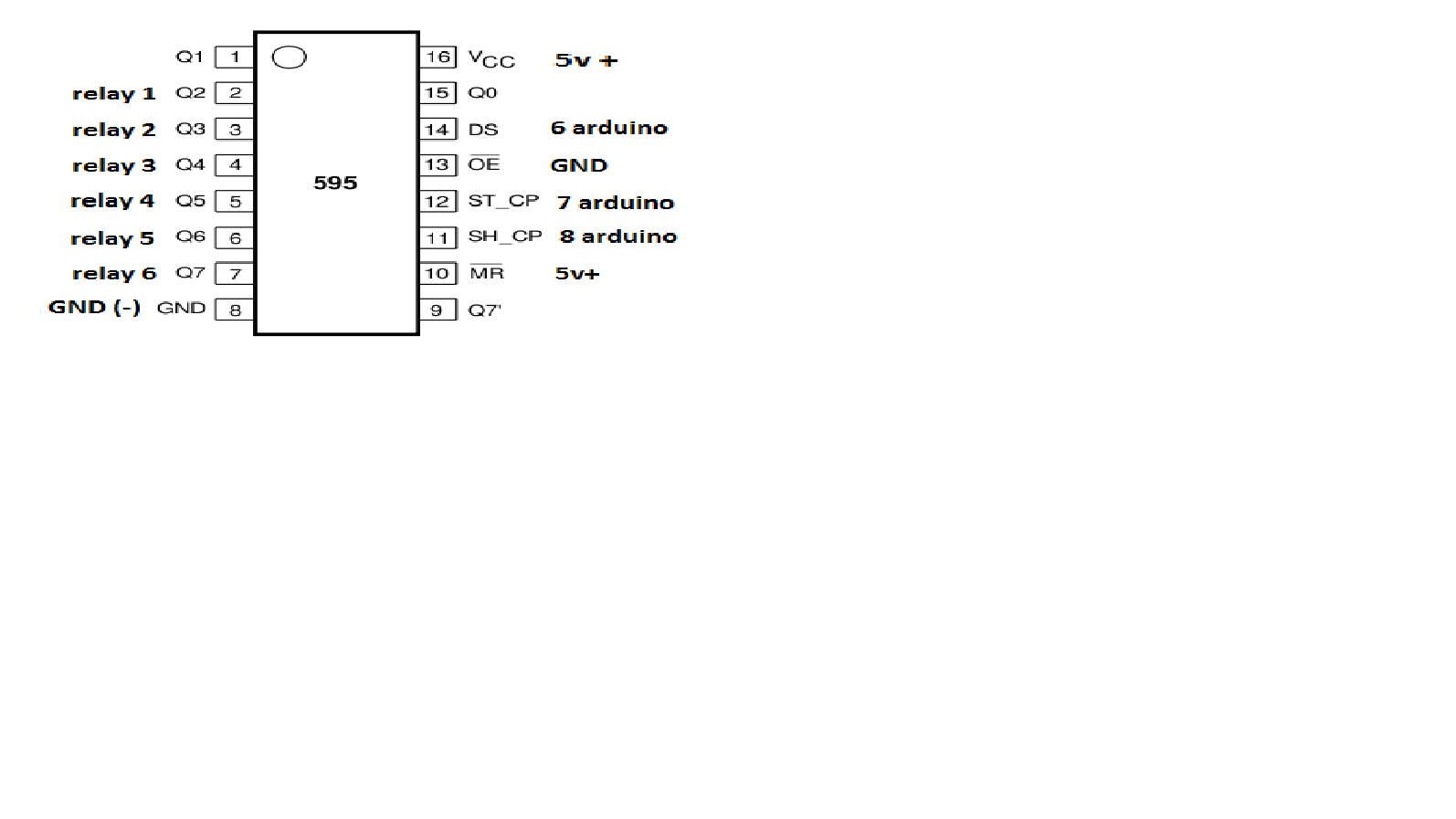
              So the correct instructions should have been:

              pin 14 (DS) to Arduino pin 6
              pin 12 (RCLK) to Arduino pin 7
              pin 11 (CLK) to Arduino pin 8
              pin 16 (Vcc) to + 5 volt
              pin 8 (GND) to ground

              relay 1-6 to pin 15 (Q0), 1 (Q1), 2 (Q2), 3 (Q3), 4 (Q4) and 5 (Q5) the other relay pins connected to ground

              Please @BartE correct me if I'm wrong since I have no personal experience from this kind of setup.

              • Tomas
              1 Reply Last reply
              0
              • V Offline
                V Offline
                vampircik
                wrote on last edited by
                #22

                collected is not working. the controller displays the switch, but it does not control the Arduino.

                1 Reply Last reply
                0
                • V Offline
                  V Offline
                  vampircik
                  wrote on last edited by
                  #23

                  includes buttons, it is displayed on the controller, with only relay nothing happens

                  1 Reply Last reply
                  0
                  • V Offline
                    V Offline
                    vampircik
                    wrote on last edited by
                    #24

                    так.jpg

                    1 Reply Last reply
                    0
                    • K Offline
                      K Offline
                      korttoma
                      Hero Member
                      wrote on last edited by
                      #25

                      Do you get anything in the serial monitor for your Relay Node?

                      • Tomas
                      1 Reply Last reply
                      0
                      • V Offline
                        V Offline
                        vampircik
                        wrote on last edited by
                        #26

                        send: 18-18-0-0 s=255,c=0,t=18,pt=0,l=3,sg=0,st=ok:1.5
                        send: 18-18-0-0 s=255,c=3,t=6,pt=1,l=1,sg=0,st=ok:0
                        read: 0-0-18 s=255,c=3,t=6,pt=0,l=1,sg=0:M
                        repeater started, id=18, parent=0, distance=1
                        send: 18-18-0-0 s=255,c=3,t=11,pt=0,l=8,sg=0,st=ok:RelaySix
                        send: 18-18-0-0 s=255,c=3,t=12,pt=0,l=3,sg=0,st=ok:1.1
                        send: 18-18-0-0 s=0,c=0,t=3,pt=0,l=0,sg=0,st=ok:
                        send: 18-18-0-0 s=0,c=2,t=2,pt=0,l=0,sg=0,st=ok:
                        send: 18-18-0-0 s=1,c=0,t=3,pt=0,l=0,sg=0,st=ok:
                        send: 18-18-0-0 s=1,c=2,t=2,pt=0,l=0,sg=0,st=ok:
                        send: 18-18-0-0 s=2,c=0,t=3,pt=0,l=0,sg=0,st=ok:
                        send: 18-18-0-0 s=2,c=2,t=2,pt=0,l=0,sg=0,st=ok:
                        send: 18-18-0-0 s=3,c=0,t=3,pt=0,l=0,sg=0,st=fail:
                        send: 18-18-0-0 s=3,c=2,t=2,pt=0,l=0,sg=0,st=fail:
                        send: 18-18-0-0 s=4,c=0,t=3,pt=0,l=0,sg=0,st=fail:
                        send: 18-18-0-0 s=4,c=2,t=2,pt=0,l=0,sg=0,st=fail:
                        send: 18-18-0-0 s=5,c=0,t=3,pt=0,l=0,sg=0,st=fail:
                        send: 18-18-0-0 s=5,c=2,t=2,pt=0,l=0,sg=0,st=fail:
                        find parent
                        send: 18-18-255-255 s=255,c=3,t=7,pt=0,l=0,sg=0,st=bc:
                        read: 0-0-18 s=0,c=1,t=2,pt=0,l=1,sg=0:0
                        send: 18-18-0-0 s=0,c=1,t=2,pt=1,l=1,sg=0,st=ok:0
                        Incoming change for sensor:0, New status: 0
                        read: 0-0-18 s=1,c=1,t=2,pt=0,l=1,sg=0:0
                        send: 18-18-0-0 s=1,c=1,t=2,pt=1,l=1,sg=0,st=ok:0
                        Incoming change for sensor:1, New status: 0
                        read: 0-0-18 s=2,c=1,t=2,pt=0,l=1,sg=0:0
                        send: 18-18-0-0 s=2,c=1,t=2,pt=1,l=1,sg=0,st=ok:0
                        Incoming change for sensor:2, New status: 0
                        read: 0-0-18 s=255,c=3,t=8,pt=1,l=1,sg=0:0
                        parent=0, d=1
                        Switch #1 to 1
                        Switch #2 to 1
                        Switch #3 to 1
                        Switch #4 to 1
                        Switch #5 to 1
                        Switch #1 to 0
                        send: 18-18-0-0 s=1,c=1,t=2,pt=1,l=1,sg=0,st=ok:1
                        Switch #1 to 1
                        Switch #2 to 0
                        send: 18-18-0-0 s=2,c=1,t=2,pt=1,l=1,sg=0,st=ok:1
                        Switch #2 to 1
                        Switch #0 to 1
                        Switch #0 to 0
                        send: 18-18-0-0 s=0,c=1,t=2,pt=1,l=1,sg=0,st=ok:1
                        Switch #3 to 0
                        send: 18-18-0-0 s=3,c=1,t=2,pt=1,l=1,sg=0,st=ok:1
                        Switch #3 to 1
                        Switch #4 to 0
                        send: 18-18-0-0 s=4,c=1,t=2,pt=1,l=1,sg=0,st=ok:1
                        Switch #4 to 1
                        Switch #5 to 0
                        send: 18-18-0-0 s=5,c=1,t=2,pt=1,l=1,sg=0,st=ok:1
                        Switch #5 to 1
                        Switch #4 to 0
                        send: 18-18-0-0 s=4,c=1,t=2,pt=1,l=1,sg=0,st=ok:1
                        Switch #4 to 1
                        Switch #4 to 0
                        send: 18-18-0-0 s=4,c=1,t=2,pt=1,l=1,sg=0,st=ok:1
                        Switch #4 to 1
                        Switch #4 to 0
                        send: 18-18-0-0 s=4,c=1,t=2,pt=1,l=1,sg=0,st=ok:1
                        Switch #4 to 1
                        Switch #4 to 0
                        send: 18-18-0-0 s=4,c=1,t=2,pt=1,l=1,sg=0,st=ok:1
                        Switch #4 to 1
                        Switch #5 to 0
                        send: 18-18-0-0 s=5,c=1,t=2,pt=1,l=1,sg=0,st=ok:1
                        Switch #5 to 1
                        Switch #5 to 0
                        send: 18-18-0-0 s=5,c=1,t=2,pt=1,l=1,sg=0,st=ok:1
                        Switch #5 to 1
                        Switch #4 to 0
                        send: 18-18-0-0 s=4,c=1,t=2,pt=1,l=1,sg=0,st=ok:1
                        Switch #4 to 1
                        Switch #5 to 0
                        send: 18-18-0-0 s=5,c=1,t=2,pt=1,l=1,sg=0,st=ok:1
                        Switch #5 to 1
                        Switch #3 to 0
                        send: 18-18-0-0 s=3,c=1,t=2,pt=1,l=1,sg=0,st=ok:1
                        Switch #3 to 1
                        Switch #3 to 0
                        send: 18-18-0-0 s=3,c=1,t=2,pt=1,l=1,sg=0,st=ok:1
                        Switch #3 to 1
                        Switch #3 to 0
                        send: 18-18-0-0 s=3,c=1,t=2,pt=1,l=1,sg=0,st=ok:1
                        Switch #3 to 1
                        Switch #4 to 0
                        send: 18-18-0-0 s=4,c=1,t=2,pt=1,l=1,sg=0,st=ok:1
                        Switch #4 to 1
                        Switch #4 to 0
                        send: 18-18-0-0 s=4,c=1,t=2,pt=1,l=1,sg=0,st=ok:1
                        Switch #4 to 1
                        Switch #4 to 0
                        send: 18-18-0-0 s=4,c=1,t=2,pt=1,l=1,sg=0,st=ok:1
                        Switch #4 to 1
                        Switch #5 to 0
                        send: 18-18-0-0 s=5,c=1,t=2,pt=1,l=1,sg=0,st=ok:1
                        Switch #5 to 1
                        Switch #0 to 1
                        Switch #0 to 0
                        send: 18-18-0-0 s=0,c=1,t=2,pt=1,l=1,sg=0,st=ok:1
                        Switch #0 to 1
                        Switch #0 to 0
                        send: 18-18-0-0 s=0,c=1,t=2,pt=1,l=1,sg=0,st=ok:1
                        Switch #2 to 0
                        send: 18-18-0-0 s=2,c=1,t=2,pt=1,l=1,sg=0,st=ok:1
                        Switch #2 to 1
                        Switch #2 to 0
                        send: 18-18-0-0 s=2,c=1,t=2,pt=1,l=1,sg=0,st=ok:1
                        Switch #2 to 1
                        Switch #1 to 0
                        send: 18-18-0-0 s=1,c=1,t=2,pt=1,l=1,sg=0,st=ok:1
                        Switch #1 to 1
                        Switch #1 to 0
                        send: 18-18-0-0 s=1,c=1,t=2,pt=1,l=1,sg=0,st=ok:1
                        Switch #1 to 1

                        1 Reply Last reply
                        0
                        • V Offline
                          V Offline
                          vampircik
                          wrote on last edited by
                          #27

                          11211.png

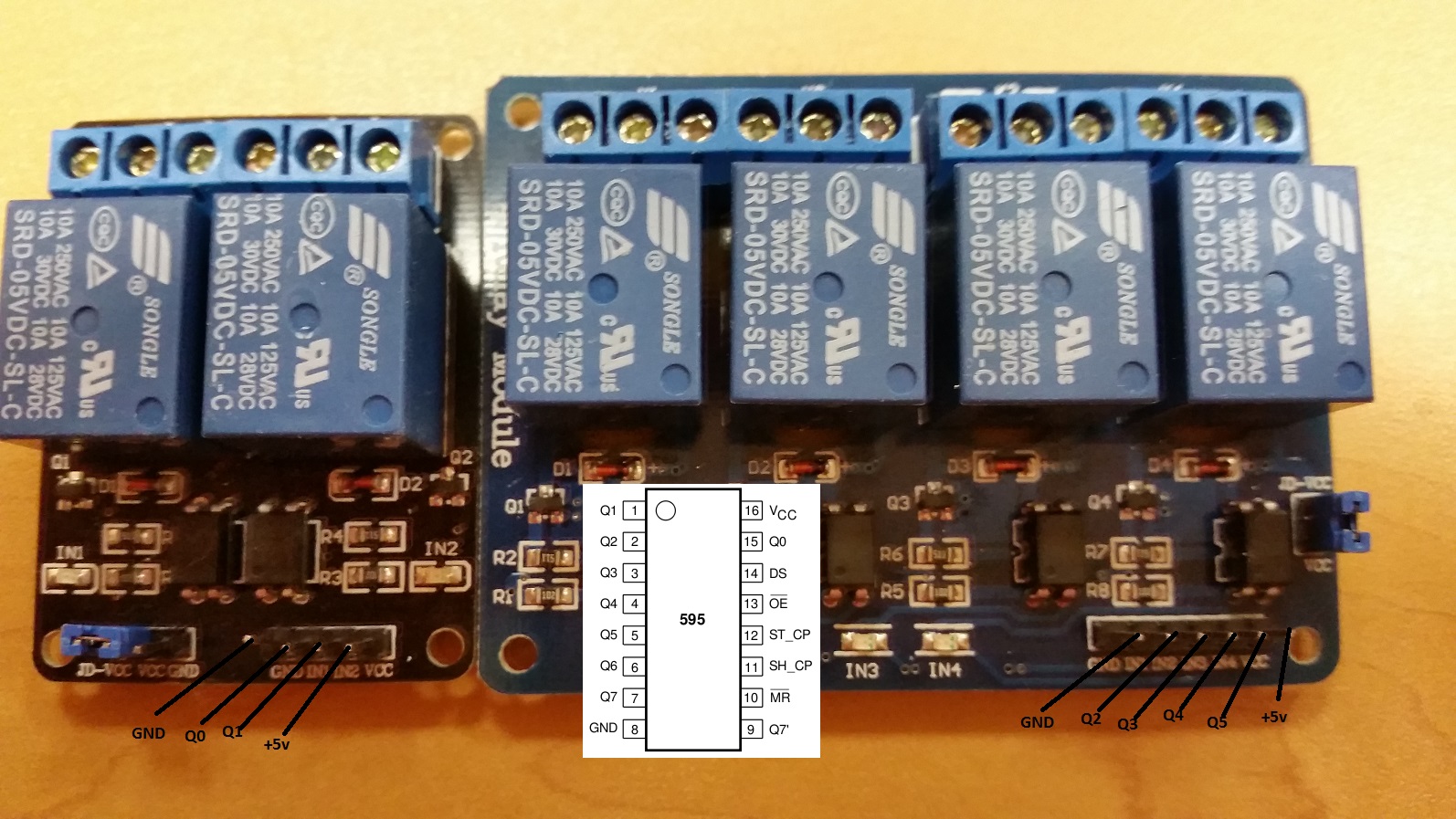
                          this is what I have now happened. includes a button, turn on the relay, reclosing button, there is no result

                          1 Reply Last reply
                          0
                          • V Offline
                            V Offline
                            vampircik
                            wrote on last edited by
                            #28

                            individual libraries should be shipped to the chip?

                            1 Reply Last reply
                            0
                            • V Offline
                              V Offline
                              vampircik
                              wrote on last edited by
                              #29
                              This post is deleted!
                              1 Reply Last reply
                              0
                              • B Offline
                                B Offline
                                BartE
                                Contest Winner
                                wrote on last edited by BartE
                                #30

                                @vampircik i see that with some help from korttoma you manage to find the correct pins setting. @korttoma thx for your help.
                                korttoma is right about the pin 11, i should have added this link with more background info

                                The sketch is designed for push buttons and not for toggle switches and will respond when releasing a button press.
                                In your movie i see that switching on and off via MySensors (mouse clicks) works but the button presses not (always) only switching off.

                                I found an error in my sketch on line 131

                                // Store new switch value
                                switches[id].currentStatus = (switchValue ? 0 : 1);


                                the correct line should be

                                // Toggle relay status
                                switches[id].currentStatus = (switches[id].currentStatus ? 0 : 1);


                                note: I've updated the sketch in the original post as well

                                1 Reply Last reply
                                3
                                • V Offline
                                  V Offline
                                  vampircik
                                  wrote on last edited by
                                  #31

                                  BartE Thank you. everything worked.

                                  1 Reply Last reply
                                  1
                                  • V Offline
                                    V Offline
                                    vampircik
                                    wrote on last edited by
                                    #32

                                    I made my monetary investment. though not particularly large

                                    1 Reply Last reply
                                    0
                                    • V Offline
                                      V Offline
                                      vampircik
                                      wrote on last edited by
                                      #33

                                      Connect the power supply to the relay which should be governed by the device stops working

                                      1 Reply Last reply
                                      0

                                      Hello! It looks like you're interested in this conversation, but you don't have an account yet.

                                      Getting fed up of having to scroll through the same posts each visit? When you register for an account, you'll always come back to exactly where you were before, and choose to be notified of new replies (either via email, or push notification). You'll also be able to save bookmarks and upvote posts to show your appreciation to other community members.

                                      With your input, this post could be even better 💗

                                      Register Login
                                      Reply
                                      • Reply as topic
                                      Log in to reply
                                      • Oldest to Newest
                                      • Newest to Oldest
                                      • Most Votes


                                      15

                                      Online

                                      12.0k

                                      Users

                                      11.2k

                                      Topics

                                      113.4k

                                      Posts


                                      Copyright 2025 TBD   |   Forum Guidelines   |   Privacy Policy   |   Terms of Service
                                      • Login

                                      • Don't have an account? Register

                                      • Login or register to search.
                                      • First post
                                        Last post
                                      0
                                      • MySensors
                                      • OpenHardware.io
                                      • Categories
                                      • Recent
                                      • Tags
                                      • Popular