Skip to content
  • MySensors
  • OpenHardware.io
  • Categories
  • Recent
  • Tags
  • Popular
Skins
  • Light
  • Brite
  • Cerulean
  • Cosmo
  • Flatly
  • Journal
  • Litera
  • Lumen
  • Lux
  • Materia
  • Minty
  • Morph
  • Pulse
  • Sandstone
  • Simplex
  • Sketchy
  • Spacelab
  • United
  • Yeti
  • Zephyr
  • Dark
  • Cyborg
  • Darkly
  • Quartz
  • Slate
  • Solar
  • Superhero
  • Vapor

  • Default (No Skin)
  • No Skin
Collapse
Brand Logo
  1. Home
  2. My Project
  3. SCT-013-030 Energy Meter

SCT-013-030 Energy Meter

Scheduled Pinned Locked Moved My Project
35 Posts 15 Posters 25.4k Views 25 Watching
  • Oldest to Newest
  • Newest to Oldest
  • Most Votes
Reply
  • Reply as topic
Log in to reply
This topic has been deleted. Only users with topic management privileges can see it.
  • P Offline
    P Offline
    patrick schaerer
    wrote on last edited by
    #3

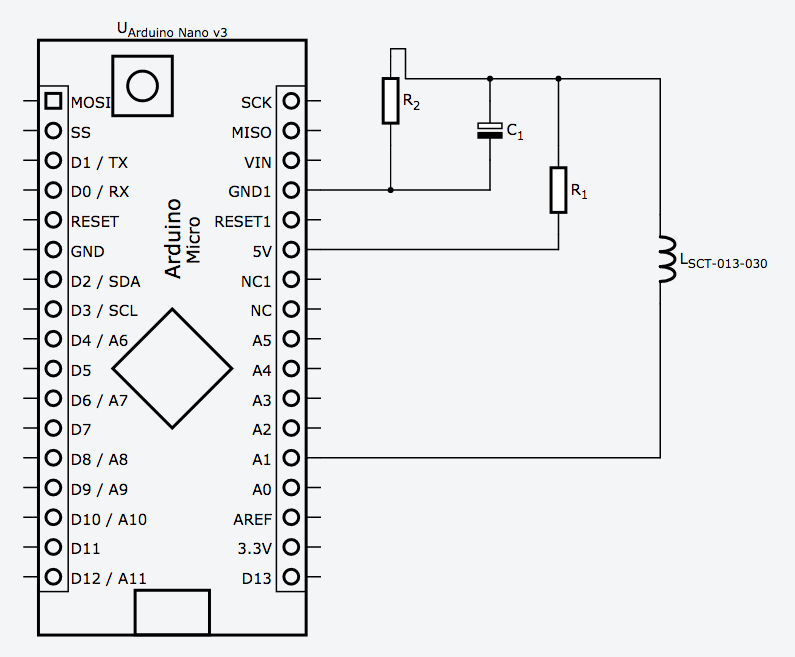
    0_1454182054474_Bildschirmfoto 2016-01-30 um 20.26.32.png

    C1 is 100uF

    R1+2 are 15k

    1 Reply Last reply
    1
    • ? Offline
      ? Offline
      A Former User
      wrote on last edited by
      #4

      Thanks for doing the groundwork in developing this. Before i copy your implementation, has there been any updates/improvements/observations now that you've had it running for almost a month? Cheers

      1 Reply Last reply
      0
      • P Offline
        P Offline
        patrick schaerer
        wrote on last edited by patrick schaerer
        #5

        I made some changes in the software. There was a mistake in the kwh and I added a DHT-Sensor (see comment in the code).
        It works well. The kwh is reset on each restart. I probably will change that in the future.

        1 Reply Last reply
        0
        • ? Offline
          ? Offline
          A Former User
          wrote on last edited by A Former User
          #6

          Hey Mate,

          Had a chance to sit down and build this node. Made a few tweaks which you may be interested in.

          Rewrote the code to sleep for 60 seconds between measurements. This saves approx 80% power ( 22mA down to 4.6mA on my 3.3v pro mini). This also corrects for the drift in the original code which resulted in gaining a second every few mins of measurements (its now only 2ms/min)

          Added battery level monitoring which is reported in volts every hour and require no additional hardware or wiring than the originally posted circuit but requires a new vcc library. The actual votlage is only reported if the battery level has changed since the last reading - to save power) .

          Let me know what you think:
          https://codebender.cc/sketch:276398

          1 Reply Last reply
          0
          • M Offline
            M Offline
            maciejka
            wrote on last edited by
            #7

            Hi, great sketch! But i have a question: how to chanhe this sketch to send kwh often then once per hour? Maybe safer will be send kwh like sending wh - every minute?

            1 Reply Last reply
            0
            • P Offline
              P Offline
              patrick schaerer
              wrote on last edited by
              #8

              @maciejka : you can change the value on column 98: minuten == 60
              "Minuten" is german for minutes. if you want to report every minute change the value to 1.

              @Surge86 : thank you for your improvements! I will compare our codes and hopefully learn a lot.
              I startet arduino programming in november and keep on learning.

              greets patrick

              1 Reply Last reply
              0
              • M Offline
                M Offline
                maciejka
                wrote on last edited by
                #9

                Thanks, i will test it :)
                Regards
                Maciej

                1 Reply Last reply
                0
                • bpairB Offline
                  bpairB Offline
                  bpair
                  wrote on last edited by bpair
                  #10

                  Thanks for sharing this! I am hoping to create an all-in-one extension cord plus this meter. I hope this way I can detect when a pump fails or maybe just how much power is being used.

                  I have read that you when using a CT you must be careful to avoid a voltage build up on the CT output. Is that a concern with this current setup? With a battery powered arduino you are not grounded? In my extension cord project I was thinking I could use the ground from the extension cord.

                  I am not an electrical engineer so I may be way off here, just trying to be safe.

                  I think this setup could be very useful. In the high school greenhouse where I have my sensor network there are so many pumps, heaters, air stones, that need to be monitored and an alert sent if they stop working.

                  I may also try this with the sensebender micro.

                  1 Reply Last reply
                  0
                  • P Offline
                    P Offline
                    patrick schaerer
                    wrote on last edited by patrick schaerer
                    #11

                    As far as i understand there is a resistor built in the sct013 that prevents this voltage buildup. But i am not an electrician.

                    1 Reply Last reply
                    0
                    • P Offline
                      P Offline
                      patrick schaerer
                      wrote on last edited by
                      #12

                      I optimized my code with the help of Surge.
                      I added a KWH reading on a restart of the node.
                      Now it's Version 1.3

                      1 Reply Last reply
                      0
                      • M Offline
                        M Offline
                        m1rk0
                        wrote on last edited by
                        #13

                        Hello Patrick, thank you for sharing your project. I tested it and it works fine but I want to test how acurate it is with low current measurements. Can you please tell me how to change your code to get results below 60W? I'm just beginning to learn arduino-programming so i don't understand everything..

                        P 1 Reply Last reply
                        0
                        • M m1rk0

                          Hello Patrick, thank you for sharing your project. I tested it and it works fine but I want to test how acurate it is with low current measurements. Can you please tell me how to change your code to get results below 60W? I'm just beginning to learn arduino-programming so i don't understand everything..

                          P Offline
                          P Offline
                          patrick schaerer
                          wrote on last edited by
                          #14

                          @m1rk0
                          In Line 95 is the following expression:
                          if (Irms < 0.3) Irms = 0;

                          Irms is RMS current. The expression sets all current smaller than 0.3 as 0.
                          You can delete this line for smaller values.
                          I suggest to use a SCT-013-005 instead of a SCT-013-030.

                          1 Reply Last reply
                          0
                          • M Offline
                            M Offline
                            m1rk0
                            wrote on last edited by
                            #15

                            Thank you patrik, i already ordered an sct-013-005, but i need sometimes higher measurements than 5a. With this second sensor i will be able to compare the results.

                            ? 1 Reply Last reply
                            0
                            • M m1rk0

                              Thank you patrik, i already ordered an sct-013-005, but i need sometimes higher measurements than 5a. With this second sensor i will be able to compare the results.

                              ? Offline
                              ? Offline
                              A Former User
                              wrote on last edited by
                              #16

                              @m1rk0 said:

                              Thank you patrik, i already ordered an sct-013-005, but i need sometimes higher measurements than 5a. With this second sensor i will be able to compare the results.

                              yeah 5A is within its range. I usually sit between 1A-20A

                              1 Reply Last reply
                              0
                              • john7845J Offline
                                john7845J Offline
                                john7845
                                wrote on last edited by
                                #17

                                hello, where is the MySensor.h file??

                                1 Reply Last reply
                                0
                                • tbowmoT Offline
                                  tbowmoT Offline
                                  tbowmo
                                  Admin
                                  wrote on last edited by tbowmo
                                  #18

                                  This is made for an earlier version of the library, things has changed a lot since.

                                  first off, the library header file is now called MySensors.h (note the added "s" to the name). But also how you use / initialize the mysensors project is very different in 2.x, than in 1.x,

                                  have a look at this post to get an idea of what you have to change, to upgrade your arduino sketch to work with MySensors 2.x library

                                  1 Reply Last reply
                                  0
                                  • P Offline
                                    P Offline
                                    patrick schaerer
                                    wrote on last edited by patrick schaerer
                                    #19

                                    I alread updated to MySensors 2.0

                                    This is the update code:

                                    I also edited the first post.

                                    /**
                                     * The MySensors Arduino library handles the wireless radio link and protocol
                                     * between your home built sensors/actuators and HA controller of choice.
                                     * The sensors forms a self healing radio network with optional repeaters. Each
                                     * repeater and gateway builds a routing tables in EEPROM which keeps track of the
                                     * network topology allowing messages to be routed to nodes.
                                     *
                                     * Created by Henrik Ekblad <henrik.ekblad@mysensors.org>
                                     * Copyright (C) 2013-2015 Sensnology AB
                                     * Full contributor list: https://github.com/mysensors/Arduino/graphs/contributors
                                     *
                                     * Documentation: http://www.mysensors.org
                                     * Support Forum: http://forum.mysensors.org
                                     *
                                     * This program is free software; you can redistribute it and/or
                                     * modify it under the terms of the GNU General Public License
                                     * version 2 as published by the Free Software Foundation.
                                     *
                                     *******************************
                                     *
                                     * EnergyMeterSCT by Patrick Schaerer
                                     * This Sketch is a WattMeter used with a SCT-013-030 non invasive PowerMeter
                                     * see documentation for schematic
                                     * 
                                     * Special thanks to Surge, who optimized my code.
                                     * 
                                     * updated to mySensors Library 2.0
                                     */
                                    
                                    
                                    #define MY_RADIO_NRF24
                                    #define MY_REPEATER_FEATURE
                                    #define MY_DEBUG
                                    
                                    
                                    #include <SPI.h>
                                    #include <MySensors.h>  
                                    #include <EmonLib.h> 
                                     
                                    #define ANALOG_INPUT_SENSOR 1  // The digital input you attached your SCT sensor.  (Only 2 and 3 generates interrupt!)
                                    //#define INTERRUPT DIGITAL_INPUT_SENSOR-2 // Usually the interrupt = pin -2 (on uno/nano anyway)
                                    #define CHILD_ID 1              // Id of the sensor child
                                    
                                    EnergyMonitor emon1;
                                    
                                    MyMessage wattMsg(CHILD_ID,V_WATT);
                                    MyMessage kwhMsg(CHILD_ID,V_KWH);
                                    MyMessage msgKWH(CHILD_ID,V_VAR1);
                                    unsigned long SLEEP_TIME = 60000 - 3735; // sleep for 60 seconds (-4 seconds to calculate values)
                                    
                                    float wattsumme = 0;
                                    float kwh = 0;
                                    float wh = 0;
                                    int minuten = 0;  //vorher 61
                                    boolean KWH_received=false;
                                    
                                    //Humidity Sensor Code
                                    #include <DHT.h>  
                                    #define CHILD_ID_HUM 2
                                    #define CHILD_ID_TEMP 3
                                    #define HUMIDITY_SENSOR_DIGITAL_PIN 2
                                    DHT dht;
                                    float lastTemp;
                                    float lastHum;
                                    boolean metric = true; 
                                    MyMessage msgHum(CHILD_ID_HUM, V_HUM);
                                    MyMessage msgTemp(CHILD_ID_TEMP, V_TEMP);
                                    
                                    //End of Humidity Sensor Code
                                    
                                    
                                    void setup()  
                                    {  
                                      //energy clamp code
                                      //gw.begin(incomingMessage, AUTO, true,0); 
                                      
                                      Serial.begin(115200);
                                      emon1.current(ANALOG_INPUT_SENSOR, 30);             // Current: input pin, calibration.
                                    
                                      
                                      double Irms = emon1.calcIrms(1480);  // initial boot to charge up capacitor (no reading is taken) - testing
                                      request(CHILD_ID,V_VAR1);
                                      //end of energy clamp code
                                    
                                    //Humidity Sensor Code
                                      dht.setup(HUMIDITY_SENSOR_DIGITAL_PIN);   
                                      metric = getConfig().isMetric;
                                      //End of Humidity Sensor Code 
                                    }
                                    
                                    void presentation() {
                                      // Send the sketch version information to the gateway and Controller
                                      // Register this device as power sensor
                                    sendSketchInfo("Energy Meter SCT013", "2.0");
                                    present(CHILD_ID, S_POWER);
                                    present(CHILD_ID_HUM, S_HUM);
                                    present(CHILD_ID_TEMP, S_TEMP);
                                    
                                    }
                                    void loop()     
                                    { 
                                      
                                      //process();
                                    
                                      //KWH reveived check
                                      if (!KWH_received) request(CHILD_ID,V_VAR1);
                                      
                                      // power used each minute
                                      if (minuten < 60) {
                                        double Irms = emon1.calcIrms(1480);  // Calculate Irms only
                                        if (Irms < 0.3) Irms = 0;
                                        long watt = Irms*240.0; // default was 230 but our local voltage is about 240
                                        wattsumme = wattsumme+watt;
                                        minuten++;
                                        send(wattMsg.set(watt));  // Send watt value to gw
                                        
                                        Serial.print(watt);         // Apparent power
                                        Serial.print("W I= ");
                                        Serial.println(Irms);          // Irms   
                                      }
                                      // end power used each minute
                                      
                                      // hours KW reading
                                      if (minuten >= 60) {
                                        wh = wh + wattsumme/60;
                                        kwh = wh/1000;
                                        send(kwhMsg.set(kwh, 3)); // Send kwh value to gw 
                                        send(msgKWH.set(kwh, 3)); // Send kwh value to gw
                                        wattsumme = 0;
                                        minuten = 0;
                                      }
                                    // end of hourly KW reading
                                        
                                    // Humidity Sensor Code
                                     if (minuten == 15 || minuten == 30 || minuten == 45|| minuten == 60) {
                                        float temperature = dht.getTemperature();
                                        if (isnan(temperature)) {
                                          Serial.println("Failed reading temperature from DHT");
                                        } else if (temperature != lastTemp) {
                                          lastTemp = temperature;
                                        if (!metric) {
                                          temperature = dht.toFahrenheit(temperature);
                                        }
                                        send(msgTemp.set(temperature, 1));
                                        Serial.print("T: ");
                                        Serial.println(temperature);
                                        }
                                      
                                      float humidity = dht.getHumidity();
                                      if (isnan(humidity)) {
                                          Serial.println("Failed reading humidity from DHT");
                                      } else if (humidity != lastHum) {
                                          lastHum = humidity;
                                          send(msgHum.set(humidity, 1));
                                          Serial.print("H: ");
                                          Serial.println(humidity);
                                      }
                                     }
                                    
                                     //End of Humidity Sensor Code
                                     wait(SLEEP_TIME);
                                    }
                                    
                                    void receive(const MyMessage &message) {
                                      if (message.type==V_VAR1) {  
                                        kwh = message.getFloat();
                                        wh = kwh*1000;
                                        Serial.print("Received last KWH from gw:");
                                        Serial.println(kwh);
                                        //send(kwhMsg.set(kwh, 3)); // Send kwh value to gw 
                                        KWH_received = true;
                                      }
                                    }


                                    Talat KeleşT Hassan AnsariH 2 Replies Last reply
                                    1
                                    • P patrick schaerer

                                      I alread updated to MySensors 2.0

                                      This is the update code:

                                      I also edited the first post.

                                      /**
                                       * The MySensors Arduino library handles the wireless radio link and protocol
                                       * between your home built sensors/actuators and HA controller of choice.
                                       * The sensors forms a self healing radio network with optional repeaters. Each
                                       * repeater and gateway builds a routing tables in EEPROM which keeps track of the
                                       * network topology allowing messages to be routed to nodes.
                                       *
                                       * Created by Henrik Ekblad <henrik.ekblad@mysensors.org>
                                       * Copyright (C) 2013-2015 Sensnology AB
                                       * Full contributor list: https://github.com/mysensors/Arduino/graphs/contributors
                                       *
                                       * Documentation: http://www.mysensors.org
                                       * Support Forum: http://forum.mysensors.org
                                       *
                                       * This program is free software; you can redistribute it and/or
                                       * modify it under the terms of the GNU General Public License
                                       * version 2 as published by the Free Software Foundation.
                                       *
                                       *******************************
                                       *
                                       * EnergyMeterSCT by Patrick Schaerer
                                       * This Sketch is a WattMeter used with a SCT-013-030 non invasive PowerMeter
                                       * see documentation for schematic
                                       * 
                                       * Special thanks to Surge, who optimized my code.
                                       * 
                                       * updated to mySensors Library 2.0
                                       */
                                      
                                      
                                      #define MY_RADIO_NRF24
                                      #define MY_REPEATER_FEATURE
                                      #define MY_DEBUG
                                      
                                      
                                      #include <SPI.h>
                                      #include <MySensors.h>  
                                      #include <EmonLib.h> 
                                       
                                      #define ANALOG_INPUT_SENSOR 1  // The digital input you attached your SCT sensor.  (Only 2 and 3 generates interrupt!)
                                      //#define INTERRUPT DIGITAL_INPUT_SENSOR-2 // Usually the interrupt = pin -2 (on uno/nano anyway)
                                      #define CHILD_ID 1              // Id of the sensor child
                                      
                                      EnergyMonitor emon1;
                                      
                                      MyMessage wattMsg(CHILD_ID,V_WATT);
                                      MyMessage kwhMsg(CHILD_ID,V_KWH);
                                      MyMessage msgKWH(CHILD_ID,V_VAR1);
                                      unsigned long SLEEP_TIME = 60000 - 3735; // sleep for 60 seconds (-4 seconds to calculate values)
                                      
                                      float wattsumme = 0;
                                      float kwh = 0;
                                      float wh = 0;
                                      int minuten = 0;  //vorher 61
                                      boolean KWH_received=false;
                                      
                                      //Humidity Sensor Code
                                      #include <DHT.h>  
                                      #define CHILD_ID_HUM 2
                                      #define CHILD_ID_TEMP 3
                                      #define HUMIDITY_SENSOR_DIGITAL_PIN 2
                                      DHT dht;
                                      float lastTemp;
                                      float lastHum;
                                      boolean metric = true; 
                                      MyMessage msgHum(CHILD_ID_HUM, V_HUM);
                                      MyMessage msgTemp(CHILD_ID_TEMP, V_TEMP);
                                      
                                      //End of Humidity Sensor Code
                                      
                                      
                                      void setup()  
                                      {  
                                        //energy clamp code
                                        //gw.begin(incomingMessage, AUTO, true,0); 
                                        
                                        Serial.begin(115200);
                                        emon1.current(ANALOG_INPUT_SENSOR, 30);             // Current: input pin, calibration.
                                      
                                        
                                        double Irms = emon1.calcIrms(1480);  // initial boot to charge up capacitor (no reading is taken) - testing
                                        request(CHILD_ID,V_VAR1);
                                        //end of energy clamp code
                                      
                                      //Humidity Sensor Code
                                        dht.setup(HUMIDITY_SENSOR_DIGITAL_PIN);   
                                        metric = getConfig().isMetric;
                                        //End of Humidity Sensor Code 
                                      }
                                      
                                      void presentation() {
                                        // Send the sketch version information to the gateway and Controller
                                        // Register this device as power sensor
                                      sendSketchInfo("Energy Meter SCT013", "2.0");
                                      present(CHILD_ID, S_POWER);
                                      present(CHILD_ID_HUM, S_HUM);
                                      present(CHILD_ID_TEMP, S_TEMP);
                                      
                                      }
                                      void loop()     
                                      { 
                                        
                                        //process();
                                      
                                        //KWH reveived check
                                        if (!KWH_received) request(CHILD_ID,V_VAR1);
                                        
                                        // power used each minute
                                        if (minuten < 60) {
                                          double Irms = emon1.calcIrms(1480);  // Calculate Irms only
                                          if (Irms < 0.3) Irms = 0;
                                          long watt = Irms*240.0; // default was 230 but our local voltage is about 240
                                          wattsumme = wattsumme+watt;
                                          minuten++;
                                          send(wattMsg.set(watt));  // Send watt value to gw
                                          
                                          Serial.print(watt);         // Apparent power
                                          Serial.print("W I= ");
                                          Serial.println(Irms);          // Irms   
                                        }
                                        // end power used each minute
                                        
                                        // hours KW reading
                                        if (minuten >= 60) {
                                          wh = wh + wattsumme/60;
                                          kwh = wh/1000;
                                          send(kwhMsg.set(kwh, 3)); // Send kwh value to gw 
                                          send(msgKWH.set(kwh, 3)); // Send kwh value to gw
                                          wattsumme = 0;
                                          minuten = 0;
                                        }
                                      // end of hourly KW reading
                                          
                                      // Humidity Sensor Code
                                       if (minuten == 15 || minuten == 30 || minuten == 45|| minuten == 60) {
                                          float temperature = dht.getTemperature();
                                          if (isnan(temperature)) {
                                            Serial.println("Failed reading temperature from DHT");
                                          } else if (temperature != lastTemp) {
                                            lastTemp = temperature;
                                          if (!metric) {
                                            temperature = dht.toFahrenheit(temperature);
                                          }
                                          send(msgTemp.set(temperature, 1));
                                          Serial.print("T: ");
                                          Serial.println(temperature);
                                          }
                                        
                                        float humidity = dht.getHumidity();
                                        if (isnan(humidity)) {
                                            Serial.println("Failed reading humidity from DHT");
                                        } else if (humidity != lastHum) {
                                            lastHum = humidity;
                                            send(msgHum.set(humidity, 1));
                                            Serial.print("H: ");
                                            Serial.println(humidity);
                                        }
                                       }
                                      
                                       //End of Humidity Sensor Code
                                       wait(SLEEP_TIME);
                                      }
                                      
                                      void receive(const MyMessage &message) {
                                        if (message.type==V_VAR1) {  
                                          kwh = message.getFloat();
                                          wh = kwh*1000;
                                          Serial.print("Received last KWH from gw:");
                                          Serial.println(kwh);
                                          //send(kwhMsg.set(kwh, 3)); // Send kwh value to gw 
                                          KWH_received = true;
                                        }
                                      }


                                      Talat KeleşT Offline
                                      Talat KeleşT Offline
                                      Talat Keleş
                                      wrote on last edited by Talat Keleş
                                      #20

                                      @patrick-schaerer said:

                                      I alread updated to MySensors 2.0

                                      I just got my sct-013-000 non-burden version and will try it as soon as atmega+nrf packs arrive. Thanks for code update. :thumbsup:
                                      Meanwhile what is "msgKWH" for? What is different than "kwhMsg"? Which controller do you use?

                                      1 Reply Last reply
                                      0
                                      • john7845J Offline
                                        john7845J Offline
                                        john7845
                                        wrote on last edited by
                                        #21

                                        Hello, now with the new code I get this error:

                                        Arduino: 1.6.9 (Windows 10), Board: "Arduino/Genuino Uno"

                                        WARNING: Spurious .mystools folder in 'MySensors' library
                                        C:\Users\LENOVO\Desktop\arduino_code\Voltage_sensor_5\Voltage_sensor_5.ino:58:19: fatal error: DHT.h: No such file or directory

                                        #include <DHT.h>

                                                       ^
                                        

                                        compilation terminated.

                                        exit status 1
                                        Error compiling for board Arduino/Genuino Uno.

                                        This report would have more information with
                                        "Show verbose output during compilation"
                                        option enabled in File -> Preferences.

                                        Talat KeleşT 1 Reply Last reply
                                        0
                                        • john7845J john7845

                                          Hello, now with the new code I get this error:

                                          Arduino: 1.6.9 (Windows 10), Board: "Arduino/Genuino Uno"

                                          WARNING: Spurious .mystools folder in 'MySensors' library
                                          C:\Users\LENOVO\Desktop\arduino_code\Voltage_sensor_5\Voltage_sensor_5.ino:58:19: fatal error: DHT.h: No such file or directory

                                          #include <DHT.h>

                                                         ^
                                          

                                          compilation terminated.

                                          exit status 1
                                          Error compiling for board Arduino/Genuino Uno.

                                          This report would have more information with
                                          "Show verbose output during compilation"
                                          option enabled in File -> Preferences.

                                          Talat KeleşT Offline
                                          Talat KeleşT Offline
                                          Talat Keleş
                                          wrote on last edited by
                                          #22

                                          @john7845
                                          Error is related to missing library of DHT. If you will use DHT temperature/humidity sensor in your circuit, you should add DHT library to your Sketchbook/libraries folder. If you don't use that sensor, clear or comment out dht related codes in sketch.

                                          1 Reply Last reply
                                          0
                                          Reply
                                          • Reply as topic
                                          Log in to reply
                                          • Oldest to Newest
                                          • Newest to Oldest
                                          • Most Votes


                                          15

                                          Online

                                          11.7k

                                          Users

                                          11.2k

                                          Topics

                                          113.1k

                                          Posts


                                          Copyright 2025 TBD   |   Forum Guidelines   |   Privacy Policy   |   Terms of Service
                                          • Login

                                          • Don't have an account? Register

                                          • Login or register to search.
                                          • First post
                                            Last post
                                          0
                                          • MySensors
                                          • OpenHardware.io
                                          • Categories
                                          • Recent
                                          • Tags
                                          • Popular