Skip to content
  • MySensors
  • OpenHardware.io
  • Categories
  • Recent
  • Tags
  • Popular
Skins
  • Light
  • Brite
  • Cerulean
  • Cosmo
  • Flatly
  • Journal
  • Litera
  • Lumen
  • Lux
  • Materia
  • Minty
  • Morph
  • Pulse
  • Sandstone
  • Simplex
  • Sketchy
  • Spacelab
  • United
  • Yeti
  • Zephyr
  • Dark
  • Cyborg
  • Darkly
  • Quartz
  • Slate
  • Solar
  • Superhero
  • Vapor

  • Default (No Skin)
  • No Skin
Collapse
Brand Logo
  1. Home
  2. Development
  3. Serial gateway, which example to follow??

Serial gateway, which example to follow??

Scheduled Pinned Locked Moved Development
19 Posts 4 Posters 7.1k Views 3 Watching
  • Oldest to Newest
  • Newest to Oldest
  • Most Votes
Reply
  • Reply as topic
Log in to reply
This topic has been deleted. Only users with topic management privileges can see it.
  • hekH Offline
    hekH Offline
    hek
    Admin
    wrote on last edited by
    #3

    Not sure what you're doing here.. But if you want to receive data from the controller, just use the receive() function.. No need to parse any serial data. It's handled by MySensors.

    You just do exactly like any other radio node.. I.e. call present() etc,

    skatunS 1 Reply Last reply
    0
    • hekH hek

      Not sure what you're doing here.. But if you want to receive data from the controller, just use the receive() function.. No need to parse any serial data. It's handled by MySensors.

      You just do exactly like any other radio node.. I.e. call present() etc,

      skatunS Offline
      skatunS Offline
      skatun
      wrote on last edited by
      #4

      @hek
      Thanks, so this link is not valid?

      so how can I use the receive method to obtain the nodeID?

      nodeID = receive().destination
      
      1 Reply Last reply
      0
      • hekH Offline
        hekH Offline
        hek
        Admin
        wrote on last edited by
        #5

        Not if you use 2.0, which the example above looked like.

        Check out the 2.0 RelayActuator-example for an hint of how to use receive() for incoming data.

        skatunS 1 Reply Last reply
        0
        • hekH hek

          Not if you use 2.0, which the example above looked like.

          Check out the 2.0 RelayActuator-example for an hint of how to use receive() for incoming data.

          skatunS Offline
          skatunS Offline
          skatun
          wrote on last edited by
          #6

          @hek
          Thanks, I have downloaded today the 2.0 version from github
          This however gives me this error code:

          In file included from C:\Users\kim\Documents\Arduino\openhab\openhab.ino:4:0:
          
          C:\Users\kim\Documents\Arduino\libraries\MySensors/MySensors.h:287:4: error: #error No forward link or gateway feature activated. This means nowhere to send messages! Pretty pointless.
          
             #error No forward link or gateway feature activated. This means nowhere to send messages! Pretty pointless.
          
              ^
          

          Which I thought was patched now..

          I also tried to implement the receive code as you suggested, see code below in version 2.0 style and not 1.5 style as the webpage suggest. My gateway currently are pretty simply, if it receieve node id= 10 send it off on software serial, i.e send the whole buffer to that node. (Eventually I will have 7 software serial nodes..id =10..16 and 24 locally attached sensors, as well as a few radio nodes)

          #include <SoftwareSerial.h>
          #include <SPI.h>
          #include <MyConfig.h>
          #include <MySensors.h>
          
          // Enable debug prints to serial monitor
          //#define MY_DEBUG
          
          // Enable serial gateway
          #define MY_GATEWAY_SERIAL
          
          SoftwareSerial mySerial(10, 11); // RX, TX
          
          void setup() {
          
            //Set up all our software serial ports...
            mySerial.begin(9600);
            // Setup locally attached sensors
          }
          
          void presentation() {
            // Present locally attached sensors
          
          }
          
          void loop() {
            // Send locally attached sensor data here
            gw.process();
          
            //Just forward data received on software serial to the controller
            if (mySerial.available()) {
              Serial.write(mySerial.read());
            }
          
          }
          
          
          void receive(const MyMessage &msg) {
          
          
            //Locally attached sensor......
            if (msg.destination = 0) {
          
            }
          
            //We forward our message on software serial
            else if (msg.destination = 10) {
              mySerial.write(msg); //is this the complete message??
            }
          
            // send it out on the radio modem, to be implemented later
            else {
          
            }
          
          }
          
          1 Reply Last reply
          0
          • hekH Offline
            hekH Offline
            hek
            Admin
            wrote on last edited by hek
            #7

            Include the MySensor.h after #defines.

            Use one of the examples as a template. So you'll get the structuring right.

            skatunS 1 Reply Last reply
            0
            • hekH hek

              Include the MySensor.h after #defines.

              Use one of the examples as a template. So you'll get the structuring right.

              skatunS Offline
              skatunS Offline
              skatun
              wrote on last edited by
              #8

              @hek
              Now it compiles:) Thanks. So 2 questions for you:
              1:The receieve event is triggered when a whole string with \n is received on the serial line?
              2: How to get the whole string sent from controller? msg.getString() or msg.getStream() (Trying to understand the MyMessage.h file...)

              Updated code below

              // Enable debug prints to serial monitor
              //#define MY_DEBUG
              
              // Enable serial gateway
              #define MY_GATEWAY_SERIAL
              
              
              #include <SoftwareSerial.h>
              #include <SPI.h>
              #include <MySensors.h>
              
              SoftwareSerial mySerial(10, 11); // RX, TX
              
              void setup() {
              
                //Set up all our software serial ports...
                mySerial.begin(9600);
                // Setup locally attached sensors
              }
              
              void presentation() {
                // Present locally attached sensors
                //how to do this???
              }
              
              void loop() {
                // Send locally attached sensor data here
              
                if (mySerial.available()) {
                  Serial.write(mySerial.read());
                }
              
              }
              
              
              void receive(const MyMessage &msg) {
              
              
                //Locally attached sensor......
                if (msg.destination == 0) {
              
                }
              
                //We forward our message on software serial
                else if (msg.destination == 10) {
                  //mySerial.write(msg); //is this the complete message??
                }
              
                // send it out on the radio modem, to be implemented later
                else {
              
                }
              
              }
              
              skatunS 1 Reply Last reply
              0
              • skatunS skatun

                @hek
                Now it compiles:) Thanks. So 2 questions for you:
                1:The receieve event is triggered when a whole string with \n is received on the serial line?
                2: How to get the whole string sent from controller? msg.getString() or msg.getStream() (Trying to understand the MyMessage.h file...)

                Updated code below

                // Enable debug prints to serial monitor
                //#define MY_DEBUG
                
                // Enable serial gateway
                #define MY_GATEWAY_SERIAL
                
                
                #include <SoftwareSerial.h>
                #include <SPI.h>
                #include <MySensors.h>
                
                SoftwareSerial mySerial(10, 11); // RX, TX
                
                void setup() {
                
                  //Set up all our software serial ports...
                  mySerial.begin(9600);
                  // Setup locally attached sensors
                }
                
                void presentation() {
                  // Present locally attached sensors
                  //how to do this???
                }
                
                void loop() {
                  // Send locally attached sensor data here
                
                  if (mySerial.available()) {
                    Serial.write(mySerial.read());
                  }
                
                }
                
                
                void receive(const MyMessage &msg) {
                
                
                  //Locally attached sensor......
                  if (msg.destination == 0) {
                
                  }
                
                  //We forward our message on software serial
                  else if (msg.destination == 10) {
                    //mySerial.write(msg); //is this the complete message??
                  }
                
                  // send it out on the radio modem, to be implemented later
                  else {
                
                  }
                
                }
                
                skatunS Offline
                skatunS Offline
                skatun
                wrote on last edited by
                #9

                @hek
                So finally I got home to grab my arduino so I can do some hardware testing and not just software!

                It seems like the receive method is not running on the gateway, I have read through everything on the library api three times now, but I still can not figure out how the receive method are working. It runs inside the main loop, hence you can not use any sleep routine as far as I understood.
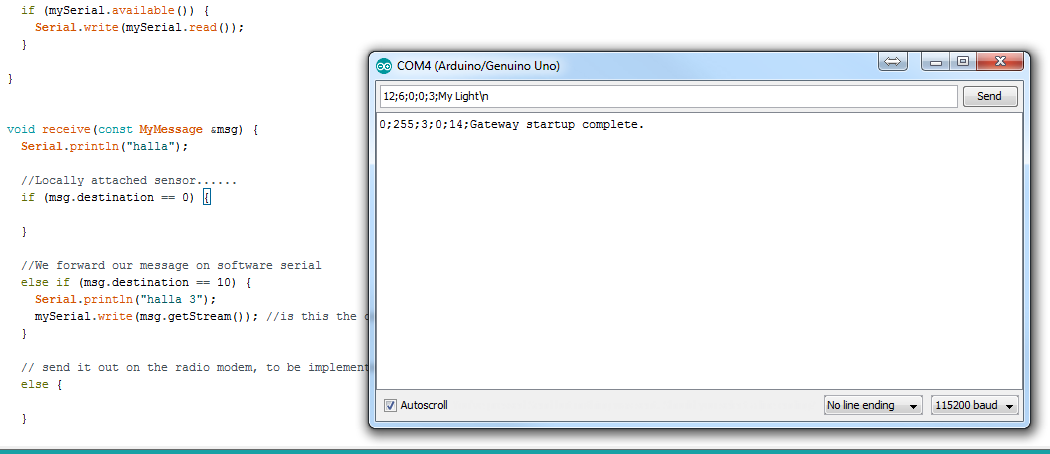
                0_1468333270528_Screenshot_1.png image url)

                What can I do to get the receive method to run?

                skatunS 1 Reply Last reply
                0
                • skatunS skatun

                  @hek
                  So finally I got home to grab my arduino so I can do some hardware testing and not just software!

                  It seems like the receive method is not running on the gateway, I have read through everything on the library api three times now, but I still can not figure out how the receive method are working. It runs inside the main loop, hence you can not use any sleep routine as far as I understood.
                  0_1468333270528_Screenshot_1.png image url)

                  What can I do to get the receive method to run?

                  skatunS Offline
                  skatunS Offline
                  skatun
                  wrote on last edited by
                  #10

                  Its not something in the transport class I need to change right?

                  AWIA 1 Reply Last reply
                  0
                  • skatunS skatun

                    Its not something in the transport class I need to change right?

                    AWIA Offline
                    AWIA Offline
                    AWI
                    Hero Member
                    wrote on last edited by
                    #11

                    @skatun What do you want to accomplish? The "receive method" just runs if you receive messages from other sensors (not locally connected}.

                    skatunS 1 Reply Last reply
                    0
                    • AWIA AWI

                      @skatun What do you want to accomplish? The "receive method" just runs if you receive messages from other sensors (not locally connected}.

                      skatunS Offline
                      skatunS Offline
                      skatun
                      wrote on last edited by
                      #12

                      @AWI
                      Basically I have my Gateway(Mega, might swap to Due, higher resolution ADC), on my gateway I have:
                      1 radio modem connected,
                      7 Arduino nano which are soldered to tx/rx(I might need to resolder those?),
                      12 motion sensors,
                      1 pulsePowerMeter,
                      6 ledstrips
                      1 IR generator(simulate my tv /stereo,etc remote)

                      So if my controller Openhab:
                      sends or receive CHildID = 0 then send/receive data to locally attached sensor
                      sends or receive CHildID = 10-16 then send/receive data on software serial to the 7 arduino nano(Basically relay sensor nodes)
                      sends or receive CHildID = 20-31 then send/receive data on radio to my radio nodes(temperature mainly)

                      My problem is that I can not figure out how to set up software serial with my sensor.

                       If msg.destination =16 sendTo software Serial on pin 34
                      

                      Below is a picture of my Gateway setup:
                      0_1468414835666_IMG_20160713_145404[1].jpg

                      AWIA 1 Reply Last reply
                      0
                      • skatunS skatun

                        @AWI
                        Basically I have my Gateway(Mega, might swap to Due, higher resolution ADC), on my gateway I have:
                        1 radio modem connected,
                        7 Arduino nano which are soldered to tx/rx(I might need to resolder those?),
                        12 motion sensors,
                        1 pulsePowerMeter,
                        6 ledstrips
                        1 IR generator(simulate my tv /stereo,etc remote)

                        So if my controller Openhab:
                        sends or receive CHildID = 0 then send/receive data to locally attached sensor
                        sends or receive CHildID = 10-16 then send/receive data on software serial to the 7 arduino nano(Basically relay sensor nodes)
                        sends or receive CHildID = 20-31 then send/receive data on radio to my radio nodes(temperature mainly)

                        My problem is that I can not figure out how to set up software serial with my sensor.

                         If msg.destination =16 sendTo software Serial on pin 34
                        

                        Below is a picture of my Gateway setup:
                        0_1468414835666_IMG_20160713_145404[1].jpg

                        AWIA Offline
                        AWIA Offline
                        AWI
                        Hero Member
                        wrote on last edited by
                        #13

                        @skatun I'm still confused. Looks like you are forcing the MySensors protocol to do your own thing.
                        Your topology has different nano's (nodes) connected via tx/rx to the gateway. The MySensors way to communicate with these is to treat them as 'nodes' and communicate to them by means of the wired protocol. Each of these nodes needs a different node number.
                        Then if you want to combine this with radio communication you need a different gateway which communicates by means of the wireless (rf24) protocol with the remote nodes.

                        skatunS 1 Reply Last reply
                        0
                        • AWIA AWI

                          @skatun I'm still confused. Looks like you are forcing the MySensors protocol to do your own thing.
                          Your topology has different nano's (nodes) connected via tx/rx to the gateway. The MySensors way to communicate with these is to treat them as 'nodes' and communicate to them by means of the wired protocol. Each of these nodes needs a different node number.
                          Then if you want to combine this with radio communication you need a different gateway which communicates by means of the wireless (rf24) protocol with the remote nodes.

                          skatunS Offline
                          skatunS Offline
                          skatun
                          wrote on last edited by
                          #14

                          @AWI

                          Quote:"means of the wired protocol"
                          I was so fortunate that I could connect most of my nodes and sensors wired, more reliable, no need to change battery so I tried todo so with most of my nodes and sensors.

                          Quote : "Then if you want to combine this with radio communication you need a different gateway"
                          Why do I need two gateways, why cant one gateway handle both wired and radio? For now I don't need the radio, just locally and wired connection

                          Quote:" Each of these nodes needs a different node number."
                          Yupp thats why I try to give them static node numbers: So the one on balcony gets ID 11 the one in the bar is 13 and so on. (my idea was to group ID numbers, 0 locally sensor, 10-19 software serial, >20 radio nodes, >50 wifi nodes ,>70 rs485 nodes)

                          The benefit of using MySensor is that the Openhab has a binding for it, I can use the example codes for my nodes(like the relay with button sketch) and I need some format of the string sended/received from the controller to my nodes anyway, so why not use the mysensor format?

                          so My orignally Idea was to use the serial event:

                          void serialEvent() {
                            while (Serial.available()) {
                              // get the new byte:
                              char inChar = (char)Serial.read();
                              // if the incoming character is a newline, set a flag
                              // so the main loop can do something about it:
                              if (inputPos < MAX_RECEIVE_LENGTH - 1 && !commandComplete) {
                                if (inChar == '\n') {
                                  inputString[inputPos] = 0;
                                  commandComplete = true;
                                } else {
                                  // add it to the inputString:
                                  inputString[inputPos] = inChar;
                                  inputPos++;
                                }
                              } else {
                                // Incoming message too long. Throw away
                                inputPos = 0;
                              }
                            }
                          }
                          

                          and then use the Message class to split the input buffer the string based "," like in vba I would just use arrayMy = split(inputBuffer,",")

                          Then If ID=11 forward the whole thing to software serial to the balcony, then the code on that node would be exactly the same as if the message came over the radio link.

                          That was my orginally idea, but then @hek suggested that I should rather use the receive method since this grab the buffer from serial somehow.

                          I am open to all solutions:) I just have limited space on some of my nodes which makes it hard to implement a radio link on them as well as an rs485 shield. (even using nano is hard)

                          skatunS 1 Reply Last reply
                          0
                          • skatunS skatun

                            @AWI

                            Quote:"means of the wired protocol"
                            I was so fortunate that I could connect most of my nodes and sensors wired, more reliable, no need to change battery so I tried todo so with most of my nodes and sensors.

                            Quote : "Then if you want to combine this with radio communication you need a different gateway"
                            Why do I need two gateways, why cant one gateway handle both wired and radio? For now I don't need the radio, just locally and wired connection

                            Quote:" Each of these nodes needs a different node number."
                            Yupp thats why I try to give them static node numbers: So the one on balcony gets ID 11 the one in the bar is 13 and so on. (my idea was to group ID numbers, 0 locally sensor, 10-19 software serial, >20 radio nodes, >50 wifi nodes ,>70 rs485 nodes)

                            The benefit of using MySensor is that the Openhab has a binding for it, I can use the example codes for my nodes(like the relay with button sketch) and I need some format of the string sended/received from the controller to my nodes anyway, so why not use the mysensor format?

                            so My orignally Idea was to use the serial event:

                            void serialEvent() {
                              while (Serial.available()) {
                                // get the new byte:
                                char inChar = (char)Serial.read();
                                // if the incoming character is a newline, set a flag
                                // so the main loop can do something about it:
                                if (inputPos < MAX_RECEIVE_LENGTH - 1 && !commandComplete) {
                                  if (inChar == '\n') {
                                    inputString[inputPos] = 0;
                                    commandComplete = true;
                                  } else {
                                    // add it to the inputString:
                                    inputString[inputPos] = inChar;
                                    inputPos++;
                                  }
                                } else {
                                  // Incoming message too long. Throw away
                                  inputPos = 0;
                                }
                              }
                            }
                            

                            and then use the Message class to split the input buffer the string based "," like in vba I would just use arrayMy = split(inputBuffer,",")

                            Then If ID=11 forward the whole thing to software serial to the balcony, then the code on that node would be exactly the same as if the message came over the radio link.

                            That was my orginally idea, but then @hek suggested that I should rather use the receive method since this grab the buffer from serial somehow.

                            I am open to all solutions:) I just have limited space on some of my nodes which makes it hard to implement a radio link on them as well as an rs485 shield. (even using nano is hard)

                            skatunS Offline
                            skatunS Offline
                            skatun
                            wrote on last edited by
                            #15

                            @hek
                            I am making great progress on my gateway:) I am almost done wiring everything and software is coming along. So my sensors sends out data nicely to the controller, however I can not receive commands, which is essentials for my RGB led strips.

                            I am trying to send this from the Serial Monitor in arduino: 0,30,1,0,40,ff0000\n

                            However the received method never gets called, what am I missing?

                            // Enable debug prints to serial monitor
                            //#define MY_DEBUG
                            
                            // Enable serial gateway
                            #define MY_GATEWAY_SERIAL
                            
                            
                            #include <SoftwareSerial.h>
                            #include <SPI.h>
                            #include <MySensors.h>
                            #include <ChainableLED.h>
                            
                            SoftwareSerial mySerial(10, 11); // RX, TX
                            
                            
                            MyMessage msg1(1, V_LIGHT);
                            
                            //RGB
                            int NUM_LEDS = 34;
                            ChainableLED leds(5, 6, NUM_LEDS);  // CLK, DATA, LEDS
                            
                            //PowerMeter
                            #define DIGITAL_INPUT_SENSOR 3  // The digital input you attached your light sensor.  (Only 2 and 3 generates interrupt!)
                            #define PULSE_FACTOR 1000       // Nummber of blinks per KWH of your meeter
                            #define SLEEP_MODE false        // Watt-value can only be reported when sleep mode is false.
                            #define MAX_WATT 10000          // Max watt value to report. This filetrs outliers.
                            
                            
                            #define CHILD_ID_POWER 2       // Id of the sensor child
                            #define CHILD_ID_RGB_START 30
                            #define NUM_LEDS_STRIPS 5
                            
                            
                            int counter[NUM_LEDS_STRIPS];
                            int current[NUM_LEDS_STRIPS][3];
                            int step[NUM_LEDS_STRIPS][3];
                            
                            
                            unsigned long SEND_FREQUENCY = 20000; // Minimum time between send (in milliseconds). We don't wnat to spam the gateway.
                            double ppwh = ((double)PULSE_FACTOR) / 1000; // Pulses per watt hour
                            boolean pcReceived = false;
                            volatile unsigned long pulseCount = 0;
                            volatile unsigned long lastBlink = 0;
                            volatile unsigned long watt = 0;
                            unsigned long oldPulseCount = 0;
                            unsigned long oldWatt = 0;
                            double oldKwh;
                            unsigned long lastSend;
                            MyMessage wattMsg(CHILD_ID_POWER, V_WATT);
                            MyMessage kwhMsg(CHILD_ID_POWER, V_KWH);
                            MyMessage pcMsg(CHILD_ID_POWER, V_VAR1);
                            
                            
                            void setup() {
                            
                              //Set up all our software serial ports...
                              mySerial.begin(9600);
                              // Setup locally attached sensors
                            
                            
                              //RGB
                            
                              leds.init();
                              for (byte CHILD_ID_RGB = CHILD_ID_RGB_START; CHILD_ID_RGB < NUM_LEDS_STRIPS; CHILD_ID_RGB++) {
                                counter[CHILD_ID_RGB] = 0;
                                current[CHILD_ID_RGB][0] = 0;
                                current[CHILD_ID_RGB][1] = 0;
                                current[CHILD_ID_RGB][2] = 0;
                                step[CHILD_ID_RGB][0] = 0;
                                step[CHILD_ID_RGB][1] = 0;
                                step[CHILD_ID_RGB][2] = 0;
                                leds.setColorRGB(CHILD_ID_RGB, current[CHILD_ID_RGB][0], current[CHILD_ID_RGB][1], current[CHILD_ID_RGB][2]); // Turn of on startup
                              }
                            
                            
                              // Power Meter
                              // Fetch last known pulse count value from gw
                              request(CHILD_ID_POWER, V_VAR1);
                            
                              // Use the internal pullup to be able to hook up this sketch directly to an energy meter with S0 output
                              // If no pullup is used, the reported usage will be too high because of the floating pin
                              pinMode(DIGITAL_INPUT_SENSOR, INPUT_PULLUP);
                            
                              attachInterrupt(digitalPinToInterrupt(DIGITAL_INPUT_SENSOR), onPulse, RISING);
                              lastSend = millis();
                            
                            }
                            
                            void presentation() {
                              // Present locally attached sensors
                            
                              //RGB 0,30,1,0,40,ff0000\n
                              sendSketchInfo("RGB Led", "1.2");
                              for (byte CHILD_ID_RGB = CHILD_ID_RGB_START; CHILD_ID_RGB < NUM_LEDS_STRIPS; CHILD_ID_RGB++) {
                                present(CHILD_ID_RGB, S_RGB_LIGHT);
                              }
                            
                            
                              //RELAY
                              sendSketchInfo("Relay & Button", "1.0");
                            
                              // Register all sensors to gw (they will be created as child devices)
                              present(1, S_LIGHT);
                            
                            
                              //POWER METER
                              // Send the sketch version information to the gateway and Controller
                              sendSketchInfo("Energy Meter", "1.0");
                            
                              // Register this device as power sensor
                              present(CHILD_ID_POWER, S_POWER);
                            
                            
                            }
                            
                            void loop() {
                              // Send locally attached sensor data here
                              //send(msg1.set(true), true); // Send new state and request ack back
                              if (mySerial.available()) {
                                Serial.write(mySerial.read());
                              }
                            
                              //RGB
                              for (byte CHILD_ID_RGB = CHILD_ID_RGB_START; CHILD_ID_RGB < NUM_LEDS_STRIPS; CHILD_ID_RGB++) {
                                if (counter[CHILD_ID_RGB] >= 0) {
                                  counter[CHILD_ID_RGB]--;
                                  int i = 1020 - counter[CHILD_ID_RGB];
                                  current[CHILD_ID_RGB][0] = calculateVal(step[CHILD_ID_RGB][0], current[CHILD_ID_RGB][0], i);
                                  current[CHILD_ID_RGB][1] = calculateVal(step[CHILD_ID_RGB][1], current[CHILD_ID_RGB][1], i);
                                  current[CHILD_ID_RGB][2] = calculateVal(step[CHILD_ID_RGB][2], current[CHILD_ID_RGB][2], i);
                            
                                  leds.setColorRGB(CHILD_ID_RGB, current[CHILD_ID_RGB][0], current[CHILD_ID_RGB][1], current[CHILD_ID_RGB][2]);
                                }
                              }
                            
                              //POWER
                              unsigned long now = millis();
                              // Only send values at a maximum frequency or woken up from sleep
                              bool sendTime = now - lastSend > SEND_FREQUENCY;
                              if (pcReceived && (SLEEP_MODE || sendTime)) {
                                // New watt value has been calculated
                                if (!SLEEP_MODE && watt != oldWatt) {
                                  // Check that we dont get unresonable large watt value.
                                  // could hapen when long wraps or false interrupt triggered
                                  if (watt < ((unsigned long)MAX_WATT)) {
                                    send(wattMsg.set(watt));  // Send watt value to gw
                                  }
                                  Serial.print("Watt:");
                                  Serial.println(watt);
                                  oldWatt = watt;
                                }
                            
                                // Pulse cout has changed
                                if (pulseCount != oldPulseCount) {
                                  send(pcMsg.set(pulseCount));  // Send pulse count value to gw
                                  Serial.print("PulseCount:");
                                  Serial.println(pulseCount);
                                  double kwh = ((double)pulseCount / ((double)PULSE_FACTOR));
                                  oldPulseCount = pulseCount;
                                  if (kwh != oldKwh) {
                                    send(kwhMsg.set(kwh, 4));  // Send kwh value to gw
                                    oldKwh = kwh;
                                    Serial.print("KWh:");
                                    Serial.println(kwh);
                                  }
                                }
                                lastSend = now;
                              } else if (sendTime && !pcReceived) {
                                // No count received. Try requesting it again
                                request(CHILD_ID_POWER, V_VAR1);
                                Serial.println("requesting a new value");
                                lastSend = now;
                              }
                            
                            }


                            //PowerMeter
                            void onPulse() {
                              unsigned long newBlink = micros();
                              unsigned long interval = newBlink - lastBlink;
                              if (interval < 10000L) { // Sometimes we get interrupt on RISING
                                return;
                              }
                              watt = (3600000000.0 / interval) / ppwh;
                              lastBlink = newBlink;
                            
                              pulseCount++;
                            }
                            
                            //RGB
                            void setColor(byte led, int R, int G, int B) {
                              step[led][0] = calculateStep(current[led][0], R);
                              step[led][1] = calculateStep(current[led][1], G);
                              step[led][2] = calculateStep(current[led][2], B);
                            
                              counter[led] = 255;
                            }
                            
                            int calculateStep(int prevValue, int endValue) {
                              int step = endValue - prevValue; // What's the overall gap?
                              if (step) {                      // If its non-zero,
                                step = 255 / step;            //   divide by 1020
                              }
                              return step;
                            }
                            
                            int calculateVal(int step, int val, int i) {
                            
                              if ((step) && i % step == 0) { // If step is non-zero and its time to change a value,
                                if (step > 0) {              //   increment the value if step is positive...
                                  val += 1;
                                }
                                else if (step < 0) {         //   ...or decrement it if step is negative
                                  val -= 1;
                                }
                              }
                              // Defensive driving: make sure val stays in the range 0-255
                              if (val > 255) {
                                val = 255;
                              }
                              else if (val < 0) {
                                val = 0;
                              }
                              return val;
                            }


                            void receive(const MyMessage & msg) {
                              Serial.println("Hello");
                            
                              //send(msg1.set(true), true);
                            
                              if (msg.type == V_RGB) {
                                String hexstring = msg.getString();
                                long number = (long) strtol( &hexstring[0], NULL, 16);
                                int colorR = number >> 16;
                                int colorG = number >> 8 & 0xFF;
                                int colorB = number & 0xFF;
                            
                                // Write some debug info
                                Serial.print("Incoming change for sensor:");
                                Serial.print(msg.sensor);
                                Serial.print(", Red: ");
                                Serial.print(colorR);
                                Serial.print(", Green: ");
                                Serial.print(colorG);
                                Serial.print(", Blue: ");
                                Serial.print(colorB);
                                Serial.print(", New status: ");
                                Serial.println(msg.getString());
                            
                                setColor(msg.sensor, colorR, colorG, colorB);
                                //leds.setColorRGB(message.sensor, colorR, colorG, colorB);
                              }
                            
                              //POWER
                              if (msg.type == V_VAR1) {
                                pulseCount = oldPulseCount = msg.getLong();
                                Serial.print("Received last pulse count from gw:");
                                Serial.println(pulseCount);
                                pcReceived = true;
                              }
                            
                              //Locally attached sensor......
                              if (msg.destination == 0) {
                            
                              }
                            
                              //We forward our message on software serial
                              else if (msg.destination == 10) {
                                Serial.println("halla 3");
                                //mySerial.write(msg.getStream()); //is this the complete message??
                              }
                            
                              // send it out on the radio modem, to be implemented later
                              else {
                            
                              }
                            
                            }
                            
                            tekkaT 1 Reply Last reply
                            0
                            • skatunS skatun

                              @hek
                              I am making great progress on my gateway:) I am almost done wiring everything and software is coming along. So my sensors sends out data nicely to the controller, however I can not receive commands, which is essentials for my RGB led strips.

                              I am trying to send this from the Serial Monitor in arduino: 0,30,1,0,40,ff0000\n

                              However the received method never gets called, what am I missing?

                              // Enable debug prints to serial monitor
                              //#define MY_DEBUG
                              
                              // Enable serial gateway
                              #define MY_GATEWAY_SERIAL
                              
                              
                              #include <SoftwareSerial.h>
                              #include <SPI.h>
                              #include <MySensors.h>
                              #include <ChainableLED.h>
                              
                              SoftwareSerial mySerial(10, 11); // RX, TX
                              
                              
                              MyMessage msg1(1, V_LIGHT);
                              
                              //RGB
                              int NUM_LEDS = 34;
                              ChainableLED leds(5, 6, NUM_LEDS);  // CLK, DATA, LEDS
                              
                              //PowerMeter
                              #define DIGITAL_INPUT_SENSOR 3  // The digital input you attached your light sensor.  (Only 2 and 3 generates interrupt!)
                              #define PULSE_FACTOR 1000       // Nummber of blinks per KWH of your meeter
                              #define SLEEP_MODE false        // Watt-value can only be reported when sleep mode is false.
                              #define MAX_WATT 10000          // Max watt value to report. This filetrs outliers.
                              
                              
                              #define CHILD_ID_POWER 2       // Id of the sensor child
                              #define CHILD_ID_RGB_START 30
                              #define NUM_LEDS_STRIPS 5
                              
                              
                              int counter[NUM_LEDS_STRIPS];
                              int current[NUM_LEDS_STRIPS][3];
                              int step[NUM_LEDS_STRIPS][3];
                              
                              
                              unsigned long SEND_FREQUENCY = 20000; // Minimum time between send (in milliseconds). We don't wnat to spam the gateway.
                              double ppwh = ((double)PULSE_FACTOR) / 1000; // Pulses per watt hour
                              boolean pcReceived = false;
                              volatile unsigned long pulseCount = 0;
                              volatile unsigned long lastBlink = 0;
                              volatile unsigned long watt = 0;
                              unsigned long oldPulseCount = 0;
                              unsigned long oldWatt = 0;
                              double oldKwh;
                              unsigned long lastSend;
                              MyMessage wattMsg(CHILD_ID_POWER, V_WATT);
                              MyMessage kwhMsg(CHILD_ID_POWER, V_KWH);
                              MyMessage pcMsg(CHILD_ID_POWER, V_VAR1);
                              
                              
                              void setup() {
                              
                                //Set up all our software serial ports...
                                mySerial.begin(9600);
                                // Setup locally attached sensors
                              
                              
                                //RGB
                              
                                leds.init();
                                for (byte CHILD_ID_RGB = CHILD_ID_RGB_START; CHILD_ID_RGB < NUM_LEDS_STRIPS; CHILD_ID_RGB++) {
                                  counter[CHILD_ID_RGB] = 0;
                                  current[CHILD_ID_RGB][0] = 0;
                                  current[CHILD_ID_RGB][1] = 0;
                                  current[CHILD_ID_RGB][2] = 0;
                                  step[CHILD_ID_RGB][0] = 0;
                                  step[CHILD_ID_RGB][1] = 0;
                                  step[CHILD_ID_RGB][2] = 0;
                                  leds.setColorRGB(CHILD_ID_RGB, current[CHILD_ID_RGB][0], current[CHILD_ID_RGB][1], current[CHILD_ID_RGB][2]); // Turn of on startup
                                }
                              
                              
                                // Power Meter
                                // Fetch last known pulse count value from gw
                                request(CHILD_ID_POWER, V_VAR1);
                              
                                // Use the internal pullup to be able to hook up this sketch directly to an energy meter with S0 output
                                // If no pullup is used, the reported usage will be too high because of the floating pin
                                pinMode(DIGITAL_INPUT_SENSOR, INPUT_PULLUP);
                              
                                attachInterrupt(digitalPinToInterrupt(DIGITAL_INPUT_SENSOR), onPulse, RISING);
                                lastSend = millis();
                              
                              }
                              
                              void presentation() {
                                // Present locally attached sensors
                              
                                //RGB 0,30,1,0,40,ff0000\n
                                sendSketchInfo("RGB Led", "1.2");
                                for (byte CHILD_ID_RGB = CHILD_ID_RGB_START; CHILD_ID_RGB < NUM_LEDS_STRIPS; CHILD_ID_RGB++) {
                                  present(CHILD_ID_RGB, S_RGB_LIGHT);
                                }
                              
                              
                                //RELAY
                                sendSketchInfo("Relay & Button", "1.0");
                              
                                // Register all sensors to gw (they will be created as child devices)
                                present(1, S_LIGHT);
                              
                              
                                //POWER METER
                                // Send the sketch version information to the gateway and Controller
                                sendSketchInfo("Energy Meter", "1.0");
                              
                                // Register this device as power sensor
                                present(CHILD_ID_POWER, S_POWER);
                              
                              
                              }
                              
                              void loop() {
                                // Send locally attached sensor data here
                                //send(msg1.set(true), true); // Send new state and request ack back
                                if (mySerial.available()) {
                                  Serial.write(mySerial.read());
                                }
                              
                                //RGB
                                for (byte CHILD_ID_RGB = CHILD_ID_RGB_START; CHILD_ID_RGB < NUM_LEDS_STRIPS; CHILD_ID_RGB++) {
                                  if (counter[CHILD_ID_RGB] >= 0) {
                                    counter[CHILD_ID_RGB]--;
                                    int i = 1020 - counter[CHILD_ID_RGB];
                                    current[CHILD_ID_RGB][0] = calculateVal(step[CHILD_ID_RGB][0], current[CHILD_ID_RGB][0], i);
                                    current[CHILD_ID_RGB][1] = calculateVal(step[CHILD_ID_RGB][1], current[CHILD_ID_RGB][1], i);
                                    current[CHILD_ID_RGB][2] = calculateVal(step[CHILD_ID_RGB][2], current[CHILD_ID_RGB][2], i);
                              
                                    leds.setColorRGB(CHILD_ID_RGB, current[CHILD_ID_RGB][0], current[CHILD_ID_RGB][1], current[CHILD_ID_RGB][2]);
                                  }
                                }
                              
                                //POWER
                                unsigned long now = millis();
                                // Only send values at a maximum frequency or woken up from sleep
                                bool sendTime = now - lastSend > SEND_FREQUENCY;
                                if (pcReceived && (SLEEP_MODE || sendTime)) {
                                  // New watt value has been calculated
                                  if (!SLEEP_MODE && watt != oldWatt) {
                                    // Check that we dont get unresonable large watt value.
                                    // could hapen when long wraps or false interrupt triggered
                                    if (watt < ((unsigned long)MAX_WATT)) {
                                      send(wattMsg.set(watt));  // Send watt value to gw
                                    }
                                    Serial.print("Watt:");
                                    Serial.println(watt);
                                    oldWatt = watt;
                                  }
                              
                                  // Pulse cout has changed
                                  if (pulseCount != oldPulseCount) {
                                    send(pcMsg.set(pulseCount));  // Send pulse count value to gw
                                    Serial.print("PulseCount:");
                                    Serial.println(pulseCount);
                                    double kwh = ((double)pulseCount / ((double)PULSE_FACTOR));
                                    oldPulseCount = pulseCount;
                                    if (kwh != oldKwh) {
                                      send(kwhMsg.set(kwh, 4));  // Send kwh value to gw
                                      oldKwh = kwh;
                                      Serial.print("KWh:");
                                      Serial.println(kwh);
                                    }
                                  }
                                  lastSend = now;
                                } else if (sendTime && !pcReceived) {
                                  // No count received. Try requesting it again
                                  request(CHILD_ID_POWER, V_VAR1);
                                  Serial.println("requesting a new value");
                                  lastSend = now;
                                }
                              
                              }


                              //PowerMeter
                              void onPulse() {
                                unsigned long newBlink = micros();
                                unsigned long interval = newBlink - lastBlink;
                                if (interval < 10000L) { // Sometimes we get interrupt on RISING
                                  return;
                                }
                                watt = (3600000000.0 / interval) / ppwh;
                                lastBlink = newBlink;
                              
                                pulseCount++;
                              }
                              
                              //RGB
                              void setColor(byte led, int R, int G, int B) {
                                step[led][0] = calculateStep(current[led][0], R);
                                step[led][1] = calculateStep(current[led][1], G);
                                step[led][2] = calculateStep(current[led][2], B);
                              
                                counter[led] = 255;
                              }
                              
                              int calculateStep(int prevValue, int endValue) {
                                int step = endValue - prevValue; // What's the overall gap?
                                if (step) {                      // If its non-zero,
                                  step = 255 / step;            //   divide by 1020
                                }
                                return step;
                              }
                              
                              int calculateVal(int step, int val, int i) {
                              
                                if ((step) && i % step == 0) { // If step is non-zero and its time to change a value,
                                  if (step > 0) {              //   increment the value if step is positive...
                                    val += 1;
                                  }
                                  else if (step < 0) {         //   ...or decrement it if step is negative
                                    val -= 1;
                                  }
                                }
                                // Defensive driving: make sure val stays in the range 0-255
                                if (val > 255) {
                                  val = 255;
                                }
                                else if (val < 0) {
                                  val = 0;
                                }
                                return val;
                              }


                              void receive(const MyMessage & msg) {
                                Serial.println("Hello");
                              
                                //send(msg1.set(true), true);
                              
                                if (msg.type == V_RGB) {
                                  String hexstring = msg.getString();
                                  long number = (long) strtol( &hexstring[0], NULL, 16);
                                  int colorR = number >> 16;
                                  int colorG = number >> 8 & 0xFF;
                                  int colorB = number & 0xFF;
                              
                                  // Write some debug info
                                  Serial.print("Incoming change for sensor:");
                                  Serial.print(msg.sensor);
                                  Serial.print(", Red: ");
                                  Serial.print(colorR);
                                  Serial.print(", Green: ");
                                  Serial.print(colorG);
                                  Serial.print(", Blue: ");
                                  Serial.print(colorB);
                                  Serial.print(", New status: ");
                                  Serial.println(msg.getString());
                              
                                  setColor(msg.sensor, colorR, colorG, colorB);
                                  //leds.setColorRGB(message.sensor, colorR, colorG, colorB);
                                }
                              
                                //POWER
                                if (msg.type == V_VAR1) {
                                  pulseCount = oldPulseCount = msg.getLong();
                                  Serial.print("Received last pulse count from gw:");
                                  Serial.println(pulseCount);
                                  pcReceived = true;
                                }
                              
                                //Locally attached sensor......
                                if (msg.destination == 0) {
                              
                                }
                              
                                //We forward our message on software serial
                                else if (msg.destination == 10) {
                                  Serial.println("halla 3");
                                  //mySerial.write(msg.getStream()); //is this the complete message??
                                }
                              
                                // send it out on the radio modem, to be implemented later
                                else {
                              
                                }
                              
                              }
                              
                              tekkaT Offline
                              tekkaT Offline
                              tekka
                              Admin
                              wrote on last edited by tekka
                              #16

                              @skatun GW receive() has been fixed in PR#522. We are currently working on the 2.0.1 release, more will follow soon.

                              skatunS 1 Reply Last reply
                              0
                              • tekkaT tekka

                                @skatun GW receive() has been fixed in PR#522. We are currently working on the 2.0.1 release, more will follow soon.

                                skatunS Offline
                                skatunS Offline
                                skatun
                                wrote on last edited by
                                #17

                                @tekka Thanks for the feedback, does that implies if I download the dev branch from git now it should be fixed?

                                here is the output from my serial monitor when i enabled logging:

                                0;255;3;0;9;Starting gateway (R-NGA-, 2.0.0-beta)
                                0;255;3;0;14;Gateway startup complete.
                                0;2;2;0;24;
                                0;255;3;0;9;No registration required
                                0;255;3;0;9;Init complete, id=0, parent=0, distance=0, registration=1
                                0;2;2;0;24;
                                

                                I am trying to get my RGB lights to work:

                                
                                #define CHILD_ID_RGB_START 30
                                #define NUM_LEDS_STRIPS 5
                                
                                void presentation() {
                                  // Present locally attached sensors
                                
                                  //RGB 0,30,1,0,40,ff0000\n
                                  sendSketchInfo("RGB Led", "1.2");
                                  Serial.println("Lets present some RGB");
                                  for (byte CHILD_ID_RGB = CHILD_ID_RGB_START; CHILD_ID_RGB < NUM_LEDS_STRIPS; CHILD_ID_RGB++) {
                                    Serial.print("RGB ID: ");
                                    Serial.println(CHILD_ID_RGB);
                                    present(CHILD_ID_RGB, S_RGB_LIGHT);
                                  }
                                

                                How can I add logging to Serial monitor to gateway, because Serial.println("Lets present some RGB"); does not produce any output?

                                shouldn't this line registered my lights as sensors in MYSController?

                                
                                present(CHILD_ID_RGB, S_RGB_LIGHT);
                                

                                So I am afraid there is something wrong with my for loop, even though i can not spot the mistake.

                                tekkaT 1 Reply Last reply
                                0
                                • skatunS skatun

                                  @tekka Thanks for the feedback, does that implies if I download the dev branch from git now it should be fixed?

                                  here is the output from my serial monitor when i enabled logging:

                                  0;255;3;0;9;Starting gateway (R-NGA-, 2.0.0-beta)
                                  0;255;3;0;14;Gateway startup complete.
                                  0;2;2;0;24;
                                  0;255;3;0;9;No registration required
                                  0;255;3;0;9;Init complete, id=0, parent=0, distance=0, registration=1
                                  0;2;2;0;24;
                                  

                                  I am trying to get my RGB lights to work:

                                  
                                  #define CHILD_ID_RGB_START 30
                                  #define NUM_LEDS_STRIPS 5
                                  
                                  void presentation() {
                                    // Present locally attached sensors
                                  
                                    //RGB 0,30,1,0,40,ff0000\n
                                    sendSketchInfo("RGB Led", "1.2");
                                    Serial.println("Lets present some RGB");
                                    for (byte CHILD_ID_RGB = CHILD_ID_RGB_START; CHILD_ID_RGB < NUM_LEDS_STRIPS; CHILD_ID_RGB++) {
                                      Serial.print("RGB ID: ");
                                      Serial.println(CHILD_ID_RGB);
                                      present(CHILD_ID_RGB, S_RGB_LIGHT);
                                    }
                                  

                                  How can I add logging to Serial monitor to gateway, because Serial.println("Lets present some RGB"); does not produce any output?

                                  shouldn't this line registered my lights as sensors in MYSController?

                                  
                                  present(CHILD_ID_RGB, S_RGB_LIGHT);
                                  

                                  So I am afraid there is something wrong with my for loop, even though i can not spot the mistake.

                                  tekkaT Offline
                                  tekkaT Offline
                                  tekka
                                  Admin
                                  wrote on last edited by tekka
                                  #18

                                  @skatun looks like you didn't define a radio on your GW, so your RGB example runs locally on the GW?


                                  skatunS 1 Reply Last reply
                                  0
                                  • tekkaT tekka

                                    @skatun looks like you didn't define a radio on your GW, so your RGB example runs locally on the GW?

                                    skatunS Offline
                                    skatunS Offline
                                    skatun
                                    wrote on last edited by
                                    #19

                                    @tekka Thats correct, i am only running locally attached sensor:) I was luckily enough to run sth like 35 cables to my gateway, I might add radio in the future to reach down to my basement.

                                    1 Reply Last reply
                                    0
                                    Reply
                                    • Reply as topic
                                    Log in to reply
                                    • Oldest to Newest
                                    • Newest to Oldest
                                    • Most Votes


                                    29

                                    Online

                                    11.7k

                                    Users

                                    11.2k

                                    Topics

                                    113.1k

                                    Posts


                                    Copyright 2025 TBD   |   Forum Guidelines   |   Privacy Policy   |   Terms of Service
                                    • Login

                                    • Don't have an account? Register

                                    • Login or register to search.
                                    • First post
                                      Last post
                                    0
                                    • MySensors
                                    • OpenHardware.io
                                    • Categories
                                    • Recent
                                    • Tags
                                    • Popular