Skip to content
  • MySensors
  • OpenHardware.io
  • Categories
  • Recent
  • Tags
  • Popular
Skins
  • Light
  • Brite
  • Cerulean
  • Cosmo
  • Flatly
  • Journal
  • Litera
  • Lumen
  • Lux
  • Materia
  • Minty
  • Morph
  • Pulse
  • Sandstone
  • Simplex
  • Sketchy
  • Spacelab
  • United
  • Yeti
  • Zephyr
  • Dark
  • Cyborg
  • Darkly
  • Quartz
  • Slate
  • Solar
  • Superhero
  • Vapor

  • Default (No Skin)
  • No Skin
Collapse
Brand Logo
  1. Home
  2. Development
  3. Multi Button Relay Sketch

Multi Button Relay Sketch

Scheduled Pinned Locked Moved Development
69 Posts 12 Posters 25.4k Views 18 Watching
  • Oldest to Newest
  • Newest to Oldest
  • Most Votes
Reply
  • Reply as topic
Log in to reply
This topic has been deleted. Only users with topic management privileges can see it.
  • rayanR rayan

    @Boots33
    i want if power of home be off and after time on again , so all of relay ( with switch up/down with each state) to be off. now in this code after startup relay is unstable for 1s and my light is on and aff quickly :)
    also if lights are off , if power off/on , so some of relay go to ON in startup !

    Boots33B Offline
    Boots33B Offline
    Boots33
    Hero Member
    wrote on last edited by
    #11

    @rayan So if the house looses power you want the relays to be turned off when power is restored?

    rayanR 1 Reply Last reply
    0
    • Boots33B Boots33

      @rayan So if the house looses power you want the relays to be turned off when power is restored?

      rayanR Offline
      rayanR Offline
      rayan
      wrote on last edited by
      #12

      @Boots33
      yes, all of lights are on or off (some on some off) so when looses power and power is restored , i want all of lights be off also in web and app light = off , so with key in app or change state of switch turn on again ...

      1 Reply Last reply
      0
      • rayanR Offline
        rayanR Offline
        rayan
        wrote on last edited by
        #13

        but this app , every time after the restored power and startup, relay ( related to state of up/down switch) have different state

        Boots33B 1 Reply Last reply
        0
        • rayanR rayan

          but this app , every time after the restored power and startup, relay ( related to state of up/down switch) have different state

          Boots33B Offline
          Boots33B Offline
          Boots33
          Hero Member
          wrote on last edited by
          #14

          @rayan yes it was meant to be used with push buttons not toggle switches. It will need a few tweaks to make it work. I am at work now so will take a look when I get home.

          rayanR 1 Reply Last reply
          0
          • Boots33B Boots33

            @rayan yes it was meant to be used with push buttons not toggle switches. It will need a few tweaks to make it work. I am at work now so will take a look when I get home.

            rayanR Offline
            rayanR Offline
            rayan
            wrote on last edited by
            #15

            @Boots33 said:

            @rayan yes it was meant to be used with push buttons not toggle switches. It will need a few tweaks to make it work. I am at work now so will take a look when I get home.

            ok thank you

            Boots33B 1 Reply Last reply
            0
            • rayanR rayan

              @Boots33 said:

              @rayan yes it was meant to be used with push buttons not toggle switches. It will need a few tweaks to make it work. I am at work now so will take a look when I get home.

              ok thank you

              Boots33B Offline
              Boots33B Offline
              Boots33
              Hero Member
              wrote on last edited by Boots33
              #16

              @rayan Ok had a quick look and I don't think we need to do a lot for this to work.
              The only extra change I have made is to add four new lines at the end of the setup function

                 /*--------------------- Added these lines for toggle switch-------------------------*/
                oldValueA = digitalRead(buttonPinA);  // set oldValueA to the current status of the toggle switch
                oldValueB = digitalRead(buttonPinB);  // set oldValueB to the current status of the toggle switch
                send(msgA.set(false)); // Send off state for relayA to ensure controller knows the switch is off
                send(msgB.set(false)); // Send off state for relayB to ensure controller knows the switch is off
              

              As you can see the oldValue variables are now set to represent the current state of the toggle switches when the node boots up. this should stop any changes in state being made in the main loop until a switch is toggled.
              The other two lines just send a message to the controller to tell it the switches are off. this should make the controller icons show the correct state

              Below is the full sketch, I have nothing to test it on so give it a try and see how it goes

              #define MY_DEBUG
              #define MY_RADIO_NRF24
              #define MY_REPEATER_FEATURE
              
              #include <SPI.h>
              #include <MySensors.h>
              #include <Bounce2.h>
              
              #define RELAY_ON 1
              #define RELAY_OFF 0
              
              #define SSR_A_ID 1   // Id of the sensor child
              #define SSR_B_ID 2   // Id of the sensor child
              
              const int buttonPinA = 18;
              const int buttonPinB = 19;
              const int relayPinA = 5;
              const int relayPinB = 6;
              int oldValueA = 0;
              int oldValueB = 0;
              bool stateA = false;
              bool stateB = false;


              Bounce debouncerA = Bounce();
              Bounce debouncerB = Bounce();
              
              MyMessage msgA(SSR_A_ID, V_STATUS);
              MyMessage msgB(SSR_B_ID, V_STATUS);
              
              void setup()
              {
              
                pinMode(buttonPinA, INPUT_PULLUP); // Setup the button Activate internal pull-up
                pinMode(buttonPinB, INPUT_PULLUP); // Setup the button Activate internal pull-up
              // Then set relay pins in output mode
                pinMode(relayPinA, OUTPUT);
                pinMode(relayPinB, OUTPUT);
              
                // After setting up the buttons, setup debouncer
                debouncerA.attach(buttonPinA);
                debouncerA.interval(5);
                debouncerB.attach(buttonPinB);
                debouncerB.interval(5);
              
                // Make sure relays are off when starting up
                digitalWrite(relayPinA, RELAY_OFF);
                digitalWrite(relayPinB, RELAY_OFF);
                
              
                  /*--------------------- Added these lines for toggle switch-------------------------*/
                oldValueA = digitalRead(buttonPinA);  // set oldValueA to the current status of the toggle switch
                oldValueB = digitalRead(buttonPinB);  // set oldValueB to the current status of the toggle switch
                send(msgA.set(false)); // Send off state for relayA to ensure controller knows the switch is off
                send(msgB.set(false)); // Send off state for relayB to ensure controller knows the switch is off
                
              }
              
              void presentation()  {
                // Send the sketch version information to the gateway and Controller
                sendSketchInfo("Mains Controller", "1.0");
              
                // Register all sensors to gw (they will be created as child devices)
                present(SSR_A_ID, S_LIGHT);
                present(SSR_B_ID, S_LIGHT);
              
              }
              
              /*
                 Example on how to asynchronously check for new messages from gw
              */
              void loop()
              {
                debouncerA.update();
                // Get the update value
                int valueA = debouncerA.read();
                if (valueA != oldValueA) {
                  send(msgA.set(stateA ? false : true), true); // Send new state and request ack back
                oldValueA = valueA;
                }
               
              
                debouncerB.update();
                // Get the update value
                int valueB = debouncerB.read();
                if (valueB != oldValueB) {
                  send(msgB.set(stateB ? false : true), true); // Send new state and request ack back
                oldValueB = valueB;
                }
              }
              
              void receive(const MyMessage &message) {
                // We only expect one type of message from controller. But we better check anyway.
                if (message.type == V_STATUS) {
                    
                  switch (message.sensor) {
                    case 1:
                      stateA = message.getBool();
                      digitalWrite(message.sensor + 4, stateA ? RELAY_ON : RELAY_OFF);
                      
                      break;
                    case 2:
                      stateB = message.getBool();
                      digitalWrite(message.sensor + 4, stateB ? RELAY_ON : RELAY_OFF);
                      
                      break;
                    
                  }
                 
                    // Write some debug info
                  Serial.print("Incoming change for sensor:");
                  Serial.println(message.sensor);
                  Serial.print("from node:");
                  Serial.println(message.sender);
                  Serial.print(", New status: ");
                  Serial.println(message.getBool());
                }
              }
              
              rayanR SGiS 2 Replies Last reply
              1
              • Boots33B Boots33

                @rayan Ok had a quick look and I don't think we need to do a lot for this to work.
                The only extra change I have made is to add four new lines at the end of the setup function

                   /*--------------------- Added these lines for toggle switch-------------------------*/
                  oldValueA = digitalRead(buttonPinA);  // set oldValueA to the current status of the toggle switch
                  oldValueB = digitalRead(buttonPinB);  // set oldValueB to the current status of the toggle switch
                  send(msgA.set(false)); // Send off state for relayA to ensure controller knows the switch is off
                  send(msgB.set(false)); // Send off state for relayB to ensure controller knows the switch is off
                

                As you can see the oldValue variables are now set to represent the current state of the toggle switches when the node boots up. this should stop any changes in state being made in the main loop until a switch is toggled.
                The other two lines just send a message to the controller to tell it the switches are off. this should make the controller icons show the correct state

                Below is the full sketch, I have nothing to test it on so give it a try and see how it goes

                #define MY_DEBUG
                #define MY_RADIO_NRF24
                #define MY_REPEATER_FEATURE
                
                #include <SPI.h>
                #include <MySensors.h>
                #include <Bounce2.h>
                
                #define RELAY_ON 1
                #define RELAY_OFF 0
                
                #define SSR_A_ID 1   // Id of the sensor child
                #define SSR_B_ID 2   // Id of the sensor child
                
                const int buttonPinA = 18;
                const int buttonPinB = 19;
                const int relayPinA = 5;
                const int relayPinB = 6;
                int oldValueA = 0;
                int oldValueB = 0;
                bool stateA = false;
                bool stateB = false;


                Bounce debouncerA = Bounce();
                Bounce debouncerB = Bounce();
                
                MyMessage msgA(SSR_A_ID, V_STATUS);
                MyMessage msgB(SSR_B_ID, V_STATUS);
                
                void setup()
                {
                
                  pinMode(buttonPinA, INPUT_PULLUP); // Setup the button Activate internal pull-up
                  pinMode(buttonPinB, INPUT_PULLUP); // Setup the button Activate internal pull-up
                // Then set relay pins in output mode
                  pinMode(relayPinA, OUTPUT);
                  pinMode(relayPinB, OUTPUT);
                
                  // After setting up the buttons, setup debouncer
                  debouncerA.attach(buttonPinA);
                  debouncerA.interval(5);
                  debouncerB.attach(buttonPinB);
                  debouncerB.interval(5);
                
                  // Make sure relays are off when starting up
                  digitalWrite(relayPinA, RELAY_OFF);
                  digitalWrite(relayPinB, RELAY_OFF);
                  
                
                    /*--------------------- Added these lines for toggle switch-------------------------*/
                  oldValueA = digitalRead(buttonPinA);  // set oldValueA to the current status of the toggle switch
                  oldValueB = digitalRead(buttonPinB);  // set oldValueB to the current status of the toggle switch
                  send(msgA.set(false)); // Send off state for relayA to ensure controller knows the switch is off
                  send(msgB.set(false)); // Send off state for relayB to ensure controller knows the switch is off
                  
                }
                
                void presentation()  {
                  // Send the sketch version information to the gateway and Controller
                  sendSketchInfo("Mains Controller", "1.0");
                
                  // Register all sensors to gw (they will be created as child devices)
                  present(SSR_A_ID, S_LIGHT);
                  present(SSR_B_ID, S_LIGHT);
                
                }
                
                /*
                   Example on how to asynchronously check for new messages from gw
                */
                void loop()
                {
                  debouncerA.update();
                  // Get the update value
                  int valueA = debouncerA.read();
                  if (valueA != oldValueA) {
                    send(msgA.set(stateA ? false : true), true); // Send new state and request ack back
                  oldValueA = valueA;
                  }
                 
                
                  debouncerB.update();
                  // Get the update value
                  int valueB = debouncerB.read();
                  if (valueB != oldValueB) {
                    send(msgB.set(stateB ? false : true), true); // Send new state and request ack back
                  oldValueB = valueB;
                  }
                }
                
                void receive(const MyMessage &message) {
                  // We only expect one type of message from controller. But we better check anyway.
                  if (message.type == V_STATUS) {
                      
                    switch (message.sensor) {
                      case 1:
                        stateA = message.getBool();
                        digitalWrite(message.sensor + 4, stateA ? RELAY_ON : RELAY_OFF);
                        
                        break;
                      case 2:
                        stateB = message.getBool();
                        digitalWrite(message.sensor + 4, stateB ? RELAY_ON : RELAY_OFF);
                        
                        break;
                      
                    }
                   
                      // Write some debug info
                    Serial.print("Incoming change for sensor:");
                    Serial.println(message.sensor);
                    Serial.print("from node:");
                    Serial.println(message.sender);
                    Serial.print(", New status: ");
                    Serial.println(message.getBool());
                  }
                }
                
                rayanR Offline
                rayanR Offline
                rayan
                wrote on last edited by
                #17

                @Boots33 said:

                i test your code and this is excellent . but there is another tiny problem :)
                when relay is ON then loses power so in app relay is ON (icon) , when power is restored and relay go to OFF in app icon is ON and dont Ack for go to show Off .
                you are best in programming :)

                Boots33B 1 Reply Last reply
                0
                • rayanR rayan

                  @Boots33 said:

                  i test your code and this is excellent . but there is another tiny problem :)
                  when relay is ON then loses power so in app relay is ON (icon) , when power is restored and relay go to OFF in app icon is ON and dont Ack for go to show Off .
                  you are best in programming :)

                  Boots33B Offline
                  Boots33B Offline
                  Boots33
                  Hero Member
                  wrote on last edited by Boots33
                  #18

                  @rayan maybe trying to send the off message before the presentation stops it from sending

                  try this , have moved the messages to the main loop where they will only be sent once in the first loop

                  #define MY_DEBUG
                  #define MY_RADIO_NRF24
                  #define MY_REPEATER_FEATURE
                  
                  #include <SPI.h>
                  #include <MySensors.h>
                  #include <Bounce2.h>
                  
                  #define RELAY_ON 1
                  #define RELAY_OFF 0
                  
                  #define SSR_A_ID 1   // Id of the sensor child
                  #define SSR_B_ID 2   // Id of the sensor child
                  
                  const int buttonPinA = 18;
                  const int buttonPinB = 19;
                  const int relayPinA = 5;
                  const int relayPinB = 6;
                  int oldValueA = 0;
                  int oldValueB = 0;
                  bool stateA = false;
                  bool stateB = false;
                  int trigger = 0;
                  
                  
                  Bounce debouncerA = Bounce();
                  Bounce debouncerB = Bounce();
                  
                  MyMessage msgA(SSR_A_ID, V_STATUS);
                  MyMessage msgB(SSR_B_ID, V_STATUS);
                  
                  void setup()
                  {
                  
                    pinMode(buttonPinA, INPUT_PULLUP); // Setup the button Activate internal pull-up
                    pinMode(buttonPinB, INPUT_PULLUP); // Setup the button Activate internal pull-up
                  // Then set relay pins in output mode
                    pinMode(relayPinA, OUTPUT);
                    pinMode(relayPinB, OUTPUT);
                  
                    // After setting up the buttons, setup debouncer
                    debouncerA.attach(buttonPinA);
                    debouncerA.interval(5);
                    debouncerB.attach(buttonPinB);
                    debouncerB.interval(5);
                  
                    // Make sure relays are off when starting up
                    digitalWrite(relayPinA, RELAY_OFF);
                    digitalWrite(relayPinB, RELAY_OFF);
                    
                  
                      /*--------------------- Added these lines for toggle switch-------------------------*/
                    oldValueA = digitalRead(buttonPinA);  // set oldValueA to the current status of the toggle switch
                    oldValueB = digitalRead(buttonPinB);  // set oldValueB to the current status of the toggle switch
                   // send(msgA.set(false)); // Send off state for relayA to ensure controller knows the switch is off
                   // send(msgB.set(false)); // Send off state for relayB to ensure controller knows the switch is off
                    
                  }
                  
                  void presentation()  {
                    // Send the sketch version information to the gateway and Controller
                    sendSketchInfo("Mains Controller", "1.0");
                  
                    // Register all sensors to gw (they will be created as child devices)
                    present(SSR_A_ID, S_LIGHT);
                    present(SSR_B_ID, S_LIGHT);
                  
                  }
                  
                  /*
                     Example on how to asynchronously check for new messages from gw
                  */
                  void loop()
                  {
                  if (trigger == 0){
                    send(msgA.set(false)); // Send off state for relayA to ensure controller knows the switch is off
                    send(msgB.set(false)); // Send off state for relayB to ensure controller knows the switch is off
                    trigger = 1;
                  }
                  
                  
                    debouncerA.update();
                    // Get the update value
                    int valueA = debouncerA.read();
                    if (valueA != oldValueA) {
                      send(msgA.set(stateA ? false : true), true); // Send new state and request ack back
                    oldValueA = valueA;
                    }
                   
                  
                    debouncerB.update();
                    // Get the update value
                    int valueB = debouncerB.read();
                    if (valueB != oldValueB) {
                      send(msgB.set(stateB ? false : true), true); // Send new state and request ack back
                    oldValueB = valueB;
                    }
                  }
                  
                  void receive(const MyMessage &message) {
                    // We only expect one type of message from controller. But we better check anyway.
                    if (message.type == V_STATUS) {
                        
                      switch (message.sensor) {
                        case 1:
                          stateA = message.getBool();
                          digitalWrite(message.sensor + 4, stateA ? RELAY_ON : RELAY_OFF);
                          
                          break;
                        case 2:
                          stateB = message.getBool();
                          digitalWrite(message.sensor + 4, stateB ? RELAY_ON : RELAY_OFF);
                          
                          break;
                        
                      }
                     
                        // Write some debug info
                      Serial.print("Incoming change for sensor:");
                      Serial.println(message.sensor);
                      Serial.print("from node:");
                      Serial.println(message.sender);
                      Serial.print(", New status: ");
                      Serial.println(message.getBool());
                    }
                  }
                  
                  rayanR pepsonP 4 Replies Last reply
                  1
                  • Boots33B Boots33

                    @rayan maybe trying to send the off message before the presentation stops it from sending

                    try this , have moved the messages to the main loop where they will only be sent once in the first loop

                    #define MY_DEBUG
                    #define MY_RADIO_NRF24
                    #define MY_REPEATER_FEATURE
                    
                    #include <SPI.h>
                    #include <MySensors.h>
                    #include <Bounce2.h>
                    
                    #define RELAY_ON 1
                    #define RELAY_OFF 0
                    
                    #define SSR_A_ID 1   // Id of the sensor child
                    #define SSR_B_ID 2   // Id of the sensor child
                    
                    const int buttonPinA = 18;
                    const int buttonPinB = 19;
                    const int relayPinA = 5;
                    const int relayPinB = 6;
                    int oldValueA = 0;
                    int oldValueB = 0;
                    bool stateA = false;
                    bool stateB = false;
                    int trigger = 0;
                    
                    
                    Bounce debouncerA = Bounce();
                    Bounce debouncerB = Bounce();
                    
                    MyMessage msgA(SSR_A_ID, V_STATUS);
                    MyMessage msgB(SSR_B_ID, V_STATUS);
                    
                    void setup()
                    {
                    
                      pinMode(buttonPinA, INPUT_PULLUP); // Setup the button Activate internal pull-up
                      pinMode(buttonPinB, INPUT_PULLUP); // Setup the button Activate internal pull-up
                    // Then set relay pins in output mode
                      pinMode(relayPinA, OUTPUT);
                      pinMode(relayPinB, OUTPUT);
                    
                      // After setting up the buttons, setup debouncer
                      debouncerA.attach(buttonPinA);
                      debouncerA.interval(5);
                      debouncerB.attach(buttonPinB);
                      debouncerB.interval(5);
                    
                      // Make sure relays are off when starting up
                      digitalWrite(relayPinA, RELAY_OFF);
                      digitalWrite(relayPinB, RELAY_OFF);
                      
                    
                        /*--------------------- Added these lines for toggle switch-------------------------*/
                      oldValueA = digitalRead(buttonPinA);  // set oldValueA to the current status of the toggle switch
                      oldValueB = digitalRead(buttonPinB);  // set oldValueB to the current status of the toggle switch
                     // send(msgA.set(false)); // Send off state for relayA to ensure controller knows the switch is off
                     // send(msgB.set(false)); // Send off state for relayB to ensure controller knows the switch is off
                      
                    }
                    
                    void presentation()  {
                      // Send the sketch version information to the gateway and Controller
                      sendSketchInfo("Mains Controller", "1.0");
                    
                      // Register all sensors to gw (they will be created as child devices)
                      present(SSR_A_ID, S_LIGHT);
                      present(SSR_B_ID, S_LIGHT);
                    
                    }
                    
                    /*
                       Example on how to asynchronously check for new messages from gw
                    */
                    void loop()
                    {
                    if (trigger == 0){
                      send(msgA.set(false)); // Send off state for relayA to ensure controller knows the switch is off
                      send(msgB.set(false)); // Send off state for relayB to ensure controller knows the switch is off
                      trigger = 1;
                    }
                    
                    
                      debouncerA.update();
                      // Get the update value
                      int valueA = debouncerA.read();
                      if (valueA != oldValueA) {
                        send(msgA.set(stateA ? false : true), true); // Send new state and request ack back
                      oldValueA = valueA;
                      }
                     
                    
                      debouncerB.update();
                      // Get the update value
                      int valueB = debouncerB.read();
                      if (valueB != oldValueB) {
                        send(msgB.set(stateB ? false : true), true); // Send new state and request ack back
                      oldValueB = valueB;
                      }
                    }
                    
                    void receive(const MyMessage &message) {
                      // We only expect one type of message from controller. But we better check anyway.
                      if (message.type == V_STATUS) {
                          
                        switch (message.sensor) {
                          case 1:
                            stateA = message.getBool();
                            digitalWrite(message.sensor + 4, stateA ? RELAY_ON : RELAY_OFF);
                            
                            break;
                          case 2:
                            stateB = message.getBool();
                            digitalWrite(message.sensor + 4, stateB ? RELAY_ON : RELAY_OFF);
                            
                            break;
                          
                        }
                       
                          // Write some debug info
                        Serial.print("Incoming change for sensor:");
                        Serial.println(message.sensor);
                        Serial.print("from node:");
                        Serial.println(message.sender);
                        Serial.print(", New status: ");
                        Serial.println(message.getBool());
                      }
                    }
                    
                    rayanR Offline
                    rayanR Offline
                    rayan
                    wrote on last edited by
                    #19

                    @Boots33
                    great.
                    so this is best sketch :)
                    thank you

                    1 Reply Last reply
                    0
                    • Boots33B Boots33

                      @rayan maybe trying to send the off message before the presentation stops it from sending

                      try this , have moved the messages to the main loop where they will only be sent once in the first loop

                      #define MY_DEBUG
                      #define MY_RADIO_NRF24
                      #define MY_REPEATER_FEATURE
                      
                      #include <SPI.h>
                      #include <MySensors.h>
                      #include <Bounce2.h>
                      
                      #define RELAY_ON 1
                      #define RELAY_OFF 0
                      
                      #define SSR_A_ID 1   // Id of the sensor child
                      #define SSR_B_ID 2   // Id of the sensor child
                      
                      const int buttonPinA = 18;
                      const int buttonPinB = 19;
                      const int relayPinA = 5;
                      const int relayPinB = 6;
                      int oldValueA = 0;
                      int oldValueB = 0;
                      bool stateA = false;
                      bool stateB = false;
                      int trigger = 0;
                      
                      
                      Bounce debouncerA = Bounce();
                      Bounce debouncerB = Bounce();
                      
                      MyMessage msgA(SSR_A_ID, V_STATUS);
                      MyMessage msgB(SSR_B_ID, V_STATUS);
                      
                      void setup()
                      {
                      
                        pinMode(buttonPinA, INPUT_PULLUP); // Setup the button Activate internal pull-up
                        pinMode(buttonPinB, INPUT_PULLUP); // Setup the button Activate internal pull-up
                      // Then set relay pins in output mode
                        pinMode(relayPinA, OUTPUT);
                        pinMode(relayPinB, OUTPUT);
                      
                        // After setting up the buttons, setup debouncer
                        debouncerA.attach(buttonPinA);
                        debouncerA.interval(5);
                        debouncerB.attach(buttonPinB);
                        debouncerB.interval(5);
                      
                        // Make sure relays are off when starting up
                        digitalWrite(relayPinA, RELAY_OFF);
                        digitalWrite(relayPinB, RELAY_OFF);
                        
                      
                          /*--------------------- Added these lines for toggle switch-------------------------*/
                        oldValueA = digitalRead(buttonPinA);  // set oldValueA to the current status of the toggle switch
                        oldValueB = digitalRead(buttonPinB);  // set oldValueB to the current status of the toggle switch
                       // send(msgA.set(false)); // Send off state for relayA to ensure controller knows the switch is off
                       // send(msgB.set(false)); // Send off state for relayB to ensure controller knows the switch is off
                        
                      }
                      
                      void presentation()  {
                        // Send the sketch version information to the gateway and Controller
                        sendSketchInfo("Mains Controller", "1.0");
                      
                        // Register all sensors to gw (they will be created as child devices)
                        present(SSR_A_ID, S_LIGHT);
                        present(SSR_B_ID, S_LIGHT);
                      
                      }
                      
                      /*
                         Example on how to asynchronously check for new messages from gw
                      */
                      void loop()
                      {
                      if (trigger == 0){
                        send(msgA.set(false)); // Send off state for relayA to ensure controller knows the switch is off
                        send(msgB.set(false)); // Send off state for relayB to ensure controller knows the switch is off
                        trigger = 1;
                      }
                      
                      
                        debouncerA.update();
                        // Get the update value
                        int valueA = debouncerA.read();
                        if (valueA != oldValueA) {
                          send(msgA.set(stateA ? false : true), true); // Send new state and request ack back
                        oldValueA = valueA;
                        }
                       
                      
                        debouncerB.update();
                        // Get the update value
                        int valueB = debouncerB.read();
                        if (valueB != oldValueB) {
                          send(msgB.set(stateB ? false : true), true); // Send new state and request ack back
                        oldValueB = valueB;
                        }
                      }
                      
                      void receive(const MyMessage &message) {
                        // We only expect one type of message from controller. But we better check anyway.
                        if (message.type == V_STATUS) {
                            
                          switch (message.sensor) {
                            case 1:
                              stateA = message.getBool();
                              digitalWrite(message.sensor + 4, stateA ? RELAY_ON : RELAY_OFF);
                              
                              break;
                            case 2:
                              stateB = message.getBool();
                              digitalWrite(message.sensor + 4, stateB ? RELAY_ON : RELAY_OFF);
                              
                              break;
                            
                          }
                         
                            // Write some debug info
                          Serial.print("Incoming change for sensor:");
                          Serial.println(message.sensor);
                          Serial.print("from node:");
                          Serial.println(message.sender);
                          Serial.print(", New status: ");
                          Serial.println(message.getBool());
                        }
                      }
                      
                      rayanR Offline
                      rayanR Offline
                      rayan
                      wrote on last edited by
                      #20

                      @Boots33
                      oh , after added this device , happen a Event ! node id of motion sensor and this device is 1 ! and after sense of motion light on in dashborad ! why both Catch node id 1 .
                      i dont add #define node id for motion and for this. but both take id 1 and Interference
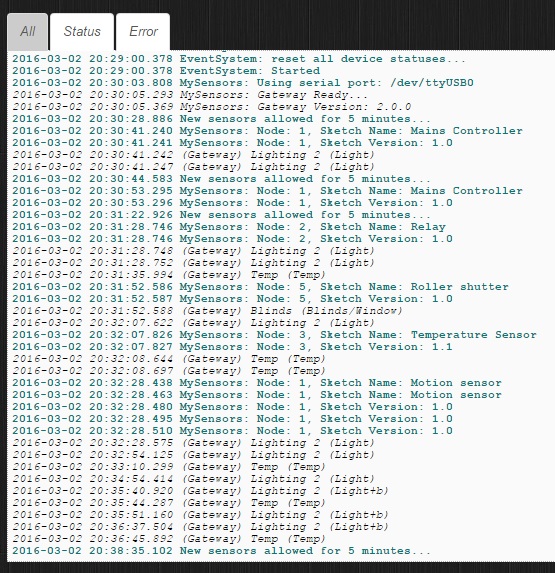
                      0_1475589467935_mdmddmdmd.jpg

                      Boots33B 1 Reply Last reply
                      0
                      • rayanR rayan

                        @Boots33
                        oh , after added this device , happen a Event ! node id of motion sensor and this device is 1 ! and after sense of motion light on in dashborad ! why both Catch node id 1 .
                        i dont add #define node id for motion and for this. but both take id 1 and Interference

                        0_1475589467935_mdmddmdmd.jpg

                        Boots33B Offline
                        Boots33B Offline
                        Boots33
                        Hero Member
                        wrote on last edited by
                        #21

                        @rayan As far as I am aware if you don't set the id manually then the controller gives out an id. Why it has doubled up I don't know. Did you use that arduino before and it was originally given that address?

                        Anyway you will have to delete the node from the mysensors hardware device in Domiticz then clear the eeprom of that arduino using the clearEepromConfig sketch in the mysensors examples and then reload the mains switch sketch. It should then be given a new id.

                        rayanR 1 Reply Last reply
                        1
                        • Boots33B Boots33

                          @rayan As far as I am aware if you don't set the id manually then the controller gives out an id. Why it has doubled up I don't know. Did you use that arduino before and it was originally given that address?

                          Anyway you will have to delete the node from the mysensors hardware device in Domiticz then clear the eeprom of that arduino using the clearEepromConfig sketch in the mysensors examples and then reload the mains switch sketch. It should then be given a new id.

                          rayanR Offline
                          rayanR Offline
                          rayan
                          wrote on last edited by
                          #22

                          @Boots33
                          thank you very much

                          1 Reply Last reply
                          0
                          • Boots33B Boots33

                            @SGi I have used two buttons in my Mains controller project. I have posted just the relay code below to show you what you need to do. I have not used the eeprom to store the state but you could soon add that back in. The main thing you need to do is check to see which sensor the incoming message is for.

                            /**
                               
                               DESCRIPTION
                               Based on the RelayWithButtonActuator sketch
                              
                            */
                            
                            // Enable debug prints to serial monitor
                            #define MY_DEBUG
                            
                            // Enable and select radio type attached
                            #define MY_RADIO_NRF24
                            //#define MY_RADIO_RFM69
                            
                            // Enabled repeater feature for this node
                            //#define MY_REPEATER_FEATURE
                            
                            #include <SPI.h>
                            #include <MySensors.h>
                            #include <Bounce2.h>
                            
                            #define RELAY_ON 1
                            #define RELAY_OFF 0
                            
                            #define SSR_A_ID 1   // Id of the sensor child
                            #define SSR_B_ID 2   // Id of the sensor child
                            
                            const int buttonPinA = 3;
                            const int buttonPinB = 4;
                            const int relayPinA = 5;
                            const int relayPinB = 6;
                            int oldValueA = 0;
                            int oldValueB = 0;
                            bool stateA = false;
                            bool stateB = false;


                            Bounce debouncerA = Bounce();
                            Bounce debouncerB = Bounce();
                            
                            MyMessage msgA(SSR_A_ID, V_STATUS);
                            MyMessage msgB(SSR_B_ID, V_STATUS);
                            
                            void setup()
                            {
                            
                              pinMode(buttonPinA, INPUT_PULLUP); // Setup the button Activate internal pull-up
                              pinMode(buttonPinB, INPUT_PULLUP); // Setup the button Activate internal pull-up
                            // Then set relay pins in output mode
                              pinMode(relayPinA, OUTPUT);
                              pinMode(relayPinB, OUTPUT);
                            
                              // After setting up the buttons, setup debouncer
                              debouncerA.attach(buttonPinA);
                              debouncerA.interval(5);
                              debouncerB.attach(buttonPinB);
                              debouncerB.interval(5);
                            
                              // Make sure relays are off when starting up
                              digitalWrite(relayPinA, RELAY_OFF);
                              digitalWrite(relayPinB, RELAY_OFF);
                              
                              
                            }
                            
                            void presentation()  {
                              // Send the sketch version information to the gateway and Controller
                              sendSketchInfo("Mains Controller", "1.0");
                            
                              // Register all sensors to gw (they will be created as child devices)
                              present(SSR_A_ID, S_LIGHT);
                              present(SSR_B_ID, S_LIGHT);
                            
                            }
                            
                            /*
                               Example on how to asynchronously check for new messages from gw
                            */
                            void loop()
                            {
                              debouncerA.update();
                              // Get the update value
                              int valueA = debouncerA.read();
                              if (valueA != oldValueA && valueA == 0) {
                                send(msgA.set(stateA ? false : true), true); // Send new state and request ack back
                            
                              }
                              oldValueA = valueA;
                             
                            
                              debouncerB.update();
                              // Get the update value
                              int valueB = debouncerB.read();
                              if (valueB != oldValueB && valueB == 0) {
                                send(msgB.set(stateB ? false : true), true); // Send new state and request ack back
                            
                              }
                              oldValueB = valueB;
                            }
                            
                            void receive(const MyMessage &message) {
                              // We only expect one type of message from controller. But we better check anyway.


                              if (message.type == V_STATUS) {
                                  
                                switch (message.sensor) {
                                  case 1:
                                    stateA = message.getBool();
                                    digitalWrite(message.sensor + 4, stateA ? RELAY_ON : RELAY_OFF);
                                    
                                    break;
                                  case 2:
                                    stateB = message.getBool();
                                    digitalWrite(message.sensor + 4, stateB ? RELAY_ON : RELAY_OFF);
                                    
                                    break;
                                  
                                }
                               
                                  // Write some debug info
                                Serial.print("Incoming change for sensor:");
                                Serial.println(message.sensor);
                                Serial.print("from node:");
                                Serial.println(message.sender);
                                Serial.print(", New status: ");
                                Serial.println(message.getBool());
                              }
                            }
                            
                            
                            SGiS Offline
                            SGiS Offline
                            SGi
                            wrote on last edited by
                            #23
                            This post is deleted!
                            1 Reply Last reply
                            0
                            • Boots33B Boots33

                              @SGi I have used two buttons in my Mains controller project. I have posted just the relay code below to show you what you need to do. I have not used the eeprom to store the state but you could soon add that back in. The main thing you need to do is check to see which sensor the incoming message is for.

                              /**
                                 
                                 DESCRIPTION
                                 Based on the RelayWithButtonActuator sketch
                                
                              */
                              
                              // Enable debug prints to serial monitor
                              #define MY_DEBUG
                              
                              // Enable and select radio type attached
                              #define MY_RADIO_NRF24
                              //#define MY_RADIO_RFM69
                              
                              // Enabled repeater feature for this node
                              //#define MY_REPEATER_FEATURE
                              
                              #include <SPI.h>
                              #include <MySensors.h>
                              #include <Bounce2.h>
                              
                              #define RELAY_ON 1
                              #define RELAY_OFF 0
                              
                              #define SSR_A_ID 1   // Id of the sensor child
                              #define SSR_B_ID 2   // Id of the sensor child
                              
                              const int buttonPinA = 3;
                              const int buttonPinB = 4;
                              const int relayPinA = 5;
                              const int relayPinB = 6;
                              int oldValueA = 0;
                              int oldValueB = 0;
                              bool stateA = false;
                              bool stateB = false;


                              Bounce debouncerA = Bounce();
                              Bounce debouncerB = Bounce();
                              
                              MyMessage msgA(SSR_A_ID, V_STATUS);
                              MyMessage msgB(SSR_B_ID, V_STATUS);
                              
                              void setup()
                              {
                              
                                pinMode(buttonPinA, INPUT_PULLUP); // Setup the button Activate internal pull-up
                                pinMode(buttonPinB, INPUT_PULLUP); // Setup the button Activate internal pull-up
                              // Then set relay pins in output mode
                                pinMode(relayPinA, OUTPUT);
                                pinMode(relayPinB, OUTPUT);
                              
                                // After setting up the buttons, setup debouncer
                                debouncerA.attach(buttonPinA);
                                debouncerA.interval(5);
                                debouncerB.attach(buttonPinB);
                                debouncerB.interval(5);
                              
                                // Make sure relays are off when starting up
                                digitalWrite(relayPinA, RELAY_OFF);
                                digitalWrite(relayPinB, RELAY_OFF);
                                
                                
                              }
                              
                              void presentation()  {
                                // Send the sketch version information to the gateway and Controller
                                sendSketchInfo("Mains Controller", "1.0");
                              
                                // Register all sensors to gw (they will be created as child devices)
                                present(SSR_A_ID, S_LIGHT);
                                present(SSR_B_ID, S_LIGHT);
                              
                              }
                              
                              /*
                                 Example on how to asynchronously check for new messages from gw
                              */
                              void loop()
                              {
                                debouncerA.update();
                                // Get the update value
                                int valueA = debouncerA.read();
                                if (valueA != oldValueA && valueA == 0) {
                                  send(msgA.set(stateA ? false : true), true); // Send new state and request ack back
                              
                                }
                                oldValueA = valueA;
                               
                              
                                debouncerB.update();
                                // Get the update value
                                int valueB = debouncerB.read();
                                if (valueB != oldValueB && valueB == 0) {
                                  send(msgB.set(stateB ? false : true), true); // Send new state and request ack back
                              
                                }
                                oldValueB = valueB;
                              }
                              
                              void receive(const MyMessage &message) {
                                // We only expect one type of message from controller. But we better check anyway.


                                if (message.type == V_STATUS) {
                                    
                                  switch (message.sensor) {
                                    case 1:
                                      stateA = message.getBool();
                                      digitalWrite(message.sensor + 4, stateA ? RELAY_ON : RELAY_OFF);
                                      
                                      break;
                                    case 2:
                                      stateB = message.getBool();
                                      digitalWrite(message.sensor + 4, stateB ? RELAY_ON : RELAY_OFF);
                                      
                                      break;
                                    
                                  }
                                 
                                    // Write some debug info
                                  Serial.print("Incoming change for sensor:");
                                  Serial.println(message.sensor);
                                  Serial.print("from node:");
                                  Serial.println(message.sender);
                                  Serial.print(", New status: ");
                                  Serial.println(message.getBool());
                                }
                              }
                              
                              
                              SGiS Offline
                              SGiS Offline
                              SGi
                              wrote on last edited by
                              #24

                              @Boots33 Whoa sorry, here is the code in the proper format/window...

                              /**
                               *******************************
                               *
                               * REVISION HISTORY
                               * Version 0.1 - SGI
                               * 
                               * DESCRIPTION
                               * Sketch to control 4 relays for irrigations, including 4 local push buttons.. 
                               */ 
                              
                              // Enable debug prints to serial monitor
                              #define MY_DEBUG 
                              
                              // Enable and select radio type attached
                              #define MY_RADIO_NRF24
                              //#define MY_RADIO_RFM69
                              
                              // Enable repeater functionality for this node
                              #define MY_REPEATER_FEATURE
                              
                              #include <SPI.h>
                              #include <MySensors.h>
                              #include <Bounce2.h>
                              
                              // Define Relays
                              #define RELAY_1  5  // Arduino Digital I/O pin number for first relay (second on pin+1 etc)
                              #define NUMBER_OF_RELAYS 4 // Total number of attached relays
                              #define RELAY_ON 0  // GPIO value to write to turn on attached relay
                              #define RELAY_OFF 1 // GPIO value to write to turn off attached relay
                              
                              // Define Sensor ID's
                              #define SSR_A_ID 11   // Id of the sensor child
                              #define SSR_B_ID 12   // Id of the sensor child
                              #define SSR_C_ID 13   // Id of the sensor child
                              #define SSR_D_ID 14   // Id of the sensor child
                              
                              // Define Buttons
                              const int buttonPinA = 1;
                              const int buttonPinB = 2;
                              const int buttonPinC = 3;
                              const int buttonPinD = 4;
                              
                              // Define Variables
                              int oldValueA = 0;
                              int oldValueB = 0;
                              int oldValueC = 0;
                              int oldValueD = 0;
                              bool stateA;
                              bool stateB;
                              bool stateC;
                              bool stateD;
                              
                              // Define Debounce
                              Bounce debouncerA = Bounce();
                              Bounce debouncerB = Bounce();
                              Bounce debouncerC = Bounce();
                              Bounce debouncerD = Bounce();
                              
                              // Define messages to send back to gateway
                              MyMessage msgA(SSR_A_ID, V_STATUS);
                              MyMessage msgB(SSR_B_ID, V_STATUS);
                              MyMessage msgC(SSR_C_ID, V_STATUS);
                              MyMessage msgD(SSR_D_ID, V_STATUS);
                              
                              
                              void setup() {
                              
                                // Setup relay pins and set to output then set relays to startup off
                                for (int sensor=1, pin=RELAY_1; sensor<=NUMBER_OF_RELAYS;sensor++, pin++) {
                                  // Then set relay pins in output mode
                                  pinMode(pin, OUTPUT);   
                                  // Set relay off
                                  digitalWrite(pin, 1);
                                }
                              
                                // Setup the button Activate internal pull-up
                                pinMode(buttonPinA, INPUT_PULLUP); 
                                pinMode(buttonPinB, INPUT_PULLUP);
                                pinMode(buttonPinC, INPUT_PULLUP);
                                pinMode(buttonPinD, INPUT_PULLUP);
                              
                                // After setting up the buttons, setup debouncer
                                debouncerA.attach(buttonPinA);
                                debouncerA.interval(5);
                                debouncerB.attach(buttonPinB);
                                debouncerB.interval(5);
                                debouncerC.attach(buttonPinC);
                                debouncerC.interval(5);
                                debouncerD.attach(buttonPinD);
                                debouncerD.interval(5);
                                
                              }
                              
                              void presentation()  
                              {   
                                // Send the sketch version information to the gateway and Controller
                                sendSketchInfo("Irrigation with Buttons", "0.1");
                                
                                // Register all sensors to gw (they will be created as child devices)
                                present(SSR_A_ID, S_LIGHT);
                                present(SSR_B_ID, S_LIGHT);
                                present(SSR_C_ID, S_LIGHT);
                                present(SSR_D_ID, S_LIGHT);
                              }
                              
                              
                              void loop() 
                              {
                                debouncerA.update();
                                // Get the update value
                                int valueA = debouncerA.read();
                                if (valueA != oldValueA && valueA == 0) {
                                  send(msgA.set(stateA?false:true), true); // Send new state and request ack back
                                }
                                oldValueA = valueA;
                               
                                debouncerB.update();
                                // Get the update value
                                int valueB = debouncerB.read();
                                if (valueB != oldValueB && valueB == 0) {
                                  send(msgB.set(stateB?false:true), true); // Send new state and request ack back
                                }
                                oldValueB = valueB;
                              
                                debouncerC.update();
                                // Get the update value
                                int valueC = debouncerC.read();
                                if (valueC != oldValueC && valueC == 0) {
                                  send(msgC.set(stateC ? false : true), true); // Send new state and request ack back
                                }
                                oldValueC = valueC;
                              
                                debouncerD.update();
                                // Get the update value
                                int valueD = debouncerD.read();
                                if (valueD != oldValueD && valueD == 0) {
                                  send(msgD.set(stateD ? false : true), true); // Send new state and request ack back
                                }
                                oldValueD = valueD;  
                              }
                              
                              void receive(const MyMessage &message) {
                                // We only expect one type of message from controller. But we better check anyway.
                                if (message.type==V_STATUS) {
                                   
                                  switch (message.sensor) {
                                    case 1:
                                      stateA = message.getBool();
                                      digitalWrite(message.sensor+4, stateA ? RELAY_ON : RELAY_OFF);
                                      break;
                                    case 2:
                                      stateB = message.getBool();
                                      digitalWrite(message.sensor+4, stateB ? RELAY_ON : RELAY_OFF);
                                      break;
                                    case 3:
                                      stateC = message.getBool();
                                      digitalWrite(message.sensor+4, stateC ? RELAY_ON : RELAY_OFF);
                                      break;
                                    case 4:
                                      stateD = message.getBool();
                                      digitalWrite(message.sensor+4, stateD ? RELAY_ON : RELAY_OFF);
                                      break;
                                      }
                                   // Change relay state
                                   // digitalWrite(message.sensor-1+RELAY_1, message.getBool()?RELAY_ON:RELAY_OFF);
                                   // Store state in eeprom
                                   //saveState(message.sensor, message.getBool());
                                   // Write some debug info
                                   Serial.print("Incoming change for sensor:");
                                   Serial.print(message.sensor);
                                   Serial.print(", New status: ");
                                   Serial.println(message.getBool());
                                 } 
                              }
                              
                              1 Reply Last reply
                              0
                              • Boots33B Boots33

                                @rayan Ok had a quick look and I don't think we need to do a lot for this to work.
                                The only extra change I have made is to add four new lines at the end of the setup function

                                   /*--------------------- Added these lines for toggle switch-------------------------*/
                                  oldValueA = digitalRead(buttonPinA);  // set oldValueA to the current status of the toggle switch
                                  oldValueB = digitalRead(buttonPinB);  // set oldValueB to the current status of the toggle switch
                                  send(msgA.set(false)); // Send off state for relayA to ensure controller knows the switch is off
                                  send(msgB.set(false)); // Send off state for relayB to ensure controller knows the switch is off
                                

                                As you can see the oldValue variables are now set to represent the current state of the toggle switches when the node boots up. this should stop any changes in state being made in the main loop until a switch is toggled.
                                The other two lines just send a message to the controller to tell it the switches are off. this should make the controller icons show the correct state

                                Below is the full sketch, I have nothing to test it on so give it a try and see how it goes

                                #define MY_DEBUG
                                #define MY_RADIO_NRF24
                                #define MY_REPEATER_FEATURE
                                
                                #include <SPI.h>
                                #include <MySensors.h>
                                #include <Bounce2.h>
                                
                                #define RELAY_ON 1
                                #define RELAY_OFF 0
                                
                                #define SSR_A_ID 1   // Id of the sensor child
                                #define SSR_B_ID 2   // Id of the sensor child
                                
                                const int buttonPinA = 18;
                                const int buttonPinB = 19;
                                const int relayPinA = 5;
                                const int relayPinB = 6;
                                int oldValueA = 0;
                                int oldValueB = 0;
                                bool stateA = false;
                                bool stateB = false;


                                Bounce debouncerA = Bounce();
                                Bounce debouncerB = Bounce();
                                
                                MyMessage msgA(SSR_A_ID, V_STATUS);
                                MyMessage msgB(SSR_B_ID, V_STATUS);
                                
                                void setup()
                                {
                                
                                  pinMode(buttonPinA, INPUT_PULLUP); // Setup the button Activate internal pull-up
                                  pinMode(buttonPinB, INPUT_PULLUP); // Setup the button Activate internal pull-up
                                // Then set relay pins in output mode
                                  pinMode(relayPinA, OUTPUT);
                                  pinMode(relayPinB, OUTPUT);
                                
                                  // After setting up the buttons, setup debouncer
                                  debouncerA.attach(buttonPinA);
                                  debouncerA.interval(5);
                                  debouncerB.attach(buttonPinB);
                                  debouncerB.interval(5);
                                
                                  // Make sure relays are off when starting up
                                  digitalWrite(relayPinA, RELAY_OFF);
                                  digitalWrite(relayPinB, RELAY_OFF);
                                  
                                
                                    /*--------------------- Added these lines for toggle switch-------------------------*/
                                  oldValueA = digitalRead(buttonPinA);  // set oldValueA to the current status of the toggle switch
                                  oldValueB = digitalRead(buttonPinB);  // set oldValueB to the current status of the toggle switch
                                  send(msgA.set(false)); // Send off state for relayA to ensure controller knows the switch is off
                                  send(msgB.set(false)); // Send off state for relayB to ensure controller knows the switch is off
                                  
                                }
                                
                                void presentation()  {
                                  // Send the sketch version information to the gateway and Controller
                                  sendSketchInfo("Mains Controller", "1.0");
                                
                                  // Register all sensors to gw (they will be created as child devices)
                                  present(SSR_A_ID, S_LIGHT);
                                  present(SSR_B_ID, S_LIGHT);
                                
                                }
                                
                                /*
                                   Example on how to asynchronously check for new messages from gw
                                */
                                void loop()
                                {
                                  debouncerA.update();
                                  // Get the update value
                                  int valueA = debouncerA.read();
                                  if (valueA != oldValueA) {
                                    send(msgA.set(stateA ? false : true), true); // Send new state and request ack back
                                  oldValueA = valueA;
                                  }
                                 
                                
                                  debouncerB.update();
                                  // Get the update value
                                  int valueB = debouncerB.read();
                                  if (valueB != oldValueB) {
                                    send(msgB.set(stateB ? false : true), true); // Send new state and request ack back
                                  oldValueB = valueB;
                                  }
                                }
                                
                                void receive(const MyMessage &message) {
                                  // We only expect one type of message from controller. But we better check anyway.
                                  if (message.type == V_STATUS) {
                                      
                                    switch (message.sensor) {
                                      case 1:
                                        stateA = message.getBool();
                                        digitalWrite(message.sensor + 4, stateA ? RELAY_ON : RELAY_OFF);
                                        
                                        break;
                                      case 2:
                                        stateB = message.getBool();
                                        digitalWrite(message.sensor + 4, stateB ? RELAY_ON : RELAY_OFF);
                                        
                                        break;
                                      
                                    }
                                   
                                      // Write some debug info
                                    Serial.print("Incoming change for sensor:");
                                    Serial.println(message.sensor);
                                    Serial.print("from node:");
                                    Serial.println(message.sender);
                                    Serial.print(", New status: ");
                                    Serial.println(message.getBool());
                                  }
                                }
                                
                                SGiS Offline
                                SGiS Offline
                                SGi
                                wrote on last edited by
                                #25

                                @Boots33 i just worked out what was wrong the code above... and now understand how the message.sensor number works... now my only issue is why the buttons on pins 2,3,4 work but not pin 1... does pin 1 on the arduino have special use?

                                Boots33B 1 Reply Last reply
                                0
                                • SGiS SGi

                                  @Boots33 i just worked out what was wrong the code above... and now understand how the message.sensor number works... now my only issue is why the buttons on pins 2,3,4 work but not pin 1... does pin 1 on the arduino have special use?

                                  Boots33B Offline
                                  Boots33B Offline
                                  Boots33
                                  Hero Member
                                  wrote on last edited by Boots33
                                  #26

                                  @SGi great that you worked it out and improved your understanding of mysensors as well. 😊. Probably good to post the fix so others may also gain from the thread.

                                  I think digital pins 0 and 1 are also used for serial communication so probably best to avoid them wherever possible. If you turn off debugging they will probably work but you may have problems uploading sketches too. The analogue pins can also be used as digital pins if you need a few more.

                                  1 Reply Last reply
                                  0
                                  • Boots33B Boots33

                                    @rayan maybe trying to send the off message before the presentation stops it from sending

                                    try this , have moved the messages to the main loop where they will only be sent once in the first loop

                                    #define MY_DEBUG
                                    #define MY_RADIO_NRF24
                                    #define MY_REPEATER_FEATURE
                                    
                                    #include <SPI.h>
                                    #include <MySensors.h>
                                    #include <Bounce2.h>
                                    
                                    #define RELAY_ON 1
                                    #define RELAY_OFF 0
                                    
                                    #define SSR_A_ID 1   // Id of the sensor child
                                    #define SSR_B_ID 2   // Id of the sensor child
                                    
                                    const int buttonPinA = 18;
                                    const int buttonPinB = 19;
                                    const int relayPinA = 5;
                                    const int relayPinB = 6;
                                    int oldValueA = 0;
                                    int oldValueB = 0;
                                    bool stateA = false;
                                    bool stateB = false;
                                    int trigger = 0;
                                    
                                    
                                    Bounce debouncerA = Bounce();
                                    Bounce debouncerB = Bounce();
                                    
                                    MyMessage msgA(SSR_A_ID, V_STATUS);
                                    MyMessage msgB(SSR_B_ID, V_STATUS);
                                    
                                    void setup()
                                    {
                                    
                                      pinMode(buttonPinA, INPUT_PULLUP); // Setup the button Activate internal pull-up
                                      pinMode(buttonPinB, INPUT_PULLUP); // Setup the button Activate internal pull-up
                                    // Then set relay pins in output mode
                                      pinMode(relayPinA, OUTPUT);
                                      pinMode(relayPinB, OUTPUT);
                                    
                                      // After setting up the buttons, setup debouncer
                                      debouncerA.attach(buttonPinA);
                                      debouncerA.interval(5);
                                      debouncerB.attach(buttonPinB);
                                      debouncerB.interval(5);
                                    
                                      // Make sure relays are off when starting up
                                      digitalWrite(relayPinA, RELAY_OFF);
                                      digitalWrite(relayPinB, RELAY_OFF);
                                      
                                    
                                        /*--------------------- Added these lines for toggle switch-------------------------*/
                                      oldValueA = digitalRead(buttonPinA);  // set oldValueA to the current status of the toggle switch
                                      oldValueB = digitalRead(buttonPinB);  // set oldValueB to the current status of the toggle switch
                                     // send(msgA.set(false)); // Send off state for relayA to ensure controller knows the switch is off
                                     // send(msgB.set(false)); // Send off state for relayB to ensure controller knows the switch is off
                                      
                                    }
                                    
                                    void presentation()  {
                                      // Send the sketch version information to the gateway and Controller
                                      sendSketchInfo("Mains Controller", "1.0");
                                    
                                      // Register all sensors to gw (they will be created as child devices)
                                      present(SSR_A_ID, S_LIGHT);
                                      present(SSR_B_ID, S_LIGHT);
                                    
                                    }
                                    
                                    /*
                                       Example on how to asynchronously check for new messages from gw
                                    */
                                    void loop()
                                    {
                                    if (trigger == 0){
                                      send(msgA.set(false)); // Send off state for relayA to ensure controller knows the switch is off
                                      send(msgB.set(false)); // Send off state for relayB to ensure controller knows the switch is off
                                      trigger = 1;
                                    }
                                    
                                    
                                      debouncerA.update();
                                      // Get the update value
                                      int valueA = debouncerA.read();
                                      if (valueA != oldValueA) {
                                        send(msgA.set(stateA ? false : true), true); // Send new state and request ack back
                                      oldValueA = valueA;
                                      }
                                     
                                    
                                      debouncerB.update();
                                      // Get the update value
                                      int valueB = debouncerB.read();
                                      if (valueB != oldValueB) {
                                        send(msgB.set(stateB ? false : true), true); // Send new state and request ack back
                                      oldValueB = valueB;
                                      }
                                    }
                                    
                                    void receive(const MyMessage &message) {
                                      // We only expect one type of message from controller. But we better check anyway.
                                      if (message.type == V_STATUS) {
                                          
                                        switch (message.sensor) {
                                          case 1:
                                            stateA = message.getBool();
                                            digitalWrite(message.sensor + 4, stateA ? RELAY_ON : RELAY_OFF);
                                            
                                            break;
                                          case 2:
                                            stateB = message.getBool();
                                            digitalWrite(message.sensor + 4, stateB ? RELAY_ON : RELAY_OFF);
                                            
                                            break;
                                          
                                        }
                                       
                                          // Write some debug info
                                        Serial.print("Incoming change for sensor:");
                                        Serial.println(message.sensor);
                                        Serial.print("from node:");
                                        Serial.println(message.sender);
                                        Serial.print(", New status: ");
                                        Serial.println(message.getBool());
                                      }
                                    }
                                    
                                    pepsonP Offline
                                    pepsonP Offline
                                    pepson
                                    wrote on last edited by
                                    #27

                                    @Boots33 said:

                                    @rayan maybe trying to send the off message before the presentation stops it from sending

                                    try this , have moved the messages to the main loop where they will only be sent once in the first loop

                                    #define MY_DEBUG
                                    #define MY_RADIO_NRF24
                                    #define MY_REPEATER_FEATURE
                                    
                                    #include <SPI.h>
                                    #include <MySensors.h>
                                    #include <Bounce2.h>
                                    
                                    #define RELAY_ON 1
                                    #define RELAY_OFF 0
                                    
                                    #define SSR_A_ID 1   // Id of the sensor child
                                    #define SSR_B_ID 2   // Id of the sensor child
                                    
                                    const int buttonPinA = 18;
                                    const int buttonPinB = 19;
                                    const int relayPinA = 5;
                                    const int relayPinB = 6;
                                    int oldValueA = 0;
                                    int oldValueB = 0;
                                    bool stateA = false;
                                    bool stateB = false;
                                    int trigger = 0;
                                    
                                    
                                    Bounce debouncerA = Bounce();
                                    Bounce debouncerB = Bounce();
                                    
                                    MyMessage msgA(SSR_A_ID, V_STATUS);
                                    MyMessage msgB(SSR_B_ID, V_STATUS);
                                    
                                    void setup()
                                    {
                                    
                                      pinMode(buttonPinA, INPUT_PULLUP); // Setup the button Activate internal pull-up
                                      pinMode(buttonPinB, INPUT_PULLUP); // Setup the button Activate internal pull-up
                                    
                                    
                                      // After setting up the buttons, setup debouncer
                                      debouncerA.attach(buttonPinA);
                                      debouncerA.interval(5);
                                      debouncerB.attach(buttonPinB);
                                      debouncerB.interval(5);
                                    
                                      // Make sure relays are off when starting up
                                      digitalWrite(relayPinA, RELAY_OFF);
                                      digitalWrite(relayPinB, RELAY_OFF);
                                      // Then set relay pins in output mode
                                      pinMode(relayPinA, OUTPUT);
                                      pinMode(relayPinB, OUTPUT);
                                    
                                        /*--------------------- Added these lines for toggle switch-------------------------*/
                                      oldValueA = digitalRead(buttonPinA);  // set oldValueA to the current status of the toggle switch
                                      oldValueB = digitalRead(buttonPinB);  // set oldValueB to the current status of the toggle switch
                                     // send(msgA.set(false)); // Send off state for relayA to ensure controller knows the switch is off
                                     // send(msgB.set(false)); // Send off state for relayB to ensure controller knows the switch is off
                                      
                                    }
                                    
                                    void presentation()  {
                                      // Send the sketch version information to the gateway and Controller
                                      sendSketchInfo("Mains Controller", "1.0");
                                    
                                      // Register all sensors to gw (they will be created as child devices)
                                      present(SSR_A_ID, S_LIGHT);
                                      present(SSR_B_ID, S_LIGHT);
                                    
                                    }
                                    
                                    /*
                                       Example on how to asynchronously check for new messages from gw
                                    */
                                    void loop()
                                    {
                                    if (trigger == 0){
                                      send(msgA.set(false)); // Send off state for relayA to ensure controller knows the switch is off
                                      send(msgB.set(false)); // Send off state for relayB to ensure controller knows the switch is off
                                      trigger = 1;
                                    }
                                    
                                    
                                      debouncerA.update();
                                      // Get the update value
                                      int valueA = debouncerA.read();
                                      if (valueA != oldValueA) {
                                        send(msgA.set(stateA ? false : true), true); // Send new state and request ack back
                                      oldValueA = valueA;
                                      }
                                     
                                    
                                      debouncerB.update();
                                      // Get the update value
                                      int valueB = debouncerB.read();
                                      if (valueB != oldValueB) {
                                        send(msgB.set(stateB ? false : true), true); // Send new state and request ack back
                                      oldValueB = valueB;
                                      }
                                    }
                                    
                                    void receive(const MyMessage &message) {
                                      // We only expect one type of message from controller. But we better check anyway.
                                      if (message.type == V_STATUS) {
                                          
                                        switch (message.sensor) {
                                          case 1:
                                            stateA = message.getBool();
                                            digitalWrite(message.sensor + 4, stateA ? RELAY_ON : RELAY_OFF);
                                            
                                            break;
                                          case 2:
                                            stateB = message.getBool();
                                            digitalWrite(message.sensor + 4, stateB ? RELAY_ON : RELAY_OFF);
                                            
                                            break;
                                          
                                        }
                                       
                                          // Write some debug info
                                        Serial.print("Incoming change for sensor:");
                                        Serial.println(message.sensor);
                                        Serial.print("from node:");
                                        Serial.println(message.sender);
                                        Serial.print(", New status: ");
                                        Serial.println(message.getBool());
                                      }
                                    }
                                    

                                    Thanks this code works ok. But by switch i must still connect to GND to keep change status. Is possible to change it to give only impuls GND to change status Relay ? I want use switch monostable.

                                    And anybody tell me how i can clear all eeprom in my Arduino Mini Pro. I want clear eeprom before upload sketch.

                                    rayanR Boots33B 2 Replies Last reply
                                    0
                                    • pepsonP pepson

                                      @Boots33 said:

                                      @rayan maybe trying to send the off message before the presentation stops it from sending

                                      try this , have moved the messages to the main loop where they will only be sent once in the first loop

                                      #define MY_DEBUG
                                      #define MY_RADIO_NRF24
                                      #define MY_REPEATER_FEATURE
                                      
                                      #include <SPI.h>
                                      #include <MySensors.h>
                                      #include <Bounce2.h>
                                      
                                      #define RELAY_ON 1
                                      #define RELAY_OFF 0
                                      
                                      #define SSR_A_ID 1   // Id of the sensor child
                                      #define SSR_B_ID 2   // Id of the sensor child
                                      
                                      const int buttonPinA = 18;
                                      const int buttonPinB = 19;
                                      const int relayPinA = 5;
                                      const int relayPinB = 6;
                                      int oldValueA = 0;
                                      int oldValueB = 0;
                                      bool stateA = false;
                                      bool stateB = false;
                                      int trigger = 0;
                                      
                                      
                                      Bounce debouncerA = Bounce();
                                      Bounce debouncerB = Bounce();
                                      
                                      MyMessage msgA(SSR_A_ID, V_STATUS);
                                      MyMessage msgB(SSR_B_ID, V_STATUS);
                                      
                                      void setup()
                                      {
                                      
                                        pinMode(buttonPinA, INPUT_PULLUP); // Setup the button Activate internal pull-up
                                        pinMode(buttonPinB, INPUT_PULLUP); // Setup the button Activate internal pull-up
                                      
                                      
                                        // After setting up the buttons, setup debouncer
                                        debouncerA.attach(buttonPinA);
                                        debouncerA.interval(5);
                                        debouncerB.attach(buttonPinB);
                                        debouncerB.interval(5);
                                      
                                        // Make sure relays are off when starting up
                                        digitalWrite(relayPinA, RELAY_OFF);
                                        digitalWrite(relayPinB, RELAY_OFF);
                                        // Then set relay pins in output mode
                                        pinMode(relayPinA, OUTPUT);
                                        pinMode(relayPinB, OUTPUT);
                                      
                                          /*--------------------- Added these lines for toggle switch-------------------------*/
                                        oldValueA = digitalRead(buttonPinA);  // set oldValueA to the current status of the toggle switch
                                        oldValueB = digitalRead(buttonPinB);  // set oldValueB to the current status of the toggle switch
                                       // send(msgA.set(false)); // Send off state for relayA to ensure controller knows the switch is off
                                       // send(msgB.set(false)); // Send off state for relayB to ensure controller knows the switch is off
                                        
                                      }
                                      
                                      void presentation()  {
                                        // Send the sketch version information to the gateway and Controller
                                        sendSketchInfo("Mains Controller", "1.0");
                                      
                                        // Register all sensors to gw (they will be created as child devices)
                                        present(SSR_A_ID, S_LIGHT);
                                        present(SSR_B_ID, S_LIGHT);
                                      
                                      }
                                      
                                      /*
                                         Example on how to asynchronously check for new messages from gw
                                      */
                                      void loop()
                                      {
                                      if (trigger == 0){
                                        send(msgA.set(false)); // Send off state for relayA to ensure controller knows the switch is off
                                        send(msgB.set(false)); // Send off state for relayB to ensure controller knows the switch is off
                                        trigger = 1;
                                      }
                                      
                                      
                                        debouncerA.update();
                                        // Get the update value
                                        int valueA = debouncerA.read();
                                        if (valueA != oldValueA) {
                                          send(msgA.set(stateA ? false : true), true); // Send new state and request ack back
                                        oldValueA = valueA;
                                        }
                                       
                                      
                                        debouncerB.update();
                                        // Get the update value
                                        int valueB = debouncerB.read();
                                        if (valueB != oldValueB) {
                                          send(msgB.set(stateB ? false : true), true); // Send new state and request ack back
                                        oldValueB = valueB;
                                        }
                                      }
                                      
                                      void receive(const MyMessage &message) {
                                        // We only expect one type of message from controller. But we better check anyway.
                                        if (message.type == V_STATUS) {
                                            
                                          switch (message.sensor) {
                                            case 1:
                                              stateA = message.getBool();
                                              digitalWrite(message.sensor + 4, stateA ? RELAY_ON : RELAY_OFF);
                                              
                                              break;
                                            case 2:
                                              stateB = message.getBool();
                                              digitalWrite(message.sensor + 4, stateB ? RELAY_ON : RELAY_OFF);
                                              
                                              break;
                                            
                                          }
                                         
                                            // Write some debug info
                                          Serial.print("Incoming change for sensor:");
                                          Serial.println(message.sensor);
                                          Serial.print("from node:");
                                          Serial.println(message.sender);
                                          Serial.print(", New status: ");
                                          Serial.println(message.getBool());
                                        }
                                      }
                                      

                                      Thanks this code works ok. But by switch i must still connect to GND to keep change status. Is possible to change it to give only impuls GND to change status Relay ? I want use switch monostable.

                                      And anybody tell me how i can clear all eeprom in my Arduino Mini Pro. I want clear eeprom before upload sketch.

                                      rayanR Offline
                                      rayanR Offline
                                      rayan
                                      wrote on last edited by
                                      #28

                                      @pepson
                                      go to : file > examples > mysensors > clear eeprom config
                                      and select arduino pro mini from : tools > board > arduino pro or pro mini

                                      1 Reply Last reply
                                      0
                                      • Boots33B Boots33

                                        @rayan maybe trying to send the off message before the presentation stops it from sending

                                        try this , have moved the messages to the main loop where they will only be sent once in the first loop

                                        #define MY_DEBUG
                                        #define MY_RADIO_NRF24
                                        #define MY_REPEATER_FEATURE
                                        
                                        #include <SPI.h>
                                        #include <MySensors.h>
                                        #include <Bounce2.h>
                                        
                                        #define RELAY_ON 1
                                        #define RELAY_OFF 0
                                        
                                        #define SSR_A_ID 1   // Id of the sensor child
                                        #define SSR_B_ID 2   // Id of the sensor child
                                        
                                        const int buttonPinA = 18;
                                        const int buttonPinB = 19;
                                        const int relayPinA = 5;
                                        const int relayPinB = 6;
                                        int oldValueA = 0;
                                        int oldValueB = 0;
                                        bool stateA = false;
                                        bool stateB = false;
                                        int trigger = 0;
                                        
                                        
                                        Bounce debouncerA = Bounce();
                                        Bounce debouncerB = Bounce();
                                        
                                        MyMessage msgA(SSR_A_ID, V_STATUS);
                                        MyMessage msgB(SSR_B_ID, V_STATUS);
                                        
                                        void setup()
                                        {
                                        
                                          pinMode(buttonPinA, INPUT_PULLUP); // Setup the button Activate internal pull-up
                                          pinMode(buttonPinB, INPUT_PULLUP); // Setup the button Activate internal pull-up
                                        // Then set relay pins in output mode
                                          pinMode(relayPinA, OUTPUT);
                                          pinMode(relayPinB, OUTPUT);
                                        
                                          // After setting up the buttons, setup debouncer
                                          debouncerA.attach(buttonPinA);
                                          debouncerA.interval(5);
                                          debouncerB.attach(buttonPinB);
                                          debouncerB.interval(5);
                                        
                                          // Make sure relays are off when starting up
                                          digitalWrite(relayPinA, RELAY_OFF);
                                          digitalWrite(relayPinB, RELAY_OFF);
                                          
                                        
                                            /*--------------------- Added these lines for toggle switch-------------------------*/
                                          oldValueA = digitalRead(buttonPinA);  // set oldValueA to the current status of the toggle switch
                                          oldValueB = digitalRead(buttonPinB);  // set oldValueB to the current status of the toggle switch
                                         // send(msgA.set(false)); // Send off state for relayA to ensure controller knows the switch is off
                                         // send(msgB.set(false)); // Send off state for relayB to ensure controller knows the switch is off
                                          
                                        }
                                        
                                        void presentation()  {
                                          // Send the sketch version information to the gateway and Controller
                                          sendSketchInfo("Mains Controller", "1.0");
                                        
                                          // Register all sensors to gw (they will be created as child devices)
                                          present(SSR_A_ID, S_LIGHT);
                                          present(SSR_B_ID, S_LIGHT);
                                        
                                        }
                                        
                                        /*
                                           Example on how to asynchronously check for new messages from gw
                                        */
                                        void loop()
                                        {
                                        if (trigger == 0){
                                          send(msgA.set(false)); // Send off state for relayA to ensure controller knows the switch is off
                                          send(msgB.set(false)); // Send off state for relayB to ensure controller knows the switch is off
                                          trigger = 1;
                                        }
                                        
                                        
                                          debouncerA.update();
                                          // Get the update value
                                          int valueA = debouncerA.read();
                                          if (valueA != oldValueA) {
                                            send(msgA.set(stateA ? false : true), true); // Send new state and request ack back
                                          oldValueA = valueA;
                                          }
                                         
                                        
                                          debouncerB.update();
                                          // Get the update value
                                          int valueB = debouncerB.read();
                                          if (valueB != oldValueB) {
                                            send(msgB.set(stateB ? false : true), true); // Send new state and request ack back
                                          oldValueB = valueB;
                                          }
                                        }
                                        
                                        void receive(const MyMessage &message) {
                                          // We only expect one type of message from controller. But we better check anyway.
                                          if (message.type == V_STATUS) {
                                              
                                            switch (message.sensor) {
                                              case 1:
                                                stateA = message.getBool();
                                                digitalWrite(message.sensor + 4, stateA ? RELAY_ON : RELAY_OFF);
                                                
                                                break;
                                              case 2:
                                                stateB = message.getBool();
                                                digitalWrite(message.sensor + 4, stateB ? RELAY_ON : RELAY_OFF);
                                                
                                                break;
                                              
                                            }
                                           
                                              // Write some debug info
                                            Serial.print("Incoming change for sensor:");
                                            Serial.println(message.sensor);
                                            Serial.print("from node:");
                                            Serial.println(message.sender);
                                            Serial.print(", New status: ");
                                            Serial.println(message.getBool());
                                          }
                                        }
                                        
                                        rayanR Offline
                                        rayanR Offline
                                        rayan
                                        wrote on last edited by
                                        #29

                                        @Boots33 this your code is good, but there is a small issue .button work just when the connection is ok (radio with gateway) ! and when radio is disconnect or controller is off, so button dont work handy . do you have any idea for this ? that when controller is off the button work handy

                                        pepsonP Boots33B 2 Replies Last reply
                                        0
                                        • rayanR rayan

                                          @Boots33 this your code is good, but there is a small issue .button work just when the connection is ok (radio with gateway) ! and when radio is disconnect or controller is off, so button dont work handy . do you have any idea for this ? that when controller is off the button work handy

                                          pepsonP Offline
                                          pepsonP Offline
                                          pepson
                                          wrote on last edited by
                                          #30

                                          @rayan
                                          Hi
                                          I do this eeprom clear and after that when i upload sketch for relay with buttons , this not working. Any communication with Gateway. Upload sketch successful write.

                                          I need changes in code to button monostable. Now if i want enable RELAY i must still connect pin to GND by button. I want only give impuls GND and relay should have enable. Again give impuls GND should disable relay. The same as working Fibaro relay switch by Z-Wave.

                                          In code should be add option to select buttons:
                                          -Monostable
                                          -Bistable

                                          rayanR 1 Reply Last reply
                                          0
                                          Reply
                                          • Reply as topic
                                          Log in to reply
                                          • Oldest to Newest
                                          • Newest to Oldest
                                          • Most Votes


                                          22

                                          Online

                                          11.7k

                                          Users

                                          11.2k

                                          Topics

                                          113.1k

                                          Posts


                                          Copyright 2025 TBD   |   Forum Guidelines   |   Privacy Policy   |   Terms of Service
                                          • Login

                                          • Don't have an account? Register

                                          • Login or register to search.
                                          • First post
                                            Last post
                                          0
                                          • MySensors
                                          • OpenHardware.io
                                          • Categories
                                          • Recent
                                          • Tags
                                          • Popular