
Slim Node Si7021 sensor example
-
-
-
So sad I still not getting it working with the slim node :( !!! Always same result either with internal 1mhz or 8mhz...
-
-
Hello
I also have big problems with getting the node to send temp and hum values
It starts up and presents itself to the GW but then nothing happensI have tested the SI721 module with a simple arduino code and then it reads and prints both values just fine
My code is below, in practice its a version of Sensebender Micro code. I have changed the force transmit value to 1
Exactly as @clempat I have tried both 1MHz optiboot and 8MHz internal oscillator without any success/** * The MySensors Arduino library handles the wireless radio link and protocol * between your home built sensors/actuators and HA controller of choice. * The sensors forms a self healing radio network with optional repeaters. Each * repeater and gateway builds a routing tables in EEPROM which keeps track of the * network topology allowing messages to be routed to nodes. * * Created by Henrik Ekblad <henrik.ekblad@mysensors.org> * Copyright (C) 2013-2015 Sensnology AB * Full contributor list: https://github.com/mysensors/Arduino/graphs/contributors * * Documentation: http://www.mysensors.org * Support Forum: http://forum.mysensors.org * * This program is free software; you can redistribute it and/or * modify it under the terms of the GNU General Public License * version 2 as published by the Free Software Foundation. * ******************************* * * REVISION HISTORY * Version 1.0 - Thomas Bowman MC8rch * * DESCRIPTION * Default sensor sketch for Sensebender Micro module * Act as a temperature / humidity sensor by default. * * If A0 is held low while powering on, it will enter testmode, which verifies all on-board peripherals * * Battery voltage is as battery percentage (Internal message), and optionally as a sensor value (See defines below) * * * Version 1.3 - Thomas Bowman MC8rch * Improved transmission logic, eliminating spurious transmissions (when temperatuere / humidity fluctuates 1 up and down between measurements) * Added OTA boot mode, need to hold A1 low while applying power. (uses slightly more power as it's waiting for bootloader messages) * * Version 1.4 - Thomas Bowman MC8rch * * Corrected division in the code deciding whether to transmit or not, that resulted in generating an integer. Now it's generating floats as expected. * Simplified detection for OTA bootloader, now detecting if MY_OTA_FIRMWARE_FEATURE is defined. If this is defined sensebender automaticly waits 300mS after each transmission * Moved Battery status messages, so they are transmitted together with normal sensor updates (but only every 60th minute) * */ // Enable debug prints to serial monitor #define MY_DEBUG // Define a static node address, remove if you want auto address assignment //#deine MY_NODE_ID 3 // Enable and select radio type attached #define MY_RADIO_NRF24 //#define MY_RADIO_RFM69 #include <SPI.h> #include <MySensors.h> #include <Wire.h> #include <SI7021-master\SI7021.h> #include <RunningAverage.h> // Uncomment the line below, to transmit battery voltage as a normal sensor value #define BATT_SENSOR 199 #define RELEASE "1.4" #define AVERAGES 2 // Child sensor ID's #define CHILD_ID_TEMP 1 #define CHILD_ID_HUM 2 // How many milli seconds between each measurement #define MEASURE_INTERVAL 60000 // FORCE_TRANSMIT_INTERVAL, this number of times of wakeup, the sensor is forced to report all values to the controller #define FORCE_TRANSMIT_INTERVAL 1 // When MEASURE_INTERVAL is 60000 and FORCE_TRANSMIT_INTERVAL is 30, we force a transmission every 30 minutes. // Between the forced transmissions a tranmission will only occur if the measured value differs from the previous measurement // HUMI_TRANSMIT_THRESHOLD tells how much the humidity should have changed since last time it was transmitted. Likewise with // TEMP_TRANSMIT_THRESHOLD for temperature threshold. #define HUMI_TRANSMIT_THRESHOLD 0.5 #define TEMP_TRANSMIT_THRESHOLD 0.5 SI7021 humiditySensor; // Sensor messages MyMessage msgHum(CHILD_ID_HUM, V_HUM); MyMessage msgTemp(CHILD_ID_TEMP, V_TEMP); #ifdef BATT_SENSOR MyMessage msgBatt(BATT_SENSOR, V_VOLTAGE); #endif // Global settings int measureCount = 0; int sendBattery = 0; boolean isMetric = true; boolean highfreq = true; boolean transmission_occured = false; // Storage of old measurements float lastTemperature = -100; int lastHumidity = -100; long lastBattery = -100; RunningAverage raHum(AVERAGES); /**************************************************** * * Setup code * ****************************************************/ void setup() { Serial.begin(9600); Serial.print(F("Sensebender Micro FW ")); Serial.print(RELEASE); Serial.flush(); humiditySensor.begin(); Serial.flush(); Serial.println(F(" - Online!")); isMetric = getConfig().isMetric; Serial.print(F("isMetric: ")); Serial.println(isMetric); raHum.clear(); sendTempHumidityMeasurements(false); sendBattLevel(false); } void presentation() { sendSketchInfo("TempHum", RELEASE); present(CHILD_ID_TEMP, S_TEMP); present(CHILD_ID_HUM, S_HUM); #ifdef BATT_SENSOR present(BATT_SENSOR, S_POWER); #endif } /*********************************************** * * Main loop function * ***********************************************/ void loop() { measureCount++; sendBattery++; bool forceTransmit = false; transmission_occured = false; if (measureCount > FORCE_TRANSMIT_INTERVAL) { // force a transmission forceTransmit = true; measureCount = 0; } sendTempHumidityMeasurements(forceTransmit); /* if (sendBattery > 60) { sendBattLevel(forceTransmit); // Not needed to send battery info that often sendBattery = 0; }*/ sleep(MEASURE_INTERVAL); } /********************************************* * * Sends temperature and humidity from Si7021 sensor * * Parameters * - force : Forces transmission of a value (even if it's the same as previous measurement) * *********************************************/ void sendTempHumidityMeasurements(bool force) { bool tx = force; si7021_env data = humiditySensor.getHumidityAndTemperature(); raHum.addValue(data.humidityPercent); float diffTemp = abs(lastTemperature - (isMetric ? data.celsiusHundredths : data.fahrenheitHundredths) / 100.0); float diffHum = abs(lastHumidity - raHum.getAverage()); Serial.print(F("TempDiff :"));Serial.println(diffTemp); Serial.print(F("HumDiff :"));Serial.println(diffHum); if (isnan(diffHum)) tx = true; if (diffTemp > TEMP_TRANSMIT_THRESHOLD) tx = true; if (diffHum > HUMI_TRANSMIT_THRESHOLD) tx = true; if (tx) { measureCount = 0; float temperature = (isMetric ? data.celsiusHundredths : data.fahrenheitHundredths) / 100.0; int humidity = data.humidityPercent; Serial.print("T: ");Serial.println(temperature); Serial.print("H: ");Serial.println(humidity); send(msgTemp.set(temperature, 1)); send(msgHum.set(humidity)); lastTemperature = temperature; lastHumidity = humidity; transmission_occured = true; if (sendBattery > 60) { sendBattLevel(true); // Not needed to send battery info that often sendBattery = 0; } } } /******************************************** * * Sends battery information (battery percentage) * * Parameters * - force : Forces transmission of a value * *******************************************/ void sendBattLevel(bool force) { if (force) lastBattery = -1; long vcc = readVcc(); if (vcc != lastBattery) { lastBattery = vcc; #ifdef BATT_SENSOR float send_voltage = float(vcc) / 1000.0f; send(msgBatt.set(send_voltage, 3)); #endif // Calculate percentage vcc = vcc - 1900; // subtract 1.9V from vcc, as this is the lowest voltage we will operate at long percent = vcc / 14.0; sendBatteryLevel(percent); transmission_occured = true; } } /******************************************* * * Internal battery ADC measuring * *******************************************/ long readVcc() { // Read 1.1V reference against AVcc // set the reference to Vcc and the measurement to the internal 1.1V reference #if defined(__AVR_ATmega32U4__) || defined(__AVR_ATmega1280__) || defined(__AVR_ATmega2560__) ADMUX = _BV(REFS0) | _BV(MUX4) | _BV(MUX3) | _BV(MUX2) | _BV(MUX1); #elif defined (__AVR_ATtiny24__) || defined(__AVR_ATtiny44__) || defined(__AVR_ATtiny84__) ADMUX = _BV(MUX5) | _BV(MUX0); #elif defined (__AVR_ATtiny25__) || defined(__AVR_ATtiny45__) || defined(__AVR_ATtiny85__) ADcdMUX = _BV(MUX3) | _BV(MUX2); #else ADMUX = _BV(REFS0) | _BV(MUX3) | _BV(MUX2) | _BV(MUX1); #endif delay(2); // Wait for Vref to settle ADCSRA |= _BV(ADSC); // Start conversion while (bit_is_set(ADCSRA, ADSC)); // measuring uint8_t low = ADCL; // must read ADCL first - it then locks ADCH uint8_t high = ADCH; // unlocks both long result = (high << 8) | low; result = 1125300L / result; // Calculate Vcc (in mV); 1125300 = 1.1*1023*1000 return result; // Vcc in millivolts } -
It would be interesting if someone with issues also tried older versions of libs for Si7021 and/or MySensors.
-
So, after a few months of 2 nodes up and running using the HTU21D sensor I have come the conclusion that the HTU21D is no good for where I live. Lately it has been getting cooler outside (down to mid 50s F) but humidity is still high. As the evening progresses the humidity gets to 100% and the node no longer sends data. This happens around 6pm every day (about half and hour after sunset). It then comes back online at about 10 am the next day. The node that I have inside does not have this issue (same shipment of arduino, pcb, and HTU21D sensors and the same arduino code). Both running off of fresh AAs. May need to upgrade to the SI7021 for outside node.
Here is the graph showing last 7 days. As you can see it flatlines (literally!) at 100% humidity!
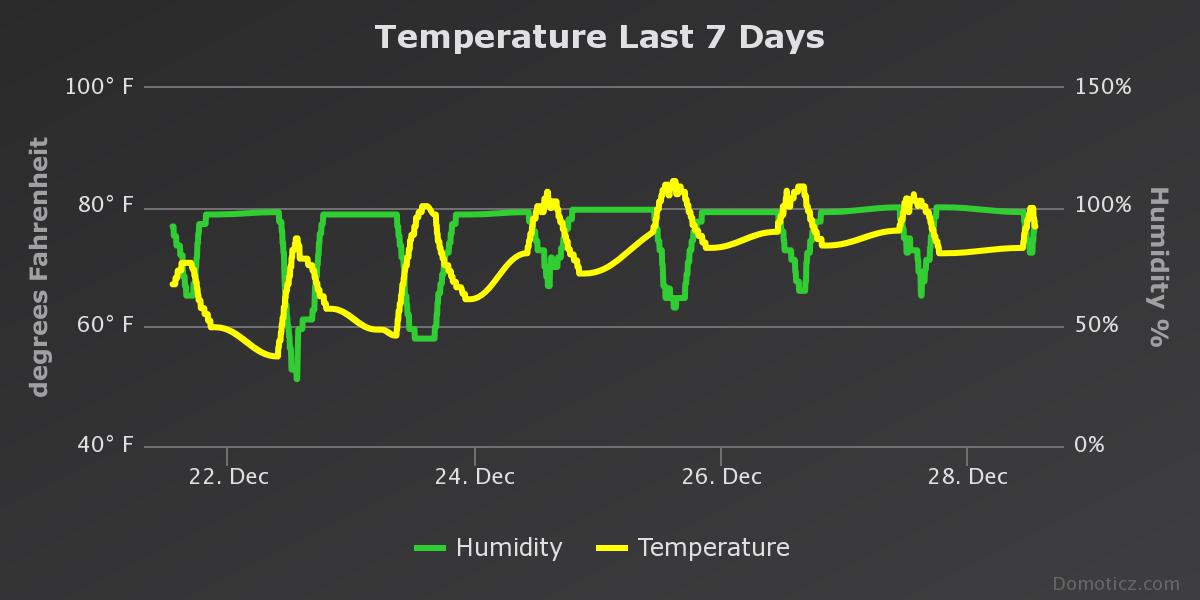
All good times with the learning!
-
So, after a few months of 2 nodes up and running using the HTU21D sensor I have come the conclusion that the HTU21D is no good for where I live. Lately it has been getting cooler outside (down to mid 50s F) but humidity is still high. As the evening progresses the humidity gets to 100% and the node no longer sends data. This happens around 6pm every day (about half and hour after sunset). It then comes back online at about 10 am the next day. The node that I have inside does not have this issue (same shipment of arduino, pcb, and HTU21D sensors and the same arduino code). Both running off of fresh AAs. May need to upgrade to the SI7021 for outside node.
Here is the graph showing last 7 days. As you can see it flatlines (literally!) at 100% humidity!
All good times with the learning!
-
-
@m26872 & @bjacobse - Yes, 100% humidity is normal here. Good old Florida! My concern is that the node stops reporting. Possibly due to condensation shorting out something. During the summer here we also hit 100% humidity but it is also a lot hotter (high 90s). Now, I think that the cooler temps are forcing a dew point that is allowing water to condense on the node. Then during the morning it drys out and resumes transmitting. I would like to find a way to stop this.
-
@m26872 & @bjacobse - Yes, 100% humidity is normal here. Good old Florida! My concern is that the node stops reporting. Possibly due to condensation shorting out something. During the summer here we also hit 100% humidity but it is also a lot hotter (high 90s). Now, I think that the cooler temps are forcing a dew point that is allowing water to condense on the node. Then during the morning it drys out and resumes transmitting. I would like to find a way to stop this.
-
@m26872 I have looked at a lot of those links. I am leaning towards covering my node in non-reactive glue. This will seal all contacts. The only part that would be difficult would be the actual teeny tiny sensor chip on the HTU21D. Hopefully any condensation there can be minimal. The next step would be to make sure the battery case is sealed as well (although I do not think this will be much of an issue).
-
Do you have some battery saving stuff in your code, so you maybe wakeup check temp + humidity, and if they are same value as previous, then go back to sleep - no need to use battery usage to send same values again, this can cause your sensor to not report values
-
Do you have some battery saving stuff in your code, so you maybe wakeup check temp + humidity, and if they are same value as previous, then go back to sleep - no need to use battery usage to send same values again, this can cause your sensor to not report values
-
I've done 6 nodes off this sensor. Do I have to change something else then node id? Also I'm using the 1mhz bootloader with bud rate 9200 should I change that in the sketch?
Seems like I only get the temprature and humidity once on first start up...
Edit:
I think my problem is that I haven't changed the bud rate in mysensors.h file. I've just reinstalled everything now and I don't know how to get si7021 installed the right way. I installed the package inside arduino but it doesn't work.
I such a noob sorry guys -
I have problem to get my sensors to work. Thay start up and shows a not so accurate value sometimes and thay report once or twice but then never again. I thought it was because buad rate was wrong in the MyConfig.H file. Now i changed that and i tried a few different codes and librarys. Nothing seems to work.
So my question is which code and library should i use?
I got the slim node and sensor as in the first post.
Im running 1mhz optiboot bootloader from the slim node thread
And i updated mysensors to 2.1. -
I have problem to get my sensors to work. Thay start up and shows a not so accurate value sometimes and thay report once or twice but then never again. I thought it was because buad rate was wrong in the MyConfig.H file. Now i changed that and i tried a few different codes and librarys. Nothing seems to work.
So my question is which code and library should i use?
I got the slim node and sensor as in the first post.
Im running 1mhz optiboot bootloader from the slim node thread
And i updated mysensors to 2.1.@Eawo Sorry for a late reply. Please post your sketch to begin with.
Do you have v2.1 for both gateway and sensors?
"#define MY_BAUD_RATE 9600" should be before the "include MySensors.h" and that should be all regarding baud rate setting. No need to mess with MyConfig.h in v2.x.
A lot of the SlimNode example codes are still in v1.x unfortunately. So please look at more recent post above in this thread instead for v2.x.To verify the Si7021 you should use a clean Arduino+Si7021 setup with the only hw/sw needed for that, i.e. no radio or MySensors-library. Si7021-example sketches generally comes with the lib.
-
Ok i redid everything from skratch and now i got it working atleast with 1 node havnt tried the other yet.
I used the code miljume did link the only line i changed was
#include <SI7021-master\SI7021.h>
to
#include <SI7021.h>
It is working but it shows up as 2 nodes in domoticz
1401 0 TempHum Temp + Humidity WTGR800 20.9 C, 35 % 2017-01-19 17:59:05
1400 0 TempHum Temp + Humidity WTGR800 20.7 C, 34 % 2017-01-19 17:59:05
anyone know why?
also this does report every 60sec will this be short battery life? -
Ok i redid everything from skratch and now i got it working atleast with 1 node havnt tried the other yet.
I used the code miljume did link the only line i changed was
#include <SI7021-master\SI7021.h>
to
#include <SI7021.h>
It is working but it shows up as 2 nodes in domoticz
1401 0 TempHum Temp + Humidity WTGR800 20.9 C, 35 % 2017-01-19 17:59:05
1400 0 TempHum Temp + Humidity WTGR800 20.7 C, 34 % 2017-01-19 17:59:05
anyone know why?
also this does report every 60sec will this be short battery life?@Eawo Domoticz groups sensors after the order you present them in, see: https://forum.mysensors.org/topic/5132/ds18b20-ans-sht31-d-show-up-as-combined-sensors-on-domoticz/15
I send every 5 minutes and check the value before so that I only send if the value has changed
I have been running my sensor for nearly 2 months now and battery level has only decreased 1-2%
Make sure you use 1 MHz bootloader




Hello! It looks like you're interested in this conversation, but you don't have an account yet.
Getting fed up of having to scroll through the same posts each visit? When you register for an account, you'll always come back to exactly where you were before, and choose to be notified of new replies (either via email, or push notification). You'll also be able to save bookmarks and upvote posts to show your appreciation to other community members.
With your input, this post could be even better 💗
Register Login