Skip to content
  • MySensors
  • OpenHardware.io
  • Categories
  • Recent
  • Tags
  • Popular
Skins
  • Light
  • Brite
  • Cerulean
  • Cosmo
  • Flatly
  • Journal
  • Litera
  • Lumen
  • Lux
  • Materia
  • Minty
  • Morph
  • Pulse
  • Sandstone
  • Simplex
  • Sketchy
  • Spacelab
  • United
  • Yeti
  • Zephyr
  • Dark
  • Cyborg
  • Darkly
  • Quartz
  • Slate
  • Solar
  • Superhero
  • Vapor

  • Default (No Skin)
  • No Skin
Collapse
Brand Logo
  1. Home
  2. Controllers
  3. Vera
  4. "Last update" node field in Vera interface

"Last update" node field in Vera interface

Scheduled Pinned Locked Moved Vera
5 Posts 3 Posters 1.4k Views 3 Watching
  • Oldest to Newest
  • Newest to Oldest
  • Most Votes
Reply
  • Reply as topic
Log in to reply
This topic has been deleted. Only users with topic management privileges can see it.
  • A Offline
    A Offline
    Alexander Ivanov
    wrote on last edited by
    #1

    I have 21:50 local time at Vera clock. Two temperature nodes which updates info twice a mins show different strange time:
    (node1) Last Update:20:09
    (node2) Last Update:19:54

    What does "Last update" node field really means ? And how to add date there to see that the node still responding?

    1 Reply Last reply
    0
    • hekH Offline
      hekH Offline
      hek
      Admin
      wrote on last edited by
      #2

      https://github.com/mysensors/Vera/blob/development/L_Arduino.lua#L236

      korttomaK A 2 Replies Last reply
      2
      • hekH hek

        https://github.com/mysensors/Vera/blob/development/L_Arduino.lua#L236

        korttomaK Offline
        korttomaK Offline
        korttoma
        Hero Member
        wrote on last edited by
        #3

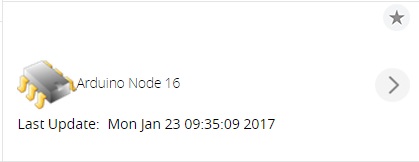
        @hek tested to replace '%H:%M' with '%c' and it gave a quite nice result:

        0_1485157093862_procent_c.jpg

        • Tomas
        1 Reply Last reply
        2
        • hekH hek

          https://github.com/mysensors/Vera/blob/development/L_Arduino.lua#L236

          A Offline
          A Offline
          Alexander Ivanov
          wrote on last edited by
          #4

          @hek, many thanks, changed the format and see full info now!
          Question about this Last update value: does it show when value was changed for Vera or this is time when the node sent last value (even if the node sent same value as before)?
          I mean, does it show time of last communication of with the node, or time when value was changed?

          1 Reply Last reply
          0
          • hekH Offline
            hekH Offline
            hek
            Admin
            wrote on last edited by
            #5

            If I remember correctly it show last time any value was received for the device. Updated or not.

            1 Reply Last reply
            1
            Reply
            • Reply as topic
            Log in to reply
            • Oldest to Newest
            • Newest to Oldest
            • Most Votes


            12

            Online

            11.7k

            Users

            11.2k

            Topics

            113.1k

            Posts


            Copyright 2025 TBD   |   Forum Guidelines   |   Privacy Policy   |   Terms of Service
            • Login

            • Don't have an account? Register

            • Login or register to search.
            • First post
              Last post
            0
            • MySensors
            • OpenHardware.io
            • Categories
            • Recent
            • Tags
            • Popular