Skip to content
  • MySensors
  • OpenHardware.io
  • Categories
  • Recent
  • Tags
  • Popular
Skins
  • Light
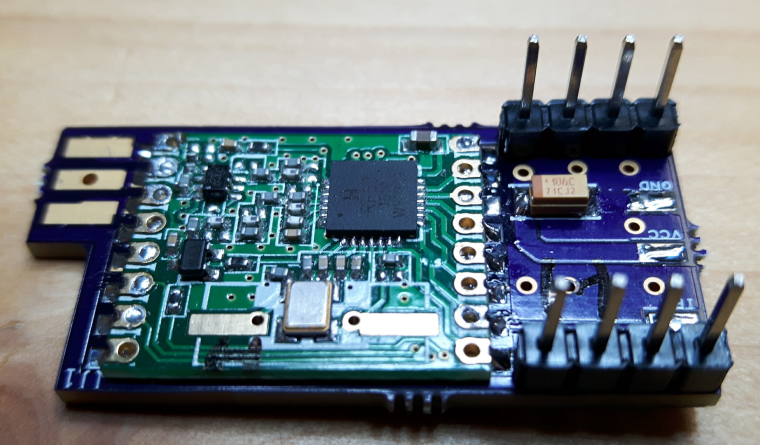
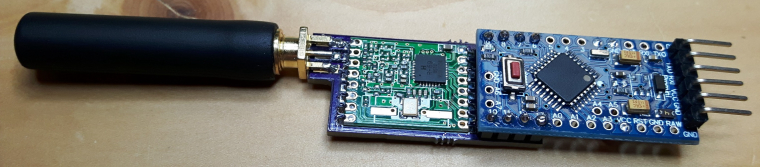
  • Brite
  • Cerulean
  • Cosmo
  • Flatly
  • Journal
  • Litera
  • Lumen
  • Lux
  • Materia
  • Minty
  • Morph
  • Pulse
  • Sandstone
  • Simplex
  • Sketchy
  • Spacelab
  • United
  • Yeti
  • Zephyr
  • Dark
  • Cyborg
  • Darkly
  • Quartz
  • Slate
  • Solar
  • Superhero
  • Vapor

  • Default (No Skin)
  • No Skin
Collapse
Brand Logo
  1. Home
  2. OpenHardware.io
  3. 💬 RFM69(H)W Arduino Mini Pro Shield

💬 RFM69(H)W Arduino Mini Pro Shield

Scheduled Pinned Locked Moved OpenHardware.io
rfm69arduino pro minishieldrfm69hw
27 Posts 8 Posters 9.3k Views 5 Watching
  • Oldest to Newest
  • Newest to Oldest
  • Most Votes
Reply
  • Reply as topic
Log in to reply
This topic has been deleted. Only users with topic management privileges can see it.
  • NeverDieN Offline
    NeverDieN Offline
    NeverDie
    Hero Member
    wrote on last edited by NeverDie
    #2

    Interesting design. Are all those holes for cooling, or for better connection to the ground plane? How much of a difference do they make?

    Also, you may be interested in this:
    https://www.openhardware.io/view/268/RFM69HW-interstitial-board-for-Pro-Mini-Temp-Humidity-sensor

    sundberg84S 1 Reply Last reply
    1
    • J Offline
      J Offline
      jlaraujo
      wrote on last edited by
      #3

      They are for a better connection to the ground plane, in theory to reduce noise. They were added in the spirit of "it can't hurt".
      Thanks for sharing the interstitial board, i'm currently thinking in improving the design to overlap more of the board with the Mini Pro, i'll post some pictures of the current version already soldered tomorrow.

      Domoticz, mysensors 2.3.1, RFM69 and RF24 sensors

      1 Reply Last reply
      0
      • NeverDieN NeverDie

        Interesting design. Are all those holes for cooling, or for better connection to the ground plane? How much of a difference do they make?

        Also, you may be interested in this:
        https://www.openhardware.io/view/268/RFM69HW-interstitial-board-for-Pro-Mini-Temp-Humidity-sensor

        sundberg84S Offline
        sundberg84S Offline
        sundberg84
        Hardware Contributor
        wrote on last edited by
        #4

        @NeverDie - Its called "Via Stitching" http://techdocs.altium.com/display/ADOH/Via+Stitching#

        Could the author add design files as well (not only gerber?).
        Im interested in the RFM antenna design. Do you have any library used for the RFM module as well?

        Controller: Proxmox VM - Home Assistant
        MySensors GW: Arduino Uno - W5100 Ethernet, Gw Shield Nrf24l01+ 2,4Ghz
        MySensors GW: Arduino Uno - Gw Shield RFM69, 433mhz
        RFLink GW - Arduino Mega + RFLink Shield, 433mhz

        J NeverDieN 2 Replies Last reply
        0
        • gohanG Offline
          gohanG Offline
          gohan
          Mod
          wrote on last edited by
          #5

          how does it connect to the Arduino? Does it sticks out or fits just completely over the mini pro?

          1 Reply Last reply
          0
          • sundberg84S sundberg84

            @NeverDie - Its called "Via Stitching" http://techdocs.altium.com/display/ADOH/Via+Stitching#

            Could the author add design files as well (not only gerber?).
            Im interested in the RFM antenna design. Do you have any library used for the RFM module as well?

            J Offline
            J Offline
            jlaraujo
            wrote on last edited by
            #6

            @sundberg84 Well, it has no antenna, it uses a PCB SMA plug mouted horizontally, also allows a wire antenna to be connected to the SMD pad for flexibility. The library for DesignSpark is here https://github.com/NeuroRoboticTech/NRTDesignSparkLibraries.
            Unfortunately, I don't seem to be able to export the DesignSpark pcb to other format, humm, will have to think if DesignSpark is the way to go forwardm don't want to get stuck on a single platform.
            Anyway, here is the PCB file:0_1494349092804_RFM69H.pcb

            Domoticz, mysensors 2.3.1, RFM69 and RF24 sensors

            1 Reply Last reply
            1
            • sundberg84S sundberg84

              @NeverDie - Its called "Via Stitching" http://techdocs.altium.com/display/ADOH/Via+Stitching#

              Could the author add design files as well (not only gerber?).
              Im interested in the RFM antenna design. Do you have any library used for the RFM module as well?

              NeverDieN Offline
              NeverDieN Offline
              NeverDie
              Hero Member
              wrote on last edited by
              #7

              @sundberg84 said in 💬 RFM69(H)W Arduino Mini Pro Shield:

              @NeverDie - Its called "Via Stitching" http://techdocs.altium.com/display/ADOH/Via+Stitching#

              When it comes to RF, it seems like there are competing theories floating around. I guess via stitching is one theory. Another theory is that you want the ground plane to be as uninterrupted as possible. I've also seen a theory that says you want to have only one point of connection between nets. I'm not sure how to resolve all that, except by experimentation. That's why I'm glad the OP machine gunned his board with via's: it's something new to try for a compare/contrast. Since it doesn't add to cost, I'd be delighted if it turns out to be beneficial.

              scalzS 1 Reply Last reply
              1
              • NeverDieN NeverDie

                @sundberg84 said in 💬 RFM69(H)W Arduino Mini Pro Shield:

                @NeverDie - Its called "Via Stitching" http://techdocs.altium.com/display/ADOH/Via+Stitching#

                When it comes to RF, it seems like there are competing theories floating around. I guess via stitching is one theory. Another theory is that you want the ground plane to be as uninterrupted as possible. I've also seen a theory that says you want to have only one point of connection between nets. I'm not sure how to resolve all that, except by experimentation. That's why I'm glad the OP machine gunned his board with via's: it's something new to try for a compare/contrast. Since it doesn't add to cost, I'd be delighted if it turns out to be beneficial.

                scalzS Offline
                scalzS Offline
                scalz
                Hardware Contributor
                wrote on last edited by
                #8

                @NeverDie said in 💬 RFM69(H)W Arduino Mini Pro Shield:

                @sundberg84 said in 💬 RFM69(H)W Arduino Mini Pro Shield:

                @NeverDie - Its called "Via Stitching" http://techdocs.altium.com/display/ADOH/Via+Stitching#

                When it comes to RF, it seems like there are competing theories

                not competing, i would say complementary :)

                1 Reply Last reply
                0
                • J Offline
                  J Offline
                  jlaraujo
                  wrote on last edited by
                  #9

                  Updated the project with two pictures, i'm also posting them here.
                  0_1494365871132_board with RFM69.jpg
                  0_1494365896700_board full.jpg

                  Regarding the performance, i haven't done many tests yet, with the limited tests that i have done i suspect that is is better now than just connecting the wires to the Arduino.

                  Domoticz, mysensors 2.3.1, RFM69 and RF24 sensors

                  1 Reply Last reply
                  0
                  • stevebusS Offline
                    stevebusS Offline
                    stevebus
                    wrote on last edited by
                    #10

                    Hi,

                    Neat project. This will really make for much cleaner projects for me.

                    I ordered a few to play with and I'm trying to understand the connections. I soldered the RFM69 module on, no problem, and the antenna. I'll do the capacitor next.

                    However, I'm trying to figure out the GND, VCC, and IRQ connections. Are the pads the only option for connection, or do the holes next to them work too (hole a lot easier to solder than pad :-)) ? I don't see any kind of etching connecting the two visible on either the top or the bottom. I assume the intent is to connect a wire to them and then run that wire "underneath" the mini to connect to GND, VSS, and D2 respectively?

                    Sorry if that's a stupid question, as I don't have tools to via the design files.

                    --Steve

                    Vera Edge/UI7; mysensors; Arduino's and RPIs; data posted to Azure for an IoT 'dashboard' of my house

                    Opinions expressed here are my own and do not necessarily reflect Microsoft's feelings on a given topic :-)

                    J 1 Reply Last reply
                    0
                    • stevebusS stevebus

                      Hi,

                      Neat project. This will really make for much cleaner projects for me.

                      I ordered a few to play with and I'm trying to understand the connections. I soldered the RFM69 module on, no problem, and the antenna. I'll do the capacitor next.

                      However, I'm trying to figure out the GND, VCC, and IRQ connections. Are the pads the only option for connection, or do the holes next to them work too (hole a lot easier to solder than pad :-)) ? I don't see any kind of etching connecting the two visible on either the top or the bottom. I assume the intent is to connect a wire to them and then run that wire "underneath" the mini to connect to GND, VSS, and D2 respectively?

                      Sorry if that's a stupid question, as I don't have tools to via the design files.

                      --Steve

                      J Offline
                      J Offline
                      jlaraujo
                      wrote on last edited by
                      #11

                      Glad the project seems interesting, the possibility to it being useful to someone else is the main reason for sharing.

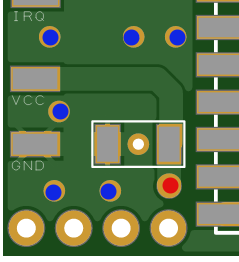
                      Regarding the connections, for GND, you can connect to any of the blue dots, for VCC to the red dot, IRQ has no option other than the pad.
                      0_1496187001732_upload-f023faee-04de-4454-9623-144db56da374

                      My idea in using the pads was to make the board easier to slide below the mini, exactly like you state.
                      If you want, i can create a custom board for you with hole instead of pad, i used designspark PCB which is easy(er) to use but does not allow to export to other PCB software formats :-(.

                      Domoticz, mysensors 2.3.1, RFM69 and RF24 sensors

                      1 Reply Last reply
                      0
                      • stevebusS Offline
                        stevebusS Offline
                        stevebus
                        wrote on last edited by
                        #12

                        Thanks for the quick reply. No need for special build for IRQ (although that might be a good addition for a future rev to have that option). I can solder to a pad, it's just trickier as my E.E. training, skills, steadier hands, and better eyesight were 20+ years ago :-)

                        For the holes, out of curiosity, I see the VCC hole connection trace on the board, but I can't see how the pins are all connected to GND (i.e. can't see any traces). Is it between the layers of the board? Or am I just going blind?

                        Thanks again for the contribution as this is a very nice project.

                        Vera Edge/UI7; mysensors; Arduino's and RPIs; data posted to Azure for an IoT 'dashboard' of my house

                        Opinions expressed here are my own and do not necessarily reflect Microsoft's feelings on a given topic :-)

                        J 1 Reply Last reply
                        0
                        • stevebusS stevebus

                          Thanks for the quick reply. No need for special build for IRQ (although that might be a good addition for a future rev to have that option). I can solder to a pad, it's just trickier as my E.E. training, skills, steadier hands, and better eyesight were 20+ years ago :-)

                          For the holes, out of curiosity, I see the VCC hole connection trace on the board, but I can't see how the pins are all connected to GND (i.e. can't see any traces). Is it between the layers of the board? Or am I just going blind?

                          Thanks again for the contribution as this is a very nice project.

                          J Offline
                          J Offline
                          jlaraujo
                          wrote on last edited by
                          #13

                          @stevebus you are going blind :-D (like me probably) all those pins are in the ground plane, trying to provide a uniform ground to see if it improves the performance of the radio (by reducing outside interference). You can see that clearly on the gnd of the capacitor or in the gnd pad.

                          Domoticz, mysensors 2.3.1, RFM69 and RF24 sensors

                          gohanG 1 Reply Last reply
                          0
                          • stevebusS Offline
                            stevebusS Offline
                            stevebus
                            wrote on last edited by
                            #14

                            Ah! I see! (said the blind man :-) ).

                            I had never really paid attention to PCB design, so didn't realize there were often "planes" for some widespread connections (like ground)... makes perfect sense.

                            Thx again for the quick responses. I'll be soldering up the rest of the connections tomorrow so I'll be able to give it a test.

                            Vera Edge/UI7; mysensors; Arduino's and RPIs; data posted to Azure for an IoT 'dashboard' of my house

                            Opinions expressed here are my own and do not necessarily reflect Microsoft's feelings on a given topic :-)

                            1 Reply Last reply
                            0
                            • J jlaraujo

                              @stevebus you are going blind :-D (like me probably) all those pins are in the ground plane, trying to provide a uniform ground to see if it improves the performance of the radio (by reducing outside interference). You can see that clearly on the gnd of the capacitor or in the gnd pad.

                              gohanG Offline
                              gohanG Offline
                              gohan
                              Mod
                              wrote on last edited by
                              #15

                              @jlaraujo I am about to order sma connectors, is there anything to look for or anyone would do?

                              sundberg84S 1 Reply Last reply
                              0
                              • gohanG gohan

                                @jlaraujo I am about to order sma connectors, is there anything to look for or anyone would do?

                                sundberg84S Offline
                                sundberg84S Offline
                                sundberg84
                                Hardware Contributor
                                wrote on last edited by sundberg84
                                #16

                                @gohan - use the same size on the connector as you have when you order the boards ;)

                                Controller: Proxmox VM - Home Assistant
                                MySensors GW: Arduino Uno - W5100 Ethernet, Gw Shield Nrf24l01+ 2,4Ghz
                                MySensors GW: Arduino Uno - Gw Shield RFM69, 433mhz
                                RFLink GW - Arduino Mega + RFLink Shield, 433mhz

                                1 Reply Last reply
                                0
                                • gohanG Offline
                                  gohanG Offline
                                  gohan
                                  Mod
                                  wrote on last edited by
                                  #17

                                  If you can find the size let me know, I looked on aliexpress and none are showing what is the supported pcb size. So either it is like standard for 1.6mm pcbs or I have no idea

                                  J sundberg84S 2 Replies Last reply
                                  0
                                  • stevebusS Offline
                                    stevebusS Offline
                                    stevebus
                                    wrote on last edited by
                                    #18

                                    Was able to finish up the soldering, and just playing with the mocksensor sketch... works great! (not sure why my pics are sideways, they are straight on my machine :-) )

                                    Looking at the RSSI data, this sensor seems to be about the same signal strength as my other sensors (maybe even slightly better, probably due to the shorter and more solid connections). So it seems that the performance of the radio is pretty good.

                                    sensor1

                                    sensor2

                                    Vera Edge/UI7; mysensors; Arduino's and RPIs; data posted to Azure for an IoT 'dashboard' of my house

                                    Opinions expressed here are my own and do not necessarily reflect Microsoft's feelings on a given topic :-)

                                    J 1 Reply Last reply
                                    0
                                    • gohanG gohan

                                      If you can find the size let me know, I looked on aliexpress and none are showing what is the supported pcb size. So either it is like standard for 1.6mm pcbs or I have no idea

                                      J Offline
                                      J Offline
                                      jlaraujo
                                      wrote on last edited by
                                      #19

                                      @gohan It seems to be a standard sma size the 1.6mm distance between the legs, anyway if it is bigger you can solder only the top layer, if it is shorter, you can cut some legs.
                                      Not the best but it should work.

                                      Domoticz, mysensors 2.3.1, RFM69 and RF24 sensors

                                      1 Reply Last reply
                                      0
                                      • stevebusS stevebus

                                        Was able to finish up the soldering, and just playing with the mocksensor sketch... works great! (not sure why my pics are sideways, they are straight on my machine :-) )

                                        Looking at the RSSI data, this sensor seems to be about the same signal strength as my other sensors (maybe even slightly better, probably due to the shorter and more solid connections). So it seems that the performance of the radio is pretty good.

                                        sensor1

                                        sensor2

                                        J Offline
                                        J Offline
                                        jlaraujo
                                        wrote on last edited by
                                        #20

                                        @stevebus glad it is working i have an updated version of the pcb in the first production run, that will not need any extra wiring, i'll keep you guys updated on the progress.

                                        Domoticz, mysensors 2.3.1, RFM69 and RF24 sensors

                                        1 Reply Last reply
                                        1
                                        • stevebusS Offline
                                          stevebusS Offline
                                          stevebus
                                          wrote on last edited by
                                          #21

                                          Thanks @jlaraujo... Definitely keep us up to date and i'll be happy to order and try it out.

                                          Vera Edge/UI7; mysensors; Arduino's and RPIs; data posted to Azure for an IoT 'dashboard' of my house

                                          Opinions expressed here are my own and do not necessarily reflect Microsoft's feelings on a given topic :-)

                                          1 Reply Last reply
                                          0
                                          Reply
                                          • Reply as topic
                                          Log in to reply
                                          • Oldest to Newest
                                          • Newest to Oldest
                                          • Most Votes


                                          18

                                          Online

                                          11.7k

                                          Users

                                          11.2k

                                          Topics

                                          113.1k

                                          Posts


                                          Copyright 2025 TBD   |   Forum Guidelines   |   Privacy Policy   |   Terms of Service
                                          • Login

                                          • Don't have an account? Register

                                          • Login or register to search.
                                          • First post
                                            Last post
                                          0
                                          • MySensors
                                          • OpenHardware.io
                                          • Categories
                                          • Recent
                                          • Tags
                                          • Popular