
Skip to content
  • MySensors
  • OpenHardware.io
  • Categories
  • Recent
  • Tags
  • Popular
Skins
  • Light
  • Brite
  • Cerulean
  • Cosmo
  • Flatly
  • Journal
  • Litera
  • Lumen
  • Lux
  • Materia
  • Minty
  • Morph
  • Pulse
  • Sandstone
  • Simplex
  • Sketchy
  • Spacelab
  • United
  • Yeti
  • Zephyr
  • Dark
  • Cyborg
  • Darkly
  • Quartz
  • Slate
  • Solar
  • Superhero
  • Vapor

  • Default (No Skin)
  • No Skin
Collapse
Brand Logo
  1. Home
  2. My Project
  3. Video How To: Battery Powered Chair Occupancy (Contact) Sensor

Video How To: Battery Powered Chair Occupancy (Contact) Sensor
Scheduled Pinned Locked Moved My Project
20 Posts 8 Posters 12.1k Views 7 Watching
  • Oldest to Newest
  • Newest to Oldest
  • Most Votes
Reply
  • Reply as topic
Log in to reply
This topic has been deleted. Only users with topic management privileges can see it.
  • N Nca78

    Thank a lot for the idea and for the video explaining the implementation.

    Did you check the power consumption when you don't send battery life at regular intervals ? If you set the wake up only on interrupt then current in sleep mode goes from 5-6uA to 2 when contact is opened. It's so low that you don't really need regular reporting of battery life. I do that and report battery life only on opening/closing of doors/windows and my battery life is great even on chinese CR2032 cells (still over 85% on my entrance door).
    I guess it would drop to 5-6µA when sensor is connected ?

    P Offline
    P Offline
    petewill
    Admin
    wrote on last edited by petewill
    #8

    @Nca78 Wow, cool. I never got readings down to 2uA. Maybe my multimeter isn't very good or something else...? The main reason I regularly report the battery is to provide a heartbeat as well as reset the sensor if for some reason it could not communicate with the gateway the first time.

    Edit: I just re-read your post. I now see that you were saying I could save those additional uA by not using the sleep. That is a good idea. I'm still a little torn on the idea because I like the assurance of the heartbeat. I'll have to think about it. Thanks for sharing though!

    My "How To" home automation video channel: https://www.youtube.com/channel/UCq_Evyh5PQALx4m4CQuxqkA

    1 Reply Last reply
    1
    • JicJ Offline
      JicJ Offline
      Jic
      wrote on last edited by Jic
      #9

      That doesn't work to me! :( I am using an arduino clone. I don't Know if that is the problem.

      When I use your sketch (an others from Mysensors) my Arduino usage is 30mA, seems like the sleep method doesn't work rigth.

      I test with a liltle example from rocketscream/Low-Power and then my Arduino usage is 16uA. Anyone know where the problem may be?

      Thanks

      S mfalkviddM P 3 Replies Last reply
      0
      • JicJ Jic

        That doesn't work to me! :( I am using an arduino clone. I don't Know if that is the problem.

        When I use your sketch (an others from Mysensors) my Arduino usage is 30mA, seems like the sleep method doesn't work rigth.

        I test with a liltle example from rocketscream/Low-Power and then my Arduino usage is 16uA. Anyone know where the problem may be?

        Thanks

        S Offline
        S Offline
        sundberg84
        Hardware Contributor
        wrote on last edited by
        #10

        @Jic did you remove the led and voltage regulator?

        Controller: Proxmox VM - Home Assistant
        MySensors GW: Arduino Uno - W5100 Ethernet, Gw Shield Nrf24l01+ 2,4Ghz
        MySensors GW: Arduino Uno - Gw Shield RFM69, 433mhz
        RFLink GW - Arduino Mega + RFLink Shield, 433mhz

        JicJ 1 Reply Last reply
        0
        • S sundberg84

          @Jic did you remove the led and voltage regulator?

          JicJ Offline
          JicJ Offline
          Jic
          wrote on last edited by
          #11

          @sundberg84

          Yes, I have removed both

          S 1 Reply Last reply
          0
          • JicJ Jic

            That doesn't work to me! :( I am using an arduino clone. I don't Know if that is the problem.

            When I use your sketch (an others from Mysensors) my Arduino usage is 30mA, seems like the sleep method doesn't work rigth.

            I test with a liltle example from rocketscream/Low-Power and then my Arduino usage is 16uA. Anyone know where the problem may be?

            Thanks

            mfalkviddM Offline
            mfalkviddM Offline
            mfalkvidd
            Mod
            wrote on last edited by mfalkvidd
            #12

            @Jic 30mA is way too high even for an unmodified Arduino that is fully awake. There must be something wrong with the Arduino or the measurement.

            1 Reply Last reply
            0
            • JicJ Jic

              @sundberg84

              Yes, I have removed both

              S Offline
              S Offline
              sundberg84
              Hardware Contributor
              wrote on last edited by
              #13

              @Jic - you should see in the serial debug if the node is sleeping or not. I have heard there might be a problem with sleep in som recent version. Maybe you investigate this and if nessecaru upgrade to development branch.

              Controller: Proxmox VM - Home Assistant
              MySensors GW: Arduino Uno - W5100 Ethernet, Gw Shield Nrf24l01+ 2,4Ghz
              MySensors GW: Arduino Uno - Gw Shield RFM69, 433mhz
              RFLink GW - Arduino Mega + RFLink Shield, 433mhz

              1 Reply Last reply
              1
              • JicJ Jic

                That doesn't work to me! :( I am using an arduino clone. I don't Know if that is the problem.

                When I use your sketch (an others from Mysensors) my Arduino usage is 30mA, seems like the sleep method doesn't work rigth.

                I test with a liltle example from rocketscream/Low-Power and then my Arduino usage is 16uA. Anyone know where the problem may be?

                Thanks

                P Offline
                P Offline
                petewill
                Admin
                wrote on last edited by
                #14

                @Jic In addition to the great suggestions above also try to disconnect all the sensors and measure again. I had two bad radios that were using way too much power. Bad clones I guess.

                My "How To" home automation video channel: https://www.youtube.com/channel/UCq_Evyh5PQALx4m4CQuxqkA

                1 Reply Last reply
                0
                • OliverDogO Offline
                  OliverDogO Offline
                  OliverDog
                  wrote on last edited by
                  #15

                  Thanks for sharing this awesome project...

                  I want to install all my windows with reed sensors powered by 2AA alcaline batteries and would like they last more than 5 years... and I think your project fits perfectly
                  How long do those used batteries last?

                  Did you implement what @Nca78 suggested?

                  I have already cut LED and Power Regulator from Arduino Pro Mini 3.3v and will change bootloader.
                  Have you choosen the best (lowest power consumption) bootloader to use?

                  I would try the MYSBootloader_1MHz.hex from MySensors GitHub.
                  Would the optiboot_atmega328_01M_009600_NOLED from GertSanders better for low power?

                  Thanks for the help...

                  N 1 Reply Last reply
                  0
                  • OliverDogO OliverDog

                    Thanks for sharing this awesome project...

                    I want to install all my windows with reed sensors powered by 2AA alcaline batteries and would like they last more than 5 years... and I think your project fits perfectly
                    How long do those used batteries last?

                    Did you implement what @Nca78 suggested?

                    I have already cut LED and Power Regulator from Arduino Pro Mini 3.3v and will change bootloader.
                    Have you choosen the best (lowest power consumption) bootloader to use?

                    I would try the MYSBootloader_1MHz.hex from MySensors GitHub.
                    Would the optiboot_atmega328_01M_009600_NOLED from GertSanders better for low power?

                    Thanks for the help...

                    N Offline
                    N Offline
                    Nca78
                    Hardware Contributor
                    wrote on last edited by Nca78
                    #16

                    @OliverDog if you are using 2xAA then 6uA in sleep mode is fine for a few decades.
                    You can estimate battery life there, if you don't spend your time jumping on your chair it should last the 5 years easily ;)
                    http://oregonembedded.com/batterycalc.htm

                    For the bootloaders battery life won't be different, any bootloader using internal oscillator at 1MHz is fine.

                    1 Reply Last reply
                    1
                    • OliverDogO Offline
                      OliverDogO Offline
                      OliverDog
                      wrote on last edited by
                      #17

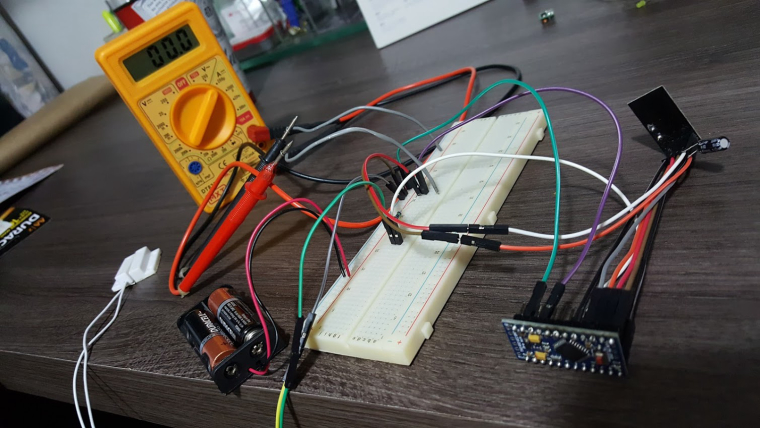
                      Great!!! Got it working, but can't measure the consumption...
                      My multimeter shows always 000.
                      The sensors is working fine and reporting properly while connected to multimeter, but always 0 current...
                      Tried 200u, 2000u, 20m and 200m, always reporting zero... Is is that low?

                      Did I connect something wrong??? (multimeter in series with positive battery pole and circuit line in (Radio+APM+1M ResistorPin3)
                      Or is my aliexpress multimeter that bad???
                      0_1502410544175_20170810_210709.jpg

                      N 1 Reply Last reply
                      0
                      • OliverDogO OliverDog

                        Great!!! Got it working, but can't measure the consumption...
                        My multimeter shows always 000.
                        The sensors is working fine and reporting properly while connected to multimeter, but always 0 current...
                        Tried 200u, 2000u, 20m and 200m, always reporting zero... Is is that low?

                        Did I connect something wrong??? (multimeter in series with positive battery pole and circuit line in (Radio+APM+1M ResistorPin3)
                        Or is my aliexpress multimeter that bad???

                        0_1502410544175_20170810_210709.jpg

                        N Offline
                        N Offline
                        Nca78
                        Hardware Contributor
                        wrote on last edited by Nca78
                        #18

                        Clean desk you have here @OliverDog this would make my wife dream :D

                        For the multimeter, no idea. At 200u it should see something, maybe your red wire is in the wrong plug of the multimeter ? Usually it's a different plug for voltage and for current but you can have a different plug for high current (A) and low current (mA) too...

                        1 Reply Last reply
                        1
                        • OliverDogO Offline
                          OliverDogO Offline
                          OliverDog
                          wrote on last edited by
                          #19

                          I had just cleaned it!!! My wife gave up caring about this desk...:smirk:

                          I found my multimeter fuse was burned... so I wired its base poles and now I can measure:

                          Sleeping + Reed Disconnected - most time 6 uA
                          Sleeping + Reed Connected - most time 9 uA
                          When sending new status to gateway - 25 - 230 uA (around 140 uA most times)
                          Sending time was less than 1 second.

                          2 AA will give me 29 years (battery certainly will die first)
                          2 AAA - 12 years.
                          1 CR2032 - 2,5 years.

                          Thanks for the help...

                          1 Reply Last reply
                          2
                          • N Offline
                            N Offline
                            Nca78
                            Hardware Contributor
                            wrote on last edited by
                            #20

                            @OliverDog when sending to gateway you cannot trust your multimeter. It's probably around 15mA but only during a fraction of a second, and what you read is some kind of average between that and the very low power consumption in sleep mode.


                            1 Reply Last reply
                            0

                            Hello! It looks like you're interested in this conversation, but you don't have an account yet.

                            Getting fed up of having to scroll through the same posts each visit? When you register for an account, you'll always come back to exactly where you were before, and choose to be notified of new replies (either via email, or push notification). You'll also be able to save bookmarks and upvote posts to show your appreciation to other community members.

                            With your input, this post could be even better 💗

                            Register Login
                            Reply
                            • Reply as topic
                            Log in to reply
                            • Oldest to Newest
                            • Newest to Oldest
                            • Most Votes


                            19

                            Online

                            12.0k

                            Users

                            11.2k

                            Topics

                            113.4k

                            Posts


                            Copyright 2025 TBD   |   Forum Guidelines   |   Privacy Policy   |   Terms of Service
                            • Login

                            • Don't have an account? Register

                            • Login or register to search.
                            • First post
                              Last post
                            0
                            • MySensors
                            • OpenHardware.io
                            • Categories
                            • Recent
                            • Tags
                            • Popular
