Skip to content
  • MySensors
  • OpenHardware.io
  • Categories
  • Recent
  • Tags
  • Popular
Skins
  • Light
  • Brite
  • Cerulean
  • Cosmo
  • Flatly
  • Journal
  • Litera
  • Lumen
  • Lux
  • Materia
  • Minty
  • Morph
  • Pulse
  • Sandstone
  • Simplex
  • Sketchy
  • Spacelab
  • United
  • Yeti
  • Zephyr
  • Dark
  • Cyborg
  • Darkly
  • Quartz
  • Slate
  • Solar
  • Superhero
  • Vapor

  • Default (No Skin)
  • No Skin
Collapse
Brand Logo
  1. Home
  2. Hardware
  3. [SOLVED] Problems with ESP8266 and NRF24L01+

[SOLVED] Problems with ESP8266 and NRF24L01+

Scheduled Pinned Locked Moved Hardware
24 Posts 5 Posters 17.3k Views 5 Watching
  • Oldest to Newest
  • Newest to Oldest
  • Most Votes
Reply
  • Reply as topic
Log in to reply
This topic has been deleted. Only users with topic management privileges can see it.
  • numanxN numanx

    Hello,
    I have a problem using an ESP8266 and a NRF24L01+ module.
    I followed all the steps from this guide https://forum.mysensors.org/topic/666/debug-faq-and-how-ask-for-help and still it won't work.
    I am using an adapter like this https://www.aliexpress.com/item/5pcs-Socket-Adapter-Module-Board-for-NRF24L01-Wireless-Module/32368381876.html for converting the power and for power stability.
    I have two NRF24L01+ modules and I've tested them with an Arduino Nano which it works.
    I can't get it to work with ESP8266, I've checked the wirings multiple times.
    Arduino IDE 1.6.8 with latest version of MySensors Library on Linux and Mac OS X using an ESP8266 and NRF24L01+
    I've tried to power the module directly from ESP8266 and separately from a 5V PSU with the 5V regulator adapter and common ground with the ESP8266.

    Thanks for your help!

    This is the serial monitor error:

    0;255;3;0;9;TSM:INIT
    0;255;3;0;9;!TSM:INIT:TSP FAIL
    0;255;3;0;9;TSM:FAIL:CNT=7
    0;255;3;0;9;TSM:FAIL:PDT
    0;255;3;0;9;TSM:FAIL:RE-INIT```
    NeverDieN Offline
    NeverDieN Offline
    NeverDie
    Hero Member
    wrote on last edited by NeverDie
    #9

    @numanx
    Also, what voltage are you supplying the socket adapter with? If you're supplying it with 3.3v, then that may be your problem. Supply it with 5v instead. It has a voltage regulator to reduce the voltage to 3.3v, but if you feed it with 3.3v instead, it maybe isn't producing enough regulated voltage.

    1 Reply Last reply
    1
    • mfalkviddM Offline
      mfalkviddM Offline
      mfalkvidd
      Mod
      wrote on last edited by
      #10

      How about skipping the adapter, at least temporarily to check whether the radio works without it. That would eliminate one possible problem source.

      1 Reply Last reply
      1
      • NeverDieN NeverDie

        Which board did you pick beneath the board manager?

        numanxN Offline
        numanxN Offline
        numanx
        wrote on last edited by
        #11

        @NeverDie
        The board selected is NodeMCU 1.0 (ESP-12E module)
        I've tried suplying the adapter with 3.3v and also with 5V.

        @mfalkvidd
        Now the radio is connected directly to the ESP8266 but still I have the same error.

        1 Reply Last reply
        0
        • NeverDieN Offline
          NeverDieN Offline
          NeverDie
          Hero Member
          wrote on last edited by NeverDie
          #12

          At this point, it becomes 20 questions unless you post detailed photos of exactly what you've done. Either your hardware is defective or you've made an error that you can't see by yourself.

          If all else fails, you can try this instead:
          https://www.openhardware.io/view/442/Small-nRF24L01-Shield-for-ESP8266-Wemos-D1-Mini
          It's not nodemcu, but it is ESP8266. It does the "wiring" for you. And it works.

          1 Reply Last reply
          1
          • numanxN Offline
            numanxN Offline
            numanx
            wrote on last edited by
            #13

            Now I have another problem...
            I've tried to change the Wireless SSID and Password in the sketch and it seems that after uploading on the ESP8266 it doesn't update them. I've tried clearing EEPROM memory and now the ESP8266 seems to be stucked in the AP mode and I have some strange characters when I open Serial Monitor...

            0;255;3;0;9;MCO:BGN:INIT GW,CP=RNNGE--,VER=2.1.1
            0;255;3;0;9;TSF:LRT:OK
            0;255;3;0;9;TSM:INIT
            0;255;3;0;9;TSF:WUR:MS=0
            0;255;3;0;9;!TSM:INIT:TSP FAIL
            0;255;3;0;9;TSM:FAIL:CNT=1
            0;255;3;0;9;TSM:FAIL:PDT
            chg_A2:-40
            
            1 Reply Last reply
            0
            • numanxN Offline
              numanxN Offline
              numanx
              wrote on last edited by
              #14

              Ok, I've solved the problem with the Wireless SSID and password by uploading the HelloServer sketch from the ESP8266 examples.
              Now I rewire the ESP8266 and Radio and I will post some photos.

              1 Reply Last reply
              0
              • numanxN Offline
                numanxN Offline
                numanx
                wrote on last edited by numanx
                #15

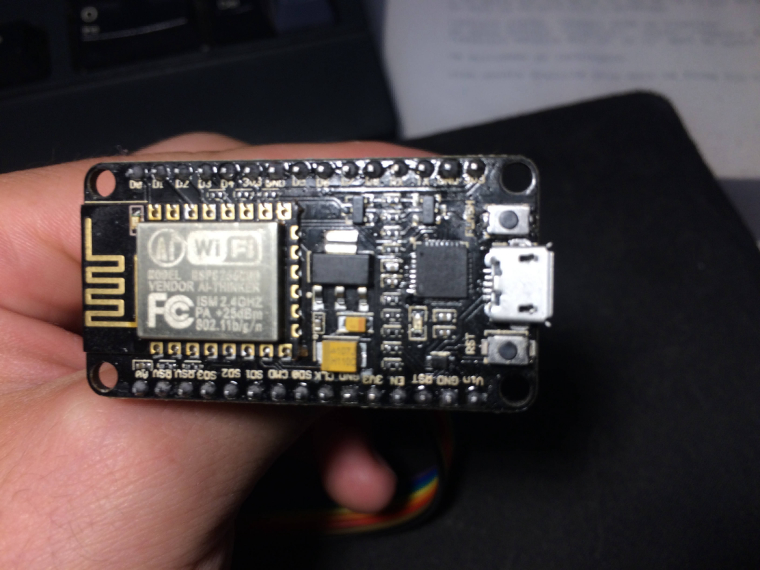
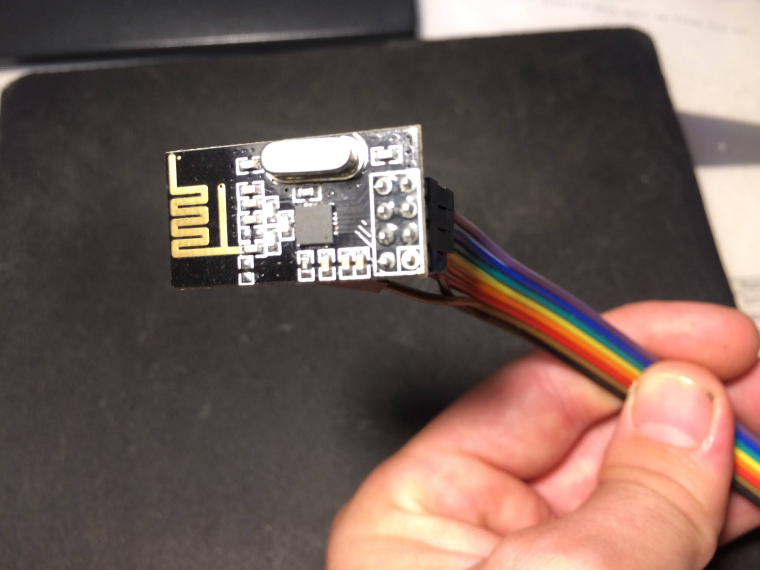
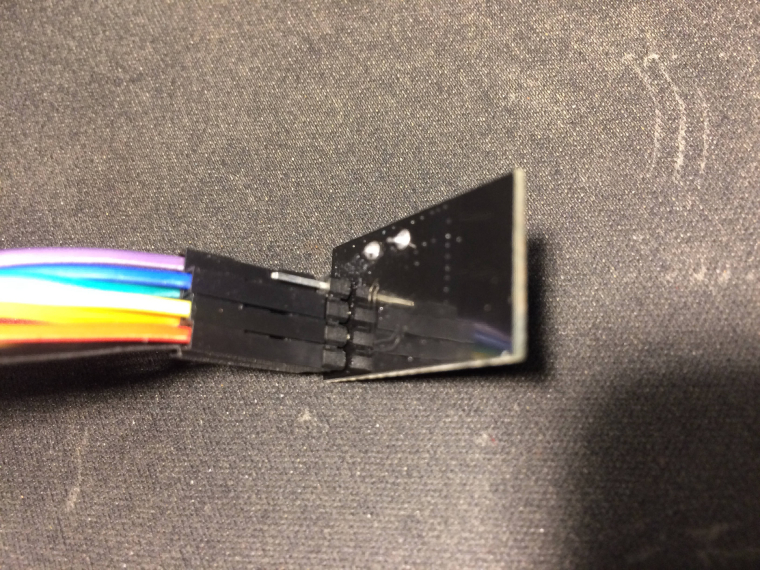
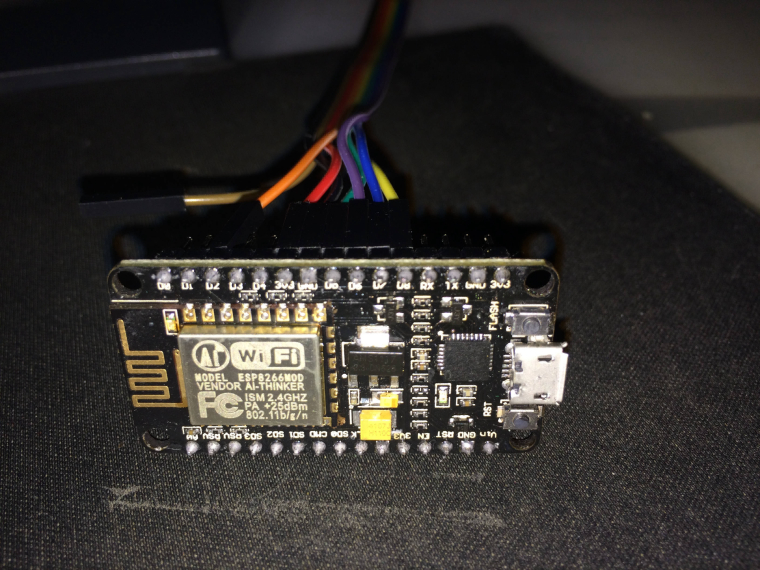
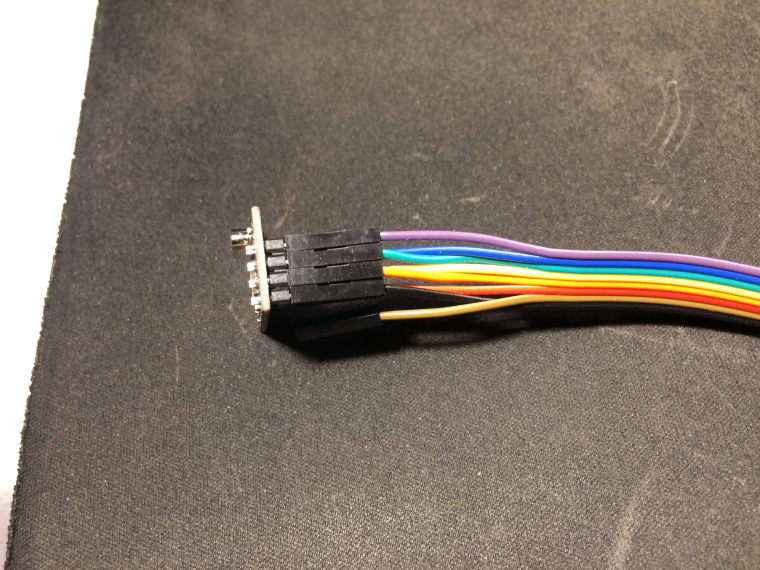
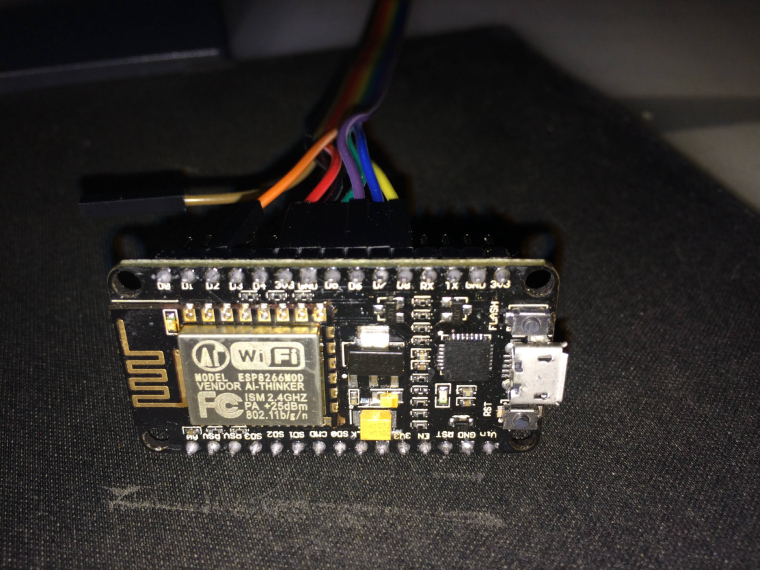
                Here are the photos of the ESP8266 board, NR24L01+ and the wiring.
                1_1502911770672_IMG_1597.JPG 0_1502911770672_IMG_1596.JPG 0_1502911837444_IMG_1594.JPG 0_1502911797701_IMG_1592.JPG 0_1502911843654_IMG_1595.JPG

                1 Reply Last reply
                0
                • numanxN Offline
                  numanxN Offline
                  numanx
                  wrote on last edited by
                  #16

                  0_1502912006276_IMG_1592.JPG

                  1 Reply Last reply
                  0
                  • NeverDieN Offline
                    NeverDieN Offline
                    NeverDie
                    Hero Member
                    wrote on last edited by NeverDie
                    #17

                    It's hard to tell from your photos what is wired to what.

                    Suggest you upgrade to the current Arduino IDE and verify that you have the most current NodeMCU board definition installed. Also confirm that you're using the latest release of the Mysensors library.

                    Have you verified that your hardware is working? e.g. try the radio module in a different "known good" platform and see if it runs correctly. On the NodeMCU, try driving something else that has a SPI interface and confirm that it works properly.

                    If all of the above checks out, then I would think the next step would be to use a logic probe to see if you're getting the proper signals sent between your NodeMCU and the nRF24L01 module. If not, maybe you need to add a pull-up or a pull-down resistor on one of the datalines. The logic probe would tell the tale.

                    1 Reply Last reply
                    0
                    • numanxN Offline
                      numanxN Offline
                      numanx
                      wrote on last edited by
                      #18

                      Finally got it!
                      It seems that I have a problem with the ESP8266.
                      After about 24 Hours of debugging I found the problem...

                      Steps:
                      Checked if the wiring is good with a multimeter probe on each pin of the adapter(which I know it worked) and each pin of the radio to verify the correct pinout.
                      It seems that the pinout was ok and the wiring was also ok.
                      Write a sketch with all the ports from D2 to D8 in output HIGH and with a little buzzer I've tested each pin.
                      It seems that D7 doesn't give voltage.
                      Checked the pinout diagram for the ESP-12E. Checked for continuity between GPIO13(from the chip) and D7 and there was no continuity.
                      Tried to connect the radio MOSI Pin directly to GPIO13 and IT WORKED!

                      0;255;3;0;9;TSM:INIT
                      0;255;3;0;9;TSM:INIT:TSP OK
                      0;255;3;0;9;TSM:INIT:GW MODE
                      0;255;3;0;9;TSM:READY:ID=0,PAR=0,DIS=0
                      0;255;3;0;9;MCO:REG:NOT NEEDED
                      

                      Is there any way to move the MOSI pin from the board to another digital pin from ESP8266?
                      Thanks!

                      mfalkviddM NeverDieN 2 Replies Last reply
                      1
                      • numanxN numanx

                        Finally got it!
                        It seems that I have a problem with the ESP8266.
                        After about 24 Hours of debugging I found the problem...

                        Steps:
                        Checked if the wiring is good with a multimeter probe on each pin of the adapter(which I know it worked) and each pin of the radio to verify the correct pinout.
                        It seems that the pinout was ok and the wiring was also ok.
                        Write a sketch with all the ports from D2 to D8 in output HIGH and with a little buzzer I've tested each pin.
                        It seems that D7 doesn't give voltage.
                        Checked the pinout diagram for the ESP-12E. Checked for continuity between GPIO13(from the chip) and D7 and there was no continuity.
                        Tried to connect the radio MOSI Pin directly to GPIO13 and IT WORKED!

                        0;255;3;0;9;TSM:INIT
                        0;255;3;0;9;TSM:INIT:TSP OK
                        0;255;3;0;9;TSM:INIT:GW MODE
                        0;255;3;0;9;TSM:READY:ID=0,PAR=0,DIS=0
                        0;255;3;0;9;MCO:REG:NOT NEEDED
                        

                        Is there any way to move the MOSI pin from the board to another digital pin from ESP8266?
                        Thanks!

                        mfalkviddM Offline
                        mfalkviddM Offline
                        mfalkvidd
                        Mod
                        wrote on last edited by mfalkvidd
                        #19

                        Great work @numanx !

                        It is possible to use software spi instead of hardware spi (hardware spi only works with the default pins). See https://www.mysensors.org/build/ethernet_gateway for how to enable software spi and use #define directives to use different pins.

                        numanxN 1 Reply Last reply
                        0
                        • numanxN numanx

                          Finally got it!
                          It seems that I have a problem with the ESP8266.
                          After about 24 Hours of debugging I found the problem...

                          Steps:
                          Checked if the wiring is good with a multimeter probe on each pin of the adapter(which I know it worked) and each pin of the radio to verify the correct pinout.
                          It seems that the pinout was ok and the wiring was also ok.
                          Write a sketch with all the ports from D2 to D8 in output HIGH and with a little buzzer I've tested each pin.
                          It seems that D7 doesn't give voltage.
                          Checked the pinout diagram for the ESP-12E. Checked for continuity between GPIO13(from the chip) and D7 and there was no continuity.
                          Tried to connect the radio MOSI Pin directly to GPIO13 and IT WORKED!

                          0;255;3;0;9;TSM:INIT
                          0;255;3;0;9;TSM:INIT:TSP OK
                          0;255;3;0;9;TSM:INIT:GW MODE
                          0;255;3;0;9;TSM:READY:ID=0,PAR=0,DIS=0
                          0;255;3;0;9;MCO:REG:NOT NEEDED
                          

                          Is there any way to move the MOSI pin from the board to another digital pin from ESP8266?
                          Thanks!

                          NeverDieN Offline
                          NeverDieN Offline
                          NeverDie
                          Hero Member
                          wrote on last edited by NeverDie
                          #20

                          @numanx said in Problems with ESP8266 and NRF24L01+:

                          Checked the pinout diagram for the ESP-12E. Checked for continuity between GPIO13(from the chip) and D7 and there was no continuity.
                          Tried to connect the radio MOSI Pin directly to GPIO13 and IT WORKED!

                          Good work!

                          Check the solder connection between the GPIO13 and the pcb. Probably it's faulty. With a little luck probably you can just re-solder the connection manually, and `then you'll be good to go.

                          numanxN 1 Reply Last reply
                          1
                          • mfalkviddM mfalkvidd

                            Great work @numanx !

                            It is possible to use software spi instead of hardware spi (hardware spi only works with the default pins). See https://www.mysensors.org/build/ethernet_gateway for how to enable software spi and use #define directives to use different pins.

                            numanxN Offline
                            numanxN Offline
                            numanx
                            wrote on last edited by
                            #21

                            @mfalkvidd
                            It seems that ESP8266 doesn't support SOFTSPI

                            In file included from /home/numanx/Arduino/ESP8266OTA/ESP8266OTA.ino:120:0:
                            /home/andreihering/Arduino/libraries/MySensors/MySensors.h:248:2: error: #error Soft SPI is not available on ESP8266
                            
                            mfalkviddM 1 Reply Last reply
                            0
                            • numanxN numanx

                              @mfalkvidd
                              It seems that ESP8266 doesn't support SOFTSPI

                              In file included from /home/numanx/Arduino/ESP8266OTA/ESP8266OTA.ino:120:0:
                              /home/andreihering/Arduino/libraries/MySensors/MySensors.h:248:2: error: #error Soft SPI is not available on ESP8266
                              
                              mfalkviddM Offline
                              mfalkviddM Offline
                              mfalkvidd
                              Mod
                              wrote on last edited by
                              #22

                              @numanx oh. Sorry. My bad.

                              1 Reply Last reply
                              0
                              • NeverDieN NeverDie

                                @numanx said in Problems with ESP8266 and NRF24L01+:

                                Checked the pinout diagram for the ESP-12E. Checked for continuity between GPIO13(from the chip) and D7 and there was no continuity.
                                Tried to connect the radio MOSI Pin directly to GPIO13 and IT WORKED!

                                Good work!

                                Check the solder connection between the GPIO13 and the pcb. Probably it's faulty. With a little luck probably you can just re-solder the connection manually, and `then you'll be good to go.

                                numanxN Offline
                                numanxN Offline
                                numanx
                                wrote on last edited by
                                #23

                                @NeverDie @mfalkvidd
                                Today I've resoldered the ESP8266 Chip.
                                Everything works perfect.
                                Thanks for your help!

                                1 Reply Last reply
                                3
                                • George LaynesG Offline
                                  George LaynesG Offline
                                  George Laynes
                                  wrote on last edited by
                                  #24

                                  This thread has been a life saver for me.
                                  Just wanted to drop a line for anyone else who might be despairing why despite numerous tests, the radio would still not work on the NodeMCU.

                                  In my case, it was NodeMCU v3 from Lolin and I had two traces not workingbetween GPIO13 and GPIO12 - there was no continuity of the trace between the ESP-12E chip and the board pins. I had to solder those two traces together and now - everything works!

                                  Thank you for inspiring me to look for this problem.

                                  1 Reply Last reply
                                  0
                                  Reply
                                  • Reply as topic
                                  Log in to reply
                                  • Oldest to Newest
                                  • Newest to Oldest
                                  • Most Votes


                                  25

                                  Online

                                  11.7k

                                  Users

                                  11.2k

                                  Topics

                                  113.1k

                                  Posts


                                  Copyright 2025 TBD   |   Forum Guidelines   |   Privacy Policy   |   Terms of Service
                                  • Login

                                  • Don't have an account? Register

                                  • Login or register to search.
                                  • First post
                                    Last post
                                  0
                                  • MySensors
                                  • OpenHardware.io
                                  • Categories
                                  • Recent
                                  • Tags
                                  • Popular