
Problem with sensors on arduino and domoticz
-
Hello,
can you please :
- tell us what controller you are using, and if your gateway was successfully added to it, with gateway responding to the controller ?
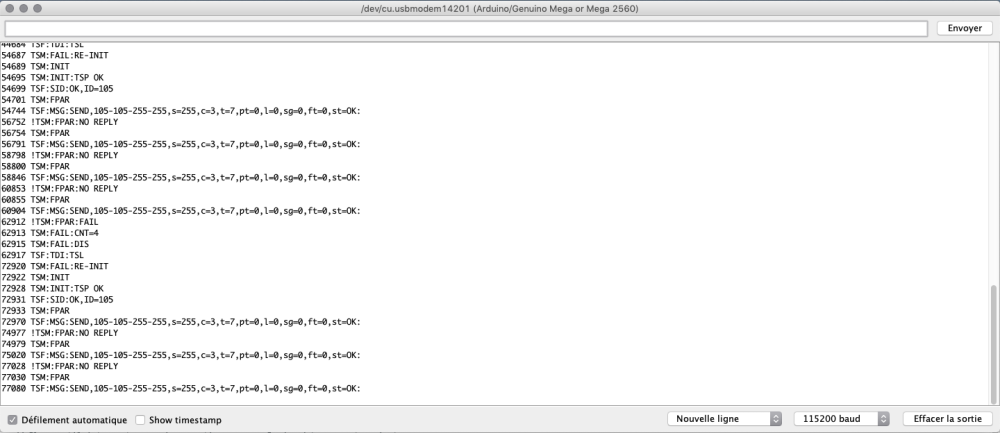
- enable debug mode in your sensor sketch (remove // before "#define MY_DEBUG" line) and tell us what you see in the log ?
-
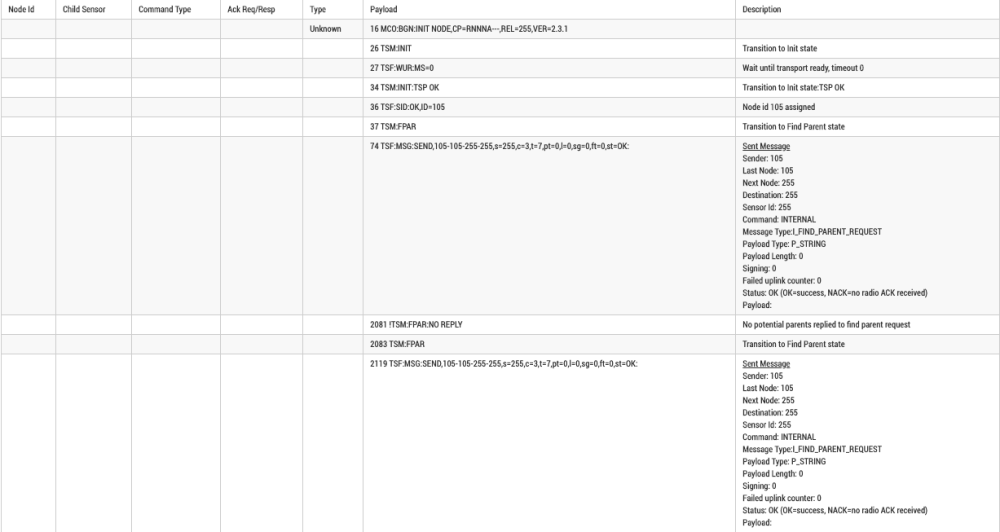
@hyperflemme you can check the log using the log parser
https://www.mysensors.org/build/parserHere it says it cannot connect to parent, is you gateway active, and on the same radio channel ?
-
@hyperflemme you can check the log using the log parser
https://www.mysensors.org/build/parserHere it says it cannot connect to parent, is you gateway active, and on the same radio channel ?
@nca78 what do you mean by log parser?
i just have put a gateway usb into arduino. -
@hyperflemme you can check the log using the log parser
https://www.mysensors.org/build/parserHere it says it cannot connect to parent, is you gateway active, and on the same radio channel ?
-
@hyperflemme as you can read "no potential parents replied to find parent request". It means no gateway replied to the radio calls.
Please describe your full mysensors installation if you want help :
- controller used ?
- board, radio used for gateway ?
- board, radio used for sensor ?
-
@kimot I have only 1 arduino, i have put the gateway into this card.
@hyperflemme
Than in your second sketch ( with sensors )
define MY_GATEWAY_SERIAL
is missing.
This sketch works like normal node without this, not as gateway with sensors connected. -
@hyperflemme as you can read "no potential parents replied to find parent request". It means no gateway replied to the radio calls.
Please describe your full mysensors installation if you want help :
- controller used ?
- board, radio used for gateway ?
- board, radio used for sensor ?
@nca78 Hi,
I just have an nrf24l01 plug into my arduino.
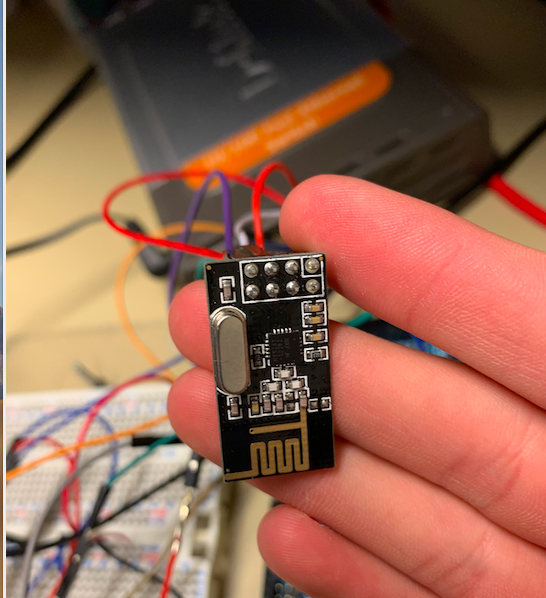
I miss something to make it work?
Thank's for helping me -
@hyperflemme
Than in your second sketch ( with sensors )
define MY_GATEWAY_SERIAL
is missing.
This sketch works like normal node without this, not as gateway with sensors connected.@kimot in my sketch for motion sensor you think i just have to had #define MY_GATEWAY_SERIAL on the top of the program?
Thank's for your help
-
@kimot in my sketch for motion sensor you think i just have to had #define MY_GATEWAY_SERIAL on the top of the program?
Thank's for your help
@hyperflemme said in Problem with sensors on arduino and domoticz:
@kimot in my sketch for motion sensor you think i just have to had #define MY_GATEWAY_SERIAL on the top of the program?
Thank's for your help
The arduino that is connected to computer with USB should have #define MY_GATEWAY_SERIAL yes, so it will behave as a gateway and send the data to the computer. You need to configure it in your controller (home automation software) also.
If you have 1 gateway (arduino + radio) connected to computer + 1 sensor (arduino + radio) separated then the sensor should not have this #define.
-
@hyperflemme said in Problem with sensors on arduino and domoticz:
@kimot in my sketch for motion sensor you think i just have to had #define MY_GATEWAY_SERIAL on the top of the program?
Thank's for your help
The arduino that is connected to computer with USB should have #define MY_GATEWAY_SERIAL yes, so it will behave as a gateway and send the data to the computer. You need to configure it in your controller (home automation software) also.
If you have 1 gateway (arduino + radio) connected to computer + 1 sensor (arduino + radio) separated then the sensor should not have this #define.
@nca78 all my sensor are connected on the arduino card with nRF24L01, and the arduino card is connected by usb on my computer. I want tu connect the arduino card at an raspberry pi 3 but she don't recognise arduino card and sensor, however i have put the gateway and sketch of sensor into the arduino card....
-
@nca78 all my sensor are connected on the arduino card with nRF24L01, and the arduino card is connected by usb on my computer. I want tu connect the arduino card at an raspberry pi 3 but she don't recognise arduino card and sensor, however i have put the gateway and sketch of sensor into the arduino card....
@hyperflemme what controller software are you using on the raspberry pi ?
-
@hyperflemme what controller software are you using on the raspberry pi ?
@nca78 Linux on raspberry pi 3 with domoticz
-
@nca78 Linux on raspberry pi 3 with domoticz
@hyperflemme did rebuild the gateway script with #define MY_GATEWAY_SERIAL ?
Then did you add the gateway in the hardware tab of domoticz ? -
@hyperflemme did rebuild the gateway script with #define MY_GATEWAY_SERIAL ?
Then did you add the gateway in the hardware tab of domoticz ?@nca78 domoticz recognize the arduino card, his version of gateway, but into hardware tab if i change the card i have an children "Unknown" with id 3 and an other child unusable with a ID 255.
in the log of domoticz i have "Gateway ready" -
@nca78 domoticz recognize the arduino card, his version of gateway, but into hardware tab if i change the card i have an children "Unknown" with id 3 and an other child unusable with a ID 255.
in the log of domoticz i have "Gateway ready"@hyperflemme so it's good news domoticz can see your gateway.
Can you post the script you are using now ?
-
@hyperflemme so it's good news domoticz can see your gateway.
Can you post the script you are using now ?
@nca78 the script of the gateway or the script of one of the sensors?
I give you both juste here:
for the gateway i just use this: https://www.mysensors.org/build/serial_gateway and i just added this before inclide mysensors.h:#define MY_RF24_CE_PIN 49
#define MY_RF24_CS_PIN 53the script of the sensors is:
/*
 * The MySensors Arduino library handles the wireless radio link and protocol
 * between your home built sensors/actuators and HA controller of choice.
 * The sensors forms a self healing radio network with optional repeaters. Each
 * repeater and gateway builds a routing tables in EEPROM which keeps track of the
 * network topology allowing messages to be routed to nodes.
 *
 * Created by Henrik Ekblad <henrik.ekblad@mysensors.org>
 * Copyright (C) 2013-2018 Sensnology AB
 * Full contributor list: https://github.com/mysensors/MySensors/graphs/contributors
 *
 * Documentation: http://www.mysensors.org
 * Support Forum: http://forum.mysensors.org
 *
 * This program is free software; you can redistribute it and/or
 * modify it under the terms of the GNU General Public License
 * version 2 as published by the Free Software Foundation.
 *
 *******************************
 *
 * REVISION HISTORY
 * Version 1.0 - Henrik Ekblad
 *
 * DESCRIPTION
 * Motion Sensor example using HC-SR501
 * http://www.mysensors.org/build/motion
 *
 */

// Enable debug prints
// #define MY_DEBUG

// Enable and select radio type attached
#define MY_RADIO_RF24
//#define MY_RADIO_NRF5_ESB
//#define MY_RADIO_RFM69
//#define MY_RADIO_RFM95

#include <MySensors.h>

uint32_t SLEEP_TIME = 120000; // Sleep time between reports (in milliseconds)
#define DIGITAL_INPUT_SENSOR 3   // The digital input you attached your motion sensor.  (Only 2 and 3 generates interrupt!)
#define CHILD_ID 1   // Id of the sensor child

// Initialize motion message
MyMessage msg(CHILD_ID, V_TRIPPED);

void setup()
{
	pinMode(DIGITAL_INPUT_SENSOR, INPUT);      // sets the motion sensor digital pin as input
}

void presentation()
{
	// Send the sketch version information to the gateway and Controller
	sendSketchInfo("Motion Sensor", "1.0");

	// Register all sensors to gw (they will be created as child devices)
	present(CHILD_ID, S_MOTION);
}

void loop()
{
	// Read digital motion value
	bool tripped = digitalRead(DIGITAL_INPUT_SENSOR) == HIGH;

	Serial.println(tripped);
	send(msg.set(tripped?"1":"0"));  // Send tripped value to gw

	// Sleep until interrupt comes in on motion sensor. Send update every two minute.
	sleep(digitalPinToInterrupt(DIGITAL_INPUT_SENSOR), CHANGE, SLEEP_TIME);
}
for motion sensor i use a PIR Sensor V1.0
-
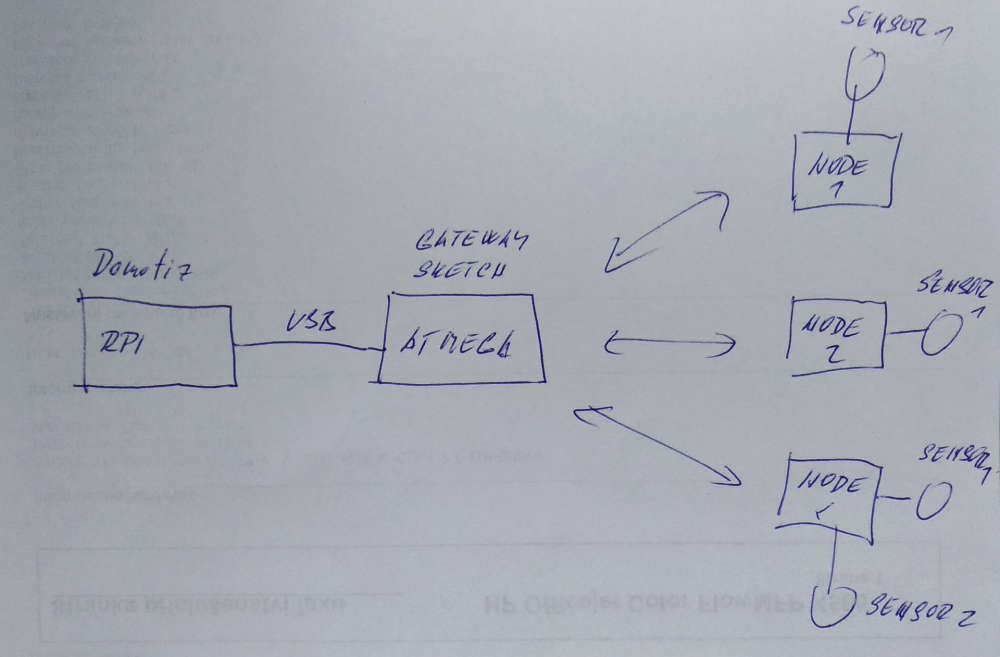
I think we still do not know the topology of your network and we use different terms.
For most of us a "sensor" is - temperature sensor, humidity sensor, pressure sensor, etc. These sensors are connected to Arduino, which we call the "node".
These node are connected through radio or RS485 to Arduino which works like gateway and send received messages from nodes to controller ( Rpi with Domoticz ).
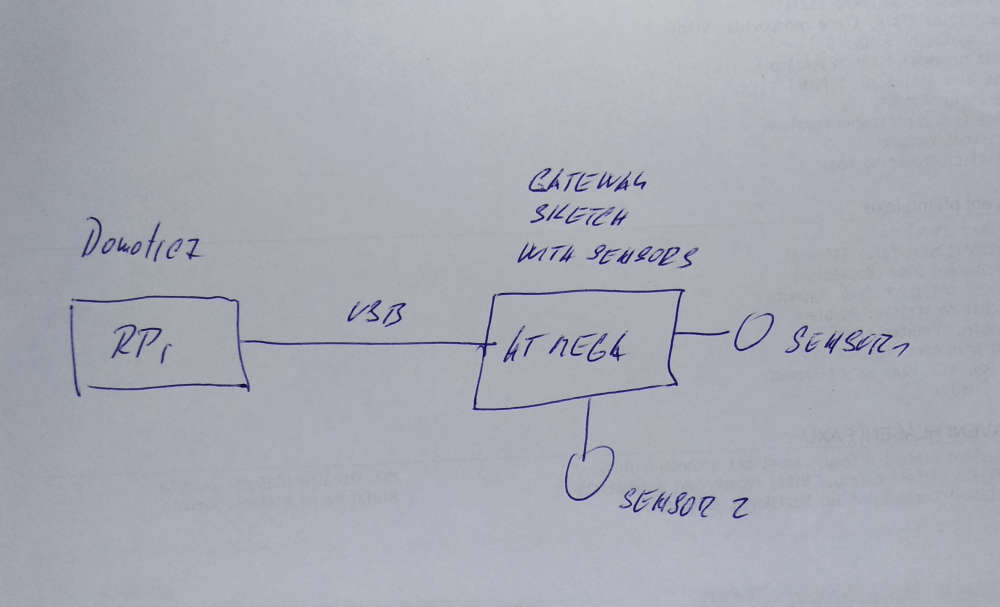
Usually gateway have got no sensors and you can use pure gateway sketch from examples.
But you can connect sensors directly to gateway, but you must modify gateway sketch then.- setup your sensors
- present your sensors
- send values form your sensors.
And of course NO SLEEP FUNCTION in sensor send code.
Places, where put it is marked by comments in gateway sketch:
void setup()
{
    // Setup locally attached sensors
}

void presentation()
{
    // Present locally attached sensors
}

void loop()
{
    // Send locally attached sensor data here
}
Usual topology:
I think your topology:
-
I think we still do not know the topology of your network and we use different terms.
For most of us a "sensor" is - temperature sensor, humidity sensor, pressure sensor, etc. These sensors are connected to Arduino, which we call the "node".
These node are connected through radio or RS485 to Arduino which works like gateway and send received messages from nodes to controller ( Rpi with Domoticz ).
Usually gateway have got no sensors and you can use pure gateway sketch from examples.
But you can connect sensors directly to gateway, but you must modify gateway sketch then.- setup your sensors
- present your sensors
- send values form your sensors.
And of course NO SLEEP FUNCTION in sensor send code.
Places, where put it is marked by comments in gateway sketch:
void setup()
{
    // Setup locally attached sensors
}

void presentation()
{
    // Present locally attached sensors
}

void loop()
{
    // Send locally attached sensor data here
}
Usual topology:
I think your topology:
@kimot Hi , tank's for your help,
my topology: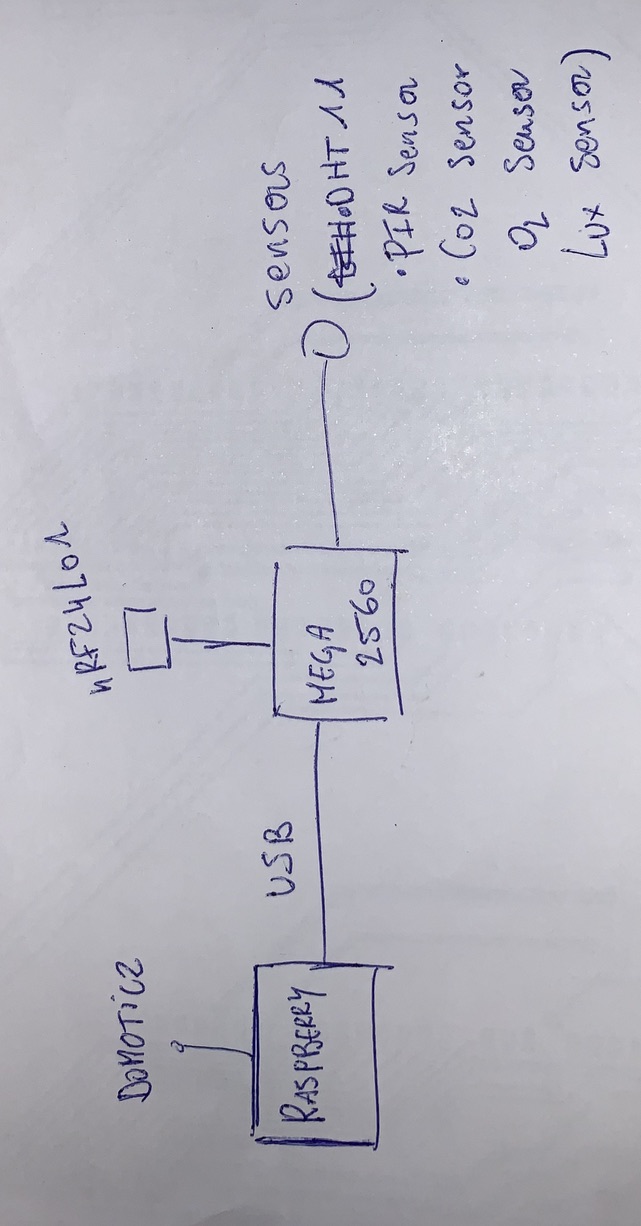
how can i do?
-
@kimot Hi , tank's for your help,
my topology:how can i do?
@hyperflemme
Use gateway sketch and add sensor presentation and sensor data sending like in node sketch.example from this forum:
void presentation() {
  // Present locally attached sensors here
    // Send the sketch version information to the gateway and Controller
  sendSketchInfo("AWI_ESP 120", "1.0");

  // Register all sensors to gw (they will be created as child devices)
  present(CHILD_ID, S_DIMMER, "AWI_ESP 120" " dimmer");
  present(CHILD_ID2, S_INFO, "AWI_ESP 120" " text");

}


void loop() {
  // Send locally attached sensors data here
 	send(msg.set(messageCounter)); 										// Send message to gw
	messageCounter = ++messageCounter % 100 ;							// wrap
	send(msg2.set("Hallo")); 											// Send message to gw
	// Send update every SLEEP_TIME
	wait(SLEEP_TIME) ;
}

void receive(const MyMessage &message) {  								// messages from node or controller
	//char printBuf[40] ;
	//Serial.print(message.getInt());
		//sprintf(printBuf, "Message node: %d %d  OK\n", message.sender, message.getInt());
}
	//Serial.print(printBuf) ;
	//sprintf(printBuf, "Messages: %d Errors: %d\n", messageCounter, messageErrorCounter);
	//Serial.print(printBuf) ;
Search forum here, you are not alone with this solution.
-
@hyperflemme
Use gateway sketch and add sensor presentation and sensor data sending like in node sketch.example from this forum:
void presentation() {
  // Present locally attached sensors here
    // Send the sketch version information to the gateway and Controller
  sendSketchInfo("AWI_ESP 120", "1.0");

  // Register all sensors to gw (they will be created as child devices)
  present(CHILD_ID, S_DIMMER, "AWI_ESP 120" " dimmer");
  present(CHILD_ID2, S_INFO, "AWI_ESP 120" " text");

}


void loop() {
  // Send locally attached sensors data here
 	send(msg.set(messageCounter)); 										// Send message to gw
	messageCounter = ++messageCounter % 100 ;							// wrap
	send(msg2.set("Hallo")); 											// Send message to gw
	// Send update every SLEEP_TIME
	wait(SLEEP_TIME) ;
}

void receive(const MyMessage &message) {  								// messages from node or controller
	//char printBuf[40] ;
	//Serial.print(message.getInt());
		//sprintf(printBuf, "Message node: %d %d  OK\n", message.sender, message.getInt());
}
	//Serial.print(printBuf) ;
	//sprintf(printBuf, "Messages: %d Errors: %d\n", messageCounter, messageErrorCounter);
	//Serial.print(printBuf) ;
Search forum here, you are not alone with this solution.
@kimot THANKS !!!
for 1 sensor it's ok, but if i had a 2nd sensor he doesn't work...
Hello! It looks like you're interested in this conversation, but you don't have an account yet.
Getting fed up of having to scroll through the same posts each visit? When you register for an account, you'll always come back to exactly where you were before, and choose to be notified of new replies (either via email, or push notification). You'll also be able to save bookmarks and upvote posts to show your appreciation to other community members.
With your input, this post could be even better 💗
Register Login