Skip to content
  • MySensors
  • OpenHardware.io
  • Categories
  • Recent
  • Tags
  • Popular
Skins
  • Light
  • Brite
  • Cerulean
  • Cosmo
  • Flatly
  • Journal
  • Litera
  • Lumen
  • Lux
  • Materia
  • Minty
  • Morph
  • Pulse
  • Sandstone
  • Simplex
  • Sketchy
  • Spacelab
  • United
  • Yeti
  • Zephyr
  • Dark
  • Cyborg
  • Darkly
  • Quartz
  • Slate
  • Solar
  • Superhero
  • Vapor

  • Default (No Skin)
  • No Skin
Collapse
Brand Logo
  1. Home
  2. Development
  3. get a string out of a payload

get a string out of a payload

Scheduled Pinned Locked Moved Development
getcustomstringstringgetstring
17 Posts 4 Posters 5.3k Views 1 Watching
  • Oldest to Newest
  • Newest to Oldest
  • Most Votes
Reply
  • Reply as topic
Log in to reply
This topic has been deleted. Only users with topic management privileges can see it.
  • M Mickey

    char strMsg[25];
    char *strMsgPtr = strMsg;

    void incomingMessage(const MyMessage &message)
    {
    // We only expect one type of message from controller. But we better check anyway.
    if (message.type==V_VAR1)
    {
    // spit to serial
    Serial.print("Incoming change for sensor:");
    Serial.print(message.sensor);
    Serial.print(", New payload: ");
    Serial.println(message.getCustomString(strMsgPtr));
    }
    }

    hekH Online
    hekH Online
    hek
    Admin
    wrote on last edited by
    #4

    @Mickey

    Are you getting compile error using:

    Serial.println(message.getString(strMsg));
    
    1 Reply Last reply
    0
    • M Offline
      M Offline
      Mickey
      wrote on last edited by
      #5

      No
      with this method it compile ...

      thanks

      1 Reply Last reply
      0
      • M Offline
        M Offline
        Mickey
        wrote on last edited by Mickey
        #6

        OK
        Now I having problems with the other way around(x,y,z are one byte numbers) I want to convert 3 values of x,y,z to one string that contain 3 hex numbers

        char *strTag[] = {String(x, HEX)+String(y, HEX)+String(z, HEX)};
        gw.send(msg.set(strTag));

        but I cant work it out...

        *EDIT:
        This workout for me:
        String temp="I";
        temp+=String(x, HEX);
        temp+=String(y, HEX);
        temp+=String(z, HEX);
        temp.toCharArray(strMsg,10);
        gw.send(msg.set(strMsgPtr));

        BulldogLowellB 1 Reply Last reply
        0
        • M Mickey

          OK
          Now I having problems with the other way around(x,y,z are one byte numbers) I want to convert 3 values of x,y,z to one string that contain 3 hex numbers

          char *strTag[] = {String(x, HEX)+String(y, HEX)+String(z, HEX)};
          gw.send(msg.set(strTag));

          but I cant work it out...

          *EDIT:
          This workout for me:
          String temp="I";
          temp+=String(x, HEX);
          temp+=String(y, HEX);
          temp+=String(z, HEX);
          temp.toCharArray(strMsg,10);
          gw.send(msg.set(strMsgPtr));

          BulldogLowellB Offline
          BulldogLowellB Offline
          BulldogLowell
          Contest Winner
          wrote on last edited by BulldogLowell
          #7

          @Mickey

          how do you parse this string back out?

          you will not get leading zeroes, so how will you know if where the first second and third digit start and end in your string?

          
          byte a = 255;
          byte b = 0;
          byte c = 15;
          
          unsigned long myHex = 0;
          
          void setup()
          {
            Serial.begin(9600);
            String yourString;
            yourString += String(a, HEX);
            yourString += String(b, HEX);
            yourString += String(c, HEX);
            Serial.println("your string looks like this:");
            Serial.println(yourString);
            //
            // try this?
            //
            myHex |= a;
            myHex <<= 8;
            myHex |= b;
            myHex <<= 8;
            myHex |= c;
            String myString = String(myHex, HEX);
            Serial.println("my string looks like this:");
            Serial.println(myString);
            //
            char buffer[6];
            sprintf(buffer,"%02x%02x%02x",a,b,c);
            Serial.println("or even better...");
            Serial.println(buffer);
          }
          void loop()
          {
              
          }
          

          output:

          your string looks like this:
          ff0f
          my string looks like this:
          ff000f
          or even better...
          ff000f
          

          updated

          1 Reply Last reply
          0
          • M Offline
            M Offline
            Mickey
            wrote on last edited by
            #8

            ok I saw what you did and its way better.
            this is my current code:

            char strMsg[]="";
            char *strMsgPtr = strMsg;
            unsigned long myHex = 0;
            myHex |= x;
            myHex <<= 8;
            myHex |= y;
            myHex <<= 8;
            myHex |= z;
            String myString = String(myHex, HEX);
            myString .toCharArray(strMsg,7;
            gw.send(msg.set(strMsgPtr));
            

            right now its doing the job.
            also how do I embed code in the forum?

            ChaoticC BulldogLowellB 2 Replies Last reply
            0
            • M Mickey

              ok I saw what you did and its way better.
              this is my current code:

              char strMsg[]="";
              char *strMsgPtr = strMsg;
              unsigned long myHex = 0;
              myHex |= x;
              myHex <<= 8;
              myHex |= y;
              myHex <<= 8;
              myHex |= z;
              String myString = String(myHex, HEX);
              myString .toCharArray(strMsg,7;
              gw.send(msg.set(strMsgPtr));
              

              right now its doing the job.
              also how do I embed code in the forum?

              ChaoticC Offline
              ChaoticC Offline
              Chaotic
              wrote on last edited by
              #9

              @Mickey
              If your talking about codebender code just paste the link
              Example modified cleareeprom sketch that reports when done.
              https://codebender.cc/sketch:89547

              1 Reply Last reply
              0
              • M Offline
                M Offline
                Mickey
                wrote on last edited by
                #10

                no I meant like above with the black background(didn't know how but I just paste code from arduino IDE and it turn out like this...)

                ChaoticC 1 Reply Last reply
                0
                • M Mickey

                  no I meant like above with the black background(didn't know how but I just paste code from arduino IDE and it turn out like this...)

                  ChaoticC Offline
                  ChaoticC Offline
                  Chaotic
                  wrote on last edited by
                  #11

                  @Mickey oh thats easy start the line with 4 spaces and a blank line before it

                  like this
                  

                  I had assumed you knew about that since you did it in your post before this.

                  If you click on the ? when replying it should bring you to a page on markup which tells you how to do that and other things.

                  BulldogLowellB 1 Reply Last reply
                  0
                  • M Offline
                    M Offline
                    Mickey
                    wrote on last edited by
                    #12

                    @Chaotic said:

                    @Mickey oh thats easy start the line with 4 spaces and a blank line before it

                    like this
                    

                    I had assumed you knew about that since you did it in your post before this.

                    If you click on the ? when replying it should bring you to a page on markup which tells you how to do that and other things.

                    Thanks
                    I must say its turn out to be a great community this site...

                    1 Reply Last reply
                    0
                    • ChaoticC Chaotic

                      @Mickey oh thats easy start the line with 4 spaces and a blank line before it

                      like this
                      

                      I had assumed you knew about that since you did it in your post before this.

                      If you click on the ? when replying it should bring you to a page on markup which tells you how to do that and other things.

                      BulldogLowellB Offline
                      BulldogLowellB Offline
                      BulldogLowell
                      Contest Winner
                      wrote on last edited by
                      #13

                      @Chaotic said:

                      @Mickey oh thats easy start the line with 4 spaces and a blank line before it

                      or put the whole block of code between 3 backticks like this:
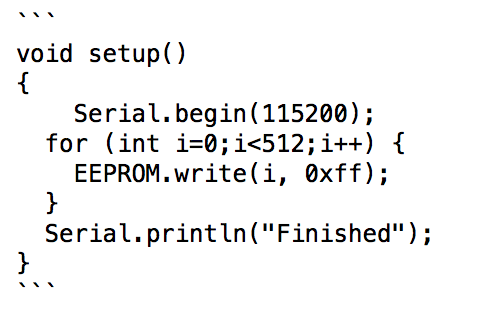
                      Screen Shot 2015-03-12 at 6.07.55 PM.png

                      (backticks are the apostrophe looking thingy to the left of your 1 on the keyboard!)

                      code posts automagically:

                      void setup()  
                      { 
                      	Serial.begin(115200);
                        for (int i=0;i<512;i++) {
                          EEPROM.write(i, 0xff);
                        }
                        Serial.println("Finished");
                      }
                      
                      1 Reply Last reply
                      0
                      • M Mickey

                        ok I saw what you did and its way better.
                        this is my current code:

                        char strMsg[]="";
                        char *strMsgPtr = strMsg;
                        unsigned long myHex = 0;
                        myHex |= x;
                        myHex <<= 8;
                        myHex |= y;
                        myHex <<= 8;
                        myHex |= z;
                        String myString = String(myHex, HEX);
                        myString .toCharArray(strMsg,7;
                        gw.send(msg.set(strMsgPtr));
                        

                        right now its doing the job.
                        also how do I embed code in the forum?

                        BulldogLowellB Offline
                        BulldogLowellB Offline
                        BulldogLowell
                        Contest Winner
                        wrote on last edited by
                        #14

                        @Mickey said:

                        right now its doing the job.

                        isn't it still dropping a leading zero on the first byte?

                        how about:

                        byte a = 13;
                        byte b = 255;
                        byte c = 16;
                        
                        void setup()
                        {
                          Serial.begin(9600);
                          
                          char *buffer = "";
                          sprintf(buffer,"%02x%02x%02x",a,b,c);
                          Serial.println(buffer);
                         // gw.send(msg.set(buffer))//<<<<<<<<<<<<<<
                        }
                        void loop()
                        {
                            
                        }
                        

                        that should work, and get you the leading zero and is a little simpler code...

                        1 Reply Last reply
                        0
                        • M Offline
                          M Offline
                          Mickey
                          wrote on last edited by
                          #15

                          @BulldogLowell said:

                          char *buffer = "";
                          sprintf(buffer,"%02x%02x%02x",a,b,c);
                          Serial.println(buffer);
                          // gw.send(msg.set(buffer))//<<<<<<<<<<<<<<

                          this is what I get with this suggested code:

                          acff53ffd2

                          I expected and needed a six char figure here like RGB color code:
                          ffffff
                          000000
                          and this is what I got with my previous code
                          but I getting 10 chars now...(or am I missing some fundamental understanding on hex numbers...?)

                          BulldogLowellB 1 Reply Last reply
                          0
                          • M Mickey

                            @BulldogLowell said:

                            char *buffer = "";
                            sprintf(buffer,"%02x%02x%02x",a,b,c);
                            Serial.println(buffer);
                            // gw.send(msg.set(buffer))//<<<<<<<<<<<<<<

                            this is what I get with this suggested code:

                            acff53ffd2

                            I expected and needed a six char figure here like RGB color code:
                            ffffff
                            000000
                            and this is what I got with my previous code
                            but I getting 10 chars now...(or am I missing some fundamental understanding on hex numbers...?)

                            BulldogLowellB Offline
                            BulldogLowellB Offline
                            BulldogLowell
                            Contest Winner
                            wrote on last edited by
                            #16

                            @Mickey

                            are you using an Arduino to break up the message on the other end? In other words, to what are you sending this message? It may be easier to send it as an Unsigned Long, and use the bitshift method you used, as long as you can decode it on the receiving side.

                            Can you decode an UL where the message is going?

                            1 Reply Last reply
                            0
                            • M Offline
                              M Offline
                              Mickey
                              wrote on last edited by Mickey
                              #17

                              I'm writing a sketch that use a MEMS sensor (ADXL345 in this case but it will be a start point for more sensors like this like MPU6050).
                              this chip can raise an interrupt when: inactivity sensed,activity sensed,tap,double tap,free fall.
                              so the reading of the XYZ values with a leading char that represent the event sensed (I for inactivity and etc ) are going to a serial MySensor GW and from there to the controller (right now I'm using MYSController).

                              *EDIT
                              I found out that values can be negative so I just sending the decimal numbers as is...

                              1 Reply Last reply
                              0
                              Reply
                              • Reply as topic
                              Log in to reply
                              • Oldest to Newest
                              • Newest to Oldest
                              • Most Votes


                              22

                              Online

                              11.7k

                              Users

                              11.2k

                              Topics

                              113.1k

                              Posts


                              Copyright 2025 TBD   |   Forum Guidelines   |   Privacy Policy   |   Terms of Service
                              • Login

                              • Don't have an account? Register

                              • Login or register to search.
                              • First post
                                Last post
                              0
                              • MySensors
                              • OpenHardware.io
                              • Categories
                              • Recent
                              • Tags
                              • Popular