
Battery Sensor / Voltage Monitor
-
Guys,
This sketch compiled but doesn't work. I wondering if some one could have a look at it and see what I have done wrong. Cheers!
Serial Logs
sensor started, id 1
send: 1-1-0-0 s=255,c=0,t=17,pt=0,l=5,st=ok:1.4.1
send: 1-1-0-0 s=255,c=3,t=6,pt=1,l=1,st=ok:0
send: 1-1-0-0 s=255,c=3,t=11,pt=0,l=13,st=ok:Battery Meter
send: 1-1-0-0 s=255,c=3,t=12,pt=0,l=3,st=ok:1.0
send: 1-1-0-0 s=20,c=0,t=38,pt=0,l=5,st=ok:1.4.1
1023
Battery Voltage: 3.44 V
Battery percent: 102 %
send: 1-1-0-0 s=255,c=3,t=0,pt=1,l=1,st=ok:102// This is an example that demonstrates how to report the battery level for a sensor // Instructions for measuring battery capacity on A0 are available in the follwoing forum // thread: http://forum.micasaverde.com/index.php/topic,20078.0.html #include <SPI.h> #include <MySensor.h> #define CHILD_ID_BATT 20 int BATTERY_SENSE_PIN = A0; // select the input pin for the battery sense point MySensor gw; MyMessage msgBattery(CHILD_ID_BATT, V_VOLTAGE); unsigned long SLEEP_TIME = 900000; // sleep time between reads (seconds * 1000 milliseconds) int oldBatteryPcnt = 0; void setup() { // use the 1.1 V internal reference analogReference(INTERNAL); gw.begin(); // Send the sketch version information to the gateway and Controller gw.sendSketchInfo("Battery Meter", "1.0"); gw.present(CHILD_ID_BATT, V_VOLTAGE); } void loop() { // get the battery Voltage int sensorValue = analogRead(BATTERY_SENSE_PIN); Serial.println(sensorValue); // 1M, 470K divider across battery and using internal ADC ref of 1.1V // Sense point is bypassed with 0.1 uF cap to reduce noise at that point // ((1e6+470e3)/470e3)*1.1 = Vmax = 3.44 Volts // 3.44/1023 = Volts per bit = 0.003363075 float batteryV = sensorValue * 0.003363075; int batteryPcnt = sensorValue / 10; Serial.print("Battery Voltage: "); Serial.print(batteryV); Serial.println(" V"); Serial.print("Battery percent: "); Serial.print(batteryPcnt); Serial.println(" %"); if (oldBatteryPcnt != batteryPcnt) { // Power up radio after sleep gw.sendBatteryLevel(batteryPcnt); oldBatteryPcnt = batteryPcnt; } gw.sleep(SLEEP_TIME); } -
Guys,
This sketch compiled but doesn't work. I wondering if some one could have a look at it and see what I have done wrong. Cheers!
Serial Logs
sensor started, id 1
send: 1-1-0-0 s=255,c=0,t=17,pt=0,l=5,st=ok:1.4.1
send: 1-1-0-0 s=255,c=3,t=6,pt=1,l=1,st=ok:0
send: 1-1-0-0 s=255,c=3,t=11,pt=0,l=13,st=ok:Battery Meter
send: 1-1-0-0 s=255,c=3,t=12,pt=0,l=3,st=ok:1.0
send: 1-1-0-0 s=20,c=0,t=38,pt=0,l=5,st=ok:1.4.1
1023
Battery Voltage: 3.44 V
Battery percent: 102 %
send: 1-1-0-0 s=255,c=3,t=0,pt=1,l=1,st=ok:102// This is an example that demonstrates how to report the battery level for a sensor // Instructions for measuring battery capacity on A0 are available in the follwoing forum // thread: http://forum.micasaverde.com/index.php/topic,20078.0.html #include <SPI.h> #include <MySensor.h> #define CHILD_ID_BATT 20 int BATTERY_SENSE_PIN = A0; // select the input pin for the battery sense point MySensor gw; MyMessage msgBattery(CHILD_ID_BATT, V_VOLTAGE); unsigned long SLEEP_TIME = 900000; // sleep time between reads (seconds * 1000 milliseconds) int oldBatteryPcnt = 0; void setup() { // use the 1.1 V internal reference analogReference(INTERNAL); gw.begin(); // Send the sketch version information to the gateway and Controller gw.sendSketchInfo("Battery Meter", "1.0"); gw.present(CHILD_ID_BATT, V_VOLTAGE); } void loop() { // get the battery Voltage int sensorValue = analogRead(BATTERY_SENSE_PIN); Serial.println(sensorValue); // 1M, 470K divider across battery and using internal ADC ref of 1.1V // Sense point is bypassed with 0.1 uF cap to reduce noise at that point // ((1e6+470e3)/470e3)*1.1 = Vmax = 3.44 Volts // 3.44/1023 = Volts per bit = 0.003363075 float batteryV = sensorValue * 0.003363075; int batteryPcnt = sensorValue / 10; Serial.print("Battery Voltage: "); Serial.print(batteryV); Serial.println(" V"); Serial.print("Battery percent: "); Serial.print(batteryPcnt); Serial.println(" %"); if (oldBatteryPcnt != batteryPcnt) { // Power up radio after sleep gw.sendBatteryLevel(batteryPcnt); oldBatteryPcnt = batteryPcnt; } gw.sleep(SLEEP_TIME); }@jeylites From what I see the sketch is working fine except that it is reporting a 102% battery level :) So it could be that your controller is not interpreting the message or that you are expecting the Voltage to show up as a sensor. To do the last you have to send it with your the 'msgBattery' message. Which controller are you using?
-
Everything looks fine.
this is send to the gw send: 1-1-0-0 s=255,c=3,t=0,pt=1,l=1,st=ok:102
Maybe the controller doesn't accept higher than 100.
Your voltage is higher than 3.363V so thats why its 102%.
add this just after
int batteryPcnt - sensorValue / 10;if(batteryPcnt > 100) { batteryPcnt = 100; }or
batteryPcnt = min(batteryPcnt, 100); -
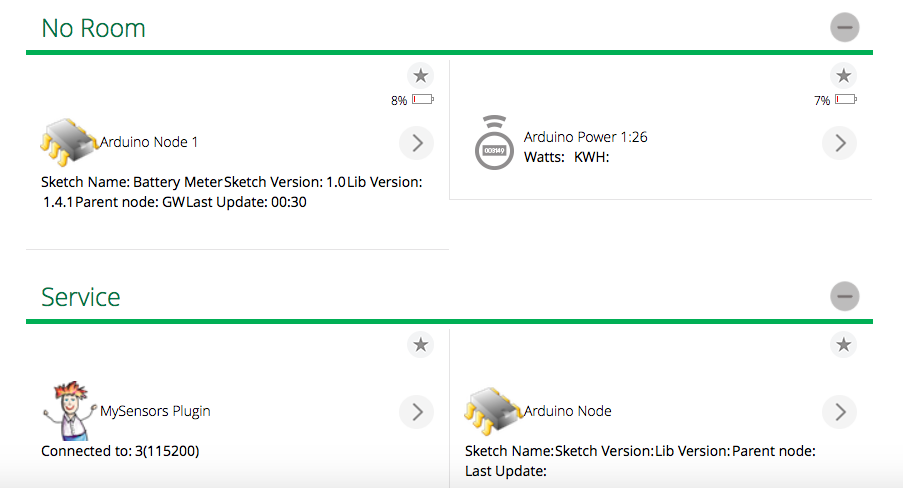
It actually comes up as Arduino Door... very odd. Still can't get voltage or battery level to show up.
-
It actually comes up as Arduino Door... very odd. Still can't get voltage or battery level to show up.
@jeylites You are presenting the sensor as V_VOLTAGE (value=38). The sensor should present itself with a S_.... message. eg S_POWER (value=13) to be recognized correctly. Have a look at the API/ Serial spec
-
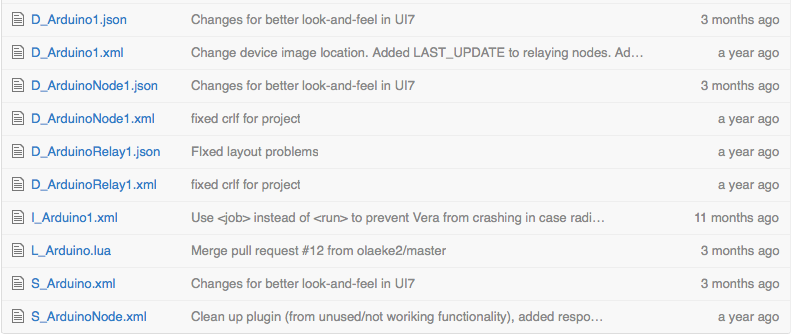
S_VOLTAGE has not been implemented on vera (someone needs to create the device-files).
But I don't think you need to present anything at all. The Battery level is added to the Node-device which is automatically created.
-
You are running the UI7 branch right?
https://github.com/mysensors/Vera/tree/UI7 -
@jeylites said:
I did not know what this does so I did not add....
No they should not be added.
If someone has the time to adjust the UI7 GUI a bit I would appreciate it. There are a lot of whitespace above the icon. I hope that space is available to use by the device. If not, is sucks.
-
@hek out of curiosity, I was checking out the sketch for Sensebender and saw that it had a Child Id for Battery Sensor and Voltage sensor. How does this work as a Child id?
Since Voltage is not available on Vera at this time , I'm assuming I will not be able to use this feature... correct?
-
That battery ChildId is a leftover, from some earlier monitoring that I did, to monitor batteryvoltage decrease. Back then I used pidome as controler.
For a long time it has only reported battery percentage with the following routine
/********************************************
 *
 * Sends battery information (battery percentage)
 *
 * Parameters
 * - force : Forces transmission of a value
 *
 *******************************************/
void sendBattLevel(bool force)
{
  if (force) lastBattery = -1;
  long vcc = readVcc();
  if (vcc != lastBattery) {
    lastBattery = vcc;
    // Calculate percentage

    vcc = vcc - 1900; // subtract 1.9V from vcc, as this is the lowest voltage we will operate at

    long percent = vcc / 14.0;
    gw.sendBatteryLevel(percent);
  }
}
There are a couple of variable references back in the code at github, for the old battery voltage childId. These where removed last night, while I did some cleanup of the code. The changes are not pushed to github yet, as I haven't tested it yet.
-
How can I present the value in Voltage (for example 3.06 V)? I don't like the "Battery monitor".
I have got the multiple temperature meter (DHT + Dallas) working very well. Would be nice to have battery level in volts also.
Cheers!
-
How can I present the value in Voltage (for example 3.06 V)? I don't like the "Battery monitor".
I have got the multiple temperature meter (DHT + Dallas) working very well. Would be nice to have battery level in volts also.
Cheers!
@stamag That depends on the kind of controller employed.
There is no plugin for Vera according to @hek .
S_VOLTAGE has not been implemented on vera (someone needs to create the device-files).
But I don't think you need to present anything at all. The Battery level is added to the Node-device which is automatically created.




Hello! It looks like you're interested in this conversation, but you don't have an account yet.
Getting fed up of having to scroll through the same posts each visit? When you register for an account, you'll always come back to exactly where you were before, and choose to be notified of new replies (either via email, or push notification). You'll also be able to save bookmarks and upvote posts to show your appreciation to other community members.
With your input, this post could be even better 💗
Register Login