
Dimmer doesn't appear in devices
-
Hi!
I am kind of new here, but I have been trying to build a simple white led dimmer to control with Domoticz.
So far, I have accomplished to get the radio working, then I built the hardware and finally I tested the dimmer with a simple arduino skecth:
 void setup()
 {
   pinMode( 9, OUTPUT);
   pinMode(10, OUTPUT);
 }

 byte b = 0;

 void loop()
 {
   analogWrite(9, b);
   analogWrite(10, b);
   delay(100);
   ++b;
 }
And it worked!
Also, I managed to get the node recognized in Domoticz (after some struggle), but I cannot seem to get Domoticz to actually dim the LED!
FYI: I used this sketch:
/**
 * The MySensors Arduino library handles the wireless radio link and protocol
 * between your home built sensors/actuators and HA controller of choice.
 * The sensors forms a self healing radio network with optional repeaters. Each
 * repeater and gateway builds a routing tables in EEPROM which keeps track of the
 * network topology allowing messages to be routed to nodes.
 *
 * Created by Henrik Ekblad <henrik.ekblad@mysensors.org>
 * Copyright (C) 2013-2015 Sensnology AB
 * Full contributor list: https://github.com/mysensors/Arduino/graphs/contributors
 *
 * Documentation: http://www.mysensors.org
 * Support Forum: http://forum.mysensors.org
 *
 * This program is free software; you can redistribute it and/or
 * modify it under the terms of the GNU General Public License
 * version 2 as published by the Free Software Foundation.
 *
 *******************************
 *
 * REVISION HISTORY
 * Version 1.0 - February 15, 2014 - Bruce Lacey
 * Version 1.1 - August 13, 2014 - Converted to 1.4 (hek)
 *
 * DESCRIPTION
 * This sketch provides a Dimmable LED Light using PWM and based Henrik Ekblad
 * <henrik.ekblad@gmail.com> Vera Arduino Sensor project.
 * Developed by Bruce Lacey, inspired by Hek's MySensor's example sketches.
 *
 * The circuit uses a MOSFET for Pulse-Wave-Modulation to dim the attached LED or LED strip.
 * The MOSFET Gate pin is connected to Arduino pin 3 (LED_PIN), the MOSFET Drain pin is connected
 * to the LED negative terminal and the MOSFET Source pin is connected to ground.
 *
 * This sketch is extensible to support more than one MOSFET/PWM dimmer per circuit.
 * http://www.mysensors.org/build/dimmer
 */

#define SN "DimmableLED"
#define SV "1.1"

#include <MySensor.h>
#include <SPI.h>

#define LED_PIN 3      // Arduino pin attached to MOSFET Gate pin
#define FADE_DELAY 10  // Delay in ms for each percentage fade up/down (10ms = 1s full-range dim)

MySensor gw;

static int currentLevel = 0;  // Current dim level...
MyMessage dimmerMsg(0, V_DIMMER);
MyMessage lightMsg(0, V_LIGHT);


/***
 * Dimmable LED initialization method
 */
void setup()
{
  Serial.println( SN );
  gw.begin( incomingMessage );

  // Register the LED Dimmable Light with the gateway
  gw.present( 0, S_DIMMER );

  gw.sendSketchInfo(SN, SV);
  // Pull the gateway's current dim level - restore light level upon sendor node power-up
  gw.request( 0, V_DIMMER );
}

/***
 *  Dimmable LED main processing loop
 */
void loop()
{
  gw.process();
}


void incomingMessage(const MyMessage &message) {
  if (message.type == V_LIGHT || message.type == V_DIMMER) {

    //  Retrieve the power or dim level from the incoming request message
    int requestedLevel = atoi( message.data );

    // Adjust incoming level if this is a V_LIGHT variable update [0 == off, 1 == on]
    requestedLevel *= ( message.type == V_LIGHT ? 100 : 1 );

    // Clip incoming level to valid range of 0 to 100
    requestedLevel = requestedLevel > 100 ? 100 : requestedLevel;
    requestedLevel = requestedLevel < 0   ? 0   : requestedLevel;

    Serial.print( "Changing level to " );
    Serial.print( requestedLevel );
    Serial.print( ", from " );
    Serial.println( currentLevel );

    fadeToLevel( requestedLevel );

    // Inform the gateway of the current DimmableLED's SwitchPower1 and LoadLevelStatus value...
    gw.send(lightMsg.set(currentLevel > 0 ? 1 : 0));

    // hek comment: Is this really nessesary?
    gw.send( dimmerMsg.set(currentLevel) );


    }
}

/***
 *  This method provides a graceful fade up/down effect
 */
void fadeToLevel( int toLevel ) {

  int delta = ( toLevel - currentLevel ) < 0 ? -1 : 1;

  while ( currentLevel != toLevel ) {
    currentLevel += delta;
    analogWrite( LED_PIN, (int)(currentLevel / 100. * 255) );
    delay( FADE_DELAY );
  }
}
Can somebody help me please?
I am using a 3.3v Arduino Mini Pro clone, a IRF540 MOSFET and a 12v power supply.
Thanks for your help!
PS: amazing project!
@andrezibaia If you have the serial monitor hooked up to the sensor (dimmer), do you see the "Changing level to " output in the serial log?
Cheers
Al -
Hi @Sparkman!
No, the sensor does not get any input.
This is all I get in the serial monitor:
send: 55-55-0-0 s=255,c=0,t=17,pt=0,l=3,sg=0,st=ok:1.5
send: 55-55-0-0 s=255,c=3,t=6,pt=1,l=1,sg=0,st=ok:0
sensor started, id=55, parent=0, distance=0
send: 55-55-0-0 s=0,c=0,t=4,pt=0,l=0,sg=0,st=ok:
send: 55-55-0-0 s=255,c=3,t=11,pt=0,l=11,sg=0,st=ok:DimmableLED
send: 55-55-0-0 s=255,c=3,t=12,pt=0,l=3,sg=0,st=ok:1.1
send: 55-55-0-0 s=0,c=2,t=3,pt=0,l=0,sg=0,st=ok:
Thanks for the ultra-fast reply!
-
Hi @Sparkman!
No, the sensor does not get any input.
This is all I get in the serial monitor:
send: 55-55-0-0 s=255,c=0,t=17,pt=0,l=3,sg=0,st=ok:1.5
send: 55-55-0-0 s=255,c=3,t=6,pt=1,l=1,sg=0,st=ok:0
sensor started, id=55, parent=0, distance=0
send: 55-55-0-0 s=0,c=0,t=4,pt=0,l=0,sg=0,st=ok:
send: 55-55-0-0 s=255,c=3,t=11,pt=0,l=11,sg=0,st=ok:DimmableLED
send: 55-55-0-0 s=255,c=3,t=12,pt=0,l=3,sg=0,st=ok:1.1
send: 55-55-0-0 s=0,c=2,t=3,pt=0,l=0,sg=0,st=ok:
Thanks for the ultra-fast reply!
@andrezibaia NP. Maybe add a println in the incomingMessage function:
void incomingMessage(const MyMessage &message) {
 Serial.println( message.type );
  if (message.type == V_LIGHT || message.type == V_DIMMER) {
and then send a command from Domoticz and see what the serial log shows when you do that.
Cheers
Al -
-
@Sparkman, nothing happens...
No message at all in the serial monitor.
@andrezibaia To rule out an issue with Domoticz, do you have the ability to hookup the gateway to MYSController? Might be worth a try to see what happens with it.
Cheers
Al -
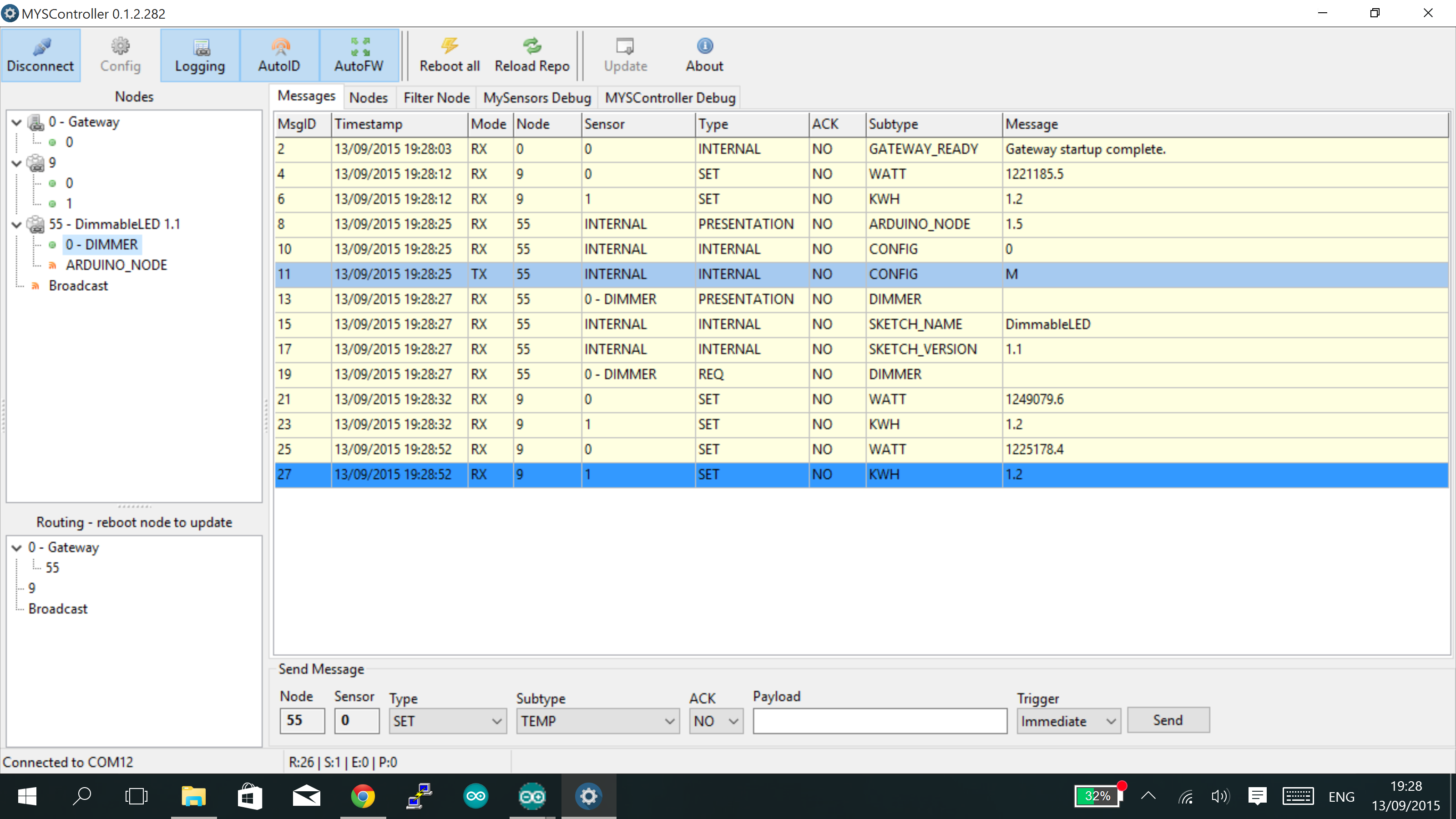
Yes, sure. Just did that.
Here's what I have:
What should I do now?
Cheers!
-
Yes, sure. Just did that.
Here's what I have:
What should I do now?
Cheers!
@andrezibaia Should be able to send a message to the node using the "Send Message" portion on the bottom of the screen.
Cheers
Al -
Sure. What should I write in the payload section?
I tried this, but nothing happened.
I'm sorry for all the "noobness", I am still trying to learn all this...
-
Sure. What should I write in the payload section?
I tried this, but nothing happened.
I'm sorry for all the "noobness", I am still trying to learn all this...
@andrezibaia Looks correct. Anything in the serial monitor of the dimmer? Try the light subtype as well and send a 0 or a 1. What does the MYSController log show when you do this?
Cheers
Al -
Nothing at all in the node serial monitor...
The log from MYSController shows this:
13/09/2015 19:53:01 TX 55;255;3;0;6;M 13/09/2015 19:53:01 RX 55;255;3;0;6;0 13/09/2015 19:53:04 RX 0;0;3;0;9;read: 55-55-0 s=0,c=0,t=4,pt=0,l=0,sg=0: 13/09/2015 19:53:04 DEBUG Update child id=0, type=DIMMER 13/09/2015 19:53:04 RX 55;0;0;0;4; 13/09/2015 19:53:04 RX 0;0;3;0;9;read: 55-55-0 s=255,c=3,t=11,pt=0,l=11,sg=0:DimmableLED 13/09/2015 19:53:04 RX 55;255;3;0;11;DimmableLED 13/09/2015 19:53:04 RX 0;0;3;0;9;read: 55-55-0 s=255,c=3,t=12,pt=0,l=3,sg=0:1.1 13/09/2015 19:53:04 RX 55;255;3;0;12;1.1 13/09/2015 19:53:04 RX 0;0;3;0;9;read: 55-55-0 s=0,c=2,t=3,pt=0,l=0,sg=0: 13/09/2015 19:53:04 RX 55;0;2;0;3; 13/09/2015 19:53:12 TX 55;0;1;0;3;50 13/09/2015 19:53:46 RX 0;0;3;0;9;read: 55-55-0 s=255,c=0,t=17,pt=0,l=3,sg=0:1.5 13/09/2015 19:53:46 DEBUG Update child id=255, type=ARDUINO_NODE 13/09/2015 19:53:46 RX 55;255;0;0;17;1.5 13/09/2015 19:53:46 RX 0;0;3;0;9;read: 55-55-0 s=255,c=3,t=6,pt=1,l=1,sg=0:0 13/09/2015 19:53:46 TX 55;255;3;0;6;M 13/09/2015 19:53:46 RX 55;255;3;0;6;0 13/09/2015 19:53:48 RX 0;0;3;0;9;read: 55-55-0 s=0,c=0,t=4,pt=0,l=0,sg=0: 13/09/2015 19:53:48 DEBUG Update child id=0, type=DIMMER 13/09/2015 19:53:48 RX 55;0;0;0;4; 13/09/2015 19:53:48 RX 0;0;3;0;9;read: 55-55-0 s=255,c=3,t=11,pt=0,l=11,sg=0:DimmableLED 13/09/2015 19:53:48 RX 55;255;3;0;11;DimmableLED 13/09/2015 19:53:48 RX 0;0;3;0;9;read: 55-55-0 s=255,c=3,t=12,pt=0,l=3,sg=0:1.1 13/09/2015 19:53:48 RX 55;255;3;0;12;1.1 13/09/2015 19:53:48 RX 0;0;3;0;9;read: 55-55-0 s=0,c=2,t=3,pt=0,l=0,sg=0: 13/09/2015 19:53:48 RX 55;0;2;0;3; 13/09/2015 19:53:56 TX 55;0;1;0;3;50 13/09/2015 19:54:16 TX 55;0;1;0;2;50 13/09/2015 19:55:02 TX 55;0;1;0;2;50 -
Nothing at all in the node serial monitor...
The log from MYSController shows this:
13/09/2015 19:53:01 TX 55;255;3;0;6;M 13/09/2015 19:53:01 RX 55;255;3;0;6;0 13/09/2015 19:53:04 RX 0;0;3;0;9;read: 55-55-0 s=0,c=0,t=4,pt=0,l=0,sg=0: 13/09/2015 19:53:04 DEBUG Update child id=0, type=DIMMER 13/09/2015 19:53:04 RX 55;0;0;0;4; 13/09/2015 19:53:04 RX 0;0;3;0;9;read: 55-55-0 s=255,c=3,t=11,pt=0,l=11,sg=0:DimmableLED 13/09/2015 19:53:04 RX 55;255;3;0;11;DimmableLED 13/09/2015 19:53:04 RX 0;0;3;0;9;read: 55-55-0 s=255,c=3,t=12,pt=0,l=3,sg=0:1.1 13/09/2015 19:53:04 RX 55;255;3;0;12;1.1 13/09/2015 19:53:04 RX 0;0;3;0;9;read: 55-55-0 s=0,c=2,t=3,pt=0,l=0,sg=0: 13/09/2015 19:53:04 RX 55;0;2;0;3; 13/09/2015 19:53:12 TX 55;0;1;0;3;50 13/09/2015 19:53:46 RX 0;0;3;0;9;read: 55-55-0 s=255,c=0,t=17,pt=0,l=3,sg=0:1.5 13/09/2015 19:53:46 DEBUG Update child id=255, type=ARDUINO_NODE 13/09/2015 19:53:46 RX 55;255;0;0;17;1.5 13/09/2015 19:53:46 RX 0;0;3;0;9;read: 55-55-0 s=255,c=3,t=6,pt=1,l=1,sg=0:0 13/09/2015 19:53:46 TX 55;255;3;0;6;M 13/09/2015 19:53:46 RX 55;255;3;0;6;0 13/09/2015 19:53:48 RX 0;0;3;0;9;read: 55-55-0 s=0,c=0,t=4,pt=0,l=0,sg=0: 13/09/2015 19:53:48 DEBUG Update child id=0, type=DIMMER 13/09/2015 19:53:48 RX 55;0;0;0;4; 13/09/2015 19:53:48 RX 0;0;3;0;9;read: 55-55-0 s=255,c=3,t=11,pt=0,l=11,sg=0:DimmableLED 13/09/2015 19:53:48 RX 55;255;3;0;11;DimmableLED 13/09/2015 19:53:48 RX 0;0;3;0;9;read: 55-55-0 s=255,c=3,t=12,pt=0,l=3,sg=0:1.1 13/09/2015 19:53:48 RX 55;255;3;0;12;1.1 13/09/2015 19:53:48 RX 0;0;3;0;9;read: 55-55-0 s=0,c=2,t=3,pt=0,l=0,sg=0: 13/09/2015 19:53:48 RX 55;0;2;0;3; 13/09/2015 19:53:56 TX 55;0;1;0;3;50 13/09/2015 19:54:16 TX 55;0;1;0;2;50 13/09/2015 19:55:02 TX 55;0;1;0;2;50@andrezibaia said:
13/09/2015 19:53:56 TX 55;0;1;0;3;50
13/09/2015 19:54:16 TX 55;0;1;0;2;50
13/09/2015 19:55:02 TX 55;0;1;0;2;50The last 3 lines show you sending 50 to the dimmer device first (3) and then twice to the light device (2). The light device should only respond to a 0 or a 1. Have you tried sending that?
Cheers
Al -
Yes, I tried that as well. Nothing happened.
In the meantime, the serial monitor from the node shows only this and nothing else:
send: 55-55-0-0 s=255,c=0,t=17,pt=0,l=3,sg=0,st=ok:1.5
send: 55-55-0-0 s=255,c=3,t=6,pt=1,l=1,sg=0,st=ok:0
sensor started, id=55, parent=0, distance=0
send: 55-55-0-0 s=0,c=0,t=4,pt=0,l=0,sg=0,st=ok:
send: 55-55-0-0 s=255,c=3,t=11,pt=0,l=11,sg=0,st=ok:DimmableLED
send: 55-55-0-0 s=255,c=3,t=12,pt=0,l=3,sg=0,st=ok:1.1
send: 55-55-0-0 s=0,c=2,t=3,pt=0,l=0,sg=0,st=ok:
Is it perhaps a problem with the radio? It only sends and does not receive?
I tried different NRF24L01+ chips, but the problem remains...
I even tried to feed the NRF chip through a 3.3v regulator, but nothing happens...
-
Yes, I tried that as well. Nothing happened.
In the meantime, the serial monitor from the node shows only this and nothing else:
send: 55-55-0-0 s=255,c=0,t=17,pt=0,l=3,sg=0,st=ok:1.5
send: 55-55-0-0 s=255,c=3,t=6,pt=1,l=1,sg=0,st=ok:0
sensor started, id=55, parent=0, distance=0
send: 55-55-0-0 s=0,c=0,t=4,pt=0,l=0,sg=0,st=ok:
send: 55-55-0-0 s=255,c=3,t=11,pt=0,l=11,sg=0,st=ok:DimmableLED
send: 55-55-0-0 s=255,c=3,t=12,pt=0,l=3,sg=0,st=ok:1.1
send: 55-55-0-0 s=0,c=2,t=3,pt=0,l=0,sg=0,st=ok:
Is it perhaps a problem with the radio? It only sends and does not receive?
I tried different NRF24L01+ chips, but the problem remains...
I even tried to feed the NRF chip through a 3.3v regulator, but nothing happens...
@andrezibaia said:
Is it perhaps a problem with the radio? It only sends and does not receive?
It's possible, but none of the logs indicate a communications issue. Maybe @blacey who wrote the sketch or @hek have some other ideas.
Cheers
Al -
@andrezibaia said:
Is it perhaps a problem with the radio? It only sends and does not receive?
It's possible, but none of the logs indicate a communications issue. Maybe @blacey who wrote the sketch or @hek have some other ideas.
Cheers
Al@Sparkman Thanks a lot for all your time and effort!
Cheers!
-
@Sparkman, after a lot of days of despair, I found the problem!
My gateway was built on a 3.3v Arduino Mini Pro. As soon as I set it up on a 5V one (I did not even need a power regulator for the radio, because I used one of those Sparkfun ones with an antenna.
Now it's all kicking ass! :dancer:
Thanks again, man!
-
@Sparkman, after a lot of days of despair, I found the problem!
My gateway was built on a 3.3v Arduino Mini Pro. As soon as I set it up on a 5V one (I did not even need a power regulator for the radio, because I used one of those Sparkfun ones with an antenna.
Now it's all kicking ass! :dancer:
Thanks again, man!
@andrezibaia You're welcome and glad to hear you got it resolved.
Cheers
Al


Hello! It looks like you're interested in this conversation, but you don't have an account yet.
Getting fed up of having to scroll through the same posts each visit? When you register for an account, you'll always come back to exactly where you were before, and choose to be notified of new replies (either via email, or push notification). You'll also be able to save bookmarks and upvote posts to show your appreciation to other community members.
With your input, this post could be even better 💗
Register Login