Skip to content
  • MySensors
  • OpenHardware.io
  • Categories
  • Recent
  • Tags
  • Popular
Skins
  • Light
  • Brite
  • Cerulean
  • Cosmo
  • Flatly
  • Journal
  • Litera
  • Lumen
  • Lux
  • Materia
  • Minty
  • Morph
  • Pulse
  • Sandstone
  • Simplex
  • Sketchy
  • Spacelab
  • United
  • Yeti
  • Zephyr
  • Dark
  • Cyborg
  • Darkly
  • Quartz
  • Slate
  • Solar
  • Superhero
  • Vapor

  • Default (No Skin)
  • No Skin
Collapse
Brand Logo
  1. Home
  2. Announcements
  3. 1.4 Beta

1.4 Beta

Scheduled Pinned Locked Moved Announcements
1.4betahelp
129 Posts 18 Posters 112.0k Views 4 Watching
  • Oldest to Newest
  • Newest to Oldest
  • Most Votes
Reply
  • Reply as topic
Log in to reply
This topic has been deleted. Only users with topic management privileges can see it.
  • Y Yveaux

    @hek said:

    Do you have any suggestion?

    It's in my post hek ;-)

    H Offline
    H Offline
    hek
    Admin
    wrote on last edited by
    #99

    @Yveaux said:

    It's in my post hek

    Yes, you suggest to always have but that might not be possible if we choose some other transportation layer (which most probably will use the first bytes for it's own routing).

    When sending the other way, I guess the serial data is always sent as text by the gateway to the sensor, right?
    Too bad we can't also use different formats when sending through the serial api... Did you think about this?

    Yes, I've thought about it. We have a couple of options here. Start type:ing variables through the serial protocol (controller must send datatype) or have a hard coded variable->type map on arduino side. Both of these are valid options.
    A binary serial protocol is also an option (could be an option when building gateway).. But that makes it harder to debug e.g. Arduino Serial Monitor.

    Y 1 Reply Last reply
    0
    • H hek

      @Yveaux said:

      It's in my post hek

      Yes, you suggest to always have but that might not be possible if we choose some other transportation layer (which most probably will use the first bytes for it's own routing).

      When sending the other way, I guess the serial data is always sent as text by the gateway to the sensor, right?
      Too bad we can't also use different formats when sending through the serial api... Did you think about this?

      Yes, I've thought about it. We have a couple of options here. Start type:ing variables through the serial protocol (controller must send datatype) or have a hard coded variable->type map on arduino side. Both of these are valid options.
      A binary serial protocol is also an option (could be an option when building gateway).. But that makes it harder to debug e.g. Arduino Serial Monitor.

      Y Offline
      Y Offline
      Yveaux
      Mod
      wrote on last edited by Yveaux
      #100

      @hek said:

      but that might not be possible if we choose some other transportation layer

      Then the transportation layer data is not part of mysensors protocol. It's that simple!
      IMHO This again boils down to nested protocol headers which we talked about before.
      The routing info is part of transportation layer (it could even have its own version info) followed by the mysensors header ( starting with a version number) which tells us what's in the message. Then come the actual data, be it a value, presentation info or whatever. I can make a sketch of this structure if that helps in the discussion.

      http://yveaux.blogspot.nl

      H 1 Reply Last reply
      0
      • Y Yveaux

        @hek said:

        but that might not be possible if we choose some other transportation layer

        Then the transportation layer data is not part of mysensors protocol. It's that simple!
        IMHO This again boils down to nested protocol headers which we talked about before.
        The routing info is part of transportation layer (it could even have its own version info) followed by the mysensors header ( starting with a version number) which tells us what's in the message. Then come the actual data, be it a value, presentation info or whatever. I can make a sketch of this structure if that helps in the discussion.

        H Offline
        H Offline
        hek
        Admin
        wrote on last edited by
        #101

        @Yveaux

        I think we agree. Only problem is that I haven't split up the structure in mysensors-transportation/mysensors-header/mysensors-payload yet but if you look from the sniffer side this would not matter.

        Please post you suggested structure (but in a new thread).

        D 1 Reply Last reply
        0
        • H hek

          @Yveaux

          I think we agree. Only problem is that I haven't split up the structure in mysensors-transportation/mysensors-header/mysensors-payload yet but if you look from the sniffer side this would not matter.

          Please post you suggested structure (but in a new thread).

          D Offline
          D Offline
          Damme
          Code Contributor
          wrote on last edited by
          #102

          I got this question from a friend and since I dont know the answer either;

          I'm trying to figure out the sleep mode and if the radio module wakes up or not (via INT pin 2) .. but for me it does not seam to do this. Which sleep-modes does 1.4b have and how do I see if the message is for me, and if not continue sleep?

          H 1 Reply Last reply
          0
          • D Damme

            I got this question from a friend and since I dont know the answer either;

            I'm trying to figure out the sleep mode and if the radio module wakes up or not (via INT pin 2) .. but for me it does not seam to do this. Which sleep-modes does 1.4b have and how do I see if the message is for me, and if not continue sleep?

            H Offline
            H Offline
            hek
            Admin
            wrote on last edited by
            #103

            @Damme

            The radio interrupts is not used at the moment.

            It uses the following sleep modes

            LowPower.powerDown(SLEEP_FOREVER, ADC_OFF, BOD_OFF);
            

            or

            LowPower.powerDown(SLEEP_XXXXS, ADC_OFF, BOD_OFF); 
            

            Depending on if you want timer to wake up or not. Radio is always put to sleep.
            For more details, check out MySensor.cpp.

            1 Reply Last reply
            0
            • W Offline
              W Offline
              warawara
              wrote on last edited by
              #104

              I'm trying to create my own controller in Node-Red.

              My setup is as followed:
              Motion Sensor arduino with standard example sketch <--> SerialGateway arduino with standard example sketch <--> USB <--> Node-Red (installed on Raspberry PI)

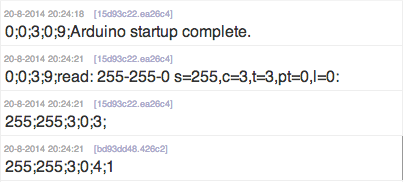
              My SerialGateway receives the request for a node ID (255;255;3;0;3;)
              I then return a serial command: 255;255;3;0;4;1

              You can see my Node-Red output below:
              Schermafdruk 2014-08-20 20.25.29.png

              For some reason my SerialGateway is not broadcasting my command. It's only repeating the above commands sevral times;

              Am i using the correct protocol values or is there something else I should do?

              H 1 Reply Last reply
              0
              • W warawara

                I'm trying to create my own controller in Node-Red.

                My setup is as followed:
                Motion Sensor arduino with standard example sketch <--> SerialGateway arduino with standard example sketch <--> USB <--> Node-Red (installed on Raspberry PI)

                My SerialGateway receives the request for a node ID (255;255;3;0;3;)
                I then return a serial command: 255;255;3;0;4;1

                You can see my Node-Red output below:
                Schermafdruk 2014-08-20 20.25.29.png

                For some reason my SerialGateway is not broadcasting my command. It's only repeating the above commands sevral times;

                Am i using the correct protocol values or is there something else I should do?

                H Offline
                H Offline
                hek
                Admin
                wrote on last edited by
                #105

                @warawara

                Did you remember sending a newline?

                W 2 Replies Last reply
                0
                • H hek

                  @warawara

                  Did you remember sending a newline?

                  W Offline
                  W Offline
                  warawara
                  wrote on last edited by
                  #106

                  @hek
                  Yes I did.

                  My Node-Red is configured to send a newline after every command.

                  But just to make sure I also tried adding it to the string.

                  Same result.

                  1 Reply Last reply
                  0
                  • H hek

                    @warawara

                    Did you remember sending a newline?

                    W Offline
                    W Offline
                    warawara
                    wrote on last edited by
                    #107

                    @hek

                    I assume sending de command in ascii is good or do I need to send a binary buffer?

                    H 1 Reply Last reply
                    0
                    • W warawara

                      @hek

                      I assume sending de command in ascii is good or do I need to send a binary buffer?

                      H Offline
                      H Offline
                      hek
                      Admin
                      wrote on last edited by
                      #108

                      @warawara

                      If it's working from your gateway Serial Monitor in IDE you must be doing something wrong in your program.

                      W 2 Replies Last reply
                      0
                      • H hek

                        @warawara

                        If it's working from your gateway Serial Monitor in IDE you must be doing something wrong in your program.

                        W Offline
                        W Offline
                        warawara
                        wrote on last edited by
                        #109

                        @hek
                        Not working in IDE.

                        1 Reply Last reply
                        0
                        • H hek

                          @warawara

                          If it's working from your gateway Serial Monitor in IDE you must be doing something wrong in your program.

                          W Offline
                          W Offline
                          warawara
                          wrote on last edited by
                          #110

                          @hek

                          Got it working, but my solution is not very satisfying.

                          I swapt the sketches on my 2 arduino's.

                          Original arduino setup was:
                          SerialGatway - Arduino pro mini 3.3v (including Decoupling-Capacitor)
                          Motion Sensor - Arduino Uno (including Decoupling-Capacitor)

                          Now the sketches are switched and it works.

                          Eventually I will be working with only Arduino pro mini's but still the original setup should have worked.

                          D 1 Reply Last reply
                          0
                          • W warawara

                            @hek

                            Got it working, but my solution is not very satisfying.

                            I swapt the sketches on my 2 arduino's.

                            Original arduino setup was:
                            SerialGatway - Arduino pro mini 3.3v (including Decoupling-Capacitor)
                            Motion Sensor - Arduino Uno (including Decoupling-Capacitor)

                            Now the sketches are switched and it works.

                            Eventually I will be working with only Arduino pro mini's but still the original setup should have worked.

                            D Offline
                            D Offline
                            Damme
                            Code Contributor
                            wrote on last edited by
                            #111

                            @warawara did you try clearing using clear eeprom? That helped me some times. Dont really know why some nodes just wont want to recieve packages..

                            W 1 Reply Last reply
                            0
                            • D Damme

                              @warawara did you try clearing using clear eeprom? That helped me some times. Dont really know why some nodes just wont want to recieve packages..

                              W Offline
                              W Offline
                              warawara
                              wrote on last edited by
                              #112

                              @Damme
                              Thanks for the tip.

                              I will try that in the future. But I don't think it was a problem of not receiving on the sensor part. I think it was a problem with not sending on the Serial Gateway part.

                              But I got it working now!

                              1 Reply Last reply
                              0
                              • R Offline
                                R Offline
                                RJ_Make
                                Hero Member
                                wrote on last edited by
                                #113

                                Ok, So I took the plunge and upgraded to 1.4.b1, and everything went "OK" with one glaring exception...... All temperatures display in Celsius. No matter what I do, I can't seem to get it to display in Fahrenheit..

                                Any Idea's?

                                RJ_Make

                                H 1 Reply Last reply
                                0
                                • B Offline
                                  B Offline
                                  Bandra
                                  wrote on last edited by
                                  #114

                                  @hek
                                  I'd like to ask for a small change to be made to the sleep function.

                                  When we call gw.sleep(x) or gw.sleep(x,y,z) then the arduino disables the interrupt timer (to save power) that triggers the counter that drives millis(). So the value returned from millis() stalls when we sleep.

                                  This is ok on our battery powered devices, since it's saving power, but makes it hard to determine how long it's been since we sent values to the gateway.

                                  For example, if I use this code:

                                  if ((unsigned long)(millis() - timeOfLastSensorSend) >= MIN_SAMPLING_INTERVAL) {
                                      // read sensors and send to gateway
                                      timeOfLastSensorSend = millis();
                                  }
                                  gw.sleep(SLEEP_TIME);
                                  

                                  Then it doesn't work because millis() does not increment while the the sketch is asleep.

                                  I have a thought on how we can solve this but I have a to get to a work meeting.

                                  1 Reply Last reply
                                  0
                                  • B Offline
                                    B Offline
                                    Bandra
                                    wrote on last edited by
                                    #115

                                    Ok, back from meeting.

                                    So, for sketches that don't need to sleep on interrupt, then things are ok because I can code around it like this:

                                    if ((unsigned long)(millis() - timeOfLastSensorSend) >= MIN_SAMPLING_INTERVAL) {
                                        // read sensors and send to gateway
                                        timeOfLastSensorSend = millis();
                                    }
                                    gw.sleep(SLEEP_TIME);
                                    timeOfLastSensorSend -= SLEEP_TIME;
                                    

                                    My rationale here is that if millis doesn't increment then I should make my variable decrement by the same amount. Same effect.

                                    However, the catch is when sleeping with interrupt. My thinking was to modify MySensors.cpp to change the return value of sleep. Something like this:

                                    unsigned long MySensor::internalSleep(unsigned long ms) {
                                        unsigned long origMs = ms;
                                        while (continueTimer && ms >= 8000) { LowPower.powerDown(SLEEP_8S, ADC_OFF, BOD_OFF); ms -= 8000; }
                                        if (continueTimer && ms >= 4000)    { LowPower.powerDown(SLEEP_4S, ADC_OFF, BOD_OFF); ms -= 4000; }
                                        ...
                                        if (continueTimer && ms >= 16)      { LowPower.powerDown(SLEEP_15Ms, ADC_OFF, BOD_OFF); ms -= 15; }
                                        return (origMs - ms);
                                    }
                                    
                                    unsigned long MySensor::sleep(unsigned long ms) {
                                        // Let serial prints finish (debug, log etc)
                                        Serial.flush();
                                        RF24::powerDown();
                                        continueTimer = true;
                                        return internalSleep(ms);
                                    }
                                    
                                    unsigned long MySensor::sleep(int interrupt, int mode, unsigned long  ms) {
                                        // Let serial prints finish (debug, log etc)
                                        unsigned long sleptFor = 0;
                                        Serial.flush();
                                        RF24::powerDown();
                                        attachInterrupt(interrupt, wakeUp, mode); //Interrupt on pin 3 for any change in solar power
                                        if (ms>0) {
                                                continueTimer = true;
                                                sleptFor = sleep(ms);
                                        } else {
                                                Serial.flush();
                                                LowPower.powerDown(SLEEP_FOREVER, ADC_OFF, BOD_OFF);
                                        }
                                        detachInterrupt(interrupt);
                                        return sleptFor;
                                    }
                                    

                                    So rather than return a boolean on sleep(x,y,z), return the amount of time it slept for before it was interrupted. The check of the boolean is replaced with a check if return code > 0.

                                    Hopefully my ramblings make some kind of sense.

                                    1 Reply Last reply
                                    0
                                    • R RJ_Make

                                      Ok, So I took the plunge and upgraded to 1.4.b1, and everything went "OK" with one glaring exception...... All temperatures display in Celsius. No matter what I do, I can't seem to get it to display in Fahrenheit..

                                      Any Idea's?

                                      H Offline
                                      H Offline
                                      hek
                                      Admin
                                      wrote on last edited by
                                      #116

                                      @ServiceXp

                                      The sensor fetches the unit setting from Vera at startup. Something probably fails during this data exchange. You'll have to look at the debug logs to see what happens.

                                      This behavior might change in 1.4 with sensors just reporting SI-units and controller makes the necessary conversion/scaling.

                                      R 1 Reply Last reply
                                      0
                                      • H hek

                                        @ServiceXp

                                        The sensor fetches the unit setting from Vera at startup. Something probably fails during this data exchange. You'll have to look at the debug logs to see what happens.

                                        This behavior might change in 1.4 with sensors just reporting SI-units and controller makes the necessary conversion/scaling.

                                        R Offline
                                        R Offline
                                        RJ_Make
                                        Hero Member
                                        wrote on last edited by
                                        #117

                                        @hek
                                        This is the first time I've ssh into vera, so I have no idea what I'm looking for.. I have 2 Everspring ST-814's that display correctly, and of course 2 MySensor sensor which did in 1.3, but not in 1.4b1.

                                        I found this, but not sure if this is what you need.

                                        02 08/22/14 7:47:04.914 luup_log:87: Arduino: Incoming internal command '0;0;3;9;read: 2-2-0 s=1,c=1,t=0,pt=7,l=5:22.6' discarded for child: nil <0x2f8b3680>
                                        50 08/22/14 7:47:04.916 luup_log:87: Arduino: Set variable: 2;1;1;0;0;22.6 <0x2f8b3680>
                                        50 08/22/14 7:47:04.916 luup_log:87: Arduino: Setting variable 'CurrentTemperature' to value '22.6' <0x2f8b3680>
                                        50 08/22/14 7:47:04.916 luup_log:87: Arduino: urn:upnp-org:serviceId:TemperatureSensor1,CurrentTemperature, 22.6, 92 <0x2f8b3680>
                                        06 08/22/14 7:47:04.917 Device_Variable::m_szValue_set device: 92 service: urn:upnp-org:serviceId:TemperatureSensor1 variable: CurrentTemperature was: 22.5 now: 22.6 #hooks: 3 upnp: 0 v:0xda4620/NONE duplicate:0 <0x2f8b3680>
                                        01 08/22/14 7:47:04.918 LuaInterface::CallFunction_Variable func: w_switch Device_Variable 92 urn:upnp-org:serviceId:TemperatureSensor1:CurrentTemperature failed [string "..."]:14: bad argument #1 to 'sub' (string expected, got nil) <0x2f8b3680>
                                        01 08/22/14 7:47:04.919 LuaInterface::CallFunction_Variable func: w_switch Device_Variable 92 urn:upnp-org:serviceId:TemperatureSensor1:CurrentTemperature failed [string "..."]:14: bad argument #1 to 'sub' (string expected, got nil) <0x2f8b3680>

                                        RJ_Make

                                        H 1 Reply Last reply
                                        0
                                        • R RJ_Make

                                          @hek
                                          This is the first time I've ssh into vera, so I have no idea what I'm looking for.. I have 2 Everspring ST-814's that display correctly, and of course 2 MySensor sensor which did in 1.3, but not in 1.4b1.

                                          I found this, but not sure if this is what you need.

                                          02 08/22/14 7:47:04.914 luup_log:87: Arduino: Incoming internal command '0;0;3;9;read: 2-2-0 s=1,c=1,t=0,pt=7,l=5:22.6' discarded for child: nil <0x2f8b3680>
                                          50 08/22/14 7:47:04.916 luup_log:87: Arduino: Set variable: 2;1;1;0;0;22.6 <0x2f8b3680>
                                          50 08/22/14 7:47:04.916 luup_log:87: Arduino: Setting variable 'CurrentTemperature' to value '22.6' <0x2f8b3680>
                                          50 08/22/14 7:47:04.916 luup_log:87: Arduino: urn:upnp-org:serviceId:TemperatureSensor1,CurrentTemperature, 22.6, 92 <0x2f8b3680>
                                          06 08/22/14 7:47:04.917 Device_Variable::m_szValue_set device: 92 service: urn:upnp-org:serviceId:TemperatureSensor1 variable: CurrentTemperature was: 22.5 now: 22.6 #hooks: 3 upnp: 0 v:0xda4620/NONE duplicate:0 <0x2f8b3680>
                                          01 08/22/14 7:47:04.918 LuaInterface::CallFunction_Variable func: w_switch Device_Variable 92 urn:upnp-org:serviceId:TemperatureSensor1:CurrentTemperature failed [string "..."]:14: bad argument #1 to 'sub' (string expected, got nil) <0x2f8b3680>
                                          01 08/22/14 7:47:04.919 LuaInterface::CallFunction_Variable func: w_switch Device_Variable 92 urn:upnp-org:serviceId:TemperatureSensor1:CurrentTemperature failed [string "..."]:14: bad argument #1 to 'sub' (string expected, got nil) <0x2f8b3680>

                                          H Offline
                                          H Offline
                                          hek
                                          Admin
                                          wrote on last edited by
                                          #118

                                          @ServiceXp

                                          The node will be transferring celsius data until it manage to receive settings from controller (this is done in the background) by setup().
                                          Attach your failing sensor to the computer. Upload sketch with debug enabled. And look at the Serial monitor. Restart a sensor a few times .


                                          R 1 Reply Last reply
                                          0

                                          Hello! It looks like you're interested in this conversation, but you don't have an account yet.

                                          Getting fed up of having to scroll through the same posts each visit? When you register for an account, you'll always come back to exactly where you were before, and choose to be notified of new replies (either via email, or push notification). You'll also be able to save bookmarks and upvote posts to show your appreciation to other community members.

                                          With your input, this post could be even better 💗

                                          Register Login
                                          Reply
                                          • Reply as topic
                                          Log in to reply
                                          • Oldest to Newest
                                          • Newest to Oldest
                                          • Most Votes


                                          18

                                          Online

                                          12.0k

                                          Users

                                          11.2k

                                          Topics

                                          113.4k

                                          Posts


                                          Copyright 2025 TBD   |   Forum Guidelines   |   Privacy Policy   |   Terms of Service
                                          • Login

                                          • Don't have an account? Register

                                          • Login or register to search.
                                          • First post
                                            Last post
                                          0
                                          • MySensors
                                          • OpenHardware.io
                                          • Categories
                                          • Recent
                                          • Tags
                                          • Popular