
Can't get DHT22 working with MySbootloader
-
Hello,
After some successful test with MySensor for Tempeture, Humidity, Motion, Light, battery voltage I would like to go through MYSbootloader.
After that OTA firmware upgrade works perfectly but I've got issue to get DHT22 working.
here is my code :
#include <SPI.h>
#include <MySensor.h>
#include <DHT.h>

#define CHILD_ID_HUM 0
#define CHILD_ID_TEMP 1
#define CHILD_ID_MOTION 2
#define CHILD_ID_LIGHT 3


#define HUMIDITY_SENSOR_DIGITAL_PIN 5
#define MOTION_SENSOR_DIGITAL_PIN 2
#define INTERRUPT DIGITAL_INPUT_SENSOR 2
#define LIGHT_SENSOR_ANALOG_PIN A0
#define BATTERY_SENSE_PIN A1 // select the input pin for the battery sense point

unsigned long SLEEP_TIME = 60000; // Sleep time between reads (in milliseconds)


MySensor gw;
DHT dht;
float lastTemp;
float lastHum;
boolean metric = true;
int lastLightLevel;
char lasttripped;
int lastBatteryPcnt;

MyMessage msgHum(CHILD_ID_HUM, V_HUM);
MyMessage msgTemp(CHILD_ID_TEMP, V_TEMP);
MyMessage msg(CHILD_ID_MOTION, V_TRIPPED);
MyMessage msglight(CHILD_ID_LIGHT, V_LIGHT_LEVEL);

void setup()
{

  gw.begin(NULL, 28, false);
  dht.setup(HUMIDITY_SENSOR_DIGITAL_PIN);
  pinMode(MOTION_SENSOR_DIGITAL_PIN, INPUT);

  attachInterrupt(digitalPinToInterrupt(MOTION_SENSOR_DIGITAL_PIN), loop, CHANGE);


  // Send the Sketch Version Information to the Gateway
  gw.sendSketchInfo("Sensor Pack", "1.2");

  // Register all sensors to gw (they will be created as child devices)
  gw.present(CHILD_ID_HUM, S_HUM);
  gw.present(CHILD_ID_TEMP, S_TEMP);
  gw.present(CHILD_ID_MOTION, S_MOTION);
  gw.present(CHILD_ID_LIGHT, S_LIGHT_LEVEL);
  metric = true;
}

void loop()
{

  // Motion Sensor
  boolean tripped = digitalRead(MOTION_SENSOR_DIGITAL_PIN) == HIGH;
  if (tripped != lasttripped)
  {
    Serial.print("Motion : ");
    Serial.println(tripped);
    gw.send(msg.set(tripped ? "1" : "0")); // Send tripped value to gw
    lasttripped = tripped;
  }


  // DHT sensor for Humidity and temperature

  delay(dht.getMinimumSamplingPeriod());

  float temperature = dht.getTemperature();
  if (isnan(temperature)) {
    Serial.println("Failed reading temperature from DHT");
  } else if (temperature != lastTemp) {
    lastTemp = temperature;
    if (!metric) {
      temperature = dht.toFahrenheit(temperature);
    }
    gw.send(msgTemp.set(temperature, 1));
    Serial.print("Temperature : ");
    Serial.println(temperature);
  }

  float humidity = dht.getHumidity();
  if (isnan(humidity)) {
    Serial.println("Failed reading humidity from DHT");
  } else if (humidity != lastHum) {
    lastHum = humidity;
    gw.send(msgHum.set(humidity, 1));
    Serial.print("Humidity: ");
    Serial.println(humidity);
  }


  // Batt


  // Diviseur de tension : Vbatt = VCC*(R2/(R1+R2)
  // Vbatt Max : 3.3x(463000/(981000 + 463000)
  // Vbatt Max : 3.3 / 0,3206371191135734
  // vbatt Max : 1.05
  // --> Resolution : (1.05 * 1023) / 3.3
  // --> ADC Max batt value 328

  // Vbatt Min : 2.4 x(463000/(981000 + 463000)
  // Vbatt Min : 2.4 / 0,3206371191135734
  // vbatt Min : 0.7695
  // --> Resolution : (0.7695 * 1023) / 3.3
  // --> ADC Min batt value 238

  int sensorValue = analogRead(BATTERY_SENSE_PIN);
  int batteryPcnt = map(sensorValue, 238, 328, 0, 100);

  if (lastBatteryPcnt != batteryPcnt) {
    gw.sendBatteryLevel(batteryPcnt);
    lastBatteryPcnt = batteryPcnt;
    Serial.print("Battery percent: ");
    Serial.print(batteryPcnt);
    Serial.println(" %");
  }

 // Light Sensor
  //  int lightLevel = analogRead(0);
  int lightLevel = (1023 - analogRead(LIGHT_SENSOR_ANALOG_PIN)) / 10.23;
  Serial.print("Light level : ");
  Serial.println(lightLevel);

  if (lightLevel != lastLightLevel) {
    Serial.print("Light : ");
    Serial.println(lightLevel);
    gw.send(msglight.set(lightLevel));
    lastLightLevel = lightLevel;
  }


  gw.sleep(SLEEP_TIME); //sleep a bit

}
The DHT report nothing.
I already try to change DHT pin, but still the same. when returning to the default bootloader DHT report successfully temperature and Humidity.So I suspect something wrong when going to 16Mhz clock. do you have any idea ?
Thanks in Advance.
-
Just to add some things.
I'm using 1.5 lib.
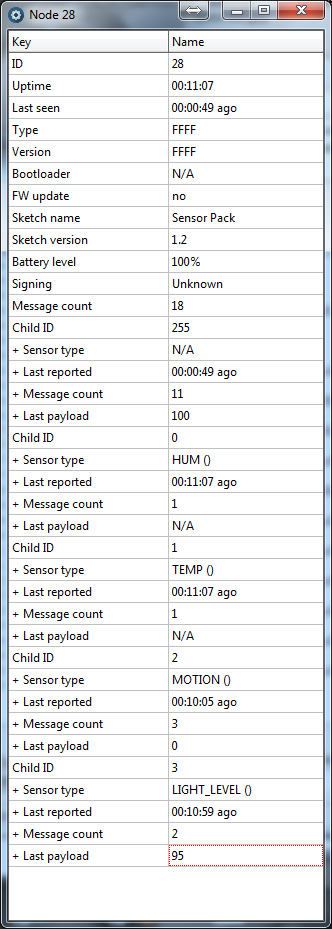
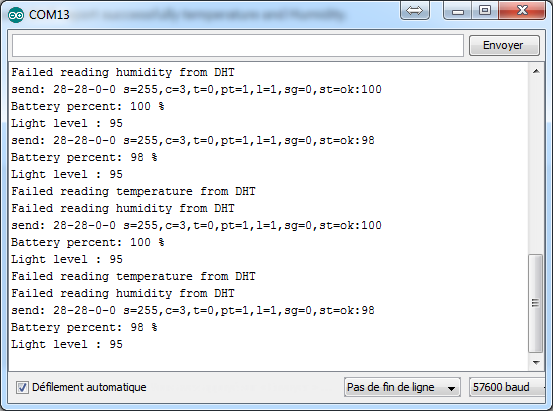
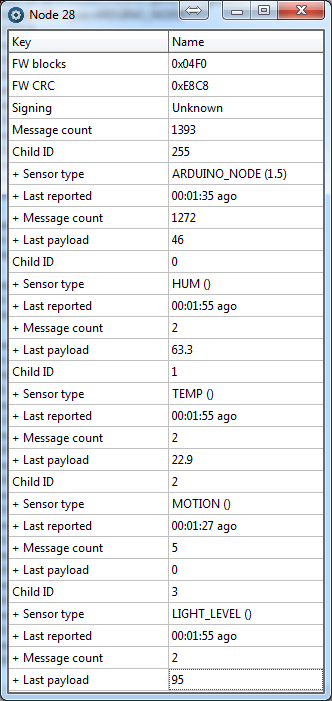
Here is a screenshot from Myscontroller and my serial debug line : -
Just to add some things.
I'm using 1.5 lib.
Here is a screenshot from Myscontroller and my serial debug line : -
with the default bootloader I use : Arduino pro mini 3.3V - 8Mhz
For the MYSbootloader I use :
proMYSBL.name=ATmega328 16Mhz MYSBootloader
proMYSBL.upload.tool=avrdude
proMYSBL.upload.protocol=arduino
proMYSBL.upload.maximum_size=30720
proMYSBL.upload.maximum_data_size=2048
proMYSBL.upload.speed=115200
proMYSBL.bootloader.tool=avrdude
proMYSBL.bootloader.low_fuses=0xF7
proMYSBL.bootloader.high_fuses=0xDA
proMYSBL.bootloader.extended_fuses=0x06
proMYSBL.bootloader.unlock_bits=0x3F
proMYSBL.bootloader.lock_bits=0x0F
proMYSBL.bootloader.file=MySensors/MYSBootloader.hex
proMYSBL.build.mcu=atmega328p
proMYSBL.build.f_cpu=16000000L
proMYSBL.build.board=AVR_UNO
proMYSBL.build.core=arduino
proMYSBL.build.variant=standardI try to change the f_cpu settings to 8000000L but same result.
-
with the default bootloader I use : Arduino pro mini 3.3V - 8Mhz
For the MYSbootloader I use :
proMYSBL.name=ATmega328 16Mhz MYSBootloader
proMYSBL.upload.tool=avrdude
proMYSBL.upload.protocol=arduino
proMYSBL.upload.maximum_size=30720
proMYSBL.upload.maximum_data_size=2048
proMYSBL.upload.speed=115200
proMYSBL.bootloader.tool=avrdude
proMYSBL.bootloader.low_fuses=0xF7
proMYSBL.bootloader.high_fuses=0xDA
proMYSBL.bootloader.extended_fuses=0x06
proMYSBL.bootloader.unlock_bits=0x3F
proMYSBL.bootloader.lock_bits=0x0F
proMYSBL.bootloader.file=MySensors/MYSBootloader.hex
proMYSBL.build.mcu=atmega328p
proMYSBL.build.f_cpu=16000000L
proMYSBL.build.board=AVR_UNO
proMYSBL.build.core=arduino
proMYSBL.build.variant=standardI try to change the f_cpu settings to 8000000L but same result.
-
Yes i'm using the 8mhz external oscilator.
I just change f_cpu while flashing the bootloader.
Didn't try yet to recompile. -
I confirm it was due to Clock mismatch.
I burnt a 8mhz version of the bootloader, assign good fuse.and now get everything working.
Thanks
-
I confirm it was due to Clock mismatch.
I burnt a 8mhz version of the bootloader, assign good fuse.and now get everything working.
Thanks
@fifipil909 said:
I confirm it was due to Clock mismatch.
I burnt a 8mhz version of the bootloader, assign good fuse.and now get everything working.
Thanks
Importantly, it's not the bootloader at 8mhz that fixed the issue, it's the correct fuse settings matching f_cpu and the crystal. The bootloader is not controlling anything but OTA FW update.
-
Hello,
I have an issue really close to yours. I burnt MYSBootloader to an Arduino Pro Mini at 8MHz and 3.3v.
Burning is ok and using Nick Gammon sketch I confirm it's correct:Atmega fuse calculator. Written by Nick Gammon. Version 1.10 Compiled on Nov 21 2015 at 10:56:15 with Arduino IDE 10605. Attempting to enter programming mode ... Entered programming mode OK. Signature = 0x1E 0x95 0x0F Processor = ATmega328P Flash memory size = 32768 LFuse = 0xF7 HFuse = 0xDA EFuse = 0xFE Lock byte = 0xCF Clock calibration = 0xA8 External Reset Disable.................. [ ] Debug Wire Enable....................... [ ] Enable Serial (ICSP) Programming........ [X] Watchdog Timer Always On................ [ ] Preserve EEPROM through chip erase...... [ ] Boot into bootloader.................... [X] Divide clock by 8....................... [ ] Clock output............................ [ ] Bootloader size: 2048 bytes. Start-up time: SUT0: [ ] SUT1: [ ] (see datasheet) Clock source: full-swing crystal. Brownout detection at: 1.8V.But impossible to upload a sketch after that. I got the 'not in sync' problem:
avrdude: stk500_recv(): programmer is not responding avrdude: stk500_getsync() attempt 1 of 10: not in sync: resp=0x00 avrdude: stk500_recv(): programmer is not responding avrdude: stk500_getsync() attempt 2 of 10: not in sync: resp=0x00 avrdude: stk500_recv(): programmer is not responding@tekka: I understood from your last reply that I need to change fuse settings for matching f_cpu and the crystal ? I only change f_cpu to 8000000L in board.txt but without fuses modification and no bootloader compilation. Can you confirm modifications I have to do ?
Thanks !
-
Hello,
I have an issue really close to yours. I burnt MYSBootloader to an Arduino Pro Mini at 8MHz and 3.3v.
Burning is ok and using Nick Gammon sketch I confirm it's correct:Atmega fuse calculator. Written by Nick Gammon. Version 1.10 Compiled on Nov 21 2015 at 10:56:15 with Arduino IDE 10605. Attempting to enter programming mode ... Entered programming mode OK. Signature = 0x1E 0x95 0x0F Processor = ATmega328P Flash memory size = 32768 LFuse = 0xF7 HFuse = 0xDA EFuse = 0xFE Lock byte = 0xCF Clock calibration = 0xA8 External Reset Disable.................. [ ] Debug Wire Enable....................... [ ] Enable Serial (ICSP) Programming........ [X] Watchdog Timer Always On................ [ ] Preserve EEPROM through chip erase...... [ ] Boot into bootloader.................... [X] Divide clock by 8....................... [ ] Clock output............................ [ ] Bootloader size: 2048 bytes. Start-up time: SUT0: [ ] SUT1: [ ] (see datasheet) Clock source: full-swing crystal. Brownout detection at: 1.8V.But impossible to upload a sketch after that. I got the 'not in sync' problem:
avrdude: stk500_recv(): programmer is not responding avrdude: stk500_getsync() attempt 1 of 10: not in sync: resp=0x00 avrdude: stk500_recv(): programmer is not responding avrdude: stk500_getsync() attempt 2 of 10: not in sync: resp=0x00 avrdude: stk500_recv(): programmer is not responding@tekka: I understood from your last reply that I need to change fuse settings for matching f_cpu and the crystal ? I only change f_cpu to 8000000L in board.txt but without fuses modification and no bootloader compilation. Can you confirm modifications I have to do ?
Thanks !
-
-
-



Hello! It looks like you're interested in this conversation, but you don't have an account yet.
Getting fed up of having to scroll through the same posts each visit? When you register for an account, you'll always come back to exactly where you were before, and choose to be notified of new replies (either via email, or push notification). You'll also be able to save bookmarks and upvote posts to show your appreciation to other community members.
With your input, this post could be even better 💗
Register Login