
SceneController
-
@Dalhoj is it possible to have one button stop/start the same scene, as an on/off switch for a light for example?
-
I dont know if you can have a 1 sec press!
but i uses LUUP and a simple ex could be turn on a lamp and if the lamp if on turn it off:
local relay1 = 114 --Light ID
local relay1_status = luup.variable_get("urn:upnp-org:serviceId:SwitchPower1", "Status", relay1) --Status of Light
if (relay1_status == "0") then
luup.call_action("urn:upnp-org:serviceId:SwitchPower1","SetTarget",{ newTargetValue="1" }, relay1)
else
luup.call_action("urn:upnp-org:serviceId:SwitchPower1","SetTarget",{ newTargetValue="0" }, relay1)
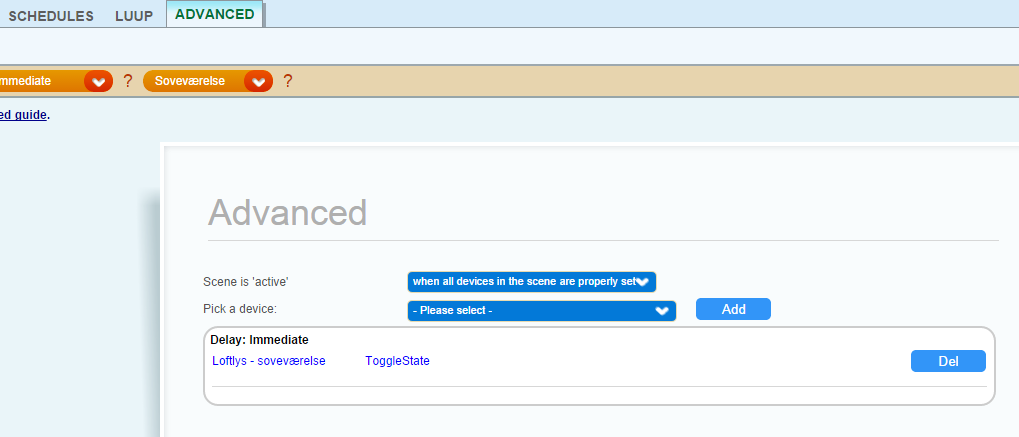
endOr you can use a toggle from the advanced scene menu:
That is how I do it.
-
I dont know if you can have a 1 sec press!
but i uses LUUP and a simple ex could be turn on a lamp and if the lamp if on turn it off:
local relay1 = 114 --Light ID
local relay1_status = luup.variable_get("urn:upnp-org:serviceId:SwitchPower1", "Status", relay1) --Status of Light
if (relay1_status == "0") then
luup.call_action("urn:upnp-org:serviceId:SwitchPower1","SetTarget",{ newTargetValue="1" }, relay1)
else
luup.call_action("urn:upnp-org:serviceId:SwitchPower1","SetTarget",{ newTargetValue="0" }, relay1)
endOr you can use a toggle from the advanced scene menu:
That is how I do it.
-
@Dalhoj said:
I dont know if you can have a 1 sec press!
I mean that the Arduino checks if user presses button for one sec and send the SCENE_OFF. You probably shouldn't let Vera handle this.
@hek said:
I mean that the Arduino checks if user presses button for one sec and send the SCENE_OFF. You probably shouldn't let Vera handle this.
I would make the Arduino send ie. for button 1 send scene ID 0 at short press and scene ID 1 for long press and so on.
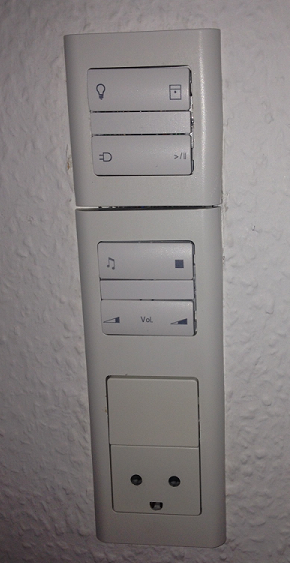
@Nuubi Here is two of my scene controllers:
The first one is installed in my bedtable
and is a combination of a scenecontroller and a relaysensor for controling the 3 leds.
The 2. is installed in the living room, and is a 8 button scenecontroller.
It controlles- the lights in the living room
- Blinds Open / Close
- a power outlet On/Off
- pause/plays my XBMC Medie Center
- starts my Yamaha reciver and starts playing net radio
- stops the radion again and turn of the reciver
- turns up / down the volume on the reciver
That is what I use it for at the moment.
-
@hek said:
I mean that the Arduino checks if user presses button for one sec and send the SCENE_OFF. You probably shouldn't let Vera handle this.
I would make the Arduino send ie. for button 1 send scene ID 0 at short press and scene ID 1 for long press and so on.
@Nuubi Here is two of my scene controllers:
The first one is installed in my bedtable
The 2. is installed in the living room, and is a 8 button scenecontroller.
It controlles- the lights in the living room
- Blinds Open / Close
- a power outlet On/Off
- pause/plays my XBMC Medie Center
- starts my Yamaha reciver and starts playing net radio
- stops the radion again and turn of the reciver
- turns up / down the volume on the reciver
That is what I use it for at the moment.
-
Its a danish enclosure: http://www.lk.dk/produkter/afbrydermateriel-lk-fuga/lk-fuga/antibakteriel/underlag/baseline-2-modul-346dd488/ for the button one and: http://www.lk.dk/produkter/afbrydermateriel-lk-fuga/lk-fuga/antibakteriel/underlag/baseline-1-modul-hvid/ for the top one.
Its a danish department of Schneider Electric called LK(Lauritz Knudsen)
Hello! It looks like you're interested in this conversation, but you don't have an account yet.
Getting fed up of having to scroll through the same posts each visit? When you register for an account, you'll always come back to exactly where you were before, and choose to be notified of new replies (either via email, or push notification). You'll also be able to save bookmarks and upvote posts to show your appreciation to other community members.
With your input, this post could be even better 💗
Register Login