Skip to content
  • MySensors
  • OpenHardware.io
  • Categories
  • Recent
  • Tags
  • Popular
Skins
  • Light
  • Brite
  • Cerulean
  • Cosmo
  • Flatly
  • Journal
  • Litera
  • Lumen
  • Lux
  • Materia
  • Minty
  • Morph
  • Pulse
  • Sandstone
  • Simplex
  • Sketchy
  • Spacelab
  • United
  • Yeti
  • Zephyr
  • Dark
  • Cyborg
  • Darkly
  • Quartz
  • Slate
  • Solar
  • Superhero
  • Vapor

  • Default (No Skin)
  • No Skin
Collapse
Brand Logo
  1. Home
  2. Announcements
  3. MySensors 1.4 Released

MySensors 1.4 Released

Scheduled Pinned Locked Moved Announcements
72 Posts 19 Posters 29.0k Views 2 Watching
  • Oldest to Newest
  • Newest to Oldest
  • Most Votes
Reply
  • Reply as topic
Log in to reply
This topic has been deleted. Only users with topic management privileges can see it.
  • hekH hek

    @epierre said:

    except for INTERNAL as it seems.

    Yes, true.

    In the LA I only see time as new, right ?

    :question:

    could the sensor soop on startup to get the data, but anyway manage reading the status of the sensor ?

    :question:

    epierreE Offline
    epierreE Offline
    epierre
    Hero Member
    wrote on last edited by
    #29

    @hek I corrected the post above... still the android template problem when posting...

    1 Reply Last reply
    0
    • hekH Offline
      hekH Offline
      hek
      Admin
      wrote on last edited by
      #30

      @epierre said:

      In the Vera LUA I only see TIME as a new event, right ?

      TIME was present already in 1.3 (https://github.com/mysensors/Vera/compare/1.3...master)

      given the limited write cycle, I guess I wouldn't want to use the EEPROM for storing states. But if my watermeter starts but cannot get the reference volume, that would mean a mess if that persist, could the sensor loop on startup to get the data, but anyway manage reading the status of the sensor ?

      Guess you could implement it with some inspiration from my example above where you instead keep requesting watermeter level until you get a response. Meanwhile you can save watermeter values and add it to the grand total when response comes in.

      1 Reply Last reply
      0
      • hekH hek

        @epierre said:

        Before we had a description of the radio signal as 5 fields, now it is 6 and even reading the lua code for Vera I've not seen the new field being used. (apart for making it not backward compatible, not a big issue for me)

        No, the (incoming) ack status is currently not used by the Vera plugin. For outgoing messages to actuators it is always enabled.

        Also some new capacities are here, but they lack documentation (at least for me), where can I have a look to see the expected behavior on both side ? (sensor and controller/gateway)?

        Yes, agree. This could be documented better.

        And to finish, what is the ack behavior on the radio, meaning that before I observed that the sendVariable needed to be requested 2 to 3 times to have it correctly received by the node, is there an automatic retry from the node as before ? (I suspect not from the simpler and clever new method...).

        No, the (blocking) automatic retry has been removed. If I would need retry functionality it would probably look something like this:

        https://codebender.cc/sketch:46971

        epierreE Offline
        epierreE Offline
        epierre
        Hero Member
        wrote on last edited by
        #31

        @hek In what case should I use the ack ?

        hekH 1 Reply Last reply
        0
        • epierreE epierre

          @hek In what case should I use the ack ?

          hekH Offline
          hekH Offline
          hek
          Admin
          wrote on last edited by
          #32

          @epierre

          If you really want to make sure your sensor data has reached the gateway (or the other way around).

          In the vera plugin the state isn't changed until ack comes back from actuator. So user get instant feedback if there is some problem in communication (=nothing updates in GUI).

          BulldogLowellB 1 Reply Last reply
          0
          • hekH hek

            @epierre

            If you really want to make sure your sensor data has reached the gateway (or the other way around).

            In the vera plugin the state isn't changed until ack comes back from actuator. So user get instant feedback if there is some problem in communication (=nothing updates in GUI).

            BulldogLowellB Offline
            BulldogLowellB Offline
            BulldogLowell
            Contest Winner
            wrote on last edited by
            #33

            @hek

            Congratulations

            1 Reply Last reply
            0
            • hekH Offline
              hekH Offline
              hek
              Admin
              wrote on last edited by hek
              #34

              ###1.4 update 1 released

              NOTE: This release does not require you to update all nodes . Nothing has changed in protocols.

              • All outgoing messages from gateway included a newline character. This has now been fixed.
              • The msg.getByte() wrongfully used atoi() conversion if payload was of string type.
              • The getByte-bug caused problems when receiving Metric/Imperial settings from controller.
              • A new sleep-method added to allow wake-up on both external interrupts.
              • A new example BinarySwitchSleepSensor showing the new sleep function (thanks @Anticimex).
              • Library code (RF24) reduced by 624 bytes (thanks @Damme)
              • Many people has reported powering problems when using amplified version of the NRF-chip on their gateway. The Arduino Nanos 3v3 output does not seem to be sufficient for PA_MAX. The radio needs to be feeded separately with a stable 3v3 to work. Defaulting gateway PA-level to LOW now and if you are using a vanilla radio on gateway you can switch back to MAX in your MyConfig.h.
              RJ_MakeR T 2 Replies Last reply
              0
              • epierreE Offline
                epierreE Offline
                epierre
                Hero Member
                wrote on last edited by
                #35
                This post is deleted!
                1 Reply Last reply
                0
                • M Offline
                  M Offline
                  mikeones
                  wrote on last edited by
                  #36

                  @hek I am having an issue assigning a node ID since the last update. I have cleared the eprom in one of my nodes and I am trying to assign a node id of 1 via the serial monitor on the GW. I am sending "255;255;3;0;4;1" in response to the node ID request of "255;255;3;0;3;".

                  This is the console log from the node with debug enabled.

                  send: 255-255-255-255 s=255,c=3,t=7,pt=0,l=0,st=fail:
                  read: 0-0-255 s=255,c=3,t=8,pt=1,l=1:0
                  new parent=0, d=1
                  req node id
                  send: 255-255-0-0 s=255,c=3,t=3,pt=0,l=0,st=ok:
                  read: 0-0-255 s=255,c=3,t=4,pt=0,l=1:1
                  id=49
                  sensor started, id 49
                  send: 49-49-0-0 s=255,c=0,t=17,pt=0,l=3,st=ok:1.4
                  send: 49-49-0-0 s=255,c=3,t=6,pt=1,l=1,st=ok:0
                  

                  Here is the console log from the GW.

                  0;0;3;0;14;Gateway startup complete.
                  255;255;3;0;3;
                  49;255;0;0;17;1.4
                  49;255;3;0;6;0
                  

                  What I don't understand is why the node would get assigned ID "49" when I sent "1" as the new node ID. Should the node get an ID of "1" or "49" for the command below?

                  255;255;3;0;4;1
                  
                  hekH 1 Reply Last reply
                  0
                  • M mikeones

                    @hek I am having an issue assigning a node ID since the last update. I have cleared the eprom in one of my nodes and I am trying to assign a node id of 1 via the serial monitor on the GW. I am sending "255;255;3;0;4;1" in response to the node ID request of "255;255;3;0;3;".

                    This is the console log from the node with debug enabled.

                    send: 255-255-255-255 s=255,c=3,t=7,pt=0,l=0,st=fail:
                    read: 0-0-255 s=255,c=3,t=8,pt=1,l=1:0
                    new parent=0, d=1
                    req node id
                    send: 255-255-0-0 s=255,c=3,t=3,pt=0,l=0,st=ok:
                    read: 0-0-255 s=255,c=3,t=4,pt=0,l=1:1
                    id=49
                    sensor started, id 49
                    send: 49-49-0-0 s=255,c=0,t=17,pt=0,l=3,st=ok:1.4
                    send: 49-49-0-0 s=255,c=3,t=6,pt=1,l=1,st=ok:0
                    

                    Here is the console log from the GW.

                    0;0;3;0;14;Gateway startup complete.
                    255;255;3;0;3;
                    49;255;0;0;17;1.4
                    49;255;3;0;6;0
                    

                    What I don't understand is why the node would get assigned ID "49" when I sent "1" as the new node ID. Should the node get an ID of "1" or "49" for the command below?

                    255;255;3;0;4;1
                    
                    hekH Offline
                    hekH Offline
                    hek
                    Admin
                    wrote on last edited by
                    #37

                    @mikeones

                    Darn, yes, you are so right. The getByte fix affected the node-id functionality. Please update again (MySensor.cpp) and report back.

                    1 Reply Last reply
                    0
                    • M Offline
                      M Offline
                      mikeones
                      wrote on last edited by mikeones
                      #38

                      @hek After updating, I have tested this via the serial monitor and it seems ok.

                      send: 255-255-0-0 s=255,c=3,t=3,pt=0,l=0,st=fail:
                      read: 0-0-255 s=255,c=3,t=4,pt=0,l=1:1
                      id=1
                      

                      When I send this string via a (ago) controller, the node sets an id of 0 again. Do you see any issue with this string format?

                      255;255;3;0;4;1
                      

                      Serial monitor output. Does "l=0:" indicate there was an issue with the payload?

                      send: 255-255-255-0 s=255,c=3,t=3,pt=0,l=0,st=fail:
                      read: 0-0-255 s=255,c=3,t=4,pt=0,l=0:
                      id=0
                      
                      hekH 1 Reply Last reply
                      0
                      • M mikeones

                        @hek After updating, I have tested this via the serial monitor and it seems ok.

                        send: 255-255-0-0 s=255,c=3,t=3,pt=0,l=0,st=fail:
                        read: 0-0-255 s=255,c=3,t=4,pt=0,l=1:1
                        id=1
                        

                        When I send this string via a (ago) controller, the node sets an id of 0 again. Do you see any issue with this string format?

                        255;255;3;0;4;1
                        

                        Serial monitor output. Does "l=0:" indicate there was an issue with the payload?

                        send: 255-255-255-0 s=255,c=3,t=3,pt=0,l=0,st=fail:
                        read: 0-0-255 s=255,c=3,t=4,pt=0,l=0:
                        id=0
                        
                        hekH Offline
                        hekH Offline
                        hek
                        Admin
                        wrote on last edited by
                        #39

                        @mikeones

                        Hmm. I wonder which control characters Argcontrol sends ( \n and/or \r ). It could be that Vera sends both. I'll have to check when I get home.

                        1 Reply Last reply
                        0
                        • M Offline
                          M Offline
                          mikeones
                          wrote on last edited by
                          #40

                          @hek

                          It appears sending "255;255;3;0;4;1\r\n" fixes my issue.

                          send: 255-255-255-0 s=255,c=3,t=3,pt=0,l=0,st=fail:
                          read: 0-0-255 s=255,c=3,t=4,pt=0,l=1:1
                          id=1
                          sensor started, id 1
                          
                          hekH 1 Reply Last reply
                          0
                          • M mikeones

                            @hek

                            It appears sending "255;255;3;0;4;1\r\n" fixes my issue.

                            send: 255-255-255-0 s=255,c=3,t=3,pt=0,l=0,st=fail:
                            read: 0-0-255 s=255,c=3,t=4,pt=0,l=1:1
                            id=1
                            sensor started, id 1
                            
                            hekH Offline
                            hekH Offline
                            hek
                            Admin
                            wrote on last edited by
                            #41

                            @mikeones

                            Ok thanks. I will make this more robust. It should be ok to skip the carriage return character.

                            1 Reply Last reply
                            0
                            • M Offline
                              M Offline
                              mikeones
                              wrote on last edited by mikeones
                              #42

                              What does st=fail represent? Is that stating the ack failed or sending failed? Would this error show up for all messages if debug is enabled on the sensor node and not the gateway.? Maybe this is a non issue? I am trying to confirm if gw.getConfig and gw.requestTime requests are reaching the GW since they don't seem to be set consistently in my environment.

                              sensor started, id 3
                              send: 3-3-0-0 s=255,c=0,t=17,pt=0,l=3,st=fail:1.4
                              send: 3-3-0-0 s=255,c=3,t=6,pt=1,l=1,st=fail:0
                              send: 3-3-0-0 s=255,c=3,t=11,pt=0,l=8,st=ok:Humidity
                              send: 3-3-0-0 s=255,c=3,t=12,pt=0,l=3,st=ok:1.0
                              send: 3-3-0-0 s=0,c=0,t=7,pt=0,l=3,st=fail:1.4
                              send: 3-3-0-0 s=1,c=0,t=6,pt=0,l=3,st=fail:1.4
                              send: 3-3-0-0 s=1,c=1,t=0,pt=7,l=5,st=fail:25.8
                              T: 25.80
                              send: 3-3-0-0 s=0,c=1,t=1,pt=7,l=5,st=fail:50.4
                              H: 50.40
                              send: 3-3-0-0 s=1,c=1,t=0,pt=7,l=5,st=fail:25.8
                              T: 25.80
                              send: 3-3-0-0 s=0,c=1,t=1,pt=7,l=5,st=fail:50.4
                              H: 50.40
                              
                              1 Reply Last reply
                              0
                              • hekH hek

                                ###1.4 update 1 released

                                NOTE: This release does not require you to update all nodes . Nothing has changed in protocols.

                                • All outgoing messages from gateway included a newline character. This has now been fixed.
                                • The msg.getByte() wrongfully used atoi() conversion if payload was of string type.
                                • The getByte-bug caused problems when receiving Metric/Imperial settings from controller.
                                • A new sleep-method added to allow wake-up on both external interrupts.
                                • A new example BinarySwitchSleepSensor showing the new sleep function (thanks @Anticimex).
                                • Library code (RF24) reduced by 624 bytes (thanks @Damme)
                                • Many people has reported powering problems when using amplified version of the NRF-chip on their gateway. The Arduino Nanos 3v3 output does not seem to be sufficient for PA_MAX. The radio needs to be feeded separately with a stable 3v3 to work. Defaulting gateway PA-level to LOW now and if you are using a vanilla radio on gateway you can switch back to MAX in your MyConfig.h.
                                RJ_MakeR Offline
                                RJ_MakeR Offline
                                RJ_Make
                                Hero Member
                                wrote on last edited by
                                #43

                                @hek said:> ###1.4 update 1 released

                                NOTE: This release does not require you to update all nodes . Nothing has changed in protocols.

                                • All outgoing messages from gateway included a newline character. This has now been fixed.
                                • The msg.getByte() wrongfully used atoi() conversion if payload was of string type.
                                • The getByte-bug caused problems when receiving Metric/Imperial settings from controller.
                                • A new sleep-method added to allow wake-up on both external interrupts.
                                • A new example BinarySwitchSleepSensor showing the new sleep function (thanks @Anticimex).
                                • Library code (RF24) reduced by 624 bytes (thanks @Damme)
                                • Many people has reported powering problems when using amplified version of the NRF-chip on their gateway. The Arduino Nanos 3v3 output does not seem to be sufficient for PA_MAX. The radio needs to be feeded separately with a stable 3v3 to work. Defaulting gateway PA-level to LOW now and if you are using a vanilla radio on gateway you can switch back to MAX in your MyConfig.h.

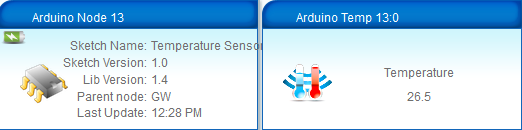
                                Was this release supposed to fix the C to F conversion problem I've been having? I just updated and problem persists for me.

                                2014-09-08_12-28-44.png

                                2014-09-08_12-29-11.png

                                RJ_Make

                                hekH 1 Reply Last reply
                                0
                                • RJ_MakeR RJ_Make

                                  @hek said:> ###1.4 update 1 released

                                  NOTE: This release does not require you to update all nodes . Nothing has changed in protocols.

                                  • All outgoing messages from gateway included a newline character. This has now been fixed.
                                  • The msg.getByte() wrongfully used atoi() conversion if payload was of string type.
                                  • The getByte-bug caused problems when receiving Metric/Imperial settings from controller.
                                  • A new sleep-method added to allow wake-up on both external interrupts.
                                  • A new example BinarySwitchSleepSensor showing the new sleep function (thanks @Anticimex).
                                  • Library code (RF24) reduced by 624 bytes (thanks @Damme)
                                  • Many people has reported powering problems when using amplified version of the NRF-chip on their gateway. The Arduino Nanos 3v3 output does not seem to be sufficient for PA_MAX. The radio needs to be feeded separately with a stable 3v3 to work. Defaulting gateway PA-level to LOW now and if you are using a vanilla radio on gateway you can switch back to MAX in your MyConfig.h.

                                  Was this release supposed to fix the C to F conversion problem I've been having? I just updated and problem persists for me.

                                  2014-09-08_12-28-44.png

                                  2014-09-08_12-29-11.png

                                  hekH Offline
                                  hekH Offline
                                  hek
                                  Admin
                                  wrote on last edited by
                                  #44

                                  @ServiceXp
                                  Think I found the config problem. No wonder it didn't work. Please download and try again.

                                  @mikeones
                                  You should now be able to omit carriage return now.
                                  The fail you're seeing is for the inter-node-ack.
                                  Just verified requesting time from controller and it seems to work fine here (using the example sketch).

                                  RJ_MakeR 1 Reply Last reply
                                  0
                                  • YveauxY Offline
                                    YveauxY Offline
                                    Yveaux
                                    Mod
                                    wrote on last edited by
                                    #45

                                    @hek When MySensors has no parent, or fails to contact parent for a number of times, the findParentNode() method is entered.
                                    This sends a broadcast (ignoring the result) and then waits at most 2 seconds for a response.
                                    When this response doesn't come, the sensor just carries on as if the parent has been found, sending messages until again a number of times it failed to contact the parent.

                                    Shouldn't findParentNode() either block until the parent has been found (maybe not desirable for battery based nodes) or only reset the failedTransmissions counter when a succesful response from the parent has been received?

                                    http://yveaux.blogspot.nl

                                    hekH 1 Reply Last reply
                                    0
                                    • YveauxY Yveaux

                                      @hek When MySensors has no parent, or fails to contact parent for a number of times, the findParentNode() method is entered.
                                      This sends a broadcast (ignoring the result) and then waits at most 2 seconds for a response.
                                      When this response doesn't come, the sensor just carries on as if the parent has been found, sending messages until again a number of times it failed to contact the parent.

                                      Shouldn't findParentNode() either block until the parent has been found (maybe not desirable for battery based nodes) or only reset the failedTransmissions counter when a succesful response from the parent has been received?

                                      hekH Offline
                                      hekH Offline
                                      hek
                                      Admin
                                      wrote on last edited by
                                      #46

                                      @Yveaux said:

                                      Shouldn't findParentNode() either block until the parent has been found (maybe not desirable for battery based nodes) or only reset the failedTransmissions counter when a succesful response from the parent has been received?

                                      Blocking is as you say a bad idea for battery sensors (1.3 had this problem resulting in drained batteries).

                                      How would it help to reset failedTransmissions?

                                      YveauxY 1 Reply Last reply
                                      0
                                      • hekH Offline
                                        hekH Offline
                                        hek
                                        Admin
                                        wrote on last edited by
                                        #47

                                        @Yveaux

                                        BTW. Do you have any idea why this happens?

                                        http://forum.mysensors.org/topic/347/1-4-error-compiling-with-pinchangeint-h-library-file/5

                                        I can't explain why linker includes things from MyGateway.cpp when compiling sensor examples.

                                        YveauxY 1 Reply Last reply
                                        0
                                        • hekH hek

                                          @Yveaux said:

                                          Shouldn't findParentNode() either block until the parent has been found (maybe not desirable for battery based nodes) or only reset the failedTransmissions counter when a succesful response from the parent has been received?

                                          Blocking is as you say a bad idea for battery sensors (1.3 had this problem resulting in drained batteries).

                                          How would it help to reset failedTransmissions?

                                          YveauxY Offline
                                          YveauxY Offline
                                          Yveaux
                                          Mod
                                          wrote on last edited by
                                          #48

                                          @hek said:

                                          How would it help to reset failedTransmissions?

                                          Just thinking out aloud:

                                          • Don't reset failedTransmissions in findParentNode()
                                          • Reset failedTransmissions only when a new parent has been found
                                          • In sendRoute() first perform findParentNode() when failedTransmissions > SEARCH_FAILURES
                                          • When succesful (failedTransmissions == 0) perform sendWrite()

                                          This will always first try to find a parent when none has been found yet, before trying to send the message.
                                          If it fails, the send of the message will fail and the (battery powered) sensor will just carry on as if the message has been send, and sleep the sensor as usual.
                                          Just sending to a known-bad parent node should be avoided at all times.

                                          http://yveaux.blogspot.nl

                                          hekH 1 Reply Last reply
                                          0
                                          Reply
                                          • Reply as topic
                                          Log in to reply
                                          • Oldest to Newest
                                          • Newest to Oldest
                                          • Most Votes


                                          33

                                          Online

                                          11.7k

                                          Users

                                          11.2k

                                          Topics

                                          113.1k

                                          Posts


                                          Copyright 2025 TBD   |   Forum Guidelines   |   Privacy Policy   |   Terms of Service
                                          • Login

                                          • Don't have an account? Register

                                          • Login or register to search.
                                          • First post
                                            Last post
                                          0
                                          • MySensors
                                          • OpenHardware.io
                                          • Categories
                                          • Recent
                                          • Tags
                                          • Popular