Skip to content
  • MySensors
  • OpenHardware.io
  • Categories
  • Recent
  • Tags
  • Popular
Skins
  • Light
  • Brite
  • Cerulean
  • Cosmo
  • Flatly
  • Journal
  • Litera
  • Lumen
  • Lux
  • Materia
  • Minty
  • Morph
  • Pulse
  • Sandstone
  • Simplex
  • Sketchy
  • Spacelab
  • United
  • Yeti
  • Zephyr
  • Dark
  • Cyborg
  • Darkly
  • Quartz
  • Slate
  • Solar
  • Superhero
  • Vapor

  • Default (No Skin)
  • No Skin
Collapse
Brand Logo
  1. Home
  2. Development
  3. ESP8266 gateway + WebServer = Awesome!

ESP8266 gateway + WebServer = Awesome!

Scheduled Pinned Locked Moved Development
33 Posts 10 Posters 12.6k Views 16 Watching
  • Oldest to Newest
  • Newest to Oldest
  • Most Votes
Reply
  • Reply as topic
Log in to reply
This topic has been deleted. Only users with topic management privileges can see it.
  • JapioJ Offline
    JapioJ Offline
    Japio
    Hardware Contributor
    wrote on last edited by
    #14

    Yes, I see the difference. I'll try the bèta version tomorrow.

    1 Reply Last reply
    0
    • JapioJ Japio

      Hi,

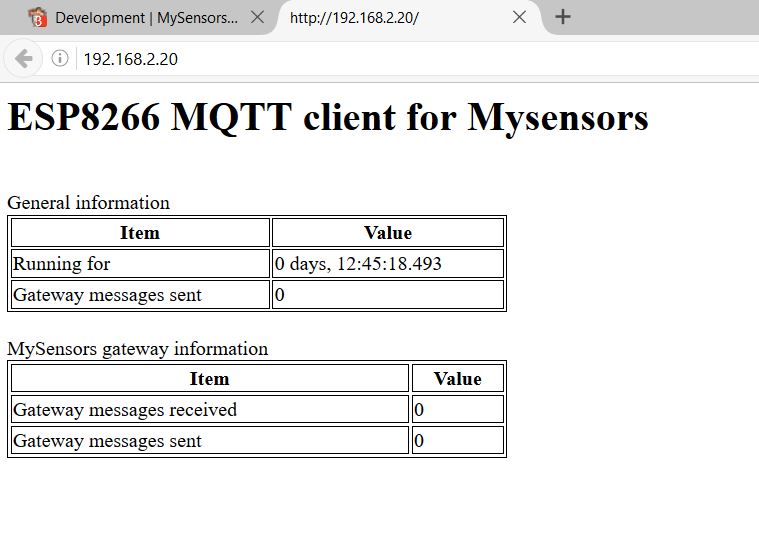
      I used the indications feature of MySensors 2.0 and a webserver to have the gateway provide status information through a web page:
      0_1474090614863_Gateway.JPG

      This is how I did it:

      In the global section I added this:

      #include <ESP8266WiFi.h>
      #include <ESP8266WebServer.h>
      #include <WiFiClient.h>
      
      ESP8266WebServer WebServer(80);
      unsigned long startTime=millis();
      unsigned long gwMsgSent = 0;
      unsigned long gwMsgRec = 0;
      
      String WebPage = "<h1>ESP8266 MQTT client for Mysensors</h1>";
      
      void setupWebServer();
      void showRootPage();
      String readableTimestamp(unsigned long milliseconds);
      

      In the setup() Added this:

        Serial.begin(9600);
      
        setupWebServer();
      

      Defined the following functions:

      void setupWebServer()
      {
        WebServer.on("/", HTTP_GET, showRootPage);
      
      
        WebServer.begin();
        Serial.println("WebServer started...");
      
      }
      
      void indication( const indication_t ind )
      {
        switch (ind)
        {
          case INDICATION_GW_TX:
            gwMsgSent++;
            break;
      
          case INDICATION_GW_RX:
            gwMsgRec++;
            break;
      
          default:
          break;
        };
      }
      
      void showRootPage()
      {
        unsigned long runningTime = millis() - startTime;
        String page = WebPage;
        page+="<br>General information</br>";
        page+= "<style> table, th, td { border: 1px solid black;}</style>";
        page+="<table style=\"width:400\">";
        page+="<tr>"; page+=  "<th>Item</th>";        page+=  "<th>Value</th>";                                            page+="</tr>";
        page+="<tr>"; page+=  "<td>Running for</td>";               page+=  "<td>"; page += readableTimestamp(runningTime) ; page+= "</td>";                 page+="</tr>";
        page+="<tr>"; page+=  "<td>Gateway messages sent</td>";     page+=  "<td>"; page += gwMsgSent; page+= "</td>";                                page+="</tr>";
        page+="</table>";
      
        page+="<br>MySensors gateway information</br>";
        page+= "<style> table, th, td { border: 1px solid black;}</style>";
        page+="<table style=\"width:400\">";
        page+="<tr>"; page+=  "<th>Item</th>";        page+=  "<th>Value</th>";                                            page+="</tr>";
        page+="<tr>"; page+=  "<td>Gateway messages received</td>";     page+=  "<td>"; page += gwMsgRec; page+= "</td>";                                page+="</tr>";
        page+="<tr>"; page+=  "<td>Gateway messages sent</td>";     page+=  "<td>"; page += gwMsgSent; page+= "</td>";                                page+="</tr>";
        page+="</table>";
      
        Serial.println("WS: Send root webpage");
        WebServer.send(200, "text/html", page);
      }
      
      String readableTimestamp(unsigned long milliseconds)
      {
        int days = milliseconds / 86400000;
      
        milliseconds=milliseconds % 86400000;
        int hours = milliseconds / 3600000;
        milliseconds = milliseconds %3600000;
      
         int minutes = milliseconds / 60000;
         milliseconds = milliseconds % 60000;
      
         int seconds = milliseconds / 1000;
         milliseconds = milliseconds % 1000;
      
          String timeStamp;
          timeStamp = days; timeStamp += " days, ";
          timeStamp += hours; timeStamp += ":";
          timeStamp += minutes ; timeStamp +=  ":";
          timeStamp +=seconds; timeStamp += ".";
          timeStamp +=milliseconds;
          Serial.println(timeStamp);
          return timeStamp;
      }
      

      And in loop() added the following:

        WebServer.handleClient();
      

      If you have any more idaes on what to add to this page (I am thinking about maintaining a list of registered nodes and sensors) just post a reply!

      chrilleC Offline
      chrilleC Offline
      chrille
      wrote on last edited by
      #15

      @Japio Very nice idea - I just tested it on my ESP8266/RFM69 gateway. However the counters doesn't seem to increment (always shows 0) - is there anything special I need to make sure the indication() handler is called?

      1 Reply Last reply
      0
      • JapioJ Offline
        JapioJ Offline
        Japio
        Hardware Contributor
        wrote on last edited by
        #16

        No, it worked right out of the box, something that surprised me as well.

        You do need Mysensors 2.0 for this.

        You can check if you have a myindication.h file in the source tree of the Mysensors library. That file also contains the indications sent.

        chrilleC 2 Replies Last reply
        0
        • JapioJ Japio

          No, it worked right out of the box, something that surprised me as well.

          You do need Mysensors 2.0 for this.

          You can check if you have a myindication.h file in the source tree of the Mysensors library. That file also contains the indications sent.

          chrilleC Offline
          chrilleC Offline
          chrille
          wrote on last edited by
          #17

          @Japio I am using the latest beta from github - it must be something else

          chrilleC 1 Reply Last reply
          0
          • chrilleC chrille

            @Japio I am using the latest beta from github - it must be something else

            chrilleC Offline
            chrilleC Offline
            chrille
            wrote on last edited by
            #18

            @chrille said:

            I am using the latest beta from github - it must be something else

            It works on my NRF24 gateway, but not on the RFM69 gateway... Odd...
            I'm curious if someone else with a RFM69 based gateway could this this

            • Jan
            chrilleC 1 Reply Last reply
            0
            • JapioJ Japio

              No, it worked right out of the box, something that surprised me as well.

              You do need Mysensors 2.0 for this.

              You can check if you have a myindication.h file in the source tree of the Mysensors library. That file also contains the indications sent.

              chrilleC Offline
              chrilleC Offline
              chrille
              wrote on last edited by
              #19

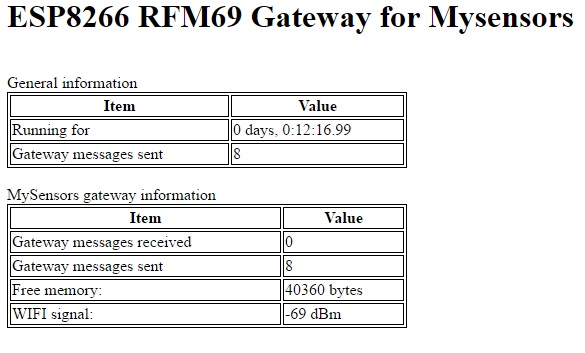
              @Japio It's very easy to get information about available memory and wifi signal - just add

              page+="<tr>"; page+=  "<td>Free memory:</td>";               page+=  "<td>"; page += ESP.getFreeHeap() ; page+= " bytes</td>";                 page+="</tr>";
                page+="<tr>"; page+=  "<td>WIFI signal:</td>";               page+=  "<td>"; page += WiFi.RSSI(); ; page+= " dBm</td>";                 page+="</tr>";
              
              1 Reply Last reply
              0
              • JapioJ Offline
                JapioJ Offline
                Japio
                Hardware Contributor
                wrote on last edited by
                #20

                Great! This will be added.

                I am going to continue with the node and sensor status tomorrow.

                1 Reply Last reply
                0
                • Mark SwiftM Offline
                  Mark SwiftM Offline
                  Mark Swift
                  wrote on last edited by Mark Swift
                  #21

                  Love this, subscribed. It's s such a shame I always has issues with my ESP gateway and had to revert to standard ethernet. The ESP always used to fail upon large amounts of traffic :(

                  I believe this was down to blocking code, is this resolved? (off topic).

                  BTW, is it possible to somehow record any failures?

                  1 Reply Last reply
                  0
                  • JapioJ Offline
                    JapioJ Offline
                    Japio
                    Hardware Contributor
                    wrote on last edited by
                    #22

                    Yes, this works!

                    0;255;3;0;9;TSF:MSG:READ,20-20-0,s=255,c=3,t=15,pt=2,l=2,sg=0:0
                    0;255;3;0;9;TSF:MSG:SEND,0-0-20-20,s=255,c=3,t=15,pt=6,l=2,sg=0,ft=0,st=OK:0100
                    0;255;3;0;9;TSF:MSG:READ,20-20-0,s=255,c=0,t=17,pt=0,l=5,sg=0:1.5.3
                    0;255;3;0;9;Sending message on topic: mygateway1-out/20/255/0/0/17
                    @@@@@@@#####@@@@@Message
                    0;255;3;0;9;TSF:MSG:READ,20-20-0,s=255,c=3,t=6,pt=1,l=1,sg=0:0
                    0;255;3;0;9;Sending message on topic: mygateway1-out/20/255/3/0/6
                    @@@@@@@#####@@@@@Message
                    0;255;3;0;9;TSF:MSG:READ,20-20-0,s=255,c=3,t=11,pt=0,l=10,sg=0:Smartmeter
                    0;255;3;0;9;Sending message on topic: mygateway1-out/20/255/3/0/11
                    @@@@@@@#####@@@@@Message
                    0;255;3;0;9;TSF:MSG:READ,20-20-0,s=255,c=3,t=12,pt=0,l=3,sg=0:0.1
                    0;255;3;0;9;Sending message on topic: mygateway1-out/20/255/3/0/12
                    @@@@@@@#####@@@@@Message
                    0;255;3;0;9;TSF:MSG:READ,20-20-0,s=1,c=0,t=13,pt=0,l=0,sg=0:
                    0;255;3;0;9;Sending message on topic: mygateway1-out/20/1/0/0/13
                    @@@@@@@#####@@@@@Message
                    0;255;3;0;9;TSF:MSG:READ,20-20-0,s=2,c=0,t=13,pt=0,l=0,sg=0:
                    0;255;3;0;9;Sending message on topic: mygateway1-out/20/2/0/0/13
                    @@@@@@@#####@@@@@Message
                    0;255;3;0;9;TSF:SANCHK:OK
                    

                    The @@@@###@@@ Message is printed in my receive() function!

                    Awesome. :smile:

                    korttomaK 1 Reply Last reply
                    0
                    • JapioJ Japio

                      Yes, this works!

                      0;255;3;0;9;TSF:MSG:READ,20-20-0,s=255,c=3,t=15,pt=2,l=2,sg=0:0
                      0;255;3;0;9;TSF:MSG:SEND,0-0-20-20,s=255,c=3,t=15,pt=6,l=2,sg=0,ft=0,st=OK:0100
                      0;255;3;0;9;TSF:MSG:READ,20-20-0,s=255,c=0,t=17,pt=0,l=5,sg=0:1.5.3
                      0;255;3;0;9;Sending message on topic: mygateway1-out/20/255/0/0/17
                      @@@@@@@#####@@@@@Message
                      0;255;3;0;9;TSF:MSG:READ,20-20-0,s=255,c=3,t=6,pt=1,l=1,sg=0:0
                      0;255;3;0;9;Sending message on topic: mygateway1-out/20/255/3/0/6
                      @@@@@@@#####@@@@@Message
                      0;255;3;0;9;TSF:MSG:READ,20-20-0,s=255,c=3,t=11,pt=0,l=10,sg=0:Smartmeter
                      0;255;3;0;9;Sending message on topic: mygateway1-out/20/255/3/0/11
                      @@@@@@@#####@@@@@Message
                      0;255;3;0;9;TSF:MSG:READ,20-20-0,s=255,c=3,t=12,pt=0,l=3,sg=0:0.1
                      0;255;3;0;9;Sending message on topic: mygateway1-out/20/255/3/0/12
                      @@@@@@@#####@@@@@Message
                      0;255;3;0;9;TSF:MSG:READ,20-20-0,s=1,c=0,t=13,pt=0,l=0,sg=0:
                      0;255;3;0;9;Sending message on topic: mygateway1-out/20/1/0/0/13
                      @@@@@@@#####@@@@@Message
                      0;255;3;0;9;TSF:MSG:READ,20-20-0,s=2,c=0,t=13,pt=0,l=0,sg=0:
                      0;255;3;0;9;Sending message on topic: mygateway1-out/20/2/0/0/13
                      @@@@@@@#####@@@@@Message
                      0;255;3;0;9;TSF:SANCHK:OK
                      

                      The @@@@###@@@ Message is printed in my receive() function!

                      Awesome. :smile:

                      korttomaK Offline
                      korttomaK Offline
                      korttoma
                      Hero Member
                      wrote on last edited by
                      #23

                      Nice work @Japio

                      I'm working on a ESP8266 RFM69 Gateway myself and will definitely try this also.

                      • Tomas
                      chrilleC 1 Reply Last reply
                      0
                      • korttomaK korttoma

                        Nice work @Japio

                        I'm working on a ESP8266 RFM69 Gateway myself and will definitely try this also.

                        chrilleC Offline
                        chrilleC Offline
                        chrille
                        wrote on last edited by
                        #24

                        @korttoma I'm looking forward to hear your results, as I couldn't get it to work with RFM69. However, there doesn't seem to be transport specific code for indication(), so I really don't understand why it works with NRF and not RFM

                        korttomaK 1 Reply Last reply
                        0
                        • mfalkviddM Online
                          mfalkviddM Online
                          mfalkvidd
                          Mod
                          wrote on last edited by
                          #25

                          ESP8266+RFM69 discussion forked to https://forum.mysensors.org/topic/4889/esp8266-rfm69-gateway/

                          1 Reply Last reply
                          0
                          • chrilleC chrille

                            @chrille said:

                            I am using the latest beta from github - it must be something else

                            It works on my NRF24 gateway, but not on the RFM69 gateway... Odd...
                            I'm curious if someone else with a RFM69 based gateway could this this

                            • Jan
                            chrilleC Offline
                            chrilleC Offline
                            chrille
                            wrote on last edited by
                            #26

                            @chrille said:

                            It works on my NRF24 gateway, but not on the RFM69 gateway... Odd...
                            I'm curious if someone else with a RFM69 based gateway could this this

                            I created an issue for this, but I'm still interested in hearing from other RFM69 users

                            https://github.com/mysensors/MySensors/issues/584

                            tekkaT 1 Reply Last reply
                            0
                            • chrilleC chrille

                              @chrille said:

                              It works on my NRF24 gateway, but not on the RFM69 gateway... Odd...
                              I'm curious if someone else with a RFM69 based gateway could this this

                              I created an issue for this, but I'm still interested in hearing from other RFM69 users

                              https://github.com/mysensors/MySensors/issues/584

                              tekkaT Offline
                              tekkaT Offline
                              tekka
                              Admin
                              wrote on last edited by
                              #27

                              @chrille Please see my comment on github

                              1 Reply Last reply
                              1
                              • korttomaK Offline
                                korttomaK Offline
                                korttoma
                                Hero Member
                                wrote on last edited by
                                #28

                                Would it be possible to add information about if a controller is connected to the GW WebHMI?
                                0_1474432417379_GW_WebHMI.jpg

                                • Tomas
                                1 Reply Last reply
                                0
                                • Mark SwiftM Offline
                                  Mark SwiftM Offline
                                  Mark Swift
                                  wrote on last edited by
                                  #29

                                  Is this still under development?

                                  1 Reply Last reply
                                  0
                                  • JapioJ Offline
                                    JapioJ Offline
                                    Japio
                                    Hardware Contributor
                                    wrote on last edited by
                                    #30

                                    Yes, it actually is.

                                    Current features:

                                    • Stores wifi and mqtt broker configuration in flash. When no configuration is found, or the flash button of the ESP is pressed for 10 seconds, released, and then the reset button is pressed, it will restart in access point mode, allowing configuration to be done.
                                    • Status page shows all nodes and sensors connected and the last sensors data and presentation time.
                                    • Status indications on the box itself using a neopixel stick of 8 leds:
                                      • Gateway status (operation or access point mode)
                                      • Wifi strength
                                      • Mqtt connection status
                                      • Transmit error
                                      • Receive indication.

                                    I designed a board to nicely fit in a standard Aliexpress housing.

                                    Main problem still is the instability of the ESP, it resets often, and I tried to work around it by maikng sure it resets quickly.

                                    I am planning to make a more elaborate topic, including board designs soon.

                                    R 1 Reply Last reply
                                    3
                                    • JapioJ Japio

                                      Yes, it actually is.

                                      Current features:

                                      • Stores wifi and mqtt broker configuration in flash. When no configuration is found, or the flash button of the ESP is pressed for 10 seconds, released, and then the reset button is pressed, it will restart in access point mode, allowing configuration to be done.
                                      • Status page shows all nodes and sensors connected and the last sensors data and presentation time.
                                      • Status indications on the box itself using a neopixel stick of 8 leds:
                                        • Gateway status (operation or access point mode)
                                        • Wifi strength
                                        • Mqtt connection status
                                        • Transmit error
                                        • Receive indication.

                                      I designed a board to nicely fit in a standard Aliexpress housing.

                                      Main problem still is the instability of the ESP, it resets often, and I tried to work around it by maikng sure it resets quickly.

                                      I am planning to make a more elaborate topic, including board designs soon.

                                      R Offline
                                      R Offline
                                      r-nox
                                      wrote on last edited by
                                      #31

                                      @japio

                                      Where did this all end up?

                                      1 Reply Last reply
                                      1
                                      • mfalkviddM mfalkvidd

                                        @Japio perhaps you mean https://github.com/tzapu/WiFiManager ? I'm using that. It is pretty ok, but I would prefer something that had support for the async web server.

                                        pihomeP Offline
                                        pihomeP Offline
                                        pihome
                                        wrote on last edited by
                                        #32

                                        @mfalkvidd I know this is very old post but I stumble upon this while looking for esp gateway wifimanager git, can you share ur code if you don’t mind, save me time on re-inventing the wheel again...

                                        PiHome - Smart Heating Control

                                        mfalkviddM 1 Reply Last reply
                                        0
                                        • pihomeP pihome

                                          @mfalkvidd I know this is very old post but I stumble upon this while looking for esp gateway wifimanager git, can you share ur code if you don’t mind, save me time on re-inventing the wheel again...

                                          mfalkviddM Online
                                          mfalkviddM Online
                                          mfalkvidd
                                          Mod
                                          wrote on last edited by
                                          #33

                                          @pihome I have a sketch at https://github.com/mfalkvidd/Arduino-Datormagazin-Pomodoro/blob/datormagazin/Arduino-Datormagazin-Pomodoro.ino but I think it is easier to just follow the instructions in the wifimanager readme.

                                          1 Reply Last reply
                                          2
                                          Reply
                                          • Reply as topic
                                          Log in to reply
                                          • Oldest to Newest
                                          • Newest to Oldest
                                          • Most Votes


                                          15

                                          Online

                                          11.7k

                                          Users

                                          11.2k

                                          Topics

                                          113.1k

                                          Posts


                                          Copyright 2025 TBD   |   Forum Guidelines   |   Privacy Policy   |   Terms of Service
                                          • Login

                                          • Don't have an account? Register

                                          • Login or register to search.
                                          • First post
                                            Last post
                                          0
                                          • MySensors
                                          • OpenHardware.io
                                          • Categories
                                          • Recent
                                          • Tags
                                          • Popular