
Radio FAIL after ~3 weeks [SOLVED]
-
@tboha
hi friend i have same problem. in serial monitor some time i have this errors:!TSF:MSG:SEND,5-5-0-0,s=1,c=1,t=2,pt=1,l=1,sg=0,ft=10,st=NACK:1 !TSM:READY:UPL FAIL,SNP !TSF:SND:TNRi use a 4.7 and 100 capacitor but i have problem yet. are you using a regulator module for your device ? so you have not any problem now? and all of commands send ? for me after some time i test relay and i see dont work , after some try this is work and some time dont work.... my device and gateway is 50 meter distance with a thin wall .
@Reza said:
!TSM:READY:UPL FAIL,SNP
I had not got such errors due to power issues. Unstable/insufficient power supply mostly resulted in inconsistent functions - not in steady errors. Sometimes (depending on weather? phase of the moon?) functions were ok, sometimes not.
Changing power supply (either batteries or buck-device) healed this problems.So far I understand your error-messages they could probably mean what they say:
UPLink control FAILed and your node is Searching New Parent - which is a logical consequence.I think flopp and Jan Gatzke are right: 50 meters is quite a large distance - may be too much for stable connection.
If your device is mobile - lower the distance (just for testing purposes) and look for a stable connection. Depending on the result you may take further actions like described above or - if you like tinkering - you may have a look at
http://www.instructables.com/id/Enhanced-NRF24L01/ or https://www.youtube.com/watch?v=NpMnauHeR7Y
I have not done this until now - but it looks really cool.
-
@flopp
@Jan-Gatzke
@tboha
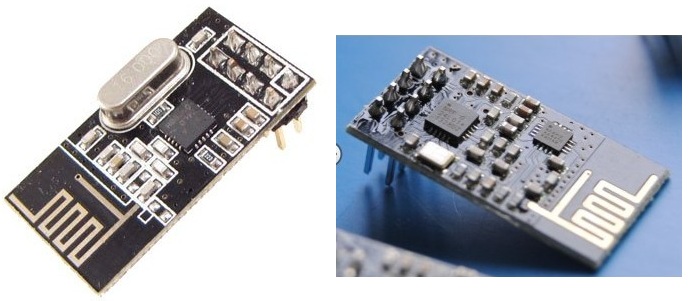
Thank you friends for help. I use this models. Good communication is the first (but not send all command. Especially when I send quickly some commands)
But the main problem is after time. for example 1 hours or 1 day . when i want send a command , command dont send . i try again and again but dont work.
-
@flopp
@Jan-Gatzke
@tboha
Thank you friends for help. I use this models. Good communication is the first (but not send all command. Especially when I send quickly some commands)
But the main problem is after time. for example 1 hours or 1 day . when i want send a command , command dont send . i try again and again but dont work.
-
@Reza
Can you post your code here please
Don't forget to use CODE-tag when you post the code#define MY_DEBUG #define MY_RADIO_NRF24 #define MY_RF24_CHANNEL 0 #define MY_REPEATER_FEATURE #define MY_NODE_ID 5 #include <SPI.h> #include <MySensors.h> #include <Bounce2.h> #include <avr/wdt.h> #define RELAY_ON 0 #define RELAY_OFF 1 #define A_ID 1 #define B_ID 2 #define C_ID 3 #define D_ID 4 #define E_ID 5 #define F_ID 6 const int buttonPinA = 14; const int buttonPinB = 15; const int buttonPinC = 16; const int buttonPinD = 17; const int buttonPinE = 18; const int buttonPinF = 19; const int relayPinA = 3; const int relayPinB = 4; const int relayPinC = 5; const int relayPinD = 6; const int relayPinE = 7; const int relayPinF = 8; int oldValueA = 0; int oldValueB = 0; int oldValueC = 0; int oldValueD = 0; int oldValueE = 0; int oldValueF = 0; unsigned long time_m; unsigned long a, b, c, d, e, f ; bool stateA = false; bool stateB = false; bool stateC = false; bool stateD = false; bool stateE = false; bool stateF = false; int trigger = 0; Bounce debouncerA = Bounce(); Bounce debouncerB = Bounce(); Bounce debouncerC = Bounce(); Bounce debouncerD = Bounce(); Bounce debouncerE = Bounce(); Bounce debouncerF = Bounce(); MyMessage msgA(A_ID, V_STATUS); MyMessage msgB(B_ID, V_STATUS); MyMessage msgC(C_ID, V_STATUS); MyMessage msgD(D_ID, V_STATUS); MyMessage msgE(E_ID, V_STATUS); MyMessage msgF(F_ID, V_STATUS); void setup() { pinMode(buttonPinA, INPUT_PULLUP); pinMode(buttonPinB, INPUT_PULLUP); pinMode(buttonPinC, INPUT_PULLUP); pinMode(buttonPinD, INPUT_PULLUP); pinMode(buttonPinE, INPUT_PULLUP); pinMode(buttonPinF, INPUT_PULLUP); // After setting up the buttons, setup debouncer debouncerA.attach(buttonPinA); debouncerA.interval(5); debouncerB.attach(buttonPinB); debouncerB.interval(5); debouncerC.attach(buttonPinC); debouncerC.interval(5); debouncerD.attach(buttonPinD); debouncerD.interval(5); debouncerE.attach(buttonPinE); debouncerE.interval(5); debouncerF.attach(buttonPinF); debouncerF.interval(5); // Make sure relays are off when starting up digitalWrite(relayPinA, RELAY_OFF); digitalWrite(relayPinB, RELAY_OFF); digitalWrite(relayPinC, RELAY_OFF); digitalWrite(relayPinD, RELAY_OFF); digitalWrite(relayPinE, RELAY_OFF); digitalWrite(relayPinF, RELAY_OFF); // Then set relay pins in output mode pinMode(relayPinA, OUTPUT); pinMode(relayPinB, OUTPUT); pinMode(relayPinC, OUTPUT); pinMode(relayPinD, OUTPUT); pinMode(relayPinE, OUTPUT); pinMode(relayPinF, OUTPUT); /*--------------------- Added these lines for toggle switch-------------------------*/ oldValueA = digitalRead(buttonPinA); // set oldValueA to the current status of the toggle switch oldValueB = digitalRead(buttonPinB); // set oldValueB to the current status of the toggle switch oldValueC = digitalRead(buttonPinC); oldValueD = digitalRead(buttonPinD); oldValueE = digitalRead(buttonPinE); oldValueF = digitalRead(buttonPinF); // send(msgA.set(false)); // Send off state for relayA to ensure controller knows the switch is off // send(msgB.set(false)); // Send off state for relayB to ensure controller knows the switch is off wdt_enable(WDTO_4S); } void presentation() { // Send the sketch version information to the gateway and Controller sendSketchInfo("RELAY6", "1.0"); // Register all sensors to gw (they will be created as child devices) present(A_ID, S_LIGHT); present(B_ID, S_LIGHT); present(C_ID, S_LIGHT); present(D_ID, S_LIGHT); present(E_ID, S_LIGHT); present(F_ID, S_LIGHT); } /* Example on how to asynchronously check for new messages from gw */ void loop() { { time_m = millis(); a = time_m % 3600000; b = time_m % 3601000; c = time_m % 3602000; d = time_m % 3603000; e = time_m % 3604000; f = time_m % 3605000; if (a == 0) { send(msgA.set(stateA ? true : false), true); } if (b == 0) { send(msgB.set(stateB ? true : false), true); } if (c == 0) { send(msgC.set(stateC ? true : false), true); } if (d == 0) { send(msgD.set(stateD ? true : false), true); } if (e == 0) { send(msgE.set(stateE ? true : false), true); } if (f == 0) { send(msgF.set(stateF ? true : false), true); } } if (trigger == 0) { send(msgA.set(false)); // Send off state for relayA to ensure controller knows the switch is off send(msgB.set(false)); // Send off state for relayB to ensure controller knows the switch is off send(msgC.set(false)); send(msgD.set(false)); send(msgE.set(false)); send(msgF.set(false)); trigger = 1; } debouncerA.update(); // Get the update value int valueA = debouncerA.read(); if (valueA != oldValueA) { send(msgA.set(stateA ? false : true), true); // Send new state and request ack back oldValueA = valueA; } debouncerB.update(); // Get the update value int valueB = debouncerB.read(); if (valueB != oldValueB) { send(msgB.set(stateB ? false : true), true); // Send new state and request ack back oldValueB = valueB; } debouncerC.update(); // Get the update value int valueC = debouncerC.read(); if (valueC != oldValueC) { send(msgC.set(stateC ? false : true), true); // Send new state and request ack back oldValueC = valueC; } debouncerD.update(); // Get the update value int valueD = debouncerD.read(); if (valueD != oldValueD) { send(msgD.set(stateD ? false : true), true); // Send new state and request ack back oldValueD = valueD; } debouncerE.update(); // Get the update value int valueE = debouncerE.read(); if (valueE != oldValueE) { send(msgE.set(stateE ? false : true), true); // Send new state and request ack back oldValueE = valueE; } debouncerF.update(); // Get the update value int valueF = debouncerF.read(); if (valueF != oldValueF) { send(msgF.set(stateF ? false : true), true); // Send new state and request ack back oldValueF = valueF; } wdt_reset(); } void receive(const MyMessage &message) { // We only expect one type of message from controller. But we better check anyway. if (message.type == V_STATUS) { switch (message.sensor) { case 1: stateA = message.getBool(); digitalWrite(message.sensor + 2, stateA ? RELAY_ON : RELAY_OFF); break; case 2: stateB = message.getBool(); digitalWrite(message.sensor + 2, stateB ? RELAY_ON : RELAY_OFF); break; case 3: stateC = message.getBool(); digitalWrite(message.sensor + 2, stateC ? RELAY_ON : RELAY_OFF); break; case 4: stateD = message.getBool(); digitalWrite(message.sensor + 2, stateD ? RELAY_ON : RELAY_OFF); break; case 5: stateE = message.getBool(); digitalWrite(message.sensor + 2, stateE ? RELAY_ON : RELAY_OFF); break; case 6: stateF = message.getBool(); digitalWrite(message.sensor + 2, stateF ? RELAY_ON : RELAY_OFF); break; } // Write some debug info Serial.print("Incoming change for sensor:"); Serial.println(message.sensor); Serial.print("from node:"); Serial.println(message.sender); Serial.print(", New status: "); Serial.println(message.getBool()); } } -
#define MY_DEBUG #define MY_RADIO_NRF24 #define MY_RF24_CHANNEL 0 #define MY_REPEATER_FEATURE #define MY_NODE_ID 5 #include <SPI.h> #include <MySensors.h> #include <Bounce2.h> #include <avr/wdt.h> #define RELAY_ON 0 #define RELAY_OFF 1 #define A_ID 1 #define B_ID 2 #define C_ID 3 #define D_ID 4 #define E_ID 5 #define F_ID 6 const int buttonPinA = 14; const int buttonPinB = 15; const int buttonPinC = 16; const int buttonPinD = 17; const int buttonPinE = 18; const int buttonPinF = 19; const int relayPinA = 3; const int relayPinB = 4; const int relayPinC = 5; const int relayPinD = 6; const int relayPinE = 7; const int relayPinF = 8; int oldValueA = 0; int oldValueB = 0; int oldValueC = 0; int oldValueD = 0; int oldValueE = 0; int oldValueF = 0; unsigned long time_m; unsigned long a, b, c, d, e, f ; bool stateA = false; bool stateB = false; bool stateC = false; bool stateD = false; bool stateE = false; bool stateF = false; int trigger = 0; Bounce debouncerA = Bounce(); Bounce debouncerB = Bounce(); Bounce debouncerC = Bounce(); Bounce debouncerD = Bounce(); Bounce debouncerE = Bounce(); Bounce debouncerF = Bounce(); MyMessage msgA(A_ID, V_STATUS); MyMessage msgB(B_ID, V_STATUS); MyMessage msgC(C_ID, V_STATUS); MyMessage msgD(D_ID, V_STATUS); MyMessage msgE(E_ID, V_STATUS); MyMessage msgF(F_ID, V_STATUS); void setup() { pinMode(buttonPinA, INPUT_PULLUP); pinMode(buttonPinB, INPUT_PULLUP); pinMode(buttonPinC, INPUT_PULLUP); pinMode(buttonPinD, INPUT_PULLUP); pinMode(buttonPinE, INPUT_PULLUP); pinMode(buttonPinF, INPUT_PULLUP); // After setting up the buttons, setup debouncer debouncerA.attach(buttonPinA); debouncerA.interval(5); debouncerB.attach(buttonPinB); debouncerB.interval(5); debouncerC.attach(buttonPinC); debouncerC.interval(5); debouncerD.attach(buttonPinD); debouncerD.interval(5); debouncerE.attach(buttonPinE); debouncerE.interval(5); debouncerF.attach(buttonPinF); debouncerF.interval(5); // Make sure relays are off when starting up digitalWrite(relayPinA, RELAY_OFF); digitalWrite(relayPinB, RELAY_OFF); digitalWrite(relayPinC, RELAY_OFF); digitalWrite(relayPinD, RELAY_OFF); digitalWrite(relayPinE, RELAY_OFF); digitalWrite(relayPinF, RELAY_OFF); // Then set relay pins in output mode pinMode(relayPinA, OUTPUT); pinMode(relayPinB, OUTPUT); pinMode(relayPinC, OUTPUT); pinMode(relayPinD, OUTPUT); pinMode(relayPinE, OUTPUT); pinMode(relayPinF, OUTPUT); /*--------------------- Added these lines for toggle switch-------------------------*/ oldValueA = digitalRead(buttonPinA); // set oldValueA to the current status of the toggle switch oldValueB = digitalRead(buttonPinB); // set oldValueB to the current status of the toggle switch oldValueC = digitalRead(buttonPinC); oldValueD = digitalRead(buttonPinD); oldValueE = digitalRead(buttonPinE); oldValueF = digitalRead(buttonPinF); // send(msgA.set(false)); // Send off state for relayA to ensure controller knows the switch is off // send(msgB.set(false)); // Send off state for relayB to ensure controller knows the switch is off wdt_enable(WDTO_4S); } void presentation() { // Send the sketch version information to the gateway and Controller sendSketchInfo("RELAY6", "1.0"); // Register all sensors to gw (they will be created as child devices) present(A_ID, S_LIGHT); present(B_ID, S_LIGHT); present(C_ID, S_LIGHT); present(D_ID, S_LIGHT); present(E_ID, S_LIGHT); present(F_ID, S_LIGHT); } /* Example on how to asynchronously check for new messages from gw */ void loop() { { time_m = millis(); a = time_m % 3600000; b = time_m % 3601000; c = time_m % 3602000; d = time_m % 3603000; e = time_m % 3604000; f = time_m % 3605000; if (a == 0) { send(msgA.set(stateA ? true : false), true); } if (b == 0) { send(msgB.set(stateB ? true : false), true); } if (c == 0) { send(msgC.set(stateC ? true : false), true); } if (d == 0) { send(msgD.set(stateD ? true : false), true); } if (e == 0) { send(msgE.set(stateE ? true : false), true); } if (f == 0) { send(msgF.set(stateF ? true : false), true); } } if (trigger == 0) { send(msgA.set(false)); // Send off state for relayA to ensure controller knows the switch is off send(msgB.set(false)); // Send off state for relayB to ensure controller knows the switch is off send(msgC.set(false)); send(msgD.set(false)); send(msgE.set(false)); send(msgF.set(false)); trigger = 1; } debouncerA.update(); // Get the update value int valueA = debouncerA.read(); if (valueA != oldValueA) { send(msgA.set(stateA ? false : true), true); // Send new state and request ack back oldValueA = valueA; } debouncerB.update(); // Get the update value int valueB = debouncerB.read(); if (valueB != oldValueB) { send(msgB.set(stateB ? false : true), true); // Send new state and request ack back oldValueB = valueB; } debouncerC.update(); // Get the update value int valueC = debouncerC.read(); if (valueC != oldValueC) { send(msgC.set(stateC ? false : true), true); // Send new state and request ack back oldValueC = valueC; } debouncerD.update(); // Get the update value int valueD = debouncerD.read(); if (valueD != oldValueD) { send(msgD.set(stateD ? false : true), true); // Send new state and request ack back oldValueD = valueD; } debouncerE.update(); // Get the update value int valueE = debouncerE.read(); if (valueE != oldValueE) { send(msgE.set(stateE ? false : true), true); // Send new state and request ack back oldValueE = valueE; } debouncerF.update(); // Get the update value int valueF = debouncerF.read(); if (valueF != oldValueF) { send(msgF.set(stateF ? false : true), true); // Send new state and request ack back oldValueF = valueF; } wdt_reset(); } void receive(const MyMessage &message) { // We only expect one type of message from controller. But we better check anyway. if (message.type == V_STATUS) { switch (message.sensor) { case 1: stateA = message.getBool(); digitalWrite(message.sensor + 2, stateA ? RELAY_ON : RELAY_OFF); break; case 2: stateB = message.getBool(); digitalWrite(message.sensor + 2, stateB ? RELAY_ON : RELAY_OFF); break; case 3: stateC = message.getBool(); digitalWrite(message.sensor + 2, stateC ? RELAY_ON : RELAY_OFF); break; case 4: stateD = message.getBool(); digitalWrite(message.sensor + 2, stateD ? RELAY_ON : RELAY_OFF); break; case 5: stateE = message.getBool(); digitalWrite(message.sensor + 2, stateE ? RELAY_ON : RELAY_OFF); break; case 6: stateF = message.getBool(); digitalWrite(message.sensor + 2, stateF ? RELAY_ON : RELAY_OFF); break; } // Write some debug info Serial.print("Incoming change for sensor:"); Serial.println(message.sensor); Serial.print("from node:"); Serial.println(message.sender); Serial.print(", New status: "); Serial.println(message.getBool()); } }@Reza Your code isn´t easy to understand. More Comments within your code would be very helpful.
So I will try a little mind reading.....
Basic concept seems to be decoupling switches/pushbuttons from the relais part and to control the relais action through your controller.
Management of switches/pushbuttons is done in loop().
"Master of states" is your controller (software).
Actions are performed by receive().
At last a clean soloution - but some parts aren´t that clean.
The only reference to stateX is within receive() directly before digital_write(X). So any change to stateX from within the sketch will not have any effekt. So the introduction of the stateX variable isn´t actually necessary.
digitalWrite(message.sensor + 2, message.getBool() ? RELAY_ON : RELAY_OFF);should work to. This eliminates thes risk of double originals which can get very tricky if things go wrong. (i.e. there should be only one set of stateX variables in your system because keeping copied sets tidy is a huge amount of work and prone to errors).
In the first part of loop() you try to instantiate some basic mechanisms to accomplish this mission but I fear it will not succeed.
Within loop you begin with a chain of modulo-operations which might be intended to send the state variable to your controller once every hour (?) with 1 second interval. This will fail eternally if your loop starts accidentally with millis() at xxxxxx1 and loop duration is xxxxxx2. The remainder of % operation will always be 1 (or more) but never zero. Precise timing down to 1 millisecond would be too critical to little errors and is not necessary.
Spacing send() to one second should not be necessary either - MySensors framework can deal with lot of send() in a row.
So maybe a statement likeif (millis() >= lasttime+INTERVALL) {.....}could fit your needs. It isn´t that precise - but precise enough and robust.
if (trigger == 0) {...;trigger=1;}
This part is executed only once because you never reset trigger to zero. If you intend to reset your controller variables you might move this part to setup() - or better leave it to your controller.
But if you omit stateX copying this whole section could be skipped.
The rest of loop() consists of switch management which seems ok to me. Nevertheless a little proposal for optimisation:
send(msgA.set(stateA ? true : false), true);
There is no really need for the trinary operator ? because stateA is bool, it may be send directly like
send(msgA.set(stateA ), true);debouncerA.update();
I am not very familiar with debounce(). But omitting "&&valueA==0" will cause your statement to react to pressing your button as well as to releasing your button. So this statement will act twice on one keystroke -- so far I remember the debounce() function.
Because stateA is not likely to be changed in this short amount of time, this statement will send stateA twice - which causes unnecessary traffic.
These are surely no crucial points but I think the sketch woud be more robust.wdt_enable(WDTO_4S);
Please don´t do this - it may have terrible side effects and may make you mad while searching for errors.
So over all your sketch isn´t that bad for a first proof of concept and should be functional for your basic needs.
So missing send should be due to the qualitiy of your connection. Maybe a longer log of debug messages (both sides?) would be helpful.
.
-
@Reza Your code isn´t easy to understand. More Comments within your code would be very helpful.
So I will try a little mind reading.....
Basic concept seems to be decoupling switches/pushbuttons from the relais part and to control the relais action through your controller.
Management of switches/pushbuttons is done in loop().
"Master of states" is your controller (software).
Actions are performed by receive().
At last a clean soloution - but some parts aren´t that clean.
The only reference to stateX is within receive() directly before digital_write(X). So any change to stateX from within the sketch will not have any effekt. So the introduction of the stateX variable isn´t actually necessary.
digitalWrite(message.sensor + 2, message.getBool() ? RELAY_ON : RELAY_OFF);should work to. This eliminates thes risk of double originals which can get very tricky if things go wrong. (i.e. there should be only one set of stateX variables in your system because keeping copied sets tidy is a huge amount of work and prone to errors).
In the first part of loop() you try to instantiate some basic mechanisms to accomplish this mission but I fear it will not succeed.
Within loop you begin with a chain of modulo-operations which might be intended to send the state variable to your controller once every hour (?) with 1 second interval. This will fail eternally if your loop starts accidentally with millis() at xxxxxx1 and loop duration is xxxxxx2. The remainder of % operation will always be 1 (or more) but never zero. Precise timing down to 1 millisecond would be too critical to little errors and is not necessary.
Spacing send() to one second should not be necessary either - MySensors framework can deal with lot of send() in a row.
So maybe a statement likeif (millis() >= lasttime+INTERVALL) {.....}could fit your needs. It isn´t that precise - but precise enough and robust.
if (trigger == 0) {...;trigger=1;}
This part is executed only once because you never reset trigger to zero. If you intend to reset your controller variables you might move this part to setup() - or better leave it to your controller.
But if you omit stateX copying this whole section could be skipped.
The rest of loop() consists of switch management which seems ok to me. Nevertheless a little proposal for optimisation:
send(msgA.set(stateA ? true : false), true);
There is no really need for the trinary operator ? because stateA is bool, it may be send directly like
send(msgA.set(stateA ), true);debouncerA.update();
I am not very familiar with debounce(). But omitting "&&valueA==0" will cause your statement to react to pressing your button as well as to releasing your button. So this statement will act twice on one keystroke -- so far I remember the debounce() function.
Because stateA is not likely to be changed in this short amount of time, this statement will send stateA twice - which causes unnecessary traffic.
These are surely no crucial points but I think the sketch woud be more robust.wdt_enable(WDTO_4S);
Please don´t do this - it may have terrible side effects and may make you mad while searching for errors.
So over all your sketch isn´t that bad for a first proof of concept and should be functional for your basic needs.
So missing send should be due to the qualitiy of your connection. Maybe a longer log of debug messages (both sides?) would be helpful.
.
Great analysis. I will surely send you my code for review next time. :D
-
@Reza Your code isn´t easy to understand. More Comments within your code would be very helpful.
So I will try a little mind reading.....
Basic concept seems to be decoupling switches/pushbuttons from the relais part and to control the relais action through your controller.
Management of switches/pushbuttons is done in loop().
"Master of states" is your controller (software).
Actions are performed by receive().
At last a clean soloution - but some parts aren´t that clean.
The only reference to stateX is within receive() directly before digital_write(X). So any change to stateX from within the sketch will not have any effekt. So the introduction of the stateX variable isn´t actually necessary.
digitalWrite(message.sensor + 2, message.getBool() ? RELAY_ON : RELAY_OFF);should work to. This eliminates thes risk of double originals which can get very tricky if things go wrong. (i.e. there should be only one set of stateX variables in your system because keeping copied sets tidy is a huge amount of work and prone to errors).
In the first part of loop() you try to instantiate some basic mechanisms to accomplish this mission but I fear it will not succeed.
Within loop you begin with a chain of modulo-operations which might be intended to send the state variable to your controller once every hour (?) with 1 second interval. This will fail eternally if your loop starts accidentally with millis() at xxxxxx1 and loop duration is xxxxxx2. The remainder of % operation will always be 1 (or more) but never zero. Precise timing down to 1 millisecond would be too critical to little errors and is not necessary.
Spacing send() to one second should not be necessary either - MySensors framework can deal with lot of send() in a row.
So maybe a statement likeif (millis() >= lasttime+INTERVALL) {.....}could fit your needs. It isn´t that precise - but precise enough and robust.
if (trigger == 0) {...;trigger=1;}
This part is executed only once because you never reset trigger to zero. If you intend to reset your controller variables you might move this part to setup() - or better leave it to your controller.
But if you omit stateX copying this whole section could be skipped.
The rest of loop() consists of switch management which seems ok to me. Nevertheless a little proposal for optimisation:
send(msgA.set(stateA ? true : false), true);
There is no really need for the trinary operator ? because stateA is bool, it may be send directly like
send(msgA.set(stateA ), true);debouncerA.update();
I am not very familiar with debounce(). But omitting "&&valueA==0" will cause your statement to react to pressing your button as well as to releasing your button. So this statement will act twice on one keystroke -- so far I remember the debounce() function.
Because stateA is not likely to be changed in this short amount of time, this statement will send stateA twice - which causes unnecessary traffic.
These are surely no crucial points but I think the sketch woud be more robust.wdt_enable(WDTO_4S);
Please don´t do this - it may have terrible side effects and may make you mad while searching for errors.
So over all your sketch isn´t that bad for a first proof of concept and should be functional for your basic needs.
So missing send should be due to the qualitiy of your connection. Maybe a longer log of debug messages (both sides?) would be helpful.
.
@tboha
thank you my friend for help
i am beginner and sorry for this sketch. i tried hardly until build this sketch with use other sketch in site. in this code i want use a 6channel relay with 6 button(toggle button up/down). also i want after power supply off/on , all relay go to off and in app (for example domoticz) show me all relay go to off. about millis() when i use a repeater (for this 6channel relay) and if repeater to be fail so radio in relay can not found a new way for connect to gateway. because that is not any connection with gateway. so if every hours relay send her state so if see that connection is fail so search and found a new way for connection.sorry for weak in english :(
so you think my problem in connection is related to my sketch ? but i can not change this because i am beginner . can you help me to fix this code ? please
-
@tboha
thank you my friend for help
i am beginner and sorry for this sketch. i tried hardly until build this sketch with use other sketch in site. in this code i want use a 6channel relay with 6 button(toggle button up/down). also i want after power supply off/on , all relay go to off and in app (for example domoticz) show me all relay go to off. about millis() when i use a repeater (for this 6channel relay) and if repeater to be fail so radio in relay can not found a new way for connect to gateway. because that is not any connection with gateway. so if every hours relay send her state so if see that connection is fail so search and found a new way for connection.sorry for weak in english :(
so you think my problem in connection is related to my sketch ? but i can not change this because i am beginner . can you help me to fix this code ? please
The Problem is most likely a problem with your hardware. Try to lower the distance and see if the problem still exists. If not you should replace your radios. Look for radios with pa / lna.
-
The Problem is most likely a problem with your hardware. Try to lower the distance and see if the problem still exists. If not you should replace your radios. Look for radios with pa / lna.
@Jan-Gatzke said:
Try to lower the distance and see if the problem still exists. If not you should replace your radios. Look for radios with pa / lna.
i test with lower distance . there is problem yet. i think problem is related to my sketch. i can not fix this :(
-
Great analysis. I will surely send you my code for review next time. :D
@Jan-Gatzke You are welcome.
@Reza : don´t worry, there will be a simple solution.
I´m in a hurry at the moment, I was ordered to do some party tonight. If my supreme command detects my current activities I will have very bad Karma for the next days.To whom it may already apply: Happy new Year!! :boom:
if (applies == 0) { wait.some(hours); read.again(); } -
@Jan-Gatzke You are welcome.
@Reza : don´t worry, there will be a simple solution.
I´m in a hurry at the moment, I was ordered to do some party tonight. If my supreme command detects my current activities I will have very bad Karma for the next days.To whom it may already apply: Happy new Year!! :boom:
if (applies == 0) { wait.some(hours); read.again(); } -
@Jan-Gatzke You are welcome.
@Reza : don´t worry, there will be a simple solution.
I´m in a hurry at the moment, I was ordered to do some party tonight. If my supreme command detects my current activities I will have very bad Karma for the next days.To whom it may already apply: Happy new Year!! :boom:
if (applies == 0) { wait.some(hours); read.again(); } -
@tboha
happy new year to you and your family <3
my friend i am beginner . can you edit and fix my sketch next day? and paste here ? please .thank you@reza:
I made some modifications to your sketch, trying to adhere to your style of programming. So it may be easier to adapt it to your needs.#define MY_DEBUG #define MY_RADIO_NRF24 #define MY_RF24_CHANNEL 0 #define MY_REPEATER_FEATURE #define MY_NODE_ID 5 #include <SPI.h> #include <MySensors.h> #include <Bounce2.h> #define RELAY_ON 0 #define RELAY_OFF 1 #define A_ID 1 #define B_ID 2 #define C_ID 3 #define D_ID 4 #define E_ID 5 #define F_ID 6 #define DISPLAY_INTERVALL 10000 const int buttonPinA = 14; const int buttonPinB = 15; const int buttonPinC = 16; const int buttonPinD = 17; const int buttonPinE = 18; const int buttonPinF = 19; const int relayPinA = 3; const int relayPinB = 4; const int relayPinC = 5; const int relayPinD = 6; const int relayPinE = 7; const int relayPinF = 8; int oldValueA = 0; int oldValueB = 0; int oldValueC = 0; int oldValueD = 0; int oldValueE = 0; int oldValueF = 0; unsigned long loop_count = 0; // counter for loop activity unsigned long last_time; bool toggleA = false, toggleB = false, toggleC = false, toggleD = false, toggleE = false, toggleF = false; Bounce debouncerA = Bounce(); Bounce debouncerB = Bounce(); Bounce debouncerC = Bounce(); Bounce debouncerD = Bounce(); Bounce debouncerE = Bounce(); Bounce debouncerF = Bounce(); MyMessage msgA(A_ID, V_STATUS); MyMessage msgB(B_ID, V_STATUS); MyMessage msgC(C_ID, V_STATUS); MyMessage msgD(D_ID, V_STATUS); MyMessage msgE(E_ID, V_STATUS); MyMessage msgF(F_ID, V_STATUS); void setup() { pinMode(buttonPinA, INPUT_PULLUP); pinMode(buttonPinB, INPUT_PULLUP); pinMode(buttonPinC, INPUT_PULLUP); pinMode(buttonPinD, INPUT_PULLUP); pinMode(buttonPinE, INPUT_PULLUP); pinMode(buttonPinF, INPUT_PULLUP); // After setting up the buttons, setup debouncer debouncerA.attach(buttonPinA); debouncerA.interval(5); debouncerB.attach(buttonPinB); debouncerB.interval(5); debouncerC.attach(buttonPinC); debouncerC.interval(5); debouncerD.attach(buttonPinD); debouncerD.interval(5); debouncerE.attach(buttonPinE); debouncerE.interval(5); debouncerF.attach(buttonPinF); debouncerF.interval(5); // Make sure relays are off when starting up digitalWrite(relayPinA, RELAY_OFF); digitalWrite(relayPinB, RELAY_OFF); digitalWrite(relayPinC, RELAY_OFF); digitalWrite(relayPinD, RELAY_OFF); digitalWrite(relayPinE, RELAY_OFF); digitalWrite(relayPinF, RELAY_OFF); // Then set relay pins in output mode pinMode(relayPinA, OUTPUT); pinMode(relayPinB, OUTPUT); pinMode(relayPinC, OUTPUT); pinMode(relayPinD, OUTPUT); pinMode(relayPinE, OUTPUT); pinMode(relayPinF, OUTPUT); wait(1000); // testing LEDs. should be omitted for Relais. digitalWrite(relayPinA, RELAY_ON); digitalWrite(relayPinB, RELAY_ON); digitalWrite(relayPinC, RELAY_ON); digitalWrite(relayPinD, RELAY_ON); digitalWrite(relayPinE, RELAY_ON); digitalWrite(relayPinF, RELAY_ON); /*--------------------- Added these lines for toggle switch-------------------------*/ oldValueA = digitalRead(buttonPinA); // set oldValueA to the current status of the toggle switch oldValueB = digitalRead(buttonPinB); // set oldValueB to the current status of the toggle switch oldValueC = digitalRead(buttonPinC); oldValueD = digitalRead(buttonPinD); oldValueE = digitalRead(buttonPinE); oldValueF = digitalRead(buttonPinF); } void presentation() { // Send the sketch version information to the gateway and Controller sendSketchInfo("RELAY6", "0.1"); // Register all sensors to gw (they will be created as child devices) present(A_ID, S_LIGHT, "Relais A"); present(B_ID, S_LIGHT, "Relais B"); present(C_ID, S_LIGHT, "Relais C"); present(D_ID, S_LIGHT, "Relais D"); present(E_ID, S_LIGHT, "Relais E"); present(F_ID, S_LIGHT, "Relais F"); } /* Example on how to asynchronously check for new messages from gw */ void loop() { loop_count ++; // increment loop count if ( millis() >= last_time + DISPLAY_INTERVALL ) { // Display Loop-cycles every DISPLAY_INTERVALL milliseconds last_time = millis(); // reset and start over again Serial.print("loop_count: "); Serial.println(loop_count); loop_count = 0; } debouncerA.update(); // Get the update value int valueA = debouncerA.read(); if (valueA != oldValueA && valueA == 0) { send(msgA.set(toggleA, true)); // Send new state and request ack back digitalWrite(relayPinA, toggleA); // switch relais Serial.println("Switch A pressed"); toggleA = !toggleA; // this is the actual toggle switch } oldValueA = valueA; debouncerB.update(); // Get the update value int valueB = debouncerB.read(); if (valueB != oldValueB) { send(msgB.set(valueB ? false : true), true); // Send new state and request ack back Serial.println("Switch B pressed"); oldValueB = valueB; } debouncerC.update(); // Get the update value int valueC = debouncerC.read(); if (valueC != oldValueC) { send(msgC.set(valueC ? false : true), true); // Send new state and request ack back Serial.println("Switch C pressed"); oldValueC = valueC; } debouncerD.update(); // Get the update value int valueD = debouncerD.read(); if (valueD != oldValueD) { send(msgD.set(valueD ? false : true), true); // Send new state and request ack back Serial.println("Switch D pressed"); oldValueD = valueD; } debouncerE.update(); // Get the update value int valueE = debouncerE.read(); if (valueE != oldValueE) { send(msgE.set(valueE ? false : true), true); // Send new state and request ack back Serial.println("Switch E pressed"); oldValueE = valueE; } debouncerF.update(); // Get the update value int valueF = debouncerF.read(); if (valueF != oldValueF) { send(msgF.set(valueF ? false : true), true); // Send new state and request ack back Serial.println("Switch F pressed"); oldValueF = valueF; } } void receive(const MyMessage &message) { // We only expect one type of message from controller. But we better check anyway. if (message.type == V_STATUS) { switch (message.sensor) { case 1: digitalWrite(message.sensor + 2, message.getBool() ? RELAY_ON : RELAY_OFF); break; case 2: digitalWrite(message.sensor + 2, message.getBool() ? RELAY_ON : RELAY_OFF); break; case 3: digitalWrite(message.sensor + 2, message.getBool() ? RELAY_ON : RELAY_OFF); break; case 4: digitalWrite(message.sensor + 2, message.getBool() ? RELAY_ON : RELAY_OFF); break; case 5: digitalWrite(message.sensor + 2, message.getBool() ? RELAY_ON : RELAY_OFF); break; case 6: digitalWrite(message.sensor + 2, message.getBool() ? RELAY_ON : RELAY_OFF); break; default: Serial.println("bad message (child_id >6)"); break; } // Write some debug info Serial.print("Incoming change for sensor:"); Serial.print(message.sensor); Serial.print(" from node:"); Serial.print(message.sender); Serial.print(", New status: "); Serial.println(message.getBool()); } }I haven`t copied the code for all push-buttons - I leave this to you if this sketch is functional for your needs.
Acting carefully, you may mingle some parts with blacey´s sketch successfully (by the way - impressing coding style).
Reenacting your sketch I found some strange behavior: no reaction to push-button-press - meaning the sketch didn´t even take notice of the push-button after it had been pressed once - or sometimes twice.
Adding an external pull-up resistor (4.7k) fixed this problem.
So maybe it has not been a sending problem but a hardware problem (internal pull-ups to weak?).
Please flood your sketch with print statements - like "button A pressed" "send command issued" etc. and watch your serial terminal carefully and/or post your logs.
Thinking about the modulo-driven time-statement - actually it is a cute idea. Something like
 time_m = millis();
    a = (time_m / 1000) % 3600;
should make it immune to uneven starting values an even loop-cycle duration. (loop-cycle-time of the above sketch: approximately 125 µs)
These are the lesser problems. I fear you have to do some boring English lecture.
Please read: https://en.wikipedia.org/wiki/Finite-state_machine
https://en.wikipedia.org/wiki/State_machine_replicationand first: https://en.wikipedia.org/wiki/Two_Generals'_Problem
https://en.wikipedia.org/wiki/Byzantine_fault_toleranceas an excerpt :
The Two Generals Problem was the first computer communication problem to be proved to be unsolvable.
This is not "we don´t have a solution until now" but: "it is sure there can´t be a solution"
So you will have to live with a certain amount of uncertainty .....
Conclusion:
-
Check correct function of push-button with Serial.print(), with and without external pull-up resistor.
-
Please post your logs afterwards.
-
be prepared to make some decisions concerning tolerable fuzziness.
-
if necessary start learning about scripting capabilities of your controller.
-
-
@reza:
I made some modifications to your sketch, trying to adhere to your style of programming. So it may be easier to adapt it to your needs.#define MY_DEBUG #define MY_RADIO_NRF24 #define MY_RF24_CHANNEL 0 #define MY_REPEATER_FEATURE #define MY_NODE_ID 5 #include <SPI.h> #include <MySensors.h> #include <Bounce2.h> #define RELAY_ON 0 #define RELAY_OFF 1 #define A_ID 1 #define B_ID 2 #define C_ID 3 #define D_ID 4 #define E_ID 5 #define F_ID 6 #define DISPLAY_INTERVALL 10000 const int buttonPinA = 14; const int buttonPinB = 15; const int buttonPinC = 16; const int buttonPinD = 17; const int buttonPinE = 18; const int buttonPinF = 19; const int relayPinA = 3; const int relayPinB = 4; const int relayPinC = 5; const int relayPinD = 6; const int relayPinE = 7; const int relayPinF = 8; int oldValueA = 0; int oldValueB = 0; int oldValueC = 0; int oldValueD = 0; int oldValueE = 0; int oldValueF = 0; unsigned long loop_count = 0; // counter for loop activity unsigned long last_time; bool toggleA = false, toggleB = false, toggleC = false, toggleD = false, toggleE = false, toggleF = false; Bounce debouncerA = Bounce(); Bounce debouncerB = Bounce(); Bounce debouncerC = Bounce(); Bounce debouncerD = Bounce(); Bounce debouncerE = Bounce(); Bounce debouncerF = Bounce(); MyMessage msgA(A_ID, V_STATUS); MyMessage msgB(B_ID, V_STATUS); MyMessage msgC(C_ID, V_STATUS); MyMessage msgD(D_ID, V_STATUS); MyMessage msgE(E_ID, V_STATUS); MyMessage msgF(F_ID, V_STATUS); void setup() { pinMode(buttonPinA, INPUT_PULLUP); pinMode(buttonPinB, INPUT_PULLUP); pinMode(buttonPinC, INPUT_PULLUP); pinMode(buttonPinD, INPUT_PULLUP); pinMode(buttonPinE, INPUT_PULLUP); pinMode(buttonPinF, INPUT_PULLUP); // After setting up the buttons, setup debouncer debouncerA.attach(buttonPinA); debouncerA.interval(5); debouncerB.attach(buttonPinB); debouncerB.interval(5); debouncerC.attach(buttonPinC); debouncerC.interval(5); debouncerD.attach(buttonPinD); debouncerD.interval(5); debouncerE.attach(buttonPinE); debouncerE.interval(5); debouncerF.attach(buttonPinF); debouncerF.interval(5); // Make sure relays are off when starting up digitalWrite(relayPinA, RELAY_OFF); digitalWrite(relayPinB, RELAY_OFF); digitalWrite(relayPinC, RELAY_OFF); digitalWrite(relayPinD, RELAY_OFF); digitalWrite(relayPinE, RELAY_OFF); digitalWrite(relayPinF, RELAY_OFF); // Then set relay pins in output mode pinMode(relayPinA, OUTPUT); pinMode(relayPinB, OUTPUT); pinMode(relayPinC, OUTPUT); pinMode(relayPinD, OUTPUT); pinMode(relayPinE, OUTPUT); pinMode(relayPinF, OUTPUT); wait(1000); // testing LEDs. should be omitted for Relais. digitalWrite(relayPinA, RELAY_ON); digitalWrite(relayPinB, RELAY_ON); digitalWrite(relayPinC, RELAY_ON); digitalWrite(relayPinD, RELAY_ON); digitalWrite(relayPinE, RELAY_ON); digitalWrite(relayPinF, RELAY_ON); /*--------------------- Added these lines for toggle switch-------------------------*/ oldValueA = digitalRead(buttonPinA); // set oldValueA to the current status of the toggle switch oldValueB = digitalRead(buttonPinB); // set oldValueB to the current status of the toggle switch oldValueC = digitalRead(buttonPinC); oldValueD = digitalRead(buttonPinD); oldValueE = digitalRead(buttonPinE); oldValueF = digitalRead(buttonPinF); } void presentation() { // Send the sketch version information to the gateway and Controller sendSketchInfo("RELAY6", "0.1"); // Register all sensors to gw (they will be created as child devices) present(A_ID, S_LIGHT, "Relais A"); present(B_ID, S_LIGHT, "Relais B"); present(C_ID, S_LIGHT, "Relais C"); present(D_ID, S_LIGHT, "Relais D"); present(E_ID, S_LIGHT, "Relais E"); present(F_ID, S_LIGHT, "Relais F"); } /* Example on how to asynchronously check for new messages from gw */ void loop() { loop_count ++; // increment loop count if ( millis() >= last_time + DISPLAY_INTERVALL ) { // Display Loop-cycles every DISPLAY_INTERVALL milliseconds last_time = millis(); // reset and start over again Serial.print("loop_count: "); Serial.println(loop_count); loop_count = 0; } debouncerA.update(); // Get the update value int valueA = debouncerA.read(); if (valueA != oldValueA && valueA == 0) { send(msgA.set(toggleA, true)); // Send new state and request ack back digitalWrite(relayPinA, toggleA); // switch relais Serial.println("Switch A pressed"); toggleA = !toggleA; // this is the actual toggle switch } oldValueA = valueA; debouncerB.update(); // Get the update value int valueB = debouncerB.read(); if (valueB != oldValueB) { send(msgB.set(valueB ? false : true), true); // Send new state and request ack back Serial.println("Switch B pressed"); oldValueB = valueB; } debouncerC.update(); // Get the update value int valueC = debouncerC.read(); if (valueC != oldValueC) { send(msgC.set(valueC ? false : true), true); // Send new state and request ack back Serial.println("Switch C pressed"); oldValueC = valueC; } debouncerD.update(); // Get the update value int valueD = debouncerD.read(); if (valueD != oldValueD) { send(msgD.set(valueD ? false : true), true); // Send new state and request ack back Serial.println("Switch D pressed"); oldValueD = valueD; } debouncerE.update(); // Get the update value int valueE = debouncerE.read(); if (valueE != oldValueE) { send(msgE.set(valueE ? false : true), true); // Send new state and request ack back Serial.println("Switch E pressed"); oldValueE = valueE; } debouncerF.update(); // Get the update value int valueF = debouncerF.read(); if (valueF != oldValueF) { send(msgF.set(valueF ? false : true), true); // Send new state and request ack back Serial.println("Switch F pressed"); oldValueF = valueF; } } void receive(const MyMessage &message) { // We only expect one type of message from controller. But we better check anyway. if (message.type == V_STATUS) { switch (message.sensor) { case 1: digitalWrite(message.sensor + 2, message.getBool() ? RELAY_ON : RELAY_OFF); break; case 2: digitalWrite(message.sensor + 2, message.getBool() ? RELAY_ON : RELAY_OFF); break; case 3: digitalWrite(message.sensor + 2, message.getBool() ? RELAY_ON : RELAY_OFF); break; case 4: digitalWrite(message.sensor + 2, message.getBool() ? RELAY_ON : RELAY_OFF); break; case 5: digitalWrite(message.sensor + 2, message.getBool() ? RELAY_ON : RELAY_OFF); break; case 6: digitalWrite(message.sensor + 2, message.getBool() ? RELAY_ON : RELAY_OFF); break; default: Serial.println("bad message (child_id >6)"); break; } // Write some debug info Serial.print("Incoming change for sensor:"); Serial.print(message.sensor); Serial.print(" from node:"); Serial.print(message.sender); Serial.print(", New status: "); Serial.println(message.getBool()); } }I haven`t copied the code for all push-buttons - I leave this to you if this sketch is functional for your needs.
Acting carefully, you may mingle some parts with blacey´s sketch successfully (by the way - impressing coding style).
Reenacting your sketch I found some strange behavior: no reaction to push-button-press - meaning the sketch didn´t even take notice of the push-button after it had been pressed once - or sometimes twice.
Adding an external pull-up resistor (4.7k) fixed this problem.
So maybe it has not been a sending problem but a hardware problem (internal pull-ups to weak?).
Please flood your sketch with print statements - like "button A pressed" "send command issued" etc. and watch your serial terminal carefully and/or post your logs.
Thinking about the modulo-driven time-statement - actually it is a cute idea. Something like
 time_m = millis();
    a = (time_m / 1000) % 3600;
should make it immune to uneven starting values an even loop-cycle duration. (loop-cycle-time of the above sketch: approximately 125 µs)
These are the lesser problems. I fear you have to do some boring English lecture.
Please read: https://en.wikipedia.org/wiki/Finite-state_machine
https://en.wikipedia.org/wiki/State_machine_replicationand first: https://en.wikipedia.org/wiki/Two_Generals'_Problem
https://en.wikipedia.org/wiki/Byzantine_fault_toleranceas an excerpt :
The Two Generals Problem was the first computer communication problem to be proved to be unsolvable.
This is not "we don´t have a solution until now" but: "it is sure there can´t be a solution"
So you will have to live with a certain amount of uncertainty .....
Conclusion:
-
Check correct function of push-button with Serial.print(), with and without external pull-up resistor.
-
Please post your logs afterwards.
-
be prepared to make some decisions concerning tolerable fuzziness.
-
if necessary start learning about scripting capabilities of your controller.
@tboha
i think my problem is related to other reason
this is out of sketch with change you:0 MCO:BGN:INIT REPEATER,CP=RNNRA--,VER=2.0.1-beta 4 TSM:INIT 11 TSM:INIT:TSP OK 12 TSM:INIT:STATID=4 14 TSF:SID:OK,ID=4 16 TSM:FPAR 52 TSF:MSG:SEND,4-4-255-255,s=255,c=3,t=7,pt=0,l=0,sg=0,ft=0,st=OK: 2059 !TSM:FPAR:NO REPLY 2061 TSM:FPAR 2097 TSF:MSG:SEND,4-4-255-255,s=255,c=3,t=7,pt=0,l=0,sg=0,ft=0,st=OK: 2165 TSF:MSG:READ,2-2-4,s=255,c=3,t=8,pt=1,l=1,sg=0:1 2170 TSF:MSG:FPAR OK,ID=2,D=2 2340 TSF:MSG:READ,3-3-4,s=255,c=3,t=8,pt=1,l=1,sg=0:3 4105 TSM:FPAR:OK 4106 TSM:ID 4107 TSM:ID:OK 4109 TSM:UPL 4146 !TSF:MSG:SEND,4-4-2-0,s=255,c=3,t=24,pt=1,l=1,sg=0,ft=0,st=NACK:1 6153 TSM:UPL 6190 !TSF:MSG:SEND,4-4-2-0,s=255,c=3,t=24,pt=1,l=1,sg=0,ft=1,st=NACK:1 8197 TSM:UPL 8206 TSF:MSG:SEND,4-4-2-0,s=255,c=3,t=24,pt=1,l=1,sg=0,ft=2,st=OK:1 8240 TSF:MSG:READ,0-2-4,s=255,c=3,t=25,pt=1,l=1,sg=0:2 8245 TSF:MSG:PONG RECV,HP=2 8248 TSM:UPL:OK 8249 TSM:READY 8266 TSF:MSG:SEND,4-4-2-0,s=255,c=3,t=15,pt=6,l=2,sg=0,ft=0,st=OK:0100 8292 TSF:MSG:READ,0-2-4,s=255,c=3,t=15,pt=6,l=2,sg=0:0100 8338 !TSF:MSG:SEND,4-4-2-0,s=255,c=0,t=18,pt=0,l=10,sg=0,ft=0,st=NACK:2.0.1-beta 8373 TSF:MSG:SEND,4-4-2-0,s=255,c=3,t=6,pt=1,l=1,sg=0,ft=1,st=OK:2 8402 TSF:MSG:READ,0-2-4,s=255,c=3,t=6,pt=0,l=1,sg=0:M 8445 !TSF:MSG:SEND,4-4-2-0,s=255,c=3,t=11,pt=0,l=6,sg=0,ft=0,st=NACK:RELAY6 8477 TSF:MSG:SEND,4-4-2-0,s=255,c=3,t=12,pt=0,l=3,sg=0,ft=1,st=OK:0.1 8523 !TSF:MSG:SEND,4-4-2-0,s=1,c=0,t=3,pt=0,l=8,sg=0,ft=0,st=NACK:Relais A 8569 !TSF:MSG:SEND,4-4-2-0,s=2,c=0,t=3,pt=0,l=8,sg=0,ft=1,st=NACK:Relais B 8615 !TSF:MSG:SEND,4-4-2-0,s=3,c=0,t=3,pt=0,l=8,sg=0,ft=2,st=NACK:Relais C 8662 !TSF:MSG:SEND,4-4-2-0,s=4,c=0,t=3,pt=0,l=8,sg=0,ft=3,st=NACK:Relais D 8708 !TSF:MSG:SEND,4-4-2-0,s=5,c=0,t=3,pt=0,l=8,sg=0,ft=4,st=NACK:Relais E 8754 !TSF:MSG:SEND,4-4-2-0,s=6,c=0,t=3,pt=0,l=8,sg=0,ft=5,st=NACK:Relais F 8761 MCO:REG:REQ 8783 TSF:MSG:SEND,4-4-2-0,s=255,c=3,t=26,pt=1,l=1,sg=0,ft=6,st=OK:2 8809 TSF:MSG:READ,0-2-4,s=255,c=3,t=27,pt=1,l=1,sg=0:1 8814 MCO:PIM:NODE REG=1 8816 MCO:BGN:STP 9818 MCO:BGN:INIT OK,ID=4,PAR=2,DIS=2,REG=1 loop_count: 1552 loop_count: 87002 loop_count: 86993 loop_count: 87002 loop_count: 87002 -
-
i have problem in send and receive ack ! i dont know where is problem ! i change radio and wire and arduino ... but this problem dont resolve :(
also in my sketch i want when relay module is power on (relays off (LED OFF) ) and when i send command LED on and relay on. also i use a key with up / down button. so i want when key is up send one command and when key is down send other command...
-
0 MCO:BGN:INIT REPEATER,CP=RNNRA--,VER=2.0.1-beta 4 TSM:INIT 11 TSM:INIT:TSP OK 12 TSM:INIT:STATID=4 14 TSF:SID:OK,ID=4 16 TSM:FPAR 52 TSF:MSG:SEND,4-4-255-255,s=255,c=3,t=7,pt=0,l=0,sg=0,ft=0,st=OK: 2059 !TSM:FPAR:NO REPLY 2061 TSM:FPAR 2097 TSF:MSG:SEND,4-4-255-255,s=255,c=3,t=7,pt=0,l=0,sg=0,ft=0,st=OK: 2830 TSF:MSG:READ,2-2-4,s=255,c=3,t=8,pt=1,l=1,sg=0:1 2835 TSF:MSG:FPAR OK,ID=2,D=2 4105 TSM:FPAR:OK 4106 TSM:ID 4107 TSM:ID:OK 4109 TSM:UPL 4146 !TSF:MSG:SEND,4-4-2-0,s=255,c=3,t=24,pt=1,l=1,sg=0,ft=0,st=NACK:1 6153 TSM:UPL 6190 !TSF:MSG:SEND,4-4-2-0,s=255,c=3,t=24,pt=1,l=1,sg=0,ft=1,st=NACK:1 8197 TSM:UPL 8233 !TSF:MSG:SEND,4-4-2-0,s=255,c=3,t=24,pt=1,l=1,sg=0,ft=2,st=NACK:1 10241 TSM:UPL 10277 !TSF:MSG:SEND,4-4-2-0,s=255,c=3,t=24,pt=1,l=1,sg=0,ft=3,st=NACK:1 12285 !TSM:UPL:FAIL 12286 TSM:FPAR 12323 TSF:MSG:SEND,4-4-255-255,s=255,c=3,t=7,pt=0,l=0,sg=0,ft=4,st=OK: 14332 !TSM:FPAR:NO REPLY 14334 TSM:FPAR 14371 TSF:MSG:SEND,4-4-255-255,s=255,c=3,t=7,pt=0,l=0,sg=0,ft=0,st=OK: 16378 !TSM:FPAR:NO REPLY 16380 TSM:FPAR 16417 TSF:MSG:SEND,4-4-255-255,s=255,c=3,t=7,pt=0,l=0,sg=0,ft=0,st=OK: 18424 !TSM:FPAR:NO REPLY 18426 TSM:FPAR 18463 TSF:MSG:SEND,4-4-255-255,s=255,c=3,t=7,pt=0,l=0,sg=0,ft=0,st=OK: 20470 !TSM:FPAR:FAIL 20471 TSM:FAIL:CNT=1 20473 TSM:FAIL:PDT 30476 TSM:FAIL:RE-INIT 30478 TSM:INIT 30485 TSM:INIT:TSP OK 30487 TSM:INIT:STATID=4 30489 TSF:SID:OK,ID=4 30491 TSM:FPAR 30528 TSF:MSG:SEND,4-4-255-255,s=255,c=3,t=7,pt=0,l=0,sg=0,ft=0,st=OK: 32535 !TSM:FPAR:NO REPLY 32537 TSM:FPAR 32574 TSF:MSG:SEND,4-4-255-255,s=255,c=3,t=7,pt=0,l=0,sg=0,ft=0,st=OK: 34581 !TSM:FPAR:NO REPLY 34583 TSM:FPAR 34620 TSF:MSG:SEND,4-4-255-255,s=255,c=3,t=7,pt=0,l=0,sg=0,ft=0,st=OK: 36627 !TSM:FPAR:NO REPLY 36629 TSM:FPAR 36666 TSF:MSG:SEND,4-4-255-255,s=255,c=3,t=7,pt=0,l=0,sg=0,ft=0,st=OK: -
0 MCO:BGN:INIT REPEATER,CP=RNNRA--,VER=2.0.1-beta 4 TSM:INIT 11 TSM:INIT:TSP OK 12 TSM:INIT:STATID=4 14 TSF:SID:OK,ID=4 16 TSM:FPAR 52 TSF:MSG:SEND,4-4-255-255,s=255,c=3,t=7,pt=0,l=0,sg=0,ft=0,st=OK: 2059 !TSM:FPAR:NO REPLY 2061 TSM:FPAR 2097 TSF:MSG:SEND,4-4-255-255,s=255,c=3,t=7,pt=0,l=0,sg=0,ft=0,st=OK: 2830 TSF:MSG:READ,2-2-4,s=255,c=3,t=8,pt=1,l=1,sg=0:1 2835 TSF:MSG:FPAR OK,ID=2,D=2 4105 TSM:FPAR:OK 4106 TSM:ID 4107 TSM:ID:OK 4109 TSM:UPL 4146 !TSF:MSG:SEND,4-4-2-0,s=255,c=3,t=24,pt=1,l=1,sg=0,ft=0,st=NACK:1 6153 TSM:UPL 6190 !TSF:MSG:SEND,4-4-2-0,s=255,c=3,t=24,pt=1,l=1,sg=0,ft=1,st=NACK:1 8197 TSM:UPL 8233 !TSF:MSG:SEND,4-4-2-0,s=255,c=3,t=24,pt=1,l=1,sg=0,ft=2,st=NACK:1 10241 TSM:UPL 10277 !TSF:MSG:SEND,4-4-2-0,s=255,c=3,t=24,pt=1,l=1,sg=0,ft=3,st=NACK:1 12285 !TSM:UPL:FAIL 12286 TSM:FPAR 12323 TSF:MSG:SEND,4-4-255-255,s=255,c=3,t=7,pt=0,l=0,sg=0,ft=4,st=OK: 14332 !TSM:FPAR:NO REPLY 14334 TSM:FPAR 14371 TSF:MSG:SEND,4-4-255-255,s=255,c=3,t=7,pt=0,l=0,sg=0,ft=0,st=OK: 16378 !TSM:FPAR:NO REPLY 16380 TSM:FPAR 16417 TSF:MSG:SEND,4-4-255-255,s=255,c=3,t=7,pt=0,l=0,sg=0,ft=0,st=OK: 18424 !TSM:FPAR:NO REPLY 18426 TSM:FPAR 18463 TSF:MSG:SEND,4-4-255-255,s=255,c=3,t=7,pt=0,l=0,sg=0,ft=0,st=OK: 20470 !TSM:FPAR:FAIL 20471 TSM:FAIL:CNT=1 20473 TSM:FAIL:PDT 30476 TSM:FAIL:RE-INIT 30478 TSM:INIT 30485 TSM:INIT:TSP OK 30487 TSM:INIT:STATID=4 30489 TSF:SID:OK,ID=4 30491 TSM:FPAR 30528 TSF:MSG:SEND,4-4-255-255,s=255,c=3,t=7,pt=0,l=0,sg=0,ft=0,st=OK: 32535 !TSM:FPAR:NO REPLY 32537 TSM:FPAR 32574 TSF:MSG:SEND,4-4-255-255,s=255,c=3,t=7,pt=0,l=0,sg=0,ft=0,st=OK: 34581 !TSM:FPAR:NO REPLY 34583 TSM:FPAR 34620 TSF:MSG:SEND,4-4-255-255,s=255,c=3,t=7,pt=0,l=0,sg=0,ft=0,st=OK: 36627 !TSM:FPAR:NO REPLY 36629 TSM:FPAR 36666 TSF:MSG:SEND,4-4-255-255,s=255,c=3,t=7,pt=0,l=0,sg=0,ft=0,st=OK:@Reza I got your nodes behavior mostly reproduced (see protocol below).
Only difference:2097 TSF:MSG:SEND,4-4-255-255,s=255,c=3,t=7,pt=0,l=0,sg=0,ft=0,st=OK: 2830 TSF:MSG:READ,2-2-4,s=255,c=3,t=8,pt=1,l=1,sg=0:1 2835 TSF:MSG:FPAR OK,ID=2,D=2 4105 TSM:FPAR:OK 4106 TSM:IDIn my network I got direct connections to my gateway.
so most messages in your logs document all nodes broadcasting all the time searching for your gateway and getting no response.
If there is no connection - there can be no ACK.Would you please check your gateway sketch for the RF-channel in use?
Protocol with non matching RF-channel (#define MY_RF24_CHANNEL 0)
0 MCO:BGN:INIT REPEATER,CP=RNNRA--,VER=2.1.0
3 TSM:INIT
4 TSF:WUR:MS=0
11 TSM:INIT:TSP OK
13 TSM:INIT:STATID=5
15 TSF:SID:OK,ID=5
17 TSM:FPAR
53 TSF:MSG:SEND,5-5-255-255,s=255,c=3,t=7,pt=0,l=0,sg=0,ft=0,st=OK:
2060 !TSM:FPAR:NO REPLY
2062 TSM:FPAR
2098 TSF:MSG:SEND,5-5-255-255,s=255,c=3,t=7,pt=0,l=0,sg=0,ft=0,st=OK:
4105 !TSM:FPAR:NO REPLY
4107 TSM:FPAR
4143 TSF:MSG:SEND,5-5-255-255,s=255,c=3,t=7,pt=0,l=0,sg=0,ft=0,st=OK:
6150 !TSM:FPAR:NO REPLY
6152 TSM:FPAR
6188 TSF:MSG:SEND,5-5-255-255,s=255,c=3,t=7,pt=0,l=0,sg=0,ft=0,st=OK:
8195 !TSM:FPAR:FAIL
8196 TSM:FAIL:CNT=1
8198 TSM:FAIL:PDT
18201 TSM:FAIL:RE-INIT
18203 TSM:INIT
18210 TSM:INIT:TSP OK
18212 TSM:INIT:STATID=5
18214 TSF:SID:OK,ID=5
18216 TSM:FPAR
18253 TSF:MSG:SEND,5-5-255-255,s=255,c=3,t=7,pt=0,l=0,sg=0,ft=0,st=OK:
20260 !TSM:FPAR:NO REPLY
20262 TSM:FPAR
20298 TSF:MSG:SEND,5-5-255-255,s=255,c=3,t=7,pt=0,l=0,sg=0,ft=0,st=OK:
22306 !TSM:FPAR:NO REPLY
22308 TSM:FPAR
22344 TSF:MSG:SEND,5-5-255-255,s=255,c=3,t=7,pt=0,l=0,sg=0,ft=0,st=OK:
24352 !TSM:FPAR:NO REPLY
24354 TSM:FPAR
24390 TSF:MSG:SEND,5-5-255-255,s=255,c=3,t=7,pt=0,l=0,sg=0,ft=0,st=OK:
26398 !TSM:FPAR:FAIL
26399 TSM:FAIL:CNT=2
26401 TSM:FAIL:PDT
Protocol with matching RF-Channel (without #define MY_RF24_CHANNEL 0,i.e. using default channel)
0 MCO:BGN:INIT REPEATER,CP=RNNRA--,VER=2.1.0
3 TSM:INIT
4 TSF:WUR:MS=0
11 TSM:INIT:TSP OK
13 TSM:INIT:STATID=5
15 TSF:SID:OK,ID=5
17 TSM:FPAR
53 TSF:MSG:SEND,5-5-255-255,s=255,c=3,t=7,pt=0,l=0,sg=0,ft=0,st=OK:
2060 !TSM:FPAR:NO REPLY
2062 TSM:FPAR
2098 TSF:MSG:SEND,5-5-255-255,s=255,c=3,t=7,pt=0,l=0,sg=0,ft=0,st=OK:
2377 TSF:MSG:READ,14-14-5,s=255,c=3,t=8,pt=1,l=1,sg=0:1
2382 TSF:MSG:FPAR OK,ID=14,D=2
2811 TSF:MSG:READ,0-0-5,s=255,c=3,t=8,pt=1,l=1,sg=0:0
2817 TSF:MSG:FPAR OK,ID=0,D=1
3289 TSF:MSG:READ,7-7-5,s=255,c=3,t=8,pt=1,l=1,sg=0:2
3734 TSF:MSG:READ,4-4-5,s=255,c=3,t=8,pt=1,l=1,sg=0:1
4105 TSM:FPAR:OK
4106 TSM:ID
4107 TSM:ID:OK
4109 TSM:UPL
4112 TSF:MSG:SEND,5-5-0-0,s=255,c=3,t=24,pt=1,l=1,sg=0,ft=0,st=OK:1
4118 TSF:MSG:READ,0-0-5,s=255,c=3,t=25,pt=1,l=1,sg=0:1
4123 TSF:MSG:PONG RECV,HP=1
4126 TSM:UPL:OK
4127 TSM:READY:ID=5,PAR=0,DIS=1
4132 TSF:MSG:SEND,5-5-0-0,s=255,c=3,t=15,pt=6,l=2,sg=0,ft=0,st=OK:0100
4139 TSF:MSG:READ,0-0-5,s=255,c=3,t=15,pt=6,l=2,sg=0:0100
4146 TSF:MSG:SEND,5-5-0-0,s=255,c=0,t=18,pt=0,l=5,sg=0,ft=0,st=OK:2.1.0
4155 TSF:MSG:SEND,5-5-0-0,s=255,c=3,t=6,pt=1,l=1,sg=0,ft=0,st=OK:0
4584 TSF:MSG:READ,0-0-5,s=255,c=3,t=6,pt=0,l=6,sg=0:Metric
4590 TSF:MSG:ACK REQ
4594 TSF:MSG:SEND,5-5-0-0,s=255,c=3,t=6,pt=0,l=6,sg=0,ft=0,st=OK:Metric
4602 TSF:MSG:SEND,5-5-0-0,s=255,c=3,t=11,pt=0,l=6,sg=0,ft=0,st=OK:RELAY6
4611 TSF:MSG:SEND,5-5-0-0,s=255,c=3,t=12,pt=0,l=3,sg=0,ft=0,st=OK:0.1
4620 TSF:MSG:SEND,5-5-0-0,s=1,c=0,t=3,pt=0,l=8,sg=0,ft=0,st=OK:Relais A
4628 TSF:MSG:SEND,5-5-0-0,s=2,c=0,t=3,pt=0,l=8,sg=0,ft=0,st=OK:Relais B
4637 TSF:MSG:SEND,5-5-0-0,s=3,c=0,t=3,pt=0,l=8,sg=0,ft=0,st=OK:Relais C
4645 TSF:MSG:SEND,5-5-0-0,s=4,c=0,t=3,pt=0,l=8,sg=0,ft=0,st=OK:Relais D
4655 TSF:MSG:SEND,5-5-0-0,s=5,c=0,t=3,pt=0,l=8,sg=0,ft=0,st=OK:Relais E
4663 TSF:MSG:SEND,5-5-0-0,s=6,c=0,t=3,pt=0,l=8,sg=0,ft=0,st=OK:Relais F
4670 MCO:REG:REQ
4673 TSF:MSG:SEND,5-5-0-0,s=255,c=3,t=26,pt=1,l=1,sg=0,ft=0,st=OK:2
4679 TSF:MSG:READ,0-0-5,s=255,c=3,t=27,pt=1,l=1,sg=0:1
4684 MCO:PIM:NODE REG=1
4686 MCO:BGN:STP
4714 TSF:MSG:READ,0-0-5,s=255,c=3,t=6,pt=0,l=6,sg=0:Metric
5688 MCO:BGN:INIT OK,TSP=1
7503 TSF:MSG:READ,8-8-5,s=255,c=3,t=8,pt=1,l=1,sg=0:1
7508 !TSF:MSG:FPAR INACTIVE
loop_count: 36610
loop_count: 85099
loop_count: 85091
31153 TSF:MSG:SEND,5-5-0-0,s=1,c=1,t=2,pt=7,l=5,sg=0,ft=0,st=OK:0.0
Switch A pressed
34217 TSF:MSG:SEND,5-5-0-0,s=1,c=1,t=2,pt=7,l=5,sg=0,ft=0,st=OK:1.0
Switch A pressed
36277 TSF:MSG:SEND,5-5-0-0,s=1,c=1,t=2,pt=7,l=5,sg=0,ft=0,st=OK:0.0
Switch A pressed
loop_count: 84876
Which kind of Gateway are you using?
-
@Reza I got your nodes behavior mostly reproduced (see protocol below).
Only difference:2097 TSF:MSG:SEND,4-4-255-255,s=255,c=3,t=7,pt=0,l=0,sg=0,ft=0,st=OK: 2830 TSF:MSG:READ,2-2-4,s=255,c=3,t=8,pt=1,l=1,sg=0:1 2835 TSF:MSG:FPAR OK,ID=2,D=2 4105 TSM:FPAR:OK 4106 TSM:IDIn my network I got direct connections to my gateway.
so most messages in your logs document all nodes broadcasting all the time searching for your gateway and getting no response.
If there is no connection - there can be no ACK.Would you please check your gateway sketch for the RF-channel in use?
Protocol with non matching RF-channel (#define MY_RF24_CHANNEL 0)
0 MCO:BGN:INIT REPEATER,CP=RNNRA--,VER=2.1.0
3 TSM:INIT
4 TSF:WUR:MS=0
11 TSM:INIT:TSP OK
13 TSM:INIT:STATID=5
15 TSF:SID:OK,ID=5
17 TSM:FPAR
53 TSF:MSG:SEND,5-5-255-255,s=255,c=3,t=7,pt=0,l=0,sg=0,ft=0,st=OK:
2060 !TSM:FPAR:NO REPLY
2062 TSM:FPAR
2098 TSF:MSG:SEND,5-5-255-255,s=255,c=3,t=7,pt=0,l=0,sg=0,ft=0,st=OK:
4105 !TSM:FPAR:NO REPLY
4107 TSM:FPAR
4143 TSF:MSG:SEND,5-5-255-255,s=255,c=3,t=7,pt=0,l=0,sg=0,ft=0,st=OK:
6150 !TSM:FPAR:NO REPLY
6152 TSM:FPAR
6188 TSF:MSG:SEND,5-5-255-255,s=255,c=3,t=7,pt=0,l=0,sg=0,ft=0,st=OK:
8195 !TSM:FPAR:FAIL
8196 TSM:FAIL:CNT=1
8198 TSM:FAIL:PDT
18201 TSM:FAIL:RE-INIT
18203 TSM:INIT
18210 TSM:INIT:TSP OK
18212 TSM:INIT:STATID=5
18214 TSF:SID:OK,ID=5
18216 TSM:FPAR
18253 TSF:MSG:SEND,5-5-255-255,s=255,c=3,t=7,pt=0,l=0,sg=0,ft=0,st=OK:
20260 !TSM:FPAR:NO REPLY
20262 TSM:FPAR
20298 TSF:MSG:SEND,5-5-255-255,s=255,c=3,t=7,pt=0,l=0,sg=0,ft=0,st=OK:
22306 !TSM:FPAR:NO REPLY
22308 TSM:FPAR
22344 TSF:MSG:SEND,5-5-255-255,s=255,c=3,t=7,pt=0,l=0,sg=0,ft=0,st=OK:
24352 !TSM:FPAR:NO REPLY
24354 TSM:FPAR
24390 TSF:MSG:SEND,5-5-255-255,s=255,c=3,t=7,pt=0,l=0,sg=0,ft=0,st=OK:
26398 !TSM:FPAR:FAIL
26399 TSM:FAIL:CNT=2
26401 TSM:FAIL:PDT
Protocol with matching RF-Channel (without #define MY_RF24_CHANNEL 0,i.e. using default channel)
0 MCO:BGN:INIT REPEATER,CP=RNNRA--,VER=2.1.0
3 TSM:INIT
4 TSF:WUR:MS=0
11 TSM:INIT:TSP OK
13 TSM:INIT:STATID=5
15 TSF:SID:OK,ID=5
17 TSM:FPAR
53 TSF:MSG:SEND,5-5-255-255,s=255,c=3,t=7,pt=0,l=0,sg=0,ft=0,st=OK:
2060 !TSM:FPAR:NO REPLY
2062 TSM:FPAR
2098 TSF:MSG:SEND,5-5-255-255,s=255,c=3,t=7,pt=0,l=0,sg=0,ft=0,st=OK:
2377 TSF:MSG:READ,14-14-5,s=255,c=3,t=8,pt=1,l=1,sg=0:1
2382 TSF:MSG:FPAR OK,ID=14,D=2
2811 TSF:MSG:READ,0-0-5,s=255,c=3,t=8,pt=1,l=1,sg=0:0
2817 TSF:MSG:FPAR OK,ID=0,D=1
3289 TSF:MSG:READ,7-7-5,s=255,c=3,t=8,pt=1,l=1,sg=0:2
3734 TSF:MSG:READ,4-4-5,s=255,c=3,t=8,pt=1,l=1,sg=0:1
4105 TSM:FPAR:OK
4106 TSM:ID
4107 TSM:ID:OK
4109 TSM:UPL
4112 TSF:MSG:SEND,5-5-0-0,s=255,c=3,t=24,pt=1,l=1,sg=0,ft=0,st=OK:1
4118 TSF:MSG:READ,0-0-5,s=255,c=3,t=25,pt=1,l=1,sg=0:1
4123 TSF:MSG:PONG RECV,HP=1
4126 TSM:UPL:OK
4127 TSM:READY:ID=5,PAR=0,DIS=1
4132 TSF:MSG:SEND,5-5-0-0,s=255,c=3,t=15,pt=6,l=2,sg=0,ft=0,st=OK:0100
4139 TSF:MSG:READ,0-0-5,s=255,c=3,t=15,pt=6,l=2,sg=0:0100
4146 TSF:MSG:SEND,5-5-0-0,s=255,c=0,t=18,pt=0,l=5,sg=0,ft=0,st=OK:2.1.0
4155 TSF:MSG:SEND,5-5-0-0,s=255,c=3,t=6,pt=1,l=1,sg=0,ft=0,st=OK:0
4584 TSF:MSG:READ,0-0-5,s=255,c=3,t=6,pt=0,l=6,sg=0:Metric
4590 TSF:MSG:ACK REQ
4594 TSF:MSG:SEND,5-5-0-0,s=255,c=3,t=6,pt=0,l=6,sg=0,ft=0,st=OK:Metric
4602 TSF:MSG:SEND,5-5-0-0,s=255,c=3,t=11,pt=0,l=6,sg=0,ft=0,st=OK:RELAY6
4611 TSF:MSG:SEND,5-5-0-0,s=255,c=3,t=12,pt=0,l=3,sg=0,ft=0,st=OK:0.1
4620 TSF:MSG:SEND,5-5-0-0,s=1,c=0,t=3,pt=0,l=8,sg=0,ft=0,st=OK:Relais A
4628 TSF:MSG:SEND,5-5-0-0,s=2,c=0,t=3,pt=0,l=8,sg=0,ft=0,st=OK:Relais B
4637 TSF:MSG:SEND,5-5-0-0,s=3,c=0,t=3,pt=0,l=8,sg=0,ft=0,st=OK:Relais C
4645 TSF:MSG:SEND,5-5-0-0,s=4,c=0,t=3,pt=0,l=8,sg=0,ft=0,st=OK:Relais D
4655 TSF:MSG:SEND,5-5-0-0,s=5,c=0,t=3,pt=0,l=8,sg=0,ft=0,st=OK:Relais E
4663 TSF:MSG:SEND,5-5-0-0,s=6,c=0,t=3,pt=0,l=8,sg=0,ft=0,st=OK:Relais F
4670 MCO:REG:REQ
4673 TSF:MSG:SEND,5-5-0-0,s=255,c=3,t=26,pt=1,l=1,sg=0,ft=0,st=OK:2
4679 TSF:MSG:READ,0-0-5,s=255,c=3,t=27,pt=1,l=1,sg=0:1
4684 MCO:PIM:NODE REG=1
4686 MCO:BGN:STP
4714 TSF:MSG:READ,0-0-5,s=255,c=3,t=6,pt=0,l=6,sg=0:Metric
5688 MCO:BGN:INIT OK,TSP=1
7503 TSF:MSG:READ,8-8-5,s=255,c=3,t=8,pt=1,l=1,sg=0:1
7508 !TSF:MSG:FPAR INACTIVE
loop_count: 36610
loop_count: 85099
loop_count: 85091
31153 TSF:MSG:SEND,5-5-0-0,s=1,c=1,t=2,pt=7,l=5,sg=0,ft=0,st=OK:0.0
Switch A pressed
34217 TSF:MSG:SEND,5-5-0-0,s=1,c=1,t=2,pt=7,l=5,sg=0,ft=0,st=OK:1.0
Switch A pressed
36277 TSF:MSG:SEND,5-5-0-0,s=1,c=1,t=2,pt=7,l=5,sg=0,ft=0,st=OK:0.0
Switch A pressed
loop_count: 84876
Which kind of Gateway are you using?
-
@Reza
Based on your answer I have to confess I didn´t read your log carefully enough - being fixed to missing ACKs I didn´t pay attention to successful transmissions.Difference between Node 160 log and Node 4 log is the complete absence of any messages from Node 0 (GW) in Node 160 log, whereas in Node 4 log there are answers from GW.
So my next question would be: are these failures consistent?
If you are not feed up already, would you please log some boot sequences from Node 4? And some button-presses too?
I think it would be interesting if failures are the exact identical or just almost identical.
(exact identical favors software problem, almost identical favors hardware problem).A parallel log from the GW would be nice too. Maybe there is a problem in the ACK system.
If you don´t trust your OrangePi hardware - would a temporarily switch to Laptop/Windows/Linux make much effort? Just to prove integrity of GW-Arduino and radio.
-
@Reza
I forgot - you are completely right. Why is there any need for a repeater node in between at 1m distance?To get a clean solution you could isolate your GW and Node 4 by changing RF-channels and have a look at their private conversation without being disturbed by other (healthy) nodes.

Hello! It looks like you're interested in this conversation, but you don't have an account yet.
Getting fed up of having to scroll through the same posts each visit? When you register for an account, you'll always come back to exactly where you were before, and choose to be notified of new replies (either via email, or push notification). You'll also be able to save bookmarks and upvote posts to show your appreciation to other community members.
With your input, this post could be even better 💗
Register Login