NodeManager: plugin for a rapid development of battery-powered sensors
-
@user2684
Hi,NODE OUTPUT
0 MCO:BGN:INIT NODE,CP=RRNNA--,VER=2.1.1
40 MCO:BGN:BFR
REG I=1 P=3 P=1 T=16
NodeManager v1.4
INT1 M=3
INT2 M=255
59 TSM:INIT
135 TSF:WUR:MS=0
153 TSM:INIT:TSP OK
176 TSM:INIT:STATID=100
200 TSF:SID:OK,ID=100
223 TSM:FPAR
368 TSF:MSG:SEND,100-100-255-255,s=255,c=3,t=7,pt=0,l=0,sg=0,ft=0,st=OK:
641 TSF:MSG:READ,0-0-100,s=255,c=3,t=8,pt=1,l=1,sg=0:0
698 TSF:MSG:FPAR OK,ID=0,D=1
2445 TSM:FPAR:OK
2461 TSM:ID
2476 TSM:ID:OK
2490 TSM:UPL
2512 TSF:MSG:SEND,100-100-0-0,s=255,c=3,t=24,pt=1,l=1,sg=0,ft=0,st=OK:1
2633 TSF:MSG:READ,0-0-100,s=255,c=3,t=25,pt=1,l=1,sg=0:1
2693 TSF:MSG:PONG RECV,HP=1
2721 TSM:UPL:OK
2738 TSM:READY:ID=100,PAR=0,DIS=1
2785 TSF:MSG:SEND,100-100-0-0,s=255,c=3,t=15,pt=6,l=2,sg=0,ft=0,st=OK:0100
2904 TSF:MSG:READ,0-0-100,s=255,c=3,t=15,pt=6,l=2,sg=0:0100
3018 TSF:MSG:SEND,100-100-0-0,s=255,c=0,t=17,pt=0,l=5,sg=0,ft=0,st=OK:2.1.1
3229 !TSF:MSG:SEND,100-100-0-0,s=255,c=3,t=6,pt=1,l=1,sg=0,ft=0,st=NACK:0
5316 TSF:MSG:SEND,100-100-0-0,s=255,c=3,t=11,pt=0,l=19,sg=0,ft=1,st=OK:NodeManagerTemplate
5541 !TSF:MSG:SEND,100-100-0-0,s=255,c=3,t=12,pt=0,l=3,sg=0,ft=0,st=NACK:1.0
RADIO OK
PRES I=200, T=23
5715 TSF:MSG:SEND,100-100-0-0,s=200,c=0,t=23,pt=0,l=0,sg=0,ft=1,st=OK:
PRES I=201, T=30
5922 !TSF:MSG:SEND,100-100-0-0,s=201,c=0,t=30,pt=0,l=0,sg=0,ft=0,st=NACK:
BATT V=3.21 P=86
SEND D=0 I=201 C=0 T=38 S= I=0 F=3.21
6072 !MCO:SND:NODE NOT REG
6164 TSF:MSG:SEND,100-100-0-0,s=255,c=3,t=0,pt=1,l=1,sg=0,ft=1,st=OK:86
PRES I=1 T=1
6371 !TSF:MSG:SEND,100-100-0-0,s=1,c=0,t=1,pt=0,l=0,sg=0,ft=0,st=NACK:
READY

6445 MCO:REG:REQ
6531 TSF:MSG:SEND,100-100-0-0,s=255,c=3,t=26,pt=1,l=1,sg=0,ft=1,st=OK:2
6619 TSF:MSG:READ,0-0-100,s=255,c=3,t=27,pt=1,l=1,sg=0:1
6678 MCO:PIM:NODE REG=1
6705 MCO:BGN:STP
MY I=100 M=1
6723 MCO:BGN:INIT OK,TSP=1
SWITCH I=1 P=3 V=1
SEND D=0 I=1 C=0 T=16 S= N=1 F=0.00
6817 TSF:MSG:SEND,100-100-0-0,s=1,c=1,t=16,pt=2,l=2,sg=0,ft=0,st=OK:1
SLEEP 3600s

6897 MCO:SLP:MS=3600000,SMS=1,I1=1,M1=3,I2=255,M2=255
7104 !TSF:MSG:SEND,100-100-0-0,s=255,c=3,t=22,pt=5,l=4,sg=0,ft=0,st=NACK:264
7684 MCO:SLP:TPD
7700 MCO:SLP:WUP=1
WAKE P=3, M=3
AWAKE
SWITCH I=1 P=3 V=1
SEND D=0 I=1 C=1 T=16 S= N=1 F=0.00
7786 TSF:MSG:SEND,100-100-0-0,s=1,c=1,t=16,pt=2,l=2,sg=0,ft=1,st=OK:1
SLEEP 3600s

7876 MCO:SLP:MS=3600000,SMS=1,I1=1,M1=3,I2=255,M2=255
8087 !TSF:MSG:SEND,100-100-0-0,s=255,c=3,t=22,pt=5,l=4,sg=0,ft=0,st=NACK:1243
8667 MCO:SLP:TPD
8683 MCO:SLP:WUP=1
WAKE P=3, M=3
AWAKE
SWITCH I=1 P=3 V=1
SEND D=0 I=1 C=1 T=16 S= N=1 F=0
8757 TSF:MSG:SEND,100-100-0-0,s=1,c=1,t=16,pt=2,l=2,sg=0,ft=1,st=OK:1
SLEEP 3600s

8859 MCO:SLP:MS=3600000,SMS=1,I1=1,M1=3,I2=255,M2=255
8982 TSF:MSG:SEND,100-100-0-0,s=255,c=3,t=22,pt=5,l=4,sg=0,ft=0,st=OK:2226
9562 MCO:SLP:TPD
9578 MCO:SLP:WUP=1
WAKE P=3, M=3
AWAKE
SWITCH I=1 P=3 V=1
SEND D=0 I=1 C=1 T=16 S= N=1 F=0.00
9621 TSF:MSG:SEND,100-100-0-0,s=1,c=1,t=16,pt=2,l=2,sg=0,ft=0,st=OK:1
SLEEP 3600s

9754 MCO:SLP:MS=3600000,SMS=1,I1=1,M1=3,I2=255,M2=255
9961 !TSF:MSG:SEND,100-100-0-0,s=255,c=3,t=22,pt=5,l=4,sg=0,ft=0,st=NACK:3121
10541 MCO:SLP:TPD
Tanks
@mar.conte ok, this looks better, the node is presenting correctly and I see the sensor triggering continuously. You still have a lot of radio failures while sending but this is another story and it is not related to the issue but keep in mind you are losing a few messages.
Now, if I look at the digital read of the pin waking up the board (V=):SWITCH I=1 P=3 V=1This is HIGH so the board correctly wakes up. Since the signal apparently stays high, the board goes in and out of sleep so looks like an expected behavior. The are a couple of functions available to prevent this (setTriggerTime() and setDebounce()) but before giving direction I'd ask you to measure the voltage at pin 3 with a multimeter because it looks like the motion sensor goes HIGH and stay HIGH for a long time. If we know this timeframe, we can adjust the settings accordingly. Btw you should have the same behavior with the example sketch at https://www.mysensors.org/build/motion.
Thanks -
@mar.conte ok, this looks better, the node is presenting correctly and I see the sensor triggering continuously. You still have a lot of radio failures while sending but this is another story and it is not related to the issue but keep in mind you are losing a few messages.
Now, if I look at the digital read of the pin waking up the board (V=):SWITCH I=1 P=3 V=1This is HIGH so the board correctly wakes up. Since the signal apparently stays high, the board goes in and out of sleep so looks like an expected behavior. The are a couple of functions available to prevent this (setTriggerTime() and setDebounce()) but before giving direction I'd ask you to measure the voltage at pin 3 with a multimeter because it looks like the motion sensor goes HIGH and stay HIGH for a long time. If we know this timeframe, we can adjust the settings accordingly. Btw you should have the same behavior with the example sketch at https://www.mysensors.org/build/motion.
Thanks@user2684
ok, I will check first the voltage of the pir and even the power of the MCU, it seems to me that the rfm69 module does not communicate with each other (node-gateway), it seems strange because with the sketch of links that you suggested it all works well ! thanks anyway I'll do my tests and let you know soon ... -
I wanted to know what are the connections to monitor the batteries of my sensor, do I connect the battery V+ to the analog pin A0?
@mar.conte said in NodeManager: plugin for a rapid development of battery-powered sensors:
I wanted to know what are the connections to monitor the batteries of my sensor, do I connect the battery V+ to the analog pin A0?
If you are connecting the arduino directly to the battery (e.g. no step-up-down), then you don't need any connection since NodeManager is able to sense and measure the input vcc (and according to my measures it is very accurate). In case instead you need to use the method here https://www.mysensors.org/build/battery, you need the following:
nodeManager.setBatteryInternalVcc(false);
nodeManager.setBatteryPin(A0);
You can even customize the default 0.003363075 voltage per bit with setBatteryVoltsPerBit()
-
@mar.conte said in NodeManager: plugin for a rapid development of battery-powered sensors:
I wanted to know what are the connections to monitor the batteries of my sensor, do I connect the battery V+ to the analog pin A0?
If you are connecting the arduino directly to the battery (e.g. no step-up-down), then you don't need any connection since NodeManager is able to sense and measure the input vcc (and according to my measures it is very accurate). In case instead you need to use the method here https://www.mysensors.org/build/battery, you need the following:
nodeManager.setBatteryInternalVcc(false);
nodeManager.setBatteryPin(A0);
You can even customize the default 0.003363075 voltage per bit with setBatteryVoltsPerBit()
-
THEN MY NODE WILL BE CONNECTED TO A BATTERY 3.6 VOLT AA 2600 MAH, SO I DO NOT RIGHT CONNECTIONS? BUT I HAVE TO CHANGE OTHER PARAMETERS TO BEING 3.6?
TANKS@mar.conte said in NodeManager: plugin for a rapid development of battery-powered sensors:
THEN MY NODE WILL BE CONNECTED TO A BATTERY 3.6 VOLT AA 2600 MAH, SO I DO NOT RIGHT CONNECTIONS? BUT I HAVE TO CHANGE OTHER PARAMETERS TO BEING 3.6?
TANKSIf directly connected to the battery you don't need any other connection. To set minimum and maximum voltage to have an accurate battery percentage level calculated you need to use e.g.:
nodeManager.setBatteryMin(2.7);
nodeManager.setBatteryMax(3.6);
So the percentage will be calculated between the two values.
-
@mar.conte said in NodeManager: plugin for a rapid development of battery-powered sensors:
THEN MY NODE WILL BE CONNECTED TO A BATTERY 3.6 VOLT AA 2600 MAH, SO I DO NOT RIGHT CONNECTIONS? BUT I HAVE TO CHANGE OTHER PARAMETERS TO BEING 3.6?
TANKSIf directly connected to the battery you don't need any other connection. To set minimum and maximum voltage to have an accurate battery percentage level calculated you need to use e.g.:
nodeManager.setBatteryMin(2.7);
nodeManager.setBatteryMax(3.6);
So the percentage will be calculated between the two values.
-
@mar.conte ok, this looks better, the node is presenting correctly and I see the sensor triggering continuously. You still have a lot of radio failures while sending but this is another story and it is not related to the issue but keep in mind you are losing a few messages.
Now, if I look at the digital read of the pin waking up the board (V=):SWITCH I=1 P=3 V=1This is HIGH so the board correctly wakes up. Since the signal apparently stays high, the board goes in and out of sleep so looks like an expected behavior. The are a couple of functions available to prevent this (setTriggerTime() and setDebounce()) but before giving direction I'd ask you to measure the voltage at pin 3 with a multimeter because it looks like the motion sensor goes HIGH and stay HIGH for a long time. If we know this timeframe, we can adjust the settings accordingly. Btw you should have the same behavior with the example sketch at https://www.mysensors.org/build/motion.
Thanks@user2684
Solved
I solved it by putting settriggertime (5000) setdebounce (50); also solved the supply problems because if power is ftdi with the sensor was always high, with batteries the pir is stable and works well
thanks for the support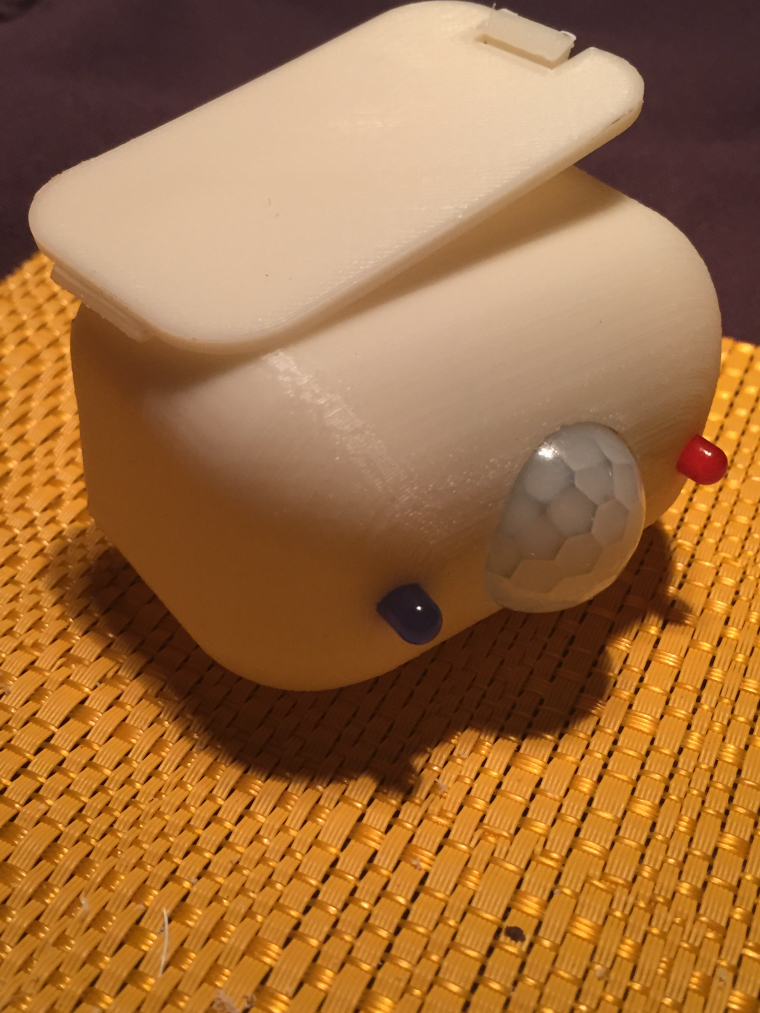
This is my reprap printed house for my project
-
@user2684
Solved
I solved it by putting settriggertime (5000) setdebounce (50); also solved the supply problems because if power is ftdi with the sensor was always high, with batteries the pir is stable and works well
thanks for the supportThis is my reprap printed house for my project
@mar.conte great to hear it is working now! For anybody else interested in these parameters, setDebounce() will set a debounce interval, e.g. the value of the input is checked after the interval from the wakeup so to avoid false positives, while seTriggerTime() ignore any input after the pir has triggered to avoid the sensor to trigger continuously. Btw, very nice and clean packaging!
-
-
Can I suggest updated sourceforge to say that the code has been moved to github, and leaving little else there? That way it's easier to update everything in the same place. I was browsing on sourceforge for a while and wondering "Why isn't this on github instead?" It wasn't even until I came back and started skimming this thread that I realized it was moved to github.
-
I have a problem, my node is in sleep for 60 minutes and hourly reads the battery voltage but when you wake the pir is high and in addition to the high volts sends me even then the controller sends me a pir pir movement false; how can I avoid it?
@mar.conte said in NodeManager: plugin for a rapid development of battery-powered sensors:
I have a problem, my node is in sleep for 60 minutes and hourly reads the battery voltage but when you wake the pir is high and in addition to the high volts sends me even then the controller sends me a pir pir movement false; how can I avoid it?
So you are saying when the node wakes up not from the pir interrupt at the end of the sleeping cycle to report battery level, is it also reporting a V_TRIPPED with payload 0? Thanks
-
Can I suggest updated sourceforge to say that the code has been moved to github, and leaving little else there? That way it's easier to update everything in the same place. I was browsing on sourceforge for a while and wondering "Why isn't this on github instead?" It wasn't even until I came back and started skimming this thread that I realized it was moved to github.
@JonnyDev13 said in NodeManager: plugin for a rapid development of battery-powered sensors:
Can I suggest updated sourceforge to say that the code has been moved to github
Good advice thanks! I've changed the website link on Sourceforge as well as added a note in the description and redirected the "Support" link.
-
@mar.conte said in NodeManager: plugin for a rapid development of battery-powered sensors:
I have a problem, my node is in sleep for 60 minutes and hourly reads the battery voltage but when you wake the pir is high and in addition to the high volts sends me even then the controller sends me a pir pir movement false; how can I avoid it?
So you are saying when the node wakes up not from the pir interrupt at the end of the sleeping cycle to report battery level, is it also reporting a V_TRIPPED with payload 0? Thanks
-
@JonnyDev13 said in NodeManager: plugin for a rapid development of battery-powered sensors:
Can I suggest updated sourceforge to say that the code has been moved to github
Good advice thanks! I've changed the website link on Sourceforge as well as added a note in the description and redirected the "Support" link.
@user2684 Looks great!