Skip to content
  • MySensors
  • OpenHardware.io
  • Categories
  • Recent
  • Tags
  • Popular
Skins
  • Light
  • Brite
  • Cerulean
  • Cosmo
  • Flatly
  • Journal
  • Litera
  • Lumen
  • Lux
  • Materia
  • Minty
  • Morph
  • Pulse
  • Sandstone
  • Simplex
  • Sketchy
  • Spacelab
  • United
  • Yeti
  • Zephyr
  • Dark
  • Cyborg
  • Darkly
  • Quartz
  • Slate
  • Solar
  • Superhero
  • Vapor

  • Default (No Skin)
  • No Skin
Collapse
Brand Logo
  1. Home
  2. Development
  3. MySensors controller with Rasberry Pi 3 & Windows IoT

MySensors controller with Rasberry Pi 3 & Windows IoT

Scheduled Pinned Locked Moved Development
15 Posts 6 Posters 4.6k Views 4 Watching
  • Oldest to Newest
  • Newest to Oldest
  • Most Votes
Reply
  • Reply as topic
Log in to reply
This topic has been deleted. Only users with topic management privileges can see it.
  • M Offline
    M Offline
    MrVince
    wrote on last edited by MrVince
    #1

    Hi everyone !

    For my studies, I choose to create a "home monitoring" project. My project need to request a many informations like temperature, .. via a gateway using mysensor API. My controller need to be on Windows IoT (C#) and I need to write all the informations in database. So, everything is good except one thing.

    After searching a looooong time i'm blocked !

    I want to create my own controler working on Rpi with IoT (C#) but I don't know how send message to my gateway in serial USB. I found nothing about how to send request.

    I want to know how send request from my controller to my gateway. I can use an external API to do that, but I don't know what ><

    Please, someone can help me?

    Thank you :)

    PS : Sorry if my english is too bad, I'm a french guy !

    mfalkviddM 1 Reply Last reply
    1
    • M MrVince

      Hi everyone !

      For my studies, I choose to create a "home monitoring" project. My project need to request a many informations like temperature, .. via a gateway using mysensor API. My controller need to be on Windows IoT (C#) and I need to write all the informations in database. So, everything is good except one thing.

      After searching a looooong time i'm blocked !

      I want to create my own controler working on Rpi with IoT (C#) but I don't know how send message to my gateway in serial USB. I found nothing about how to send request.

      I want to know how send request from my controller to my gateway. I can use an external API to do that, but I don't know what ><

      Please, someone can help me?

      Thank you :)

      PS : Sorry if my english is too bad, I'm a french guy !

      mfalkviddM Offline
      mfalkviddM Offline
      mfalkvidd
      Mod
      wrote on last edited by
      #2

      @MrVince big welcome to the MySensors community!
      The serial api is used for communication with a gateway. The api is described here: https://www.mysensors.org/download/serial_api_20

      You can also look at HomeGenie, which is an open source controller written in C#.

      1 Reply Last reply
      1
      • M Offline
        M Offline
        MrVince
        wrote on last edited by MrVince
        #3

        @mfalkvidd Thanks for the welcome !

        I already look and studies the API. I understand a format and how build a Message but not how send it to my gateway.

        I've look this https://developer.microsoft.com/en-us/windows/iot/docs/wra on MSDN to connect an Arduino to a Raspberry, but there is something I can't understand. Do I need to create a string with a good format and send it to gateway? If yes, how, and if not, what I need to do.

        Maybe it's obvious and there is something I can't understand, I'm sorry if it's that

        EDIT : One more thing about the API, it's to the Arduino right?

        1 Reply Last reply
        0
        • S Offline
          S Offline
          scalz
          Hardware Contributor
          wrote on last edited by scalz
          #4

          Hi,

          I think you should start by taking a look at a Serial UART example for VS, for learning how com port session, communication are handled.
          A very good exercise, could be to start by trying to code a Serial monitor. Then it should be easier to understand.
          See above link from @mfalkvidd for the serial api and use it from your homemade Serial monitor, sending command, reading etc..
          Or as sugested too, you could take a look how Homegenie works (serial communication, threads, database etc.)

          M 1 Reply Last reply
          0
          • S scalz

            Hi,

            I think you should start by taking a look at a Serial UART example for VS, for learning how com port session, communication are handled.
            A very good exercise, could be to start by trying to code a Serial monitor. Then it should be easier to understand.
            See above link from @mfalkvidd for the serial api and use it from your homemade Serial monitor, sending command, reading etc..
            Or as sugested too, you could take a look how Homegenie works (serial communication, threads, database etc.)

            M Offline
            M Offline
            MrVince
            wrote on last edited by
            #5

            @scalz I will look thanks :)

            1 Reply Last reply
            0
            • gohanG Offline
              gohanG Offline
              gohan
              Mod
              wrote on last edited by
              #6

              Keep in mind that mysensors gw also works over ethernet and mqtt

              1 Reply Last reply
              0
              • M Offline
                M Offline
                MrVince
                wrote on last edited by
                #7

                Hy everyone ! So, THIS IS WORKING ! Thanks a lot :)

                Now, new problemes ! (It's not funny without)

                I build a serial gateway and a motionsensor

                This is my log
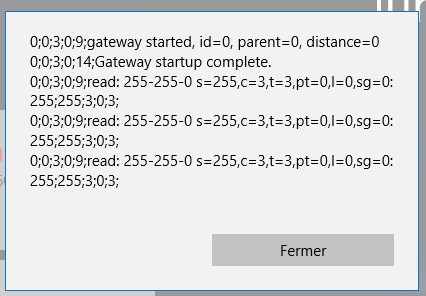
                0_1496323093938_Screenshot_1.jpg image url)

                0;0;3;0;9 -> ok it's a gateway init
                0;0;3;0;14 -> gateway is ready

                but, what is the next one? Normally I will receive just x;x;x;x;x; right? what's about read: 255-255....

                Thank you :)

                1 Reply Last reply
                0
                • gohanG Offline
                  gohanG Offline
                  gohan
                  Mod
                  wrote on last edited by
                  #8

                  take a look at https://www.mysensors.org/build/parser

                  1 Reply Last reply
                  1
                  • M Offline
                    M Offline
                    MrVince
                    wrote on last edited by
                    #9

                    Ok, if I right, there is a trouble with a motionsensor who want an ID ?

                    Do I need to give it one, or it's done by a gateway?

                    S 1 Reply Last reply
                    0
                    • M MrVince

                      Ok, if I right, there is a trouble with a motionsensor who want an ID ?

                      Do I need to give it one, or it's done by a gateway?

                      S Offline
                      S Offline
                      sundberg84
                      Hardware Contributor
                      wrote on last edited by sundberg84
                      #10

                      @MrVince - It is done by the controller. The GW never assign ID.
                      You could set a static ID in the node as well.

                      Controller: Proxmox VM - Home Assistant
                      MySensors GW: Arduino Uno - W5100 Ethernet, Gw Shield Nrf24l01+ 2,4Ghz
                      MySensors GW: Arduino Uno - Gw Shield RFM69, 433mhz
                      RFLink GW - Arduino Mega + RFLink Shield, 433mhz

                      M 1 Reply Last reply
                      1
                      • S sundberg84

                        @MrVince - It is done by the controller. The GW never assign ID.
                        You could set a static ID in the node as well.

                        M Offline
                        M Offline
                        MrVince
                        wrote on last edited by
                        #11

                        @sundberg84 It's work ! Thank you :)

                        1 Reply Last reply
                        1
                        • M Offline
                          M Offline
                          MrVince
                          wrote on last edited by MrVince
                          #12

                          Hi everyone !

                          Let's do a check up :

                          • Read from a GW in serial connection : ok
                          • Read information when I give a static ID : ok
                          • Find a node who want an ID : ok
                          • Give an ID to a node with my controller : nope

                          So, the question is, if I receive '255;255;3;0;3;' my controller understand it's an ID_REQUEST and I need to use an ID_RESPONSE, but if I want to give an ID I need to build something like this :

                          node-id ; child-sensor-id ; command ; ack ; type ; payload

                          node-id : ??
                          child-id : ??
                          command : 3 for internal
                          ack : 0 ?
                          type : 4 for response
                          payload : new ID (ex: 101)

                          What are the node-id & child-id if the sensor doesn't have one?

                          One more time, I want to thank's all of you, with your help it's more easier to understand and I start to see the end !

                          EDIT : One more thing, I have an idea. I want to open a pop-up when a new sensor is on to choose for wich room is it.
                          Can I give an temporary ID (like 254), wait for a first message with ID 254, with a first message I can see what type of sensor is, open a pop up, and give a new ID after I choose the room?

                          1 Reply Last reply
                          0
                          • gohanG Offline
                            gohanG Offline
                            gohan
                            Mod
                            wrote on last edited by
                            #13

                            the controller should keep track of the assigned IDs and respond with the following free one, I don't think you can change the ID via software, unless there is a way to change it in eeprom and reboot node so it will read it from eeprom and boot with that

                            M 1 Reply Last reply
                            0
                            • gohanG gohan

                              the controller should keep track of the assigned IDs and respond with the following free one, I don't think you can change the ID via software, unless there is a way to change it in eeprom and reboot node so it will read it from eeprom and boot with that

                              M Offline
                              M Offline
                              MrVince
                              wrote on last edited by MrVince
                              #14

                              @gohan ok

                              I understand for the controller, but I think I miss something about the ID_RESPONSE

                              Imagine this situation:

                              I have just one sensor with no ID
                              The GW send me (the controller) : '255;255;3;0;3;' // Sensor want a node_ID
                              If I want to give it the ID 1, what I need to send to the gw? I think something like '255;255;3;0;4;1', that's right?

                              EDIT : I try and it's work now, but I need to clear EEPROM first

                              1 Reply Last reply
                              0
                              • C Offline
                                C Offline
                                carolynlawson
                                wrote on last edited by
                                #15

                                Thank you for sharing the details.

                                1 Reply Last reply
                                0

                                Hello! It looks like you're interested in this conversation, but you don't have an account yet.

                                Getting fed up of having to scroll through the same posts each visit? When you register for an account, you'll always come back to exactly where you were before, and choose to be notified of new replies (either via email, or push notification). You'll also be able to save bookmarks and upvote posts to show your appreciation to other community members.

                                With your input, this post could be even better 💗

                                Register Login
                                Reply
                                • Reply as topic
                                Log in to reply
                                • Oldest to Newest
                                • Newest to Oldest
                                • Most Votes


                                18

                                Online

                                12.0k

                                Users

                                11.2k

                                Topics

                                113.4k

                                Posts


                                Copyright 2025 TBD   |   Forum Guidelines   |   Privacy Policy   |   Terms of Service
                                • Login

                                • Don't have an account? Register

                                • Login or register to search.
                                • First post
                                  Last post
                                0
                                • MySensors
                                • OpenHardware.io
                                • Categories
                                • Recent
                                • Tags
                                • Popular