
Vera command to relay board
-
My MySensors gateway has been successfully communicating soil moisture sensor information to my Vera controller.
I now need to be able to send Vera commands to a relay board.
This is the sketch
// Enable debug prints to serial monitor
#define MY_DEBUG

// Enable and select radio type attached
#define MY_RADIO_NRF24
//#define MY_RADIO_RFM69

// Enable repeater functionality for this node
#define MY_REPEATER_FEATURE

#include <MySensors.h>

#define RELAY_1  3  // Arduino Digital I/O pin number for first relay (second on pin+1 etc)
#define NUMBER_OF_RELAYS 1 // Total number of attached relays
#define RELAY_ON 1  // GPIO value to write to turn on attached relay
#define RELAY_OFF 0 // GPIO value to write to turn off attached relay


void before()
{
  for (int sensor=1, pin=RELAY_1; sensor<=NUMBER_OF_RELAYS; sensor++, pin++) {
    // Then set relay pins in output mode
    pinMode(pin, OUTPUT);
    // Set relay to last known state (using eeprom storage)
    digitalWrite(pin, loadState(sensor)?RELAY_ON:RELAY_OFF);
  }
}

void setup()
{

}

void presentation()
{
  // Send the sketch version information to the gateway and Controller
  sendSketchInfo("Relay", "1.0");

  for (int sensor=1, pin=RELAY_1; sensor<=NUMBER_OF_RELAYS; sensor++, pin++) {
    // Register all sensors to gw (they will be created as child devices)
    present(sensor, S_BINARY);
  }
}


void loop()
{

}

void receive(const MyMessage &message)
{
  // We only expect one type of message from controller. But we better check anyway.
  if (message.type==V_STATUS) {
    // Change relay state
    digitalWrite(message.sensor-1+RELAY_1, message.getBool()?RELAY_ON:RELAY_OFF);
    // Store state in eeprom
    saveState(message.sensor, message.getBool());
    // Write some debug info
    Serial.print("Incoming change for sensor:");
    Serial.print(message.sensor);
    Serial.print(", New status: ");
    Serial.println(message.getBool());```
Debug output
0 MCO:BGN:INIT REPEATER,CP=RNNRA---,VER=2.2.0-beta
4 MCO:BGN:BFR
6 TSM:INIT
6 TSF:WUR:MS=0
14 TSM:INIT:TSP OK
16 TSF:SID:OK,ID=1
18 TSM:FPAR
55 TSF:MSG:SEND,1-1-255-255,s=255,c=3,t=7,pt=0,l=0,sg=0,ft=0,st=OK:
632 TSF:MSG:READ,0-0-1,s=255,c=3,t=8,pt=1,l=1,sg=0:0
636 TSF:MSG:FPAR OK,ID=0,D=1
2062 TSM:FPAR:OK
2062 TSM:ID
2064 TSM:ID:OK
2066 TSM:UPL
2070 TSF:MSG:SEND,1-1-0-0,s=255,c=3,t=24,pt=1,l=1,sg=0,ft=0,st=OK:1
2080 TSF:MSG:READ,0-0-1,s=255,c=3,t=25,pt=1,l=1,sg=0:1
2086 TSF:MSG:PONG RECV,HP=1
2091 TSM:UPL:OK
2091 TSM:READY:ID=1,PAR=0,DIS=1
2097 TSF:MSG:SEND,1-1-0-0,s=255,c=3,t=15,pt=6,l=2,sg=0,ft=0,st=OK:0100
2105 TSF:MSG:READ,0-0-1,s=255,c=3,t=15,pt=6,l=2,sg=0:0100
2113 TSF:MSG:SEND,1-1-0-0,s=255,c=0,t=18,pt=0,l=10,sg=0,ft=0,st=OK:2.2.0-beta
2123 TSF:MSG:SEND,1-1-0-0,s=255,c=3,t=6,pt=1,l=1,sg=0,ft=0,st=OK:0
2170 TSF:MSG:READ,0-0-1,s=255,c=3,t=6,pt=0,l=1,sg=0:M
2177 !TSF:MSG:PVER,0=2
2181 TSF:MSG:SEND,1-1-0-0,s=255,c=3,t=11,pt=0,l=5,sg=0,ft=0,st=OK:Relay
2189 TSF:MSG:SEND,1-1-0-0,s=255,c=3,t=12,pt=0,l=3,sg=0,ft=0,st=OK:1.0
2199 TSF:MSG:SEND,1-1-0-0,s=1,c=0,t=3,pt=0,l=0,sg=0,ft=0,st=OK:
2207 MCO:REG:REQ
2209 TSF:MSG:SEND,1-1-0-0,s=255,c=3,t=26,pt=1,l=1,sg=0,ft=0,st=OK:2
2217 TSF:MSG:READ,0-0-1,s=255,c=3,t=27,pt=1,l=1,sg=0:1
2224 MCO:PIM:NODE REG=1
2226 MCO:BGN:STP
2228 MCO:BGN:INIT OK,TSP=1
29208 TSF:MSG:READ,0-0-1,s=1,c=1,t=2,pt=0,l=1,sg=1:0
29214 !TSF:MSG:PVER,0=2
63557 TSF:MSG:READ,0-0-1,s=1,c=1,t=2,pt=0,l=1,sg=1:1
63563 !TSF:MSG:PVER,0=2
Vera log extract
grep Arduino LuaUPnP.log
02      07/11/17 13:51:05.869   luup_log:78: Arduino: Incoming internal command '1;255;3;0;21;0' discarded for child: 95 <0x2e52a680>
50      07/11/17 13:56:50.572   luup_log:78: Arduino: Sending: 1;1;1;1;2;1 <0x2adab000>
50      07/11/17 13:58:26.814   luup_log:78: Arduino: Sending: 1;1;1;1;2;1 <0x2adab000>
50      07/11/17 13:58:38.725   luup_log:78: Arduino: Presentation: 1;255;0;0;18;2.2.0-beta <0x2e52a680>
50      07/11/17 13:58:38.725   luup_log:78: Arduino: urn:upnp-arduino-cc:serviceId:arduinonode1,ArduinoLibVersion, 2.2.0-beta, 95 <0x2e52a680>
50      07/11/17 13:58:38.725   luup_log:78: Arduino: Warning: Sensor has different library version than GW. Id: 1;255 <0x2e52a680>
50      07/11/17 13:58:38.727   luup_log:78: Arduino: urn:micasaverde-com:serviceId:HaDevice1,LastUpdate, 1499777918, 95 <0x2e52a680>
50      07/11/17 13:58:38.729   luup_log:78: Arduino: urn:micasaverde-com:serviceId:HaDevice1,LastUpdateHR, 13:58, 95 <0x2e52a680>
50      07/11/17 13:58:38.730   luup_log:78: Arduino: urn:upnp-arduino-cc:serviceId:arduinonode1,RelayNode, 0, 95 <0x2e52a680>
50      07/11/17 13:58:38.731   luup_log:78: Arduino: urn:upnp-arduino-cc:serviceId:arduinonode1,RelayNodeHR, GW, 95 <0x2e52a680>
50      07/11/17 13:58:38.731   luup_log:78: Arduino: Sending: 1;255;3;0;6;M <0x2e52a680>
50      07/11/17 13:58:38.814   luup_log:78: Arduino: urn:upnp-arduino-cc:serviceId:arduinonode1,SketchName, Relay, 95 <0x2e52a680>
50      07/11/17 13:58:38.816   luup_log:78: Arduino: urn:upnp-arduino-cc:serviceId:arduinonode1,SketchVersion, 1.0, 95 <0x2e52a680>
50      07/11/17 13:58:38.817   luup_log:78: Arduino: Presentation: 1;1;0;0;3; <0x2e52a680>
50      07/11/17 13:59:05.812   luup_log:78: Arduino: Sending: 1;1;1;1;2;0 <0x2adab000>
50      07/11/17 13:59:40.214   luup_log:78: Arduino: Sending: 1;1;1;1;2;1 <0x2adab000>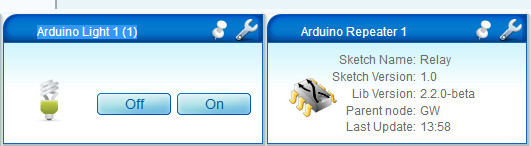
As far as I can see clicking the 'On' or 'Off' buttons in the Vera plugin sends a message to the relay board, but I cannot understand why I'm getting the '!TSF:MSG:PVER,0=2' error (Message protocol version mismatch (actual!=expected) )?
-
@Woodside i think it is wise to bring all modules to same version.
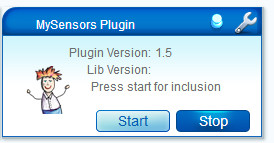
- Your MySensors tile reports an old plugin version (1.5 latest version is 1.7) does not report a lib-version (gateway) but in your Vera log this message appears
50 07/11/17 13:58:38.725 luup_log:78: Arduino: Warning: Sensor has different library version than GW. Id: 1;255 <0x2e52a680>- And your repeater tile reports 2.2.0-beta
i would suggest to start using the stable released version 2.1.1 and try again.
-

Hello! It looks like you're interested in this conversation, but you don't have an account yet.
Getting fed up of having to scroll through the same posts each visit? When you register for an account, you'll always come back to exactly where you were before, and choose to be notified of new replies (either via email, or push notification). You'll also be able to save bookmarks and upvote posts to show your appreciation to other community members.
With your input, this post could be even better 💗
Register Login