
PhoneyTV for Vera is Here!
-
I have an updated version attached to:
Add a pushbutton to control it locally (I am using an interrupt on Digital Pin 2, which is not in use presently, so you can disconnect your radio connection to pin 2)
Improved the dark dips of light, again trying to make it even more realistic.
cleaned up the code to make it (a lot) simpler; I eliminated the generic relay 'stuff' and made is single use, basically.Now you can leave it plugged in and turn it off if you are occupying the room... and no longer have to worry about plugging it back in :)
-
Completed upgrade to version 1.4, removing Relay capability.
PhoneyTV update attached:
-
Hi @BulldogLowell
get work am in the middle of working the hardware
I cant seem to download the V2 or V3.1 versions I get the reply as is is the pic
Suggestions?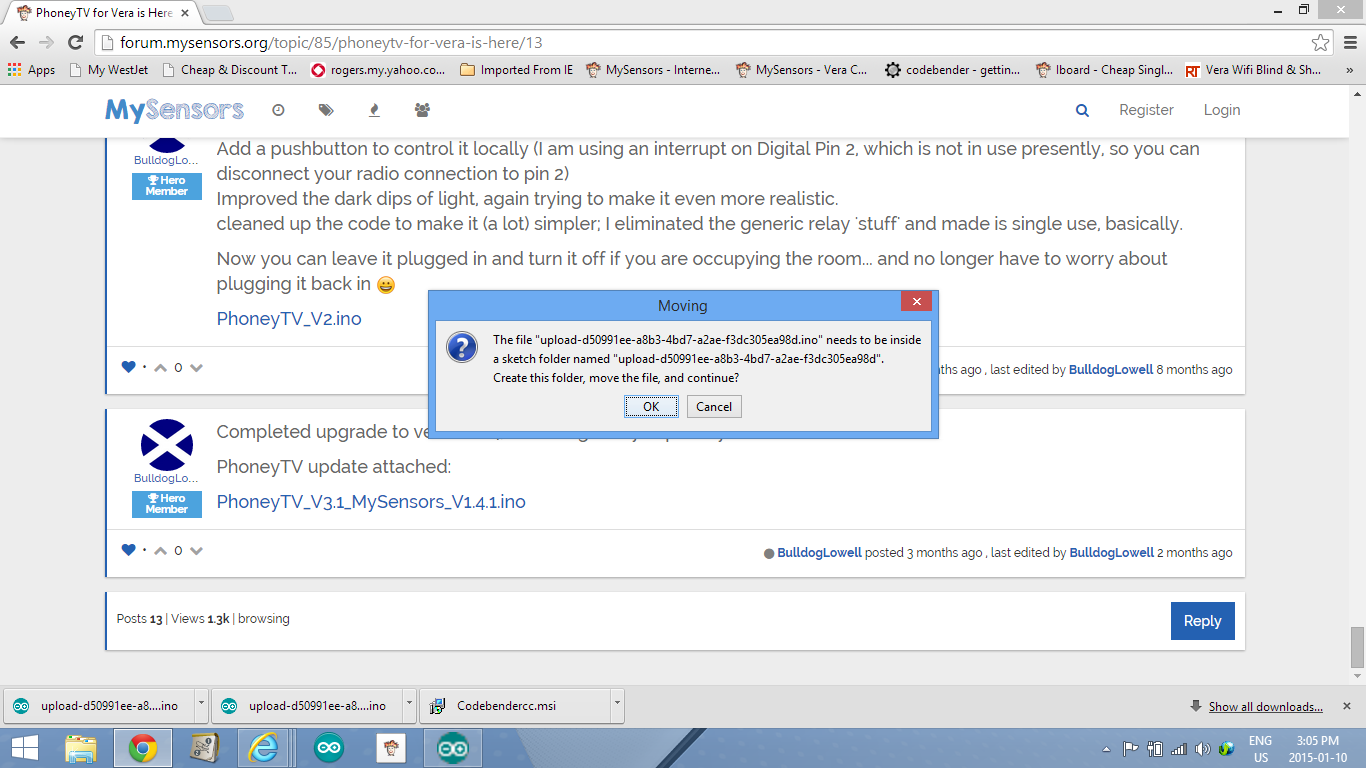
-
@BulldogLowell In the final stage of boxing this unit I like it and sure will use it in the coming months.
Question is when it was included to vera she made the node and then created the light node for it complete with on and off buttons, are they supposed to work or ignore these and use the local interrupt on d2 but would be cool to control this remotely with vera or in a scene.Great project!
-
@BulldogLowell In the final stage of boxing this unit I like it and sure will use it in the coming months.
Question is when it was included to vera she made the node and then created the light node for it complete with on and off buttons, are they supposed to work or ignore these and use the local interrupt on d2 but would be cool to control this remotely with vera or in a scene.Great project!
@5546dug said:
are they supposed to work or ignore these and use the local interrupt on d2
you will be able to turn on/off at the controller and with the (quite optional) attached button!
do you need it to work just by the button, and no controller? that is an easy mod if that is your use case.
-
@BulldogLowell , In a perfect world I would like to control Phoney TV over vera/my sensors.
right now I can use RST to drop the lights for a few secs only, but that is a physical action .I did look at phoney tv 2.0 and see the pin was changed to pinbutton and declared as an output?
There was a relay in this sketch, or is the vera switch node to be therelay ? I see when you push button it changes the state of the lights but I think not the power to the nano.I guessing my guesses are wrong.
Enough guessing from an old guy!
-
@BulldogLowell , In a perfect world I would like to control Phoney TV over vera/my sensors.
right now I can use RST to drop the lights for a few secs only, but that is a physical action .I did look at phoney tv 2.0 and see the pin was changed to pinbutton and declared as an output?
There was a relay in this sketch, or is the vera switch node to be therelay ? I see when you push button it changes the state of the lights but I think not the power to the nano.I guessing my guesses are wrong.
Enough guessing from an old guy!
Actually, the arduino never turns "off." Rather, cycling the "power" merely stops the output to the blinking/fading LEDs.
I'm not clear on your question... are you trying to use PhoneyTV without a controller at all?
anyways, you want the latest version above: PhoneyTV_V3.1_MySensors_V1.4.1.ino, i think
-
@BulldogLowell yes I have v3.1 So I was wrong -at least consistent!
I have Vera controller and at the moment My Sensors serial GW is connected ,The vera dashboard shows node for light on and off and that is really what I want. To start the lights remotely , I think using the reset locally (d2 to gnd?) may work but only if we are there
-
@BulldogLowell yes I have v3.1 So I was wrong -at least consistent!
I have Vera controller and at the moment My Sensors serial GW is connected ,The vera dashboard shows node for light on and off and that is really what I want. To start the lights remotely , I think using the reset locally (d2 to gnd?) may work but only if we are there
@5546dug said:
The vera dashboard shows node for light on and off and that is really what I want.
then you are there...
is it working?
-
@BulldogLowell I see in v3.1 pin d2 is called ' button pin' and is an' input' and 'pullup'
(understand it is for the pushbutton use but even then it is only for a few sec. in my setup.)
Also there is d13 defined as for the relay and used with the radio could that be an issue?How is the controller/GW telling the Phoney TV to change states? Do I need to run a wire from d2 (?) to gnd/vcc to create an interupt?
I don't really need the button, but I will leave it there -
@BulldogLowell Just noticed your post is v3.1 lib 1.4.1 and I have lib 1.4
That might be why I can't control from Vera ....then there is that d2 interrupt connection.
hmmm, looking at the code I posted I see why you have a problem.
Try this:
/* * PhoneyTV v3.1.1 * * This Sketch illuminates 6 sets of LED's in a random fashion as to mimic the * light eminating from a television. It is intended to make an empty home, * or an empty section of a home, appear to be occupied by someone watching * TV. As an alternative to a real television left on, this uses less than 1% * of the electrical energy. * * With the use of the MySensors plugin and gateway, PhoneyTV is intended to * be used with a controller (e.g. Vera or Raspberry PI). * * Sketch does not use any delays to create the random blinking as a way to * assure that communication back to the gateway is as unaffected as possible. * * You can adjust the length of the blink interval and its "twitchyness" by * modifying the random number generators, if you prefer more/less 'motion' in * in your unit. The lines are highlighted in the code, play around to create the * random effect you like. * * Sketch takes advantage of available PWM on pins 3, 5 & 6 using the white/blue LEDs * to allow fluctuations in the intensity of the light, enhancing the PhoneyTV's * realistic light effects. * * Created 12-APR-2014 * Free for distrubution * Credit should be given to MySensors.org for their base code for relay control * and for the radio configuration. Thanks Guys. * * 29-May-2014 * Version 2: Simplified the code, removing all redundant relay setup from original * code. Added an on/off momentary pushputton option to be set up on pin 2. Inproved * the dark dips for longer duration (can be configured) at intervals. * * 6-Jun-2015 * Version 3.1 * Updated for MySensors V1.4.1 * Contributed by Jim (BulldogLowell@gmail.com) Inspired by Josh >> Deltanu1142@gmail.com */ // #include <MySensor.h> #include <SPI.h> #include <Bounce2.h> // #define SKETCH_NAME "PhoneyTV" #define SKETCH_VERSION "3.1.1" // #define RADIO_RESET_DELAY_TIME 20 // #define BUTTON_PIN 2 // Arduino Digital I/O pin number for button #define CHILD_ID 1 // #define RADIO_ID 5 //AUTO // #define DEBUG_ON // #ifdef DEBUG_ON #define DEBUG_PRINT(x) Serial.print(x) #define DEBUG_PRINTLN(x) Serial.println(x) #define SERIAL_START(x) Serial.begin(x) #else #define DEBUG_PRINT(x) #define DEBUG_PRINTLN(x) #define SERIAL_START(x) #endif // MySensor gw; MyMessage msg(CHILD_ID, V_LIGHT); // byte ledPin3 = 3; // White using PWM byte ledPin4 = 4; // Red byte ledPin5 = 5; // Blue using PWM byte ledPin6 = 6; // Blue using PWM byte ledPin7 = 7; // Green byte ledPin8 = 8; // White (No PWM) // Bounce debouncer = Bounce(); byte oldValue = 0; boolean state = false; boolean oldState = false; int dipInterval = 10; int darkTime = 250; unsigned long currentDipTime; unsigned long dipStartTime; unsigned long currentMillis; byte ledState = LOW; unsigned long previousMillis = 0UL; byte led = 5; unsigned long interval = 2000UL; int twitch = 50; int dipCount = 0; int analogLevel = 100; boolean timeToDip = false; boolean gotAck=false; // void setup() { SERIAL_START(115200); pinMode(ledPin3, OUTPUT); pinMode(ledPin4, OUTPUT); pinMode(ledPin5, OUTPUT); pinMode(ledPin6, OUTPUT); pinMode(ledPin7, OUTPUT); pinMode(ledPin8, OUTPUT); pinMode(BUTTON_PIN, INPUT_PULLUP); // debouncer.attach(BUTTON_PIN); debouncer.interval(50); // gw.begin(incomingMessage, RADIO_ID, true, 0); // configured as a repeating node!! gw.sendSketchInfo(SKETCH_NAME, SKETCH_VERSION); gw.wait(RADIO_RESET_DELAY_TIME); gw.present(CHILD_ID, S_LIGHT); gw.wait(RADIO_RESET_DELAY_TIME); while(!gw.send(msg.set(state), false)) { gw.wait(RADIO_RESET_DELAY_TIME); } gw.wait(RADIO_RESET_DELAY_TIME); DEBUG_PRINTLN(F("Sensor Presentation Complete")); } // void loop() { gw.process(); debouncer.update(); byte value = debouncer.read(); if (value != oldValue && value == 0) { state = !state; while(!gotAck) { gw.send(msg.set(state), true); gw.wait(RADIO_RESET_DELAY_TIME); } gotAck = false; DEBUG_PRINT(F("State Changed to:")); DEBUG_PRINTLN(state? F("PhoneyTV ON") : F("PhoneyTV OFF")); } oldValue = value; if (state) { if (timeToDip == false) { currentMillis = millis(); if (currentMillis - previousMillis > interval) { previousMillis = currentMillis; interval = random(750, 4001); //Adjusts the interval for more/less frequent random light changes twitch = random(40, 100); // Twitch provides motion effect but can be a bit much if too high dipCount = dipCount++; } if (currentMillis - previousMillis < twitch) { led = random(3, 9); analogLevel = random(50, 255); // set the range of the 3 pwm leds ledState = !ledState; switch (led) //for the three PWM pins { case 3: pwmWrite(); break; case 5: pwmWrite(); break; case 6: pwmWrite(); break; default: digitalWrite(led, ledState); } if (dipCount > dipInterval) { timeToDip = true; dipCount = 0; dipStartTime = millis(); darkTime = random(50, 150); dipInterval = random(5, 250); // cycles of flicker } } } else { DEBUG_PRINTLN(F("Dip Time")); currentDipTime = millis(); if (currentDipTime - dipStartTime < darkTime) { for (int i = 3; i < 9; i++) { digitalWrite(i, LOW); } } else { timeToDip = false; } } } else { if (state != oldState) { for (int i = 3; i < 9; i++) { digitalWrite(i, LOW); } } } oldState = state; } // void incomingMessage(const MyMessage &message) { if (message.isAck()) { DEBUG_PRINTLN(F("This is an ack from gateway")); gotAck = true; } if (message.type == V_LIGHT) { state = message.getBool(); DEBUG_PRINT(F("Incoming change for sensor... New State = ")); DEBUG_PRINTLN(state? F("ON") : F("OFF")); } } // void pwmWrite() { if (ledState == HIGH) { analogWrite(led, analogLevel); } else { digitalWrite(led, LOW); } } -
@BulldogLowell Thanks
I will try. 3.1.1 when I get home -
@BulldogLowell
here is screen shot of error codeArduino: 1.6.5 (Windows 8.1), Board: "Arduino Nano, ATmega328"Using library MySensors in folder: C:\Users\Carolyn & Doug\Documents\Arduino\libraries\MySensors (legacy)
Using library SPI in folder: C:\Program Files (x86)\Arduino\hardware\arduino\avr\libraries\SPI
Using library Bounce2 in folder: C:\Users\Carolyn & Doug\Documents\Arduino\libraries\Bounce2 (legacy)
C:\Program Files (x86)\Arduino\hardware\tools\avr/bin/avr-g++ -c -g -Os -w -fno-exceptions -ffunction-sections -fdata-sections -fno-threadsafe-statics -MMD -mmcu=atmega328p -DF_CPU=16000000L -DARDUINO=10605 -DARDUINO_AVR_NANO -DARDUINO_ARCH_AVR -IC:\Program Files (x86)\Arduino\hardware\arduino\avr\cores\arduino -IC:\Program Files (x86)\Arduino\hardware\arduino\avr\variants\eightanaloginputs -IC:\Users\Carolyn & Doug\Documents\Arduino\libraries\MySensors -IC:\Program Files (x86)\Arduino\hardware\arduino\avr\libraries\SPI -IC:\Users\Carolyn & Doug\Documents\Arduino\libraries\Bounce2 C:\Users\CAROLY~1\AppData\Local\Temp\build5063782765207672318.tmp\phoney_tv_july_20_3.1.1.cpp -o C:\Users\CAROLY~1\AppData\Local\Temp\build5063782765207672318.tmp\phoney_tv_july_20_3.1.1.cpp.o
phoney_tv_july_20_3.1.1.ino: In function 'void setup()':
phoney_tv_july_20_3.1.1.ino:111:6: error: 'class MySensor' has no member named 'wait'
phoney_tv_july_20_3.1.1.ino:113:6: error: 'class MySensor' has no member named 'wait'
phoney_tv_july_20_3.1.1.ino:116:8: error: 'class MySensor' has no member named 'wait'
phoney_tv_july_20_3.1.1.ino:118:6: error: 'class MySensor' has no member named 'wait'
phoney_tv_july_20_3.1.1.ino: In function 'void loop()':
phoney_tv_july_20_3.1.1.ino:133:10: error: 'class MySensor' has no member named 'wait'
'class MySensor' has no member named 'wait' -
@BulldogLowell
here is screen shot of error codeArduino: 1.6.5 (Windows 8.1), Board: "Arduino Nano, ATmega328"Using library MySensors in folder: C:\Users\Carolyn & Doug\Documents\Arduino\libraries\MySensors (legacy)
Using library SPI in folder: C:\Program Files (x86)\Arduino\hardware\arduino\avr\libraries\SPI
Using library Bounce2 in folder: C:\Users\Carolyn & Doug\Documents\Arduino\libraries\Bounce2 (legacy)
C:\Program Files (x86)\Arduino\hardware\tools\avr/bin/avr-g++ -c -g -Os -w -fno-exceptions -ffunction-sections -fdata-sections -fno-threadsafe-statics -MMD -mmcu=atmega328p -DF_CPU=16000000L -DARDUINO=10605 -DARDUINO_AVR_NANO -DARDUINO_ARCH_AVR -IC:\Program Files (x86)\Arduino\hardware\arduino\avr\cores\arduino -IC:\Program Files (x86)\Arduino\hardware\arduino\avr\variants\eightanaloginputs -IC:\Users\Carolyn & Doug\Documents\Arduino\libraries\MySensors -IC:\Program Files (x86)\Arduino\hardware\arduino\avr\libraries\SPI -IC:\Users\Carolyn & Doug\Documents\Arduino\libraries\Bounce2 C:\Users\CAROLY~1\AppData\Local\Temp\build5063782765207672318.tmp\phoney_tv_july_20_3.1.1.cpp -o C:\Users\CAROLY~1\AppData\Local\Temp\build5063782765207672318.tmp\phoney_tv_july_20_3.1.1.cpp.o
phoney_tv_july_20_3.1.1.ino: In function 'void setup()':
phoney_tv_july_20_3.1.1.ino:111:6: error: 'class MySensor' has no member named 'wait'
phoney_tv_july_20_3.1.1.ino:113:6: error: 'class MySensor' has no member named 'wait'
phoney_tv_july_20_3.1.1.ino:116:8: error: 'class MySensor' has no member named 'wait'
phoney_tv_july_20_3.1.1.ino:118:6: error: 'class MySensor' has no member named 'wait'
phoney_tv_july_20_3.1.1.ino: In function 'void loop()':
phoney_tv_july_20_3.1.1.ino:133:10: error: 'class MySensor' has no member named 'wait'
'class MySensor' has no member named 'wait'I think you need to update your MySensors IDE.


