Skip to content
  • MySensors
  • OpenHardware.io
  • Categories
  • Recent
  • Tags
  • Popular
Skins
  • Light
  • Brite
  • Cerulean
  • Cosmo
  • Flatly
  • Journal
  • Litera
  • Lumen
  • Lux
  • Materia
  • Minty
  • Morph
  • Pulse
  • Sandstone
  • Simplex
  • Sketchy
  • Spacelab
  • United
  • Yeti
  • Zephyr
  • Dark
  • Cyborg
  • Darkly
  • Quartz
  • Slate
  • Solar
  • Superhero
  • Vapor

  • Default (No Skin)
  • No Skin
Collapse
Brand Logo
  1. Home
  2. General Discussion
  3. CNC PCB milling

CNC PCB milling

Scheduled Pinned Locked Moved General Discussion
933 Posts 28 Posters 140.1k Views 27 Watching
  • Oldest to Newest
  • Newest to Oldest
  • Most Votes
Reply
  • Reply as topic
Log in to reply
This topic has been deleted. Only users with topic management privileges can see it.
  • andrewA Offline
    andrewA Offline
    andrew
    wrote on last edited by andrew
    #124

    @NeverDie about 6 hours, in two nights

    1 Reply Last reply
    1
    • E Offline
      E Offline
      executivul
      wrote on last edited by
      #125

      Best way to get rid of the dust seems to be not making dust to start with.
      Enjoy!
      https://youtu.be/PpXG1X9yoxs

      NeverDieN 1 Reply Last reply
      1
      • E executivul

        Best way to get rid of the dust seems to be not making dust to start with.
        Enjoy!
        https://youtu.be/PpXG1X9yoxs

        NeverDieN Offline
        NeverDieN Offline
        NeverDie
        Hero Member
        wrote on last edited by
        #126

        @executivul Which car shampoo?

        How well does it work? Would it work better if you flooded it a bit more so that it was sitting, say, a couple mm under shampoo solution?

        1 Reply Last reply
        0
        • NeverDieN Offline
          NeverDieN Offline
          NeverDie
          Hero Member
          wrote on last edited by
          #127

          I suppose your etching bit might last longer too, since maybe the liquid would help cool it.

          1 Reply Last reply
          0
          • E Offline
            E Offline
            executivul
            wrote on last edited by
            #128

            Unfortunately I can not disclose this secret recipe, all I can tell you is that s some cationic surfactant mixed with some dihydrogen peroxide :sunglasses:

            To be honest I don't know the brand, I've first tried liquid soap undiluted but was to thick and was gathering around the bit like a small tornado and splashing everywhere, decided to add some water and went looking for a spray bottle, found one with some handwriting "car shampoo", it is thicker than plain water, but not as thick as liquid soap, so it might be diluted, I still have some for a few more boards then I'll go by trial and error with dish/hand/car wash and water.
            So much better not to have windows open at 0C(32F) and the vacuum howling. Only the 2.0mm endmill still creates dust, normal engraving and drilling do not.
            Don't forget to mill on acrylic/plastic as mdf will swell if wet.

            1 Reply Last reply
            0
            • NeverDieN Offline
              NeverDieN Offline
              NeverDie
              Hero Member
              wrote on last edited by NeverDie
              #129

              Looks like my CNC2418 is on track to be delivered this Monday. It has already cleared customs.

              So, since it will be arriving well ahead of all the various bits and such, I'm guessing that just a few etching bits will be enough to get me started and confirm whether my machine can route 6 mil isolation.

              The kit itself includes 0.1mm bits (Diameter: 3.175mm tip: 0.1mm length: 30mm).

              1 Reply Last reply
              1
              • NeverDieN Offline
                NeverDieN Offline
                NeverDie
                Hero Member
                wrote on last edited by
                #130

                It arrived!

                YveauxY andrewA 2 Replies Last reply
                1
                • NeverDieN NeverDie

                  It arrived!

                  YveauxY Offline
                  YveauxY Offline
                  Yveaux
                  Mod
                  wrote on last edited by
                  #131

                  @neverdie Yay! Where can we find the live stream of the build process? ;-)

                  http://yveaux.blogspot.nl

                  1 Reply Last reply
                  1
                  • NeverDieN NeverDie

                    It arrived!

                    andrewA Offline
                    andrewA Offline
                    andrew
                    wrote on last edited by
                    #132

                    @neverdie so, I expect your first boards tomorrow :)

                    NeverDieN 1 Reply Last reply
                    3
                    • andrewA andrew

                      @neverdie so, I expect your first boards tomorrow :)

                      NeverDieN Offline
                      NeverDieN Offline
                      NeverDie
                      Hero Member
                      wrote on last edited by NeverDie
                      #133

                      @andrew said in CNC PCB milling:

                      @neverdie so, I expect your first boards tomorrow :)

                      But wait, I'm still waiting for the magic numbers from you. :) Otherwise, I'll be all dressed with nowhere to go.

                      andrewA 1 Reply Last reply
                      0
                      • NeverDieN NeverDie

                        @andrew said in CNC PCB milling:

                        @neverdie so, I expect your first boards tomorrow :)

                        But wait, I'm still waiting for the magic numbers from you. :) Otherwise, I'll be all dressed with nowhere to go.

                        andrewA Offline
                        andrewA Offline
                        andrew
                        wrote on last edited by andrew
                        #134

                        @neverdie once the assembly is done, you should adjust the stepper drivers' current limiting as well.
                        it is pololu a4988, you can find the corresponding details here:
                        https://www.pololu.com/product/1182

                        then, it is always good idea to have the basic settings exported from the board, just in case... you can do it by "$$" command sent from the g code sender gui or directly from the serial terminal.

                        currently I use the following settings, the machine might be able to create nice results with higher feed rates, but I did not have enough time to test it and I sticked to the current working config.

                        isolation routing with 2001 bits:

                        • z cut: -0.05mm
                        • feed rate: 200

                        you can calculate the V carving bit's tool width for the given milling depth with the following formula:
                        tan(bit angle/2) * milling depth * 2 + bit's end width
                        for excel formula the bit angle should be provided in radians, so it should look like this
                        tan(radians(bit angle/2)) * milling depth * 2 + bit's end width

                        edge cut or hole milling with the 0.8mm endmill:

                        • feed rate: 170
                        • z cut: -1.7mm
                        • multi depth, depth/pass: 0.2mm

                        drilling:

                        • feed rate: 130
                        • z cut: -1.8

                        the spindle should be 1000 everywhere.

                        most probably your board will not have a bootloader, so it will not be possible to update the firmware via usb serial connection (with avrdude), but it is worth to try it. for me it did not work, so I traced back the MCU pins to the pin rows and used ISP to upgrade the firmware to grbl v1.1f (the board will come with 0.9j if I remember correctly). do not forget to export the gerber settings before you upgrade the firmware, as it will loose those, and you have to re-assign the given values again, after the update.

                        the ISP pinout (from the pin row's top left corner):
                        Reset -> pin 2
                        SCK -> pin 3
                        MISO -> pin 12
                        MOSI -> pin 13

                        5v -> pin1
                        gnd-> bottom row(!) e.g. pin 1
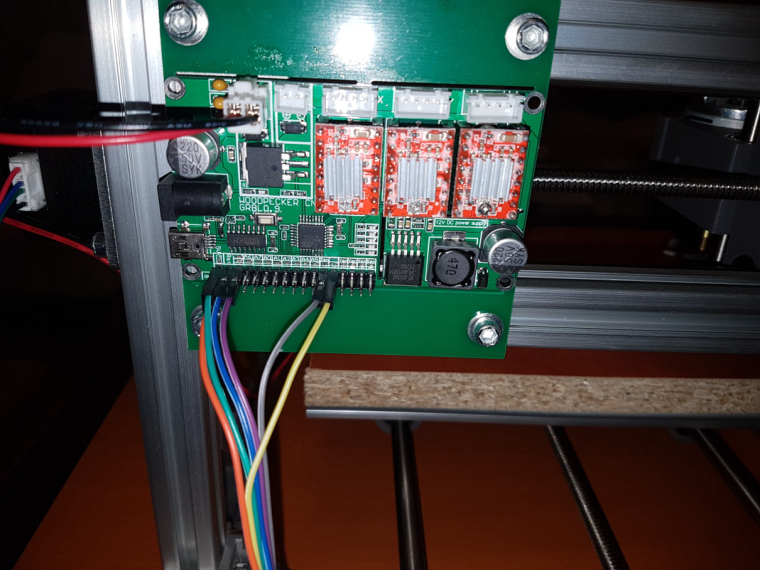
                        0_1513452548391_small_20171021_232839.jpg

                        NeverDieN rmtuckerR B 4 Replies Last reply
                        1
                        • NeverDieN Offline
                          NeverDieN Offline
                          NeverDie
                          Hero Member
                          wrote on last edited by NeverDie
                          #135

                          The assembly instructions came as a file on a mini CD. Attached for anyone who is interested.
                          [0_1513463653125_2418-Assembly instructions - English.doc](Uploading 100%)
                          Hmmm.. I guess the forum only lets me upload photos. Sorry.

                          1 Reply Last reply
                          0
                          • NeverDieN Offline
                            NeverDieN Offline
                            NeverDie
                            Hero Member
                            wrote on last edited by NeverDie
                            #136

                            I thought that the ER11 would come pre-installed ("shrink fit" onto the spindle), but it arrived as a separate piece and apparently I'm supposed to attach it by hand. That would seem to be a discrepancy with Jack's store advertises for this device, but, oh well.

                            Also, I was a bit surprised to see that most, and maybe all, of the plastic parts were 3D printed.

                            1 Reply Last reply
                            0
                            • andrewA andrew

                              @neverdie once the assembly is done, you should adjust the stepper drivers' current limiting as well.
                              it is pololu a4988, you can find the corresponding details here:
                              https://www.pololu.com/product/1182

                              then, it is always good idea to have the basic settings exported from the board, just in case... you can do it by "$$" command sent from the g code sender gui or directly from the serial terminal.

                              currently I use the following settings, the machine might be able to create nice results with higher feed rates, but I did not have enough time to test it and I sticked to the current working config.

                              isolation routing with 2001 bits:

                              • z cut: -0.05mm
                              • feed rate: 200

                              you can calculate the V carving bit's tool width for the given milling depth with the following formula:
                              tan(bit angle/2) * milling depth * 2 + bit's end width
                              for excel formula the bit angle should be provided in radians, so it should look like this
                              tan(radians(bit angle/2)) * milling depth * 2 + bit's end width

                              edge cut or hole milling with the 0.8mm endmill:

                              • feed rate: 170
                              • z cut: -1.7mm
                              • multi depth, depth/pass: 0.2mm

                              drilling:

                              • feed rate: 130
                              • z cut: -1.8

                              the spindle should be 1000 everywhere.

                              most probably your board will not have a bootloader, so it will not be possible to update the firmware via usb serial connection (with avrdude), but it is worth to try it. for me it did not work, so I traced back the MCU pins to the pin rows and used ISP to upgrade the firmware to grbl v1.1f (the board will come with 0.9j if I remember correctly). do not forget to export the gerber settings before you upgrade the firmware, as it will loose those, and you have to re-assign the given values again, after the update.

                              the ISP pinout (from the pin row's top left corner):
                              Reset -> pin 2
                              SCK -> pin 3
                              MISO -> pin 12
                              MOSI -> pin 13

                              5v -> pin1
                              gnd-> bottom row(!) e.g. pin 1

                              0_1513452548391_small_20171021_232839.jpg

                              NeverDieN Offline
                              NeverDieN Offline
                              NeverDie
                              Hero Member
                              wrote on last edited by NeverDie
                              #137

                              @andrew said in CNC PCB milling:

                              do not forget to export the gerber settings before you upgrade the firmware, as it will loose those, and you have to re-assign the given values again, after the update.

                              Where are the gerber settings, and how do I export them? Are they in EEPROM, so I just do a complete copy of that? Or does the $$ handle it?

                              andrewA 1 Reply Last reply
                              0
                              • NeverDieN Offline
                                NeverDieN Offline
                                NeverDie
                                Hero Member
                                wrote on last edited by
                                #138

                                I finished putting together the first frame. It was a bit frustrating, because the T-slot nuts they use can come out of the groove, and so to prevent that I had to keep constant tension on it while I tightened it down. I do think most of the T-slot nuts should have been the kind that don't slip out that way.

                                1 Reply Last reply
                                0
                                • NeverDieN NeverDie

                                  @andrew said in CNC PCB milling:

                                  do not forget to export the gerber settings before you upgrade the firmware, as it will loose those, and you have to re-assign the given values again, after the update.

                                  Where are the gerber settings, and how do I export them? Are they in EEPROM, so I just do a complete copy of that? Or does the $$ handle it?

                                  andrewA Offline
                                  andrewA Offline
                                  andrew
                                  wrote on last edited by
                                  #139

                                  @NeverDie
                                  firmware settings: it is stored in the EEPROM, but nothing guarantees that the same location will be used for the same parameters in case of different versions, so the output of "$$" command should be saved, this contains everything which you can manually set up if necessary.

                                  ER11: take extra care during the installation process to not "harm" the motor's axis. usually the ER11 is pretty tight and howtos mention that the motor should be cooled (by the freezer) and the ER11 should be warmed up before putting them together, to help the mounting process and to prevent unwanted distortion.

                                  I put the CNC 2418 assembly guide to my share, for ones it is interesting.

                                  NeverDieN 3 Replies Last reply
                                  2
                                  • andrewA andrew

                                    @neverdie once the assembly is done, you should adjust the stepper drivers' current limiting as well.
                                    it is pololu a4988, you can find the corresponding details here:
                                    https://www.pololu.com/product/1182

                                    then, it is always good idea to have the basic settings exported from the board, just in case... you can do it by "$$" command sent from the g code sender gui or directly from the serial terminal.

                                    currently I use the following settings, the machine might be able to create nice results with higher feed rates, but I did not have enough time to test it and I sticked to the current working config.

                                    isolation routing with 2001 bits:

                                    • z cut: -0.05mm
                                    • feed rate: 200

                                    you can calculate the V carving bit's tool width for the given milling depth with the following formula:
                                    tan(bit angle/2) * milling depth * 2 + bit's end width
                                    for excel formula the bit angle should be provided in radians, so it should look like this
                                    tan(radians(bit angle/2)) * milling depth * 2 + bit's end width

                                    edge cut or hole milling with the 0.8mm endmill:

                                    • feed rate: 170
                                    • z cut: -1.7mm
                                    • multi depth, depth/pass: 0.2mm

                                    drilling:

                                    • feed rate: 130
                                    • z cut: -1.8

                                    the spindle should be 1000 everywhere.

                                    most probably your board will not have a bootloader, so it will not be possible to update the firmware via usb serial connection (with avrdude), but it is worth to try it. for me it did not work, so I traced back the MCU pins to the pin rows and used ISP to upgrade the firmware to grbl v1.1f (the board will come with 0.9j if I remember correctly). do not forget to export the gerber settings before you upgrade the firmware, as it will loose those, and you have to re-assign the given values again, after the update.

                                    the ISP pinout (from the pin row's top left corner):
                                    Reset -> pin 2
                                    SCK -> pin 3
                                    MISO -> pin 12
                                    MOSI -> pin 13

                                    5v -> pin1
                                    gnd-> bottom row(!) e.g. pin 1

                                    0_1513452548391_small_20171021_232839.jpg

                                    rmtuckerR Offline
                                    rmtuckerR Offline
                                    rmtucker
                                    wrote on last edited by
                                    #140

                                    @andrew
                                    1000rpm for the spindle seems very slow,is that number correct?

                                    andrewA 1 Reply Last reply
                                    0
                                    • rmtuckerR rmtucker

                                      @andrew
                                      1000rpm for the spindle seems very slow,is that number correct?

                                      andrewA Offline
                                      andrewA Offline
                                      andrew
                                      wrote on last edited by
                                      #141

                                      @rmtucker it is not 1000rpm, but the pwm control for the whole spindle speed range. see the details in the official document.
                                      once you use the spindle speed with the value of $30 or above, then the controller will drive the spindle with continuous voltage, without pwm, so it will use its maximum rpm.
                                      compared to bigger cncs with bigger spindles (e.g. what you can see from @executivul's video above) , 2418's is not that fast (in rpm), on the other hand it should not be "very slow". can you show a video on that?

                                      rmtuckerR 1 Reply Last reply
                                      1
                                      • andrewA andrew

                                        @rmtucker it is not 1000rpm, but the pwm control for the whole spindle speed range. see the details in the official document.
                                        once you use the spindle speed with the value of $30 or above, then the controller will drive the spindle with continuous voltage, without pwm, so it will use its maximum rpm.
                                        compared to bigger cncs with bigger spindles (e.g. what you can see from @executivul's video above) , 2418's is not that fast (in rpm), on the other hand it should not be "very slow". can you show a video on that?

                                        rmtuckerR Offline
                                        rmtuckerR Offline
                                        rmtucker
                                        wrote on last edited by
                                        #142

                                        @andrew
                                        I see.
                                        So what would be your best guess at your actual spindle rpm when cutting under your feed/depth of cut examples given above.?

                                        andrewA 1 Reply Last reply
                                        0
                                        • andrewA andrew

                                          @NeverDie
                                          firmware settings: it is stored in the EEPROM, but nothing guarantees that the same location will be used for the same parameters in case of different versions, so the output of "$$" command should be saved, this contains everything which you can manually set up if necessary.

                                          ER11: take extra care during the installation process to not "harm" the motor's axis. usually the ER11 is pretty tight and howtos mention that the motor should be cooled (by the freezer) and the ER11 should be warmed up before putting them together, to help the mounting process and to prevent unwanted distortion.

                                          I put the CNC 2418 assembly guide to my share, for ones it is interesting.

                                          NeverDieN Offline
                                          NeverDieN Offline
                                          NeverDie
                                          Hero Member
                                          wrote on last edited by
                                          #143

                                          @andrew said in CNC PCB milling:

                                          I put the CNC 2418 assembly guide to my share, for ones it is interesting.

                                          Yes, those are exactly the same instructions I received with my kit too.

                                          1 Reply Last reply
                                          0
                                          Reply
                                          • Reply as topic
                                          Log in to reply
                                          • Oldest to Newest
                                          • Newest to Oldest
                                          • Most Votes


                                          33

                                          Online

                                          11.7k

                                          Users

                                          11.2k

                                          Topics

                                          113.1k

                                          Posts


                                          Copyright 2025 TBD   |   Forum Guidelines   |   Privacy Policy   |   Terms of Service
                                          • Login

                                          • Don't have an account? Register

                                          • Login or register to search.
                                          • First post
                                            Last post
                                          0
                                          • MySensors
                                          • OpenHardware.io
                                          • Categories
                                          • Recent
                                          • Tags
                                          • Popular