Skip to content
  • MySensors
  • OpenHardware.io
  • Categories
  • Recent
  • Tags
  • Popular
Skins
  • Light
  • Brite
  • Cerulean
  • Cosmo
  • Flatly
  • Journal
  • Litera
  • Lumen
  • Lux
  • Materia
  • Minty
  • Morph
  • Pulse
  • Sandstone
  • Simplex
  • Sketchy
  • Spacelab
  • United
  • Yeti
  • Zephyr
  • Dark
  • Cyborg
  • Darkly
  • Quartz
  • Slate
  • Solar
  • Superhero
  • Vapor

  • Default (No Skin)
  • No Skin
Collapse
Brand Logo
F

fleinze

@fleinze
About
Posts
79
Topics
11
Shares
0
Groups
0
Followers
1
Following
0

Posts

Recent Best Controversial

  • Text-Node as Temperature-Display
    F fleinze

    Hi!

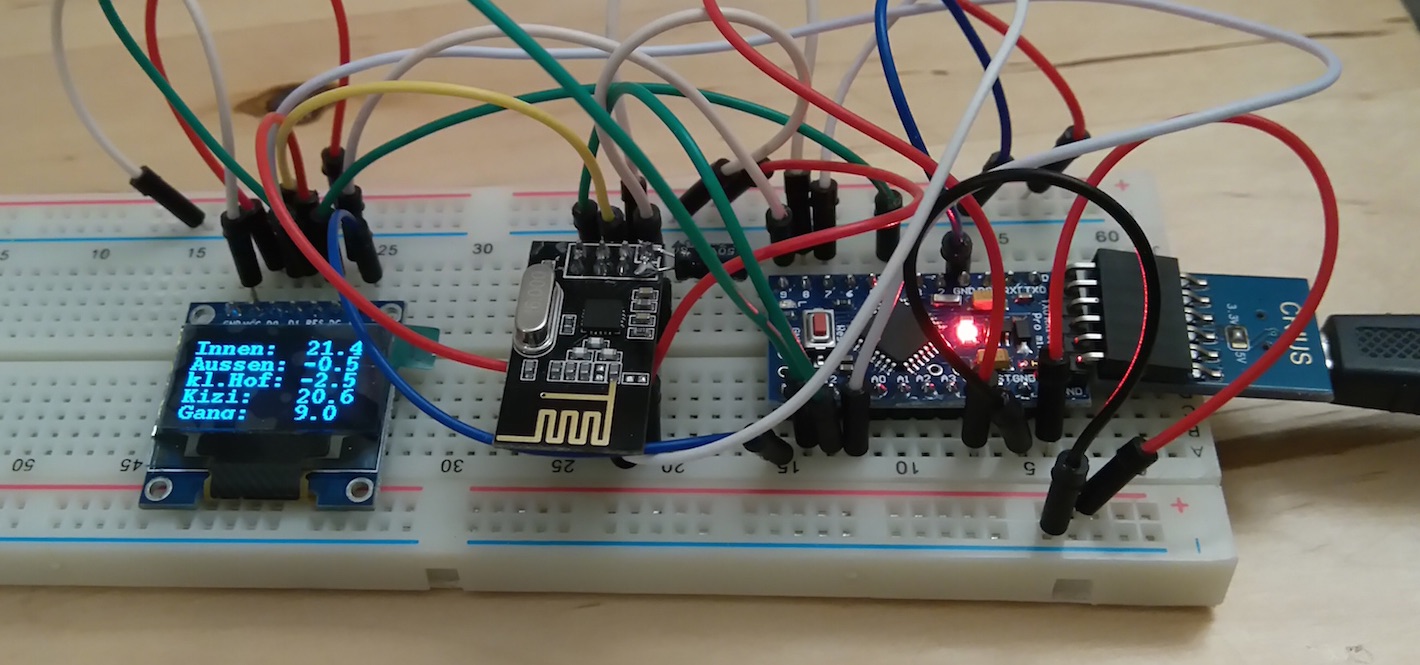
    I use MySensors with Domoticz for tracking indoor and outdoor temperatures. In summer it is important for me to know the temperatures, so I don't open the windows before it is cooler outside than inside.
    On the hottest summer nights the time to open the windows can be in the middle of the night. At this time it isn't very handy to check the Domoticz-page with a Laptop or Phone.
    For this application I found a good solution with the V_TEXT-node.

    Currently it is still a breadboard-design, but I will make something more permanent soon.
    I plan to power it with a battery and switch it off after reading.
    DSC_0030a.jpg

    The arduino-sketch requests 5 texts (for 5 display lines) and goes to sleep afterwards. It can be woken up again with a button on pin 3. In this case, the texts are requested again.

    /*
     * Text-Node:
     * this node requests five texts and goes to sleep afterwards
     *
     */
    
    #define MY_RADIO_NRF24
    #define MY_RF24_CE_PIN 5
    #define MY_RF24_CS_PIN 6
    #define MY_NODE_ID 51
    
    #include "U8glib.h"
    #include <MySensor.h>
    #include <SPI.h>
    
    U8GLIB_SSD1306_128X64 u8g(7, 8, 9); //u8g constructor cs=7, dc=8, res=9
    
    char lastLCD[5][21] = {"Booting", "MySens up", "", "", ""};                  //array of strings
    unsigned long lastUpdate = 0;
    boolean received[5] = {false, false, false, false, false};
    
    void setup() {
      pinMode(3, INPUT_PULLUP); //interrupt pin
      updateDisplay();
    
      sendSketchInfo("Temperature Text", "1.0");
    
      strcpy(lastLCD[2], "Info sent");
      updateDisplay();
    
      for ( uint8_t i = 0; i < 5; i++) {
        present(i, S_INFO);
        request(i, V_TEXT);
      }
      
      strcpy(lastLCD[3], "First requ");
      updateDisplay();
    }
    
    void loop() {
      while (received[0] == false || received[1] == false || received[2] == false || received[3] == false || received[4] == false ) {
        unsigned long now = millis();
        transportProcess();
        if (now - lastUpdate > 1000) {//repeat request every second until every string is received.
          for ( uint8_t i = 0; i < 5; i++) {
            if ( !received[i]) request(i, V_TEXT);
          }
          lastUpdate = now;
        }
        updateDisplay();
      }
    
      sleep(1, FALLING); //sleep forever, interrupt pin 3
    
      for (uint8_t i = 0; i < 5; i++) received[i] = false; //after wake up reset received status
    }
    
    void updateDisplay() {
      u8g.setFont(u8g_font_courB12);
      u8g.setFontPosTop();
    
      u8g.firstPage();
      do {
        for (uint8_t i = 0; i < 5; i++) {
          u8g.drawStr(0, i * 13, lastLCD[i]);
        }
      } while (u8g.nextPage());
    }
    
    void receive(const MyMessage & message) {
      if (message.type == V_TEXT) {                 // Text messages only
    #ifdef MY_DEBUG    // Write some debug info
        Serial.print("Sensor: "); Serial.print(message.sensor); Serial.print(", Message: "); Serial.println(message.getString());
    #endif
        if (message.sensor < 5) {
          strcpy(lastLCD[message.sensor], message.getString());
          received[message.sensor] = true;
        }
      }
    }
    

    On the Domoticz-side is a lua script, which updates the texts whenever the corresponding temperature is updated:

    -- script_device_text.lua
    local line1 = 'Textline1'
    local line1idx = '25'
    local line1text = 'Innen:  '
    local line1temp = 'Wohnzimmer'
    local line2 = 'Textline2'
    local line2idx = '26'
    local line2text = 'Aussen: '
    local line2temp = 'großer Hof'
    local line3 = 'Textline3'
    local line3idx = '27'
    local line3text = 'kl.Hof: '
    local line3temp = 'kleiner Hof'
    local line4 = 'Textline4'
    local line4idx = '28'
    local line4text = 'Kizi:   '
    local line4temp = 'Kinderzimmer'
    local line5 = 'Textline5'
    local line5idx = '29'
    local line5text = 'Gang:   '
    local line5temp = 'Gang aussen'
    
    commandArray = {}
    
    
    if devicechanged[line1temp] then
    	commandArray['UpdateDevice']=line1idx..'|0|'..line1text..otherdevices_svalues[line1temp]
    end
    
    if devicechanged[line2temp] then
    	commandArray['UpdateDevice']=line2idx..'|0|'..line2text..otherdevices_svalues[line2temp]
    end
    
    if devicechanged[line3temp] then
        commandArray['UpdateDevice']=line3idx..'|0|'..line3text..otherdevices_svalues[line3temp]
    end
    
    if devicechanged[line4temp] then
        commandArray['UpdateDevice']=line4idx..'|0|'..line4text..otherdevices_svalues[line4temp]
    end
    
    if devicechanged[line5temp] then
        commandArray['UpdateDevice']=line5idx..'|0|'..line5text..otherdevices_svalues[line5temp]
    end
    
    return commandArray
    

    I also made a sketch for a continuous-update display. As Domoticz doesn't push the texts, the sketch contains a switch. Every time the switch is switched on, the sketch requests the text:

    #define MY_RADIO_NRF24
    #define MY_RF24_CE_PIN 5
    #define MY_RF24_CS_PIN 6
    #define MY_NODE_ID 50
    
    #include "U8glib.h"
    #include <MySensor.h>
    #include <SPI.h>
    
    
    U8GLIB_SSD1306_128X64 u8g(7, 8, 9); //u8g constructor
    
    const byte LCD_CHILD = 1;
    const byte LCD_NEW_SWITCH = 0;
    char lastLCD[21] = "";
    unsigned long lastUpdate = 0, lastDisplay = 0;
    boolean incoming = false;
    
    MyMessage swMsg(LCD_NEW_SWITCH, V_LIGHT);
    
    void setup() {
      sendSketchInfo("text-push-node", "1.0");
      present(LCD_CHILD, S_INFO);
      present(LCD_NEW_SWITCH, S_LIGHT);
    
      request(LCD_CHILD, V_TEXT);
      request(LCD_NEW_SWITCH, V_LIGHT);
    }
    
    void loop() {
      // put your main code here, to run repeatedly:
      unsigned long now = millis();
    
      if (incoming) { //request text, if there is a new one available
        send(swMsg.set(false)); //reset the switch (not needed, but serves as ack)
        request(LCD_CHILD, V_TEXT);
        incoming = false;
      }
    
      if (now - lastDisplay > 1000) { //update every 1 s
        lastDisplay = now;
    
        u8g.setFont(u8g_font_helvB10);
        u8g.setFontPosTop();
    
        //update the Display:
        u8g.firstPage();
        do {
          u8g.drawStr(0, 0, lastLCD);
        } while (u8g.nextPage());
      }
    }
    
    
    void receive(const MyMessage & message) {
      if (message.type == V_TEXT) {                       // Text messages only
        // Write some debug info
    #ifdef MY_DEBUG
        Serial.print("Message: "); Serial.print(message.sensor); Serial.print(", Message: "); Serial.println(message.getString());
    #endif
        if (message.sensor == LCD_CHILD ) {
          strcpy(lastLCD, message.getString());
        }
      }
      else if (message.type == V_LIGHT && message.sensor == LCD_NEW_SWITCH) {
    #ifdef MY_DEBUG
        Serial.print("New status: "); Serial.println(message.getBool());
    #endif
        incoming = true;
      }
    }
    

    In this case you need to set the switch in the lua-script with commandArray[switch]='On' after every update of the text.

    EDIT: The sketches first published were based on an old version (ca. september '15) of the development branch, which is no longer available. Updated the sketches to Version 1.6

    My Project

  • software AES encryption for NRF24
    F fleinze

    Hey there!

    I really wanted my over-the-air data to be encrypted. As I have a powermeter sensor, I basically broadcast detailed energy usage-statistics, which is a bit more privat than temperatures.
    The encryption is done with a copy of the MyTransportNRF24.h library. This copy is named MyTransportNRF24ENC.h All the data that is sent and received is encrypted respectively decrypted.
    Check it out:
    https://github.com/fleinze/MySensors/tree/Encryption/libraries/MySensors
    To use it you need to replace the MyTransportNRF24.h with MyTransportNRF24ENC.h and the MyTransportNRF24-constructor with MyTransportNRF24ENC.
    If you want to try it yourself please download all files, because it is based on a fork I use.
    For encryption the AES-library of spaniakos is used:
    https://github.com/spaniakos/AES

    The encryption uses an additional 3400 bytes of flash, so it could get a bit tight for an ethernet-gateway.

    This encryption is a all-or-nothing thing. You can't mix encrypted and unencrypted nodes. OTA-update is not possible with this, because the bootloader expects unencrypted messages.

    Identical messages create identical encrypted messages. To prevent a replay attack you need to use message signing.

    Development

  • My controller-less mysensors temperature logger
    F fleinze

    Hi!

    I built a mysensors-datalogger that does not need a controller. The reason for this is that I wanted to log some temperature-data at my office which has a strict IT-security policy and would not allow any network based controller like rasperry pi or vera.

    This is what it looks like:
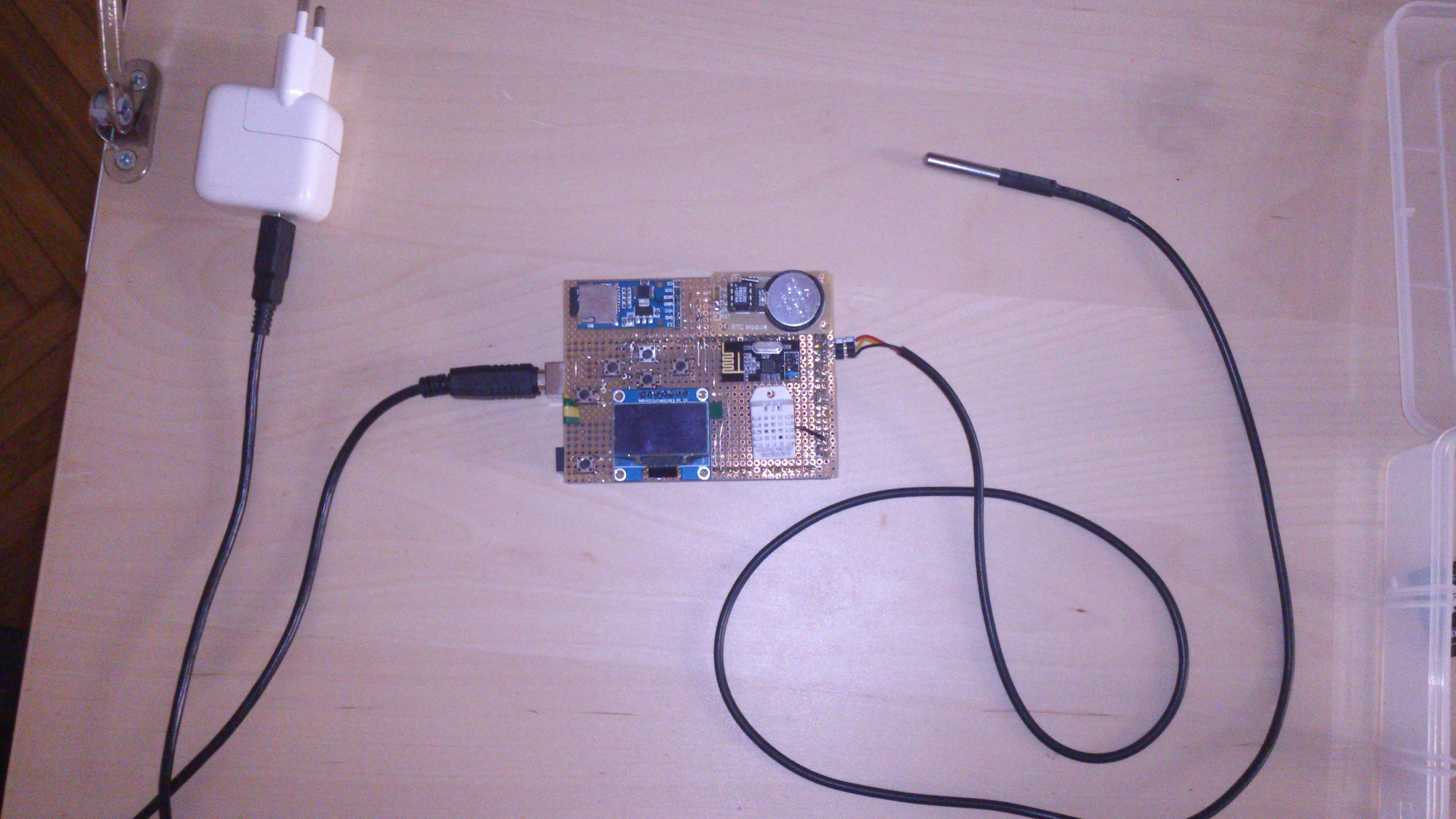
    DSC_0945 Kopie.jpg

    I used the following hardware:

    • Arduino Mega 2560 clone (atmega328 has not enough flash for this project)
    • oled-display based on sh1106 chipset
    • rtc based on DS1302 (would not recommend, but had this one available)
    • micro-SD breakout board
    • NRF24L01 module
    • DHT22 temperature and humidity senosr
    • DS18B20 temperature sensor (waterproof)
    • some buttons

    It is possible to deactivate most of the hardware-pieces in the software. If the RTC has an error or is deactivated by hand it falls back to software RTC.
    For powering the NRF24L01 I used the 3.3V regulator of the micro-SD breakout as the mega2560 has a very weak regulator.

    Basically the software continuously fetches the onboard sensors and waits for radio signals. Every 5 minutes it writes all available values to the SD-Card.

    The mysensors-support is very basic. Currently it only supports up to 6 temperature sensors with one temperature and battery reading each.

    Here is the code:

    /*
     Weatherstation-"Gateway" (Stand-alone)
    
     Created by Florian Heinze
    
     This program is free software; you can redistribute it and/or
     modify it under the terms of the GNU General Public License
     version 2 as published by the Free Software Foundation.
    */
    
    
    #include <U8glib.h>
    #include <SPI.h>
    #include "SD.h"
    #include <MySensor.h>
    #include <MyGateway.h>
    #include <stdarg.h>
    #include <DHT.h>
    #include <DallasTemperature.h>
    #include <OneWire.h>
    #include <Time.h>
    #include <DS1302RTC.h>
    #include <EEPROM.h>
    
    const uint8_t ARROW[] U8G_PROGMEM = {
      B00000000,
      B00001100,
      B00000110,
      B11111111,
      B11111111,
      B00000110,
      B00001100,
      B00000000
    };
    
    /*
     * PIN-definitions
     */
    const int DHT_BUS = A9;
    
    const int ONE_WIRE_BUS = 25;
    const int ONE_WIRE_VCC = 23;
    const int ONE_WIRE_GND = 27;
    
    const int NRF_CE_PIN = 30;
    const int NRF_CS_PIN = 36;
    
    const int SD_CS_PIN = 12;
    const int SD_MISO_PIN = 9;
    const int SD_MOSI_PIN = 10;
    const int SD_SCK_PIN = 11;
    
    const int DISP_CS_PIN = A4;
    const int DISP_DC_PIN = A3;
    const int DISP_RES_PIN = A2;
    const int DISP_SCK_PIN = A0;
    const int DISP_MOSI_PIN = A1;
    
    const int RTC_SCK_PIN = 16;
    const int RTC_DAT_PIN = 15;
    const int RTC_RST_PIN = 14;
    
    const int BUTTON_RIGHT_PIN = 4;
    const int BUTTON_LEFT_PIN = 5;
    const int BUTTON_UP_PIN = 6;
    const int BUTTON_DOWN_PIN = 3;
    const int BUTTON_ENTER_PIN = 7;
    
    //Variables for buttons
    boolean right = false;
    boolean left = false;
    boolean up = false;
    boolean down = false;
    boolean enter = false;
    boolean lastright = false;
    boolean lastleft = false;
    boolean lastup = false;
    boolean lastdown = false;
    boolean lastenter = false;
    
    const unsigned long DEBOUNCE_DELAY = 10;
    unsigned long debouncetime = 0;
    unsigned long lastSDWrite = 0;
    
    //Channel for RF
    const int RF24_CUST_CHANNEL = 50;
    
    //EEPROM-addreses. start at 512 so it doesnt collide with mysensors.
    const int START_EEPROM_ADR = 512;
    const int DHT_EEPROM_ADR = START_EEPROM_ADR;
    const int ONEWIRE_EEPROM_ADR = START_EEPROM_ADR + 1;
    const int RTC_EEPROM_ADR = START_EEPROM_ADR + 2;
    const int NRF_EEPROM_ADR = START_EEPROM_ADR + 3;
    const int SD_EEPROM_ADR = START_EEPROM_ADR + 4;
    
    //Filenames
    #define MYS_LOG "myslog.txt"
    #define DATA_LOG "datalog.txt"
    
    const unsigned int WRITE_MINUTE = 5;
    
    //status of hardware
    typedef enum {OFF = 0, ERR, ON} hw_stat_t;
    
    hw_stat_t dht_stat;
    hw_stat_t onewire_stat;
    hw_stat_t rtc_stat;
    hw_stat_t nrf_stat; //no ERR state
    hw_stat_t sd_stat;
    
    //used for rtc
    time_t t = 0;
    boolean clock_set = false;
    enum {DAY, MONTH, YEAR, HOUR, MINUTE, SECOND} set_digit = DAY;
    #define LEAP_YEAR(Y)     ( ((1970+Y)>0) && !((1970+Y)%4) && ( ((1970+Y)%100) || !((1970+Y)%400) ) )
    static  const uint8_t monthDays[] = {31, 28, 31, 30, 31, 30, 31, 31, 30, 31, 30, 31}; // API starts months from 1, this array starts from 0
    
    //state of HW-page
    enum {DHT_22 = 0, DS18B22, RTC, NRF, SD_CARD} hw_page_stat = DHT_22;
    
    //state of display
    enum {PAGE1, PAGE2, PAGE3, PAGE4, PAGE5, DIAGRAM, CLOCK, HW_SET} dispstat = PAGE1;
    
    //max number of mysensors
    const int MYS_MAX_SENSORS = 6;
    
    //variables for sensors
    long lastDHTTime;
    long lastOnewireTime;
    float tempDHT = 0;
    float humDHT = 0;
    float tempOnewire = 0;
    float tempMyS[MYS_MAX_SENSORS] = {0};//temp of mysensors
    time_t lastReadMyS[MYS_MAX_SENSORS] = {0};//last time the mysensors are read
    uint8_t battMyS[MYS_MAX_SENSORS] = {0};//battery of mysensors
    
    //used for the diagram
    float diagram[128];
    boolean diagramRead = false;
    boolean diagramScroll = false;
    boolean linesUpdate = false;
    unsigned long diagramStart = 1;
    unsigned long lines = 0;
    uint8_t numDiagram = 1;
    const int BOT_PXL = 64;
    const int TOP_PXL = 0;
    boolean dispOnewire = false;
    
    //objects for hardware: temperature-sensors
    DHT dht;
    OneWire oneWire(ONE_WIRE_BUS);
    DallasTemperature sensors(&oneWire);
    
    //rtc
    DS1302RTC rtc(RTC_RST_PIN, RTC_DAT_PIN, RTC_SCK_PIN);
    
    //display
    U8GLIB_SH1106_128X64 u8g(DISP_SCK_PIN, DISP_MOSI_PIN, DISP_CS_PIN, DISP_DC_PIN, DISP_RES_PIN);
    
    //mysensors
    MyGateway gw(NRF_CE_PIN, NRF_CS_PIN);
    
    //setup-routine of dht
    void setup_dht() {
      dht.setup(DHT_BUS);
      lastDHTTime = millis();
      if (dht.getStatus() == DHT::ERROR_NONE) dht_stat = ON; //check for error
      else dht_stat = ERR;
    }
    
    //setup routine of onewire
    void setup_onewire() {
      sensors.begin();
      sensors.setWaitForConversion(false);
      sensors.requestTemperatures();
    
      if (sensors.getDeviceCount() == 1) onewire_stat = ON; //check for error
      else onewire_stat = ERR;
    
      lastOnewireTime = millis();
    }
    
    //setup rtc
    void setup_rtc() {
      if (rtc.get() == 0) //check for error
      {
        rtc_stat = ERR;
      }
      else
      {
        rtc_stat = ON;
        setSyncProvider(rtc.get); //rtc is set up as sync provider. normal time comes from internal clock.
      }
    }
    
    //setup for sd-card
    void setup_sd() {
      if (SD.begin(SD_CS_PIN, SD_MOSI_PIN, SD_MISO_PIN, SD_SCK_PIN)) {//start and check for error
        sd_stat = ON;
        if (!SD.exists(DATA_LOG)) {//if the file does not exist, write header
          File dataFile = SD.open(DATA_LOG, FILE_WRITE);
          if (dataFile) {
            dataFile.print("time,temp-dht,humidity-dht,temp-onewire");
            for (int i = 1; i <= MYS_MAX_SENSORS; i++) {
              dataFile.print(",temp");
              dataFile.print(i);
            }
            for (int i = 1; i <= MYS_MAX_SENSORS; i++) {
              dataFile.print(",batt");
              dataFile.print(i);
            }
            dataFile.print("\n");
            dataFile.close();
          }
        }
      }
      else
      {
        sd_stat = ERR;
      }
    }
    
    //reads the last line of the datalog-file to initialize the mysensor-values with the last values after reset.
    void readLastMyS() {
      File dataFile = SD.open(DATA_LOG, FILE_READ);
      char buf[106];
      char *str, *p;
    
      if (dataFile) { //11 date 6 time 6 dhttemp 6 dhthum 6 onewire 6*6 onewire 6*4 onewire = 101 max 56 min
        unsigned long filesize = dataFile.size();
        dataFile.seek(filesize - 106);
        dataFile.find("\n");
        dataFile.readBytesUntil('\n', buf, 105); //read a line
        uint8_t j = 0;
        for (str = strtok_r(buf, ",", &p);                // goto last entry before MyS-Data
             str && j < 3;
             str = strtok_r(NULL, ",", &p)
            ) {
          j++;
        }
        for (int i = 0; i < MYS_MAX_SENSORS; i++) { //read MyS-temps
          str = strtok_r(NULL, ",", &p);
          if (str) {
            tempMyS[i] = atof(str);
          }
          else break;
        }
        for (int i = 0; i < MYS_MAX_SENSORS; i++) { //read MyS batts
          str = strtok_r(NULL, ",", &p);
          if (str) {
            battMyS[i] = atoi(str);
          }
          else break;
        }
      }
    }
    
    void(* reset_func) (void) = 0; //declare reset function @ address 0
    
    void setup() {
      pinMode(BUTTON_RIGHT_PIN, INPUT_PULLUP);
      pinMode(BUTTON_LEFT_PIN, INPUT_PULLUP);
      pinMode(BUTTON_UP_PIN, INPUT_PULLUP);
      pinMode(BUTTON_DOWN_PIN, INPUT_PULLUP);
      pinMode(BUTTON_ENTER_PIN, INPUT_PULLUP);
    
      LoadParameters(); //load hw-state from eeprom
    
      if (digitalRead(BUTTON_ENTER_PIN) == LOW) nrf_stat = OFF; //to power up without NRF24, hold down enter button on startup (no error state)
    
      //startup hardware
      pinMode(ONE_WIRE_GND, OUTPUT);
      pinMode(ONE_WIRE_VCC, OUTPUT);
      digitalWrite(ONE_WIRE_GND, LOW);
      digitalWrite(ONE_WIRE_VCC, HIGH);
      delay(10);//let the sensor power up.
    
      if (onewire_stat != OFF)
      {
        setup_onewire();
      }
    
      if (dht_stat != OFF)
      {
        setup_dht();
      }
    
      if (rtc_stat != OFF)
      {
        setup_rtc();
      }
    
      if (nrf_stat != OFF)//no ERR
      {
        gw.begin(RF24_PA_MAX, RF24_CUST_CHANNEL, RF24_DATARATE, incomingRadio);
      }
      else
      {
        Serial.begin(115200);
      }
    
      if (sd_stat != OFF) {
        setup_sd();
      }
    
      if (sd_stat == ON) { //read last MyS-Data from SD-card
        readLastMyS();
      }
    }
    
    
    void loop() {
      if ( (millis() - lastDHTTime > dht.getMinimumSamplingPeriod()) && (dht_stat == ON) ) //read DHT
      {
        tempDHT = dht.getTemperature();
        humDHT = dht.getHumidity();
        lastDHTTime = millis();
      }
    
      if ( (millis() - lastOnewireTime >= 750) && (onewire_stat == ON) ) //read onewire-sensor
      {
        tempOnewire = sensors.getTempCByIndex(1);
        sensors.requestTemperatures();
        lastOnewireTime = millis();
      }
    
      t = now();//read time
    
      if (nrf_stat != OFF) {//process radio
        gw.processRadioMessage();
      }
    
      updateDisplay();
    
      readButtons();
    
      updateState();//change display states depending on buttons
    
      //write SD
      if (sd_stat == ON && (minute(t) % WRITE_MINUTE == 0) && (millis() - lastSDWrite >= 120000)) {
        writeLogSD();
      }
    }
    
    //read and debounce the buttons
    void readButtons() {
      //inverted for internal pullup
      boolean tempright = !digitalRead(BUTTON_RIGHT_PIN);
      boolean templeft = !digitalRead(BUTTON_LEFT_PIN);
      boolean tempup = !digitalRead(BUTTON_UP_PIN);
      boolean tempdown = !digitalRead(BUTTON_DOWN_PIN);
      boolean tempenter = !digitalRead(BUTTON_ENTER_PIN);
    
      if (right || left || up || down || enter) //any button last pressed
      {
        debouncetime = millis();
      }
      if ( (millis() - debouncetime) > DEBOUNCE_DELAY )
      {
        if (tempright && !lastright) right = tempright;
        if (templeft && !lastleft) left = templeft;
        if (tempup && !lastup) up = tempup;
        if (tempdown && !lastdown) down = tempdown;
        if (tempenter && !lastenter) enter = tempenter;
      }
      else
      {
        right = 0; //right stays high only for one loop
        left = 0;
        up = 0;
        down = 0;
        enter = 0;
      }
      lastright = tempright;
      lastleft = templeft;
      lastup = tempup;
      lastdown = tempdown;
      lastenter = tempenter;
    }
    
    //write line to log-file
    void writeLogSD() {
      File dataFile = SD.open(DATA_LOG, FILE_WRITE);
      if (dataFile) {//"time,temp-dht,humidity-dht,temp-onewire,temp1,temp2,temp3,temp4,temp5,temp6"
        //dataFile.print((float)(t) / 86400 + 25569,6); //excel timestamp
        dataFile.print(day(t) > 9 ? "" : "0");
        dataFile.print(day(t));
        dataFile.print(".");
        dataFile.print(month(t) > 9 ? "" : "0");
        dataFile.print(month(t));
        dataFile.print(".");
        dataFile.print(year(t));
        dataFile.print(" ");
        dataFile.print(hour(t) > 9 ? "" : "0");
        dataFile.print(hour(t));
        dataFile.print(":");
        dataFile.print(minute(t) > 9 ? "" : "0");
        dataFile.print(minute(t));
        dataFile.print(",");
        dataFile.print(tempDHT, 1);
        dataFile.print(",");
        dataFile.print(humDHT, 1);
        dataFile.print(",");
        dataFile.print(tempOnewire, 1);
        for (int i = 0; i < MYS_MAX_SENSORS; i++) {
          dataFile.print(",");
          dataFile.print(tempMyS[i], 1);
        }
        for (int i = 0; i < MYS_MAX_SENSORS; i++) {
          dataFile.print(",");
          dataFile.print(battMyS[i]);
        }
        dataFile.print("\n");
        dataFile.close();
        lastSDWrite = millis();
      }
    }
    
    //returns the number of lines of the logfile
    unsigned long readSDFileLines() {
      unsigned long numLines = 0;
      if (sd_stat != ON) return 0;
      File dataFile = SD.open(DATA_LOG, FILE_READ);
    
      while (dataFile.find("\n")) { //find number of lines
        numLines++;
      }
      dataFile.close();
      return numLines;
    }
    
    //read values from sd-card for the diagramm
    void readTempFromSD(uint8_t numToRead, unsigned long startRecord) {
      char buf[128];
      char *str, *p;
    
      if (sd_stat != ON) return;
    
      File dataFile = SD.open(DATA_LOG, FILE_READ);
    
      for (int i = 0; i < startRecord; i++) {
        dataFile.find("\n");
      }
    
      for (uint8_t i = 0; i < 128; i++) {
        dataFile.readBytesUntil('\n', buf, 127); //read a line
        uint8_t j = 0;
        for (str = strtok_r(buf, ",", &p);        // split using comma
             str && j < numToRead;                               // loop while str is not null an max 5 times
             str = strtok_r(NULL, ",", &p)               // get subsequent tokens
            ) {
          j++;
        }
        if (str) {
          diagram[i] = atof(str);
        }
        else {
          for (; i < 128; i++) {
            diagram[i] = -127;
          }
          break;
        }
      }
      dataFile.close();
    }
    
    //print the diagram
    void printTempDiagram() {
      int maxtemp = (int) ceil(diagram[0]);//start with valid value
      int mintemp = (int) floor(diagram[0]);//start with valid value
      for (int i = 126; i >= 0; i--)
      {
        if (diagram[i] > maxtemp)
        {
          maxtemp = (int) ceil(diagram[i]);
        }
        if (diagram[i] < mintemp && diagram[i] > -127)
        {
          mintemp = (int) floor(diagram[i]);
        }
      }
    
      u8g.setFont(u8g_font_helvB08);
      u8g.setPrintPos(0, TOP_PXL + 8);
      u8g.print(maxtemp); //scale
      u8g.setPrintPos(0, BOT_PXL);
      u8g.print(mintemp); //scale
    
      if (diagramScroll) {
        u8g.setPrintPos(30, BOT_PXL);
        u8g.print("scroll "); //scale
        u8g.print(diagramStart);
      }
    
      u8g.setPrintPos(20, 8);
      if (numDiagram == 1) {
        u8g.print("Temp DHT");
      }
      else if (numDiagram == 2) {
        u8g.print("Hum DHT");
      }
      else if (numDiagram == 3) {
        u8g.print("Temp Onewire");
      }
      else if (numDiagram > 3 && numDiagram <= (3 + MYS_MAX_SENSORS)) {
        u8g.print("Temp MyS ");
        u8g.print(numDiagram - 3);
      }
      else if (numDiagram <= (3 + MYS_MAX_SENSORS * 2)) {
        u8g.print("Batt MyS ");
        u8g.print(numDiagram - 3 - MYS_MAX_SENSORS);
      }
    
      for (int i = 0; i < 128; i++) //print array
      {
        float pxl = (diagram[i] - mintemp) * (BOT_PXL - TOP_PXL) / (-maxtemp + mintemp) + BOT_PXL;
        if (diagram[i] >= mintemp && diagram[i] <= maxtemp) //dont print if out of boundery
        {
          u8g.drawPixel(i, (int)pxl);
        }
      }
    }
    
    //dump the logfile to the serial port
    void dumpFile() {
      if (sd_stat == ON) {
        File dataFile = SD.open(DATA_LOG, FILE_READ);
        if (dataFile) {
          while (dataFile.available()) {
            Serial.write(dataFile.read());
          }
          dataFile.close();
        }
      }
    }
    
    //updates the state-variables depending on pressed buttons
    void updateState() {
      switch (dispstat)
      {
        case PAGE1:
          if (right == true) dispstat = PAGE2;
          if (left == true) dispstat = HW_SET;
          if (enter == true) dumpFile();
          break;
        case PAGE2:
          if (right == true) dispstat = PAGE3;
          if (left == true) dispstat = PAGE1;
          if (up == true || down == true) dispOnewire = !dispOnewire;
          break;
        case PAGE3:
          if (right == true) dispstat = PAGE4;
          if (left == true) dispstat = PAGE2;
          if (up == true || down == true) dispOnewire = !dispOnewire;
          break;
        case PAGE4:
          if (right == true) dispstat = PAGE5;
          if (left == true) dispstat = PAGE3;
          if (up == true || down == true) dispOnewire = !dispOnewire;
          break;
        case PAGE5:
          if (right == true) dispstat = DIAGRAM;
          if (left == true) dispstat = PAGE4;
          break;
        case DIAGRAM:
          if (right == true) {
            if (diagramScroll == false) {
              dispstat = CLOCK;
              linesUpdate = false;
            }
            else {
              if (diagramStart < lines - 256 && lines > 128) {
                diagramStart += 128;
              }
              else {
                diagramStart = lines > 128 ? lines - 128 : 1;
                //Serial.print(diagramStart);
              }
              diagramRead = false;
            }
          }
          else if (left == true) {
            if (diagramScroll == false) {
              dispstat = PAGE5;
              linesUpdate = false;
            }
            else
            {
              if (diagramStart > 128) {
                diagramStart -= 128;
              }
              else {
                diagramStart = 1;
              }
              diagramRead = false;
            }
          }
          else if (enter == true) {
            diagramScroll = !diagramScroll;
          }
    
          //unsigned long diagramStart = 0;
          else if (up == true && numDiagram > 1) {
            numDiagram--;
            diagramRead = false;
          }
          else if (down == true && numDiagram < (3 + 2 * MYS_MAX_SENSORS)) {
            numDiagram++;
            diagramRead = false;
          }
          else if (!linesUpdate) {
            lines = readSDFileLines();
            diagramStart = lines - 128;
            linesUpdate = true;
          }
          else if (!diagramRead) {
            //readTempFromSD(numDiagram, diagramStart);
            readTempFromSD(numDiagram, diagramStart);
            diagramRead = true;
          }
          break;
        case CLOCK:
          if (clock_set == false && right == true) dispstat = HW_SET;
          if (clock_set == false && left == true) dispstat = DIAGRAM;
          if (enter == true) clock_set = !clock_set;
          if (clock_set == true) {
            if (left == true) {
              switch (set_digit) {
                case SECOND:
                  set_digit = MINUTE;
                  break;
                case MINUTE:
                  set_digit = HOUR;
                  break;
                case HOUR:
                  set_digit = YEAR;
                  break;
                case YEAR:
                  set_digit = MONTH;
                  break;
                case MONTH:
                  set_digit = DAY;
                  break;
                case DAY:
                  set_digit = SECOND;
                  break;
              }
            }
            else if (right == true) {
              switch (set_digit) {
                case SECOND:
                  set_digit = DAY;
                  break;
                case MINUTE:
                  set_digit = SECOND;
                  break;
                case HOUR:
                  set_digit = MINUTE;
                  break;
                case YEAR:
                  set_digit = HOUR;
                  break;
                case MONTH:
                  set_digit = YEAR;
                  break;
                case DAY:
                  set_digit = MONTH;
                  break;
              }
            }
            if (up == true || down == true) {
              int inc = up - down;
              int d = day(t);
              int m = month(t);
              int y = year(t);
              int h = hour(t);
              int mi = minute(t);
              int s = second(t);
              switch (set_digit) {
                case SECOND:
                  s += inc;
                  if (s < 0) s = 59;
                  if (s > 59) s = 0;
                  break;
                case MINUTE:
                  mi += inc;
                  if (mi < 0) mi = 59;
                  if (mi > 59) mi = 0;
                  break;
                case HOUR:
                  h += inc;
                  if (h < 0) h = 23;
                  if (h > 23) h = 0;
                  break;
                case YEAR:
                  y += inc;
                  break;
                case MONTH:
                  m += inc;
                  if (m < 1) m = 12;
                  if (m > 12) m = 1;
                  break;
                case DAY:
                  d += inc;
                  uint8_t maxday = monthDays[m - 1];
                  if (LEAP_YEAR(y - 1970) && m == 2) maxday = 29;
                  if (d < 1) d = maxday;
                  if (d > maxday) d = 1;
                  break;
              }
    
              //set time
              tmElements_t tm = {s, mi, h, 0, d, m, y - 1970};
              t = makeTime(tm);
              if (rtc_stat == ON) {
                rtc.set(t);   // set the RTC and the system time to the received value
              }
              setTime(t);
            }
          }
          break;
        case HW_SET:
          if (right == true) dispstat = PAGE1;
          if (left == true) dispstat = CLOCK;
          if (up == true) {
            switch (hw_page_stat) {
              case DHT_22:
                hw_page_stat = SD_CARD;
                break;
              case DS18B22:
                hw_page_stat = DHT_22;
                break;
              case RTC:
                hw_page_stat = DS18B22;
                break;
              case NRF:
                hw_page_stat = RTC;
                break;
              case SD_CARD:
                hw_page_stat = NRF;
                break;
            }
          }
          if (down == true) {
            switch (hw_page_stat) {
              case DHT_22:
                hw_page_stat = DS18B22;
                break;
              case DS18B22:
                hw_page_stat = RTC;
                break;
              case RTC:
                hw_page_stat = NRF;
                break;
              case NRF:
                hw_page_stat = SD_CARD;
                break;
              case SD_CARD:
                hw_page_stat = DHT_22;
                break;
            }
          }
          if (enter == true) {
            switch (hw_page_stat) {
              case DHT_22:
                if (dht_stat == ON) {
                  dht_stat = OFF;
                  tempDHT = 0;
                  humDHT = 0;
                }
                else {
                  dht_stat = ON;
                  setup_dht();
                }
                break;
              case DS18B22:
                if (onewire_stat == ON) {
                  onewire_stat = OFF;
                  tempOnewire = 0;
                }
                else {
                  onewire_stat = ON;
                  setup_onewire();
                }
                break;
              case RTC://TBD
                if (rtc_stat == ON) {
                  rtc_stat = OFF;
                  setSyncProvider(NULL);
                }
                else {
                  rtc_stat = ON;
                  setup_rtc();
                }
                break;
              case NRF:
                if (nrf_stat == ON) {
                  nrf_stat = OFF;
                  SaveParameters();
                  reset_func();
                }
                else {
                  nrf_stat = ON;
                  SaveParameters();
                  reset_func();
                }
                break;
              case SD_CARD:
                if (sd_stat == ON) {
                  sd_stat = OFF;
                  SD.end();
                }
                else {
                  sd_stat = ON;
                  setup_sd();
                }
                break;
            }
            SaveParameters();
          }
          break;
        default:
          break;
      }
    }
    
    //updates the display depending on state-variables
    void updateDisplay() {
      u8g.firstPage();
      do {
        switch (dispstat)
        {
          case PAGE1:
            u8g.setFont(u8g_font_helvB08);
            u8g.setPrintPos(40, 10);
            u8g.print(tempDHT, 1);
            u8g.print("\xb0 C ");
            u8g.print(humDHT, 1);
            u8g.print("%");
            u8g.setPrintPos(40, 20);
            u8g.print(tempOnewire, 1);
            u8g.print("\xb0 C");
            u8g.setPrintPos(40, 30);
            u8g.print(tempMyS[0], 1);
            u8g.print("\xb0 C ");
            u8g.print(tempMyS[1], 1);
            u8g.print("\xb0 C");
            u8g.setPrintPos(40, 40);
            u8g.print(tempMyS[2], 1);
            u8g.print("\xb0 C ");
            u8g.print(tempMyS[3], 1);
            u8g.print("\xb0 C");
            u8g.setPrintPos(0, 60);
            u8g.print(day(t) > 9 ? "" : "0");
            u8g.print(day(t));
            u8g.print(".");
            u8g.print(month(t) > 9 ? "" : "0");
            u8g.print(month(t));
            u8g.print(".");
            u8g.print(year(t));
            u8g.print(" ");
            u8g.print(hour(t) > 9 ? "" : "0");
            u8g.print(hour(t));
            u8g.print(":");
            u8g.print(minute(t) > 9 ? "" : "0");
            u8g.print(minute(t));
            u8g.print(":");
            u8g.print(second(t) > 9 ? "" : "0");
            u8g.print(second(t));
            u8g.setFont(u8g_font_5x7);
            u8g.setPrintPos(0, 10);
            u8g.print("DHT:");
            u8g.setPrintPos(0, 20);
            u8g.print("Dallas:");
            u8g.setPrintPos(0, 30);
            u8g.print("MyS:");
            break;
          case PAGE2:
            u8g.setFont(u8g_font_helvB18);
            u8g.setPrintPos(20, 30);
            u8g.print(dispOnewire ? tempOnewire : tempDHT, 1);
            u8g.print("\xb0 C");
            u8g.setPrintPos(20, 60);
            u8g.print(humDHT, 1);
            u8g.print("%");
            break;
          case PAGE3:
            u8g.setFont(u8g_font_helvB10);
            u8g.setPrintPos(10, 14);
            u8g.print(dispOnewire ? tempOnewire : tempDHT, 1);
            u8g.print("\xb0 C");
            u8g.setPrintPos(74, 14);
            u8g.print(humDHT, 1);
            u8g.print("%");
            u8g.setPrintPos(0, 38);
            u8g.setFont(u8g_font_5x7);
            u8g.print("1 ");
            u8g.setFont(u8g_font_helvB10);
            u8g.print(tempMyS[0], 1);
            u8g.print("\xb0 C ");
            u8g.setPrintPos(64, 38);
            u8g.setFont(u8g_font_5x7);
            u8g.print("2 ");
            u8g.setFont(u8g_font_helvB10);
            u8g.print(tempMyS[1], 1);
            u8g.print("\xb0 C ");
            u8g.setPrintPos(0, 60);
            u8g.setFont(u8g_font_5x7);
            u8g.print("3 ");
            u8g.setFont(u8g_font_helvB10);
            u8g.print(tempMyS[2], 1);
            u8g.print("\xb0 C ");
            u8g.setPrintPos(64, 60);
            u8g.setFont(u8g_font_5x7);
            u8g.print("4 ");
            u8g.setFont(u8g_font_helvB10);
            u8g.print(tempMyS[3], 1);
            u8g.print("\xb0 C ");
            break;
          case PAGE4:
            u8g.setFont(u8g_font_helvB18);
            u8g.setPrintPos(20, 30);
            u8g.print(dispOnewire ? tempOnewire : tempDHT, 1);
            u8g.print("\xb0 C");
            u8g.setPrintPos(20, 60);
            u8g.print(tempMyS[0], 1);
            u8g.print("\xb0 C");
            u8g.setFont(u8g_font_5x7);
            u8g.setPrintPos(0, 30);
            u8g.print("in");
            u8g.setPrintPos(0, 60);
            u8g.print("out");
            break;
          case PAGE5:
            for (uint8_t i = 0; i < MYS_MAX_SENSORS; i++)
            {
              u8g.setFont(u8g_font_helvB08);
              u8g.setPrintPos(0, 10 * (i + 1));
              u8g.print(i + 1);
              u8g.print(":");
              u8g.setPrintPos(10, 10 * (i + 1));
              u8g.print(tempMyS[i], 1);
              u8g.print("\xb0 C");
              u8g.setPrintPos(55, 10 * (i + 1));
              u8g.print(battMyS[i]);
              u8g.print("%");
              u8g.setPrintPos(90, 10 * (i + 1));
              if (lastReadMyS[i] == 0) u8g.print("nie");
              else if (t - lastReadMyS[i] < 60) {
                u8g.print(t - lastReadMyS[i]);
                u8g.print("s");
              }
              else if (t - lastReadMyS[i] < 3600) {
                u8g.print((t - lastReadMyS[i]) / 60, 1);
                u8g.print("min");
              }
              else {
                u8g.print((t - lastReadMyS[i]) / 3600, 1);
                u8g.print("h");
              }
            }
            break;
          case DIAGRAM:
            printTempDiagram();
            break;
          case CLOCK:
            u8g.setFont(u8g_font_helvB08);
            u8g.setPrintPos(14, 40);
            u8g.print(day(t) > 9 ? "" : "0");
            u8g.print(day(t));
            u8g.print(".");
            u8g.print(month(t) > 9 ? "" : "0");
            u8g.print(month(t));
            u8g.print(".");
            u8g.print(year(t));
            u8g.print(" ");
            u8g.print(hour(t) > 9 ? "" : "0");
            u8g.print(hour(t));
            u8g.print(":");
            u8g.print(minute(t) > 9 ? "" : "0");
            u8g.print(minute(t));
            u8g.print(":");
            u8g.print(second(t) > 9 ? "" : "0");
            u8g.print(second(t));
            if (clock_set == true) {
              //u8g.setPrintPos(0,50);
              //u8g.print("set");
              switch (set_digit) {
                case DAY:
                  u8g.drawFrame(12, 30, 15, 12);
                  break;
                case MONTH:
                  u8g.drawFrame(27, 30, 15, 12);
                  break;
                case YEAR:
                  u8g.drawFrame(42, 30, 27, 12);
                  break;
                case HOUR:
                  u8g.drawFrame(69, 30, 15, 12);
                  break;
                case MINUTE:
                  u8g.drawFrame(84, 30, 15, 12);
                  break;
                case SECOND:
                  u8g.drawFrame(99, 30, 15, 12);
                  break;
              }
    
            }
            break;
          case HW_SET:
            u8g.setFont(u8g_font_helvB08);
            u8g.setPrintPos(10, 10);
            u8g.print("DHT");
            u8g.setPrintPos(70, 10);
            if (dht_stat == OFF) u8g.print("OFF");
            if (dht_stat == ON) u8g.print("ON");
            if (dht_stat == ERR) u8g.print("ERR");
            u8g.setPrintPos(10, 20);
            u8g.print("DS18B20");
            u8g.setPrintPos(70, 20);
            if (onewire_stat == OFF) u8g.print("OFF");
            if (onewire_stat == ON) u8g.print("ON");
            if (onewire_stat == ERR) u8g.print("ERR");
            u8g.setPrintPos(10, 30);
            u8g.print("RTC");
            u8g.setPrintPos(70, 30);
            if (rtc_stat == OFF) u8g.print("OFF");
            if (rtc_stat == ON) u8g.print("ON");
            if (rtc_stat == ERR) u8g.print("ERR");
            u8g.setPrintPos(10, 40);
            u8g.print("NRF");
            u8g.setPrintPos(70, 40);
            if (nrf_stat == OFF) u8g.print("OFF");
            if (nrf_stat == ON) u8g.print("ON");
            u8g.setPrintPos(10, 50);
            u8g.print("SD");
            u8g.setPrintPos(70, 50);
            if (sd_stat == OFF) u8g.print("OFF");
            if (sd_stat == ON) u8g.print("ON");
            if (sd_stat == ERR) u8g.print("ERR");
            u8g.drawBitmapP(0, 2 + (hw_page_stat) * 10, 1, 8, ARROW);
            break;
          default:
            break;
        }
      } while ( u8g.nextPage() );
    }
    
    //callback-method called every time something arrives on the radio.
    void incomingRadio(char *message) {
      char *str, *p, *variable;
      uint8_t node = 0;
      uint8_t sensor = 0;
      uint8_t command = 0;
      uint8_t ack = 0;
      uint8_t type = 0;
      uint8_t i = 0;
    
      //log incoming message on SD-card
      if (sd_stat == ON) {
        File dataFile = SD.open(MYS_LOG, FILE_WRITE);
    
        if (dataFile) {
          dataFile.print(day(t) > 9 ? "" : "0");
          dataFile.print(day(t));
          dataFile.print(".");
          dataFile.print(month(t) > 9 ? "" : "0");
          dataFile.print(month(t));
          dataFile.print(".");
          dataFile.print(year(t));
          dataFile.print(" ");
          dataFile.print(hour(t) > 9 ? "" : "0");
          dataFile.print(hour(t));
          dataFile.print(":");
          dataFile.print(minute(t) > 9 ? "" : "0");
          dataFile.print(minute(t));
          dataFile.print(":");
          dataFile.print(second(t) > 9 ? "" : "0");
          dataFile.print(second(t));
          dataFile.print(" ");
          dataFile.print(message);
          dataFile.close();
        }
      }
    
      //process string
      for (str = strtok_r(message, ";", &p);        // split using semicolon
           str && i < 6;                               // loop while str is not null an max 5 times
           str = strtok_r(NULL, ";", &p)               // get subsequent tokens
          ) {
        switch (i) {
          case 0: // Radioid (destination)
            node = atoi(str);
            break;
          case 1: // Childid
            sensor = atoi(str);
            break;
          case 2: // Message type
            command = atoi(str);
            break;
          case 3: // Should we request ack from destination?
            ack = atoi(str);
            break;
          case 4: // Data type
            type = atoi(str);
            break;
          case 5: // Variable value
            variable = str;
            break;
        }
        i++;
      }
      if ( (node <= MYS_MAX_SENSORS) && (command == 1) && (type == 0) ) { //if temp-message: write to array
        tempMyS[node - 1] = atof(variable);
        lastReadMyS[node - 1] = t;
      }
      if ( (node <= MYS_MAX_SENSORS) && (command == 3) && (type == 0) ) { //battery
        battMyS[node - 1] = atoi(variable);
      }
    }
    
    //load parameters from eeprom (hardware-states)
    void LoadParameters() {
      dht_stat = (hw_stat_t) EEPROM.read(DHT_EEPROM_ADR);
      onewire_stat = (hw_stat_t) EEPROM.read(ONEWIRE_EEPROM_ADR);
      rtc_stat = (hw_stat_t) EEPROM.read(RTC_EEPROM_ADR);
      nrf_stat = (hw_stat_t) EEPROM.read(NRF_EEPROM_ADR);
      sd_stat = (hw_stat_t) EEPROM.read(SD_EEPROM_ADR);
      if (dht_stat == 0xff) dht_stat = ON; //after first boot, set state to one
      if (onewire_stat == 0xff) onewire_stat = ON;
      if (rtc_stat == 0xff) rtc_stat = ON;
      if (nrf_stat == 0xff) nrf_stat = ON;
      if (sd_stat == 0xff) sd_stat = ON;
    }
    
    //save parameters to eeprom (hardware-states)
    void SaveParameters() {
      if (dht_stat != (hw_stat_t) EEPROM.read(DHT_EEPROM_ADR)) EEPROM.write(DHT_EEPROM_ADR, (uint8_t) dht_stat);
      if (onewire_stat != (hw_stat_t) EEPROM.read(ONEWIRE_EEPROM_ADR)) EEPROM.write(ONEWIRE_EEPROM_ADR, (uint8_t) onewire_stat);
      if (rtc_stat != (hw_stat_t) EEPROM.read(RTC_EEPROM_ADR)) EEPROM.write(RTC_EEPROM_ADR, (uint8_t) rtc_stat);
      if (nrf_stat != (hw_stat_t) EEPROM.read(NRF_EEPROM_ADR)) EEPROM.write(NRF_EEPROM_ADR, (uint8_t) nrf_stat);
      if (sd_stat != (hw_stat_t) EEPROM.read(SD_EEPROM_ADR)) EEPROM.write(SD_EEPROM_ADR, (uint8_t) sd_stat);
    }
    

    Hope you like it!

    My Project

  • Defective pro mini and the solution
    F fleinze

    Hi!
    I had a pro mini which stopped working with the following symptoms:

    • No communication
    • not even a flicker on Pin 13 LED
    • not responding to programming attempts, not even with ISP.
    • RST pin has a voltage of ca. 100mV

    The pro mini started working again without me doing anything and then after a few months stopped working again.

    After a lot of soldering (replacing most components including the atmega) it turned out that the board had a ca. 100 Ohm short between RST and GND...

    So if you experience the above symptoms just measure resistance between RST and GND.

    Hardware

  • coin-cell (CR2032) powered temperature sensor
    F fleinze

    Hi!

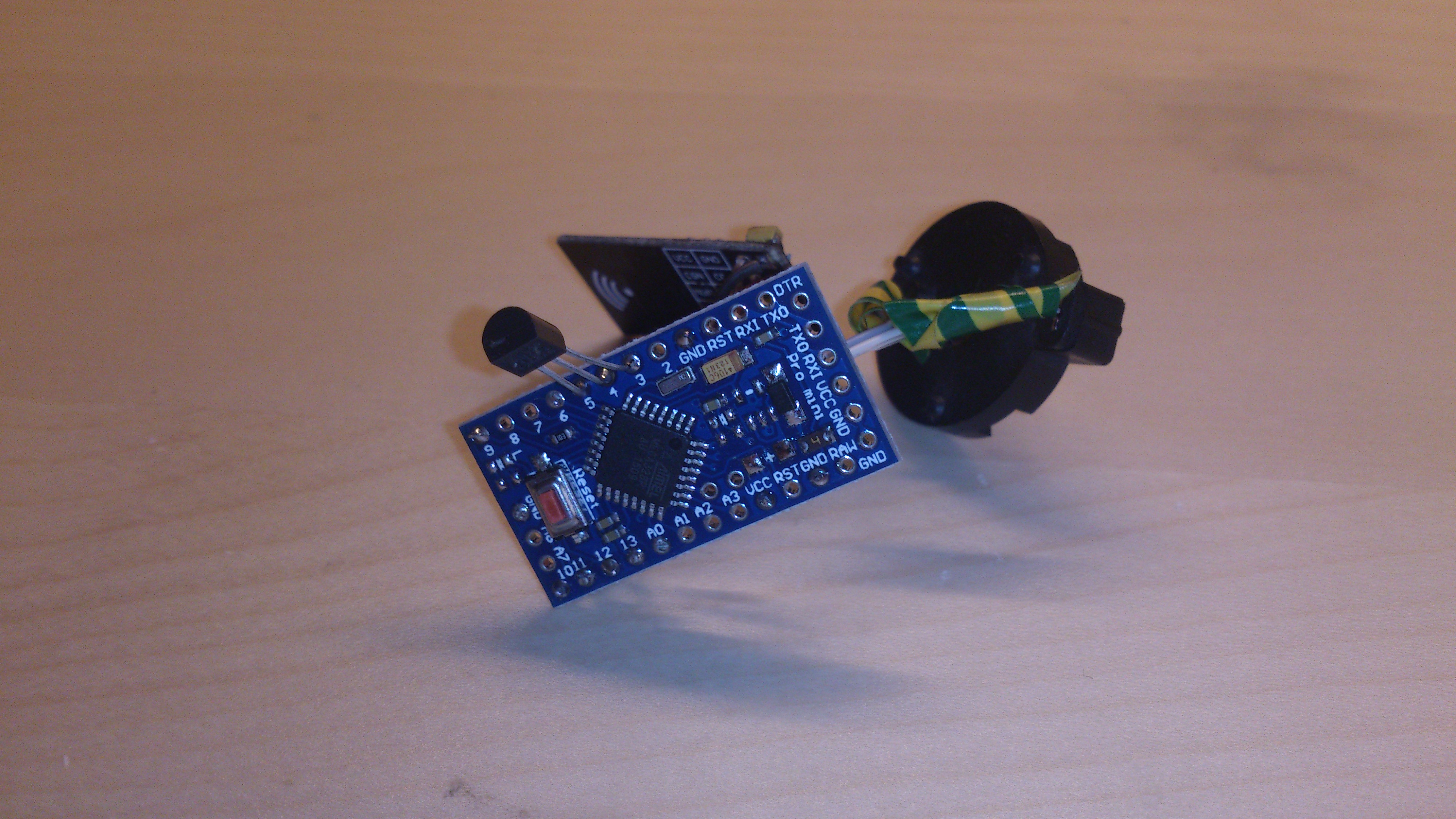
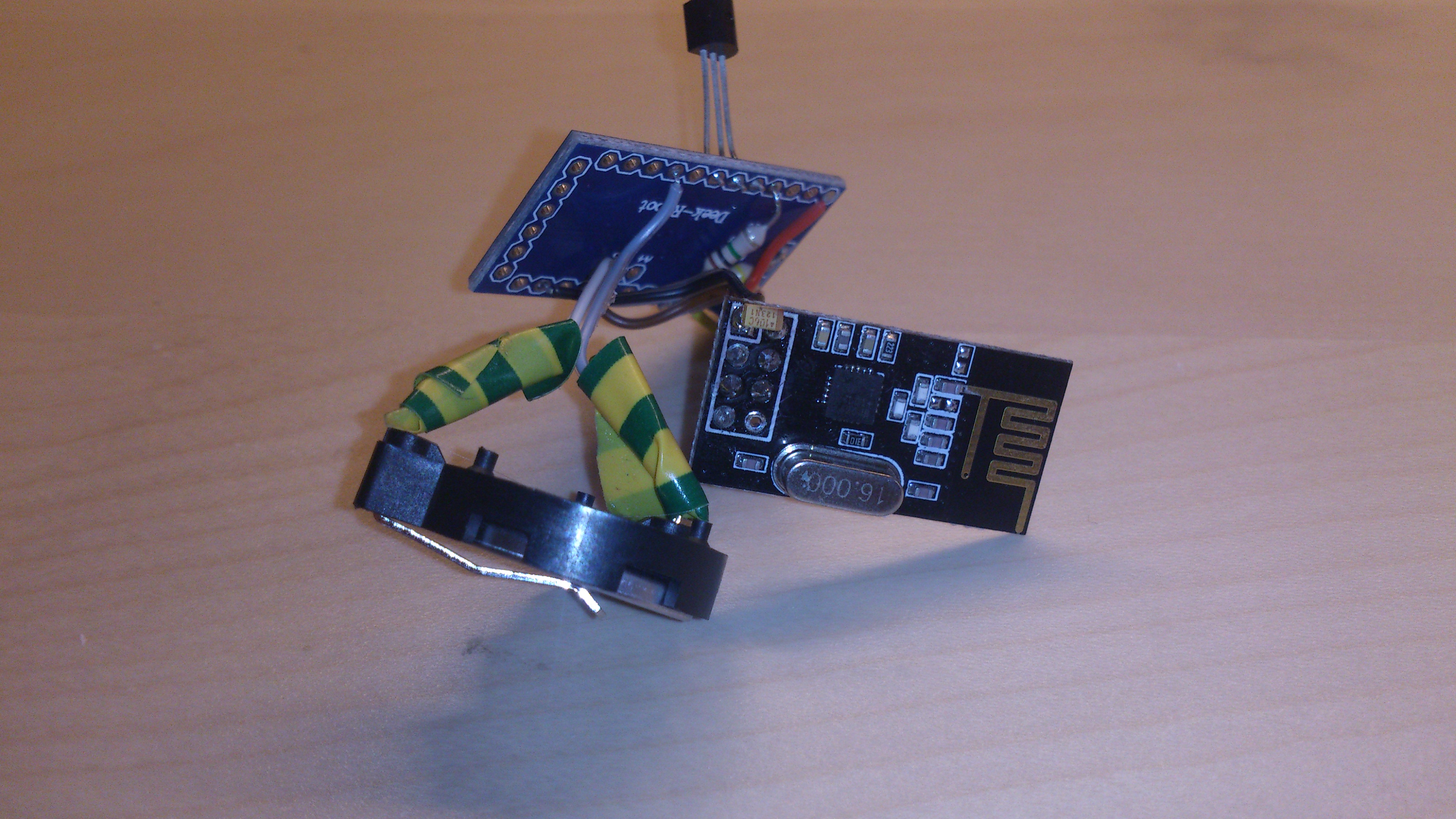
    I would like to share my experience with coin-cell (CR2032) powered temperature sensors:

    DSC_0970.jpg

    DSC_0971.jpg

    The reason for my use of a CR2032 coin cell is that I am really bad at building cases. So I wanted a sensor that will fit into a kinder-surprise egg.

    To maximize battery life I did some modifications to the pro micro clones:

    • I removed all the leds
    • and also the 3.3v-regulator
    • I used a digital pin for the voltage divider so I can turn the divider off
    • I changed the efuse value to 0x07 (BOD off)

    For easier connections I use digital pins to provide the DS18B20 temperature sensor with VCC and GND. I also got rid of the 4k7 resistor by using a modified version of the onewire.h library which uses the internal pullup instead.

    Temperature is transmitted every 5 minutes and battery level every hour.

    For the battery level I used software bounderies: 3.3V is 100%, 2.6V is 0%.

    If anyone is interested, here is the code. It is based on the old example sketch.

    #include <MySensor.h>
    #include <SPI.h>
    #include <DallasTemperature.h>
    #include <OneWire.h>
    
    #define ONE_WIRE_BUS 4 // Pin where dallase sensor is connected
    #define ONE_WIRE_GND 5
    #define ONE_WIRE_VCC 3
    #define BATT_IN_PIN A0
    #define BATT_VCC_PIN 6
    #define MAX_ATTACHED_DS18B20 16
    
    #define SLEEP_TIME 300000  // Sleep time between reads (in milliseconds)
    #define BATT_TIME 12  //when also BATT-LEVEL is reported
    
    #define BATT_100 3.3
    #define BATT_0 2.6
    
    OneWire oneWire(ONE_WIRE_BUS);
    DallasTemperature sensors(&oneWire);
    MySensor gw;
    float lastTemperature[MAX_ATTACHED_DS18B20];
    uint8_t numSensors = 0;
    boolean receivedConfig = false;
    boolean metric = true;
    // Initialize temperature message
    MyMessage msg(0, V_TEMP);
    uint8_t battReport = 0;
    int oldvalue = 0;
    
    void setup()
    {
      // Startup OneWire
    #ifdef ONE_WIRE_VCC
      pinMode(ONE_WIRE_VCC, OUTPUT);
      digitalWrite(ONE_WIRE_VCC, HIGH);
    #endif
    #ifdef ONE_WIRE_GND
      pinMode(ONE_WIRE_GND, OUTPUT);
      digitalWrite(ONE_WIRE_GND, LOW);
    #endif
    
      analogReference(INTERNAL);
      pinMode(BATT_IN_PIN, INPUT);
      pinMode(BATT_VCC_PIN, OUTPUT);
      digitalWrite(BATT_VCC_PIN, LOW);
    
      sensors.begin();
    
      // Startup and initialize MySensors library. Set callback for incoming messages.
      gw.begin();
    
      // Send the sketch version information to the gateway and Controller
      gw.sendSketchInfo("Temperature Sensor", "1.0");
    
      // Fetch the number of attached temperature sensors
      numSensors = sensors.getDeviceCount();
    
      sensors.setWaitForConversion(false);//saves a few mAs per read :-) to debug
    
      // Present all sensors to controller
      for (int i = 0; i < numSensors && i < MAX_ATTACHED_DS18B20; i++) {
        gw.present(i, S_TEMP);
      }
    }
    
    
    void loop()
    {
      // Process incoming messages (like config from server)
      //gw.process();
    
      // Fetch temperatures from Dallas sensors
      sensors.requestTemperatures();
    
      gw.sleep(750);//wait for conversion in sleep mode
    
      // Read temperatures and send them to controller
      for (int i = 0; i < numSensors && i < MAX_ATTACHED_DS18B20; i++) {
    
        // Fetch and round temperature to one decimal
        float temperature = static_cast<float>(static_cast<int>((gw.getConfig().isMetric ? sensors.getTempCByIndex(i) : sensors.getTempFByIndex(i)) * 10.)) / 10.;
    
        // Only send data if temperature has changed and no error
        if (lastTemperature[i] != temperature && temperature != -127.00) {
    
          // Send in the new temperature
          gw.send(msg.setSensor(i).set(temperature, 1));
          lastTemperature[i] = temperature;
        }
      }
      if (++battReport == BATT_TIME) {
        digitalWrite(BATT_VCC_PIN, HIGH);
        delay(1);
        int value = analogRead(BATT_IN_PIN);
        digitalWrite(BATT_VCC_PIN, LOW);
        if (value != oldvalue)
        {
          int percent = (( value * 3.36e-3) - 2.6) / (3.3 - 2.6) * 100;
          percent = (percent > 100) ? 100 : percent;
          percent = (percent < 0) ? 0 : percent;
          gw.sendBatteryLevel(percent);
        }
        oldvalue = value;
        battReport = 0;
      }
      gw.sleep(SLEEP_TIME);//wake on interrupt or after sleep-time
    }
    

    My experience so far:
    On the good side: the first sensor I built started operation on May 23 (about 3 months ago) and is still working great with the same coin cell. I first hoped for a month or two because of the small capacity of a CR2032 coin cell, so my expectation is already exceeded.

    On the bad side: Some other sensors I built later had problems. They worked well with the fresh battery but stopped working after a day or two. After this time they went into a boot loop (serial monitor reads "sensor started, id ..." over and over again) so apparently the startup of the radio somehow triggers a reboot.
    As a modification to prevent this I resoldered the input capacitor of the raw-pin (which is unused) directly to the radio.
    For most sensors this worked fine.
    But one sensor did keep rebooting. I had to change it to a 2xAA-powered sensor. I later used the same CR2032 coin cell, which powered a reboot loop for about 24 hours to power another, newly built sensor and it worked on that one.

    I don't know what the reason for this is, but it has to have something to do with the voltage drop made by the radio. Either some radios are bad and drawing a higher current or some of the pro micro clones are bad and maybe not accepting the changed efuse values.

    Has anyone had similar issues? Are there counterfeit atmega328 around which do not work up to specifications?

    My Project

  • coin-cell (CR2032) powered temperature sensor
    F fleinze

    @carmelo42 I just changed coin-cell on one of my sensors. It lasted since for 10 months, this is ok for me.

    My Project

  • How to: set your power/watermeter for domoticz on rpi
    F fleinze

    This worked for me.
    All steps are done in command line, so you don't need screen/keyboard on the raspberry pi. To get to the commandline you need to open a ssh-session (command ssh pi@raspberrypi.local on linux and macos, use putty on windows)
    You can also do the same steps with a graphical sqlite-editor.

    1. Get a db-editor
      Download:
      wget --no-check-certificate https://www.sqlite.org/2016/sqlite-amalgamation-3100100.zip
      (please look which version is current on the sqlite page)
      unzip:
      unzip sqlite-amalgamation-3100100.zip
      Build:
      cd sqlite-amalgamation-3100100
      gcc shell.c sqlite3.c -lpthread -ldl
      Get a cup of tee, this takes a while... Don't close the ssh-session!
      When the compiler is done, it has created a file named a.out, i rename it for convenience:
      mv a.out sqlit3
      this is an executable file, you can move it wherever you want.

    2. make a copy of the domoticz database in case something goes wrong!
      you can find this in the domoticz web interface at setup->settings->backup or you can copy the file directly on the rpi (need admin-rights):
      sudo cp <path-to-domoticz>/domoticz.db <some-save-path>

    3. Get domoticz and the node ready:
      Stop domoticz:
      sudo <path-to-domoticz>/domoticz.sh stop or in the web interface. It this does not work you might need to make the script executable: chmod +x domoticz.sh
      Stop the power/watermeter node (e.g. unplug the power supply).
      Read the meter. Calculate the pulse-variable by multiplying the meter-reading with the pulse-factor.
      In this example the meter reads 1150.210 kWh, the pulse-factor is 500. The pulse-variable needs to be set to 575105.

    4. Do the edit.
      Open the domoticz.db:
      sudo ./sqlite3 <path-to-domoticz>/domoticz.db
      The table to edit is MySensorsVars.
      In this example the powermeter node has the id 12, the pulse variable is set to 575105.
      UPDATE MySensorsVars SET Value=575105 WHERE NodeID=12;
      Check the result with
      SELECT * FROM MySensorsVars;
      Exit sqlite with .quit

    5. Restart
      sudo <path-to-domoticz>/domoticz.sh start
      plug in the power/watermeter-node.

    Have Fun!

    Domoticz

  • coin-cell (CR2032) powered temperature sensor
    F fleinze

    @flopp I added the capacitor and put the old battery in. By old battery I mean the one I had replaced a week earlier for a new one. Sensor running smooth since, so great success!

    My Project

  • Fun with magnetometer / digital compass sensors
    F fleinze

    A few days ago I got a HMC5883L magnetometer from China. I do not post the link as it is the reseller is offline due to Chinese new year.

    Now I can think of two applications for it:

    1. Replacement for hall-sensors
      I have one of these cheap Chinese hall-sensors using a 3144 or 44e hall switch. They are not linear but switch when a magnetic flux of 30mT is detected.
      They did not work on my very old gas-meter, even if I could measure some magnetic field with an analog compass.
      I tried to measure the field with the magnetometer and I could see a very clear change in the field when gas is flowing.
      I did not write a proper code, but will keep you updated.
      On the pro side ist the high sensitivity of 70nT (about 500000 times better than the hall sensor) and also the low current consumption (100µA in measurement, 2µA in idle mode vs. 25mA on the hall sensor).
      On the con side is the rather high effort for signal processing in code (e.g. low pass filtering for getting rid of the earth magnetic field).

    2. Non-invasive current measurement
      The maximum sampling rate of the HMC5883L is 160Hz, which is in theory enough to signals of up to 80Hz.
      Hence it can be used to measure the magnetic field of 50Hz or 60Hz currents.
      I did a first test with my 60W solder iron. When holding the sensor to the cable I got a very clear Signal with an amplitude of about 20mT.
      It might be hard to calculate an exact current from this reading, as the magnetic field depends on the exact position of the sensor.
      But it can be used as a binary switch sensor which reports the power state of some device. One could e.g. use it to monitor the fridge and send an alarm if the fridge is running for too long.

    Has anyone any experiences with the applications above?

    Hardware

  • Is Raspberry a Solid Controller?
    F fleinze

    I run domoticz on a Rpi 1 B+. At first I had some issues with a weak power supply, but never had any problems since.
    Domoticz doesn't use more than a few percent of the cpu, I didn't even have problems running kodi on the same rpi or compiling large software packages at the same time as running domoticz.
    I am sure it would even run on the new zero without problems, but this piece of hardware seems unavailable for a decent price.

    Domoticz

  • coin-cell (CR2032) powered temperature sensor
    F fleinze

    Just a quick Update on my coin-cell sensors:
    I still did not figure out why one sensor did not work because I lack of the needed measurement-equipment :(

    But I figured out something else: The voltage of a CR2032 battery has a very strong temperature-dependence. So for calculating the battery-level I probably need to calculate a temperature-normalized voltage-value.

    My Project

  • Chinese Arduino Nanos with Atmega328PB
    F fleinze

    Today I received some chinese Nanos which actually feature the Atmega328PB instead of the P variant.
    I did not yet test any of the extra features yet but at least the device signature checks out.
    The boards are standard layout so the pins 3 and 6 are not useable on this board.

    Hardware

  • 💬 Building a Raspberry Pi Gateway
    F fleinze

    I compiled the gateway for spi1 because I have a display using spi0. Two problems I came across:

    1. the master branch doesn't work. It compiles, it seems to work but it never receives anything.
    2. the development branch works but I needed to define the right cs-pin even if I redirected the pin in config.txt (with dtoverlay=spi1-1cs,cs0_pin=16)
      The following configure worked for me:
    ./configure --spi-driver=SPIDEV --spi-spidev-device=/dev/spidev1.0 --my-rf24-cs-pin=36 --my-rf24-ce-pin=33 --my-rf24-irq-pin=31
    
    Announcements

  • ESP8266 WiFi gateway port for MySensors
    F fleinze

    @DrJeff
    I remember that there was an error in the boardmanager-package for MacOS. You need to change the file-permissions to executable:

    sudo chmod +x ~/Library/Arduino15/packages/esp8266/tools/esptool/0.4.4/esptool 
    
    Development

  • My controller-less mysensors temperature logger
    F fleinze

    Here are the Fotos
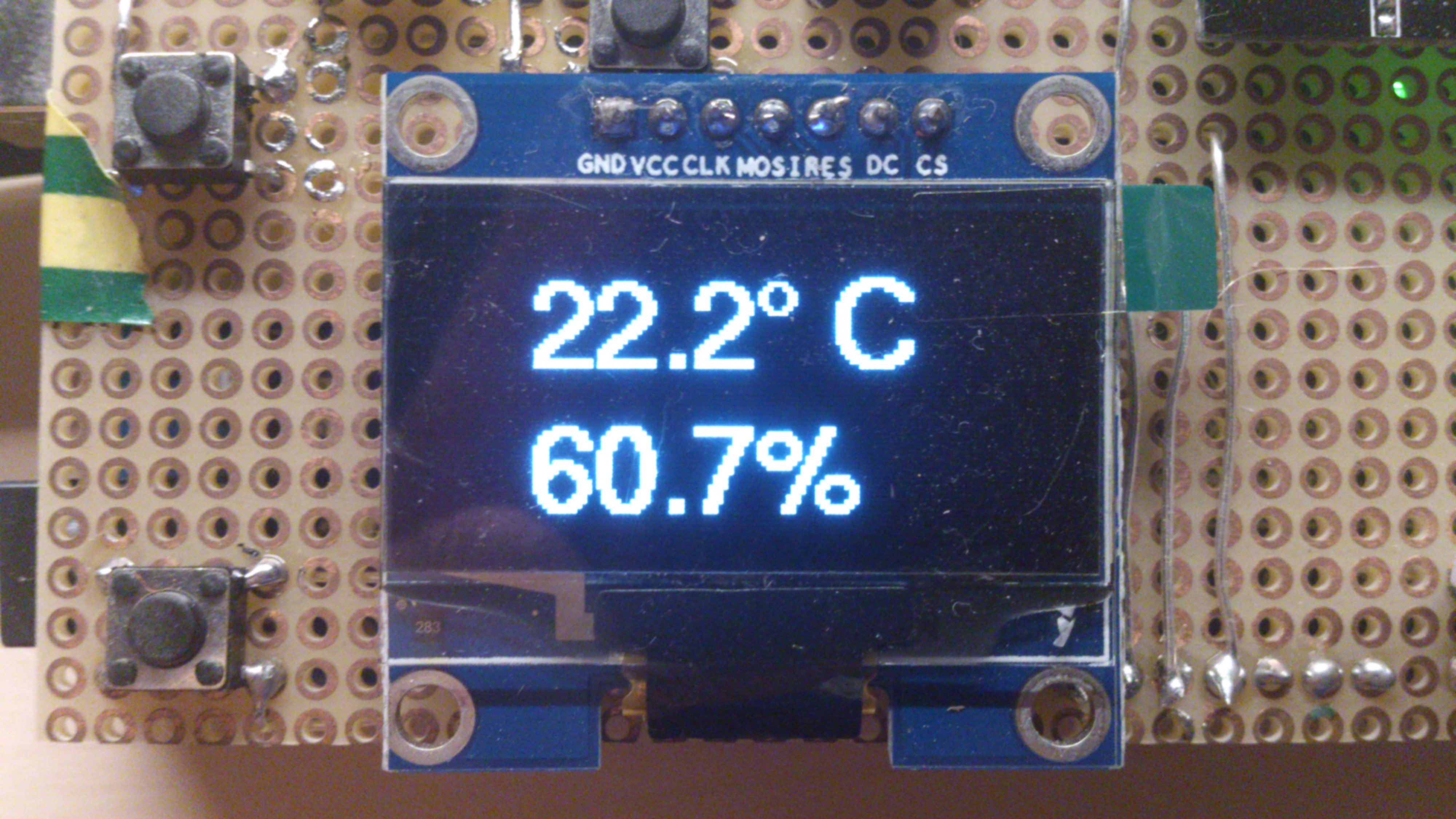
    First page, containing most informations
    DSC_1005.jpg
    Just the local DHT-Sensor
    DSC_1006.jpg
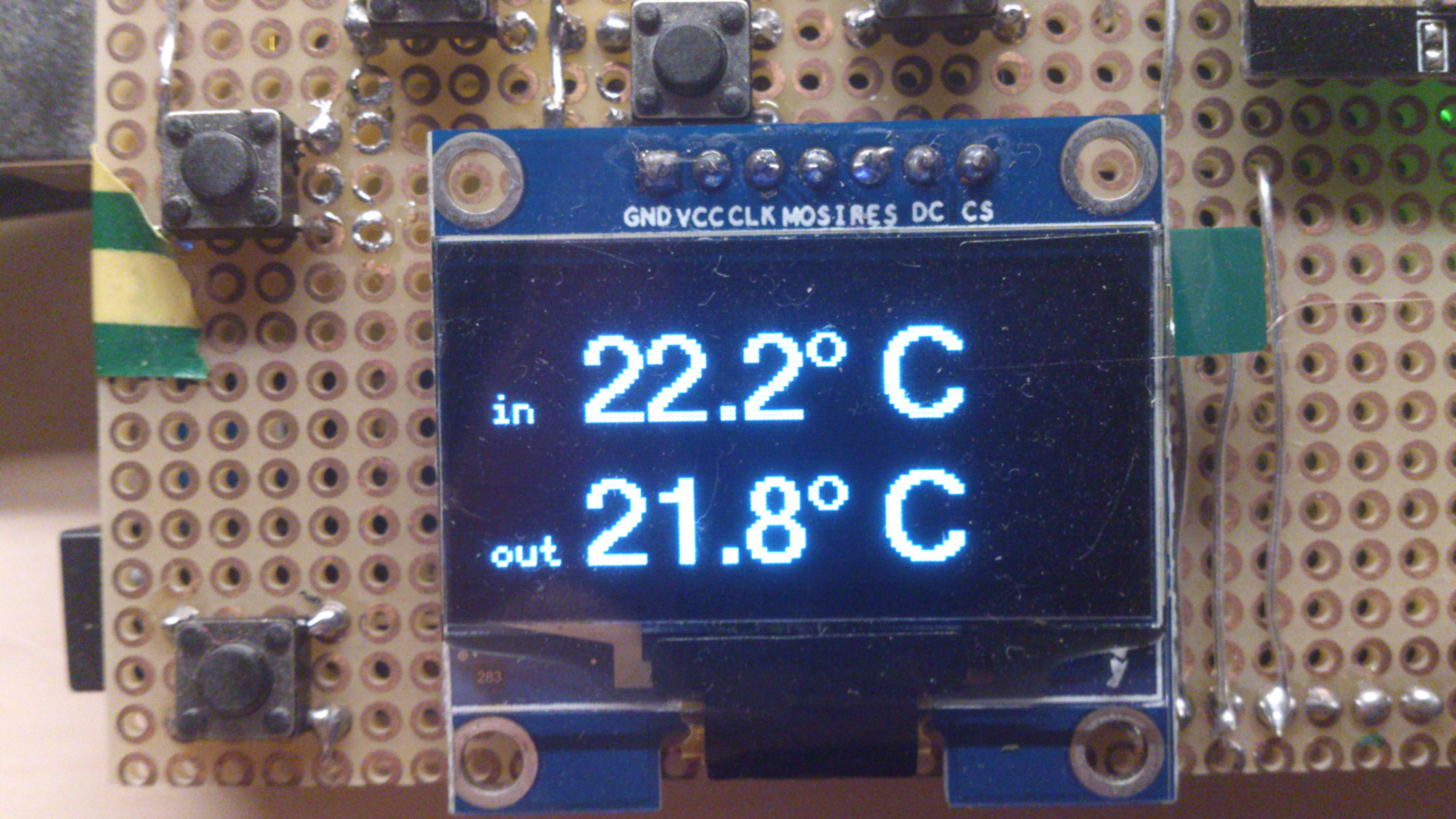
    Like first page, but less information and bigger font:
    DSC_1007.jpg
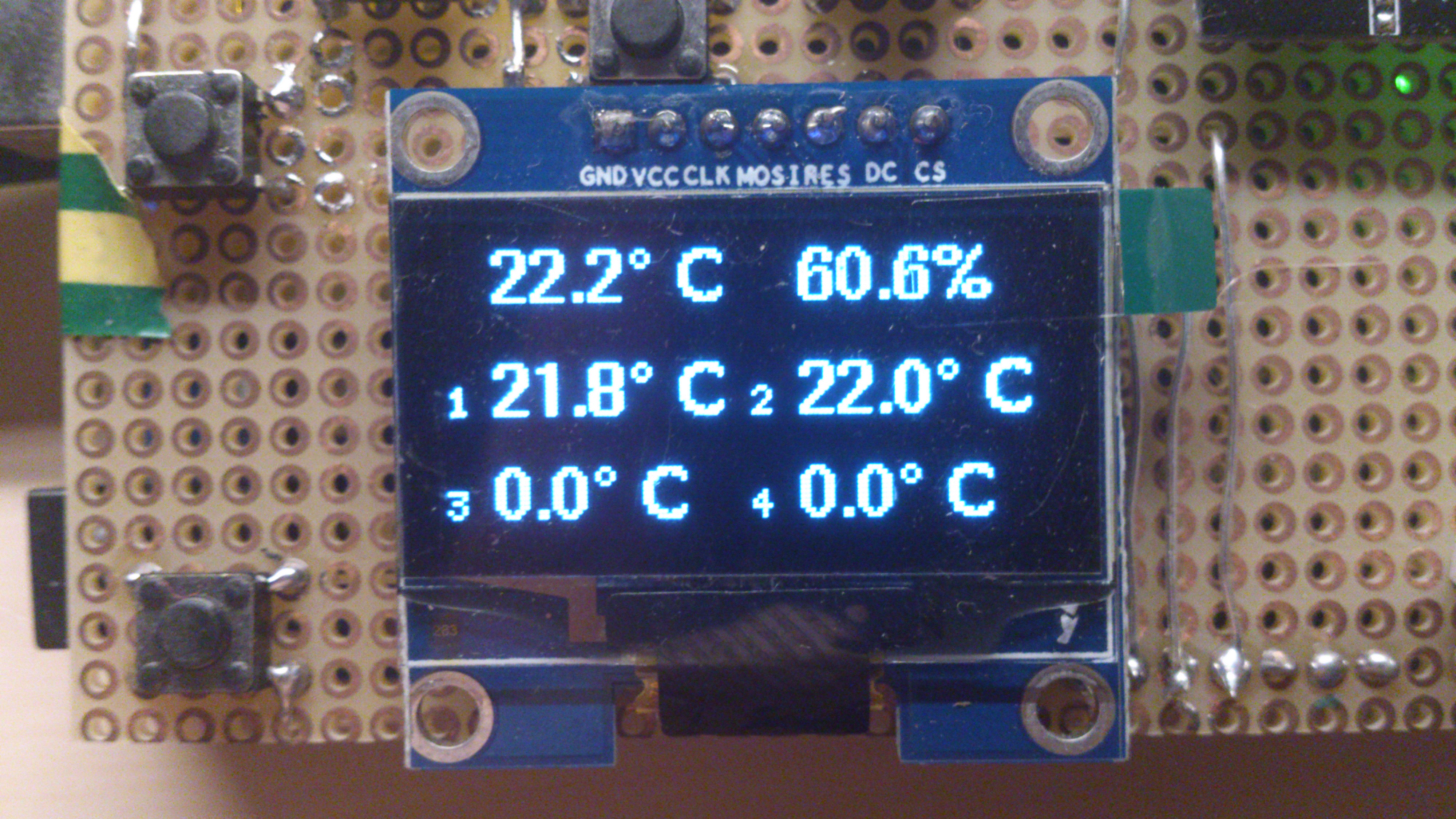
    Local temperature-Sensor plus first MySensor:
    DSC_1008.jpg
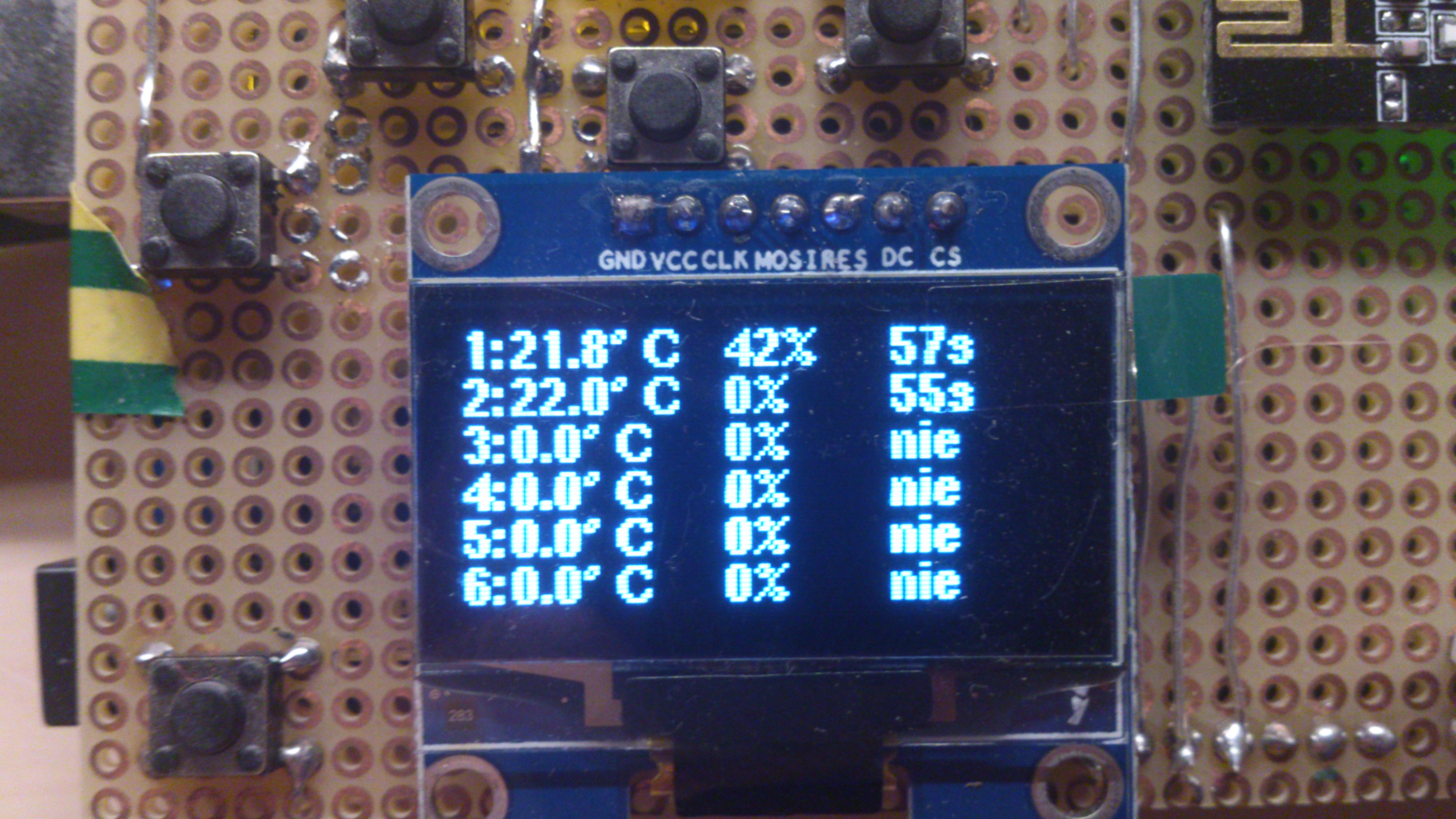
    All MySensors-informations on one page: temperature-reading, battery level and last update:
    DSC_1009.jpg
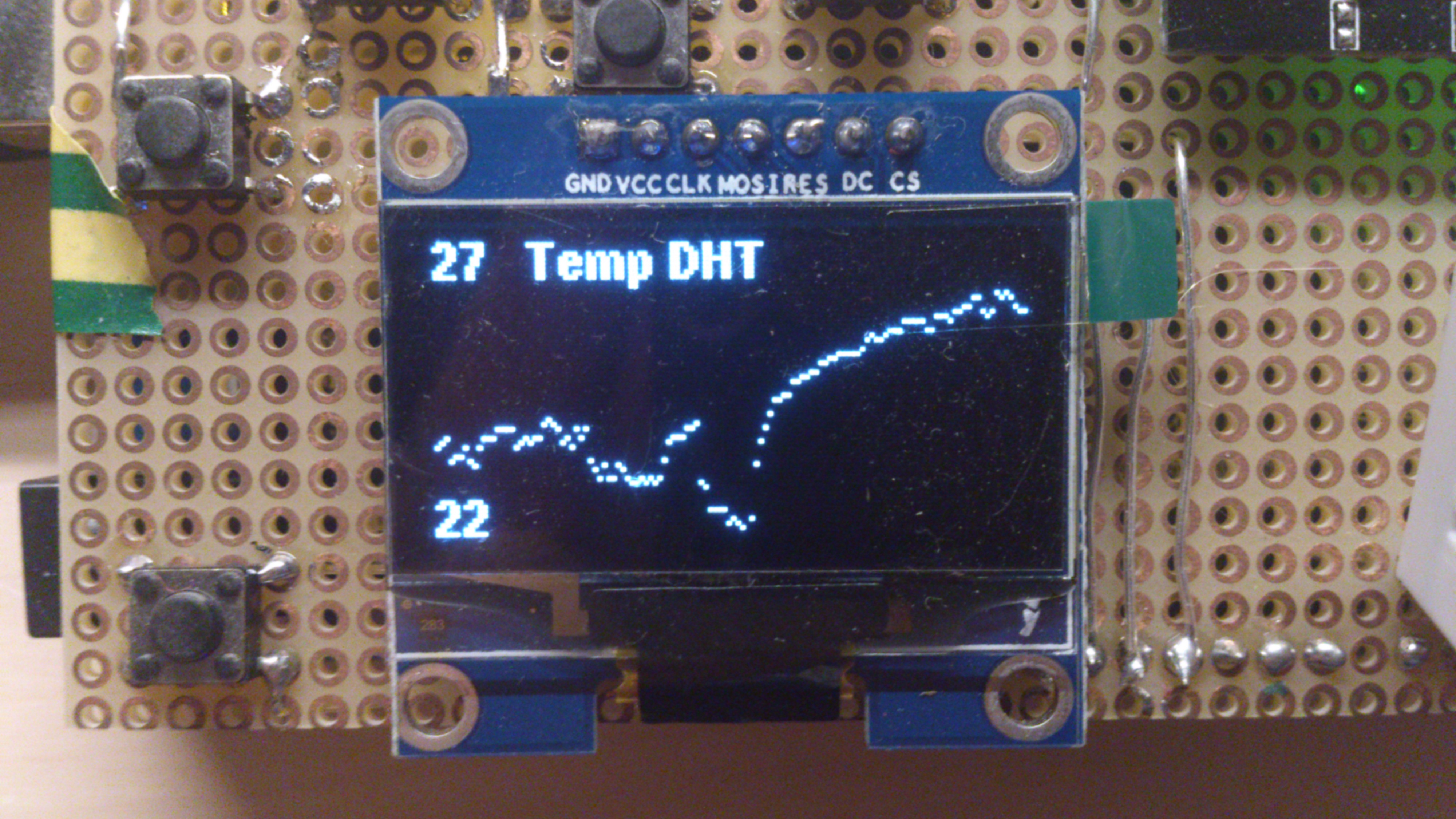
    This one is tricky: it reads the last 128 values from SD-Card and displays a diagram. Actually very slow and nearly unsuable :(
    DSC_1010.jpg
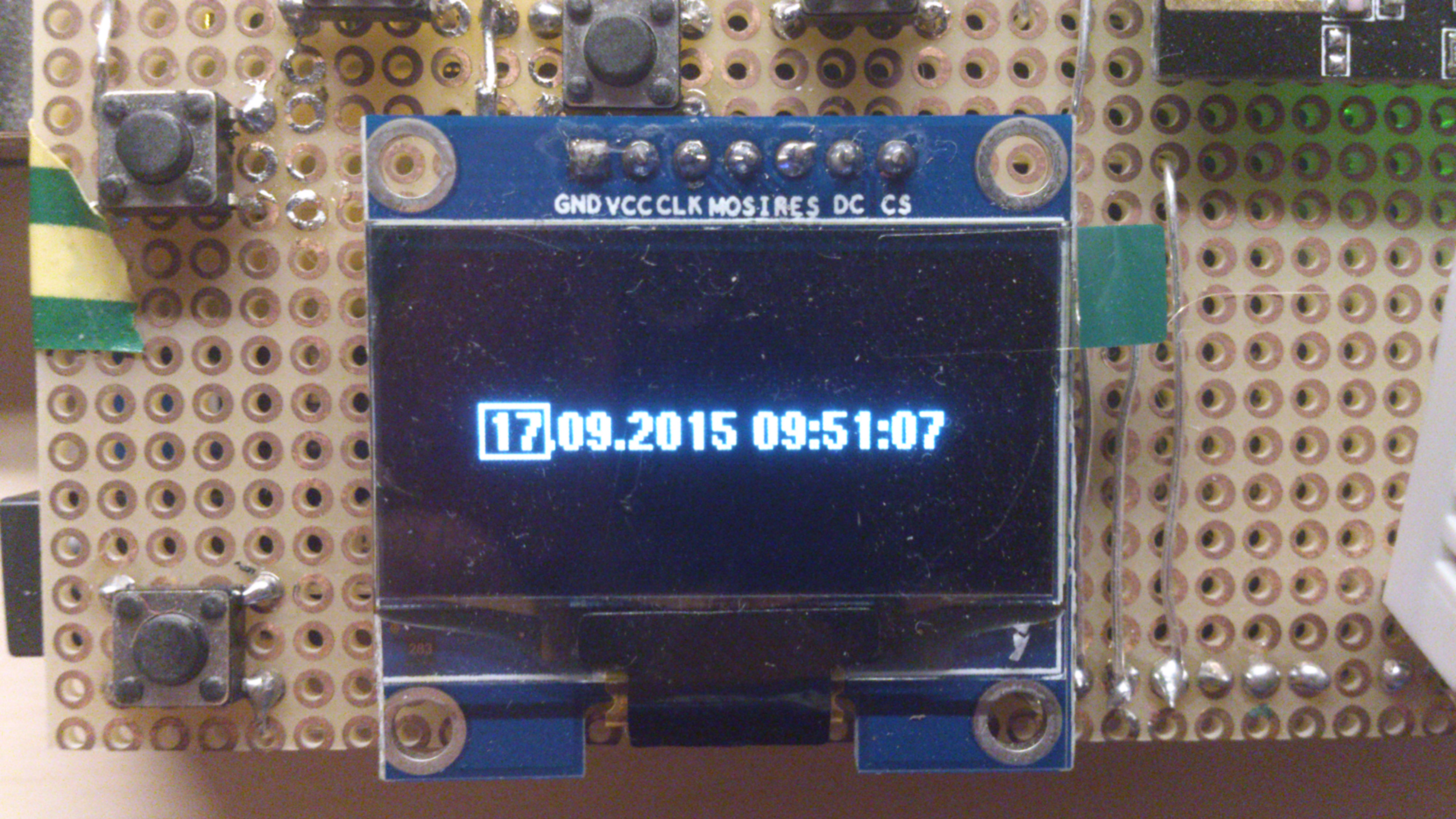
    This page is for setting the RTC
    DSC_1011.jpg
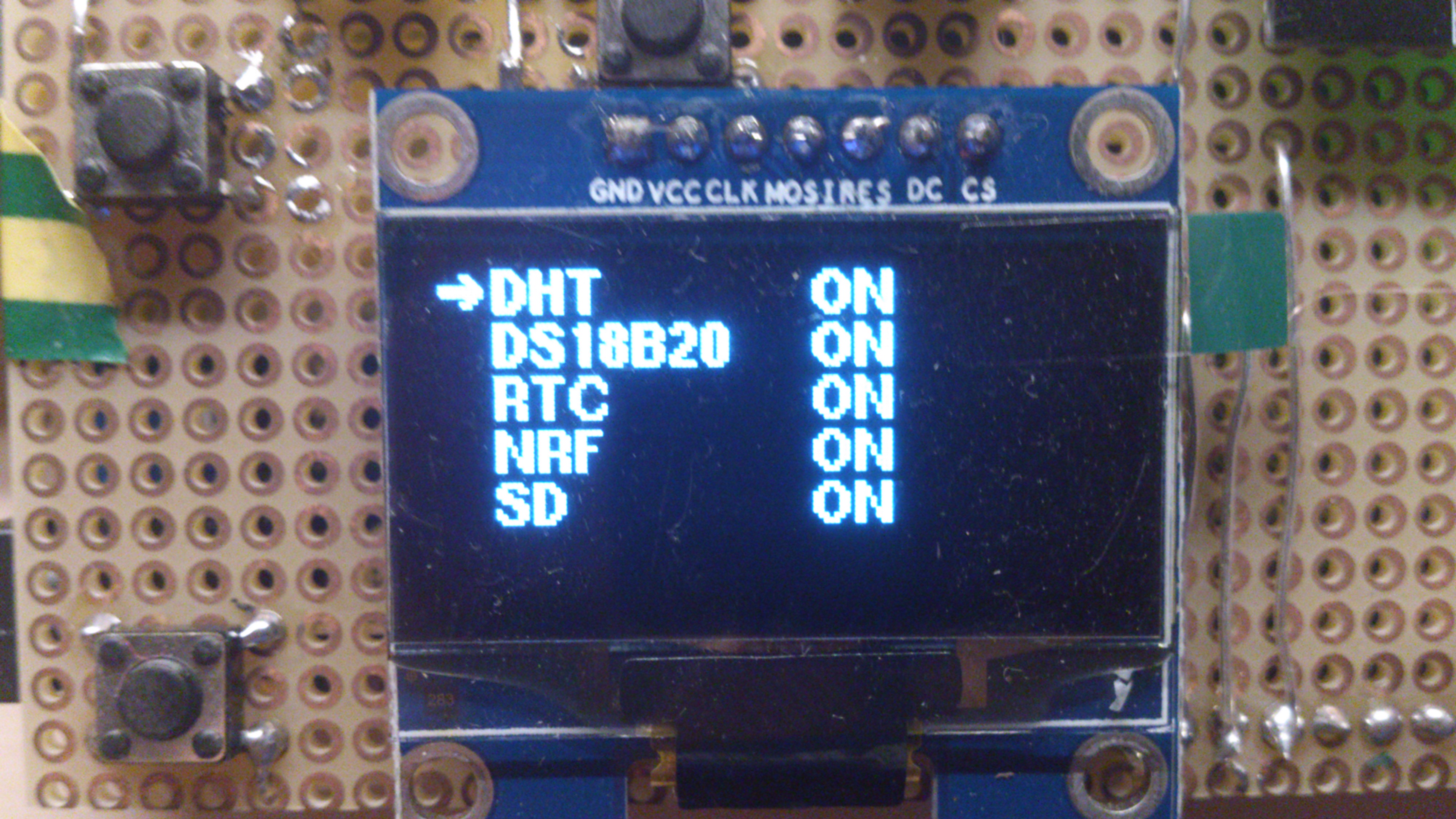
    Here is the hardware-configuration. Each hardware-entry can be deactivated and restarted after errors. Deactivating the nrf actually causes a reboot with deactivated MySensors.
    DSC_1012.jpg

    It is true that the fonts use a lot of progmem, especially the big types. But I didn't like the look of the adafruit-library-font.

    My Project

  • [security] Introducing signing support to MySensors
    F fleinze

    @Anticimex In your original post you said:

    However, the difference is that the gateway will only require signed messages from nodes it knows in turn require signed messages.

    I made pull request 208 to match this behavior in the code:
    https://github.com/mysensors/Arduino/pull/208

    • If node is not a gateway, everything is as always. (1 || x)
    • if node is gateway and the sender requires signed messages, check signature (0 || 1)
    • if node is gateway and the sender does not requires signed messages, do not check signature (0 || 0)
      please consider adding this.
    Development security

  • Temperature / humidity node with OLED display
    F fleinze

    I experienced some burn in effect on this SSD1306 displays after a few months of running, so turning the display off is a good idea!

    My Project

  • coin-cell (CR2032) powered temperature sensor
    F fleinze

    @carmelo42

    The no-resistor-library can be found here:
    https://wp.josh.com/2014/06/23/no-external-pull-up-needed-for-ds18b20-temp-sensor/

    The resistors (there are two but the other one is barely visible) are for voltage-measurement. In a later version I got rid of them using this resistor-less method of measurement:
    http://provideyourown.com/2012/secret-arduino-voltmeter-measure-battery-voltage/

    My Project

  • coin-cell (CR2032) powered temperature sensor
    F fleinze

    @carmelo42 The fuses only are written when you burn the bootloader, not when uploading the sketch. The Arduino IDE takes the fuse bytes from the boards.txt files.
    It would also be possible to just set the fuse bytes by using the avrdude-program from a command line, but you will still need to use a programmer.
    The extended-fuse setting 0xFF is the same as 0x07 as only the last 3 bits of this bytes are used. Both values will give you BOD disabled.

    My Project

  • coin-cell (CR2032) powered temperature sensor
    F fleinze

    I just added an 100uF capacitor to one of my sensors and put an old battery in. Let's see how much more life I can get out of this battery now.

    My Project
  • Login

  • Don't have an account? Register

  • Login or register to search.
  • First post
    Last post
0
  • MySensors
  • OpenHardware.io
  • Categories
  • Recent
  • Tags
  • Popular