

Overview
This is my project to add TFT LCD 1.8" color display to my home automation.
I use TFT LCD 1.8" Full Color 128x120 SPI Display module compatible with Adafruit ST7735 Driver.
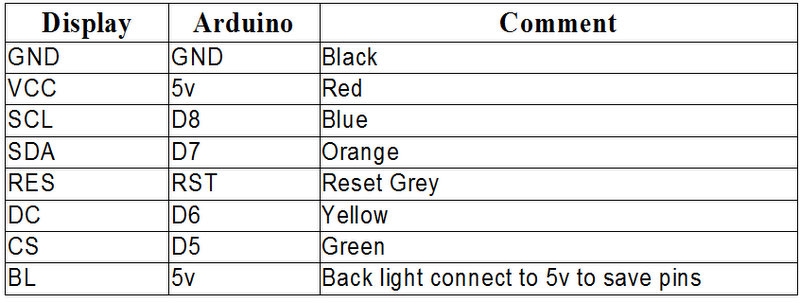
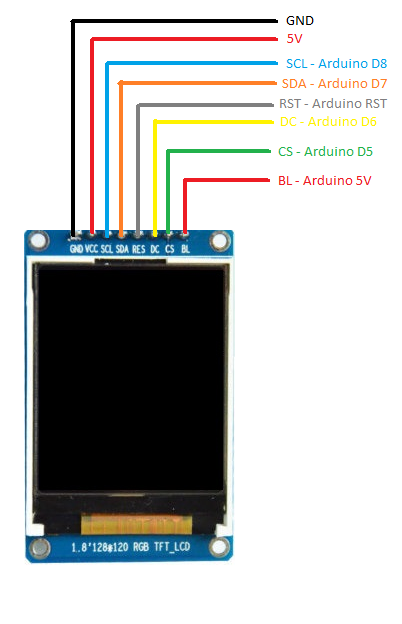
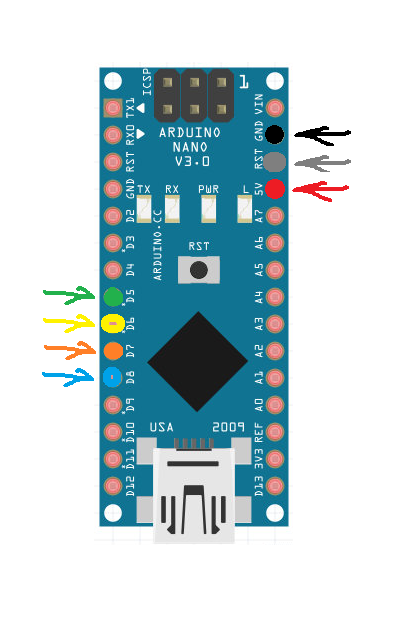
Since Mysensors Radio also uses SPI, I connect the display using "any pin" method, it is slower than SPI but it will not interfere with the radio.
WiringThings Up
Start by connecting the radio module.
Required libraries
Adafruit ST7735 Library
Adafruit GFX Library If you want to display bitmap images.
Example
This example will:
- Request the current date and time from the controler when power on/reset.
- Use "display mask" to only update parts of display to improve performance.
- Update display every minute.
- It uses Arduino Time library to manipulate date and time.
- It display message sent by your controller.
/***************************************************
 * The MySensors Arduino library handles the wireless radio link and protocol
 * between your home built sensors/actuators and HA controller of choice.
 * The sensors forms a self healing radio network with optional repeaters. Each
 * repeater and gateway builds a routing tables in EEPROM which keeps track of the
 * network topology allowing messages to be routed to nodes.
 *
 * Created by Gerson Garcia <gersongarcia67@hotmail.com>
 * Copyright (C) 2016-2017
 *
 * This program is free software; you can redistribute it and/or
 * modify it under the terms of the GNU General Public License
 * version 2 as published by the Free Software Foundation.
 *
 *******************************
 *
 * REVISION HISTORY
 * Version 1.0: Gerson Garcia
 *
 * DESCRIPTION
 * This sketch provides an example of how to implement a TFT LCD 1.8" color display
 *
 */

 ****************************************************/

#include <Adafruit_GFX.h>    // Core graphics library
#include <Adafruit_ST7735.h> // Hardware-specific library

// Enable debug prints to serial monitor
#define MY_DEBUG

// Enable and select radio type attached
#define MY_RADIO_NRF24

#include <MySensors.h>
#include <SPI.h>

#include <EEPROM.h>

#include <TimeLib.h>

// For the breakout, you can use any 2 or 3 pins
// These pins will also work for the 1.8" TFT shield
#define TFT_CS     5
#define TFT_RST    0  // you can also connect this to the Arduino reset
                      // in which case, set this #define pin to 0!
#define TFT_DC     6

// Option 2: use any pins but a little slower!
#define TFT_SCLK 8
#define TFT_MOSI 7
Adafruit_ST7735 tft = Adafruit_ST7735(TFT_CS, TFT_DC, TFT_MOSI, TFT_SCLK, TFT_RST);

#define CHILD_TFT_ID 1   // Id of the sensor child

//MyMessage msg(CHILD_TFT_ID, V_TEXT);

String RadioData;     // Data received from Radio
bool timeReceived = false;
bool clockbuilt=false;
unsigned long previousMillis=0, lastRequest=0;

void presentation()
{
  // Send the sketch version information to the gateway and Controller
  sendSketchInfo("TFT", "1.0");

  // Register all sensors to gw (they will be created as child devices)
  present(CHILD_TFT_ID, S_INFO);
}


void setup(void) {

  // Request latest time from controller at startup
  requestTime();

  // Use this initializer if you're using a 1.8" TFT
  tft.initR(INITR_BLACKTAB);   // initialize a ST7735S chip, black tab

  // large block of text
  tft.fillScreen(ST7735_BLACK);

}


void loop() {

  unsigned long currentMillis=millis();

  if (timeReceived) {
    updateclock();
    previousMillis = currentMillis;
    timeReceived=false;
    clockbuilt=true;
  }

  if(clockbuilt) {
    // Received the clock already, build the rest of display

    tft.setTextColor(ST7735_WHITE);
    tft.setCursor(17,65);
    tft.setTextColor(ST7735_WHITE);
    tft.setTextSize(1);
    tft.print("From controller:");
    tft.drawRect(5,75,tft.width()-8,20,ST7735_WHITE);
    tft.fillRect(7,78,tft.width()-11,16,ST7735_BLACK);

    clockbuilt=false;
  }

  // Update display every minute
  if (currentMillis - previousMillis >= 60000) {
    Serial.print("ENTER currentMillis=");Serial.print(currentMillis);Serial.print(" previousMillis=");Serial.println(previousMillis);

    updateclock();
    previousMillis = currentMillis;
  }

}

void updateclock() {

  time_t t=now();

  String weekdays[7]={"SUN","MON","TUE","WED","THU","FRI","SAT"};
  String months[12]={"JAN","FEB","MAR","APR","MAY","JUNFRI","JUL","AUG","SEP","OCT","NOV","DEC"};

  // Update display
  tft.drawRect(0,0,tft.width(),55,ST7735_BLACK);
  tft.fillRect(0,0,tft.width(),55,ST7735_BLACK);
  tft.setTextColor(ST7735_WHITE);
  tft.setCursor(8,5);
  tft.setTextColor(ST7735_WHITE);
  tft.setTextSize(2);
  tft.print(weekdays[weekday(t)-1]);
  tft.setCursor(53,12);
  tft.setTextSize(1);
  tft.print(months[month(t)-1]);
  tft.print(" ");
  tft.print(day(t));
  tft.print(" ");
  tft.print(year(t));
  tft.setCursor(15,30);
  tft.setTextSize(3);
  if (hour(t)<10) { tft.print("0"); }
  tft.print(hour(t));
  tft.print(":");
  if (minute(t)<10) { tft.print("0"); }
  tft.print(minute(t));
//  tft.print(":");
//  if (second(t)<10) { tft.print("0");
//  tft.print(second(t));

}


void receive(const MyMessage &message) {
  // We only expect one type of message from controller. But we better check anyway.
  if (message.type == V_TEXT) {
    // Get the message string
    RadioData=message.getString();
    Serial.print("Incoming data from controller:");
    Serial.println(RadioData);

    // Update display

    //tft.drawRect(0,0,tft.width(),55,ST7735_BLACK);
    //tft.fillRect(0,0,tft.width(),55,ST7735_BLACK);
    tft.setTextColor(ST7735_WHITE);
    tft.setTextColor(ST7735_WHITE);
    tft.drawRect(5,75,tft.width()-8,20,ST7735_WHITE);
    tft.fillRect(7,78,tft.width()-11,16,ST7735_BLACK);
    tft.setCursor(12,82);
    tft.setTextSize(1);
    tft.print(RadioData);

  }
}

// This is called when a new time value was received
void receiveTime(unsigned long controllerTime) {
  // Ok, set incoming time
  Serial.print("Time value received: ");
  Serial.println(controllerTime);
  setTime(controllerTime);
  timeReceived = true;
}
Shopping list
1.8" inch Full Color 128x120 SPI Full Color TFT LCD Display Module replace OLED