
Skip to content
  • MySensors
  • OpenHardware.io
  • Categories
  • Recent
  • Tags
  • Popular
Skins
  • Light
  • Brite
  • Cerulean
  • Cosmo
  • Flatly
  • Journal
  • Litera
  • Lumen
  • Lux
  • Materia
  • Minty
  • Morph
  • Pulse
  • Sandstone
  • Simplex
  • Sketchy
  • Spacelab
  • United
  • Yeti
  • Zephyr
  • Dark
  • Cyborg
  • Darkly
  • Quartz
  • Slate
  • Solar
  • Superhero
  • Vapor

  • Default (No Skin)
  • No Skin
Collapse
Brand Logo
M

Meister_Petz

@Meister_Petz
About
Posts
40
Topics
14
Shares
0
Groups
0
Followers
1
Following
0

Posts

Recent Best Controversial

  • ESP8266gateway with sensor
    M Meister_Petz

    Hi,

    I would like to use the ESP8266gateway standalone with a sensor. I used the ESP8266gateway sketch and it connects without problems to my controller, but I can't get it to send a message to the controller (FHEM).

    I made a very easy code, for testing. It would just be "light level" but in this case even without a sensor, just sending "100".

    /*
      */
    
    // Enable debug prints to serial monitor
    #define MY_DEBUG
    
    // Use a bit lower baudrate for serial prints on ESP8266 than default in MyConfig.h
    #define MY_BAUD_RATE 9600
    
    // Enables and select radio type (if attached)
    //#define MY_RADIO_RF24
    //#define MY_RADIO_RFM69
    //#define MY_RADIO_RFM95
    
    #define MY_GATEWAY_ESP8266
    
    #define MY_WIFI_SSID "this is the SSID"
    #define MY_WIFI_PASSWORD "And the password"
    
    // Enable UDP communication
    //#define MY_USE_UDP  // If using UDP you need to set MY_CONTROLLER_IP_ADDRESS or MY_CONTROLLER_URL_ADDRESS below
    
    // Set the hostname for the WiFi Client. This is the hostname
    // it will pass to the DHCP server if not static.
    #define MY_HOSTNAME "ESP8266_Greenhouse"
    
    // Enable MY_IP_ADDRESS here if you want a static ip address (no DHCP)
    //#define MY_IP_ADDRESS 192,168,178,87
    
    // If using static ip you can define Gateway and Subnet address as well
    //#define MY_IP_GATEWAY_ADDRESS 192,168,178,1
    //#define MY_IP_SUBNET_ADDRESS 255,255,255,0
    
    // The port to keep open on node server mode
    #define MY_PORT 5003
    
    // How many clients should be able to connect to this gateway (default 1)
    //#define MY_GATEWAY_MAX_CLIENTS 2
    
    // Controller ip address. Enables client mode (default is "server" mode).
    // Also enable this if MY_USE_UDP is used and you want sensor data sent somewhere.
    //#define MY_CONTROLLER_IP_ADDRESS 10, 0, 78, 204
    //#define MY_CONTROLLER_URL_ADDRESS "my.controller.org"
    
    // Set blinking period
    //#define MY_DEFAULT_LED_BLINK_PERIOD 300
    
    // Flash leds on rx/tx/err
    // Led pins used if blinking feature is enabled above
    //#define MY_DEFAULT_ERR_LED_PIN 16  // Error led pin
    //#define MY_DEFAULT_RX_LED_PIN  16  // Receive led pin
    //#define MY_DEFAULT_TX_LED_PIN  16  // the PCB, on board LED
    
    #include <MySensors.h>
    #define CHILD_ID_LIGHT 0
    
    MyMessage msgLight(CHILD_ID_LIGHT, V_LIGHT_LEVEL);
    
    uint32_t WAIT_TIME = 1200; // Sleep time between reads (in milliseconds)


    void setup()
    {
    	
    }
    
    void presentation()
    {
      sendSketchInfo("GreenhouseWifiNode", "1.0");
      present(CHILD_ID_LIGHT, S_LIGHT_LEVEL);
    }
    
    void loop()
    {
    	//Light
      int16_t lightLevel = 100;
      Serial.println(lightLevel);
      send(msgLight.set(lightLevel));
    
      wait(WAIT_TIME);
    }
    

    This is the serial output:

    connected with Eichenstrasse, channel 3
    dhcp client start...
    ip:10.0.78.206,mask:255.255.255.0,gw:10.0.78.1
    5137 GWT:TIN:CONNECTING...
    5165 GWT:TIN:IP: 10.0.78.206
    5196 MCO:BGN:STP
    5213 MCO:REG:NOT NEEDED
    5238 MCO:BGN:INIT OK,TSP=NA
    100
    100
    100
    100
    100
    100
    100
    100
    pm open,type:2 0
    100
    100
    100
    100
    ...
    

    Any ideas what I do wrong?
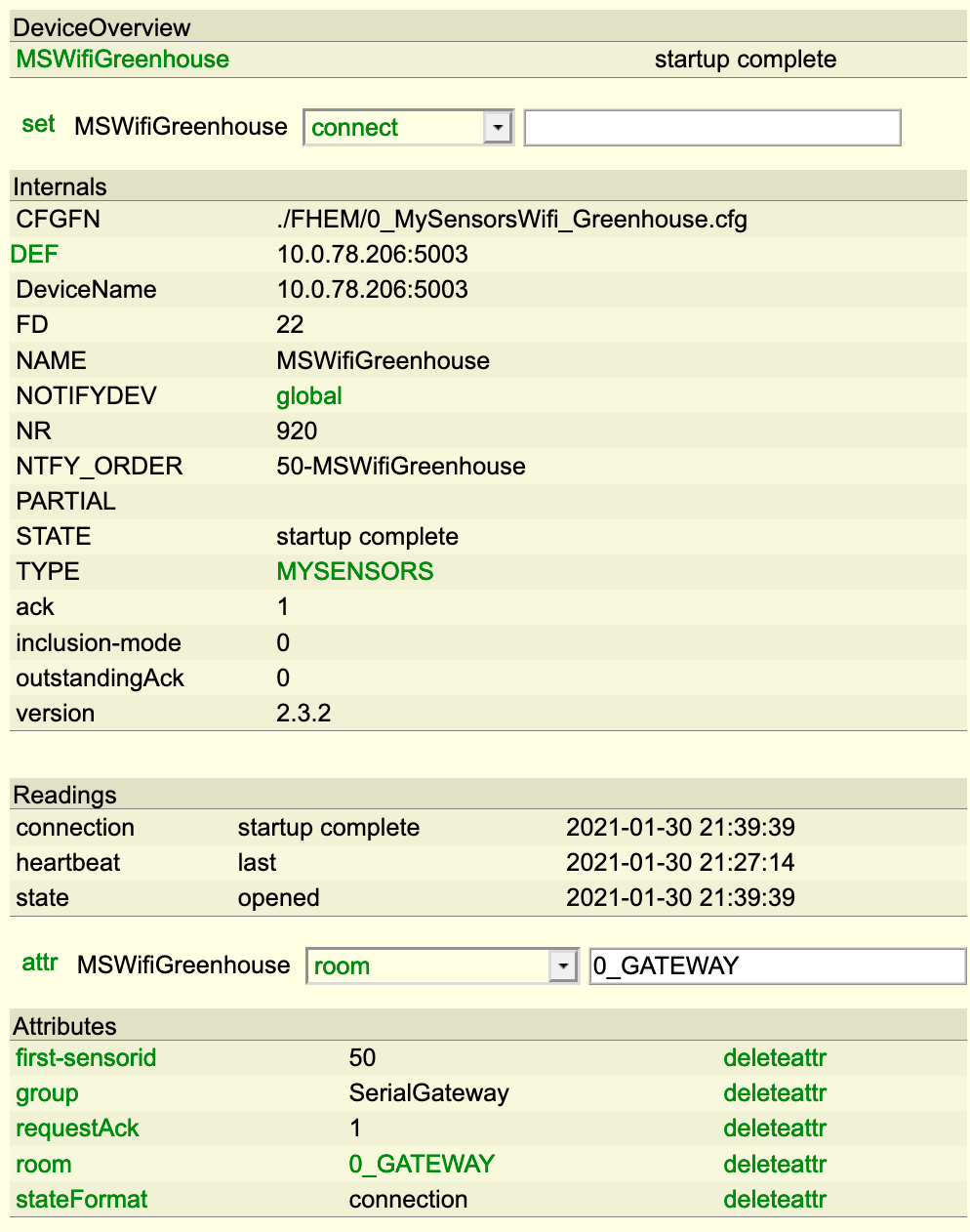
    Bildschirmfoto 2021-01-30 um 21.50.16.png

    Hardware

  • ESP8266 ... doesn't connect to sensors
    M Meister_Petz

    Good point! I use FHEM... the Gateway is connected... so FHEM maybe the Problem...

    Troubleshooting

  • ESP8266 ... doesn't connect to sensors
    M Meister_Petz

    Hi,

    my WLAN Gateway (ESP8266) doesn't connect to sensors or the other way round.

    On the sensor side:
    In serial monitor my test sensor asks for an ID but there is no reply

    On the WLAN Gateway side:
    In serial monitor:

    • I can see the sensors broadcasts
    • I can see, that the gateway switches to inclusion mode, by the inc button
    • but no transfer to the sensors is sent out

    Any ideas?

    Many Thanks

    Petz

    Troubleshooting

  • Digital Poti on same Pins as NRF24L01+ how can I solve this?
    M Meister_Petz

    sorry... I'm blind...
    maybe I can change it here:

    int CS = 10;
    

    sorry again

    Development

  • Digital Poti on same Pins as NRF24L01+ how can I solve this?
    M Meister_Petz

    The Poti only uses SPI.h no other library is involved. And I don't find anything about PIN 10 in the mysensors.h. Where can I change that for the NRF24L01+?

    Thanks

    Petz

    Development

  • Digital Poti on same Pins as NRF24L01+ how can I solve this?
    M Meister_Petz

    HI,

    I would like to use a digital poti (MCP 4131). It uses the SPI.h and PINs 10/11/13 which collides with the NRF24L01+ pins.

    How can I solve this?

    Many Thanks

    Petz

    Development

  • Serial Gateway 1.5 - LEDs not working any more
    M Meister_Petz

    Hi,
    the leds at my SerialGateway are not working. No LED lights up when receceiving - trasmitting - inclusion mode. Is there something to be done with 1.5

    I tested with the blink sketch and all leds are fine.

    Many Thanks

    Petz

    Development

  • Node is sending - but no reads....
    M Meister_Petz

    Ok, in addition, I found out, that everything works fine if I let nodes talk to the gateway directly. If the nodes are behind repeaters (I tried 3 different ones) they can send alright but they don't receive reads.

    Development

  • How to receive time?
    M Meister_Petz

    @LastSamurai said:

    Define a variable at the start of your program and safe the time in the variable that can then be accessed from the main loop too.

    Many Thanks... obvious now...

    Development

  • How to receive time?
    M Meister_Petz

    Probably I was unclear. time is showing up nicely. But home can I get this variable back to be used in "void loop"?

    Development

  • How to receive time?
    M Meister_Petz

    Hi,

    how can I get the time from the gateway?

    this is what I call in the loop:

    gw.requestTime(receiveTime);
    

    this is the function:

    void receiveTime(unsigned long time) {
      Serial.println(time);
    }
    

    how do I get "time" out of this function as it is?

    Sorry I'm not a big programmer.

    Thanks for the help!

    Development

  • Node is sending - but no reads....
    M Meister_Petz

    Hi,

    I'm playing around with one node. Dallas temp, some switches, some actuators (all in one node). The controller is FHEM.
    The sensors and triggers are sending their data perfectly, but after uploading several slightly altered sketches to the node, the node stops receiving "reads". In the FHEM monitor I can see, that the command for the actuator is sent, but no read shows up in the arduino serial monitor. Often I can get the Node working again, by re-pairing it again with the controller (first clearing its eeprom). But sometimes I have to do it several times.... I would really like to know were to search for the problem.

    Any ideas?

    Thanks
    Petz

    Development

  • My 2AA battery sensor
    M Meister_Petz

    @m26872 there is no special reason for "at"... I think I got it from some where and it worked ;-)

    My Project

  • My 2AA battery sensor
    M Meister_Petz

    ok, I did some testing and succeeded:

    This is the important part of the Arduino code:

    String allSens = String(sensor1) + " " + String(sensor2);
    gw.send(msg1.set(allSens.c_str()));
    

    This is the FHEM code:

    define Sensor MYSENSORS_DEVICE 20
    attr Sensor IODev MSGateway
    attr Sensor mapReading_brightness1 1 brightness
    attr Sensor mode node
    attr Sensor version 1.5
    attr Sensor userReadings Bat Deg
    
    # split and copy to userReadings
    define Sensor.copy at +*00:02:00 {my $a = ReadingsVal("Sensor","brightness1",1);; my @b = split(/\ /,$a);; fhem("setreading Sensor Bat $b[0]");; fhem("setreading Sensor Grad $b[1]");;}
    

    P.S.: when I had this in fhem.cfg I had to use @@ instead of only one @

    This is my complete Arduino code for a Battery Sensor with Dallas Temp:

      
    #include <MySensor.h>
    #include <SPI.h>
    
    #define SketchName "Sensor-send-all"
    #define SketchVer "1.2"
    #define NodeID 20
    
    unsigned long SleepTime = 828523; // 55234 = 1 Minute --- 828523 = 15 Minuten
      
    MySensor gw;
    
    // this is the one which sends everything
    #define SENSOR1_ID 1 // Sensor 1 - allAtOnceMessage
        
      //------------------------------------------------
      // Sensor PINS 
        #define SENSOR1_PIN  A0 // BattLevel
        #define SENSOR2_PIN  6  // Dallas
          
      // MyMessage V_TEMP, V_LIGHT_LEVEL, ... depending on Sensor Type
         MyMessage msg1(SENSOR1_ID,V_LIGHT_LEVEL); // Sensor 5 - allAtOnceMessage
    
      //------------------------------------------------
      // Dallas Temp
         #include <OneWire.h>
         #include <DallasTemperature.h>      
         OneWire oneWire(SENSOR2_PIN);
         DallasTemperature sensors(&oneWire);
         boolean receivedConfig = false;
             
         float firstRun = 1;
         boolean metric = true;
      
    void setup()  
      {  
        // use the 1.1 V internal reference
        analogReference(INTERNAL);
        delay(500); // Allow time for radio if power used as reset <<<<<<<<<<<<<< Experimented with good result 
      
        gw.begin(NULL, NodeID, false);
      
        // Send the sketch version information to the gateway and Controller
        gw.sendSketchInfo(SketchName, SketchVer);
            
        // present all Sensors to Gateway - S_TEMP, S_LIGHT_LEVEL,... depending an SENSOR type
        gw.present(SENSOR1_ID, S_LIGHT_LEVEL);     
            
        sensors.begin();  
      }
      
      
    void loop() 
      {
        gw.process();
    
           // wait some time to get all parts powered up
           if (firstRun == 1){
              delay(5000);
              firstRun = 0;
           } else {
              delay(1000);
           }
           
           //----------------------
           // Sensor1 - Battery Voltage - Part 1
              int sensorRead10 = analogRead(SENSOR1_PIN); 
    
           //----------------------
           // Sensor2 - DAL
             sensors.requestTemperatures();
             int16_t conversionTime = sensors.millisToWaitForConversion(sensors.getResolution());
             gw.sleep(conversionTime);
             float sensorRead2 = static_cast<float>(static_cast<int>((metric?sensors.getTempCByIndex(0):sensors.getTempFByIndex(0)) * 10.)) / 10.;
    
           //----------------------
           // Sensor1 - Battery Voltage - Part 2
              int sensorRead11 = analogRead(SENSOR1_PIN);
              //Volt der Battery
              
              float sensorRead1 = (sensorRead10 + sensorRead11 + sensorRead12) / 3 * 0.0033;  // should be 0.003363075 my Batteries are different
              float test = sensorRead10;
    
    
           //----------------------
           // send all to fhem
              String allComb = String(sensorRead1) + " " + String(sensorRead2);
              gw.send(msg1.set(allComb.c_str()));
    
          gw.sleep(SleepTime);
      } 


    My Project

  • Send a string as a value
    M Meister_Petz

    many thanks! I know it's easy for you - unfortunately not for me. That's why I'm here. ;-)

    Development

  • Send a string as a value
    M Meister_Petz

    @tekka
    Many Thanks!
    I'd like to avoid it, but I'm not a developer and so my programing skills are limited ;-)

    Development

  • Send a string as a value
    M Meister_Petz

    do you have an example? Many Thanks!

    Development

  • Send a string as a value
    M Meister_Petz

    Hi,

    is there a way to send a string as the value of a message:

    I would like to do that:

    String test = String(sRead1) + "-" + String(sRead2)+ "-" + String(sRead3); // result: "20.5-1011-2.5"
    gw.send(msg1.set(test));
    

    I did not find a way to get "test" transformed (char, string,...) to get it sent. But interestingly this works:

    gw.send(msg1.set("20.5-1011-2.5"));
    

    so I think there should be a way to get "test" transformed in a format which can be sent.

    Anyone any ideas?

    Many Thanks!

    Development

  • My 2AA battery sensor
    M Meister_Petz

    Ok, another thing: why not sending everything at once?

    As I understand you are using FHEM which allows a lot of coding on the controller side. So you could send batteryLevel, humidity and temperature in one go.

    Something like (this is no real code, just an idea):
    theValues = "battlvl:hum:temp"
    gw.send(msgAll.set(theValues, 1));

    and in fhem you split it at ":"

    So you have just one instead of 3 transmits.

    My Project

  • My 2AA battery sensor
    M Meister_Petz

    Just an idea... I'm not sure if someone mentioned it:
    If sending consumes so much power... what about collecting sensor data every 5 minutes and then send the data (array) once per hour? Of course there would be some time calculating before logging in the controller (fhem), but this way, I can save power... What do you think?

    My Project
  • Login

  • Don't have an account? Register

  • Login or register to search.
  • First post
    Last post
0
  • MySensors
  • OpenHardware.io
  • Categories
  • Recent
  • Tags
  • Popular