Skip to content
  • MySensors
  • OpenHardware.io
  • Categories
  • Recent
  • Tags
  • Popular
Skins
  • Light
  • Brite
  • Cerulean
  • Cosmo
  • Flatly
  • Journal
  • Litera
  • Lumen
  • Lux
  • Materia
  • Minty
  • Morph
  • Pulse
  • Sandstone
  • Simplex
  • Sketchy
  • Spacelab
  • United
  • Yeti
  • Zephyr
  • Dark
  • Cyborg
  • Darkly
  • Quartz
  • Slate
  • Solar
  • Superhero
  • Vapor

  • Default (No Skin)
  • No Skin
Collapse
Brand Logo
sburlotS

sburlot

@sburlot
About
Posts
11
Topics
1
Shares
0
Groups
0
Followers
0
Following
0

Posts

Recent Best Controversial

  • What did you build today (Pictures) ?
    sburlotS sburlot

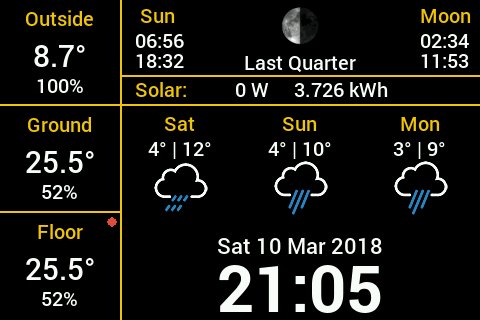
    @dbemowsk :-)
    It's a Raspberry 3, with a cheap 480x320 screen, and a Python+PyGame script.

    Start of my script comes from this script
    Temp+Humidity comes from mySensors SenseBender Micro via NodeRed/MQTT
    Solar power comes from my inverter via a script (also MQTT)
    Weather from WeatherUnderground

    0_1520784994213_screenshot.jpg

    General Discussion

  • What did you build today (Pictures) ?
    sburlotS sburlot

    I built a GPIO interface for the Raspberry PI using @GertSanders PCB (link)
    I ordered the PCB via OSH Park, successfully soldered 2 and my setup is now much cleaner without these jumper cables.
    For the second one, I soldered the NRF directly on the PCB (just because I wanted to gain some height), and everything works flawlessly.

    Big thank to @GertSanders for his PCB!

    Mandatory Pic

    My gateway runs mysgw, Mosquitto and Node-Red.

    In the back is my Raspberry Dashboard displaying the weather, info from my solar installation and the sensors MQTT messages.

    General Discussion

  • Cannot run MySensors on RPI 3
    sburlotS sburlot

    @kkanedaa said in Cannot run MySensors on RPI 3:

    gcc -MT build/drivers/Linux/log.o -MMD -MP -DMY_RADIO_NRF24 -DMY_GATEWAY_LINUX -DMY_GATEWAY_MQTT_CLIENT -DMY_DEBUG -DLINUX_SPI_SPIDEV -DMY_MQTT_CLIENT_ID="mygateway1" -DMY_MQTT_SUBSCRIBE_TOPIC_PREFIX="mysensors-in" -DMY_MQTT_PUBLISH_TOPIC_PREFIX="mysensors-out" -DMY_CONTROLLER_IP_ADDRESS=192,168,xx,166 -Ofast -g -Wall -Wextra -I. -I./core -I./drivers/Linux -I./drivers/SPIDEV -c drivers/Linux/log.c -o build/drivers/Linux/log.o

    I dont know if it's important, but your configure didn't detect the BCM chip for SPI?
    Did you enable SPI via raspi-config (or /boot/config.txt) ?

    Troubleshooting

  • Combine a controller and a gateway in a raspberry pi
    sburlotS sburlot

    I use a Raspberry 3 that is a MySensors MQTT Gateway, a Domoticz Controller, a Mosquitto Broker and Node-Red. The Raspi has more power than needed. I even had InfluxDB+Grafana on this same Raspberry.

    The NRF24L01+ is connected directly to the pins. I have ordered a PCB to mount the NRF, but I haven't found the time to install it.

    The PCB:
    https://www.openhardware.io/view/17/Raspberry-Pi2-GPIO-interface-for-NRF24L01

    General Discussion

  • How to add a serial device to use in node-red
    sburlotS sburlot

    I tried (/dev/ttyUSB20 being the port used and created by the MySensors Gateway):

    sudo socat PTY,link=/dev/ttyUSB21,mode=666,group=dialout,raw PTY,link=/dev/ttyUSB20,mode=666,group=dialout,raw
    

    (I found that Domoticz needs the port to be ttyUSB*).

    I connected Domoticz to a MySensors Gateway USB on port /dev/ttyUSB21
    And Node-RED to /dev/ttyUSB20

    But nothing worked: Domoticz did not see new data arrive and Node-RED didnt receive anything. I tried rebooting (and redo the socat dance), nothing happened.

    I suppose my non-understanding of socat is the main cause of this failure.

    So, I took the plunge and moved to a MySensors MQTT gateway. I had to reflash my sensors with a fixed unit_id (not sure if it's still a requirement), and voila.

    Now I can play with Node-RED and try other controllers in parallel of Domoticz.

    Thanks for the help.

    Node-RED

  • How to add a serial device to use in node-red
    sburlotS sburlot

    Hi,

    I had the same problem: I have a serial GW on the PI that outputs data on /tty/USB20, and is used by Domoticz.

    I want to test MQTT via node-red, so I need to read this serial port from node-red.

    I tried:

    sudo socat PTY,link=/dev/ttyS81,mode=666,group=dialout,raw PTY,link=/dev/ttyUSB20,mode=666,group=dialout,raw
    

    But nothing appears on ttyS81: I tried with

    sudo screen /dev/ttyS81 115200
    

    and of course on node-red, I set up a node that reads from ttyS81 and outputs to debug: the serial port is opened successfully, but nothing appears on debug.

    If I use

    sudo screen /dev/ttyUSB20 115200
    

    I can see some data coming

    I'm no expert with socat (I learned its existence via this forum post), so any help is appreciated.

    Thanks,
    Stephan

    Node-RED

  • Sensebender Micro reports V_HUM > 100
    sburlotS sburlot

    @gohan I live in Switzerland, but perhaps my place has more humidity than normal.

    It's not silly problems we're working on, we're learning all the time!

    Hardware domoticz sensebender micro

  • Sensebender Micro reports V_HUM > 100
    sburlotS sburlot

    I agree, 100% is a lot, but I had a look to weatherunderground and there's a Netatmo weather station near my house that reports an average of 95% humidity, with a maximum of 100%. So my measure may not be this wrong.

    I'll test with another sensor tonight (or move on, I spent 3 evenings on this)

    Hardware domoticz sensebender micro

  • 💬 Sensebender Micro
    sburlotS sburlot

    Beware that the Si7021 can return a RH value < 0 or > 100, and Domoticz will not store it. Clamp the humidity to a valid range to avoid losing values.

    Lately, my Sensebender reported values of 101-104 during the night. Took me some time to understand why Domoticz complained it didnt receive any values.
    It received these values, but didnt like them.

    See section 5.1.1 of the Si7021 datasheet says:
    Due to normal variations in RH accuracy of the device as described in Table 4, it is possible for the measured value of %RH to be slightly less than 0 when the actual RH level is close to or equal to 0. Similarly, the measured value of %RH may be slightly greater than 100 when the actual RH level is close to or equal to 100. This is expected behavior, and it is acceptable to limit the range of RH results to 0 to 100%RH in the host software by truncating values that are slightly outside of this range.

    OpenHardware.io temperature atmega328 atsha204a humidity flash mysensors

  • Sensebender Micro reports V_HUM > 100
    sburlotS sburlot

    Hi,

    I saw your post, but i'm using the Sensebender Micro and the Si7021 sensor is on the main board. Hard to just let the sensor exposed to the outside world.

    My Kapton tape insulation didnt work, I'll try to clamp the RH value.

    The Si7021 datasheets explains why this happens:

    Due to normal variations in RH accuracy of the device as described in Table 4, it is possible for the measured value of %RH to be slightly less than 0 when the actual RH level is close to or equal to 0. Similarly, the measured value of %RH may be slightly greater than 100 when the actual RH level is close to or equal to 100. This is expected behavior, and it is acceptable to limit the range of RH results to 0 to 100%RH in the host software by truncating values that are slightly outside of this range.

    Hardware domoticz sensebender micro

  • Sensebender Micro reports V_HUM > 100
    sburlotS sburlot

    Since 2 weeks, my outdoor sensor, a Sensebender Micro with a NRF24L01+, stopped reporting values to Domoticz at night, then resumed during the day.

    Here the temperature goes around 0C with 100% RH.

    After trying to add a capacitor (10uF, then changed to a 100uF), I reflashed the Sensebender, installed the latest gateway on my Raspi gateway, still no luck.

    Then, running the gateway with the debug flag, I noticed that the sensor reported humidity > 100%. And Domoticz doesn't store this value. (Why?)

    TSF:MSG:READ,1-1-0,s=1,c=1,t=0,pt=7,l=5,sg=0:2.7
    TSF:MSG:READ,1-1-0,s=2,c=1,t=1,pt=2,l=2,sg=0:100
    TSF:MSG:READ,1-1-0,s=1,c=1,t=0,pt=7,l=5,sg=0:3.0
    TSF:MSG:READ,1-1-0,s=2,c=1,t=1,pt=2,l=2,sg=0:101
    TSF:MSG:READ,1-1-0,s=1,c=1,t=0,pt=7,l=5,sg=0:3.4
    TSF:MSG:READ,1-1-0,s=2,c=1,t=1,pt=2,l=2,sg=0:101
    TSF:MSG:READ,1-1-0,s=1,c=1,t=0,pt=7,l=5,sg=0:3.5
    TSF:MSG:READ,1-1-0,s=2,c=1,t=1,pt=2,l=2,sg=0:101
    

    So if your sensor doesn't report values to your controller, check that the values are within a valid range.

    For now, I've put some Kapton tape on the Sensebender Micro, so the side in contact with the box is insulated. We'll see how it works.

    I've read all the posts on the forum, there aren't a lot of explanation on how design an outdoor enclosure, so I'll appreciate any hints!

    I'll try nail polish, as seen on this video: How to Waterproof Electronics by GreatScott!

    Hope this post will save you some time diagnosing a non-responding sensor.

    Hardware domoticz sensebender micro
  • Login

  • Don't have an account? Register

  • Login or register to search.
  • First post
    Last post
0
  • MySensors
  • OpenHardware.io
  • Categories
  • Recent
  • Tags
  • Popular