Skip to content
  • MySensors
  • OpenHardware.io
  • Categories
  • Recent
  • Tags
  • Popular
Skins
  • Light
  • Brite
  • Cerulean
  • Cosmo
  • Flatly
  • Journal
  • Litera
  • Lumen
  • Lux
  • Materia
  • Minty
  • Morph
  • Pulse
  • Sandstone
  • Simplex
  • Sketchy
  • Spacelab
  • United
  • Yeti
  • Zephyr
  • Dark
  • Cyborg
  • Darkly
  • Quartz
  • Slate
  • Solar
  • Superhero
  • Vapor

  • Default (No Skin)
  • No Skin
Collapse
Brand Logo
wesW

wes

@wes
About
Posts
16
Topics
1
Shares
0
Groups
0
Followers
0
Following
0

Posts

Recent Best Controversial

  • 6/8 Buttons battery remote node
    wesW wes

    @wes said in 6/8 Buttons battery remote node:

    I'm planning to use some cheap RF remotes and connect a RF receiver to my RPI, which hosts both my gateway and controller.

    I finally received the RF remotes and receiver/decoder from eBay and got them set up to talk directly to my controller - they work pretty well: https://youtu.be/9458-3IiG3Y

    I did try a OneButton-type approach on a MySensors node, but had lots of malfunctions with long-presses (e.g. fade up 10% per second whilst the button is depressed), where the the "button pressed" message gets through, but the "button released" message is delayed or dropped.

    General Discussion

  • Easy/Newbie PCB for MySensors
    wesW wes

    @sundberg84 said in Easy/Newbie PCB for MySensors:

    Is it ok if I link to this as a good build example on openhardware?

    Of course. I can share the raw JPG images too if you want.

    NB I used capacitor legs as header pins on the RFM69 because the proper header pins I ordered from eBay are still in the mail.

    Hardware

  • Easy/Newbie PCB for MySensors
    wesW wes

    @gohan said in Easy/Newbie PCB for MySensors:

    @wes pcb antenna is going to be a challenge since rfm69 come with 3 possible frequencies

    Of course (doh)

    @sundberg84 said in Easy/Newbie PCB for MySensors:

    I will not use any smaller / smd components on the top side. All main functions have to be 2.54mm/legs.

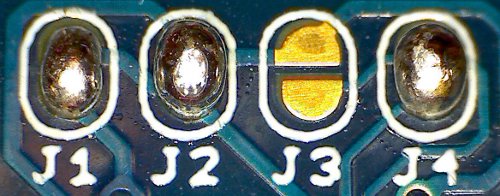
    Sure thing; that's a good philosophy. To be clear, by solder bridges I meant two pads separated by a very small gap that can be bridged with a bit of solder, aka solderable jumpers:

    solderable jumpers photo

    solderable jumpers pad designs

    (as opposed to SMD jumpers)

    For your enjoyment, here 's a timelapse of a node I built today:

    https://www.youtube.com/watch?v=N4u6jlIVNGE

    Hardware

  • Easy/Newbie PCB for MySensors
    wesW wes

    @sundberg84 said in Easy/Newbie PCB for MySensors:

    the booster I designed it for, its pins were mounted the other way around which worked out great.

    Perhaps an even better solution would be to provide two sets of holes for the booster, so that it can fit in the designated space regardless of which way round its pins are.

    @sundberg84 said in Easy/Newbie PCB for MySensors:

    Im thinking maybe I should move the resistors for battery measurment under the Arduino Pro Mini

    Great idea! The only consideration is clearance if soldering the Arduino directly to the PCB, but resistors should be ok - the black plastic spacers on the header pins are 2.3mm high, and typical resistors are only 2.2mm in diameter.

    You could even get away with putting caps under the Arduino, if you allow enough space for the them to be laid on their side if soldering the Arduino directly to the PCB. My 0.1uF electrolytics are 4.1mm diameter, so a directly soldered Arduino would have to sit about 2mm higher than normal. Or you could use tantalum or polymer capacitors, which should be less than 2.3mm high if laid on their side (but more expensive than electrolytics).

    Some further thoughts I had overnight:

    • Could you please post a JPG/PNG of the schematic in the design files section? (The schematic on the description page is a bit too small to read. Thanks!)
    • You could save some space by changing the REG/BAT selection from jumpers to solder bridges, which can be squeezed into a lot more places on the PCB, especially on the back. However, the REG/BAT headers are useful both as a power switch and a great place to connect a multimeter/ammeter to measure the node's current draw, so I'd be a bit sad if you did this.
    • There's enough space under the RFM69 (on the back of the PCB) to mount a CR16xx battery holder. Or if you relocate the adjacent caps, there would be space for a CR20xx battery (which are cheaper, higher capacity, and easier to find).
    • If you were to make the whole right hand side of the board a prototyping area (i.e. clear of components), it would be exactly the right size to mount a 1xAAA battery holder.
    • If you do bring Arduino IO pins out to the prototyping area(s), it would be really useful to put solder bridges in the traces (if space permits), or at least space the traces to make it easy to cut any that aren't wanted.
    • A PCB trace antenna would be really cool!

    I know that's quite a wishlist, and not all those ideas are compatible with each other, or the Nrf24l01+ version of the PCB, but I hope that provides some useful inspiration nonetheless.

    Thanks again @sundberg84 :+1:

    Hardware

  • Easy/Newbie PCB for MySensors
    wesW wes

    @dbemowsk said in Easy/Newbie PCB for MySensors:

    @wes Really like those 3.5mm jacks you used for the temp probes. Did you get those from ebay too?

    Yes - sockets / plugs

    The plugs were not great quality - screw threads were mangled so it was very difficult to screw on the backshells. I'd go for slightly more expensive ones next time. The sockets were fine.

    EDIT: NB the tip and ring contacts on the socket will momentarily short out as the plug is inserted, so it's really important to wire the plugs/sockets so that this doesn't short out VCC/Ground, e.g.

    • Tip: VCC
    • Ring: Data
    • Sleeve: Ground

    Which will cause VCC/Data to short out when the plug is inserted, which is fine.

    Hardware

  • Temperature sensor accuracy comparison
    wesW wes

    @zboblamont said in Temperature sensor accuracy comparison:

    crimping the DS18B20s into the plugs.

    That's even more genius, love it!

    @neverdie said in Temperature sensor accuracy comparison:

    @wes said in Temperature sensor accuracy comparison:

    DHT22: ±0.2℃ @ ?

    Really? That doesn't sound right.

    Updated to ±0.5℃. I originally looked at this datasheet which says ±0.2℃; I've since found two other datasheets which both say ±0.5℃. I suspect whoever wrote the first datasheet was getting confused between accuracy, repeatability, and resolution.

    Hardware

  • Easy/Newbie PCB for MySensors
    wesW wes

    I've just built a few nodes using the EasyPCB Rev 9 RFM69 Edition and I can confirm it lives up to its name - build takes only 15-20 mins, and node works first time because there is no chance of incorrectly wiring the radio. Thanks @sundberg84!

    The PCB fits nicely along with 1 or 2 AA batteries into the 100x60x25 project boxes available on eBay for about $1 each:

    Easy PCB in 100x60x25 project box

    (AA battery holder is actually about 1.5mm too long to fit - I've cut off the non-spring end of the holder, and the positive wire is held by tension between the +ve battery terminal and the side of the case. Ugly, but fine for nodes that don't get moved around. White tape is to prevent antenna from shorting against the top of the radio module.)

    I have a couple of observations that might be worth considering to make the next revision even better:

    • According to the MySX specification, MySX header pin 10 should be connected to Arduino pin D4, not D2 (which is already used for the radio)?
    • It would be handy to have a bit more space between the voltage booster and the adjacent cap - boosters with pre-soldered right-angle headers don't fit without hiting the adjacent cap (see photo). You could free up some space for this by mounting the battery measurement resistors vertically. (There is a risk that this might cause the voltage divider circuit to pick up noise from the adjacent booster; which might cause a bit of random fluctuation in the battery voltage readings. I suppose you'd need to do some tests to see if this is actually an issue.)

    photo showing booster hitting adjacent cap

    • I put a few layers of insulating tape under the RFM69 so that it sits about 0.5mm clear of the PCB, to make it easier to desolder if the need ever arises (see photo). It would be nice if there were holes in the RFM69 pads so that it could optionally be mounted via 2mm male/female headers. You'd need to make a small adjustment to the antenna length if actually using headers, but otherwise I don't think this would affect the radio's performance.

    photo showing tape under radio module

    • EDIT: You can surface-solder 2mm headers to the existing pads, but it ain't pretty:

    RFM69 mounted on 2mm headers

    • You can mount a DS18B20 in the prototyping area!! (requires wire soldered under PCB to arduino input pin)

    photo of DS18B20 mounted in prototyping area

    • I think the 4k7 pullup resistor for DHTxx/DS18B20 temperature sensors should be on any pin other than D3. The only (easy-to-use) hardware interrupts on the ATMega328P are D2 and D3, and D2 is already used for the radio, so D3 should be reserved for sensors that require an interrupt (e.g. motion sensors, buttons, switches).
    • In fact, the space taken up by the pullup resistor might be better used as a second prototyping area. If you bring out some arduino IO pins to this area, you could actually connect a pullup resistor to any of those IO pins. It would also be good to bring out some of the IO pins that aren't already brought out on the MySX header. Suggested layout (apologies for literally-back-of-an-envelope sketch):

    sketch of suggested prototyping area layout

    Hope that's all useful / constructive.

    Thanks again for designing this awesome PCB!

    Hardware

  • Temperature sensor accuracy comparison
    wesW wes

    Added Si7021-A20 - thanks @korttoma

    @zboblamont agreed, and actually it would be great to have a comparison of ALL the specs like operating range, voltage, standby power consumption etc, and cover other types of sensors besides temperature, but it's probably a bit hard to maintain all that in a forum post. Thoughts on best place to set this up? (Wiki page? Google sheets?)

    @zboblamont my house actually has Cat5 ports in every room but I never thought of using them to set up a OneWire bus. Genius!

    Hardware

  • Temperature sensor accuracy comparison
    wesW wes

    I did a comparison of temperature sensor accuracy as per the datasheets, and thought it might be useful to share:

    DHT11: ±2℃ @ 25℃
    DHT22: ±0.5℃ @ ?
    AM2302: ±0.5°C @ -20°C to +80°C
    AM2320: ±0.5°C @ -20°C to +80°C
    SHT21: ±0.3°C @ 5°C to 60°C
    DS18B20: ±0.5°C @ -10°C to +85°C
    HTU21D: ±0.3°C @ 5°C to 60°C
    BME280: ±0.5℃ @ 25℃; ±1.0°C @ 0°C to 65°C
    BMP085: ±0.5℃ @ 25℃; ±1.0°C @ 0°C to 65°C
    BMP180: ±0.5℃ @ 25℃; ±1.0°C @ 0°C to 65°C
    BMP280: ±0.5℃ @ 25℃; ±1.0°C @ 0°C to 65°C
    MCP9808 ±0.25°C @ -40°C to +125°C
    Si7021-A20: ±0.4°C @ -10°C to +85°C

    Corrections welcome in case I have misread or misinterpreted any of the datasheets or have got the wrong datasheet.

    Hope this is useful :-)

    Hardware

  • 💬 Building a Raspberry Pi Gateway
    wesW wes

    To upgrade to the latest release, can I use git pull, or is it better to delete the directory and start again?

    Announcements

  • 💬 Log Parser
    wesW wes

    @hek I believe this should fix the issue:

    https://gist.github.com/liwenyip/de6ff2a646ee417fcf2629eae64e6974/revisions#diff-a83c26f29ff664a062308cb4387554c0

    AFAIK you can't do a pull request on Github Gists.

    Hope that helps.

    Announcements

  • 💬 Log Parser
    wesW wes

    I think the log parser needs to be updated for new message types in MySensors v2.2.0 - they are currently being shown in the log parser as "Undefined":

    I_SIGNAL_REPORT_REQUEST = 29,
    I_SIGNAL_REPORT_REVERSE = 30,
    I_SIGNAL_REPORT_RESPONSE = 31,
    I_PRE_SLEEP_NOTIFICATION = 32,
    I_POST_SLEEP_NOTIFICATION = 33

    Is the source code for this parser somewhere on Github? If not, could we get it put on Github so it's easier to maintain?

    Announcements

  • 6/8 Buttons battery remote node
    wesW wes

    I have the same use case (remote control with buttons to control lights/scenes).

    I'm planning to use some cheap RF remotes and connect a RF receiver to my RPI, which hosts both my gateway and controller.

    Not sure if I'll receive the codes via MySensors, or write something that talks directly to the controller (thoughts on pros/cons of each approach welcome).

    Of course this won't be as reliable or flexible as buttons connected to a MySensors node, but it should be enough for my needs.

    Further thoughts welcome :-)

    General Discussion

  • Template sketch for flexible use with many different sensor types
    wesW wes

    Have a look at https://github.com/mysensors/NodeManager/

    (I think this only became available since the last reply in this thread).

    Development

  • 💬 Motion Sensor
    wesW wes

    @siod The HC-SR501 actually runs on 3.3VDC but has a 5VDC-3.3VDC regulator on board.

    There are several ways to bypass this regulator, but the easiest is to connect your 3.3VDC supply to pin 3 of JP3 (the one marked "H").

    You must make sure that your 3.3VDC supply is very stable, otherwise you will get false activations.

    See:
    https://randomnerdtutorials.com/modifying-cheap-pir-motion-sensor-to-work-at-3-3v/
    https://www.youtube.com/watch?v=5jhTQAV-hg0
    https://www.mpja.com/download/31227sc.pdf

    Announcements

  • first RFM node & Gateway !TSM:FPAR:FAIL (solved)
    wesW wes

    I had exact same issue and fixed with same solution.

    Should the example sketches have these lines added to them (commented out by default)?

    Troubleshooting
  • Login

  • Don't have an account? Register

  • Login or register to search.
  • First post
    Last post
0
  • MySensors
  • OpenHardware.io
  • Categories
  • Recent
  • Tags
  • Popular