Skip to content

Hardware

Talk about fun sensor hardware, MCUs, PCBs and how to power your sensors here.
1.8k Topics 18.3k Posts
  • NRF24L01+ on SPI1, TFT on SPI0

    8
    0 Votes
    8 Posts
    1k Views
    N
    @monte said in NRF24L01+ on SPI1, TFT on SPI0: @nizoo91 that's nice, but i didn't found this method. Thanks for the tip! It is definitely easier to do this way :) But my main point was to help someone who will try to compile mysgw for SPI1 and it won't work, because picture he refered to was wrong... I may be stupid, but i spent whole day figuring that out :) For sure :) trust me I have been there and done that, spent days trying to figure something out and to find out it was the simplest thing to solve hahah Anyhow, checkout this site for any pin reference you need. I found it to be very accurate ;) https://pinout.xyz/pinout/spi
  • Soil moisture sensor - strange readings

    12
    1
    0 Votes
    12 Posts
    3k Views
    M
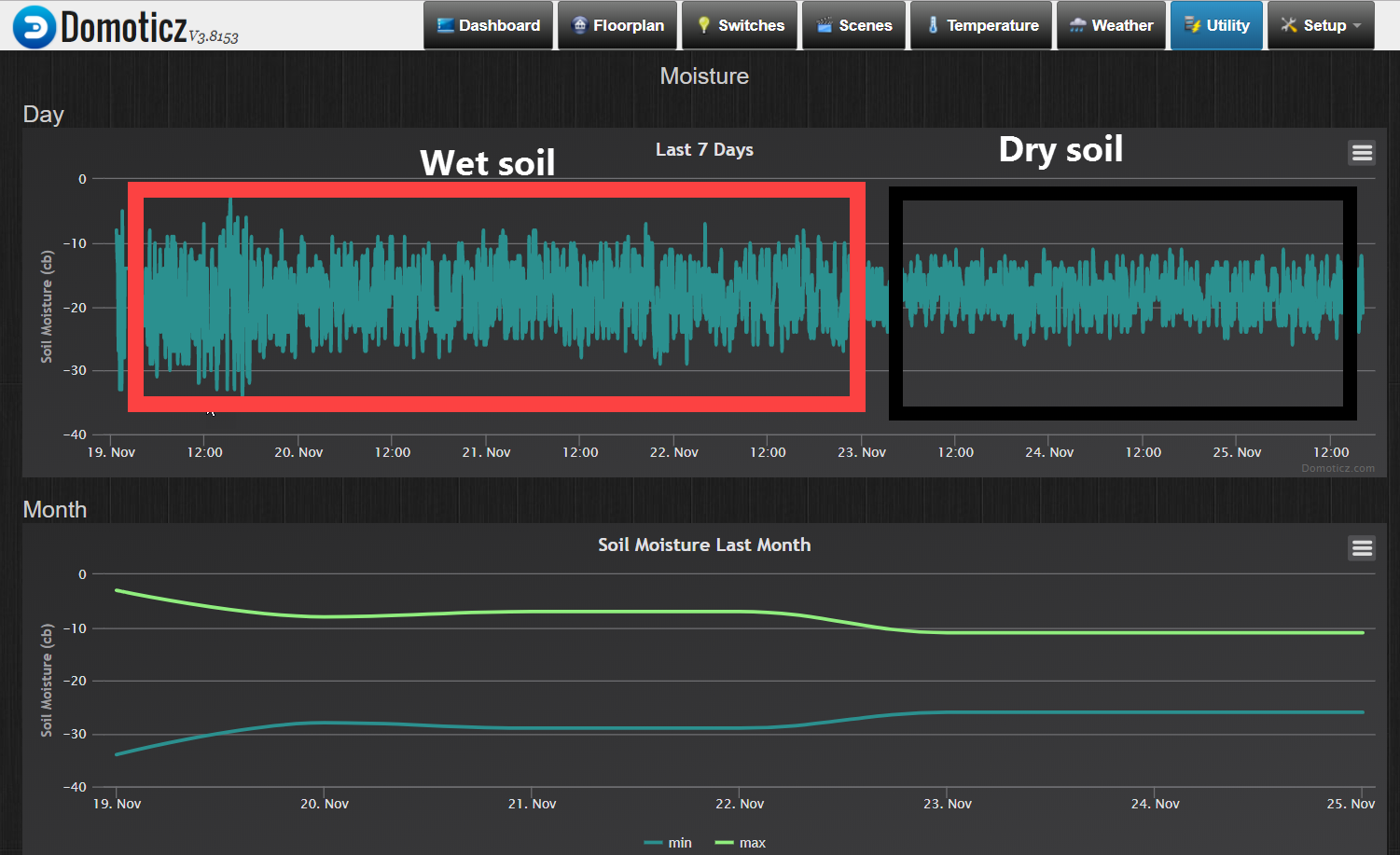
    now it Looks better :-) reversed D2 and D6 D2 -> Input 10K resistor-> Output 10K Input Fork and A1-> Output fork -> D6 The values now makes sense :-) However...Would be great if someone can have a look on the Sketch because Ihave removed the OTA part and not sure If it was correct on this way. Many thanks Markus
  • Getting started. Samd21, dragino lora hat

    3
    0 Votes
    3 Posts
    652 Views
    P
    ok thanks! Then i will order the dragino board to test if it will work. I really like the samd series, so i will just test it and see what happens.
  • Trying to design MySensors PCB / Fritzing

    6
    1
    0 Votes
    6 Posts
    1k Views
    K
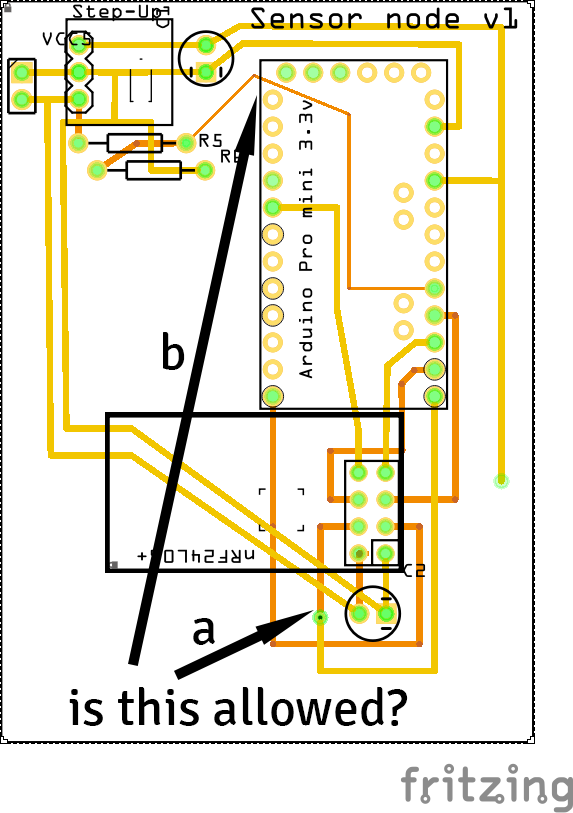
    @sundberg84 said in Trying to design MySensors PCB / Fritzing: @kokosnoot MySensors kicad library: https://github.com/mysensors-kicad I managed to install that one with a bit of effort last weekend. :ok_hand: :smiley: However, inspired by bgunnarb I am already trying again for 40minutes to get a DHT11 footprint properly working, but failing thus far. There seems to be some in: https://github.com/KiCad/kicad-footprints/tree/master/Sensor.pretty but KiCad does not appreciate that as a library, (the default is to work from github.com/kicad/Capacitors_SMD.pretty for example, but those are all archived pages) I manually tried adding https://github.com/KiCad/kicad-footprints/tree/master/Sensor.pretty - similar as the other libraries (type Github, etc) but just get a "ZIP error"... Maybe I should try a nightly build instead of the stable 5.0.2. Edit: Just got it to work by downloading the entire 5.1.0 footprint library locally, and pointing to the [..]\footprints\Sensor.pretty file. Inspired by someone else with the same issue: https://forum.kicad.info/t/personal-footprints-via-on-demand-github-plugin-error-reading-zip-local-header/11777 :smiley:. Hopefully this info might help someone else at some point!
  • Easily programmable nrf5

    Moved
    10
    0 Votes
    10 Posts
    1k Views
    alowhumA
    Thanks to both :-)
  • Absolute pressure sensor in a vacuum

    1
    0 Votes
    1 Posts
    387 Views
    No one has replied
  • WS2811 RGB strip lights up in groups of three

    11
    0 Votes
    11 Posts
    9k Views
    J
    You guys had the wrong LED type in the arduino setup: // NEO_GRB Pixels are wired for GRB bitstream (most NeoPixel products) // NEO_RGB Pixels are wired for RGB bitstream (v1 FLORA pixels, not v2) // NEO_RGBW Pixels are wired for RGBW bitstream (NeoPixel RGBW products) I have the 12V GRB option - one controller connected to 3 leds but it runs smooth as a cat. With RGB and RGBW it doesn't work that well and I see only 3 led chunks. ali express link 12V2811 5m |1 50 leds | White PCB That is the setup line that works for the WS2811 RGB strip (GRB strip): Adafruit_NeoPixel strip = Adafruit_NeoPixel(NUM_LEDS, PIN, NEO_GRB + NEO_KHZ800); I went on this by accident and I thought I should let you know even after 2 years :-) Hope that helps
  • Locally attached sensors on Raspberry PI Gateway

    3
    0 Votes
    3 Posts
    566 Views
    cozaC
    My controller is Homeassistant. On separate hardware. My current gateway is a esp8226 but I would like to have more visible debugging, that is why I am looking into a raspberry
  • Need some help with this sensor setup for RF remote

    4
    0 Votes
    4 Posts
    639 Views
    K
    RFLink to your controller plus 4 button RF senders from ebay.
  • I need some help about sensors

    8
    0 Votes
    8 Posts
    1k Views
    R
    I just realized one of the suggestions is a radar sensor. I should have said I was looking for a sensor that would detect objects like humans, trees, or poles, so I guess it would need to detect any object in front or around it that was close to it about 1 foot away. Sorry I should have mentioned that before.
  • Arduino 32u4 (MEGA) with built in GSM for $18

    6
    0 Votes
    6 Posts
    2k Views
    alowhumA
    All that is mentioned in my posts above?
  • Maximum cable length

    5
    0 Votes
    5 Posts
    3k Views
    JenniferTJ
    @mk55 said in Maximum cable length: maximum length of a shielded cable According to Cisco, the maximum cable length for STP is the same as UTP - 100' or about 330'. This is not to say that cables longer than this won't work. I personally have done very little with STP, but I'm sure I have pulled some UTP farther than 100m.
  • Mysensort mit DHT12 (i2C)

    3
    0 Votes
    3 Posts
    2k Views
    michlb1982M
    Well i did it... i've got a working MYSENSOR with DHT12... here the Code ... its not nice but it works... // Enable debug prints #define MY_DEBUG // Define Node ID #define MY_NODE_ID 128 //#define MY_REPEATER_FEATURE // Enable and select radio type attached #define MY_RADIO_NRF24 #include <SPI.h> #include <MySensors.h> #include <DHT12.h> #include <Wire.h> DHT12 dht12; #define SENSOR_TEMP_OFFSET 0 // Sleep time between sensor updates (in milliseconds) // Must be >1000ms for DHT22 and >2000ms for DHT11 static const uint64_t UPDATE_INTERVAL = 30000; static const uint8_t FORCE_UPDATE_N_READS = 10; #define CHILD_ID_HUM 0 #define CHILD_ID_TEMP 1 float lastTemp; float lastHum; uint8_t nNoUpdatesTemp; uint8_t nNoUpdatesHum; bool metric = true; MyMessage msgHum(CHILD_ID_HUM, V_HUM); MyMessage msgTemp(CHILD_ID_TEMP, V_TEMP); void presentation() { // Send the sketch version information to the gateway sendSketchInfo("DHT12", "1.1"); // Register all sensors to gw (they will be created as child devices) present(CHILD_ID_HUM, S_HUM); present(CHILD_ID_TEMP, S_TEMP); //metric = getControllerConfig().isMetric; } void setup() { Wire.begin(); } void loop() { // Force reading sensor, so it works also after sleep() //dht12.readSensor(true); // Get temperature from DHT library float temperature = dht12.readTemperature(); if (isnan(temperature)) { Serial.println("Failed reading temperature from DHT!"); } else if (temperature != lastTemp || nNoUpdatesTemp == FORCE_UPDATE_N_READS) { // Only send temperature if it changed since the last measurement or if we didn't send an update for n times lastTemp = temperature; // apply the offset before converting to something different than Celsius degrees temperature += SENSOR_TEMP_OFFSET; if (!metric) { temperature = dht12.readTemperature(); } // Reset no updates counter nNoUpdatesTemp = 0; send(msgTemp.set(temperature, 1)); #ifdef MY_DEBUG Serial.print("T: "); Serial.println(temperature); #endif } else { // Increase no update counter if the temperature stayed the same nNoUpdatesTemp++; } // Get humidity from DHT library float humidity = dht12.readHumidity(); if (isnan(humidity)) { Serial.println("Failed reading humidity from DHT"); } else if (humidity != lastHum || nNoUpdatesHum == FORCE_UPDATE_N_READS) { // Only send humidity if it changed since the last measurement or if we didn't send an update for n times lastHum = humidity; // Reset no updates counter nNoUpdatesHum = 0; send(msgHum.set(humidity, 1)); #ifdef MY_DEBUG Serial.print("H: "); Serial.println(humidity); #endif } else { // Increase no update counter if the humidity stayed the same nNoUpdatesHum++; } // Sleep for a while to save energy sleep(UPDATE_INTERVAL); //wait(UPDATE_INTERVAL); //for repeaters } i Used this library: https://github.com/Bobadas/DHT12_library_Arduino/blob/master/README.md here the datasheet of the dht12: http://www.robototehnika.ru/file/DHT12.pdf
  • This topic is deleted!

    1
    0 Votes
    1 Posts
    1 Views
    No one has replied
  • Rocketscream Mini Ultra Pro V3 as gateway

    10
    0 Votes
    10 Posts
    2k Views
    R
    @alexsh1 I've put this aside for a few days to clear my head. Changed to another breadboard started froms cratch and reconnected all the wiring. Now it does works! probably a bad connection or a miswiring. Thx for the help!
  • RFM69HW 868MHz working on 915MHz

    7
    0 Votes
    7 Posts
    1k Views
    CarywinC
    I accidentally used a 915 MHz part at 433 MHz and even that worked, albeit at substantially reduced range.
  • BME280 sensor variability

    4
    3
    0 Votes
    4 Posts
    839 Views
    JohnRobJ
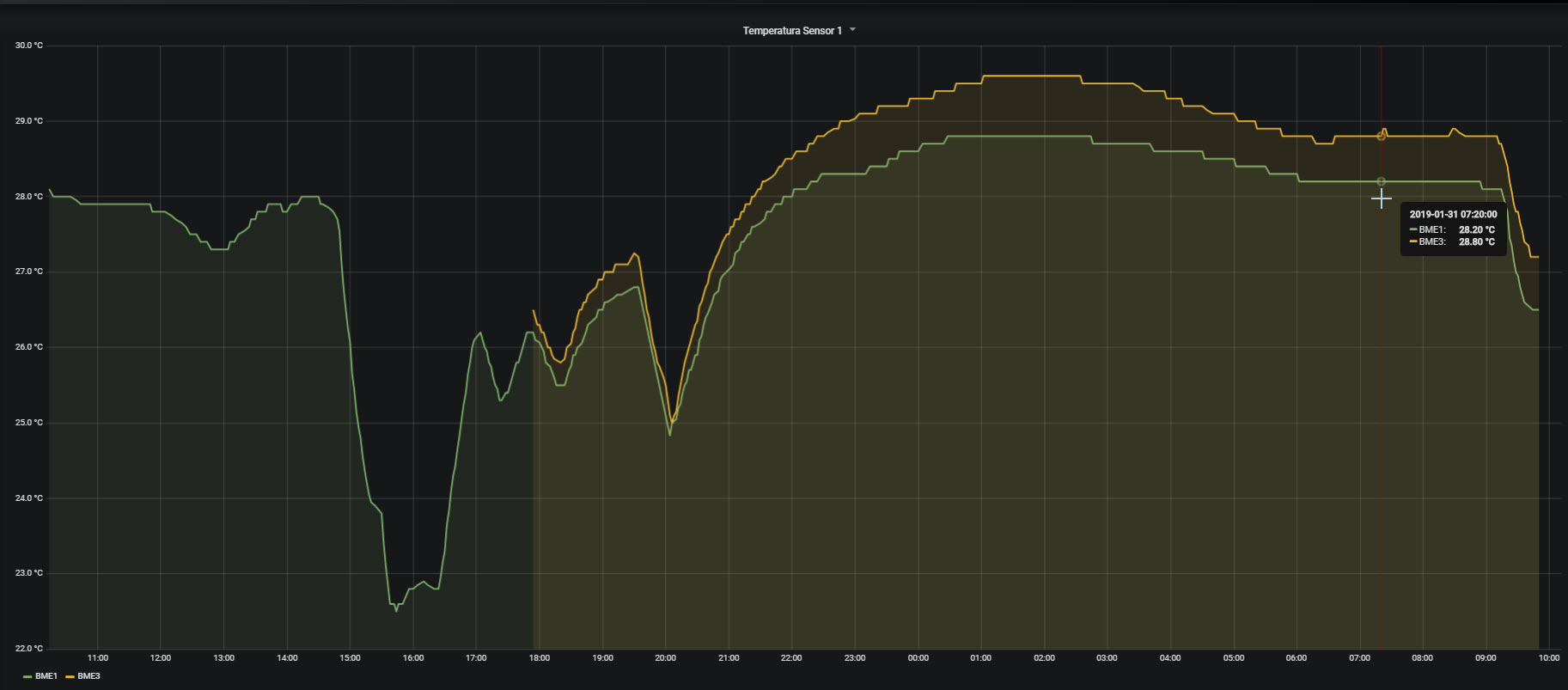
    I'm not sure how your physical test was setup. In the past I've found the best test was to put the sensors in a cardboard box, maybe 6x6x8 with the sensors on a plastic platform (an old food container), close it and let it sit for some hours in an area away from heat / cool vents etc. Is the host board the same for both sensors? For humidity you can put both in a plastic bag with a saturated solution of salt and water. Let sit for a few days. The humidity inside the bag will be almost exactly 75%. Becomes a cheap and dirty "reference" There has been reports that sampling too frequently will cause internal heating to a small degree. At what rate are you sampling the device? These suggestions are not to say what you see is not part to part variation.
  • livolo us standart currnt low .

    4
    4
    0 Votes
    4 Posts
    827 Views
    wallyllamaW
    @naty6458 no need to be sorry. I keep hoping there is a better answer than what I found, and each time it is asked I learn something, so there is at least one person that is happy you asked. My plan is optocouplers, maybe a rechargeable coin cell to help power them. I want to connect to the pins for the rf receiver. I should be able to send the same code the remote uses to turn it on and off. Since I wont be sending codes often the coin cell should be fully charged most of the time, so the low capacity (~23mah) shouldn't cause a problem, unless someone flicks the lights on and off repeatedly. I'll power the arduino/rs485 module separately.
  • [SOLVED] Blue pill (stm32f1) + VEML6075 UV sensor

    10
    0 Votes
    10 Posts
    2k Views
    F
    @yveaux I tried to use SoftWire in sketch without any libs and missed repeated start.
  • New STM32 board with provision for NRF24L01 and ESP8233 boards

    9
    0 Votes
    9 Posts
    4k Views
    mitchmitchellM
    Hmm, I got two of them -- haven't had a chance to really dig into them yet.

7

Online

11.7k

Users

11.2k

Topics

113.1k

Posts