
💬 Water Meter Pulse Sensor
-
@bereska said in 💬 Water Meter Pulse Sensor:
32319 TSF:MSG:SEND,6-6-0-0,s=1,c=2,t=24,pt=0,l=0,sg=0,ft=0,st=OK:
Logparser states: there was nothing counted (empty payload). So make sure, there really was counted anything.
(I didn't check your sketch, just assuming, it's the default one and everything is wired correctly; if that's the case, you should be able to see a different payload than nothing or "0", that your controller might treat as non existent). -
Great work @bart59 !
Do you have any indication on how long battery life you will get with this setup? -
@mfalkvidd how looks the sensor now with the modifications? and how to wire this?
-
I'm just getting this....
16:57:15.660 -> 10091 TSM:FAIL:RE-INIT
16:57:15.660 -> 10093 TSM:INIT
16:57:15.660 -> 10101 !TSM:INIT:TSP FAIL
16:57:15.660 -> 10103 TSM:FAIL:CNT=2
16:57:15.660 -> 10107 TSM:FAIL:DIS
16:57:15.713 -> 10111 TSF:TDI:TSL -
@ibibiuooui said in 💬 Water Meter Pulse Sensor:
!TSM:INIT:TSP FAIL
See https://www.mysensors.org/build/parser: There's a problem in the initialisation of your transceiver (whatever it may be). So first check wiring, see https://forum.mysensors.org/topic/666/read-this-first-it-could-save-you-a-lot-of-time for further details. If that doesn't help, imo you should open up a seperate thread.
-
I am finally getting around to trying this out. I was playing with just trying to see if i can get the pulses. First thing i did was take an old compass and put it beside the meter and had someone turn on the water. I could definitely see the compass needle pull a little as the water was flowing. So I assumed that pull was enough to be detectable with my hall effect sensor. I have tried a couple, and just can't seem to get it to pick up.
If i use a magnet, simple code will detect the pulse and the green led on the sensor lights up.
But no matter where I put that sensor near the meter it just doesn't seem to detect it. Not quite sure what's happening.
The meter i have is this one.
https://www.badgermeter.com/resources/add29b88-1ffb-49c9-80ab-bb8697bd6d1a/absolute digital encoder product data sheet ade-ds-00183-en.pdf/Not sure if anyone has any recommendation on which hall effect sensor would be the best for this but ill take suggestions lol
My sensor I am testing with is
3144E Hall Effect SensorDoesn't have a sensitivity dial but the recommended one on this build page didn't either.
-
I wanted to operate my water pulse meter on batteries and also get the water flow. The original design had the following issues with that:
- Incorrect flow calc: micros() was used to calculate the flow, however micros() wraps every 70 minutes which looks like a huge flow (which is then discarded in code)
- Volume calc: millis() wraps every 50 days which is not handled correctly either
- Too much current for battery use: The IR LED of the TCRT5000 is always on and the LM393 comparator is also taking a few mA's
- Could not report flow in sleep mode because millis() does not increment on sleep - need to do this based on calculation of total sleep time. We now simply calculate the number of pulses per minute and deduct the flow
- I also had issued with the data transport reliability, so I added error counters (which show up on the Gateway as distance sensors)
- I also wanted to provide a measurement counter to the gateway (that counts up each time a message is sent)
- The sensor will reboot itself when too many errors occur
So I modified the circuit of the IR sensor:
- Assumption that the wheel of the water meter turns slowly (takes at least a few seconds to turn around)
- We will wake up every 500 millisecond to turn on the IR LED connected to PIN 8. Pin 8 also powers the photo transistor that measures the reflection
- I removed the power from the opamp circuit that is linked to the photo transistor
- The voltage from the photo transistor is then read using an analog read on A1. Based on a threshold value we will deduct if the mirror on the water meter is in view
- Pin 7 is connected to a learning switch which will turn the device in a specific mode and the min/max values on A1 are used to calculate the value of the threshold (which is then stored in the EEPROM)
- After 30 seconds in learning mode, the new threshold is established and the LED on Pin 6 will show the actual on/off mirror signals, so you can see the pulses are correctly counted
- switch back the DIP switch on Pin 7 to bring back normal mode
- The circuit also contains the battery voltage sensor circuit (I am using a 1.5V battery and step up circuit). So the resistors used are 470k from + pole of battery to the A0 input and 1 M ohm from A0 to ground
/** * Created by Henrik Ekblad <henrik.ekblad@mysensors.org> * Copyright (C) 2013-2015 Sensnology AB * Full contributor list: https://github.com/mysensors/Arduino/graphs/contributors * * Documentation: http://www.mysensors.org * Support Forum: http://forum.mysensors.org * * This program is free software; you can redistribute it and/or * modify it under the terms of the GNU General Public License * version 2 as published by the Free Software Foundation. * ******************************* * * REVISION HISTORY * Version 1.0 - Henrik Ekblad * Version 1.1 - GizMoCuz * Version 1.2 - changed BM: using low power separate circuit for infra red on pin 8 + analog A1 * * ISSUES WITH ORIGINAL CODE * Incorrect flow calc: micros() was used to calculate the flow, however micros() is wraps every 70 minutes which looks like a huge flow (which is discarded) * Volume calc: millis() wraps every 50 days which is not handled correctly * Too much current for battery use: The IR LED of the TCRT5000 is always on and the LM393 comparator is also taking a few mA's * Could not report flow in sleep mode because millis() does not increment on sleep - need to do this based on calculation of total sleep time * * MODIFIED CIRCUIT IR SENSOR * Assumption that the wheel of the water meter turns slowly (takes at least a few seconds to turn around) * We will wake up every second to turn on the IR LED (connected to PIN 8). Pin 8 also powers the photo transistor that measures the reflection * The voltage from the photo transistor is then read using an analog read on A1. Based on a treshold value we will deduct if the mirror is in view * Pin 7 is connected to a learning switch which will turn the device in continous mode and the min/max values on A1 are used to recalc the treshold * during a 30 second period. After this period the new treshold is established and the LED on Pin 6 will show the actual on/off mirror signals * * http://www.mysensors.org/build/pulse_water */ // BOARD: PRO MINI 3.3V/ 8Mhz ATMEGA328 8Mhz // Enable debug prints to serial monitor #define MY_DEBUG // Enable and select radio type attached #define MY_RADIO_NRF24 //#define MY_RADIO_RFM69 #define MY_NODE_ID 10 // hard code the node number #include <SPI.h> #include <MySensors.h> #define SENSOR_POWER 8 // pin that will provide power to IR LED + sense circuit #define IR_SENSE_PIN A1 // input for IR voltage #define BATTERY_SENSE_PIN A0 // select the input pin for the battery sense point #define LEARN_SWITCH_PIN 7 // switch (SW1 on battery module) to turn on learning mode (low==on) #define LEARN_LED_PIN 6 // LED feedback during learning mode (LED on battery module) #define LEARN_TIME 30 // number of seconds we will keep learn loop #define PULSE_FACTOR 1000 // Nummber of blinks per m3 of your meter (One rotation/1 liter) #define MAX_FLOW 80 // Max flow (l/min) value to report. This filters outliers. #define CHILD_ID 1 // Id of the sensor child (contains 3 subs: V_FLOW, V_VOLUME, VAR1) #define CHILD_PINGID 2 // ID of ping counter #define CHILD_ERRID 3 // ID of error counter #define CHECK_FREQUENCY 500 // time in milliseconds between loop (where we check the sensor) - 500ms #define MIN_SEND_FREQ 60 // Minimum time between send (in multiplies of CHECK_FREQUENCY). We don't want to spam the gateway (30 seconds) #define MAX_SEND_FREQ 1200 // Maximum time between send (in multiplies of CHECK_FREQUENCY). We need to show we are alive (600 sec/10 min) #define IR_ON_SETTLE 2 // number of milliseconds after we turned on the IR LED and we assume the receive signal is stable (in ms) #define EE_TRESHOLD 10 // config addresses 0 + 1 used for treshold from learning (loadState() returns only uint8 value) #define TRESHOLD_MARGIN 3 // additional margin before we actually see a one or zero #define RESETMIN 5 // number of cycle times (either 30 sec of 10 min) we consistently need to have transmission errors before we perform hard reset MyMessage volumeMsg(CHILD_ID,V_VOLUME); // display volume and flow on the same CHILD_ID MyMessage flowMsg(CHILD_ID,V_FLOW); // flow MyMessage lastCounterMsg(CHILD_ID,V_VAR1); MyMessage pingMsg(CHILD_PINGID,V_DISTANCE); // use distance to keep track of changing value MyMessage errMsg(CHILD_ERRID,V_DISTANCE); // use distance to keep track of changing value double ppl = ((double)PULSE_FACTOR / 1000.0); // Pulses per liter unsigned int oldBatteryPcnt = 0; // check if changed unsigned int minsendcnt = MIN_SEND_FREQ; // counter for keeping minimum intervals between sending unsigned int maxsendcnt = MAX_SEND_FREQ; // counter for keeping maximum intervals between sending unsigned int treshold = 512; // threshold value when to swap on/off for pulse unsigned long pulseCount = 0; // total volume of this pulse meter (value stored/received on gateway on pcReceived) unsigned long oldPulseCount = 0; // to see if we have received something boolean pcReceived = false; // received volume from prior reboot boolean onoff = false; // sensor value above/below treshold unsigned int intervalcnt = 0; // number of cycles between last period (for flow calculation) double flow = 0; // maintain flow double oldflow = 0; // keep prior flow (only send on change) unsigned int learntime=LEARN_TIME*2; // timer for learning period unsigned int learnlow = 1023; // lowest value found during learning unsigned int learnhigh = 0; // highest value found during learning boolean learnsaved = false; // have saved learned value unsigned long pingcnt = 0; unsigned long errcnt = 0; // error count unsigned int errcnt2 = 0; // error counter set to 0 when sending is ok void(* resetFunc) (void) = 0;//declare reset function at address 0 (for rebooting the Arduino) void setup() { // make sure a few vars have the right init value after software reboot pingcnt = 0; pcReceived = false; pulseCount = oldPulseCount = 0; // setup hardware pinMode(SENSOR_POWER, OUTPUT); digitalWrite(SENSOR_POWER, LOW); pinMode(LEARN_SWITCH_PIN, INPUT_PULLUP); pinMode(LEARN_LED_PIN, INPUT); // default is input because this pin also has SW2 of battery block // Fetch last known pulse count value from gateway request(CHILD_ID, V_VAR1); // Fetch threshold value from EE prom treshold = readEeprom(EE_TRESHOLD); if (treshold<30 || treshold>1000) treshold = 512; // wrong value in EEprom, take default Serial.print("Treshold: "); Serial.println(treshold); // use the 1.1 V internal reference for the battery and IR sensor #if defined(__AVR_ATmega2560__) analogReference(INTERNAL1V1); #else analogReference(INTERNAL); #endif analogRead(IR_SENSE_PIN); // settle analogreference value wait(CHECK_FREQUENCY); // wait a bit } void presentation() { // Send the sketch version information to the gateway and Controller sendSketchInfo("Water Meter", "1.2"); // Register this device as Waterflow sensor present(CHILD_ID, S_WATER); present(CHILD_PINGID, S_DISTANCE); present(CHILD_ERRID, S_DISTANCE); } void loop() { if (digitalRead(LEARN_SWITCH_PIN)==LOW) { pinMode(LEARN_LED_PIN, OUTPUT); digitalWrite(SENSOR_POWER, HIGH); intervalcnt = 0; learn_loop(); } else { learntime=LEARN_TIME*2; learnlow = 1023; learnhigh = 0; pinMode(LEARN_LED_PIN, INPUT); normal_loop(); } } void learn_loop() { // will run into this loop as long as we are learning wait(500); unsigned int sensorValue = analogRead(IR_SENSE_PIN); Serial.print("IR: "); Serial.print(sensorValue); if (learntime>0) { // still learning learntime--; learnsaved = false; digitalWrite(LEARN_LED_PIN, !digitalRead(LEARN_LED_PIN)); // blink led if (sensorValue < learnlow) { learnlow = sensorValue; Serial.println(" Lowest"); } else if (sensorValue > learnhigh) { learnhigh = sensorValue; Serial.println(" Highest"); } else Serial.println(); } else { if (!learnsaved) { treshold = (learnhigh + learnlow)/2; Serial.print("Treshold: "); Serial.println(treshold); storeEeprom(EE_TRESHOLD, treshold); } learnsaved = true; // just display using LED digitalWrite(LEARN_LED_PIN, sensorValue>treshold); Serial.println((sensorValue>treshold ? " on" : " off")); } } void normal_loop() { unsigned long start_loop = millis(); // to allow adjusting wait time intervalcnt++; // we start doing a measurement digitalWrite(SENSOR_POWER, HIGH); wait(IR_ON_SETTLE); unsigned int sensorValue = analogRead(IR_SENSE_PIN); digitalWrite(SENSOR_POWER, LOW); #ifdef MY_DEBUG_DETAIL Serial.print("IR: "); Serial.println(sensorValue); #endif boolean nowvalue = onoff; if (onoff && (sensorValue<treshold-TRESHOLD_MARGIN)) nowvalue = false; if (!onoff && (sensorValue>treshold+TRESHOLD_MARGIN)) nowvalue = true; if (nowvalue != onoff) { // we have a pulse, only count on upwards pulse onoff = nowvalue; if (onoff) { pulseCount++; #ifdef MY_DEBUG Serial.print("p: "); Serial.println(pulseCount); #endif } } // Only send values at a maximum frequency or woken up from sleep if (minsendcnt>0) minsendcnt--; if (maxsendcnt>0) maxsendcnt--; // send minimum interval when we have pulse changes or if we had some flow the prior time or send on timeout if ((minsendcnt==0 && (pulseCount != oldPulseCount)) || (minsendcnt==0 && oldflow != 0) || maxsendcnt==0) { if (!pcReceived) { //Last Pulsecount not yet received from controller, request it again Serial.print("Re-request var1 .."); request(CHILD_ID, V_VAR1); // Prevent flooding the gateway with re-requests,,, wait at least 1000 ms for gateway (cannot be sleep or smartSleep wait(2*CHECK_FREQUENCY); return; } minsendcnt = MIN_SEND_FREQ; maxsendcnt = MAX_SEND_FREQ; pingcnt++; sensorValue = analogRead(BATTERY_SENSE_PIN); int batteryPcnt = sensorValue / 10; // 1M, 470K divider across battery and using internal ADC ref of 1.1V // Sense point is bypassed with 0.1 uF cap to reduce noise at that point // ((1e6+470e3)/1e6)*1.1 = Vmax = 1.67 Volts // 1.67/1023 = Volts per bit = 0.00158065 Serial.print("Battery %: "); Serial.println(batteryPcnt); if (oldBatteryPcnt != batteryPcnt) { sendBatteryLevel(batteryPcnt); oldBatteryPcnt = batteryPcnt; } double volume = ((double)pulseCount/((double)PULSE_FACTOR)); flow = ((double) (pulseCount-oldPulseCount)) * (60000.0 / ((double) intervalcnt*(double) CHECK_FREQUENCY)) / ppl; // flow in liter/min #ifdef MY_DEBUG Serial.print("pulsecount:"); Serial.println(pulseCount); Serial.print("volume:"); Serial.println(volume, 3); Serial.print("l/min:"); Serial.println(flow); #endif bool b = send(lastCounterMsg.set(pulseCount)); // Send pulsecount value to gw in VAR1 if (b) errcnt2=0; else { errcnt++; errcnt2++; } b = send(volumeMsg.set(volume, 3)); // Send volume (set function 2nd argument is resolution) if (b) errcnt2=0; else { errcnt++; errcnt2++; } b = send(flowMsg.set(flow, 2)); // Send flow value to gw if (b) errcnt2=0; else { errcnt++; errcnt2++; } b = send(pingMsg.set(pingcnt)); // ensure at least this var has a different value if (b) errcnt2=0; else { errcnt++; errcnt2++; } b = send(errMsg.set(errcnt2+((float) errcnt2/100),2)); // ensure we always send error count if (b) errcnt2=0; else { errcnt++; errcnt2++; } oldPulseCount = pulseCount; intervalcnt = 0; oldflow = flow; if (errcnt2>= (5*RESETMIN)) { Serial.println("Reset"); wait(300); resetFunc(); //call reset to reboot the Arduino } } // calculate how long it took to process all of this. then go to sleep for the remaining period unsigned long end_loop = millis(); if (end_loop - start_loop < CHECK_FREQUENCY) sleep(CHECK_FREQUENCY - (end_loop > start_loop ? end_loop - start_loop : 0)); } void receive(const MyMessage &message) { if (message.type==V_VAR1) { unsigned long gwPulseCount=message.getULong(); pulseCount += gwPulseCount; oldPulseCount += gwPulseCount; flow=oldflow=0; Serial.print("Received last pulse count from gw:"); Serial.println(pulseCount); pcReceived = true; } } void storeEeprom(int pos, int value) { // function for saving the values to the internal EEPROM // value = the value to be stored (as int) // pos = the first byte position to store the value in // only two bytes can be stored with this function (max 32.767) saveState(pos, ((unsigned int)value >> 8 )); pos++; saveState(pos, (value & 0xff)); } int readEeprom(int pos) { // function for reading the values from the internal EEPROM // pos = the first byte position to read the value from int hiByte; int loByte; hiByte = loadState(pos) << 8; pos++; loByte = loadState(pos); return (hiByte | loByte); }@bart59 Can you post full circuit diagram for the modified code you made?
-
I made some improvements on this sketch. Please review them here: https://github.com/mysensors/MySensors/pull/1540
with these changes you will have:
1 - factory reset
2 - automatic home assistant entities creation
3 - counter correction from home assistant using service notify.mysensors
4 - fixed counter automatically incremented by 1 at each device restart (due to arduino library interrupt bug)
5- other tiny improvements -
-
I really like the update you did for Home Assistant integration.
But: I do not really understand, how to correctly send the VALUE_TO_ADD.
This is what I tried to add 967.067 m³:
service: notify.mysensors
data:
  message: VALUE_TO_ADD
  target: text.water_meter_100_2
  data: 967067
But I just get this error message:
Fehler beim Aufrufen des Diensts notify.mysensors. expected dict for dictionary value @ data['data']. Got NoneThese are my newly found entities:
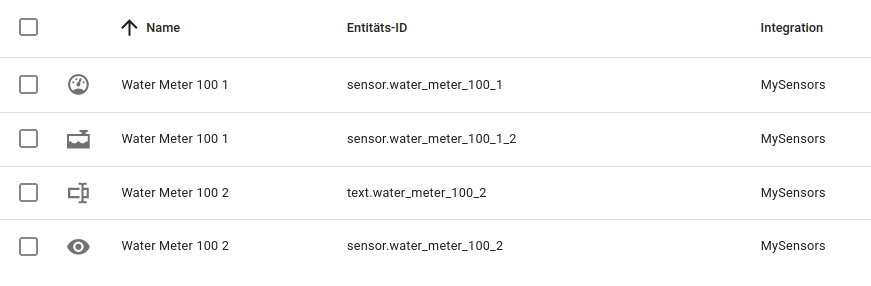
What is wrong here?
-
I really like the update you did for Home Assistant integration.
But: I do not really understand, how to correctly send the VALUE_TO_ADD.
This is what I tried to add 967.067 m³:
service: notify.mysensors
data:
  message: VALUE_TO_ADD
  target: text.water_meter_100_2
  data: 967067
But I just get this error message:
Fehler beim Aufrufen des Diensts notify.mysensors. expected dict for dictionary value @ data['data']. Got NoneThese are my newly found entities:
What is wrong here?
I finally got this to work. Unlike what the description here says, this is how to update the value:
In Home Assistant, go to Developer->Service->YAML mode:service: text.set_value data: value: "967067" target: entity_id: text.water_meter_100_2(change 967067 with the value you want to add to the current counter)
The service "notify.mysensors" seems to be deprecated by Home Assistant.


Hello! It looks like you're interested in this conversation, but you don't have an account yet.
Getting fed up of having to scroll through the same posts each visit? When you register for an account, you'll always come back to exactly where you were before, and choose to be notified of new replies (either via email, or push notification). You'll also be able to save bookmarks and upvote posts to show your appreciation to other community members.
With your input, this post could be even better 💗
Register Login