Skip to content
  • MySensors
  • OpenHardware.io
  • Categories
  • Recent
  • Tags
  • Popular
Skins
  • Light
  • Brite
  • Cerulean
  • Cosmo
  • Flatly
  • Journal
  • Litera
  • Lumen
  • Lux
  • Materia
  • Minty
  • Morph
  • Pulse
  • Sandstone
  • Simplex
  • Sketchy
  • Spacelab
  • United
  • Yeti
  • Zephyr
  • Dark
  • Cyborg
  • Darkly
  • Quartz
  • Slate
  • Solar
  • Superhero
  • Vapor

  • Default (No Skin)
  • No Skin
Collapse
Brand Logo
  1. Home
  2. Troubleshooting
  3. How to sleep the Arduino but still have it respond to the Vera?

How to sleep the Arduino but still have it respond to the Vera?

Scheduled Pinned Locked Moved Troubleshooting
23 Posts 6 Posters 13.0k Views 3 Watching
  • Oldest to Newest
  • Newest to Oldest
  • Most Votes
Reply
  • Reply as topic
Log in to reply
This topic has been deleted. Only users with topic management privileges can see it.
  • F Offline
    F Offline
    fleinze
    wrote on last edited by
    #2

    If you want to receive commands, you need to keep the nrf24 in receive mode. In this mode the radio consumes about 12mA which is a lot for a battery powered node.
    I think it would be possible to send the Arduino to sleep while the radio stays in listening mode, waking up the arduino using the irq pin, but it would still consume the 12mA.

    1 Reply Last reply
    0
    • T Offline
      T Offline
      twosh
      wrote on last edited by
      #3

      Hi @fleinze , and thanks for your suggestion. I couldn't find anything in the API or during a quick search of the forum how to do this. Do you have some code for it or?

      However, when I checked the API again and I found something I could try, namely the interrupt variable in the sleep function:

      bool sleep(int interrupt, int mode, unsigned long ms=0);
      

      I'll try something like this and see how it works!

      1 Reply Last reply
      0
      • T Offline
        T Offline
        twosh
        wrote on last edited by
        #4

        Well, that was fast... It didn't work... :(

            // Wait for card/tag to leave reader    
            while(nfc.readPassiveTargetID(PN532_MIFARE_ISO14443A, &key[0], &currentKeyLength)); 
          }
          gw.sleep(2, CHANGE, 1000);
        } 
        

        Am I missing something or am I trying to do something that isn't possible right now?

        1 Reply Last reply
        0
        • T Offline
          T Offline
          twosh
          wrote on last edited by
          #5

          Ok, using the code from http://forum.mysensors.org/topic/1112/how-low-can-arduino-can-go/20 (thanks @funky81 ) I get the Arduino sleeping peacefully while still reacting to interrupts.

          Since my rfid doesn't generate an interrupt (attached to A4 and A5) I need to set a timer to wake the little beast up every couple of seconds just to check if there happen to be a tag nearby then. I'll let you know how this turns out! :)

          BulldogLowellB 1 Reply Last reply
          0
          • T Offline
            T Offline
            twosh
            wrote on last edited by twosh
            #6

            Meh...

            Trying bits and pieces from all over the web for using the hardware timer, but since I'm not exactly sure what I'm doing when it comes to this level of hardware interaction - well the following crude sketch doesn't work. :)

            /* 
              RFID Lock sensor/actuator
              
              Henrik Ekblad <henrik.ekblad@mysensors.org>
            
              Use RFID tag to lock/unlock a door or trigger a scene on your controller.
              This example sketch allows you to add an optional relay or solenoid 
              which can be activated/opened by RFID or controller.  
            
              Use the I2C wiring option for your RFID module and connect to the following Arduino pins.
              
              RFID       Arduino
              -----      -------
              GND   ->   GND
              VCC   ->   +5V
              SCL   ->   A5
              SDA   ->   A4
              
              Use normal wiring for NRF24L01 radio
              
              Attach a optional relay or solonoid lock to pin 4
              
            */
             
            #include <MySensor.h>  
            #include <SPI.h>
            #include <Wire.h>
            #include <PN532_I2C.h>
            #include <PN532.h>
            #include <avr/sleep.h>
            #include <avr/io.h>
            #include <avr/interrupt.h>
            
            
            // Add your valid rfid keys here. To find you your key just run sketch; hold your new RFID tag in fron ot the reader; 
            // and copy the key from serial output of this sketch.
            const uint8_t maxKeyLength = 7;
            uint8_t validKeys[][maxKeyLength] = {
            
                              };
            int keyCount = sizeof validKeys / maxKeyLength; 
            
            
            #define CHILD_ID 99   // Id of the sensor child
            #define YELLOWLED 5  // Pin for the Yellow led.
             
            /*Pin definitions*/
            const int lockPin = 4;         // (Digital 4) The pin that activates the relay/solenoid lock.
            
            bool lockStatus;
            MySensor gw;
            MyMessage lockMsg(CHILD_ID, V_LOCK_STATUS);
            PN532_I2C pn532i2c(Wire);
            PN532 nfc(pn532i2c);
             
            void setup() {
              
              pinMode(lockPin, OUTPUT);
              pinMode(YELLOWLED, OUTPUT);
            
              nfc.begin();
              uint32_t versiondata = nfc.getFirmwareVersion();
              if (! versiondata) {
                Serial.print("Couldn't find PN53x board");
                while (1); // halt
              }
              Serial.print("Found NFC chip PN5"); Serial.println((versiondata>>24) & 0xFF, HEX); 
              Serial.print("Firmware ver. "); Serial.print((versiondata>>16) & 0xFF, DEC); 
              Serial.print('.'); Serial.println((versiondata>>8) & 0xFF, DEC);
              // Set the max number of retry attempts to read from a card
              // This prevents us from waiting forever for a card, which is
              // the default behaviour of the PN532.
              nfc.setPassiveActivationRetries(0x3);
              
              // configure board to read RFID tags
              nfc.SAMConfig();
            
              // Init mysensors library
              gw.begin(incomingMessage);
              
              gw.sendSketchInfo("RFID Lock", "1.0");
              gw.present(CHILD_ID, S_LOCK);
              
              lockStatus = gw.loadState(0);    // Read last lock status from eeprom
              setLockState(lockStatus, true); // Now set the last known state and send it to controller 
              
                // initialize Timer1
                cli();          // disable global interrupts
                TCCR1A = 0;     // set entire TCCR1A register to 0
                TCCR1B = 0;     // same for TCCR1B
             
                // set compare match register to desired timer count:
                OCR1A = 15624;
                // turn on CTC mode:
                TCCR1B |= (1 << WGM12);
                // Set CS10 and CS12 bits for 1024 prescaler:
                TCCR1B |= (1 << CS10);
                TCCR1B |= (1 << CS12);
                // enable timer compare interrupt:
                TIMSK1 |= (1 << OCIE1A);
                // enable global interrupts:
                sei();
              
            }
             
            void loop() {
              gw.process(); // Process incomming messages
            
              boolean success;
              uint8_t key[] = { 0, 0, 0, 0, 0, 0, 0 };  // Buffer to store the returned UID
              uint8_t currentKeyLength;                        // Length of the UID (4 or 7 bytes depending on ISO14443A card type)
            
              
              // Wait for an ISO14443A type cards (Mifare, etc.).  When one is found
              // 'uid' will be populated with the UID, and uidLength will indicate
              // if the uid is 4 bytes (Mifare Classic) or 7 bytes (Mifare Ultralight)
              success = nfc.readPassiveTargetID(PN532_MIFARE_ISO14443A, &key[0], &currentKeyLength);
              
              if (success) {
                Serial.print("Found tag id: ");
                for (uint8_t i=0; i < currentKeyLength; i++) 
                {
                  if (i>0) Serial.print(",");
                  Serial.print("0x");Serial.print(key[i], HEX); 
                }
                for (uint8_t i=currentKeyLength; i < maxKeyLength; i++) 
                {
                  Serial.print(",0x00"); 
                }
            
            
                Serial.println("");
            
                boolean valid = false;
                // Compare this key to the valid once registered here in sketch 
                for (int i=0;i<keyCount && !valid;i++) {
                  for (int j=0;i<currentKeyLength && !valid;j++) {
                    if (key[j] != validKeys[i][j]) {
                      break;
                    }
                    if (j==currentKeyLength-1) {
                      valid = true;
                    }
                  }
                }
                if (valid) {
                  // Switch lock status
                  setLockState(!lockStatus, true);       
                }
                
                // Wait for card/tag to leave reader    
                while(nfc.readPassiveTargetID(PN532_MIFARE_ISO14443A, &key[0], &currentKeyLength)); 
                //gw.sleep(2000);
              }
              sleep();
            } 


            // Unlocks the door.
            void setLockState(bool state, bool send){
              if (state) {
                 Serial.println("close lock");
                 digitalWrite(YELLOWLED, HIGH);}
              else {
                 Serial.println("open lock");
                 digitalWrite(YELLOWLED, LOW);}
              if (send)
                gw.send(lockMsg.set(state));
              digitalWrite(lockPin, state);
              gw.saveState(0,state);
              lockStatus = state;
            }
             
            void incomingMessage(const MyMessage &message) {
              // We only expect one type of message from controller. But we better check anyway.
              if (message.type==V_LOCK_STATUS) {
                 // Change relay state
                 setLockState(message.getBool(), false); 
              
                 // Write some debug info
                 Serial.print("Incoming lock status:");
                 Serial.println(message.getBool());
               } 
            }
            
            void sleep(){
               // disable ADC
              ADCSRA = 0;  
            
              // clear various "reset" flags
              MCUSR = 0;     
              // allow changes, disable reset
              WDTCSR = bit (WDCE) | bit (WDE);
              // set interrupt mode and an interval 
              WDTCSR = bit (WDIE) | bit (WDP3) | bit (WDP0);    // set WDIE, and 1 second delay
              wdt_reset();  // pat the dog
              
              set_sleep_mode (SLEEP_MODE_PWR_DOWN);  
              noInterrupts ();           // timed sequence follows
              sleep_enable();
             
              // turn off brown-out enable in software
              MCUCR = bit (BODS) | bit (BODSE);
              MCUCR = bit (BODS); 
              interrupts ();             // guarantees next instruction executed
              sleep_cpu ();  
              
              // cancel sleep as a precaution
              sleep_disable();
            }
            
            ISR(TIMER1_COMPA_vect)
            {
              boolean success;
              uint8_t key[] = { 0, 0, 0, 0, 0, 0, 0 };  // Buffer to store the returned UID
              uint8_t currentKeyLength;                        // Length of the UID (4 or 7 bytes depending on ISO14443A card type)
            
              
              // Wait for an ISO14443A type cards (Mifare, etc.).  When one is found
              // 'uid' will be populated with the UID, and uidLength will indicate
              // if the uid is 4 bytes (Mifare Classic) or 7 bytes (Mifare Ultralight)
              success = nfc.readPassiveTargetID(PN532_MIFARE_ISO14443A, &key[0], &currentKeyLength);
              
              if (success) {
                Serial.print("Found tag id: ");
                for (uint8_t i=0; i < currentKeyLength; i++) 
                {
                  if (i>0) Serial.print(",");
                  Serial.print("0x");Serial.print(key[i], HEX); 
                }
                for (uint8_t i=currentKeyLength; i < maxKeyLength; i++) 
                {
                  Serial.print(",0x00"); 
                }
            
            
                Serial.println("");
            
                boolean valid = false;
                // Compare this key to the valid once registered here in sketch 
                for (int i=0;i<keyCount && !valid;i++) {
                  for (int j=0;i<currentKeyLength && !valid;j++) {
                    if (key[j] != validKeys[i][j]) {
                      break;
                    }
                    if (j==currentKeyLength-1) {
                      valid = true;
                    }
                  }
                }
                if (valid) {
                  // Switch lock status
                  setLockState(!lockStatus, true);       
                }
                
                // Wait for card/tag to leave reader    
                while(nfc.readPassiveTargetID(PN532_MIFARE_ISO14443A, &key[0], &currentKeyLength)); 
                //gw.sleep(2000);
              }
            }
            

            Help is appreciated...

            1 Reply Last reply
            0
            • T twosh

              Ok, using the code from http://forum.mysensors.org/topic/1112/how-low-can-arduino-can-go/20 (thanks @funky81 ) I get the Arduino sleeping peacefully while still reacting to interrupts.

              Since my rfid doesn't generate an interrupt (attached to A4 and A5) I need to set a timer to wake the little beast up every couple of seconds just to check if there happen to be a tag nearby then. I'll let you know how this turns out! :)

              BulldogLowellB Offline
              BulldogLowellB Offline
              BulldogLowell
              Contest Winner
              wrote on last edited by
              #7

              @twosh said:

              Since my rfid doesn't generate an interrupt (attached to A4 and A5)

              So, your RFID device communicates with I2C, so you may be able to do what you want here.

              You could always try to connect to a pin with an interrupt (D2 or D3) by a jumper from A4 or A5. Use a resistor across the pins to limit how much current the interrupt pin sinks.

              Attach in a similar way the radio to the other interrupt pin.

              so ideally, you are waking your arduino from its slumber on an interrupt from either the RFID scanner or the radio.

              Which RFID device are you using?

              1 Reply Last reply
              1
              • T Offline
                T Offline
                twosh
                wrote on last edited by twosh
                #8

                @BulldogLowell Thanks - this sounds like a plan! :)

                I'm using this RFID-chip: http://www.ebay.com/itm/271316626820?rmvSB=true
                I've got a lot of these resistors lying http://www.ebay.com/itm/220954677122?rmvSB=true but are they too large? 5V / 4,7 kOhm ~ 1 mA, would it trigger? I've got D3 free on my arduino which interrupts, D2 is used by the radio.

                BulldogLowellB 1 Reply Last reply
                0
                • T twosh

                  @BulldogLowell Thanks - this sounds like a plan! :)

                  I'm using this RFID-chip: http://www.ebay.com/itm/271316626820?rmvSB=true
                  I've got a lot of these resistors lying http://www.ebay.com/itm/220954677122?rmvSB=true but are they too large? 5V / 4,7 kOhm ~ 1 mA, would it trigger? I've got D3 free on my arduino which interrupts, D2 is used by the radio.

                  BulldogLowellB Offline
                  BulldogLowellB Offline
                  BulldogLowell
                  Contest Winner
                  wrote on last edited by
                  #9

                  @twosh said:

                  @BulldogLowell Thanks - this sounds like a plan! :)

                  I'm using this RFID-chip: http://www.ebay.com/itm/271316626820?rmvSB=true
                  I've got a lot of these resistors lying http://www.ebay.com/itm/220954677122?rmvSB=true but are they too large? 5V / 4,7 kOhm ~ 1 mA, would it trigger? I've got D3 free on my arduino which interrupts, D2 is used by the radio.

                  look at the data sheet from your reader.... there is an IRQ pin on the board. You should see how that works.

                  1 Reply Last reply
                  0
                  • T Offline
                    T Offline
                    twosh
                    wrote on last edited by
                    #10

                    Thanks @BulldogLowell ! I can see that the chip has an IRQ pin and GND among others. SInce I'm not a hardware guy could you tell me if it would be enough to connect the IRQ to my arduino D3-pin? Would I need to connect some other pins as well, e.g. the RFID GND to Arduino GND? (The RFID is already connected to Arduino GND via the 4 pins mentioned in the MySensor guide for connecting the RFID.)

                    1 Reply Last reply
                    0
                    • T Offline
                      T Offline
                      twosh
                      wrote on last edited by
                      #11

                      Hi all!

                      Soldered a cable between D3 and the IRQ on the RFID-chip and it seems to have solved my problem. The response time is a bit slow - I need to keep my tag pressed to the RFID-chip for 2-5 seconds before it switches mode. Any idea why that would be? Note that I'm using the sleep function from http://forum.mysensors.org/topic/1112/how-low-can-arduino-can-go/20 and not gw.sleep();

                      My sketch looks like this:

                      /* 
                        RFID Lock sensor/actuator
                        
                        Henrik Ekblad <henrik.ekblad@mysensors.org>
                      
                        Use RFID tag to lock/unlock a door or trigger a scene on your controller.
                        This example sketch allows you to add an optional relay or solenoid 
                        which can be activated/opened by RFID or controller.  
                      
                        Use the I2C wiring option for your RFID module and connect to the following Arduino pins.
                        
                        RFID       Arduino
                        -----      -------
                        GND   ->   GND
                        VCC   ->   +5V
                        SCL   ->   A5
                        SDA   ->   A4
                        
                        Use normal wiring for NRF24L01 radio
                        
                        Attach a optional relay or solonoid lock to pin 4
                        
                      */
                       
                      #include <MySensor.h>  
                      #include <SPI.h>
                      #include <Wire.h>
                      #include <PN532_I2C.h>
                      #include <PN532.h>
                      #include <avr/sleep.h>
                      
                      
                      // Add your valid rfid keys here. To find you your key just run sketch; hold your new RFID tag in fron ot the reader; 
                      // and copy the key from serial output of this sketch.
                      const uint8_t maxKeyLength = 7;
                      uint8_t validKeys[][maxKeyLength] = {
                                            //Removed my keys here when posting the sketch
                                        };
                      int keyCount = sizeof validKeys / maxKeyLength; 
                      
                      
                      #define CHILD_ID 99   // Id of the sensor child
                      #define YELLOWLED 5  // Pin for the Yellow led.
                       
                      /*Pin definitions*/
                      const int lockPin = 4;         // (Digital 4) The pin that activates the relay/solenoid lock.
                      
                      bool lockStatus;
                      MySensor gw;
                      MyMessage lockMsg(CHILD_ID, V_LOCK_STATUS);
                      PN532_I2C pn532i2c(Wire);
                      PN532 nfc(pn532i2c);
                       
                      void setup() {
                        
                        pinMode(lockPin, OUTPUT);
                        pinMode(YELLOWLED, OUTPUT);
                      
                        nfc.begin();
                        uint32_t versiondata = nfc.getFirmwareVersion();
                        if (! versiondata) {
                          Serial.print("Couldn't find PN53x board");
                          while (1); // halt
                        }
                        Serial.print("Found NFC chip PN5"); Serial.println((versiondata>>24) & 0xFF, HEX); 
                        Serial.print("Firmware ver. "); Serial.print((versiondata>>16) & 0xFF, DEC); 
                        Serial.print('.'); Serial.println((versiondata>>8) & 0xFF, DEC);
                        // Set the max number of retry attempts to read from a card
                        // This prevents us from waiting forever for a card, which is
                        // the default behaviour of the PN532.
                        nfc.setPassiveActivationRetries(0x3);
                        
                        // configure board to read RFID tags
                        nfc.SAMConfig();
                      
                        // Init mysensors library
                        gw.begin(incomingMessage);
                        
                        gw.sendSketchInfo("RFID Lock", "1.0");
                        gw.present(CHILD_ID, S_LOCK);
                        
                        lockStatus = gw.loadState(0);    // Read last lock status from eeprom
                        setLockState(lockStatus, true); // Now set the last known state and send it to controller
                        
                      }
                       
                      void loop() {
                        gw.process(); // Process incomming messages
                      
                        boolean success;
                        uint8_t key[] = { 0, 0, 0, 0, 0, 0, 0 };  // Buffer to store the returned UID
                        uint8_t currentKeyLength;                        // Length of the UID (4 or 7 bytes depending on ISO14443A card type)
                      
                        
                        // Wait for an ISO14443A type cards (Mifare, etc.).  When one is found
                        // 'uid' will be populated with the UID, and uidLength will indicate
                        // if the uid is 4 bytes (Mifare Classic) or 7 bytes (Mifare Ultralight)
                        success = nfc.readPassiveTargetID(PN532_MIFARE_ISO14443A, &key[0], &currentKeyLength);
                        
                        if (success) {
                          Serial.print("Found tag id: ");
                          for (uint8_t i=0; i < currentKeyLength; i++) 
                          {
                            if (i>0) Serial.print(",");
                            Serial.print("0x");Serial.print(key[i], HEX); 
                          }
                          for (uint8_t i=currentKeyLength; i < maxKeyLength; i++) 
                          {
                            Serial.print(",0x00"); 
                          }
                      
                      
                          Serial.println("");
                      
                          boolean valid = false;
                          // Compare this key to the valid once registered here in sketch 
                          for (int i=0;i<keyCount && !valid;i++) {
                            for (int j=0;i<currentKeyLength && !valid;j++) {
                              if (key[j] != validKeys[i][j]) {
                                break;
                              }
                              if (j==currentKeyLength-1) {
                                valid = true;
                              }
                            }
                          }
                          if (valid) {
                            // Switch lock status
                            setLockState(!lockStatus, true);       
                          }
                          
                          // Wait for card/tag to leave reader    
                          while(nfc.readPassiveTargetID(PN532_MIFARE_ISO14443A, &key[0], &currentKeyLength)); 
                          //gw.sleep(2000);
                        }
                        sleep();
                      } 


                      // Unlocks the door.
                      void setLockState(bool state, bool send){
                        if (state) {
                           Serial.println("close lock");
                           digitalWrite(YELLOWLED, HIGH);}
                        else {
                           Serial.println("open lock");
                           digitalWrite(YELLOWLED, LOW);}
                        if (send)
                          gw.send(lockMsg.set(state));
                        digitalWrite(lockPin, state);
                        gw.saveState(0,state);
                        lockStatus = state;
                      }
                       
                      void incomingMessage(const MyMessage &message) {
                        // We only expect one type of message from controller. But we better check anyway.
                        if (message.type==V_LOCK_STATUS) {
                           // Change relay state
                           setLockState(message.getBool(), false); 
                        
                           // Write some debug info
                           Serial.print("Incoming lock status:");
                           Serial.println(message.getBool());
                         } 
                      }
                      
                      void sleep(){
                         // disable ADC
                        ADCSRA = 0;  
                      
                        // clear various "reset" flags
                        MCUSR = 0;     
                        // allow changes, disable reset
                        WDTCSR = bit (WDCE) | bit (WDE);
                        // set interrupt mode and an interval 
                        WDTCSR = bit (WDIE) | bit (WDP3) | bit (WDP0);    // set WDIE, and 1 second delay
                        wdt_reset();  // pat the dog
                        
                        set_sleep_mode (SLEEP_MODE_PWR_DOWN);  
                        noInterrupts ();           // timed sequence follows
                        sleep_enable();
                       
                        // turn off brown-out enable in software
                        MCUCR = bit (BODS) | bit (BODSE);
                        MCUCR = bit (BODS); 
                        interrupts ();             // guarantees next instruction executed
                        sleep_cpu ();  
                        
                        // cancel sleep as a precaution
                        sleep_disable();
                      }
                      
                      
                      BulldogLowellB 1 Reply Last reply
                      0
                      • T twosh

                        Hi all!

                        Soldered a cable between D3 and the IRQ on the RFID-chip and it seems to have solved my problem. The response time is a bit slow - I need to keep my tag pressed to the RFID-chip for 2-5 seconds before it switches mode. Any idea why that would be? Note that I'm using the sleep function from http://forum.mysensors.org/topic/1112/how-low-can-arduino-can-go/20 and not gw.sleep();

                        My sketch looks like this:

                        /* 
                          RFID Lock sensor/actuator
                          
                          Henrik Ekblad <henrik.ekblad@mysensors.org>
                        
                          Use RFID tag to lock/unlock a door or trigger a scene on your controller.
                          This example sketch allows you to add an optional relay or solenoid 
                          which can be activated/opened by RFID or controller.  
                        
                          Use the I2C wiring option for your RFID module and connect to the following Arduino pins.
                          
                          RFID       Arduino
                          -----      -------
                          GND   ->   GND
                          VCC   ->   +5V
                          SCL   ->   A5
                          SDA   ->   A4
                          
                          Use normal wiring for NRF24L01 radio
                          
                          Attach a optional relay or solonoid lock to pin 4
                          
                        */
                         
                        #include <MySensor.h>  
                        #include <SPI.h>
                        #include <Wire.h>
                        #include <PN532_I2C.h>
                        #include <PN532.h>
                        #include <avr/sleep.h>
                        
                        
                        // Add your valid rfid keys here. To find you your key just run sketch; hold your new RFID tag in fron ot the reader; 
                        // and copy the key from serial output of this sketch.
                        const uint8_t maxKeyLength = 7;
                        uint8_t validKeys[][maxKeyLength] = {
                                              //Removed my keys here when posting the sketch
                                          };
                        int keyCount = sizeof validKeys / maxKeyLength; 
                        
                        
                        #define CHILD_ID 99   // Id of the sensor child
                        #define YELLOWLED 5  // Pin for the Yellow led.
                         
                        /*Pin definitions*/
                        const int lockPin = 4;         // (Digital 4) The pin that activates the relay/solenoid lock.
                        
                        bool lockStatus;
                        MySensor gw;
                        MyMessage lockMsg(CHILD_ID, V_LOCK_STATUS);
                        PN532_I2C pn532i2c(Wire);
                        PN532 nfc(pn532i2c);
                         
                        void setup() {
                          
                          pinMode(lockPin, OUTPUT);
                          pinMode(YELLOWLED, OUTPUT);
                        
                          nfc.begin();
                          uint32_t versiondata = nfc.getFirmwareVersion();
                          if (! versiondata) {
                            Serial.print("Couldn't find PN53x board");
                            while (1); // halt
                          }
                          Serial.print("Found NFC chip PN5"); Serial.println((versiondata>>24) & 0xFF, HEX); 
                          Serial.print("Firmware ver. "); Serial.print((versiondata>>16) & 0xFF, DEC); 
                          Serial.print('.'); Serial.println((versiondata>>8) & 0xFF, DEC);
                          // Set the max number of retry attempts to read from a card
                          // This prevents us from waiting forever for a card, which is
                          // the default behaviour of the PN532.
                          nfc.setPassiveActivationRetries(0x3);
                          
                          // configure board to read RFID tags
                          nfc.SAMConfig();
                        
                          // Init mysensors library
                          gw.begin(incomingMessage);
                          
                          gw.sendSketchInfo("RFID Lock", "1.0");
                          gw.present(CHILD_ID, S_LOCK);
                          
                          lockStatus = gw.loadState(0);    // Read last lock status from eeprom
                          setLockState(lockStatus, true); // Now set the last known state and send it to controller
                          
                        }
                         
                        void loop() {
                          gw.process(); // Process incomming messages
                        
                          boolean success;
                          uint8_t key[] = { 0, 0, 0, 0, 0, 0, 0 };  // Buffer to store the returned UID
                          uint8_t currentKeyLength;                        // Length of the UID (4 or 7 bytes depending on ISO14443A card type)
                        
                          
                          // Wait for an ISO14443A type cards (Mifare, etc.).  When one is found
                          // 'uid' will be populated with the UID, and uidLength will indicate
                          // if the uid is 4 bytes (Mifare Classic) or 7 bytes (Mifare Ultralight)
                          success = nfc.readPassiveTargetID(PN532_MIFARE_ISO14443A, &key[0], &currentKeyLength);
                          
                          if (success) {
                            Serial.print("Found tag id: ");
                            for (uint8_t i=0; i < currentKeyLength; i++) 
                            {
                              if (i>0) Serial.print(",");
                              Serial.print("0x");Serial.print(key[i], HEX); 
                            }
                            for (uint8_t i=currentKeyLength; i < maxKeyLength; i++) 
                            {
                              Serial.print(",0x00"); 
                            }
                        
                        
                            Serial.println("");
                        
                            boolean valid = false;
                            // Compare this key to the valid once registered here in sketch 
                            for (int i=0;i<keyCount && !valid;i++) {
                              for (int j=0;i<currentKeyLength && !valid;j++) {
                                if (key[j] != validKeys[i][j]) {
                                  break;
                                }
                                if (j==currentKeyLength-1) {
                                  valid = true;
                                }
                              }
                            }
                            if (valid) {
                              // Switch lock status
                              setLockState(!lockStatus, true);       
                            }
                            
                            // Wait for card/tag to leave reader    
                            while(nfc.readPassiveTargetID(PN532_MIFARE_ISO14443A, &key[0], &currentKeyLength)); 
                            //gw.sleep(2000);
                          }
                          sleep();
                        } 


                        // Unlocks the door.
                        void setLockState(bool state, bool send){
                          if (state) {
                             Serial.println("close lock");
                             digitalWrite(YELLOWLED, HIGH);}
                          else {
                             Serial.println("open lock");
                             digitalWrite(YELLOWLED, LOW);}
                          if (send)
                            gw.send(lockMsg.set(state));
                          digitalWrite(lockPin, state);
                          gw.saveState(0,state);
                          lockStatus = state;
                        }
                         
                        void incomingMessage(const MyMessage &message) {
                          // We only expect one type of message from controller. But we better check anyway.
                          if (message.type==V_LOCK_STATUS) {
                             // Change relay state
                             setLockState(message.getBool(), false); 
                          
                             // Write some debug info
                             Serial.print("Incoming lock status:");
                             Serial.println(message.getBool());
                           } 
                        }
                        
                        void sleep(){
                           // disable ADC
                          ADCSRA = 0;  
                        
                          // clear various "reset" flags
                          MCUSR = 0;     
                          // allow changes, disable reset
                          WDTCSR = bit (WDCE) | bit (WDE);
                          // set interrupt mode and an interval 
                          WDTCSR = bit (WDIE) | bit (WDP3) | bit (WDP0);    // set WDIE, and 1 second delay
                          wdt_reset();  // pat the dog
                          
                          set_sleep_mode (SLEEP_MODE_PWR_DOWN);  
                          noInterrupts ();           // timed sequence follows
                          sleep_enable();
                         
                          // turn off brown-out enable in software
                          MCUCR = bit (BODS) | bit (BODSE);
                          MCUCR = bit (BODS); 
                          interrupts ();             // guarantees next instruction executed
                          sleep_cpu ();  
                          
                          // cancel sleep as a precaution
                          sleep_disable();
                        }
                        
                        
                        BulldogLowellB Offline
                        BulldogLowellB Offline
                        BulldogLowell
                        Contest Winner
                        wrote on last edited by
                        #12

                        @twosh said:

                        Note that I'm using the sleep function from http://forum.mysensors.org/topic/1112/how-low-can-arduino-can-go/20 and not gw.sleep();

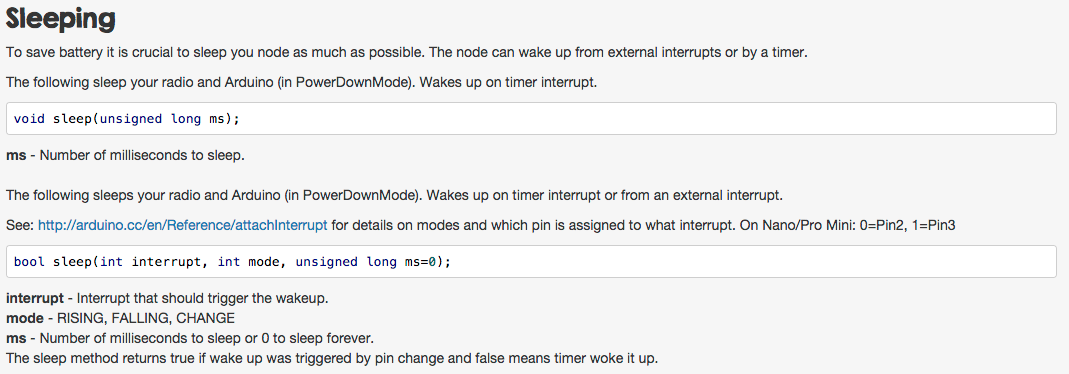
                        I'd try gw.sleep( ) because you can attach the card read function to the interrupt/wakeup event, and avoid the MCU cycling through unnecessary code to get to card read (e.g. gw.process( )).
                        Screen Shot 2015-05-27 at 4.20.00 PM.png

                        1 Reply Last reply
                        0
                        • T Offline
                          T Offline
                          twosh
                          wrote on last edited by
                          #13

                          Earlier I tried using gw.sleep(2, CHANGE, 1000); but that didn't work then. Should I use it another way? And how do I make sure I listen for interrupts on both the D2 and D3 pins?

                          1 Reply Last reply
                          0
                          • BulldogLowellB Offline
                            BulldogLowellB Offline
                            BulldogLowell
                            Contest Winner
                            wrote on last edited by
                            #14
                            attachInterrupt( )
                            

                            attachInterrupt( )

                            1 Reply Last reply
                            0
                            • marceltrapmanM Offline
                              marceltrapmanM Offline
                              marceltrapman
                              Mod
                              wrote on last edited by
                              #15

                              @BulldogLowell Isn't that the part that the MySensors libs (should) take care of?

                              Fulltime Servoy Developer
                              Parttime Moderator MySensors board

                              I use Domoticz as controller for Z-Wave and MySensors (previously Indigo and OpenHAB).
                              I have a FABtotum to print cases.

                              BulldogLowellB 1 Reply Last reply
                              0
                              • marceltrapmanM marceltrapman

                                @BulldogLowell Isn't that the part that the MySensors libs (should) take care of?

                                BulldogLowellB Offline
                                BulldogLowellB Offline
                                BulldogLowell
                                Contest Winner
                                wrote on last edited by
                                #16

                                @marceltrapman said:

                                @BulldogLowell Isn't that the part that the MySensors libs (should) take care of?

                                Good point.

                                Does gw.sleep( ) accept both interrupts?

                                1 Reply Last reply
                                0
                                • hekH Offline
                                  hekH Offline
                                  hek
                                  Admin
                                  wrote on last edited by
                                  #17

                                  I see now that documentation is lacking the dual external pin sleep function (metal note). You'll find it in MySensors.h.

                                  1 Reply Last reply
                                  1
                                  • T Offline
                                    T Offline
                                    twosh
                                    wrote on last edited by
                                    #18

                                    Hi @hek and thanks for the info!

                                    However, I'm not sure that I find anything regarding listening for both D2 and D3-pins in MySensors.h, I only find:

                                    */**
                                    	 * Sleep (PowerDownMode) the Arduino and radio. Wake up on timer or pin change.
                                    	 * See: http://arduino.cc/en/Reference/attachInterrupt for details on modes and which pin
                                    	 * is assigned to what interrupt. On Nano/Pro Mini: 0=Pin2, 1=Pin3
                                    	 * @param interrupt Interrupt that should trigger the wakeup
                                    	 * @param mode RISING, FALLING, CHANGE
                                    	 * @param ms Number of milliseconds to sleep or 0 to sleep forever
                                    	 * @return true if wake up was triggered by pin change and false means timer woke it up.
                                    	 */
                                    	bool sleep(int interrupt, int mode, unsigned long ms=0);
                                    

                                    Which is the same as the documentation, right?

                                    1 Reply Last reply
                                    0
                                    • hekH Offline
                                      hekH Offline
                                      hek
                                      Admin
                                      wrote on last edited by
                                      #19

                                      https://github.com/mysensors/Arduino/blob/master/libraries/MySensors/MySensor.h#L244

                                      1 Reply Last reply
                                      1
                                      • T Offline
                                        T Offline
                                        twosh
                                        wrote on last edited by twosh
                                        #20

                                        Ah, there it is! I was looking at his:
                                        https://github.com/mysensors/CodeBender/blob/master/MySensor.h

                                        Big thanks @hek ! I'll try this when I get home!

                                        1 Reply Last reply
                                        0
                                        • T Offline
                                          T Offline
                                          twosh
                                          wrote on last edited by
                                          #21

                                          Hi again!

                                          I've tried different approaches now with the gw.sleep(); func without success, using CHANGE, RISING or FALLING. No reaction either from tag or the Vera.

                                              // Wait for card/tag to leave reader    
                                              while(nfc.readPassiveTargetID(PN532_MIFARE_ISO14443A, &key[0], &currentKeyLength)); 
                                              // gw.sleep(2000);
                                            }
                                            gw.sleep(0, CHANGE, 1, CHANGE, 0); // int8_t sleep(uint8_t interrupt1, uint8_t mode1, uint8_t interrupt2, uint8_t mode2, unsigned long ms=0);
                                          }
                                          

                                          I've also tried adding this to setup();

                                            interrupts();
                                          

                                          as well as this:

                                            attachInterrupt(0, loop, CHANGE);
                                            attachInterrupt(1, loop, CHANGE);
                                          

                                          Nothing happens. It just continues to sleep...

                                          1 Reply Last reply
                                          0
                                          Reply
                                          • Reply as topic
                                          Log in to reply
                                          • Oldest to Newest
                                          • Newest to Oldest
                                          • Most Votes


                                          22

                                          Online

                                          11.7k

                                          Users

                                          11.2k

                                          Topics

                                          113.1k

                                          Posts


                                          Copyright 2025 TBD   |   Forum Guidelines   |   Privacy Policy   |   Terms of Service
                                          • Login

                                          • Don't have an account? Register

                                          • Login or register to search.
                                          • First post
                                            Last post
                                          0
                                          • MySensors
                                          • OpenHardware.io
                                          • Categories
                                          • Recent
                                          • Tags
                                          • Popular