Skip to content
  • MySensors
  • OpenHardware.io
  • Categories
  • Recent
  • Tags
  • Popular
Skins
  • Light
  • Brite
  • Cerulean
  • Cosmo
  • Flatly
  • Journal
  • Litera
  • Lumen
  • Lux
  • Materia
  • Minty
  • Morph
  • Pulse
  • Sandstone
  • Simplex
  • Sketchy
  • Spacelab
  • United
  • Yeti
  • Zephyr
  • Dark
  • Cyborg
  • Darkly
  • Quartz
  • Slate
  • Solar
  • Superhero
  • Vapor

  • Default (No Skin)
  • No Skin
Collapse
Brand Logo
  1. Home
  2. My Project
  3. Irrigation Controller (up to 16 valves with Shift Registers)

Irrigation Controller (up to 16 valves with Shift Registers)

Scheduled Pinned Locked Moved My Project
371 Posts 56 Posters 248.8k Views 52 Watching
  • Oldest to Newest
  • Newest to Oldest
  • Most Votes
Reply
  • Reply as topic
Log in to reply
This topic has been deleted. Only users with topic management privileges can see it.
  • impertusI impertus

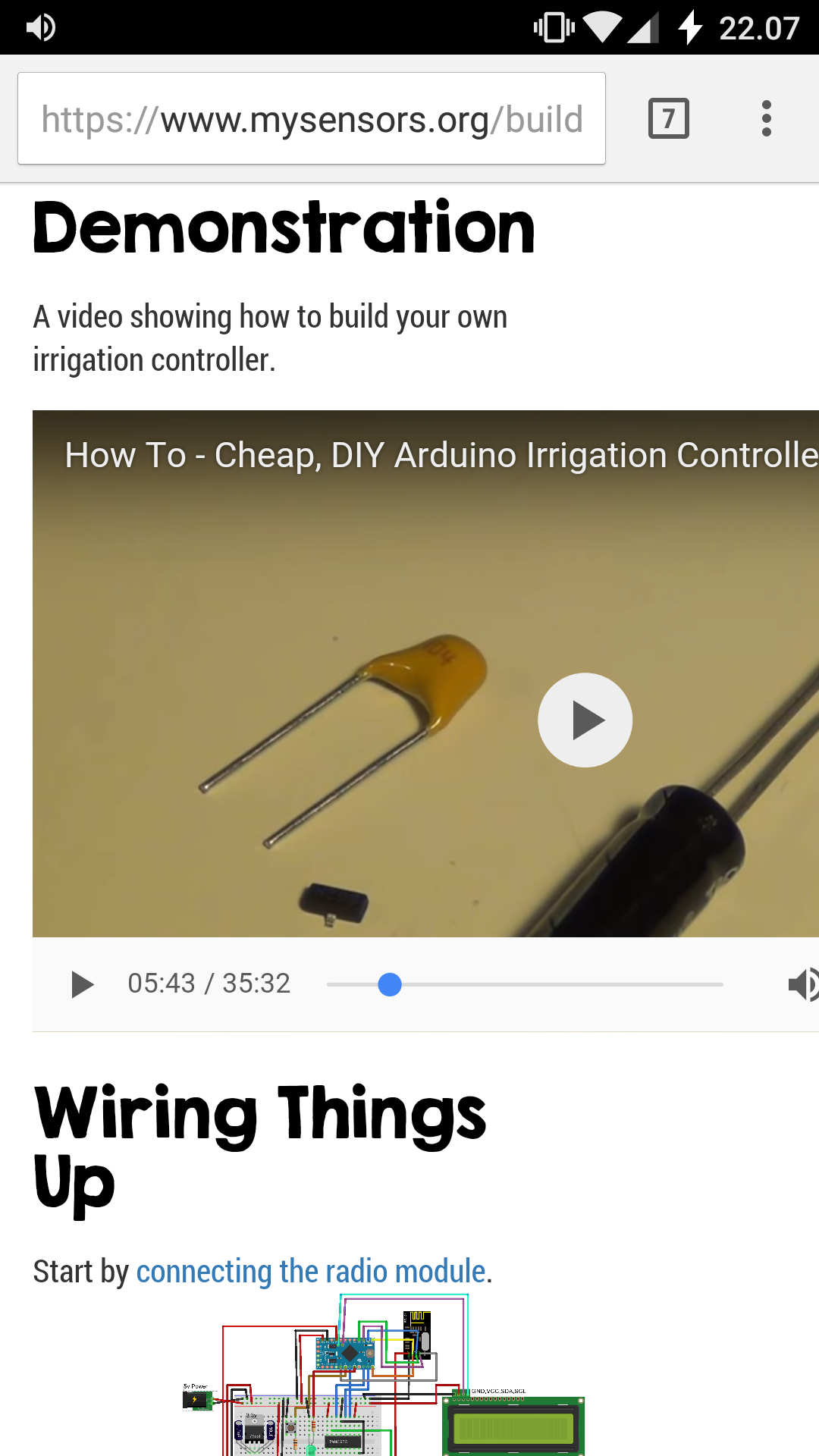
    @petewill this One. 0_1476216631327_Screenshot_20161011-220800.png

    petewillP Offline
    petewillP Offline
    petewill
    Admin
    wrote on last edited by
    #239

    @impertus Ah, ok. That is a .1uf capacitor.

    My "How To" home automation video channel: https://www.youtube.com/channel/UCq_Evyh5PQALx4m4CQuxqkA

    BulldogLowellB 1 Reply Last reply
    0
    • petewillP petewill

      @impertus Ah, ok. That is a .1uf capacitor.

      BulldogLowellB Offline
      BulldogLowellB Offline
      BulldogLowell
      Contest Winner
      wrote on last edited by
      #240

      @petewill

      which can be easily substituted by a flux capacitor.

      :wink:

      impertusI 1 Reply Last reply
      0
      • BulldogLowellB BulldogLowell

        @petewill

        which can be easily substituted by a flux capacitor.

        :wink:

        impertusI Offline
        impertusI Offline
        impertus
        wrote on last edited by
        #241

        @BulldogLowell Thx :)

        Is this the rigth setup.

        Irrigationcontroller <-----> Radio + ethernet (Gateaway) ------> Router + Wifi ------> RaspB with (Calaos HA controller)

        Wifi -----> Calaos Mobile app

        How does the HA controller detects the signal from the irrigation controller? some mystisk setup :) or plug an play..

        What HA will you use (Opensouce)(With mobil function)

        petewillP 1 Reply Last reply
        0
        • impertusI impertus

          @BulldogLowell Thx :)

          Is this the rigth setup.

          Irrigationcontroller <-----> Radio + ethernet (Gateaway) ------> Router + Wifi ------> RaspB with (Calaos HA controller)

          Wifi -----> Calaos Mobile app

          How does the HA controller detects the signal from the irrigation controller? some mystisk setup :) or plug an play..

          What HA will you use (Opensouce)(With mobil function)

          petewillP Offline
          petewillP Offline
          petewill
          Admin
          wrote on last edited by
          #242

          @BulldogLowell Ha! Unfortunately I'm fresh out of those...

          @impertus Both @BulldogLowell and I use Vera as our home automation controller (not open source). My setup looks like: Irrigation Controller <> Ethernet Gateway <> Vera <> Vera Mobile App (usually AutHomationHD). I haven't tested any other controllers with this device but reading up a little in this forum post it appears that some people have got it to work with Domoticz.

          My "How To" home automation video channel: https://www.youtube.com/channel/UCq_Evyh5PQALx4m4CQuxqkA

          impertusI 1 Reply Last reply
          1
          • petewillP petewill

            @BulldogLowell Ha! Unfortunately I'm fresh out of those...

            @impertus Both @BulldogLowell and I use Vera as our home automation controller (not open source). My setup looks like: Irrigation Controller <> Ethernet Gateway <> Vera <> Vera Mobile App (usually AutHomationHD). I haven't tested any other controllers with this device but reading up a little in this forum post it appears that some people have got it to work with Domoticz.

            impertusI Offline
            impertusI Offline
            impertus
            wrote on last edited by
            #243

            @petewill yeahh i did a little bit of surfing on the forum. And felt over Domoticz. I see that also can run on RaspBerryPi. So think i will give that at try. It will be nice with a newbie guide how to setup my sensors to Domo. step by step..

            now im waiting for the mailman with all my components :)

            1 Reply Last reply
            0
            • HuczasH Offline
              HuczasH Offline
              Huczas
              wrote on last edited by
              #244

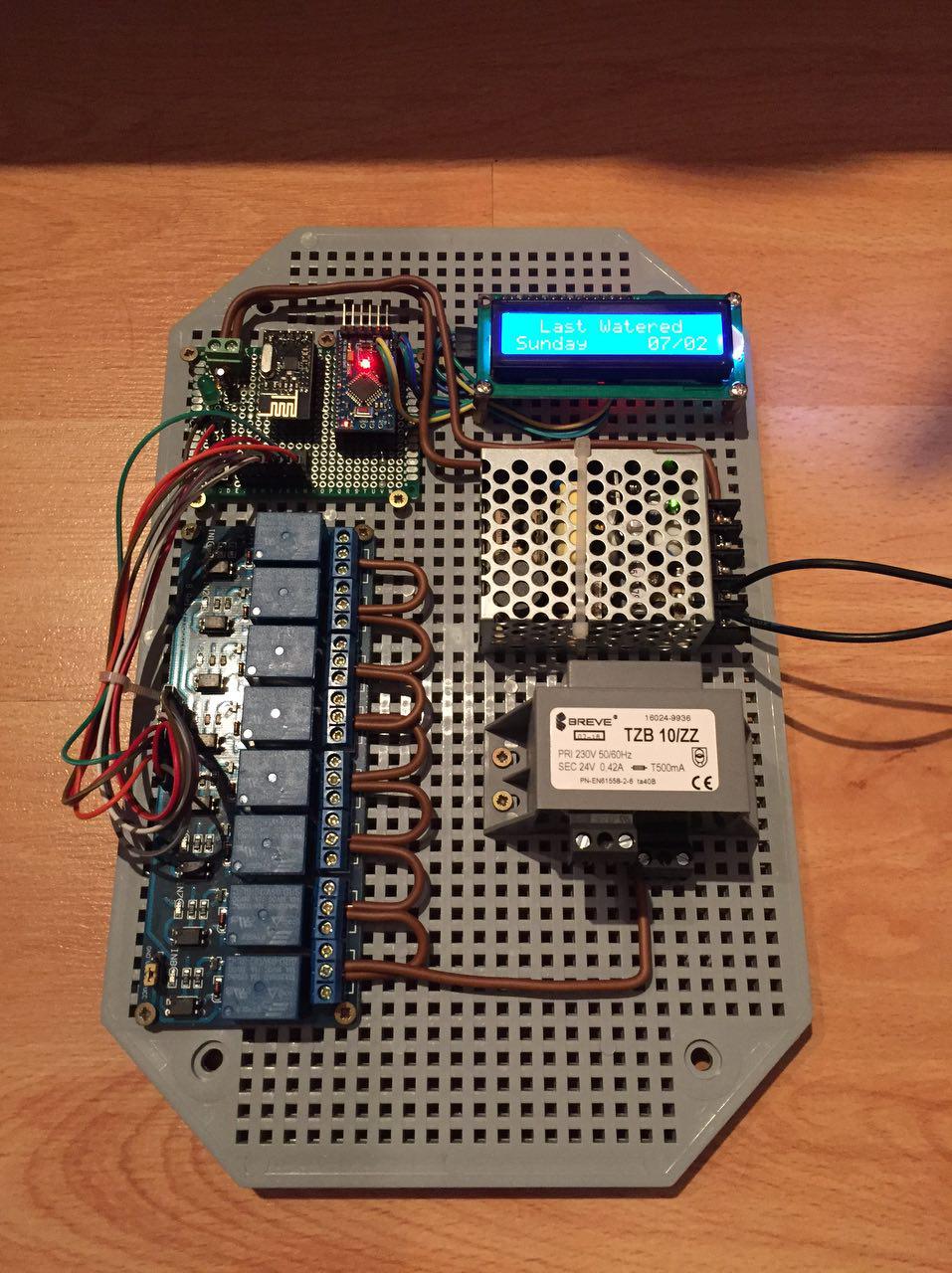
              Hi, I've done recently this setup - it works greate with domoticz and Raspberry Pi 0.
              After some tests I findout that when I plug in power - sometimes all, sometimes 3 or 4 relays are turning ON for 1second.
              If that happend my 24V power adapter will be in trash. How to prevent that? Do I need to add something in code (I'm not a programmer)?
              0_1477417969901_photo_2016-10-25_19-50-49.jpg

              BulldogLowellB 1 Reply Last reply
              0
              • HuczasH Huczas

                Hi, I've done recently this setup - it works greate with domoticz and Raspberry Pi 0.
                After some tests I findout that when I plug in power - sometimes all, sometimes 3 or 4 relays are turning ON for 1second.
                If that happend my 24V power adapter will be in trash. How to prevent that? Do I need to add something in code (I'm not a programmer)?

                0_1477417969901_photo_2016-10-25_19-50-49.jpg

                BulldogLowellB Offline
                BulldogLowellB Offline
                BulldogLowell
                Contest Winner
                wrote on last edited by
                #245

                @Huczas

                try adding a delay in various places in setup() start with 5 or even 10 seconds.

                1 Reply Last reply
                0
                • HuczasH Offline
                  HuczasH Offline
                  Huczas
                  wrote on last edited by Huczas
                  #246

                  ok, I just get back from Hackerspace. Some people fix this issue:
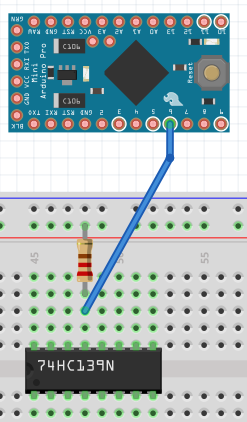
                  SN74HC595 - 13 pin (OE from datascheet) - remove GND and then add pull up 1k resistor and wire it to Arduino pin 6

                  and software, added three lines in code:

                    const int outputEnablePin = 6;
                  
                    pinMode(outputEnablePin, OUTPUT);
                    digitalWrite (outputEnablePin, LOW);


                  put them after 190 line https://github.com/mysensors/MySensorsArduinoExamples/blob/master/examples/IrrigationController/IrrigationController.ino

                  should be like that:

                  <some code>
                   //Setup Shift Register...
                  const int latchPin = 8;
                  const int clockPin = 4;
                  const int dataPin  = 7;
                  const int outputEnablePin = 6;
                  //
                  byte clock[8] = {0x0, 0xe, 0x15, 0x17, 0x11, 0xe, 0x0}; // fetching time indicator
                  byte raindrop[8] = {0x4, 0x4, 0xA, 0xA, 0x11, 0xE, 0x0,}; // fetching Valve Data indicator
                  // Set the pins on the I2C chip used for LCD connections:
                  //                    addr, en,rw,rs,d4,d5,d6,d7,bl,blpol
                  LiquidCrystal_I2C lcd(0x3F, 2, 1, 0, 4, 5, 6, 7, 3, POSITIVE);  // Set the LCD I2C address to 0x27
                  MySensor gw;
                  //
                  MyMessage msg1valve(CHILD_ID_SPRINKLER, V_LIGHT);
                  MyMessage var1valve(CHILD_ID_SPRINKLER, V_VAR1);
                  MyMessage var2valve(CHILD_ID_SPRINKLER, V_VAR2);
                  //
                  void setup()
                  {
                    SERIAL_START(115200);
                    DEBUG_PRINTLN(F("Initialising..."));
                    pinMode(latchPin, OUTPUT);
                    pinMode(clockPin, OUTPUT);
                    pinMode(dataPin, OUTPUT);
                    pinMode(ledPin, OUTPUT);
                    pinMode(waterButtonPin, INPUT_PULLUP);
                    //pinMode(waterButtonPin, INPUT);
                    attachInterrupt(1, PushButton, RISING); //May need to change for your Arduino model
                    digitalWrite (ledPin, HIGH);
                    DEBUG_PRINTLN(F("Turning All Valves Off..."));
                    updateRelays(ALL_VALVES_OFF);
                    pinMode(outputEnablePin, OUTPUT);
                    digitalWrite (outputEnablePin, LOW);
                  <some code>
                  

                  If somebody can update this project in github and that fritzling draw - would be super nice.

                  petewillP 1 Reply Last reply
                  0
                  • HuczasH Huczas

                    ok, I just get back from Hackerspace. Some people fix this issue:
                    SN74HC595 - 13 pin (OE from datascheet) - remove GND and then add pull up 1k resistor and wire it to Arduino pin 6

                    and software, added three lines in code:

                      const int outputEnablePin = 6;
                    
                      pinMode(outputEnablePin, OUTPUT);
                      digitalWrite (outputEnablePin, LOW);


                    put them after 190 line https://github.com/mysensors/MySensorsArduinoExamples/blob/master/examples/IrrigationController/IrrigationController.ino

                    should be like that:

                    <some code>
                     //Setup Shift Register...
                    const int latchPin = 8;
                    const int clockPin = 4;
                    const int dataPin  = 7;
                    const int outputEnablePin = 6;
                    //
                    byte clock[8] = {0x0, 0xe, 0x15, 0x17, 0x11, 0xe, 0x0}; // fetching time indicator
                    byte raindrop[8] = {0x4, 0x4, 0xA, 0xA, 0x11, 0xE, 0x0,}; // fetching Valve Data indicator
                    // Set the pins on the I2C chip used for LCD connections:
                    //                    addr, en,rw,rs,d4,d5,d6,d7,bl,blpol
                    LiquidCrystal_I2C lcd(0x3F, 2, 1, 0, 4, 5, 6, 7, 3, POSITIVE);  // Set the LCD I2C address to 0x27
                    MySensor gw;
                    //
                    MyMessage msg1valve(CHILD_ID_SPRINKLER, V_LIGHT);
                    MyMessage var1valve(CHILD_ID_SPRINKLER, V_VAR1);
                    MyMessage var2valve(CHILD_ID_SPRINKLER, V_VAR2);
                    //
                    void setup()
                    {
                      SERIAL_START(115200);
                      DEBUG_PRINTLN(F("Initialising..."));
                      pinMode(latchPin, OUTPUT);
                      pinMode(clockPin, OUTPUT);
                      pinMode(dataPin, OUTPUT);
                      pinMode(ledPin, OUTPUT);
                      pinMode(waterButtonPin, INPUT_PULLUP);
                      //pinMode(waterButtonPin, INPUT);
                      attachInterrupt(1, PushButton, RISING); //May need to change for your Arduino model
                      digitalWrite (ledPin, HIGH);
                      DEBUG_PRINTLN(F("Turning All Valves Off..."));
                      updateRelays(ALL_VALVES_OFF);
                      pinMode(outputEnablePin, OUTPUT);
                      digitalWrite (outputEnablePin, LOW);
                    <some code>
                    

                    If somebody can update this project in github and that fritzling draw - would be super nice.

                    petewillP Offline
                    petewillP Offline
                    petewill
                    Admin
                    wrote on last edited by
                    #247

                    @Huczas Great, thanks! Have you tested these updates? Also, can you post a link the info on hackerspace?

                    My "How To" home automation video channel: https://www.youtube.com/channel/UCq_Evyh5PQALx4m4CQuxqkA

                    HuczasH 1 Reply Last reply
                    0
                    • petewillP petewill

                      @Huczas Great, thanks! Have you tested these updates? Also, can you post a link the info on hackerspace?

                      HuczasH Offline
                      HuczasH Offline
                      Huczas
                      wrote on last edited by
                      #248

                      @petewill
                      Yes, I've tested this and it's working well!
                      Link to the hackerspace - HackerSpace Warsaw, they are on irc - where I talk with them, #hackerspace-pl at freenode servers.

                      petewillP 2 Replies Last reply
                      0
                      • HuczasH Huczas

                        @petewill
                        Yes, I've tested this and it's working well!
                        Link to the hackerspace - HackerSpace Warsaw, they are on irc - where I talk with them, #hackerspace-pl at freenode servers.

                        petewillP Offline
                        petewillP Offline
                        petewill
                        Admin
                        wrote on last edited by
                        #249

                        @Huczas Oh, ok. I thought it was a forum post. Thanks for the update. I will work to get this updated.

                        My "How To" home automation video channel: https://www.youtube.com/channel/UCq_Evyh5PQALx4m4CQuxqkA

                        1 Reply Last reply
                        0
                        • HuczasH Huczas

                          @petewill
                          Yes, I've tested this and it's working well!
                          Link to the hackerspace - HackerSpace Warsaw, they are on irc - where I talk with them, #hackerspace-pl at freenode servers.

                          petewillP Offline
                          petewillP Offline
                          petewill
                          Admin
                          wrote on last edited by
                          #250

                          @Huczas the code has been updated in the 2.0 GitHub branch. The wiring diagram has also been updated. Thanks for the fix!

                          My "How To" home automation video channel: https://www.youtube.com/channel/UCq_Evyh5PQALx4m4CQuxqkA

                          HuczasH 1 Reply Last reply
                          1
                          • petewillP petewill

                            @Huczas the code has been updated in the 2.0 GitHub branch. The wiring diagram has also been updated. Thanks for the fix!

                            HuczasH Offline
                            HuczasH Offline
                            Huczas
                            wrote on last edited by
                            #251

                            @petewill as I sad before - pull up 1k resistor and wire it to Arduino pin 6 - I mean

                            pull up - connect to power,
                            so should be 1k resistor connected with power source(that make sence with pull up) and also with pin 6. Like below:
                            0_1477751319151_Przechwytywanie.PNG

                            petewillP 1 Reply Last reply
                            0
                            • HuczasH Huczas

                              @petewill as I sad before - pull up 1k resistor and wire it to Arduino pin 6 - I mean

                              pull up - connect to power,
                              so should be 1k resistor connected with power source(that make sence with pull up) and also with pin 6. Like below:
                              0_1477751319151_Przechwytywanie.PNG

                              petewillP Offline
                              petewillP Offline
                              petewill
                              Admin
                              wrote on last edited by
                              #252

                              @Huczas Ah, missed that. I fixed it.

                              My "How To" home automation video channel: https://www.youtube.com/channel/UCq_Evyh5PQALx4m4CQuxqkA

                              1 Reply Last reply
                              0
                              • B Offline
                                B Offline
                                bsivley
                                wrote on last edited by
                                #253

                                I just finished building this but when I go to upload the code to my arduino i get this error

                                'byte clock [8]' redeclared as different kind of symbol

                                what does this mean ?

                                thanks

                                petewillP 1 Reply Last reply
                                0
                                • B bsivley

                                  I just finished building this but when I go to upload the code to my arduino i get this error

                                  'byte clock [8]' redeclared as different kind of symbol

                                  what does this mean ?

                                  thanks

                                  petewillP Offline
                                  petewillP Offline
                                  petewill
                                  Admin
                                  wrote on last edited by
                                  #254

                                  @bsivley Are you using the libraries from the MySensors github page (https://github.com/mysensors/MySensorsArduinoExamples/tree/master/libraries)? I just compiled it without any errors. What version of the Arduino IDE are you using? What version of MySensors are you using?

                                  My "How To" home automation video channel: https://www.youtube.com/channel/UCq_Evyh5PQALx4m4CQuxqkA

                                  Andrej_ABA 1 Reply Last reply
                                  0
                                  • petewillP petewill

                                    @bsivley Are you using the libraries from the MySensors github page (https://github.com/mysensors/MySensorsArduinoExamples/tree/master/libraries)? I just compiled it without any errors. What version of the Arduino IDE are you using? What version of MySensors are you using?

                                    Andrej_ABA Offline
                                    Andrej_ABA Offline
                                    Andrej_AB
                                    wrote on last edited by
                                    #255

                                    @petewill Hi, Please can you advise what version Arduino IDE you are using for this sketch?

                                    rechin304R 1 Reply Last reply
                                    0
                                    • Andrej_ABA Andrej_AB

                                      @petewill Hi, Please can you advise what version Arduino IDE you are using for this sketch?

                                      rechin304R Offline
                                      rechin304R Offline
                                      rechin304
                                      wrote on last edited by
                                      #256
                                      This post is deleted!
                                      1 Reply Last reply
                                      0
                                      • Andrej_ABA Offline
                                        Andrej_ABA Offline
                                        Andrej_AB
                                        wrote on last edited by
                                        #257

                                        Hi, Maybe somebody can help me with this issue? Managed to upload code for irrigation controller with Arduino IDE 1.6.12 but can't pair with Vera controller.

                                        petewillP 1 Reply Last reply
                                        0
                                        • Andrej_ABA Andrej_AB

                                          Hi, Maybe somebody can help me with this issue? Managed to upload code for irrigation controller with Arduino IDE 1.6.12 but can't pair with Vera controller.

                                          petewillP Offline
                                          petewillP Offline
                                          petewill
                                          Admin
                                          wrote on last edited by
                                          #258

                                          @Andrej_AB I'm using 1.6.12 but I haven't changed my node to 2.0 yet.
                                          What is the issue you are having with pairing? Do you see the presentation messages on your gateway? Do you have other nodes successfully paired with your Vera?

                                          My "How To" home automation video channel: https://www.youtube.com/channel/UCq_Evyh5PQALx4m4CQuxqkA

                                          Andrej_ABA 1 Reply Last reply
                                          0
                                          Reply
                                          • Reply as topic
                                          Log in to reply
                                          • Oldest to Newest
                                          • Newest to Oldest
                                          • Most Votes


                                          7

                                          Online

                                          11.7k

                                          Users

                                          11.2k

                                          Topics

                                          113.1k

                                          Posts


                                          Copyright 2025 TBD   |   Forum Guidelines   |   Privacy Policy   |   Terms of Service
                                          • Login

                                          • Don't have an account? Register

                                          • Login or register to search.
                                          • First post
                                            Last post
                                          0
                                          • MySensors
                                          • OpenHardware.io
                                          • Categories
                                          • Recent
                                          • Tags
                                          • Popular