Skip to content
  • MySensors
  • OpenHardware.io
  • Categories
  • Recent
  • Tags
  • Popular
Skins
  • Light
  • Brite
  • Cerulean
  • Cosmo
  • Flatly
  • Journal
  • Litera
  • Lumen
  • Lux
  • Materia
  • Minty
  • Morph
  • Pulse
  • Sandstone
  • Simplex
  • Sketchy
  • Spacelab
  • United
  • Yeti
  • Zephyr
  • Dark
  • Cyborg
  • Darkly
  • Quartz
  • Slate
  • Solar
  • Superhero
  • Vapor

  • Default (No Skin)
  • No Skin
Collapse
Brand Logo
  1. Home
  2. Announcements
  3. 💬 Battery Powered Sensors

💬 Battery Powered Sensors

Scheduled Pinned Locked Moved Announcements
battery
347 Posts 55 Posters 68.2k Views 53 Watching
  • Oldest to Newest
  • Newest to Oldest
  • Most Votes
Reply
  • Reply as topic
Log in to reply
This topic has been deleted. Only users with topic management privileges can see it.
  • GertSandersG Offline
    GertSandersG Offline
    GertSanders
    Hardware Contributor
    wrote on last edited by GertSanders
    #2

    Here is a view of a node running exactly 1year. The effect of a bad radio is seen here as the fast voltage drops. I had a very low charged battery to start with, replaced it with new batteries which also discharged fast, and replaced both batteries and the radio. Since mid january 2016 the node has been running as expected. My guess is that this combo will run for 2 years (given how it has been working the past 9 months).

    This node measures battery voltage, temperature and humidity and sends 3 messages about every 5 minutes.
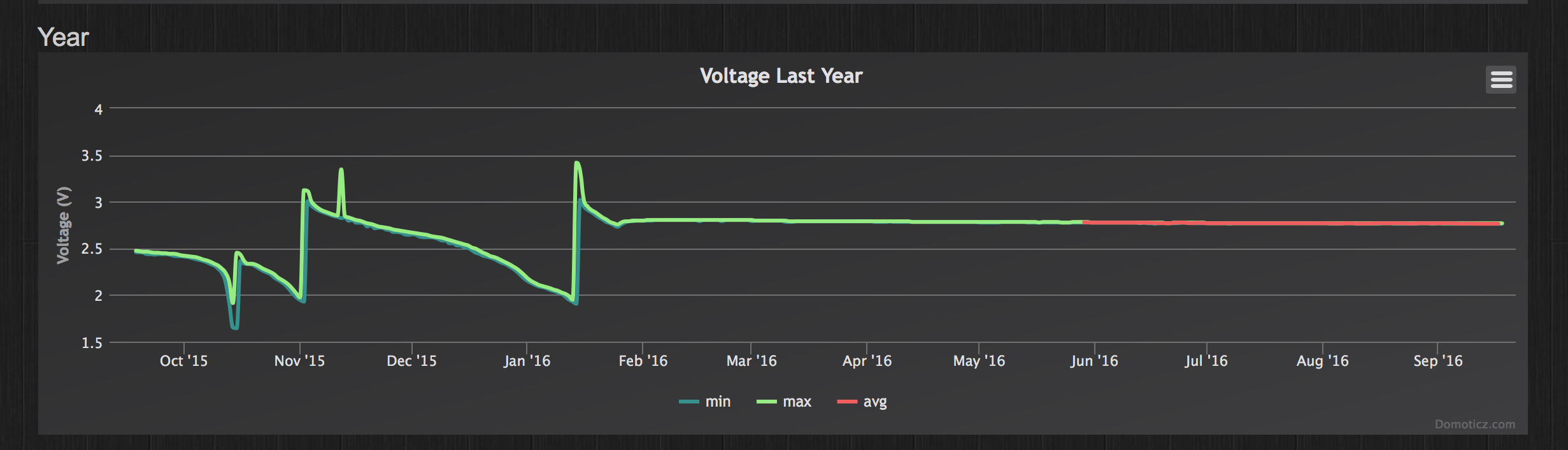
    0_1474202873202_Screen Shot 2016-09-18 at 14.41.30.png

    And here is the battery measurement of the second node that went "online" the same day (18/sep/2015, with a good radio, and similarly used batteries from the start). This node sends very few messages (at least 1 every 24 hours, and when one of 3 contacts are opened). Most days it just sends 1 message.
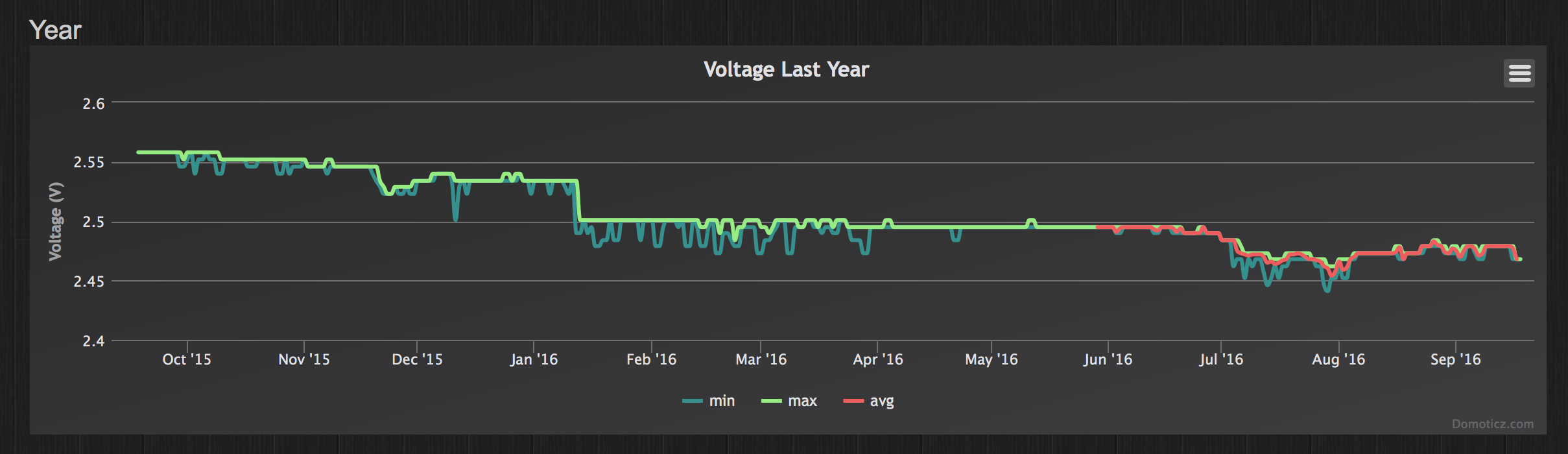
    0_1474203476121_Screen Shot 2016-09-18 at 14.55.05.png

    So even with batteries already at a low level, you can make useful nodes using the MySensors setup :-)

    C 1 Reply Last reply
    1
    • CravecodeC Offline
      CravecodeC Offline
      Cravecode
      wrote on last edited by
      #3
      This post is deleted!
      1 Reply Last reply
      0
      • N Offline
        N Offline
        Nicklas Starkel
        wrote on last edited by
        #4

        Sorry, where do you measure the power when it is in sleep mode? ie, where do you put your multimeter probes.

        mfalkviddM 1 Reply Last reply
        0
        • N Nicklas Starkel

          Sorry, where do you measure the power when it is in sleep mode? ie, where do you put your multimeter probes.

          mfalkviddM Offline
          mfalkviddM Offline
          mfalkvidd
          Mod
          wrote on last edited by
          #5

          @Nicklas-Starkel you put them in serial. So:
          battery+ to multimeter- (set to uA mode)
          Multimeter+ to vcc
          Battery- to gnd

          You need a very sensitive multimeter though. Most multimeters won't be able to measure low current reliably.

          N 1 Reply Last reply
          0
          • mfalkviddM mfalkvidd

            @Nicklas-Starkel you put them in serial. So:
            battery+ to multimeter- (set to uA mode)
            Multimeter+ to vcc
            Battery- to gnd

            You need a very sensitive multimeter though. Most multimeters won't be able to measure low current reliably.

            N Offline
            N Offline
            Nicklas Starkel
            wrote on last edited by
            #6

            @mfalkvidd that's what I thought! I see that I'm getting 3.4V in the multimeter but my pro mini nor nano will start up (I have not removed the LEDs so they should light up).
            If I use more V (6.8V) I put in via RAW on the PRO mini, and I can see teh voltage, but the same thing, it's not starting up, hmmm I wonder what rookie mistake I'm doing!

            mfalkviddM 1 Reply Last reply
            0
            • N Nicklas Starkel

              @mfalkvidd that's what I thought! I see that I'm getting 3.4V in the multimeter but my pro mini nor nano will start up (I have not removed the LEDs so they should light up).
              If I use more V (6.8V) I put in via RAW on the PRO mini, and I can see teh voltage, but the same thing, it's not starting up, hmmm I wonder what rookie mistake I'm doing!

              mfalkviddM Offline
              mfalkviddM Offline
              mfalkvidd
              Mod
              wrote on last edited by mfalkvidd
              #7

              @Nicklas-Starkel sounds like you have the multimeter set to measure voltage instead of current. Which multimeter model are you using? Could you post a photo? There is usually a dial that can be turned to switch mode. Many multimeters also require moving one of the probes to a different connector (on the multimeter itself).

              N 1 Reply Last reply
              0
              • mfalkviddM mfalkvidd

                @Nicklas-Starkel sounds like you have the multimeter set to measure voltage instead of current. Which multimeter model are you using? Could you post a photo? There is usually a dial that can be turned to switch mode. Many multimeters also require moving one of the probes to a different connector (on the multimeter itself).

                N Offline
                N Offline
                Nicklas Starkel
                wrote on last edited by
                #8

                @mfalkvidd , it was too late at night for me.
                I had it at current but it didn't show anything. So without thinking I put it at voltage.
                And the problem with not showing anything when I had it at current was I had blown the internal multimeter fuse some days ago.
                Ehrmm.. yes. move along, nothing to see here :)

                mfalkviddM 1 Reply Last reply
                2
                • N Nicklas Starkel

                  @mfalkvidd , it was too late at night for me.
                  I had it at current but it didn't show anything. So without thinking I put it at voltage.
                  And the problem with not showing anything when I had it at current was I had blown the internal multimeter fuse some days ago.
                  Ehrmm.. yes. move along, nothing to see here :)

                  mfalkviddM Offline
                  mfalkviddM Offline
                  mfalkvidd
                  Mod
                  wrote on last edited by
                  #9

                  @Nicklas-Starkel great that you figured out what was wrong

                  1 Reply Last reply
                  0
                  • bjacobtB Offline
                    bjacobtB Offline
                    bjacobt
                    wrote on last edited by
                    #10

                    Hi, I built this circuit and arduino reads 1.11 V or 33%. I've new batteries and multimeter reads 3.10 volts. Do you know what could be wrong? I'm using 1M and 470k resistors on pin A0.

                    1 Reply Last reply
                    0
                    • tonnerre33T Offline
                      tonnerre33T Offline
                      tonnerre33
                      Hardware Contributor
                      wrote on last edited by
                      #11

                      Hello,

                      Did you put this command in the setup sketch ?

                      analogReference(INTERNAL);
                      
                      1 Reply Last reply
                      0
                      • bjacobtB Offline
                        bjacobtB Offline
                        bjacobt
                        wrote on last edited by
                        #12

                        @tonnerre33, yes I've analogReference(INTERNAL); in setup()

                        1 Reply Last reply
                        0
                        • tonnerre33T Offline
                          tonnerre33T Offline
                          tonnerre33
                          Hardware Contributor
                          wrote on last edited by tonnerre33
                          #13

                          It's normal to have 1.1V on A0 when you have 3.3V on your batteries.

                          Where did you get the 1.11V value ? In the serial print or with your multimeter ?
                          If you read the value with the serial print, which variable is it (sensorValue or batteryV) ?

                          1 Reply Last reply
                          0
                          • bjacobtB Offline
                            bjacobtB Offline
                            bjacobt
                            wrote on last edited by
                            #14

                            @tonnerre33 in the serial print and MySensor MQTT gateway

                            1 Reply Last reply
                            0
                            • bjacobtB Offline
                              bjacobtB Offline
                              bjacobt
                              wrote on last edited by
                              #15

                              @tonnerre33, I'm trying to build arduio that can run on 2 AA batteries. I'm using MySensors for library and building arduino circuit based on this https://openhomeautomation.net/arduino-battery/

                              mfalkviddM 1 Reply Last reply
                              0
                              • tonnerre33T Offline
                                tonnerre33T Offline
                                tonnerre33
                                Hardware Contributor
                                wrote on last edited by tonnerre33
                                #16

                                Can you post the logs of your node and the skech used ?

                                bjacobtB 1 Reply Last reply
                                0
                                • bjacobtB bjacobt

                                  @tonnerre33, I'm trying to build arduio that can run on 2 AA batteries. I'm using MySensors for library and building arduino circuit based on this https://openhomeautomation.net/arduino-battery/

                                  mfalkviddM Offline
                                  mfalkviddM Offline
                                  mfalkvidd
                                  Mod
                                  wrote on last edited by
                                  #17

                                  @bjacobt https://www.mysensors.org/build/battery#measuring-and-reporting-battery-level describes how the battery voltage is calculated and the example sketch has code for doing the calculation. Looks like you've missed reading this part:

                                     // 1M, 470K divider across battery and using internal ADC ref of 1.1V
                                     // Sense point is bypassed with 0.1 uF cap to reduce noise at that point
                                     // ((1e6+470e3)/470e3)*1.1 = Vmax = 3.44 Volts
                                     // 3.44/1023 = Volts per bit = 0.003363075
                                  ...
                                  float batteryV  = sensorValue * 0.003363075;
                                  
                                  bjacobtB 1 Reply Last reply
                                  1
                                  • tonnerre33T tonnerre33

                                    Can you post the logs of your node and the skech used ?

                                    bjacobtB Offline
                                    bjacobtB Offline
                                    bjacobt
                                    wrote on last edited by
                                    #18

                                    @tonnerre33
                                    Here are the logs from Arduino Serial console

                                    Starting sensor (RNNNA-, 2.0.0)
                                    TSM:INIT
                                    TSM:RADIO:OK
                                    TSP:ASSIGNID:OK (ID=101)
                                    TSM:FPAR
                                    TSP:MSG:SEND 101-101-255-255 s=255,c=3,t=7,pt=0,l=0,sg=0,ft=0,st=bc:
                                    TSP:MSG:READ 0-0-101 s=255,c=3,t=8,pt=1,l=1,sg=0:0
                                    TSP:MSG:FPAR RES (ID=0, dist=0)
                                    TSP:MSG:PAR OK (ID=0, dist=1)
                                    TSM:FPAR:OK
                                    TSM:ID
                                    TSM:CHKID:OK (ID=101)
                                    TSM:UPL
                                    TSP:PING:SEND (dest=0)
                                    TSP:MSG:SEND 101-101-0-0 s=255,c=3,t=24,pt=1,l=1,sg=0,ft=0,st=ok:1
                                    TSP:MSG:READ 0-0-101 s=255,c=3,t=25,pt=1,l=1,sg=0:1
                                    TSP:MSG:PONG RECV (hops=1)
                                    TSP:CHKUPL:OK
                                    TSM:UPL:OK
                                    TSM:READY
                                    TSP:MSG:SEND 101-101-0-0 s=255,c=3,t=15,pt=6,l=2,sg=0,ft=0,st=ok:0100
                                    !TSP:MSG:SEND 101-101-0-0 s=255,c=0,t=17,pt=0,l=5,sg=0,ft=0,st=fail:2.0.0
                                    TSP:MSG:SEND 101-101-0-0 s=255,c=3,t=6,pt=1,l=1,sg=0,ft=1,st=ok:0
                                    TSP:MSG:READ 0-0-101 s=255,c=3,t=15,pt=6,l=2,sg=0:0100
                                    TSP:MSG:SEND 101-101-0-0 s=255,c=3,t=11,pt=0,l=13,sg=0,ft=0,st=ok:Battery Meter
                                    TSP:MSG:SEND 101-101-0-0 s=255,c=3,t=12,pt=0,l=3,sg=0,ft=0,st=ok:1.0
                                    Request registration...
                                    TSP:MSG:SEND 101-101-0-0 s=255,c=3,t=26,pt=1,l=1,sg=0,ft=0,st=ok:2
                                    TSP:MSG:READ 0-0-101 s=255,c=3,t=27,pt=1,l=1,sg=0:1
                                    Node registration=1
                                    Init complete, id=101, parent=0, distance=1, registration=1
                                    330
                                    Battery Voltage: 1.11 V
                                    Battery percent: 33 %
                                    TSP:MSG:SEND 101-101-0-0 s=255,c=3,t=0,pt=1,l=1,sg=0,ft=0,st=ok:33
                                    

                                    The sketch used is this:

                                    /**
                                     * The MySensors Arduino library handles the wireless radio link and protocol
                                     * between your home built sensors/actuators and HA controller of choice.
                                     * The sensors forms a self healing radio network with optional repeaters. Each
                                     * repeater and gateway builds a routing tables in EEPROM which keeps track of the
                                     * network topology allowing messages to be routed to nodes.
                                     *
                                     * Created by Henrik Ekblad <henrik.ekblad@mysensors.org>
                                     * Copyright (C) 2013-2015 Sensnology AB
                                     * Full contributor list: https://github.com/mysensors/Arduino/graphs/contributors
                                     *
                                     * Documentation: http://www.mysensors.org
                                     * Support Forum: http://forum.mysensors.org
                                     *
                                     * This program is free software; you can redistribute it and/or
                                     * modify it under the terms of the GNU General Public License
                                     * version 2 as published by the Free Software Foundation.
                                     *
                                     *******************************
                                     *
                                     * DESCRIPTION
                                     *
                                     * This is an example that demonstrates how to report the battery level for a sensor
                                     * Instructions for measuring battery capacity on A0 are available here:
                                     * http://www.mysensors.org/build/battery
                                     * 
                                     */
                                    
                                    
                                    #define MY_NODE_ID  101
                                    
                                    // Enable debug prints to serial monitor
                                    #define MY_DEBUG 
                                    
                                    // Enable and select radio type attached
                                    #define MY_RADIO_NRF24
                                    //#define MY_RADIO_RFM69
                                    
                                    #include <MySensors.h>


                                    int BATTERY_SENSE_PIN = A0;  // select the input pin for the battery sense point
                                    
                                    unsigned long SLEEP_TIME = 100000;  // sleep time between reads (seconds * 1000 milliseconds)
                                    int oldBatteryPcnt = 0;
                                    
                                    void setup()  
                                    {
                                       // use the 1.1 V internal reference
                                    #if defined(__AVR_ATmega2560__)
                                       analogReference(INTERNAL1V1);
                                    #else
                                       analogReference(INTERNAL);
                                    #endif
                                    }
                                    
                                    void presentation() {
                                       // Send the sketch version information to the gateway and Controller
                                       sendSketchInfo("Battery Meter", "1.0");
                                    }
                                    
                                    void loop()
                                    {
                                       // get the battery Voltage
                                       int sensorValue = analogRead(BATTERY_SENSE_PIN);
                                       #ifdef MY_DEBUG
                                       Serial.println(sensorValue);
                                       #endif
                                    
                                       // 1M, 470K divider across battery and using internal ADC ref of 1.1V
                                       // Sense point is bypassed with 0.1 uF cap to reduce noise at that point
                                       // ((1e6+470e3)/470e3)*1.1 = Vmax = 3.44 Volts
                                       // 3.44/1023 = Volts per bit = 0.003363075
                                    
                                       int batteryPcnt = sensorValue / 10;
                                    
                                       #ifdef MY_DEBUG
                                       float batteryV  = sensorValue * 0.003363075;
                                       Serial.print("Battery Voltage: ");
                                       Serial.print(batteryV);
                                       Serial.println(" V");
                                    
                                       Serial.print("Battery percent: ");
                                       Serial.print(batteryPcnt);
                                       Serial.println(" %");
                                       #endif
                                    
                                       if (oldBatteryPcnt != batteryPcnt) {
                                         // Power up radio after sleep
                                         sendBatteryLevel(batteryPcnt);
                                         oldBatteryPcnt = batteryPcnt;
                                       }
                                       sleep(SLEEP_TIME);
                                    }```
                                    
                                    What I see on the gateway is:


                                    mysGateway: TSF:MSG:READ,101-101-255,s=255,c=3,t=7,pt=0,l=0,sg=0:
                                    mysGateway: TSF:MSG:BC
                                    mysGateway: TSF:MSG:FPAR REQ,ID=101
                                    mysGateway: TSF:PNG:SEND,TO=0
                                    mysGateway: TSF:CKU:OK
                                    mysGateway: TSF:MSG:GWL OK
                                    mysGateway: TSF:MSG:SEND,0-0-101-101,s=255,c=3,t=8,pt=1,l=1,sg=0,ft=0,st=OK:0
                                    mysGateway: TSF:MSG:READ,101-101-0,s=255,c=3,t=24,pt=1,l=1,sg=0:1
                                    mysGateway: TSF:MSG:PINGED,ID=101,HP=1
                                    mysGateway: TSF:MSG:SEND,0-0-101-101,s=255,c=3,t=25,pt=1,l=1,sg=0,ft=0,st=OK:1
                                    mysGateway: TSF:MSG:READ,101-101-0,s=255,c=3,t=15,pt=6,l=2,sg=0:0100
                                    mysGateway: !TSF:MSG:SEND,0-0-101-101,s=255,c=3,t=15,pt=6,l=2,sg=0,ft=0,st=NACK:0100
                                    mysGateway: TSF:MSG:READ,101-101-0,s=255,c=3,t=6,pt=1,l=1,sg=0:0
                                    mysGateway: Sending message on topic: mysensors-out/101/255/3/0/6
                                    mysGateway: TSF:MSG:READ,101-101-255,s=255,c=3,t=7,pt=0,l=0,sg=0:
                                    mysGateway: TSF:MSG:BC
                                    mysGateway: TSF:MSG:FPAR REQ,ID=101
                                    mysGateway: TSF:CKU:OK,FCTRL
                                    mysGateway: TSF:MSG:GWL OK
                                    mysGateway: TSF:MSG:SEND,0-0-101-101,s=255,c=3,t=8,pt=1,l=1,sg=0,ft=0,st=OK:0
                                    mysGateway: TSF:MSG:READ,101-101-0,s=255,c=3,t=24,pt=1,l=1,sg=0:1
                                    mysGateway: TSF:MSG:PINGED,ID=101,HP=1
                                    mysGateway: TSF:MSG:SEND,0-0-101-101,s=255,c=3,t=25,pt=1,l=1,sg=0,ft=0,st=OK:1
                                    mysGateway: TSF:MSG:READ,101-101-0,s=255,c=3,t=15,pt=6,l=2,sg=0:0100
                                    mysGateway: !TSF:MSG:SEND,0-0-101-101,s=255,c=3,t=15,pt=6,l=2,sg=0,ft=0,st=NACK:0100
                                    mysGateway: TSF:MSG:READ,101-101-0,s=255,c=3,t=6,pt=1,l=1,sg=0:0
                                    mysGateway: Sending message on topic: mysensors-out/101/255/3/0/6
                                    mysGateway: TSF:MSG:READ,101-101-0,s=255,c=3,t=11,pt=0,l=13,sg=0:Battery Meter
                                    mysGateway: Sending message on topic: mysensors-out/101/255/3/0/11
                                    mysGateway: TSF:MSG:READ,101-101-0,s=255,c=3,t=12,pt=0,l=3,sg=0:1.0
                                    mysGateway: Sending message on topic: mysensors-out/101/255/3/0/12
                                    mysGateway: TSF:MSG:READ,101-101-0,s=255,c=3,t=26,pt=1,l=1,sg=0:2
                                    mysGateway: TSF:MSG:SEND,0-0-101-101,s=255,c=3,t=27,pt=1,l=1,sg=0,ft=0,st=OK:1
                                    mysGateway: TSF:MSG:READ,101-101-0,s=255,c=3,t=0,pt=1,l=1,sg=0:33
                                    mysGateway: Sending message on topic: mysensors-out/101/255/3/0/0```

                                    Thank for your help!
                                    Jacob

                                    1 Reply Last reply
                                    0
                                    • mfalkviddM mfalkvidd

                                      @bjacobt https://www.mysensors.org/build/battery#measuring-and-reporting-battery-level describes how the battery voltage is calculated and the example sketch has code for doing the calculation. Looks like you've missed reading this part:

                                         // 1M, 470K divider across battery and using internal ADC ref of 1.1V
                                         // Sense point is bypassed with 0.1 uF cap to reduce noise at that point
                                         // ((1e6+470e3)/470e3)*1.1 = Vmax = 3.44 Volts
                                         // 3.44/1023 = Volts per bit = 0.003363075
                                      ...
                                      float batteryV  = sensorValue * 0.003363075;
                                      
                                      bjacobtB Offline
                                      bjacobtB Offline
                                      bjacobt
                                      wrote on last edited by
                                      #19

                                      hi @mfalkvidd,

                                      Do you mind clarifying a bit, I've done sensorValue * 0.003363075

                                      analogRead(BATTERY_SENSE_PIN);
                                      

                                      Gives me 330, so
                                      330 * 0.003363075 = 1.10981475 volts

                                      Thank You!
                                      Jacob

                                      mfalkviddM 1 Reply Last reply
                                      0
                                      • bjacobtB bjacobt

                                        hi @mfalkvidd,

                                        Do you mind clarifying a bit, I've done sensorValue * 0.003363075

                                        analogRead(BATTERY_SENSE_PIN);
                                        

                                        Gives me 330, so
                                        330 * 0.003363075 = 1.10981475 volts

                                        Thank You!
                                        Jacob

                                        mfalkviddM Offline
                                        mfalkviddM Offline
                                        mfalkvidd
                                        Mod
                                        wrote on last edited by
                                        #20

                                        @bjacobt hmm. Yes, you are correct. The calculation seem a bit strange.
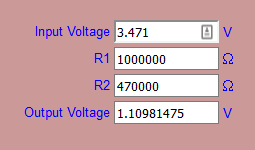
                                        Using this calculator I entered
                                        output 1.10981475 V
                                        R1 1000000
                                        R2 470000
                                        Which gives a battery voltage of 3.471V
                                        0_1478095026919_voltage.png

                                        Looks like the calculations in the sketch are wrong? Or at least confusing :) I'm pretty lost.

                                        1 Reply Last reply
                                        0
                                        • tonnerre33T Offline
                                          tonnerre33T Offline
                                          tonnerre33
                                          Hardware Contributor
                                          wrote on last edited by tonnerre33
                                          #21
                                          analogRead(BATTERY_SENSE_PIN);
                                          

                                          must give you 1023 and not 330.
                                          For me it's a problem of value resistance or analogReference.

                                          Try to add this

                                          analogReference(INTERNAL);
                                          sensorValue = analogRead(BATTERY_SENSE_PIN);
                                            #ifdef MY_DEBUG
                                           Serial.print("Value A0 before force reference: ");
                                           Serial.print(sensorValue);
                                          #endif
                                          delay(10000);
                                          sensorValue = analogRead(BATTERY_SENSE_PIN);
                                            #ifdef MY_DEBUG
                                           Serial.print("Value A0 after force reference: ");
                                           Serial.print(sensorValue);
                                          #endif
                                          

                                          Just after this existing code :

                                             #ifdef MY_DEBUG
                                             Serial.println(sensorValue);
                                             #endif
                                          

                                          And plz send me the logs of the node ;)

                                          bjacobtB 1 Reply Last reply
                                          0
                                          Reply
                                          • Reply as topic
                                          Log in to reply
                                          • Oldest to Newest
                                          • Newest to Oldest
                                          • Most Votes


                                          23

                                          Online

                                          11.7k

                                          Users

                                          11.2k

                                          Topics

                                          113.1k

                                          Posts


                                          Copyright 2025 TBD   |   Forum Guidelines   |   Privacy Policy   |   Terms of Service
                                          • Login

                                          • Don't have an account? Register

                                          • Login or register to search.
                                          • First post
                                            Last post
                                          0
                                          • MySensors
                                          • OpenHardware.io
                                          • Categories
                                          • Recent
                                          • Tags
                                          • Popular