Skip to content
  • MySensors
  • OpenHardware.io
  • Categories
  • Recent
  • Tags
  • Popular
Skins
  • Light
  • Brite
  • Cerulean
  • Cosmo
  • Flatly
  • Journal
  • Litera
  • Lumen
  • Lux
  • Materia
  • Minty
  • Morph
  • Pulse
  • Sandstone
  • Simplex
  • Sketchy
  • Spacelab
  • United
  • Yeti
  • Zephyr
  • Dark
  • Cyborg
  • Darkly
  • Quartz
  • Slate
  • Solar
  • Superhero
  • Vapor

  • Default (No Skin)
  • No Skin
Collapse
Brand Logo
  1. Home
  2. Troubleshooting
  3. Sending sensor data from raspberry via NRF24L01+ to arduino

Sending sensor data from raspberry via NRF24L01+ to arduino

Scheduled Pinned Locked Moved Troubleshooting
33 Posts 4 Posters 8.1k Views 3 Watching
  • Oldest to Newest
  • Newest to Oldest
  • Most Votes
Reply
  • Reply as topic
Log in to reply
This topic has been deleted. Only users with topic management privileges can see it.
  • H hugo_pn

    Hi,

    I'm having problems exactly the same as @LaMB95

    The MySensors library is installed, at least is says so doing as shown in the link @mfalkvidd sent.

    This is my error:

    "
    DallasTemperatureSensor.ino:36:25: fatal error: MySensors.h: No such file or directory
    Compilation terminated.
    "

    Thanks

    LaMB95L Offline
    LaMB95L Offline
    LaMB95
    wrote on last edited by
    #13

    @hugo_pn

    Okay could you check what version of Arduino IDE you have now ?
    If there is a newer version upgrade to that.

    My issue was that I could not find the library manager in the version I had.

    Hope it helps !

    1 Reply Last reply
    0
    • H hugo_pn

      Hi,

      I'm having problems exactly the same as @LaMB95

      The MySensors library is installed, at least is says so doing as shown in the link @mfalkvidd sent.

      This is my error:

      "
      DallasTemperatureSensor.ino:36:25: fatal error: MySensors.h: No such file or directory
      Compilation terminated.
      "

      Thanks

      gohanG Offline
      gohanG Offline
      gohan
      Mod
      wrote on last edited by
      #14

      @hugo_pn

      You don't have the mysensors library installed

      1 Reply Last reply
      0
      • H Offline
        H Offline
        hugo_pn
        wrote on last edited by hugo_pn
        #15

        Hi all,

        @LaMB95
        I'll have to get back to you later on that.

        @gohan
        The software says it's installed. Is there a way to uninstall and install again?

        Thanks

        gohanG 1 Reply Last reply
        0
        • H hugo_pn

          Hi all,

          @LaMB95
          I'll have to get back to you later on that.

          @gohan
          The software says it's installed. Is there a way to uninstall and install again?

          Thanks

          gohanG Offline
          gohanG Offline
          gohan
          Mod
          wrote on last edited by
          #16

          @hugo_pn
          from library manager you can install, remove, update the libraries. You can try to remove from the Arduino IDE and try to copy the library manually where you have all the libraries

          1 Reply Last reply
          0
          • H Offline
            H Offline
            hugo_pn
            wrote on last edited by
            #17

            Hi all,

            Sorry for the delay, my IDE is 1.6.5 going to try and update.

            Thanks in advance.

            cheers

            1 Reply Last reply
            0
            • H Offline
              H Offline
              hugo_pn
              wrote on last edited by hugo_pn
              #18

              Got it working, IDE updated and everything working.

              My temperature already getting values.

              Going to try and attached another DS18B20 as shown in the example.

              Don´t really know what is going to show up.

              Thanks

              1 Reply Last reply
              0
              • gohanG Offline
                gohanG Offline
                gohan
                Mod
                wrote on last edited by
                #19

                Just change the node ID and you shouldn't have any problem

                LaMB95L 1 Reply Last reply
                0
                • gohanG gohan

                  Just change the node ID and you shouldn't have any problem

                  LaMB95L Offline
                  LaMB95L Offline
                  LaMB95
                  wrote on last edited by
                  #20

                  @gohan

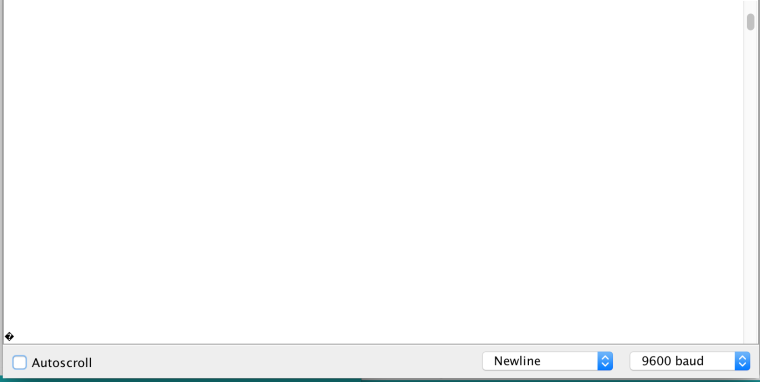
                  I am facing an issue while sending data from an Arduino pro mini 5V to an arduino UNO. Receiving a lot of garbage from the Pro mini.
                  Any idea why ?

                  gohanG 1 Reply Last reply
                  0
                  • LaMB95L LaMB95

                    @gohan

                    I am facing an issue while sending data from an Arduino pro mini 5V to an arduino UNO. Receiving a lot of garbage from the Pro mini.
                    Any idea why ?

                    gohanG Offline
                    gohanG Offline
                    gohan
                    Mod
                    wrote on last edited by
                    #21

                    @LaMB95
                    do you have a log to take a look? Just to understand what is the garbage you are talking about.
                    What NRF24 library are you using? I'm using the one from Maniacbug

                    LaMB95L 1 Reply Last reply
                    0
                    • gohanG gohan

                      @LaMB95
                      do you have a log to take a look? Just to understand what is the garbage you are talking about.
                      What NRF24 library are you using? I'm using the one from Maniacbug

                      LaMB95L Offline
                      LaMB95L Offline
                      LaMB95
                      wrote on last edited by
                      #22

                      @gohan 0_1485248054692_Screen Shot 2017-01-24 at 12.53.48 PM.png
                      Code in Pro Mini:

                      #include <HardwareSerial.h>
                      #include <SPI.h>
                      #include <nRF24L01.h>
                      #include <RF24.h>
                      
                      RF24 radio(9, 10);
                      
                      const byte rxAddr[6] = "00001";
                      
                      void setup()
                      {
                        while (!Serial);
                        Serial.begin(9600);
                        
                        radio.begin();
                        radio.openReadingPipe(1, rxAddr);
                        
                        radio.startListening();
                      }
                      
                      void loop()
                      {
                        if (radio.available())
                        {
                          char text[32] = {0};
                          radio.read(&text, sizeof(text));
                          
                          Serial.println(text);
                        }
                      }
                      

                      Code in Uno:

                      #include <SPI.h>
                      #include <nRF24L01.h>
                      #include <RF24.h>
                      
                      RF24 radio(9, 10);
                      
                      const byte rxAddr[6] = "00001";
                      
                      void setup(void)
                      {
                        radio.begin();
                        //Serial.println(F("*** PRESS 'T' to begin transmitting to the other node"));
                        radio.setRetries(15, 15);
                        radio.openWritingPipe(rxAddr);
                        
                        radio.stopListening();
                      }
                      
                      void loop(void)
                      {
                        const char text[] = "Hello World";
                        radio.write(&text, sizeof(text));
                        
                        delay(1500);
                      }
                      

                      I have set the processor to 3.3V 8MHz.
                      I have connected the Pro mini to the computer via a CP2102 breakout board.

                      1 Reply Last reply
                      0
                      • gohanG Offline
                        gohanG Offline
                        gohan
                        Mod
                        wrote on last edited by
                        #23

                        I haven't tried the Mini yet, I am waiting for it to be delivered so I can't help you much, but my best shot could be something with serial speed somewhere or something related.
                        Have you tried to use a 16x2 LCD to show data instead of the serial console? I do it sometimes when I don't want to take bring computer with me if I only need to show a few values.

                        LaMB95L 1 Reply Last reply
                        0
                        • gohanG gohan

                          I haven't tried the Mini yet, I am waiting for it to be delivered so I can't help you much, but my best shot could be something with serial speed somewhere or something related.
                          Have you tried to use a 16x2 LCD to show data instead of the serial console? I do it sometimes when I don't want to take bring computer with me if I only need to show a few values.

                          LaMB95L Offline
                          LaMB95L Offline
                          LaMB95
                          wrote on last edited by
                          #24

                          @gohan Well I was gonna use the received text to test the communication itself. The whole point I got a pro mini was to connect it as a serial gateway to the RPi3 and see it on Domoticz as we discussed earlier.

                          mfalkviddM 1 Reply Last reply
                          0
                          • H Offline
                            H Offline
                            hugo_pn
                            wrote on last edited by hugo_pn
                            #25

                            @ LaMB95 Sorry can't really help you out there.

                            Just to give a feedback on my two temperature sensors.

                            Got them working fine. Two separate graphics, only had to connect the sensor to the wright spots.

                            Thanks for the help.

                            1 Reply Last reply
                            0
                            • LaMB95L LaMB95

                              @gohan Well I was gonna use the received text to test the communication itself. The whole point I got a pro mini was to connect it as a serial gateway to the RPi3 and see it on Domoticz as we discussed earlier.

                              mfalkviddM Offline
                              mfalkviddM Offline
                              mfalkvidd
                              Mod
                              wrote on last edited by
                              #26

                              @LaMB95 if I read between the lines in your posts, it sounds as if you have a Pro Mini 5V 16MHz but you tell the Arduino IDE to program it as if it was running at 8MHz. That means all timings will be off. The code expects to run at 8MHz but is run at 16MHz so everything is twice as fast.

                              LaMB95L 1 Reply Last reply
                              0
                              • mfalkviddM mfalkvidd

                                @LaMB95 if I read between the lines in your posts, it sounds as if you have a Pro Mini 5V 16MHz but you tell the Arduino IDE to program it as if it was running at 8MHz. That means all timings will be off. The code expects to run at 8MHz but is run at 16MHz so everything is twice as fast.

                                LaMB95L Offline
                                LaMB95L Offline
                                LaMB95
                                wrote on last edited by
                                #27

                                @mfalkvidd
                                Well, I do believe that is the underlying issue here. But the NRF modules can't handle VCC more than 3.3V so I took a 3.3V connection from my breakout board (CP2012) and supplied to the NRF module (Vcc pin only).
                                Could this be causing the issue?

                                mfalkviddM 1 Reply Last reply
                                0
                                • LaMB95L LaMB95

                                  @mfalkvidd
                                  Well, I do believe that is the underlying issue here. But the NRF modules can't handle VCC more than 3.3V so I took a 3.3V connection from my breakout board (CP2012) and supplied to the NRF module (Vcc pin only).
                                  Could this be causing the issue?

                                  mfalkviddM Offline
                                  mfalkviddM Offline
                                  mfalkvidd
                                  Mod
                                  wrote on last edited by
                                  #28

                                  @LaMB95 no. At 16MHz you are running the Atmega out of spec, so it could behave in lots of strange ways, but often it works without problems.
                                  Set the Arduino IDE to 5V/16MHz and flash your sketch. Power it with 3.3V and you'll probably see that everything works.

                                  LaMB95L 1 Reply Last reply
                                  0
                                  • mfalkviddM mfalkvidd

                                    @LaMB95 no. At 16MHz you are running the Atmega out of spec, so it could behave in lots of strange ways, but often it works without problems.
                                    Set the Arduino IDE to 5V/16MHz and flash your sketch. Power it with 3.3V and you'll probably see that everything works.

                                    LaMB95L Offline
                                    LaMB95L Offline
                                    LaMB95
                                    wrote on last edited by
                                    #29

                                    @mfalkvidd I m sorry but Whats flashing a sketch ?

                                    mfalkviddM 1 Reply Last reply
                                    0
                                    • LaMB95L LaMB95

                                      @mfalkvidd I m sorry but Whats flashing a sketch ?

                                      mfalkviddM Offline
                                      mfalkviddM Offline
                                      mfalkvidd
                                      Mod
                                      wrote on last edited by
                                      #30

                                      @LaMB95 sorry. The Arduino IDE calls it "Upload"

                                      LaMB95L 1 Reply Last reply
                                      0
                                      • mfalkviddM mfalkvidd

                                        @LaMB95 sorry. The Arduino IDE calls it "Upload"

                                        LaMB95L Offline
                                        LaMB95L Offline
                                        LaMB95
                                        wrote on last edited by
                                        #31

                                        @mfalkvidd Ah thanks ! Also when you mean power it with 3.3V do you mean just the nrf module or the entire Pro mini board ?

                                        mfalkviddM 1 Reply Last reply
                                        0
                                        • LaMB95L LaMB95

                                          @mfalkvidd Ah thanks ! Also when you mean power it with 3.3V do you mean just the nrf module or the entire Pro mini board ?

                                          mfalkviddM Offline
                                          mfalkviddM Offline
                                          mfalkvidd
                                          Mod
                                          wrote on last edited by
                                          #32

                                          @LaMB95 the best would be to power the 5V Pro Mini with 5V and the nrf with 3.3V and connect GND from both power sources together.

                                          1 Reply Last reply
                                          0
                                          Reply
                                          • Reply as topic
                                          Log in to reply
                                          • Oldest to Newest
                                          • Newest to Oldest
                                          • Most Votes


                                          20

                                          Online

                                          11.7k

                                          Users

                                          11.2k

                                          Topics

                                          113.1k

                                          Posts


                                          Copyright 2025 TBD   |   Forum Guidelines   |   Privacy Policy   |   Terms of Service
                                          • Login

                                          • Don't have an account? Register

                                          • Login or register to search.
                                          • First post
                                            Last post
                                          0
                                          • MySensors
                                          • OpenHardware.io
                                          • Categories
                                          • Recent
                                          • Tags
                                          • Popular