
Need help with Hass.io and serial gateway.
-
Hi all,
I have a serial gateway connected to the RaspberryPI running Hass.io.
I've also built a sample BinarySwitchSleepSensor.
I can see the logs on the serial gateway - it seems like it receives the messages from the sensor just fine.
My problem is that I cannot see the sensor in the Home Assistant, no matter what I do...
Running ls -l /dev/tty* command brings me this:
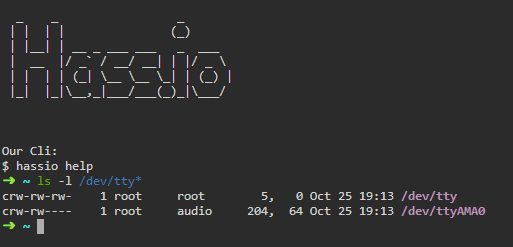
The configuration.yaml contains the following section:
mysensors:
  gateways:
    - device: '/dev/ttyAMA0'
  optimistic: false
  persistence: true
  retain: true
  version: '2.0'
In one of the attempts I actually saw the sensor (even two, for some reason) though the state never changed.
I'm unable to see them anymore...Some more info:
After RPI reboot, the "hassio hardware info" command shows:
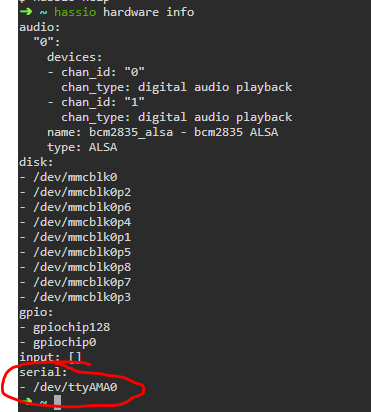
But after reattaching the USB I see

So, it seems like the gateway is invisible after the boot. Chanding ttyAMA0 to ttyUSB0 in the configuration file just results in error notification on boot...Can someone please help me with this? What am I doing wrong?
Thanks,
Alex
-
Hi all,
I have a serial gateway connected to the RaspberryPI running Hass.io.
I've also built a sample BinarySwitchSleepSensor.
I can see the logs on the serial gateway - it seems like it receives the messages from the sensor just fine.
My problem is that I cannot see the sensor in the Home Assistant, no matter what I do...
Running ls -l /dev/tty* command brings me this:
The configuration.yaml contains the following section:
mysensors:
  gateways:
    - device: '/dev/ttyAMA0'
  optimistic: false
  persistence: true
  retain: true
  version: '2.0'
In one of the attempts I actually saw the sensor (even two, for some reason) though the state never changed.
I'm unable to see them anymore...Some more info:
After RPI reboot, the "hassio hardware info" command shows:
But after reattaching the USB I see
So, it seems like the gateway is invisible after the boot. Chanding ttyAMA0 to ttyUSB0 in the configuration file just results in error notification on boot...Can someone please help me with this? What am I doing wrong?
Thanks,
Alex
-
Did you solve your problem? I had a similar problem, but using an Ethernet gateway, until I discovered that my sketch was not using the 2.x API, contrary to the gateway. This is also the case for the BinarySwitchSleepSensor you mention. You might want to try with a sketch based on the last one on this page (using the 'initialValueSent' variable): https://www.home-assistant.io/integrations/sensor.mysensors/#mysensors-2x-example-sketch
After updating to the 2.x API, my sensor showed up in the entities list of Home Asisstant (v0.106.6, HassOS 3.12, on Raspberry Pi 3) and I could create a UI card for it.(For some reason the entity is read-only in Hass.)


Hello! It looks like you're interested in this conversation, but you don't have an account yet.
Getting fed up of having to scroll through the same posts each visit? When you register for an account, you'll always come back to exactly where you were before, and choose to be notified of new replies (either via email, or push notification). You'll also be able to save bookmarks and upvote posts to show your appreciation to other community members.
With your input, this post could be even better 💗
Register Login