Skip to content
  • MySensors
  • OpenHardware.io
  • Categories
  • Recent
  • Tags
  • Popular
Skins
  • Light
  • Brite
  • Cerulean
  • Cosmo
  • Flatly
  • Journal
  • Litera
  • Lumen
  • Lux
  • Materia
  • Minty
  • Morph
  • Pulse
  • Sandstone
  • Simplex
  • Sketchy
  • Spacelab
  • United
  • Yeti
  • Zephyr
  • Dark
  • Cyborg
  • Darkly
  • Quartz
  • Slate
  • Solar
  • Superhero
  • Vapor

  • Default (No Skin)
  • No Skin
Collapse
Brand Logo
  1. Home
  2. Controllers
  3. Vera
  4. Mysensors Plugin - Lua Startup Failed

Mysensors Plugin - Lua Startup Failed

Scheduled Pinned Locked Moved Vera
13 Posts 7 Posters 6.0k Views 2 Watching
  • Oldest to Newest
  • Newest to Oldest
  • Most Votes
Reply
  • Reply as topic
Log in to reply
This topic has been deleted. Only users with topic management privileges can see it.
  • 5546dug5 Offline
    5546dug5 Offline
    5546dug
    wrote on last edited by
    #2

    I think you have the same as I did
    From where you are you. Need to go under apps-dev apps-config port
    There, change the baud rate to 115200 and select the ' my sensors plugin ' under the 'used by' pull down list .
    Important now to save this in Vera and then Hit Save , and then hit reload. That should be it.

    1 Reply Last reply
    0
    • hekH Offline
      hekH Offline
      hek
      Admin
      wrote on last edited by
      #3

      Yes, it should be described here:
      http://www.mysensors.org/controller/vera#including-new-sensors

      1 Reply Last reply
      0
      • Sven WolfS Offline
        Sven WolfS Offline
        Sven Wolf
        wrote on last edited by
        #4

        Oh, maybe I should've scrolled XD

        Thanks a lot guys. This will probably fix it.
        //Sven

        1 Reply Last reply
        0
        • H Offline
          H Offline
          heeythere47
          wrote on last edited by
          #5

          Hi, I have the same problem but when I go to serial port configaration all I get up is

          "Serial Port configuration
          If you connected the USB/serial device and it's not displayed here, reload Luup.Reload Luup
          Not available"

          Any help appreciated. Using vera lite u17. Thanks

          blaceyB 1 Reply Last reply
          0
          • H heeythere47

            Hi, I have the same problem but when I go to serial port configaration all I get up is

            "Serial Port configuration
            If you connected the USB/serial device and it's not displayed here, reload Luup.Reload Luup
            Not available"

            Any help appreciated. Using vera lite u17. Thanks

            blaceyB Offline
            blaceyB Offline
            blacey
            Admin
            wrote on last edited by
            #6

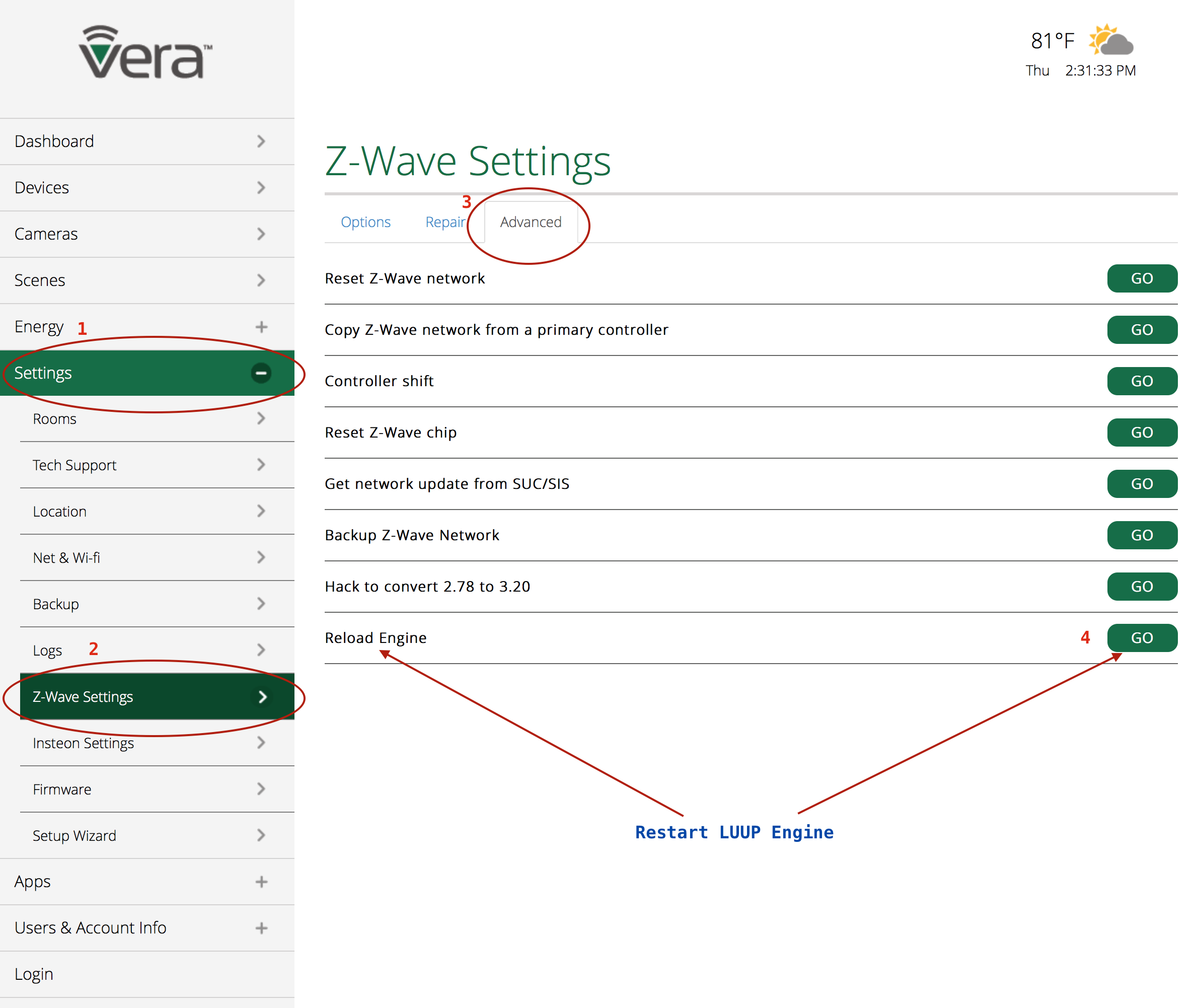
            @heeythere47 Screen Shot 2015-04-30 at 2.31.19 PM.png

            1 Reply Last reply
            0
            • H Offline
              H Offline
              heeythere47
              wrote on last edited by
              #7

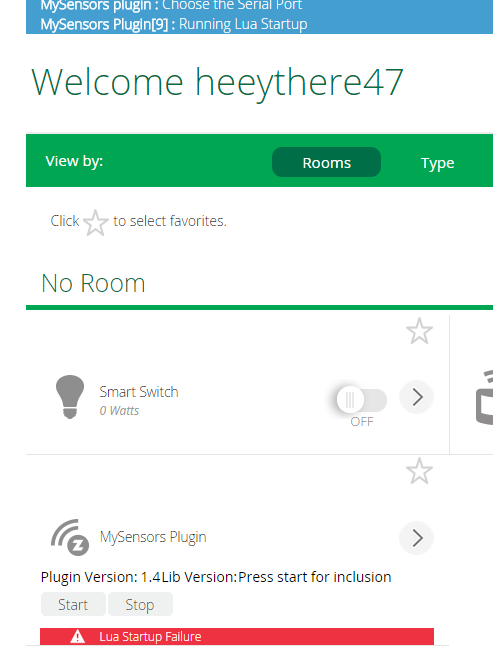
              Tried this, hasn't helped. Same message as before. This from device page.mysensor.PNG
              Would chinese clones be causing this problem?
              Thanks Jamie

              DwaltD 1 Reply Last reply
              0
              • H heeythere47

                Tried this, hasn't helped. Same message as before. This from device page.mysensor.PNG
                Would chinese clones be causing this problem?
                Thanks Jamie

                DwaltD Offline
                DwaltD Offline
                Dwalt
                wrote on last edited by
                #8

                @heeythere47 Did you try what @5546dug suggested above? Your Vera is wanting you to "choose serial port". Check the baud rate and make sure the 'MySensors plugin' is selected.

                Veralite UI5 :: IBoard Ethernet GW :: MyS 1.5

                1 Reply Last reply
                0
                • H Offline
                  H Offline
                  heeythere47
                  wrote on last edited by
                  #9

                  Hi,
                  I have gone to apps-dev apps-config port. but it is not opening the menu up to allow me to set anything.

                  I go into develop apps, create device & paste D_Arduino1.xml in Upnp Device Filename field.

                  Thats fine device is created. At this point it is an "Unnamed device"

                  Then I go back to develop apps Serial port configuration & get this

                  serial port config.PNG
                  ClickReload Luup & the device becomes
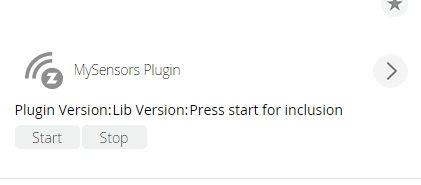
                  mysensorplugindevice.PNG
                  but i am still not able to choose serial port & if click start on the device I get
                  lua startup failure message

                  Cheers Jamie

                  1 Reply Last reply
                  0
                  • H Offline
                    H Offline
                    heeythere47
                    wrote on last edited by
                    #10

                    Also have gone to z-wave settings & restarted luup engine. Thanks

                    1 Reply Last reply
                    0
                    • H Offline
                      H Offline
                      heeythere47
                      wrote on last edited by
                      #11

                      I have come to the conclusion that my vera does not recognise theses nanos & have ordered what I hope is a genuine one by the price. I will see how that goes.
                      Cheers Jamie

                      1 Reply Last reply
                      0
                      • mjunqueiraM Offline
                        mjunqueiraM Offline
                        mjunqueira
                        wrote on last edited by
                        #12

                        There is a cheaper version of the nano that uses the ch340 Usb to Serial, there is no driver on the open wrt, to recognize it,

                        Please take a look at the bottom of your nano,
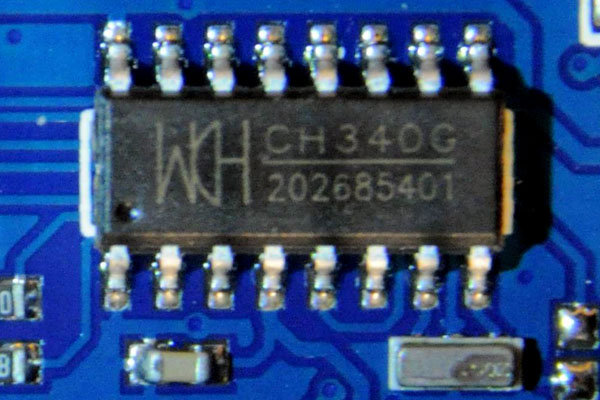
                        Nano_2014_bot_ch340g.jpg

                        if it´s the same of to photo, you will need to buy one with the FTDI chip:
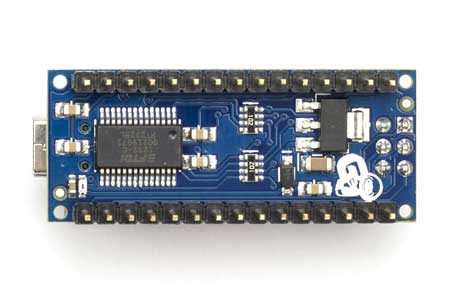
                        ArduinoNanoBack_3_sm.jpg

                        1 Reply Last reply
                        0
                        • H Offline
                          H Offline
                          heeythere47
                          wrote on last edited by
                          #13

                          Hi,
                          that is the chip on the nanos I bought. The serial gateway is working now I received a genuine nano & the cheap ones work fine with relays, motion sensors etc. All good.
                          Thanks Jamie

                          1 Reply Last reply
                          0
                          Reply
                          • Reply as topic
                          Log in to reply
                          • Oldest to Newest
                          • Newest to Oldest
                          • Most Votes


                          30

                          Online

                          11.7k

                          Users

                          11.2k

                          Topics

                          113.1k

                          Posts


                          Copyright 2025 TBD   |   Forum Guidelines   |   Privacy Policy   |   Terms of Service
                          • Login

                          • Don't have an account? Register

                          • Login or register to search.
                          • First post
                            Last post
                          0
                          • MySensors
                          • OpenHardware.io
                          • Categories
                          • Recent
                          • Tags
                          • Popular