Skip to content
  • MySensors
  • OpenHardware.io
  • Categories
  • Recent
  • Tags
  • Popular
Skins
  • Light
  • Brite
  • Cerulean
  • Cosmo
  • Flatly
  • Journal
  • Litera
  • Lumen
  • Lux
  • Materia
  • Minty
  • Morph
  • Pulse
  • Sandstone
  • Simplex
  • Sketchy
  • Spacelab
  • United
  • Yeti
  • Zephyr
  • Dark
  • Cyborg
  • Darkly
  • Quartz
  • Slate
  • Solar
  • Superhero
  • Vapor

  • Default (No Skin)
  • No Skin
Collapse
Brand Logo
  1. Home
  2. Controllers
  3. Domoticz
  4. How do I add the soil-moisture sensor to domoticz?

How do I add the soil-moisture sensor to domoticz?

Scheduled Pinned Locked Moved Domoticz
22 Posts 9 Posters 20.1k Views 4 Watching
  • Oldest to Newest
  • Newest to Oldest
  • Most Votes
Reply
  • Reply as topic
Log in to reply
This topic has been deleted. Only users with topic management privileges can see it.
  • Cliff KarlssonC Offline
    Cliff KarlssonC Offline
    Cliff Karlsson
    wrote on last edited by
    #1

    I have tried adding the soil moisture sensor in domoticz and the log sees the sensor. But in devices I only see a security-switch-sensor with no values. How do I add it the right way?

    1 Reply Last reply
    0
    • sundberg84S Offline
      sundberg84S Offline
      sundberg84
      Hardware Contributor
      wrote on last edited by
      #2

      What do you present it with? I think standard sketch is presented as 1/0 switch (moist or dry)

      Controller: Proxmox VM - Home Assistant
      MySensors GW: Arduino Uno - W5100 Ethernet, Gw Shield Nrf24l01+ 2,4Ghz
      MySensors GW: Arduino Uno - Gw Shield RFM69, 433mhz
      RFLink GW - Arduino Mega + RFLink Shield, 433mhz

      1 Reply Last reply
      0
      • mfalkviddM Offline
        mfalkviddM Offline
        mfalkvidd
        Mod
        wrote on last edited by mfalkvidd
        #3

        Sundberg is correct, the standard sketch only reports wet or dry, which is presented as a security switch that is either on or off.
        I've made a sketch that reports battery and moisture:
        codebender
        You can just remove the battery parts if you're not interested in those values.

        AWIA 1 Reply Last reply
        0
        • L Offline
          L Offline
          LastSamurai
          Hardware Contributor
          wrote on last edited by
          #4

          As mfalkvidd says: the "normal" digital value only shows up as a switch. You can add the analog pin of the sensor as a counter in domoticz (and add a water symbol). Take a look at my code here.

          1 Reply Last reply
          1
          • mfalkviddM mfalkvidd

            Sundberg is correct, the standard sketch only reports wet or dry, which is presented as a security switch that is either on or off.
            I've made a sketch that reports battery and moisture:
            codebender
            You can just remove the battery parts if you're not interested in those values.

            AWIA Offline
            AWIA Offline
            AWI
            Hero Member
            wrote on last edited by
            #5

            @mfalkvidd Just a little thing. Domoticz does not interpret S_CUSTOM you can use S_MULTIMETER in combination with V_VOLTAGE. No issue in your case because sending V_VOLTAGE on it's ownn creates the Sensor in Domoticz. You could use

            gw.present(CHILD_ID_BATTERY, S_MULTIMETER, "Moisture battery")
            

            to present the sensor name and let Domoticz default it to "Moisture battery".

            1 Reply Last reply
            0
            • mfalkviddM Offline
              mfalkviddM Offline
              mfalkvidd
              Mod
              wrote on last edited by
              #6

              AWI: yes, you are correct. I think I'm using a version of Domoticz that's too old so it doesn't support S_MULTIMETER. I should get around to upgrading.

              1 Reply Last reply
              0
              • mfalkviddM Offline
                mfalkviddM Offline
                mfalkvidd
                Mod
                wrote on last edited by
                #7

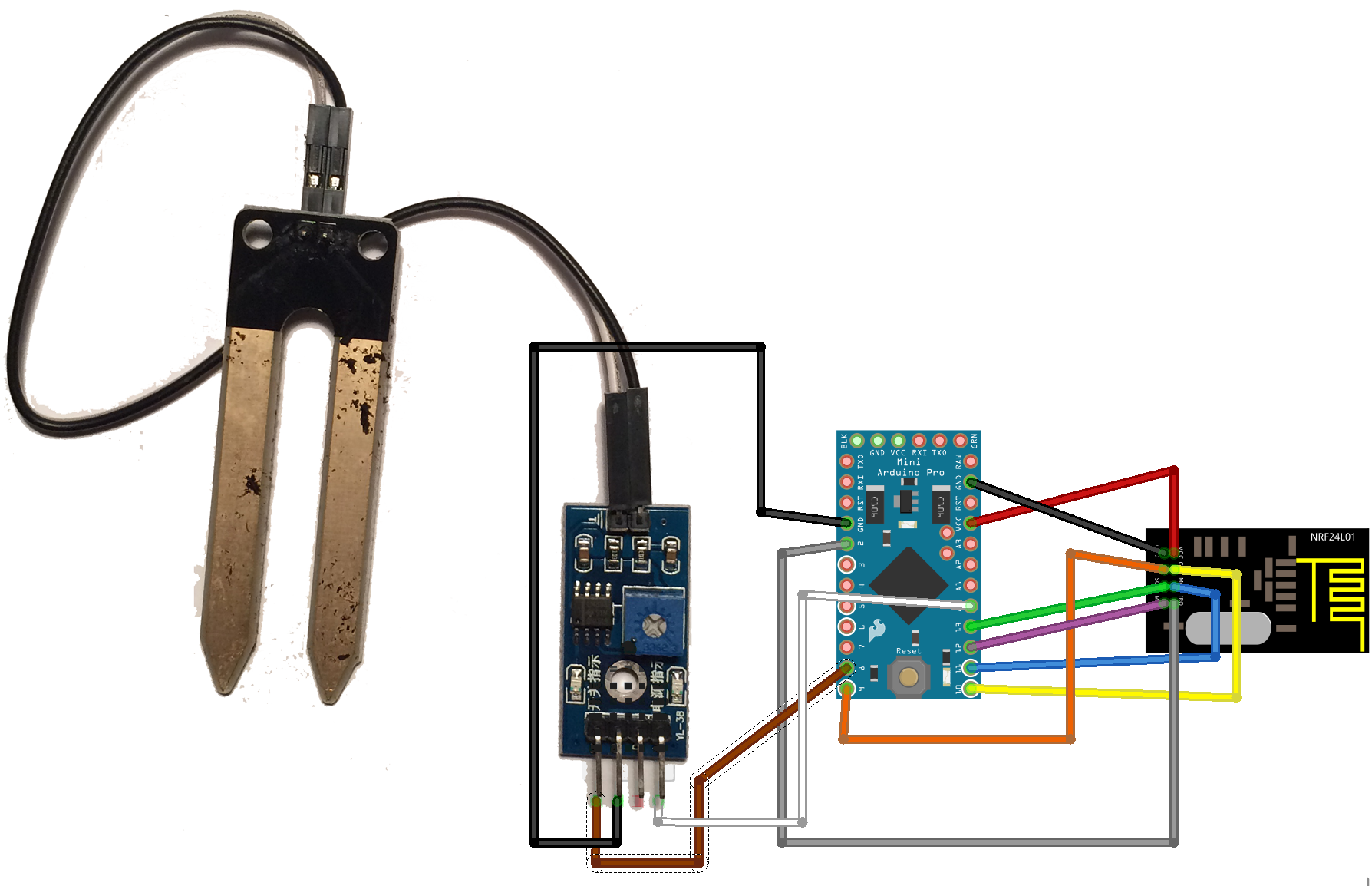
                By the way, here is how I connect the sensor to the Arduino:
                moisture_bb.png

                1 Reply Last reply
                0
                • L Offline
                  L Offline
                  LastSamurai
                  Hardware Contributor
                  wrote on last edited by
                  #8

                  Basic information are also on the project page. I was using the same kind of sensor (cheap one from ebay). I seemed to work very well for about one week but then suddenly it started to send back only one value.... when I took the sensor out of the soil I saw that the sensor (at least one leg) had mold on it. Has anyone seen such a problem? Any ideas how to prevent that?

                  hekH 1 Reply Last reply
                  0
                  • hekH Offline
                    hekH Offline
                    hek
                    Admin
                    wrote on last edited by
                    #9

                    @epierre did an update on the sketch which reverses polarity to help avoiding corrosion.

                    https://github.com/mysensors/Arduino/blob/development/libraries/MySensors/examples/SoilMoistSensor/SoilMoistSensor.ino

                    Per Arne BotnP 1 Reply Last reply
                    0
                    • L Offline
                      L Offline
                      LastSamurai
                      Hardware Contributor
                      wrote on last edited by LastSamurai
                      #10

                      @hek Where is the question to your answer hek? ;) Can't see it here.
                      But corrosion do to the current in the sensor might be the reason for my dead sensor. Any ideas how to avoid that on that kind of cheap Soil Moisture Sensors from the project page?

                      PS I guess powering the sensor over a pin of the arduino (or some kind of transistor) would make it possible to disable the sensor when not measuring. That might help?!

                      1 Reply Last reply
                      0
                      • L LastSamurai

                        Basic information are also on the project page. I was using the same kind of sensor (cheap one from ebay). I seemed to work very well for about one week but then suddenly it started to send back only one value.... when I took the sensor out of the soil I saw that the sensor (at least one leg) had mold on it. Has anyone seen such a problem? Any ideas how to prevent that?

                        hekH Offline
                        hekH Offline
                        hek
                        Admin
                        wrote on last edited by
                        #11

                        Tried to answer this...

                        @LastSamurai said:

                        I seemed to work very well for about one week but then suddenly it started to send back only one value

                        1 Reply Last reply
                        0
                        • L Offline
                          L Offline
                          LastSamurai
                          Hardware Contributor
                          wrote on last edited by
                          #12

                          Great idea hek, I think that is the problem. But the sketch you posted uses a different sensor, doesn't it? There is something about:

                           * Connection:
                           *  D6, D7: alternative powering to avoid sensor degradation
                           * A0, A1: alternative resistance mesuring
                          

                          And a link to different sensor. The cheap kind that I am using only has two connections for power and an analog and digital pin. I don't see how you could be alternating power here...
                          But perhaps it helps if the sensor isn't constantly powered on but only for measurements.
                          Does anyone else have a solution for this?

                          1 Reply Last reply
                          0
                          • hekH Offline
                            hekH Offline
                            hek
                            Admin
                            wrote on last edited by
                            #13

                            Yes, @epierre should clarify what sensors used and how it should be connected in the sketch.

                            If a new sensors type is used we should probably keep the old example and create a new one for this.

                            epierreE 1 Reply Last reply
                            0
                            • TheoLT Offline
                              TheoLT Offline
                              TheoL
                              Contest Winner
                              wrote on last edited by
                              #14

                              Maybe a bit late. But the soil moisture sketch was the first one I brought into production by soldering it on a PCB. I added it to Domoticz as a motion sensor, not as a switch. And it's working great. If the motion sensor is telling that there's motion, it means the plants aren't thirsty. If there's no motion than the plants need some water. I even let Domoticz send a message to my mobile phone when the plants are thirsty ;-). I keep forgetting to give my plants water on a regular basis, so this sensor is really helpful.

                              1 Reply Last reply
                              0
                              • sundberg84S Offline
                                sundberg84S Offline
                                sundberg84
                                Hardware Contributor
                                wrote on last edited by
                                #15

                                Hi @TheoL
                                Motion sensor and Switch (and also the soil moisture sensor) work the same way in Domoticz. Its either 1 (ON/Motion/Wet) or 0 (Off/No motion/dry).

                                Controller: Proxmox VM - Home Assistant
                                MySensors GW: Arduino Uno - W5100 Ethernet, Gw Shield Nrf24l01+ 2,4Ghz
                                MySensors GW: Arduino Uno - Gw Shield RFM69, 433mhz
                                RFLink GW - Arduino Mega + RFLink Shield, 433mhz

                                1 Reply Last reply
                                0
                                • hekH hek

                                  Yes, @epierre should clarify what sensors used and how it should be connected in the sketch.

                                  If a new sensors type is used we should probably keep the old example and create a new one for this.

                                  epierreE Offline
                                  epierreE Offline
                                  epierre
                                  Hero Member
                                  wrote on last edited by
                                  #16

                                  @hek said:

                                  Yes, @epierre should clarify what sensors used and how it should be connected in the sketch.

                                  If a new sensors type is used we should probably keep the old example and create a new one for this.

                                  Well it is here in the sketch: " Required to interface the sensor: 2 * 4.7kOhm + 2 * 1N414"

                                  but it was better in the post: http://forum.mysensors.org/topic/514/soil-humidity-and-temperature-sensor-watermark-davis-granular-matrix-sensor/2

                                  and yes it works with two connectors this way !

                                  @hek I'm not in the list ;-) https://github.com/mysensors/Arduino/graphs/contributors

                                  z-wave - Vera -> Domoticz
                                  rfx - Domoticz <- MyDomoAtHome <- Imperihome
                                  mysensors -> mysensors-gw -> Domoticz

                                  L 1 Reply Last reply
                                  0
                                  • hekH Offline
                                    hekH Offline
                                    hek
                                    Admin
                                    wrote on last edited by
                                    #17

                                    @epierre said:

                                    @hek I'm not in the list

                                    I can see you in the list :)

                                    epierreE 1 Reply Last reply
                                    0
                                    • hekH hek

                                      @epierre said:

                                      @hek I'm not in the list

                                      I can see you in the list :)

                                      epierreE Offline
                                      epierreE Offline
                                      epierre
                                      Hero Member
                                      wrote on last edited by
                                      #18

                                      @hek said:

                                      @epierre said:

                                      @hek I'm not in the list

                                      I can see you in the list :)

                                      visibly I searched myself at the bottom, but I had many bugs as it seems ;-)

                                      z-wave - Vera -> Domoticz
                                      rfx - Domoticz <- MyDomoAtHome <- Imperihome
                                      mysensors -> mysensors-gw -> Domoticz

                                      1 Reply Last reply
                                      0
                                      • epierreE epierre

                                        @hek said:

                                        Yes, @epierre should clarify what sensors used and how it should be connected in the sketch.

                                        If a new sensors type is used we should probably keep the old example and create a new one for this.

                                        Well it is here in the sketch: " Required to interface the sensor: 2 * 4.7kOhm + 2 * 1N414"

                                        but it was better in the post: http://forum.mysensors.org/topic/514/soil-humidity-and-temperature-sensor-watermark-davis-granular-matrix-sensor/2

                                        and yes it works with two connectors this way !

                                        @hek I'm not in the list ;-) https://github.com/mysensors/Arduino/graphs/contributors

                                        L Offline
                                        L Offline
                                        LastSamurai
                                        Hardware Contributor
                                        wrote on last edited by LastSamurai
                                        #19

                                        Well it is here in the sketch: " Required to interface the sensor: 2 * 4.7kOhm + 2 * 1N414"
                                        but it was better in the post: http://forum.mysensors.org/topic/514/soil-humidity-and-temperature-sensor-watermark-davis-granular-matrix-sensor/2
                                        and yes it works with two connectors this way !

                                        So this works with the sensor I linked above (= the one in the picture above)? I though changing the voltage way would destroy the sensor..
                                        My goal is to have the sensor in soil for years though. Even if I turn it off while not measuring it might break I guess.

                                        1 Reply Last reply
                                        0
                                        • L Offline
                                          L Offline
                                          LastSamurai
                                          Hardware Contributor
                                          wrote on last edited by
                                          #20

                                          Anyone? Because I really want to use the sensor but I don't really get the posts her ;)

                                          1 Reply Last reply
                                          0
                                          Reply
                                          • Reply as topic
                                          Log in to reply
                                          • Oldest to Newest
                                          • Newest to Oldest
                                          • Most Votes


                                          15

                                          Online

                                          11.7k

                                          Users

                                          11.2k

                                          Topics

                                          113.1k

                                          Posts


                                          Copyright 2025 TBD   |   Forum Guidelines   |   Privacy Policy   |   Terms of Service
                                          • Login

                                          • Don't have an account? Register

                                          • Login or register to search.
                                          • First post
                                            Last post
                                          0
                                          • MySensors
                                          • OpenHardware.io
                                          • Categories
                                          • Recent
                                          • Tags
                                          • Popular