Skip to content
  • MySensors
  • OpenHardware.io
  • Categories
  • Recent
  • Tags
  • Popular
Skins
  • Light
  • Brite
  • Cerulean
  • Cosmo
  • Flatly
  • Journal
  • Litera
  • Lumen
  • Lux
  • Materia
  • Minty
  • Morph
  • Pulse
  • Sandstone
  • Simplex
  • Sketchy
  • Spacelab
  • United
  • Yeti
  • Zephyr
  • Dark
  • Cyborg
  • Darkly
  • Quartz
  • Slate
  • Solar
  • Superhero
  • Vapor

  • Default (No Skin)
  • No Skin
Collapse
Brand Logo
  1. Home
  2. Troubleshooting
  3. [SOLVED] ESP8266 fails to boot with NRF24L01+ connected

[SOLVED] ESP8266 fails to boot with NRF24L01+ connected

Scheduled Pinned Locked Moved Troubleshooting
14 Posts 6 Posters 10.4k Views 6 Watching
  • Oldest to Newest
  • Newest to Oldest
  • Most Votes
Reply
  • Reply as topic
Log in to reply
This topic has been deleted. Only users with topic management privileges can see it.
  • DaanozD Offline
    DaanozD Offline
    Daanoz
    wrote on last edited by Daanoz
    #1

    The last couple of days I have been using a ESP8266 board to use as gateway for the sensor network.

    Currently I'm having some issues with booting the board, whenever the NRF24L01+ is connected, it won't start. Instead it spits out some random gibberish on the serial console and that's it. As soon as I remove the VCC connection to the NRF module, it starts to work again when I reset the board. If I reconnect the NRF module when the ESP is trying to connect to the WIFI, everything works fine, the gateway is just working like it's supposed to.

    I tried some different things, all not (yet) successful:

    • Ordered (not yet tried) some 47uF capacitors (I only have some 100uF capacitors lying around)
    • Different power supplies:
      • 3 different pc's
      • 2 USB power adapters (750mA & 1A)
      • USB hub, rated @ 1200mA
    • Measuring the VCC - GND output: 3.28V
    • Using a different NRF Module

    Any advise is welcome (while I'm waiting for the capacitors to come in).

    Thanks.

    Daanoz

    1 Reply Last reply
    1
    • mfalkviddM Offline
      mfalkviddM Offline
      mfalkvidd
      Mod
      wrote on last edited by
      #2

      Try setting your serial monitor to 76800 (Arduino IDE doesn't support that speed but Putty does). See the "Boot up" section on http://www.esp8266.com/wiki/doku.php?id=getting-started-with-the-esp8266

      1 Reply Last reply
      0
      • DaanozD Offline
        DaanozD Offline
        Daanoz
        wrote on last edited by
        #3

        Thanks, that already makes more sense:

         ets Jan  8 2013,rst cause:2, boot mode:(7,7)
        
        waiting for host
        

        From what I understand: 'rst cause: 2' means reset pin (or button?) being used, which I did.

        Boot mode (7, 7) is a bit more vague?

        1 Reply Last reply
        0
        • DaanozD Offline
          DaanozD Offline
          Daanoz
          wrote on last edited by
          #4

          Debugging futher...
          So if I understand correctly from the ESP8266 docs: boot mode 7, means boot from SPI FLASH (7 = 0111).

          I can disconnect 3 types of wires to get the boot procedure to run with: boot mode:(3,x)
          The boot flow changes if I disconnect either the VCC, GROUND or the CSN wire... But the boot is not always the same, I'll try to summarize:

          All pins of the NRF connected: boot mode:(7,7) - not booting
          Disconnect VCC pin, reset, reconnect after 1s: boot mode:(3,7) - booting, gateway working
          All pins connected: boot mode:(7,7) - not booting
          Disconnect CSN pin, reset, reconnect after 1s: boot mode:(3,7) - booting, gateway working
          All pins connected: boot mode:(7,7) - not booting

          So, this boot changes if I leave the pin disconnected for the full boot process (you'll get a radio init fail of course)

          All pins of the NRF connected: boot mode:(7,7) - not booting
          Disconnect VCC pin: boot mode:(3,7) - booting, gateway not working
          Reconnect VCC pin before reset: boot mode: (7,6) - not booting
          Disconnect VCC pin: boot mode:(3,6) - booting, gateway not working

          So guessing on the bootmodes: if the first integer is a 7, there is an error with the boot sequence, the second integer seems to be related to the NRF, did it fully run last time -> a 7, if I keep it out for a full boot sequence (including running of the gateway) we get a 6. Strange......

          1 Reply Last reply
          0
          • DaanozD Offline
            DaanozD Offline
            Daanoz
            wrote on last edited by Daanoz
            #5

            Got it solved!

            Ok, after debugging for a while: the problem is with the CSN pin on GPIO pin 15. Pin 15 is also used in the ESP8266 to define boot from SD card. Somehow, at least in my case, after a reset, the NRF chip sets the CSN pin to high (measured it with a multimeter), causing the ESP8266 to start the SD-card procedure, which fails of course. The solution for me is swapping the pins for inclusion with the CSN pin:

            So:
            CSN -> GPIO 5 -> D1
            Inclusion mode -> GPIO 15 -> D78

            One question though: I also seem to have SPI pins on the other side of the Devkit, why aren't those used?

            1 Reply Last reply
            1
            • hekH Offline
              hekH Offline
              hek
              Admin
              wrote on last edited by
              #6

              https://github.com/mysensors/Arduino/issues/408

              1 Reply Last reply
              0
              • DaanozD Offline
                DaanozD Offline
                Daanoz
                wrote on last edited by
                #7

                Ok, another small update from my side. I think I localized the root cause of what was putting my CSN in a high state.

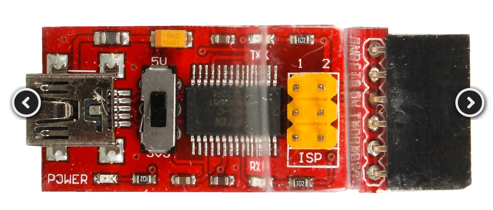
                Last couple of days I was testing with a sensor connected with power through a FTDI adapter, the adapter had a nice switch to chose between 3.3v and 5v. The sensor was actually having a problem, this problem to be precise, the sensor fails after a couple of hours. At first I didn't think much about it, since the switch was on 3.3v. After having 2 NRF chips failing, I measured the output of the 3.3v pin on the arduino pro mini, you guessed it: 5V! :sob:

                The funny thing is, the first chip that failed, I used on the gateway to test if it was working, because it did work without a reset, I didn't think much about it. Now I know that the 5V Probaly fried something in the chip, causing to output high on the CSN in some cases...

                Attached a photo of the second chip that fried even more (the right one with the 2 black blobs below the chip). Anyway, thanks for the help folks, finally can start building something!

                right chip after 5v

                barduinoB 1 Reply Last reply
                1
                • hekH Offline
                  hekH Offline
                  hek
                  Admin
                  wrote on last edited by
                  #8

                  Ok, thanks for the update on your issue.

                  1 Reply Last reply
                  0
                  • DaanozD Daanoz

                    Ok, another small update from my side. I think I localized the root cause of what was putting my CSN in a high state.

                    Last couple of days I was testing with a sensor connected with power through a FTDI adapter, the adapter had a nice switch to chose between 3.3v and 5v. The sensor was actually having a problem, this problem to be precise, the sensor fails after a couple of hours. At first I didn't think much about it, since the switch was on 3.3v. After having 2 NRF chips failing, I measured the output of the 3.3v pin on the arduino pro mini, you guessed it: 5V! :sob:

                    The funny thing is, the first chip that failed, I used on the gateway to test if it was working, because it did work without a reset, I didn't think much about it. Now I know that the 5V Probaly fried something in the chip, causing to output high on the CSN in some cases...

                    Attached a photo of the second chip that fried even more (the right one with the 2 black blobs below the chip). Anyway, thanks for the help folks, finally can start building something!

                    right chip after 5v

                    barduinoB Offline
                    barduinoB Offline
                    barduino
                    wrote on last edited by
                    #9

                    @Daanoz,

                    Inland FTDI?

                    I have the same with one of those.

                    1 Reply Last reply
                    0
                    • I Offline
                      I Offline
                      Ironbar
                      wrote on last edited by
                      #10

                      I also had one that would not change from 5v to 3.3v. I don't remember which brand it was but it had a switch instead of a jumper. It took me a long time to figure out that it was the problem.

                      1 Reply Last reply
                      0
                      • DaanozD Offline
                        DaanozD Offline
                        Daanoz
                        wrote on last edited by
                        #11

                        It's not really a brand... It's this one: http://www.aliexpress.com/item/FT232RL-3-3V-5-5V-FTDI-USB-to-TTL-Serial-Adapter-Module-For-Arduino-TE321/32574619454.html

                        1 Reply Last reply
                        0
                        • I Offline
                          I Offline
                          Ironbar
                          wrote on last edited by
                          #12

                          That's the one.

                          1 Reply Last reply
                          0
                          • YveauxY Offline
                            YveauxY Offline
                            Yveaux
                            Mod
                            wrote on last edited by
                            #13

                            The switch most likely has only to do with logic levels of the data lines. It is not related to the power output. Very confusing indeed (another Chinese fail if you ask me)

                            http://yveaux.blogspot.nl

                            1 Reply Last reply
                            0
                            • barduinoB Offline
                              barduinoB Offline
                              barduino
                              wrote on last edited by
                              #14

                              I have this one, looks the same...

                              0_1457097851989_upload-506933d0-e884-43a3-868d-57bfdad86b69

                              1 Reply Last reply
                              0
                              Reply
                              • Reply as topic
                              Log in to reply
                              • Oldest to Newest
                              • Newest to Oldest
                              • Most Votes


                              26

                              Online

                              11.7k

                              Users

                              11.2k

                              Topics

                              113.1k

                              Posts


                              Copyright 2025 TBD   |   Forum Guidelines   |   Privacy Policy   |   Terms of Service
                              • Login

                              • Don't have an account? Register

                              • Login or register to search.
                              • First post
                                Last post
                              0
                              • MySensors
                              • OpenHardware.io
                              • Categories
                              • Recent
                              • Tags
                              • Popular