
Skip to content
  • MySensors
  • OpenHardware.io
  • Categories
  • Recent
  • Tags
  • Popular
Skins
  • Light
  • Brite
  • Cerulean
  • Cosmo
  • Flatly
  • Journal
  • Litera
  • Lumen
  • Lux
  • Materia
  • Minty
  • Morph
  • Pulse
  • Sandstone
  • Simplex
  • Sketchy
  • Spacelab
  • United
  • Yeti
  • Zephyr
  • Dark
  • Cyborg
  • Darkly
  • Quartz
  • Slate
  • Solar
  • Superhero
  • Vapor

  • Default (No Skin)
  • No Skin
Collapse
Brand Logo
  1. Home
  2. Troubleshooting
  3. Has anyone made a 2 or 4 channel relay , and is that worked correct ?

Has anyone made a 2 or 4 channel relay , and is that worked correct ?

Scheduled Pinned Locked Moved Troubleshooting
40 Posts 7 Posters 10.9k Views 5 Watching
  • Oldest to Newest
  • Newest to Oldest
  • Most Votes
Reply
  • Reply as topic
Log in to reply
This topic has been deleted. Only users with topic management privileges can see it.
  • R Offline
    R Offline
    Reza
    wrote on last edited by Reza
    #1

    hi
    I built a 4 channel relay . wiring similar to wiring in mysensors Directions . The difference : IN1=3 , IN2=4 , IN3=5 , IN4=6 . and I change just this line in code :
    #define NUMBER_OF_RELAYS 1 // Total number of attached relays
    to
    #define NUMBER_OF_RELAYS 4 // Total number of attached relays

    but after the programming just one relay is working !
    please help me , please give me correct code

    1 Reply Last reply
    0
    • mfalkviddM Offline
      mfalkviddM Offline
      mfalkvidd
      Mod
      wrote on last edited by
      #2

      What does the serial debug output say?

      R 2 Replies Last reply
      0
      • mfalkviddM mfalkvidd

        What does the serial debug output say?

        R Offline
        R Offline
        Reza
        wrote on last edited by
        #3

        @mfalkvidd said:

        What does the serial debug output say?

        How do I check this?

        mfalkviddM 1 Reply Last reply
        0
        • R Reza

          @mfalkvidd said:

          What does the serial debug output say?

          How do I check this?

          mfalkviddM Offline
          mfalkviddM Offline
          mfalkvidd
          Mod
          wrote on last edited by
          #4

          @Reza said:

          How do I check this?

          See question 1 in http://forum.mysensors.org/topic/666/debug-faq-and-how-ask-for-help

          R 1 Reply Last reply
          1
          • mfalkviddM mfalkvidd

            @Reza said:

            How do I check this?

            See question 1 in http://forum.mysensors.org/topic/666/debug-faq-and-how-ask-for-help

            R Offline
            R Offline
            Reza
            wrote on last edited by
            #5

            @mfalkvidd
            thank you

            1 Reply Last reply
            1
            • mfalkviddM mfalkvidd

              What does the serial debug output say?

              R Offline
              R Offline
              Reza
              wrote on last edited by
              #6

              @mfalkvidd said:

              What does the serial debug output say?

              hi I build a 2channel relay but this is same problem ( just one relay is working
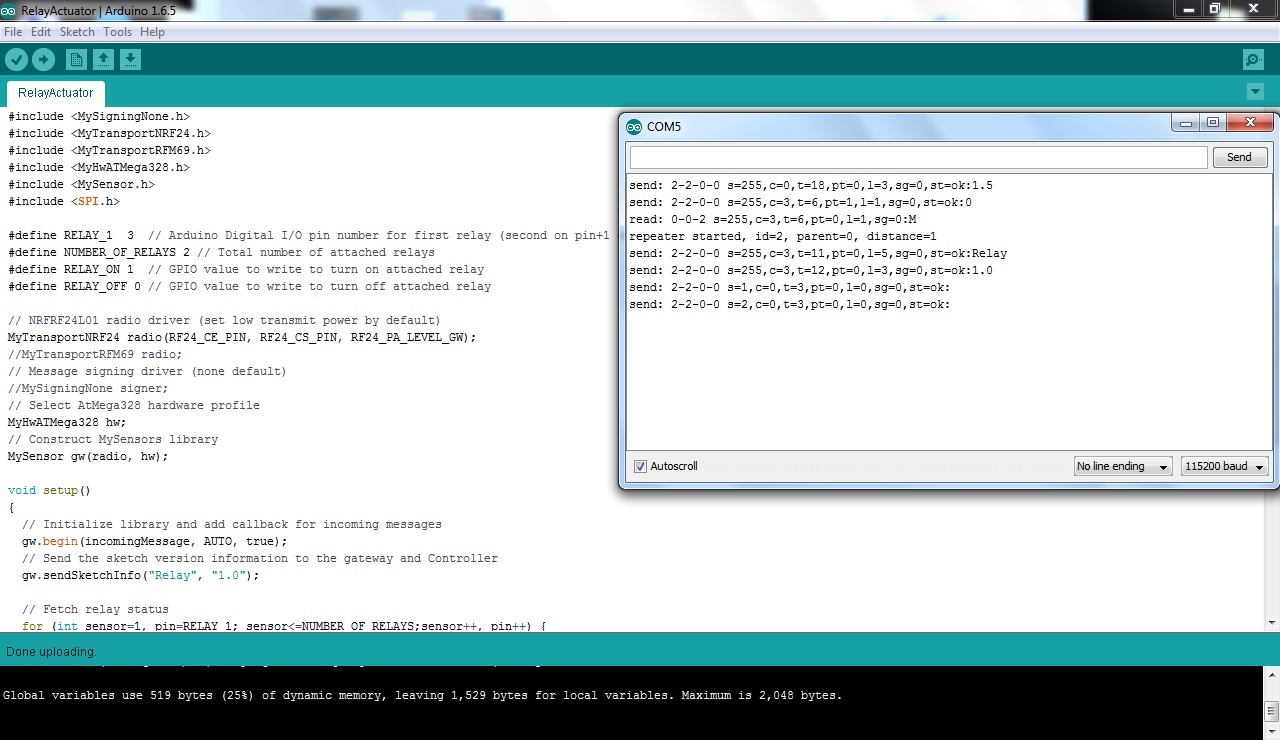
              it is serial manitor :
              send: 2-2-0-0 s=255,c=0,t=18,pt=0,l=3,sg=0,st=ok:1.5
              send: 2-2-0-0 s=255,c=3,t=6,pt=1,l=1,sg=0,st=ok:0
              read: 0-0-2 s=255,c=3,t=6,pt=0,l=1,sg=0:M
              repeater started, id=2, parent=0, distance=1
              send: 2-2-0-0 s=255,c=3,t=11,pt=0,l=5,sg=0,st=ok:Relay
              send: 2-2-0-0 s=255,c=3,t=12,pt=0,l=3,sg=0,st=ok:1.0
              send: 2-2-0-0 s=1,c=0,t=3,pt=0,l=0,sg=0,st=ok:
              send: 2-2-0-0 s=2,c=0,t=3,pt=0,l=0,sg=0,st=ok:

              1 Reply Last reply
              0
              • S Offline
                S Offline
                sundberg84
                Hardware Contributor
                wrote on last edited by
                #7

                Hi @Reza

                The start logs looks ok. Does the relay/node log say anything when you send a command from your controller. Any info from your controller?

                Did you define your pins for the relay? A long shot but someone wrote it worked when they changed from 3,4,5,6 to 4,5,6,7 for some reason.
                In most cases though it seems to be a power problem. Try changin your power source and see what happens.

                What im most curous about at this point is to see the log from your relay when you send a on/off command for the two relays.

                Controller: Proxmox VM - Home Assistant
                MySensors GW: Arduino Uno - W5100 Ethernet, Gw Shield Nrf24l01+ 2,4Ghz
                MySensors GW: Arduino Uno - Gw Shield RFM69, 433mhz
                RFLink GW - Arduino Mega + RFLink Shield, 433mhz

                R 1 Reply Last reply
                1
                • S sundberg84

                  Hi @Reza

                  The start logs looks ok. Does the relay/node log say anything when you send a command from your controller. Any info from your controller?

                  Did you define your pins for the relay? A long shot but someone wrote it worked when they changed from 3,4,5,6 to 4,5,6,7 for some reason.
                  In most cases though it seems to be a power problem. Try changin your power source and see what happens.

                  What im most curous about at this point is to see the log from your relay when you send a on/off command for the two relays.

                  R Offline
                  R Offline
                  Reza
                  wrote on last edited by
                  #8

                  @sundberg84 said:

                  Hi @Reza

                  The start logs looks ok. Does the relay/node log say anything when you send a command from your controller. Any info from your controller?

                  Did you define your pins for the relay? A long shot but someone wrote it worked when they changed from 3,4,5,6 to 4,5,6,7 for some reason.
                  In most cases though it seems to be a power problem. Try changin your power source and see what happens.

                  What im most curous about at this point is to see the log from your relay when you send a on/off command for the two relays.

                  now I have a 2channel relay , i want test for 2channel but this is similar to 4channel .
                  in pics 2_1459249017068_photo_2016-03-29_15-23-20.jpg 1_1459249017064_photo_2016-03-29_15-23-10.jpg 0_1459249017027_123223454.jpg
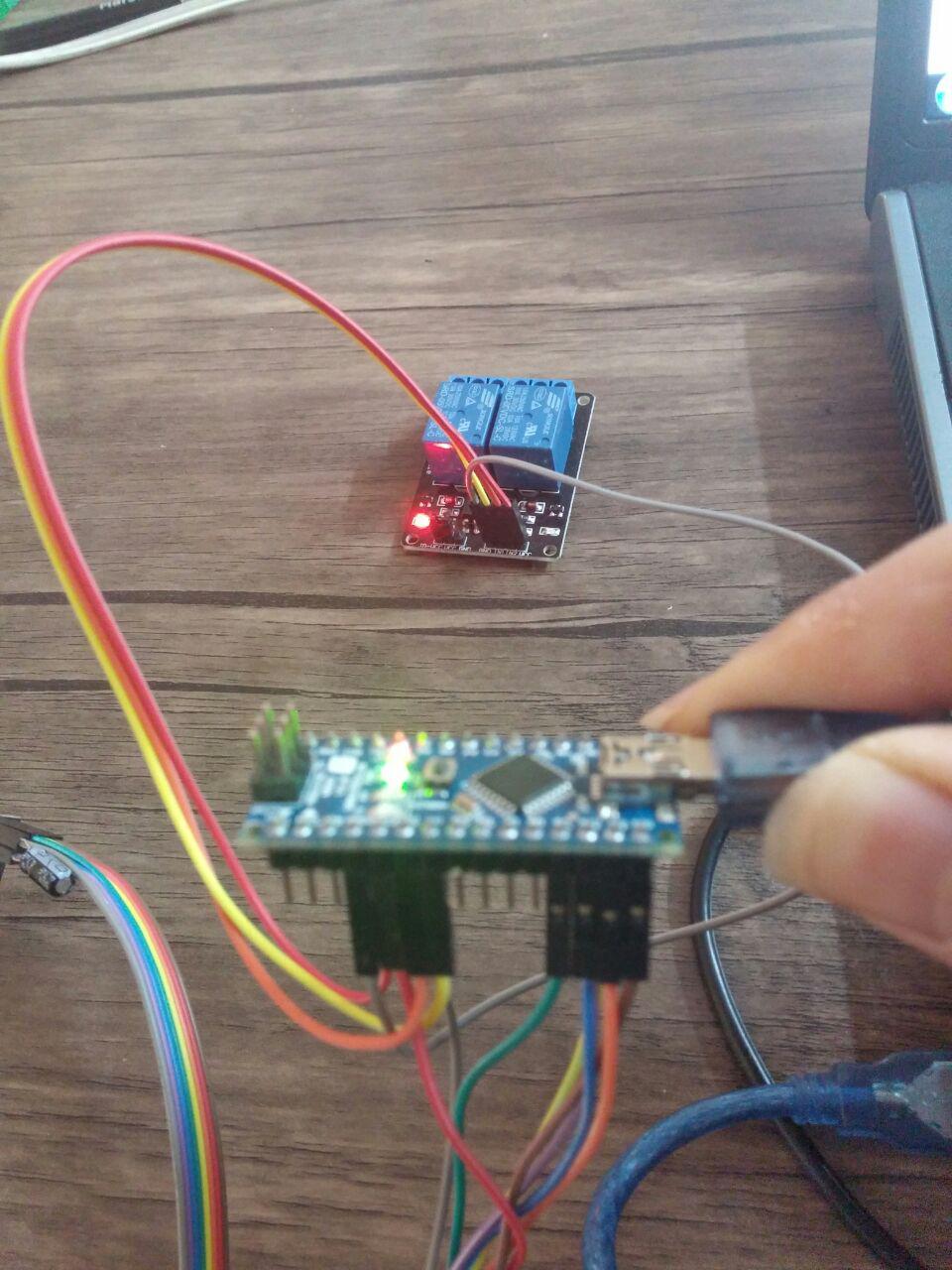
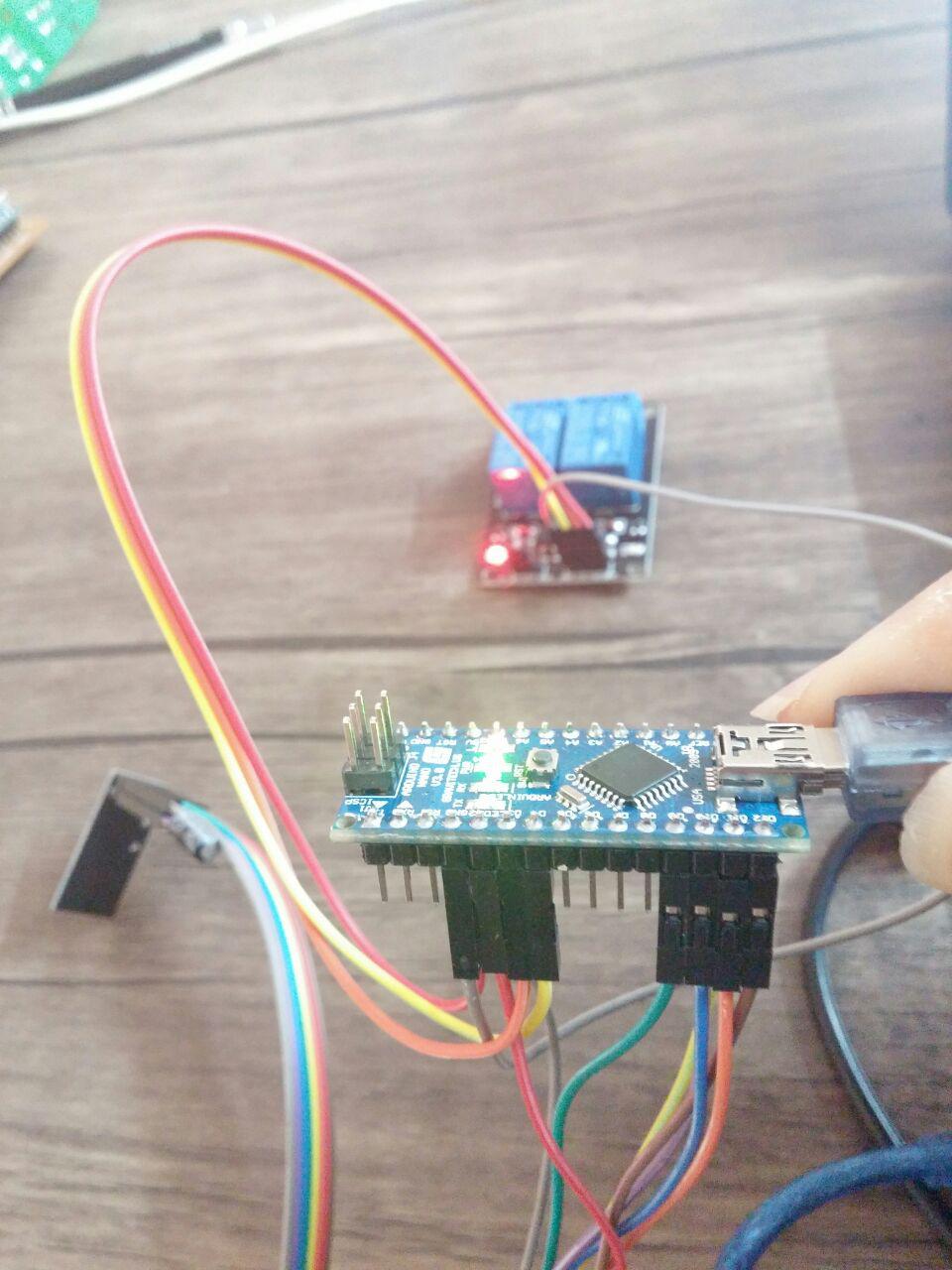
                  in1=pin3 , in2=pin4 . the pin 3 is not working , now in2 is working , but if i change pin3 and 4 in1 will working. also i change 2 line of program to and wiring in1=5 and in2=4 but now pin4 dont work ....
                  #define RELAY_1 4 // Arduino Digital I/O pin number for first relay (second on pin+1 etc)
                  #define NUMBER_OF_RELAYS 2 // Total number of attached relays
                  now

                  A 1 Reply Last reply
                  0
                  • S Offline
                    S Offline
                    sundberg84
                    Hardware Contributor
                    wrote on last edited by sundberg84
                    #9

                    Looks great - but taking steps here i want to know what happens in the serial log on your node when you send a on/off command from your controller?

                    Controller: Proxmox VM - Home Assistant
                    MySensors GW: Arduino Uno - W5100 Ethernet, Gw Shield Nrf24l01+ 2,4Ghz
                    MySensors GW: Arduino Uno - Gw Shield RFM69, 433mhz
                    RFLink GW - Arduino Mega + RFLink Shield, 433mhz

                    R 1 Reply Last reply
                    1
                    • R Reza

                      @sundberg84 said:

                      Hi @Reza

                      The start logs looks ok. Does the relay/node log say anything when you send a command from your controller. Any info from your controller?

                      Did you define your pins for the relay? A long shot but someone wrote it worked when they changed from 3,4,5,6 to 4,5,6,7 for some reason.
                      In most cases though it seems to be a power problem. Try changin your power source and see what happens.

                      What im most curous about at this point is to see the log from your relay when you send a on/off command for the two relays.

                      now I have a 2channel relay , i want test for 2channel but this is similar to 4channel .
                      in pics 2_1459249017068_photo_2016-03-29_15-23-20.jpg 1_1459249017064_photo_2016-03-29_15-23-10.jpg 0_1459249017027_123223454.jpg
                      in1=pin3 , in2=pin4 . the pin 3 is not working , now in2 is working , but if i change pin3 and 4 in1 will working. also i change 2 line of program to and wiring in1=5 and in2=4 but now pin4 dont work ....
                      #define RELAY_1 4 // Arduino Digital I/O pin number for first relay (second on pin+1 etc)
                      #define NUMBER_OF_RELAYS 2 // Total number of attached relays
                      now

                      A Offline
                      A Offline
                      AWI
                      Hero Member
                      wrote on last edited by
                      #10

                      @Reza we are kind of guessing in the dark right now. Can you post your sketch (as code, use the </> format button)

                      R 1 Reply Last reply
                      1
                      • S sundberg84

                        Looks great - but taking steps here i want to know what happens in the serial log on your node when you send a on/off command from your controller?

                        R Offline
                        R Offline
                        Reza
                        wrote on last edited by
                        #11

                        @sundberg84 said:

                        Looks great - but taking steps here i want to know what happens in the serial log on your node when you send a on/off command from your controller?

                        read: 0-0-2 s=2,c=1,t=2,pt=0,l=1,sg=0:1
                        send: 2-2-0-0 s=2,c=1,t=2,pt=0,l=1,sg=0,st=ok:1
                        Incoming change for sensor:2, New status: 1

                        1 Reply Last reply
                        0
                        • A AWI

                          @Reza we are kind of guessing in the dark right now. Can you post your sketch (as code, use the </> format button)

                          R Offline
                          R Offline
                          Reza
                          wrote on last edited by sundberg84
                          #12

                          @AWI said:

                          @Reza we are kind of guessing in the dark right now. Can you post your sketch (as code, use the </> format button)

                          #include <MySigningNone.h>
                          #include <MyTransportNRF24.h>
                          #include <MyTransportRFM69.h>
                          #include <MyHwATMega328.h>
                          #include <MySensor.h>
                          #include <SPI.h>
                          
                          #define RELAY_1  3  // Arduino Digital I/O pin number for first relay (second on pin+1 etc)
                          #define NUMBER_OF_RELAYS 2 // Total number of attached relays
                          #define RELAY_ON 1  // GPIO value to write to turn on attached relay
                          #define RELAY_OFF 0 // GPIO value to write to turn off attached relay
                          
                          // NRFRF24L01 radio driver (set low transmit power by default) 
                          MyTransportNRF24 radio(RF24_CE_PIN, RF24_CS_PIN, RF24_PA_LEVEL_GW);  
                          //MyTransportRFM69 radio;
                          // Message signing driver (none default)
                          //MySigningNone signer;
                          // Select AtMega328 hardware profile
                          MyHwATMega328 hw;
                          // Construct MySensors library
                          MySensor gw(radio, hw);
                          
                          void setup()  
                          {   
                            // Initialize library and add callback for incoming messages
                            gw.begin(incomingMessage, AUTO, true);
                            // Send the sketch version information to the gateway and Controller
                            gw.sendSketchInfo("Relay", "1.0");
                          
                            // Fetch relay status
                            for (int sensor=1, pin=RELAY_1; sensor<=NUMBER_OF_RELAYS;sensor++, pin++) {
                              // Register all sensors to gw (they will be created as child devices)
                              gw.present(sensor, S_LIGHT);
                              // Then set relay pins in output mode
                              pinMode(pin, OUTPUT);   
                              // Set relay to last known state (using eeprom storage) 
                              digitalWrite(pin, gw.loadState(sensor)?RELAY_ON:RELAY_OFF);
                            }
                          }
                          
                          
                          void loop() 
                          {
                            // Alway process incoming messages whenever possible
                            gw.process();
                          }
                          
                          void incomingMessage(const MyMessage &message) {
                            // We only expect one type of message from controller. But we better check anyway.
                            if (message.type==V_LIGHT) {
                               // Change relay state
                               digitalWrite(message.sensor-1+RELAY_1, message.getBool()?RELAY_ON:RELAY_OFF);
                               // Store state in eeprom
                               gw.saveState(message.sensor, message.getBool());
                               // Write some debug info
                               Serial.print("Incoming change for sensor:");
                               Serial.print(message.sensor);
                               Serial.print(", New status: ");
                               Serial.println(message.getBool());
                             } 
                          }
                          
                          1 Reply Last reply
                          0
                          • R Offline
                            R Offline
                            Reza
                            wrote on last edited by Reza
                            #13

                            I change power supply and use a 5v 1A adaptor , but one relay is off always ( led off). and 2channel relay is not failure because when I change output pin 3 and 4 , that relay is on and work !!

                            1 Reply Last reply
                            0
                            • barduinoB Offline
                              barduinoB Offline
                              barduino
                              wrote on last edited by barduino
                              #14
                              This post is deleted!
                              1 Reply Last reply
                              0
                              • R Offline
                                R Offline
                                Reza
                                wrote on last edited by
                                #15

                                :/ why delete your post ? :(

                                barduinoB 1 Reply Last reply
                                0
                                • S Offline
                                  S Offline
                                  sundberg84
                                  Hardware Contributor
                                  wrote on last edited by
                                  #16

                                  @Reza - ok communication looks good. My vote will be on power.
                                  I would try to power the relay separately and see what happens (not from Arduino).

                                  Controller: Proxmox VM - Home Assistant
                                  MySensors GW: Arduino Uno - W5100 Ethernet, Gw Shield Nrf24l01+ 2,4Ghz
                                  MySensors GW: Arduino Uno - Gw Shield RFM69, 433mhz
                                  RFLink GW - Arduino Mega + RFLink Shield, 433mhz

                                  R 1 Reply Last reply
                                  1
                                  • S sundberg84

                                    @Reza - ok communication looks good. My vote will be on power.
                                    I would try to power the relay separately and see what happens (not from Arduino).

                                    R Offline
                                    R Offline
                                    Reza
                                    wrote on last edited by Reza
                                    #17

                                    @sundberg84 said:

                                    @Reza - ok communication looks good. My vote will be on power.
                                    I would try to power the relay separately and see what happens (not from Arduino).

                                    i test this . with a adaptor 5v 1A but dont any happen !?

                                    1 Reply Last reply
                                    0
                                    • S Offline
                                      S Offline
                                      sundberg84
                                      Hardware Contributor
                                      wrote on last edited by
                                      #18

                                      @Reza From your images you are not - do you have another adaptor for the relay?

                                      Controller: Proxmox VM - Home Assistant
                                      MySensors GW: Arduino Uno - W5100 Ethernet, Gw Shield Nrf24l01+ 2,4Ghz
                                      MySensors GW: Arduino Uno - Gw Shield RFM69, 433mhz
                                      RFLink GW - Arduino Mega + RFLink Shield, 433mhz

                                      R 1 Reply Last reply
                                      0
                                      • S sundberg84

                                        @Reza From your images you are not - do you have another adaptor for the relay?

                                        R Offline
                                        R Offline
                                        Reza
                                        wrote on last edited by
                                        #19

                                        @sundberg84 said:

                                        @Reza From your images you are not - do you have another adaptor for the relay?

                                        I disconnect relay from arduino and connect to a adaptor 5v 1A

                                        1 Reply Last reply
                                        0
                                        • S Offline
                                          S Offline
                                          sundberg84
                                          Hardware Contributor
                                          wrote on last edited by
                                          #20

                                          Strange... im out of ideas at this point. Hardware failure?
                                          Im not that good looking at the code, but I maybe someone else is.

                                          Controller: Proxmox VM - Home Assistant
                                          MySensors GW: Arduino Uno - W5100 Ethernet, Gw Shield Nrf24l01+ 2,4Ghz
                                          MySensors GW: Arduino Uno - Gw Shield RFM69, 433mhz
                                          RFLink GW - Arduino Mega + RFLink Shield, 433mhz

                                          R 1 Reply Last reply
                                          0

                                          Hello! It looks like you're interested in this conversation, but you don't have an account yet.

                                          Getting fed up of having to scroll through the same posts each visit? When you register for an account, you'll always come back to exactly where you were before, and choose to be notified of new replies (either via email, or push notification). You'll also be able to save bookmarks and upvote posts to show your appreciation to other community members.

                                          With your input, this post could be even better 💗

                                          Register Login
                                          Reply
                                          • Reply as topic
                                          Log in to reply
                                          • Oldest to Newest
                                          • Newest to Oldest
                                          • Most Votes


                                          6

                                          Online

                                          12.0k

                                          Users

                                          11.2k

                                          Topics

                                          113.4k

                                          Posts


                                          Copyright 2025 TBD   |   Forum Guidelines   |   Privacy Policy   |   Terms of Service
                                          • Login

                                          • Don't have an account? Register

                                          • Login or register to search.
                                          • First post
                                            Last post
                                          0
                                          • MySensors
                                          • OpenHardware.io
                                          • Categories
                                          • Recent
                                          • Tags
                                          • Popular

