💬 AC-DC double solid state relay module
-
Hello,
Thank you for sharing this project. I have built it and am testing it on my outdoor lights.
.
I have three issues I can't seem to figure out and am hoping others may have had similar problems and figured out a fix.First some background. I built a double relay board and have 120V 60 hz power. I am controlling it through MyNodes 2.0. I am using an unedited version of the source code. My networks includes about 7 other nodes that are only measuring temperature. Half of them are set up to be repeater nodes. I was suspicious that I may be getting interference from the other nodes causing the problem but have had the same problems with the other nodes disabled.
Here are the issues I am trying to fix.
- I am finding that the relays will not stay in the position they are controlled to be in. Mostly they close when controlled to be open but also they are opening when controlled to be closed.
- When in a closed state relay 1 flickers every few minutes. I have replaced this relay and still have the same issue.
- The hardwired switch control isn't working for me work. The switch only causes a flicker in the lights.
Any suggestions? For me Half of the fun in the projects is trouble shooting and making them work. I'll send updates on any fixes I come across.
-
Hello,
this is the updated code, the list of changes at the top of the script.
In short :- fixed initialization of hardware buttons
- improved debug information
- made temperature sensor optional (via a #define) as I think it's location on the board is not safe
I think the behavior of the node is fine now, it has debug for physical buttons and the script uses less program space (<12k, <8k if temp sensor is disabled: you can enable debug even with an old atmega168 pro mini :)) and less ram (514 bytes for global variables).
I added the temp sensor on my first board to make some tests, it's in the ceiling now in a big (10x10cm) but air-tight electric box. Both relays are switched off at the moment and I'm waiting for the temperature to stabilize, then I will try to switch the loads on and off, leave on for a long time etc etc. 28W light tube on first relay, 2x28W on the other, it should not create problem.
/** * The MySensors Arduino library handles the wireless radio link and protocol * between your home built sensors/actuators and HA controller of choice. * The sensors forms a self healing radio network with optional repeaters. Each * repeater and gateway builds a routing tables in EEPROM which keeps track of the * network topology allowing messages to be routed to nodes. * * Created by Henrik Ekblad <henrik.ekblad@mysensors.org> * Copyright (C) 2013-2015 Sensnology AB * Full contributor list: https://github.com/mysensors/Arduino/graphs/contributors * * Documentation: http://www.mysensors.org * Support Forum: http://forum.mysensors.org * * This program is free software; you can redistribute it and/or * modify it under the terms of the GNU General Public License * version 2 as published by the Free Software Foundation. * ******************************* * * DESCRIPTION * * Script for double SSR relay board by Aproxx * https://www.openhardware.io/view/77/AC-DC-double-solid-state-relay-module * https://forum.mysensors.org/topic/3671/ac-dc-double-solid-state-relay-module * Control 2 circuits either from controller or from physical buttons connected on pins 4 & 7 * Optional DS18b20 is connected on pin 8 * * HISTORY : * xx/xx/2016 original version by Aproxx * 08/02/2016 upgraded to MySensors 2.0 by mr_const * 08/30/2016 changes by Nca78 : * - fixed initialization of physical buttons/debouncer status * - centralized pin status change for relays in setRelayState method * - centralized debug information for state changes in one method + added debug info when changed by physical switches * - added #ifdef MY_DEBUG before each Serial.print (saves prog memory when not in debug mode) and F() macros for debug strings (saves RAM when in debug mode) * - added #define USE_TEMP_SENSOR to make temperature sensor optional (not used if line is commented) * - put back #define for repeater feature * - add #define TEMPERATURE_ROUNDING for custom temperature rounding **/ // MySensor Debug //#define MY_DEBUG // Enables repeater functionality (relays messages from other nodes) //#define MY_REPEATER_FEATURE // Comment line below if you don't want to use the temperature sensor #define USE_TEMP_SENSOR #define MY_RADIO_NRF24 #include <MySensors.h> #include <SPI.h> #include <Bounce2.h> #define RELAY_PIN 3 // Arduino Digital I/O pin number for relay #define RELAY_PIN_2 5 #define BUTTON_PIN 4 // Arduino Digital I/O pin number for button #define BUTTON_PIN_2 7 #define CHILD_ID 11 // Id of the sensor child for 1st relay #define CHILD_ID_2 12 // Id of the sensor child for 2nd relay // Relay status #define RELAY_ON 1 #define RELAY_OFF 0 // Source of state change (used when printing debug information) #define CHANGE_STATE_SOURCE_RADIO 0 #define CHANGE_STATE_SOURCE_SWITCH 1 // Temperature sensor definitions #ifdef USE_TEMP_SENSOR #include <OneWire.h> #include <DallasTemperature.h> #define ONE_WIRE_BUS 8 #define CHILD_DSB_ID 13 // Id of the sensor child for temperature sensor #define TEMPERATURE_ROUNDING 10.f // Change value to change rounding of temperature value: 10.f for 0.1°C change, 5.f for 0.2°C change, 2.f for 0.5°C change #endif Bounce debouncer = Bounce(); int oldValue; bool state; Bounce debouncer2 = Bounce(); int oldValue2; bool state2; MyMessage msg(CHILD_ID, V_LIGHT); MyMessage msg2(CHILD_ID_2, V_LIGHT); #ifdef USE_TEMP_SENSOR MyMessage msgTemp(CHILD_DSB_ID, V_TEMP); OneWire oneWire(ONE_WIRE_BUS); DallasTemperature sensors(&oneWire); // Pass the oneWire reference to Dallas Temperature. #endif void presentation() { // Send the sketch version information to the gateway and Controller sendSketchInfo("Double Relay & Button", "0.2"); // Register all sensors to gw (they will be created as child devices) present(CHILD_ID, S_LIGHT); present(CHILD_ID_2, S_LIGHT); #ifdef USE_TEMP_SENSOR present(CHILD_DSB_ID, S_TEMP); #endif } void setup() { #ifdef USE_TEMP_SENSOR sensors.begin(); sensors.setWaitForConversion(false); #endif // Setup the button pinMode(BUTTON_PIN, INPUT); // Activate internal pull-up digitalWrite(BUTTON_PIN, HIGH); // Setup the button pinMode(BUTTON_PIN_2, INPUT); // Activate internal pull-up digitalWrite(BUTTON_PIN_2, HIGH); // After setting up the button, setup debouncer debouncer.attach(BUTTON_PIN); debouncer.interval(5); debouncer2.attach(BUTTON_PIN_2); debouncer2.interval(5); // Set the initial values of oldValue/oldValue2 variables from status of physical switches // if this is not done the loop() will detect status change and switch the relays on or off debouncer.update(); debouncer2.update(); oldValue = debouncer.read(); oldValue2 = debouncer2.read(); // Make sure relays are off when starting up setRelayState(RELAY_PIN, RELAY_OFF); // Then set relay pins in output mode pinMode(RELAY_PIN, OUTPUT); digitalWrite(RELAY_PIN_2, RELAY_OFF); // Then set relay pins in output mode pinMode(RELAY_PIN_2, OUTPUT); // Set relay to last known state (using eeprom storage) state = loadState(CHILD_ID); setRelayState(RELAY_PIN, state); state2 = loadState(CHILD_ID_2); setRelayState(RELAY_PIN_2, state2); } /* Example on how to asynchronously check for new messages from gw */ void loop() { #ifdef USE_TEMP_SENSOR static float prevTemp = 0; #endif debouncer.update(); debouncer2.update(); // Get the update value int value = debouncer.read(); int value2 = debouncer2.read(); if (value != oldValue) { send(msg.set(state ? false : true), true); // Send new state and request ack back // Write some debug info printStateChangedDebug(CHANGE_STATE_SOURCE_SWITCH, CHILD_ID, value); } oldValue = value; if (value2 != oldValue2) { send(msg2.set(state2 ? false : true), true); // Send new state and request ack back // Write some debug info printStateChangedDebug(CHANGE_STATE_SOURCE_SWITCH, CHILD_ID_2, value2); } oldValue2 = value2; // Fetch temperatures from Dallas sensors #ifdef USE_TEMP_SENSOR sensors.requestTemperatures(); // Fetch and round temperature to one decimal float temperature = static_cast<float>(static_cast<int>(sensors.getTempCByIndex(0) * TEMPERATURE_ROUNDING)) / TEMPERATURE_ROUNDING; if (temperature != -127.00f && temperature != 85.00f && prevTemp != temperature) { // Send in the new temperature send(msgTemp.set(temperature, 1)); #ifdef MY_DEBUG Serial.print("Sent temperature: "); Serial.println(temperature); #endif prevTemp = temperature; } #endif } void receive(const MyMessage &message) { // We only expect one type of message from controller. But we better check anyway. if (message.isAck()) { #ifdef MY_DEBUG Serial.println(F("This is an ack from gateway")); #endif } else if (message.type == V_LIGHT && message.sensor == CHILD_ID) { // Change relay state state = message.getBool(); setRelayState(RELAY_PIN, state); // Store state in eeprom saveState(CHILD_ID, state); // Write some debug info printStateChangedDebug(CHANGE_STATE_SOURCE_RADIO, CHILD_ID, state); } else if (message.type == V_LIGHT && message.sensor == CHILD_ID_2) { state2 = message.getBool(); setRelayState(RELAY_PIN_2, state2); // Store state in eeprom saveState(CHILD_ID_2, state2); // Write some debug info printStateChangedDebug(CHANGE_STATE_SOURCE_RADIO, CHILD_ID_2, state2); } } // Set status of a relay pin void setRelayState(byte relayPin, bool value) { digitalWrite(relayPin, value ? RELAY_ON : RELAY_OFF); } // Print debug info, centralized in one place to minimize memory usage and have only one #ifdef MY_DEBUG for all state change messages void printStateChangedDebug(int source, int sensorID, bool value) { #ifdef MY_DEBUG Serial.print(F("Sensor value changed, source=")); Serial.print(source == CHANGE_STATE_SOURCE_RADIO ? F("Radio") : F("Physical switch")); Serial.print(F(", Sensor=")); Serial.print(sensorID); Serial.print(F(", New status: ")); Serial.println(value); #endif }@nca78
I used the code and it worked well with the remote control.-
I can switch a LED (for testing purposes attached instead of a SSR) on and off.
If I want to switch the LED with a push button I fail.This is what I have changed:
#define RELAY_PIN 4 // Arduino Digital I/O pin number for relay
#define RELAY_PIN_2 5
#define BUTTON_PIN 3 // Arduino Digital I/O pin number for button
#define BUTTON_PIN_2 7And this is the serial output I get, after I press the button:
This is an ack from gateway
1107867 TSF:MSG:SEND,10-10-0-0,s=111,c=1,t=2,pt=1,l=1,sg=0,ft=0,st=OK:1
Sensor value changed, source=Physical switch, Sensor=111, New status: 0
1107877 TSF:MSG:READ,0-0-10,s=111,c=1,t=2,pt=1,l=1,sg=0:1
1107888 TSF:MSG:ACK
This is an ack from gateway
1108520 TSF:MSG:SEND,10-10-0-0,s=111,c=1,t=2,pt=1,l=1,sg=0,ft=0,st=OK:1
Sensor value changed, source=Physical switch, Sensor=111, New status: 1
1108531 TSF:MSG:READ,0-0-10,s=111,c=1,t=2,pt=1,l=1,sg=0:1
1108541 TSF:MSG:ACK
This is an ack from gateway -
Hi,
Any particular reason for the values of the thermal cut-offs? (73ºC, 10A)?
This temperature (73ºC) makes it difficult to solder, I've burned a couple when trying to solder it... And why 10A? Shouldn't we get a lower current? I know the other fuse is limiting the current to 0.2A, but if we have a lower current on this one we may get cheaper components... Wouldn't this one, for instance, do the same function? https://www.ebay.com/itm/10-Pcs-Fuji-Microtemp-Thermal-Fuse-115-TF-Cutoff-1A-250V-New/322657006381If the PCB is inside a box, without any lossen wires, couldn't we limit the temperature to a sliglhly higher value (115ºC)?
Thanks
-
Hi,
Any particular reason for the values of the thermal cut-offs? (73ºC, 10A)?
This temperature (73ºC) makes it difficult to solder, I've burned a couple when trying to solder it... And why 10A? Shouldn't we get a lower current? I know the other fuse is limiting the current to 0.2A, but if we have a lower current on this one we may get cheaper components... Wouldn't this one, for instance, do the same function? https://www.ebay.com/itm/10-Pcs-Fuji-Microtemp-Thermal-Fuse-115-TF-Cutoff-1A-250V-New/322657006381If the PCB is inside a box, without any lossen wires, couldn't we limit the temperature to a sliglhly higher value (115ºC)?
Thanks
Hello @joaoabs,
I think it is based on measurements here :
https://lygte-info.dk/review/Power Mains to 5V 0.6A Hi-Link HLK-PM01 UK.htmlAs you can see when he tests at full load (0.6A) for a long time, max temperature is a bit over 60°C. So temperature should not be too much higher than that if you want to detect abnormal overheating. 115° is higher than what is measured at the hottest point on the top of the enclosure after 15mn overloading at twice the maximum load, so I don't think it's safe to use a temp fuse that high.
For the max current there might be a short inrush current when switching on, so 1A could be a bit low (and that's why the other fuse is a slow blow fuse), but feel free to try and report :)
-
This looks like a great PCB and I'm interested in ordering a few from DirtyPCBs, however OpenHardware.io shows this project as "Work in Progress". Are there any plans to do additional updates to this PCB?
-
Hi,
did you consider redesigning the PCB using mini nrf24l01+ like this:
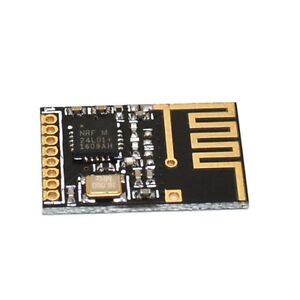
It could compact the size of the whole device. Moreover it would be great to have GND and Vcc (3.3V or 5V), and 4 GPIO (ie. 2 analog, 2 digital) pins led out on the PCB (there are 6 holes on the edge not used as I understand?). It would be great to have an option to connect some additional sensors (I use 2 dht22 sensors for environment monitoring in some projects). -
Hi all,
I've got two fully equipped, ready to go soldered v3.3.2 boards, two working USB gateways based on Arduino Nano, as well as 8 unsoldered PCBs (without the parts) to give away. I've used the system in my previous flat and it worked great. However, when I moved I wasn't able to fit them behind my light switches :(((
I don't have time anymore to solder my own boards and switched to some China Zigbee boards. They use cheap standard relais and do not react as quick as the mysensor module unfortunately. Long story short, they are sitting around in my cupboard and I thought it might help someone to quickly expand their system or to kickstart before investing to much effort.
I'm based in Germany so I would prefer to ship it to someone in Germany, however if nobody is interested then I would ship it abroad as well. Message me if you're interested :) -
Unfortunately the Bottom copper layer is corrupted.
(Spam links removed by moderator) -
Does anyone know how to convert diptrace to kicad format? I want to try and edit to make a RFM69 version.
-
Does anyone know how to convert diptrace to kicad format? I want to try and edit to make a RFM69 version.
@kaylestoinis In principle, I tried to do it this way and succeeded:
- Installed diptrace free
- opened the schematic file
- exported to eagle
- imported eagle file in KiCad
- same for the board file
-
thanks for the design.
I did build a unit in 2018.
Today I build one to control the light on my front door. It will be triggered by the IR Motion sensor.
The Switch indoors will be just to power the light (and the arduino) off completly.
Because of the IR Sensor VCC near the PIN 4 GND GND PIN7 Header.
I routed my own with a wire.Never have I soldered a slow blow fuse in one go :)
-
What I didn't quite figure out was how it operates independently as a regular light switch.
What I find most interesting is that this is 8 years old. There have been some incredible advances in the IoT world in that time. I was about to do a similar thing which morphed into an ESP-12F then added a touch screen. I call it the Universal Light Switch
Imagine this: All the switches are identical. Any switch can easily be configured to control up to five devices ... and then changed, on-the-fly, to control a different set of devices.
My design is part of a system that would require a controller (eg. Home Assistant), an MQTT broker, and receiving modules in the devices being switched. It's WiFI which assumes an access point.
The DIY ULS is under $20 and the off-the-shelf receiving modules are under $10. (About the cost of a non-networked dimmer switch) If one doesn't have the controller and MQTT broker, they can run on an old (5 years?) computer (which is cheaper than an old RasberryPi).
This project is a good one!
OSD