Skip to content
  • MySensors
  • OpenHardware.io
  • Categories
  • Recent
  • Tags
  • Popular
Skins
  • Light
  • Brite
  • Cerulean
  • Cosmo
  • Flatly
  • Journal
  • Litera
  • Lumen
  • Lux
  • Materia
  • Minty
  • Morph
  • Pulse
  • Sandstone
  • Simplex
  • Sketchy
  • Spacelab
  • United
  • Yeti
  • Zephyr
  • Dark
  • Cyborg
  • Darkly
  • Quartz
  • Slate
  • Solar
  • Superhero
  • Vapor

  • Default (No Skin)
  • No Skin
Collapse
Brand Logo
  1. Home
  2. OpenHardware.io
  3. 💬 Easy/Newbie PCB (RFM69 HW/W edition) for MySensors

💬 Easy/Newbie PCB (RFM69 HW/W edition) for MySensors

Scheduled Pinned Locked Moved OpenHardware.io
mysensoreasynewbiepcbmysx
106 Posts 20 Posters 36.9k Views 19 Watching
  • Oldest to Newest
  • Newest to Oldest
  • Most Votes
Reply
  • Reply as topic
Log in to reply
This topic has been deleted. Only users with topic management privileges can see it.
  • gohanG gohan

    they both work fine for me, just define in code wether is HW version

    M Offline
    M Offline
    Mr_sensor
    wrote on last edited by Mr_sensor
    #76

    @gohan Ok, what do you mean by "define HW" in code" ? This in my code:
    #define MY_RADIO_NRF24

    1 Reply Last reply
    0
    • gohanG Offline
      gohanG Offline
      gohan
      Mod
      wrote on last edited by
      #77

      but this is RFM69 radio pcb not NRF24

      M 1 Reply Last reply
      0
      • gohanG gohan

        but this is RFM69 radio pcb not NRF24

        M Offline
        M Offline
        Mr_sensor
        wrote on last edited by
        #78

        @gohan said in 💬 Easy/Newbie PCB (RFM69 HW/W edition) for MySensors:

        but this is RFM69 radio pcb not NRF24
        I know but I am using the nrf24 pcb.

        Do I need to add something like this when using the AP version?

        #define MY_RADIO_NRF24

        #define MY_RF24_PA_LEVEL RF24_PA_HIGH

        Or just #define MY_RADIO_NRF24

        sundberg84S 1 Reply Last reply
        0
        • M Mr_sensor

          @gohan said in 💬 Easy/Newbie PCB (RFM69 HW/W edition) for MySensors:

          but this is RFM69 radio pcb not NRF24
          I know but I am using the nrf24 pcb.

          Do I need to add something like this when using the AP version?

          #define MY_RADIO_NRF24

          #define MY_RF24_PA_LEVEL RF24_PA_HIGH

          Or just #define MY_RADIO_NRF24

          sundberg84S Offline
          sundberg84S Offline
          sundberg84
          Hardware Contributor
          wrote on last edited by
          #79

          @mr_sensor correct. As I said I'm no expert with the amplified version but that looks ok. I suggest you try it out. If it's wrong you will get an error and you can post that .

          Controller: Proxmox VM - Home Assistant
          MySensors GW: Arduino Uno - W5100 Ethernet, Gw Shield Nrf24l01+ 2,4Ghz
          MySensors GW: Arduino Uno - Gw Shield RFM69, 433mhz
          RFLink GW - Arduino Mega + RFLink Shield, 433mhz

          1 Reply Last reply
          0
          • gohanG Offline
            gohanG Offline
            gohan
            Mod
            wrote on last edited by
            #80

            You should be able to swap a regular nrf24 with a PA version without changing code, given you have a stable 3.3v supply that can handle extra power

            1 Reply Last reply
            0
            • sundberg84S Offline
              sundberg84S Offline
              sundberg84
              Hardware Contributor
              wrote on last edited by
              #81

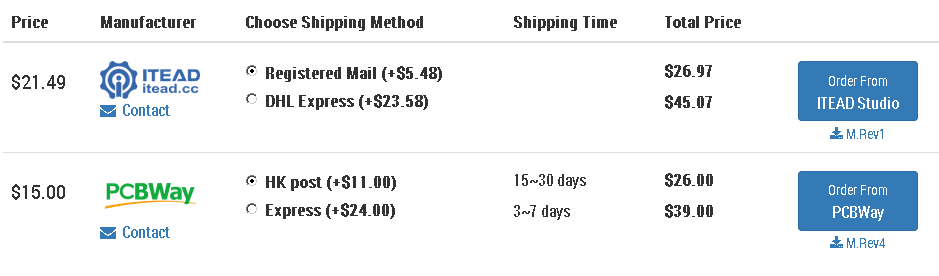
              This has now been updated to rev. 10. There are still some images left to change.

              The gerbers has been updated and sent to manufacturer but it will take some days before they update.

              Make sure it says rev5 before ordering.
              0_1528192311956_454056bd-a0ba-48e9-81d8-ecfc916ca6da-image.png

              Controller: Proxmox VM - Home Assistant
              MySensors GW: Arduino Uno - W5100 Ethernet, Gw Shield Nrf24l01+ 2,4Ghz
              MySensors GW: Arduino Uno - Gw Shield RFM69, 433mhz
              RFLink GW - Arduino Mega + RFLink Shield, 433mhz

              P 1 Reply Last reply
              1
              • sundberg84S sundberg84

                This has now been updated to rev. 10. There are still some images left to change.

                The gerbers has been updated and sent to manufacturer but it will take some days before they update.

                Make sure it says rev5 before ordering.
                0_1528192311956_454056bd-a0ba-48e9-81d8-ecfc916ca6da-image.png

                P Offline
                P Offline
                Prakhar Birla
                wrote on last edited by
                #82

                @sundberg84 said in 💬 Easy/Newbie PCB (RFM69 HW/W edition) for MySensors:

                This has now been updated to rev. 10. There are still some images left to change.

                The gerbers has been updated and sent to manufacturer but it will take some days before they update.

                Make sure it says rev5 before ordering.
                0_1528192311956_454056bd-a0ba-48e9-81d8-ecfc916ca6da-image.png

                Hello,

                Thanks for creating these PCBs, it's great to have a stable base to work upon!

                I want to make a daughter board using the MYSX connector but the pin choices are a little inconvenient. Like A0 is used by the battery voltage measure circuit, D2 is used by the RFM69 radio. Could you share your reasons for using these pins and whethe it is possible to use different pins?

                Finally, I couldn't find instructions for adding the flash memory. That is a great addition to this board!

                Cheers,
                Birla

                sundberg84S 1 Reply Last reply
                0
                • P Prakhar Birla

                  @sundberg84 said in 💬 Easy/Newbie PCB (RFM69 HW/W edition) for MySensors:

                  This has now been updated to rev. 10. There are still some images left to change.

                  The gerbers has been updated and sent to manufacturer but it will take some days before they update.

                  Make sure it says rev5 before ordering.
                  0_1528192311956_454056bd-a0ba-48e9-81d8-ecfc916ca6da-image.png

                  Hello,

                  Thanks for creating these PCBs, it's great to have a stable base to work upon!

                  I want to make a daughter board using the MYSX connector but the pin choices are a little inconvenient. Like A0 is used by the battery voltage measure circuit, D2 is used by the RFM69 radio. Could you share your reasons for using these pins and whethe it is possible to use different pins?

                  Finally, I couldn't find instructions for adding the flash memory. That is a great addition to this board!

                  Cheers,
                  Birla

                  sundberg84S Offline
                  sundberg84S Offline
                  sundberg84
                  Hardware Contributor
                  wrote on last edited by
                  #83

                  @prakhar-birla Hi!

                  The reason is that MysX is a fixed connector. This way you can make daughterboards. If the pins would be inconsistent it would not work. You can use these pins (A0 + D2) if you dont use it for radio or battery measurment.

                  I havent had time to make instructions for the flash memory, but there are several others on this site which have made that. Look around for @scalz work for example on openhardware.io

                  Controller: Proxmox VM - Home Assistant
                  MySensors GW: Arduino Uno - W5100 Ethernet, Gw Shield Nrf24l01+ 2,4Ghz
                  MySensors GW: Arduino Uno - Gw Shield RFM69, 433mhz
                  RFLink GW - Arduino Mega + RFLink Shield, 433mhz

                  P 1 Reply Last reply
                  0
                  • sundberg84S sundberg84

                    @prakhar-birla Hi!

                    The reason is that MysX is a fixed connector. This way you can make daughterboards. If the pins would be inconsistent it would not work. You can use these pins (A0 + D2) if you dont use it for radio or battery measurment.

                    I havent had time to make instructions for the flash memory, but there are several others on this site which have made that. Look around for @scalz work for example on openhardware.io

                    P Offline
                    P Offline
                    Prakhar Birla
                    wrote on last edited by
                    #84

                    Hey @sundberg84,

                    Thanks for the clarification! I checked the spec docs for the MYSX connectors but they didn't mention any fixed pins, just the purpose/pin type. Anyway, for different MCU it will inevitably be different pins. On Arduino Pro Mini since there are only two external interrupts there's no escaping D2, the analog pin on the other hand in an easy fix either use a different pin for battery measurement (A6/A7 is only a via away) or a different pinout on the MYSX.

                    I couldn't find any instructions for the flash memory, please share a link when you can. Also is it possible to add it without the footprint on the PCB?

                    PS. I just ordered a set of 10 PCBs through Open Hardware :)

                    Cheers

                    sundberg84S 1 Reply Last reply
                    0
                    • P Prakhar Birla

                      Hey @sundberg84,

                      Thanks for the clarification! I checked the spec docs for the MYSX connectors but they didn't mention any fixed pins, just the purpose/pin type. Anyway, for different MCU it will inevitably be different pins. On Arduino Pro Mini since there are only two external interrupts there's no escaping D2, the analog pin on the other hand in an easy fix either use a different pin for battery measurement (A6/A7 is only a via away) or a different pinout on the MYSX.

                      I couldn't find any instructions for the flash memory, please share a link when you can. Also is it possible to add it without the footprint on the PCB?

                      PS. I just ordered a set of 10 PCBs through Open Hardware :)

                      Cheers

                      sundberg84S Offline
                      sundberg84S Offline
                      sundberg84
                      Hardware Contributor
                      wrote on last edited by
                      #85

                      @prakhar-birla - well the idea with MysX is that the pin-order is fixed so you can attach any daugherboard to it. If you start mixing the pins around you will not be able to transfer a daugherboard from one motherboard to another since they will be different. Im not sure how MysX would translate to other MCU but other have digital and analog pins as well - so it would be most possible to connect MysX to other mcu.

                      About the external interrupt you are right, there are 2 on the atmega328. On my Nrf24l01+ version you can use D2 as an interrupt but since the RFM69 radio uses this pin you can not on this version. D3 is your only choise and if you need more you might have to create an external circuit.

                      As I said, I havent had time to look over SPI flash instructions yet. I havent even tried it - this is a user request from this forum. You can search this forum for more information - like this: https://forum.mysensors.org/topic/3160/ota-flash-types-for-mysensors/

                      Controller: Proxmox VM - Home Assistant
                      MySensors GW: Arduino Uno - W5100 Ethernet, Gw Shield Nrf24l01+ 2,4Ghz
                      MySensors GW: Arduino Uno - Gw Shield RFM69, 433mhz
                      RFLink GW - Arduino Mega + RFLink Shield, 433mhz

                      1 Reply Last reply
                      1
                      • ferroF Offline
                        ferroF Offline
                        ferro
                        wrote on last edited by
                        #86

                        Hi @sundberg84, on Easy/Newbie PCB rfm69 version PIN3 of MysX connector is connected to 3.3V resp. to the output from voltage regulator. When I compare with Easy/Newbie PCB nrf24l01 version, MysX PIN3 is connected to input of voltage regulator (to 5V). Is this a mistake in design of Easy/PCB rfm69 version?

                        sundberg84S 1 Reply Last reply
                        0
                        • ferroF ferro

                          Hi @sundberg84, on Easy/Newbie PCB rfm69 version PIN3 of MysX connector is connected to 3.3V resp. to the output from voltage regulator. When I compare with Easy/Newbie PCB nrf24l01 version, MysX PIN3 is connected to input of voltage regulator (to 5V). Is this a mistake in design of Easy/PCB rfm69 version?

                          sundberg84S Offline
                          sundberg84S Offline
                          sundberg84
                          Hardware Contributor
                          wrote on last edited by
                          #87

                          @ferro - Hi no - the RFM version is 3.3v only. nrf24 data pins are 5v tolerant but the rfm radio isnt so thats why.

                          Controller: Proxmox VM - Home Assistant
                          MySensors GW: Arduino Uno - W5100 Ethernet, Gw Shield Nrf24l01+ 2,4Ghz
                          MySensors GW: Arduino Uno - Gw Shield RFM69, 433mhz
                          RFLink GW - Arduino Mega + RFLink Shield, 433mhz

                          ferroF 1 Reply Last reply
                          0
                          • sundberg84S sundberg84

                            @ferro - Hi no - the RFM version is 3.3v only. nrf24 data pins are 5v tolerant but the rfm radio isnt so thats why.

                            ferroF Offline
                            ferroF Offline
                            ferro
                            wrote on last edited by
                            #88

                            @sundberg84 - ok thanks, it makes sense ;). I was asking because I connected your Dimmable Led Strip daughterboard via MysX to this Easy PCB. Dimmer daughterboard is providing 5V on PIN3 (when LM2940CT voltage regulator is used on it). This would bring 5V to output of voltage regulator on Easy PCB so I disconnected PIN3 connection between dimmer daughterboard and Easy PCB. I connected PIN3 from dimmer board by wire to >3.3V power input of Easy PCB instead. Other option I'm thinking of would be not using voltage regulator on dimmer daughterboard at all but use its 12V raw voltage provided by dimmer board via MysX PIN1 (+ raw jumper on Easy PSB) and use voltage regulator (LE33) on Easy PCB only.

                            1 Reply Last reply
                            0
                            • N Offline
                              N Offline
                              Nigel31
                              wrote on last edited by
                              #89

                              Schematic rfm69 version.

                              Needs updating, as it shows nrf radio.

                              sundberg84S 1 Reply Last reply
                              0
                              • N Nigel31

                                Schematic rfm69 version.

                                Needs updating, as it shows nrf radio.

                                sundberg84S Offline
                                sundberg84S Offline
                                sundberg84
                                Hardware Contributor
                                wrote on last edited by
                                #90

                                @njwyborn - you are correct, thanks for noticing! Its been corrected!

                                Controller: Proxmox VM - Home Assistant
                                MySensors GW: Arduino Uno - W5100 Ethernet, Gw Shield Nrf24l01+ 2,4Ghz
                                MySensors GW: Arduino Uno - Gw Shield RFM69, 433mhz
                                RFLink GW - Arduino Mega + RFLink Shield, 433mhz

                                1 Reply Last reply
                                0
                                • E Offline
                                  E Offline
                                  eMdzeJ
                                  wrote on last edited by
                                  #91

                                  Hi, I've lipo battery pack with 4,2v maximum voltage (3,6v nominal). Can I safely use it with this board? Do I need any modifications?

                                  sundberg84S 1 Reply Last reply
                                  0
                                  • E eMdzeJ

                                    Hi, I've lipo battery pack with 4,2v maximum voltage (3,6v nominal). Can I safely use it with this board? Do I need any modifications?

                                    sundberg84S Offline
                                    sundberg84S Offline
                                    sundberg84
                                    Hardware Contributor
                                    wrote on last edited by
                                    #92

                                    @emdzej - I'm not sure but it's designed for 3.3v. you have to check the rfm radio for Max input voltage on VCC and io. I think it's 3.3v so you might have to regulate down your lipo battery to this.

                                    Controller: Proxmox VM - Home Assistant
                                    MySensors GW: Arduino Uno - W5100 Ethernet, Gw Shield Nrf24l01+ 2,4Ghz
                                    MySensors GW: Arduino Uno - Gw Shield RFM69, 433mhz
                                    RFLink GW - Arduino Mega + RFLink Shield, 433mhz

                                    1 Reply Last reply
                                    1
                                    • sfozzS Offline
                                      sfozzS Offline
                                      sfozz
                                      wrote on last edited by
                                      #93

                                      Hi can you add the kicad files for the latest rev pls?

                                      1 Reply Last reply
                                      0
                                      • K Offline
                                        K Offline
                                        kiesel
                                        wrote on last edited by
                                        #94

                                        Has anybody any experience with pcbway? I ordered via the link provided here (7 weeks ago) and only received a message from paypal. I haven't gotten a tracking number and pcbway says they can't help me without an ordernumber (which I don't have).


                                        sundberg84S 1 Reply Last reply
                                        0
                                        • K kiesel

                                          Has anybody any experience with pcbway? I ordered via the link provided here (7 weeks ago) and only received a message from paypal. I haven't gotten a tracking number and pcbway says they can't help me without an ordernumber (which I don't have).

                                          sundberg84S Offline
                                          sundberg84S Offline
                                          sundberg84
                                          Hardware Contributor
                                          wrote on last edited by
                                          #95

                                          @kiesel - i checked my page as well but I dont have any ordernumbers. I can see some orders to PCB way latest weeks and they are marked as "shipped".

                                          @hek - do you have more intel on this?

                                          Controller: Proxmox VM - Home Assistant
                                          MySensors GW: Arduino Uno - W5100 Ethernet, Gw Shield Nrf24l01+ 2,4Ghz
                                          MySensors GW: Arduino Uno - Gw Shield RFM69, 433mhz
                                          RFLink GW - Arduino Mega + RFLink Shield, 433mhz

                                          K 1 Reply Last reply
                                          0
                                          Reply
                                          • Reply as topic
                                          Log in to reply
                                          • Oldest to Newest
                                          • Newest to Oldest
                                          • Most Votes


                                          20

                                          Online

                                          11.7k

                                          Users

                                          11.2k

                                          Topics

                                          113.1k

                                          Posts


                                          Copyright 2025 TBD   |   Forum Guidelines   |   Privacy Policy   |   Terms of Service
                                          • Login

                                          • Don't have an account? Register

                                          • Login or register to search.
                                          • First post
                                            Last post
                                          0
                                          • MySensors
                                          • OpenHardware.io
                                          • Categories
                                          • Recent
                                          • Tags
                                          • Popular