
Please share your raingauge sketch that works with Domoticz
-
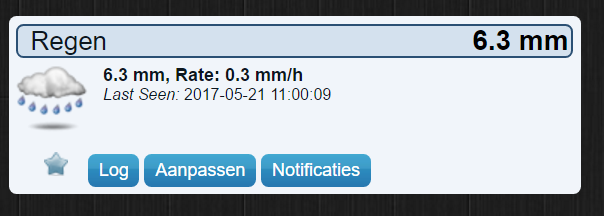
Can someone please share his Raingauge sketch that works with domoticz and is running from an external powersupply 3v or 5v. Trying to get the 'original' to work but it does not work well. It keeps sending rainfall every hour even if it does not rain :umbrella:
I tried the example from @sundberg84 and @TheoL but they have added extra sensor or using batteries.
I am using the latest Mysensors 2.1.1 using esp8266 gateway with domoticz 3.7416.Thanks Edwin.
My last try of the raingauge sketch. This one keeps asking the V_VAR1 value from the gateway.
// Arduino Tipping Bucket Rain Gauge #define MY_DEBUG // Enable MySensors debug prints to serial monitor // Enable and select radio type attached #define MY_RADIO_NRF24 #include <SPI.h> #include <MySensors.h> // Running this in Domoticz stable version 2.5 will not work - upgrade to beta. #define DIGITAL_INPUT_SENSOR 3 // The reed switch you attached. (Only 2 and 3 generates interrupt!) #define INTERRUPT DIGITAL_INPUT_SENSOR-2 // Usually the interrupt = pin -2 (on uno/nano anyway) #define CHILD_ID 1 // Id of the sensor child #define BATT_CHILD 2 #define NODE_ID AUTO // or AUTO to let controller assign #define SKETCH_NAME "Rain Gauge" // Change to a fancy name you like #define SKETCH_VERSION "10" // Your version unsigned long SLEEP_TIME = 180*60000; // Sleep time (in milliseconds). //unsigned long SLEEP_TIME = 20000; // use this instead for debug float hwRainVolume = 0; // Current rainvolume calculated in hardware. int hwPulseCounter = 0; // Pulsecount recieved from GW float fullCounter = 0; // Counts when to send counter float bucketSize = 0.3; // Bucketsize mm, needs to be 1, 0.5, 0.25, 0.2 or 0.1 boolean pcReceived = false; // If we have recieved the pulscount from GW or not boolean reedState; // Current state the reedswitch is in boolean oldReedState; // Old state (last state) of the reedswitch unsigned long lastSend =0; // Time we last tried to fetch counter. MyMessage volumeMsg(CHILD_ID,V_RAIN); MyMessage lastCounterMsg(CHILD_ID,V_VAR1); void setup() { #ifndef MY_DEBUG SERIAL_START(115200); //Start serial if MySensors debugging isn't enabled #endif pinMode(DIGITAL_INPUT_SENSOR, INPUT_PULLUP); // sets the reed sensor digital pin as input reedState = digitalRead(DIGITAL_INPUT_SENSOR); // Read what state the reedswitch is in oldReedState = reedState; // Set startup position for reedswitch } void presentation() { delay(500); // Allow time for radio if power used as reset // Send the Sketch Version Information to the Gateway sendSketchInfo(SKETCH_NAME, SKETCH_VERSION); // Register this device as Rain sensor (will not show in Domoticz until first value arrives) present(CHILD_ID, S_RAIN); } void loop() { unsigned long currentTime = millis(); //See if we have the counter/pulse from Domoticz - and ask for it if we dont. if (!pcReceived && (currentTime - lastSend > 5000)) { request(CHILD_ID, V_VAR1); lastSend=currentTime; return; } if (!pcReceived) { return; } //Read if the bucket tipped over reedState = digitalRead(DIGITAL_INPUT_SENSOR); boolean tipped = oldReedState != reedState; //BUCKET TIPS! if (tipped==true) { oldReedState = reedState; hwRainVolume = hwRainVolume + bucketSize; send(volumeMsg.set((float)hwRainVolume,1)); wait(1000); fullCounter = fullCounter + bucketSize; //Count so we send the counter for every 1mm if(fullCounter >= 1){ hwPulseCounter++; send(lastCounterMsg.set(hwPulseCounter)); wait(1000); fullCounter = 0; } } lastSend=currentTime; sleep(INTERRUPT, CHANGE, SLEEP_TIME); //The interupt can be CHANGE or FALLING depending on how you wired the hardware. } //Read if we have a incoming message. void incomingMessage(const MyMessage &message) { if (message.type==V_VAR1) { hwPulseCounter = message.getULong(); hwRainVolume = hwPulseCounter; pcReceived = true; } //Sends 1 per hour as a heartbeat. send(volumeMsg.set((float)hwRainVolume,1)); send(lastCounterMsg.set(hwPulseCounter)); } -
Can someone please share his Raingauge sketch that works with domoticz and is running from an external powersupply 3v or 5v. Trying to get the 'original' to work but it does not work well. It keeps sending rainfall every hour even if it does not rain :umbrella:
I tried the example from @sundberg84 and @TheoL but they have added extra sensor or using batteries.
I am using the latest Mysensors 2.1.1 using esp8266 gateway with domoticz 3.7416.Thanks Edwin.
My last try of the raingauge sketch. This one keeps asking the V_VAR1 value from the gateway.
// Arduino Tipping Bucket Rain Gauge #define MY_DEBUG // Enable MySensors debug prints to serial monitor // Enable and select radio type attached #define MY_RADIO_NRF24 #include <SPI.h> #include <MySensors.h> // Running this in Domoticz stable version 2.5 will not work - upgrade to beta. #define DIGITAL_INPUT_SENSOR 3 // The reed switch you attached. (Only 2 and 3 generates interrupt!) #define INTERRUPT DIGITAL_INPUT_SENSOR-2 // Usually the interrupt = pin -2 (on uno/nano anyway) #define CHILD_ID 1 // Id of the sensor child #define BATT_CHILD 2 #define NODE_ID AUTO // or AUTO to let controller assign #define SKETCH_NAME "Rain Gauge" // Change to a fancy name you like #define SKETCH_VERSION "10" // Your version unsigned long SLEEP_TIME = 180*60000; // Sleep time (in milliseconds). //unsigned long SLEEP_TIME = 20000; // use this instead for debug float hwRainVolume = 0; // Current rainvolume calculated in hardware. int hwPulseCounter = 0; // Pulsecount recieved from GW float fullCounter = 0; // Counts when to send counter float bucketSize = 0.3; // Bucketsize mm, needs to be 1, 0.5, 0.25, 0.2 or 0.1 boolean pcReceived = false; // If we have recieved the pulscount from GW or not boolean reedState; // Current state the reedswitch is in boolean oldReedState; // Old state (last state) of the reedswitch unsigned long lastSend =0; // Time we last tried to fetch counter. MyMessage volumeMsg(CHILD_ID,V_RAIN); MyMessage lastCounterMsg(CHILD_ID,V_VAR1); void setup() { #ifndef MY_DEBUG SERIAL_START(115200); //Start serial if MySensors debugging isn't enabled #endif pinMode(DIGITAL_INPUT_SENSOR, INPUT_PULLUP); // sets the reed sensor digital pin as input reedState = digitalRead(DIGITAL_INPUT_SENSOR); // Read what state the reedswitch is in oldReedState = reedState; // Set startup position for reedswitch } void presentation() { delay(500); // Allow time for radio if power used as reset // Send the Sketch Version Information to the Gateway sendSketchInfo(SKETCH_NAME, SKETCH_VERSION); // Register this device as Rain sensor (will not show in Domoticz until first value arrives) present(CHILD_ID, S_RAIN); } void loop() { unsigned long currentTime = millis(); //See if we have the counter/pulse from Domoticz - and ask for it if we dont. if (!pcReceived && (currentTime - lastSend > 5000)) { request(CHILD_ID, V_VAR1); lastSend=currentTime; return; } if (!pcReceived) { return; } //Read if the bucket tipped over reedState = digitalRead(DIGITAL_INPUT_SENSOR); boolean tipped = oldReedState != reedState; //BUCKET TIPS! if (tipped==true) { oldReedState = reedState; hwRainVolume = hwRainVolume + bucketSize; send(volumeMsg.set((float)hwRainVolume,1)); wait(1000); fullCounter = fullCounter + bucketSize; //Count so we send the counter for every 1mm if(fullCounter >= 1){ hwPulseCounter++; send(lastCounterMsg.set(hwPulseCounter)); wait(1000); fullCounter = 0; } } lastSend=currentTime; sleep(INTERRUPT, CHANGE, SLEEP_TIME); //The interupt can be CHANGE or FALLING depending on how you wired the hardware. } //Read if we have a incoming message. void incomingMessage(const MyMessage &message) { if (message.type==V_VAR1) { hwPulseCounter = message.getULong(); hwRainVolume = hwPulseCounter; pcReceived = true; } //Sends 1 per hour as a heartbeat. send(volumeMsg.set((float)hwRainVolume,1)); send(lastCounterMsg.set(hwPulseCounter)); }@edweather
Does the node get VAR1 from DZ?
Does it send new value every hour or same value? -
@edweather
Does the node get VAR1 from DZ?
Does it send new value every hour or same value?@flopp thanks for the quick reply.
The debug output gives:28004 TSF:MSG:SEND,33-33-0-0,s=1,c=2,t=24,pt=0,l=0,sg=0,ft=0,st=OK: Sent Message Sender: 33 Last Node: 33 Next Node: 0 Destination: 0 Sensor Id: 1 Command: REQ Message Type:V_VAR1 Payload Type: P_STRING Payload Length: 0 Signing: 0 Failed uplink counter: 0 Status: OK (OK=success, NACK=no radio ACK received) Payload: 28499 TSF:MSG:READ,0-0-33,s=1,c=2,t=24,pt=0,l=0,sg=0: Received Message Sender: 0 Last Node: 0 Destination: 33 Sensor Id: 1 Command: REQ Message Type: V_VAR1 Payload Type: P_STRING Payload Length: 0 Signing: 0 Payload:I tried it with your sketch but this gives me a pulse count every time the sensor starts up.
Normaly you do this only once but I think it will do this every hour when synching the time.
I uploaded your sketch 5 minutes ago so I can't confirm this now.Getting pulse count
.
Received last pulse count from gw: 1
Getting Time
.
Time received...
16:14
Tipped 2 times.
Rain fall is 0.6 mm.
Getting pulse count
.
Received last pulse count from gw: 2
Getting Time
.
Time received...
16:14
Tipped 3 times.
Rain fall is 0.9 mm.Getting pulse count
.
Received last pulse count from gw: 3
Getting Time
.
Time received...
16:16
Tipped 4 times.
Rain fall is 1.2 mm.
Getting pulse count
.
Received last pulse count from gw: 4
Getting Time
.
Time received...
16:17
Tipped 5 times.
Rain fall is 1.5 mm.
Getting pulse count
.
Received last pulse count from gw: 5
Getting Time
.
Time received...
16:17
Tipped 6 times.
Rain fall is 1.8 mm.The sketch with extra sensors removed:
// Enable and select radio type attached #define MY_RADIO_NRF24 /* Include libraries used by the sketch */ #include <Time.h> #include <TimeLib.h> #include <MySensors.h> #include <Wire.h> #define BUCKET_PIN 3 // The Arduino pin to which the bucket is attached. We need an interrupt pin (2 or 3 on the Uno and the Pro Mini) #define SKETCH_INFO "Rain Gauge" // The name of the sketch as presented to the gateway #define SKETCH_VERSION "1.0" // The version of the sketch as presented to the gateway #define CHILD_ID_RAIN_LOG 4 // The child id of the rain gauge #define MS_WAIT 100 // short delay used to give the NRF24L01+ antenna some time to recover from the last data sending #define bucketSize 0.3 // I've used a MI-SOL Rain Guage which has a bucket size of 0.3 mm MyMessage msgRain( CHILD_ID_RAIN_LOG, V_RAIN ); MyMessage lastCounterMsg( CHILD_ID_RAIN_LOG, V_VAR1 ); float hwRainVolume = 0; // Current rainvolume calculated in hardware. unsigned long hwPulseCounter = 0; // Pulsecount recieved from GW boolean pcReceived = false; // If we have recieved the pulscount from GW or not unsigned long lastTipTime = millis(); // TS of when the bucket tip has been detected for the last time volatile unsigned long wasTippedCounter; // Queue for storing the tipped counter as been set by the interrupt handler. byte lastHour; // Stores the hour used for checking if time needs to be synchronized void presentation() { // Send the sketch version information to the gateway sendSketchInfo( SKETCH_INFO, SKETCH_VERSION ); wait( MS_WAIT ); present( CHILD_ID_RAIN_LOG, S_RAIN, "Rain fall" ); wait( MS_WAIT ); unsigned long functionTimeout = millis(); while ( pcReceived == false && millis() - functionTimeout < 30000UL ) { request( CHILD_ID_RAIN_LOG, V_VAR1); Serial.println(F("Getting pulse count")); Serial.println(F(".")); wait( 1000 ); } attachInterrupt( digitalPinToInterrupt( BUCKET_PIN ), sensorTipped, CHANGE ); //FALLING ); // depending on location of the hall effect sensor may need CHANGE } void setup() { Serial.begin( 115200 ); pinMode( BUCKET_PIN, INPUT_PULLUP ); unsigned long functionTimeout = millis(); while ( timeStatus() == timeNotSet && millis() - functionTimeout < 30000UL ) { requestTime(); Serial.println(F("Getting Time")); Serial.println(F(".")); wait( 1000 ); } lastHour = hour(); } /** Sends the value of the rain gauge to the Gateway. */ void sendRainVolumeData() { float hwRainVolume = hwPulseCounter * bucketSize; Serial.print( "Tipped " ); Serial.print( hwPulseCounter ); Serial.println( " times." ); Serial.print( "Rain fall is " ); Serial.print( hwRainVolume, 1 ); Serial.println( " mm." ); send( msgRain.set( (float)hwRainVolume, 1 ) ); wait( MS_WAIT ); send( lastCounterMsg.set( hwPulseCounter ) ); wait( MS_WAIT ); } void loop() { if ( wasTippedCounter != hwPulseCounter ) { hwPulseCounter = wasTippedCounter; sendRainVolumeData(); } byte currentHour = hour(); if (currentHour != lastHour) { Serial.println( "Resyncing hour" ); requestTime(); // sync the time every hour wait( MS_WAIT ); lastHour = currentHour; sendRainVolumeData(); // Send heart beat } } void sensorTipped() { unsigned long thisTipTime = millis(); if (thisTipTime - lastTipTime > 100UL) { wasTippedCounter++; } lastTipTime = thisTipTime; } void receiveTime(unsigned long time) { Serial.println( F("Time received...")); setTime(time); char theTime[6]; sprintf(theTime, "%d:%2d", hour(), minute()); Serial.println(theTime); } void receive(const MyMessage &message) { if ( message.sensor == CHILD_ID_RAIN_LOG && message.type == V_VAR1) { // We only expect pulse count values from the gateway hwPulseCounter = message.getULong(); wasTippedCounter = hwPulseCounter; pcReceived = true; Serial.print("Received last pulse count from gw: "); Serial.println(hwPulseCounter); } } -
@flopp thanks for the quick reply.
The debug output gives:28004 TSF:MSG:SEND,33-33-0-0,s=1,c=2,t=24,pt=0,l=0,sg=0,ft=0,st=OK: Sent Message Sender: 33 Last Node: 33 Next Node: 0 Destination: 0 Sensor Id: 1 Command: REQ Message Type:V_VAR1 Payload Type: P_STRING Payload Length: 0 Signing: 0 Failed uplink counter: 0 Status: OK (OK=success, NACK=no radio ACK received) Payload: 28499 TSF:MSG:READ,0-0-33,s=1,c=2,t=24,pt=0,l=0,sg=0: Received Message Sender: 0 Last Node: 0 Destination: 33 Sensor Id: 1 Command: REQ Message Type: V_VAR1 Payload Type: P_STRING Payload Length: 0 Signing: 0 Payload:I tried it with your sketch but this gives me a pulse count every time the sensor starts up.
Normaly you do this only once but I think it will do this every hour when synching the time.
I uploaded your sketch 5 minutes ago so I can't confirm this now.Getting pulse count
.
Received last pulse count from gw: 1
Getting Time
.
Time received...
16:14
Tipped 2 times.
Rain fall is 0.6 mm.
Getting pulse count
.
Received last pulse count from gw: 2
Getting Time
.
Time received...
16:14
Tipped 3 times.
Rain fall is 0.9 mm.Getting pulse count
.
Received last pulse count from gw: 3
Getting Time
.
Time received...
16:16
Tipped 4 times.
Rain fall is 1.2 mm.
Getting pulse count
.
Received last pulse count from gw: 4
Getting Time
.
Time received...
16:17
Tipped 5 times.
Rain fall is 1.5 mm.
Getting pulse count
.
Received last pulse count from gw: 5
Getting Time
.
Time received...
16:17
Tipped 6 times.
Rain fall is 1.8 mm.The sketch with extra sensors removed:
// Enable and select radio type attached #define MY_RADIO_NRF24 /* Include libraries used by the sketch */ #include <Time.h> #include <TimeLib.h> #include <MySensors.h> #include <Wire.h> #define BUCKET_PIN 3 // The Arduino pin to which the bucket is attached. We need an interrupt pin (2 or 3 on the Uno and the Pro Mini) #define SKETCH_INFO "Rain Gauge" // The name of the sketch as presented to the gateway #define SKETCH_VERSION "1.0" // The version of the sketch as presented to the gateway #define CHILD_ID_RAIN_LOG 4 // The child id of the rain gauge #define MS_WAIT 100 // short delay used to give the NRF24L01+ antenna some time to recover from the last data sending #define bucketSize 0.3 // I've used a MI-SOL Rain Guage which has a bucket size of 0.3 mm MyMessage msgRain( CHILD_ID_RAIN_LOG, V_RAIN ); MyMessage lastCounterMsg( CHILD_ID_RAIN_LOG, V_VAR1 ); float hwRainVolume = 0; // Current rainvolume calculated in hardware. unsigned long hwPulseCounter = 0; // Pulsecount recieved from GW boolean pcReceived = false; // If we have recieved the pulscount from GW or not unsigned long lastTipTime = millis(); // TS of when the bucket tip has been detected for the last time volatile unsigned long wasTippedCounter; // Queue for storing the tipped counter as been set by the interrupt handler. byte lastHour; // Stores the hour used for checking if time needs to be synchronized void presentation() { // Send the sketch version information to the gateway sendSketchInfo( SKETCH_INFO, SKETCH_VERSION ); wait( MS_WAIT ); present( CHILD_ID_RAIN_LOG, S_RAIN, "Rain fall" ); wait( MS_WAIT ); unsigned long functionTimeout = millis(); while ( pcReceived == false && millis() - functionTimeout < 30000UL ) { request( CHILD_ID_RAIN_LOG, V_VAR1); Serial.println(F("Getting pulse count")); Serial.println(F(".")); wait( 1000 ); } attachInterrupt( digitalPinToInterrupt( BUCKET_PIN ), sensorTipped, CHANGE ); //FALLING ); // depending on location of the hall effect sensor may need CHANGE } void setup() { Serial.begin( 115200 ); pinMode( BUCKET_PIN, INPUT_PULLUP ); unsigned long functionTimeout = millis(); while ( timeStatus() == timeNotSet && millis() - functionTimeout < 30000UL ) { requestTime(); Serial.println(F("Getting Time")); Serial.println(F(".")); wait( 1000 ); } lastHour = hour(); } /** Sends the value of the rain gauge to the Gateway. */ void sendRainVolumeData() { float hwRainVolume = hwPulseCounter * bucketSize; Serial.print( "Tipped " ); Serial.print( hwPulseCounter ); Serial.println( " times." ); Serial.print( "Rain fall is " ); Serial.print( hwRainVolume, 1 ); Serial.println( " mm." ); send( msgRain.set( (float)hwRainVolume, 1 ) ); wait( MS_WAIT ); send( lastCounterMsg.set( hwPulseCounter ) ); wait( MS_WAIT ); } void loop() { if ( wasTippedCounter != hwPulseCounter ) { hwPulseCounter = wasTippedCounter; sendRainVolumeData(); } byte currentHour = hour(); if (currentHour != lastHour) { Serial.println( "Resyncing hour" ); requestTime(); // sync the time every hour wait( MS_WAIT ); lastHour = currentHour; sendRainVolumeData(); // Send heart beat } } void sensorTipped() { unsigned long thisTipTime = millis(); if (thisTipTime - lastTipTime > 100UL) { wasTippedCounter++; } lastTipTime = thisTipTime; } void receiveTime(unsigned long time) { Serial.println( F("Time received...")); setTime(time); char theTime[6]; sprintf(theTime, "%d:%2d", hour(), minute()); Serial.println(theTime); } void receive(const MyMessage &message) { if ( message.sensor == CHILD_ID_RAIN_LOG && message.type == V_VAR1) { // We only expect pulse count values from the gateway hwPulseCounter = message.getULong(); wasTippedCounter = hwPulseCounter; pcReceived = true; Serial.print("Received last pulse count from gw: "); Serial.println(hwPulseCounter); } } -
@edweather this thread discusses some recent false tips. Maybe you are experiencing something similar?
-
@edweather this thread discusses some recent false tips. Maybe you are experiencing something similar?
@mfalkvidd thanks, I will look at that thread.
-
Did you make sure the pin isnt floating? A pulldown resistor 10k to gnd can be good.
-
Did you make sure the pin isnt floating? A pulldown resistor 10k to gnd can be good.
@sundberg84 Thanks, tried but I keep getting false rain tips.


Hello! It looks like you're interested in this conversation, but you don't have an account yet.
Getting fed up of having to scroll through the same posts each visit? When you register for an account, you'll always come back to exactly where you were before, and choose to be notified of new replies (either via email, or push notification). You'll also be able to save bookmarks and upvote posts to show your appreciation to other community members.
With your input, this post could be even better 💗
Register Login