Skip to content
  • MySensors
  • OpenHardware.io
  • Categories
  • Recent
  • Tags
  • Popular
Skins
  • Light
  • Brite
  • Cerulean
  • Cosmo
  • Flatly
  • Journal
  • Litera
  • Lumen
  • Lux
  • Materia
  • Minty
  • Morph
  • Pulse
  • Sandstone
  • Simplex
  • Sketchy
  • Spacelab
  • United
  • Yeti
  • Zephyr
  • Dark
  • Cyborg
  • Darkly
  • Quartz
  • Slate
  • Solar
  • Superhero
  • Vapor

  • Default (No Skin)
  • No Skin
Collapse
Brand Logo
  1. Home
  2. My Project
  3. Relay / Motion Multisensor

Relay / Motion Multisensor

Scheduled Pinned Locked Moved My Project
motionrelaymultisensor
14 Posts 9 Posters 19.8k Views 4 Watching
  • Oldest to Newest
  • Newest to Oldest
  • Most Votes
Reply
  • Reply as topic
Log in to reply
This topic has been deleted. Only users with topic management privileges can see it.
  • R RJ_Make

    @hek said:

    Nice! But you should probably isolate the high voltage parts a bit. We wouldn't want a MySensors related fire started.

    +1 on that one!

    D Offline
    D Offline
    Dalhoj
    wrote on last edited by
    #5

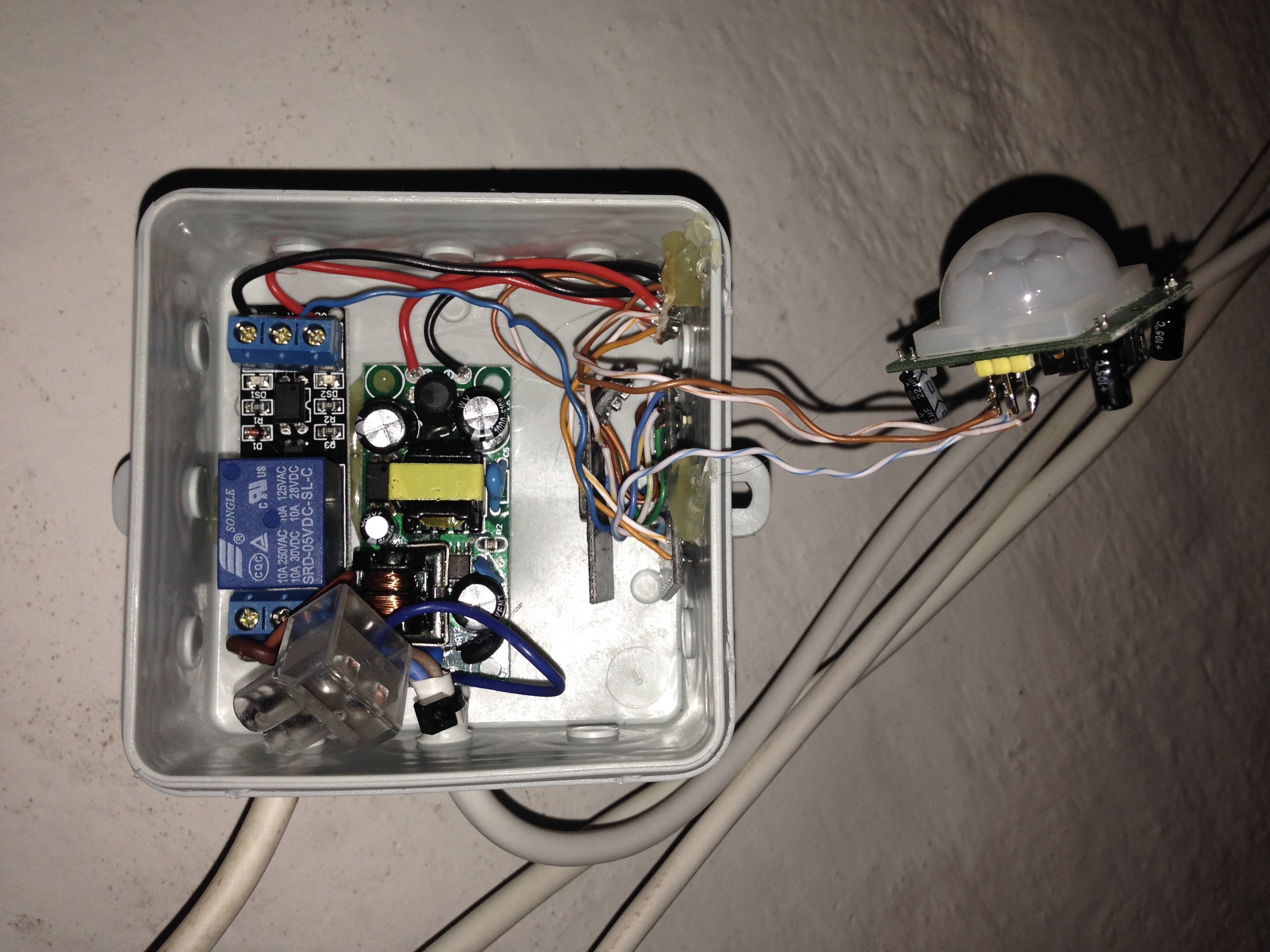
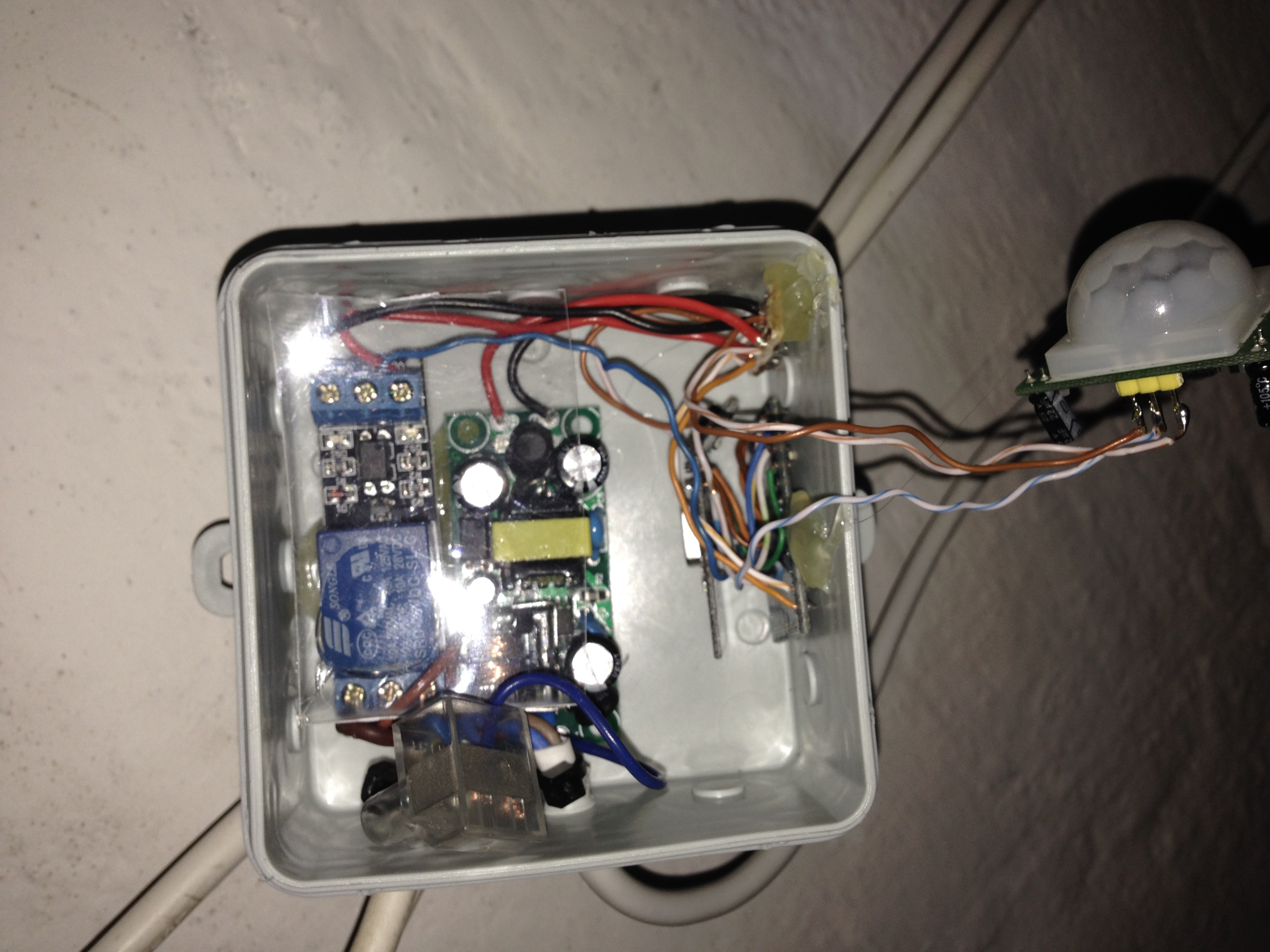
    @ServiceXp @hek Here just a little update

    I have now glued all parts to the box, and added a plastic cover over the part with 230V

    Billede 30-01-15 18.44.44.jpg
    Billede 30-01-15 18.47.20.jpg

    so now nothing should be able to touch and it looks a bit nicer.

    1 Reply Last reply
    3
    • M Offline
      M Offline
      madmax
      wrote on last edited by
      #6

      Hello

      i want to make a similar project but i want to add a dht22 with this sketch
      have you a sketch with a dht because i have a problem with mine

      thanks

      D 1 Reply Last reply
      0
      • M madmax

        Hello

        i want to make a similar project but i want to add a dht22 with this sketch
        have you a sketch with a dht because i have a problem with mine

        thanks

        D Offline
        D Offline
        Dalhoj
        wrote on last edited by
        #7

        @madmax good idea I have some DHT22 lying around. But I have not tried making a multi sensor with them.

        Have You tried the skech from the site, I tried it and it work on mine?

        M 1 Reply Last reply
        0
        • D Dalhoj

          @madmax good idea I have some DHT22 lying around. But I have not tried making a multi sensor with them.

          Have You tried the skech from the site, I tried it and it work on mine?

          M Offline
          M Offline
          madmax
          wrote on last edited by
          #8

          @Dalhoj i use this and it's working fine

          i want to include another relay and it's ok for me

          #include <SPI.h>
          #include <MySensor.h>
          #include <Wire.h>
          #include <DHT.h>
          #include <SimpleTimer.h>
          
          #define CHILD_ID_HUM 1
          #define CHILD_ID_TEMP 2
          #define CHILD_ID_MOTION 3
          #define CHILD_ID_RELAY 4
          
          #define HUMIDITY_SENSOR_DIGITAL_PIN 19
          #define MOTION_SENSOR_DIGITAL_PIN 3
          #define INTERRUPT MOTION_SENSOR_DIGITAL_PIN-2 // Usually the interrupt = pin -2 (on uno/nano anyway)
          #define RELAY  8  // Arduino Digital I/O pin number for first relay (second on pin+1 etc)
          #define RELAY_ON 0  // GPIO value to write to turn on attached relay
          #define RELAY_OFF 1 // GPIO value to write to turn off attached relay
          
          unsigned long SLEEP_TIME = 600000; // Sleep time between reads (in milliseconds) - 10mins
          
          MySensor gw;
          DHT dht;
          SimpleTimer timer;
          
          float lastTemp;
          float lastHum;
          boolean lastTripped;
          boolean metric = true;
          
          MyMessage msgHum(CHILD_ID_HUM, V_HUM);
          MyMessage msgTemp(CHILD_ID_TEMP, V_TEMP);
          MyMessage msg(CHILD_ID_MOTION, V_TRIPPED);
          
          void setup()  
          { 
            // Initialize library and add callback for incoming messages
            gw.begin(incomingMessage, AUTO, true);
            
            dht.setup(HUMIDITY_SENSOR_DIGITAL_PIN); 
          
            // Send the Sketch Version Information to the Gateway
            gw.sendSketchInfo("HumTempRelayMotion", "1.0");
          
            // Register all sensors to gw (they will be created as child devices)
            gw.present(CHILD_ID_HUM, S_HUM);
            gw.present(CHILD_ID_TEMP, S_TEMP);
            gw.present(CHILD_ID_MOTION, S_MOTION);
            gw.present(CHILD_ID_RELAY, S_LIGHT);
            pinMode(RELAY, OUTPUT);
            digitalWrite(RELAY, gw.loadState(RELAY)?RELAY_OFF:RELAY_ON);
            
            //Serial.begin(9600);
            timer.setInterval(30000, getMeasure);
            metric = gw.getConfig().isMetric;
            
          }
          
          void loop()      
          {  
            // Alway process incoming messages whenever possible
            gw.process();
            timer.run();
            
            boolean tripped = digitalRead(MOTION_SENSOR_DIGITAL_PIN) == HIGH;    
            if (tripped != lastTripped) {
              lastTripped = tripped;
              Serial.print("M: ");
              Serial.println(tripped);
              gw.send(msg.set(tripped?"1":"0"));  // Send tripped value to gw
            }
          
          }
          
          void incomingMessage(const MyMessage &message) {
            // We only expect one type of message from controller. But we better check anyway.
            if (message.type==V_LIGHT) {
               // Change relay state
               digitalWrite(message.sensor-CHILD_ID_RELAY+RELAY, message.getBool()?RELAY_ON:RELAY_OFF);
               // Store state in eeprom
               gw.saveState(message.sensor, message.getBool());
               // Write some debug info
               Serial.print("Incoming change for sensor:");
               Serial.print(message.sensor);
               Serial.print(", New status: ");
               Serial.println(message.getBool());
             } 
          }
          
          void getMeasure() {
            delay(dht.getMinimumSamplingPeriod());
          
            float temperature = dht.getTemperature();
            if (isnan(temperature)) {
                Serial.println("Failed reading temperature from DHT");
            } else if (temperature != lastTemp) {
              lastTemp = temperature;
              if (!metric) {
                temperature = dht.toFahrenheit(temperature);
              }
              gw.send(msgTemp.set(temperature, 1));
              Serial.print("T: ");
              Serial.println(temperature);
            }
            
            float humidity = dht.getHumidity();
            if (isnan(humidity)) {
                Serial.println("Failed reading humidity from DHT");
            } else if (humidity != lastHum) {
                lastHum = humidity;
                gw.send(msgHum.set(humidity, 1));
                Serial.print("H: ");
                Serial.println(humidity);
            }
          }
          
          1 Reply Last reply
          0
          • Ashley SavageA Offline
            Ashley SavageA Offline
            Ashley Savage
            wrote on last edited by
            #9

            hello, just looking to use this project to try and set up a motion triggered sprinkler to scare away some rabbits eating my plants and grass. Thinking of the relay triggering a 24v valve, my only problem is how do I extend the time the replay is closed, thinking I only need to spray water for 5-10secs... any tips would be greatly appreciated.

            thanks

            Ashley SavageA 1 Reply Last reply
            0
            • Tomasz PazioT Offline
              Tomasz PazioT Offline
              Tomasz Pazio
              wrote on last edited by Tomasz Pazio
              #10

              Guys, I would like to use this sketch with dht but on Uno and with 8 relays and use analog pins...
              Should I Just change part:

              #define RELAY 8
              To
              #define RELAY A0
              ?

              1 Reply Last reply
              0
              • G Offline
                G Offline
                GertSanders
                Hardware Contributor
                wrote on last edited by GertSanders
                #11

                This project got me inspired, so I made this:
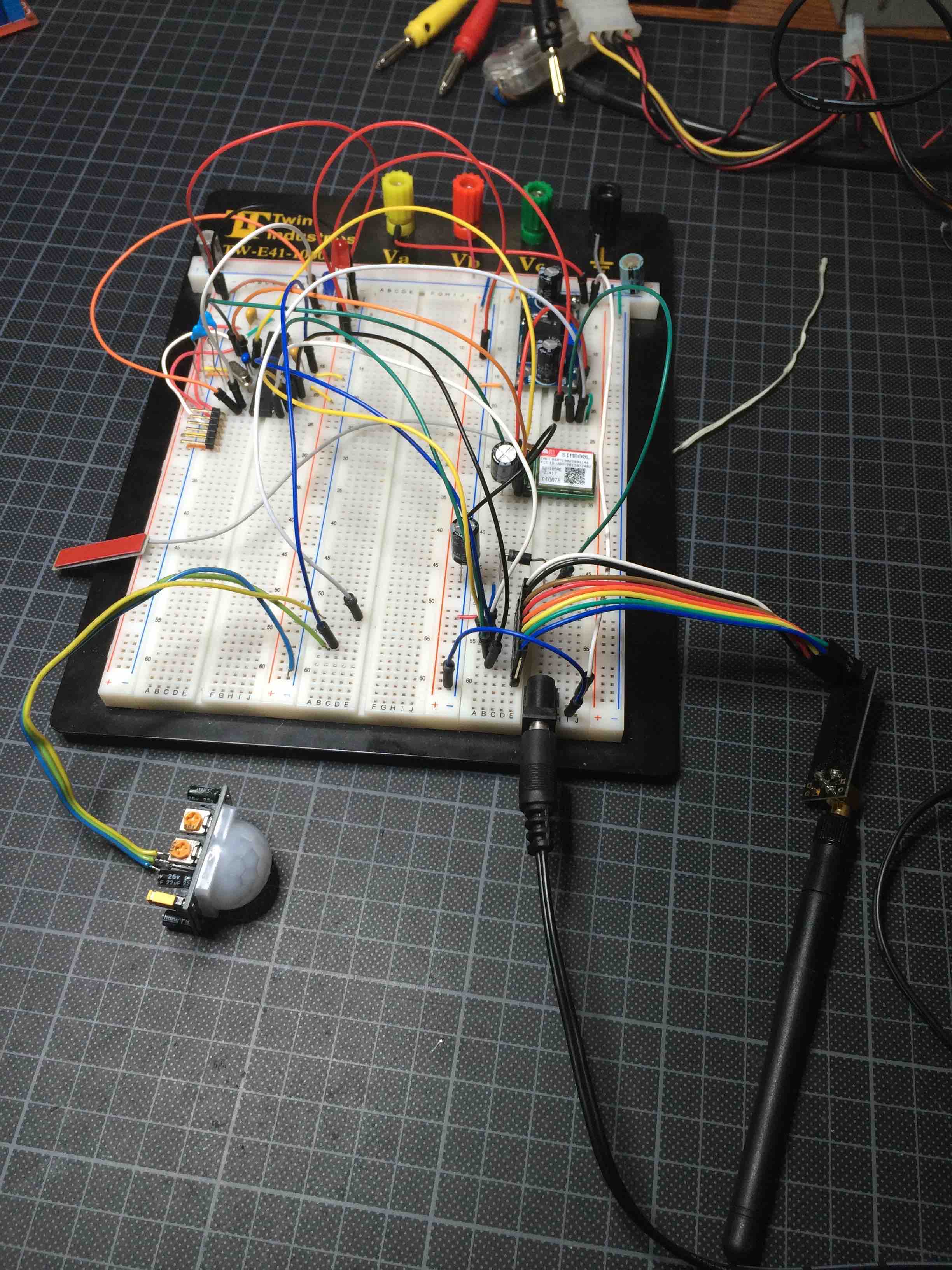
                IMG_7318.jpg

                Same PIR, no relay on this board yet. To test the principle (and sketch) I used a red LED. The kicker is that I can send an SMS ("LED ON") to this board to switch on the LED, and another (... "LED OFF" tada !) to switch it back off. I can ask "STAT?" and it sends me an SMS with the status of all analog/digital ports. And when the PIR "fires" I get a prowl message via Domoticz. Call me a kid, blame the glas of wine I just had, but this is super fun !!!!!

                1 Reply Last reply
                0
                • Ashley SavageA Ashley Savage

                  hello, just looking to use this project to try and set up a motion triggered sprinkler to scare away some rabbits eating my plants and grass. Thinking of the relay triggering a 24v valve, my only problem is how do I extend the time the replay is closed, thinking I only need to spray water for 5-10secs... any tips would be greatly appreciated.

                  thanks

                  Ashley SavageA Offline
                  Ashley SavageA Offline
                  Ashley Savage
                  wrote on last edited by
                  #12

                  @Ashley-Savage
                  ah mis read the code... build circuit and sorted my timer via my vera with a timer to switch off relay after 5 secs...

                  1 Reply Last reply
                  0
                  • N Offline
                    N Offline
                    nihilo83
                    wrote on last edited by
                    #13

                    Has anyone the code for mysensors 2.1?
                    It doesnt work for me in 2.1 :/
                    Please help

                    N 1 Reply Last reply
                    0
                    • N nihilo83

                      Has anyone the code for mysensors 2.1?
                      It doesnt work for me in 2.1 :/
                      Please help

                      N Offline
                      N Offline
                      nihilo83
                      wrote on last edited by
                      #14

                      I need your help pls :/

                      1 Reply Last reply
                      0

                      Hello! It looks like you're interested in this conversation, but you don't have an account yet.

                      Getting fed up of having to scroll through the same posts each visit? When you register for an account, you'll always come back to exactly where you were before, and choose to be notified of new replies (either via email, or push notification). You'll also be able to save bookmarks and upvote posts to show your appreciation to other community members.

                      With your input, this post could be even better 💗

                      Register Login
                      Reply
                      • Reply as topic
                      Log in to reply
                      • Oldest to Newest
                      • Newest to Oldest
                      • Most Votes


                      16

                      Online

                      12.0k

                      Users

                      11.2k

                      Topics

                      113.4k

                      Posts


                      Copyright 2025 TBD   |   Forum Guidelines   |   Privacy Policy   |   Terms of Service
                      • Login

                      • Don't have an account? Register

                      • Login or register to search.
                      • First post
                        Last post
                      0
                      • MySensors
                      • OpenHardware.io
                      • Categories
                      • Recent
                      • Tags
                      • Popular